The best portable ergonomic computer mice make laptop work more comfortable without taking up much space in your bag. This roundup compares compact Bluetooth, 2.4GHz, dual-mode, and foldable designs for travel and everyday use.
We focus on the features that matter most away from a desk, including hand comfort, portability, connection options, battery design, button layout, and quiet operation.
Best 10 Portable Ergonomic Computer Mice Picks for 2026
Quiet Bluetooth Pick

- Quiet clicks for shared or late-night spaces
- Bluetooth 5.0 with no USB receiver required
- Three DPI settings and a compact design
Best For: Students and professionals needing a quiet, portable Bluetooth mouse
Vertical Comfort Choice
Anker 2.4G Wireless Ergonomic Mouse

- Vertical handshake grip for wrist positioning
- Three DPI settings and browser navigation buttons
- Power-saving mode after eight minutes idle
Best For: Right-handed users wanting a vertical mouse for extended computer work
Ultra-Portable Minimalist

- Slim, lightweight, ambidextrous design
- Connects to and switches between three devices
- Quiet clicks and up to two years of battery life
Best For: Travelers and multi-device users seeking a compact, quiet mouse
Rechargeable Multi-Device Pick

- Soft-sided right-handed grip with thumb rest
- Dual-device Bluetooth 5.1 pairing
- Rechargeable battery, six buttons, and DPI up to 4000
Best For: Right-handed professionals wanting customizable controls and rechargeable power
Best Folding Travel Mouse
TECKNET Folding Wireless Mouse
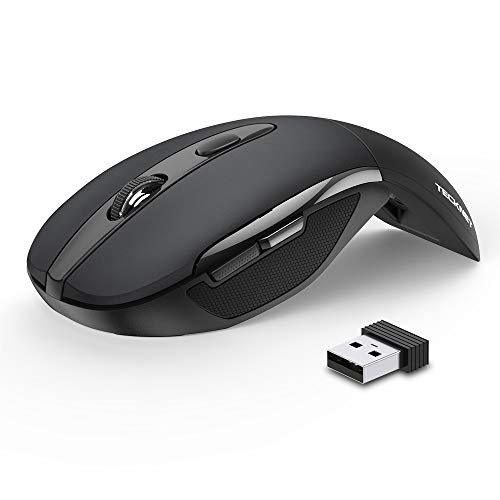
- Folds flat with a comfortable rubberized shape
- Three DPI settings and plug-and-play USB setup
- Up to 24 months of battery life with auto-sleep
Best For: Frequent travelers using laptops across multiple operating systems
Best Mini Silent Mouse
elec Space Wireless Mini Finger Mouse
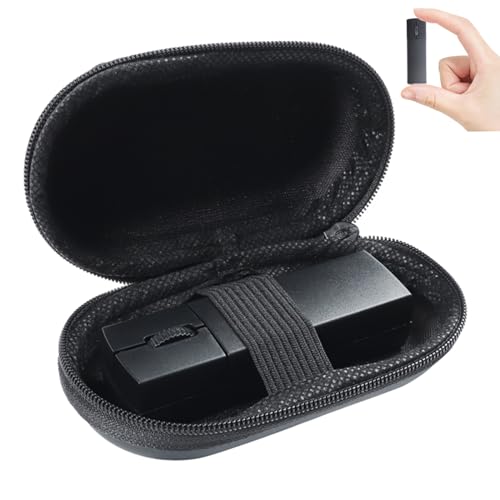
- Bluetooth and 2.4GHz dual-mode connectivity
- Rechargeable design with quiet clicking
- Includes a compact protective travel case
Best For: Quiet offices, libraries, and users carrying a very small mouse
Best Magnetic Travel Mouse

- Magnetic holder supports quick snap-to-carry storage
- Built-in USB-C cable with fast charging
- Six DPI levels and four-way scrolling
Best For: Mobile professionals needing versatile rechargeable performance
Comfort-Focused Pick
UGREEN Vertical Wireless Mouse

- Natural vertical design for medium to large hands
- Bluetooth and 2.4G support up to three devices
- Quiet five-button control with adjustable DPI
Best For: Medium to large-handed right-handed office users
Lightweight Foldable Pick
NORMIA RITA Arc Wireless Mouse

- Folds into a compact, 2.12-ounce travel design
- Bluetooth 5.3 and 2.4GHz support two devices
- Ambidextrous shape with quiet, rechargeable operation
Best For: Travelers carrying a laptop and tablet or second computer
Multi-Device Travel Pick

- Folds flat for pocket-friendly travel
- Connects with up to three devices
- Quiet clicks and rechargeable battery
Best For: Travelers moving between a desktop, laptop, and tablet
Quiet Bluetooth Pick – Lenovo WL310 Silent Mouse
The Lenovo WL310 is a practical choice among portable ergonomic computer mice for users who want a comfortable right-handed shape, quiet clicks, and Bluetooth connectivity without a USB receiver. Its adjustable DPI settings also make it suitable for everyday work and more precise tasks.
Best For: Students and professionals who need a quiet, compact mouse for Windows, Mac, or Chromebook use.
Pros:
- Ergonomic right-handed design intended to reduce wrist strain during extended use
- Silent clicks suit shared offices, libraries, and late-night work
- Bluetooth 5.0 connection works across Windows PCs, MacBooks, Chromebooks, and Lenovo laptops
- Three DPI settings—1000, 1200, and 1600—allow adjustable tracking control
Cons:
- Right-handed design is not suitable for left-handed users
- Maximum sensitivity is 1600 DPI
- Uses a battery rather than a rechargeable design
The WL310 balances portability, quiet operation, and straightforward Bluetooth pairing. It is a particularly sensible option when minimizing click noise and avoiding a USB receiver matter more than advanced customization.
Vertical Comfort Choice – Anker 2.4G Wireless Ergonomic Mouse
The Anker 2.4G Wireless Vertical Ergonomic Optical Mouse stands out among portable ergonomic computer mice for its upright handshake-style grip. It connects through a USB receiver and offers adjustable tracking, navigation buttons, and power-saving behavior for extended desktop use.
Best For: Right-handed users who prioritize a vertical grip and spend long periods browsing or working at a computer.
Pros:
- Vertical ergonomic structure promotes a neutral handshake wrist and arm position
- Adjustable 800, 1200, and 1600 DPI settings support varied tracking needs
- Next and previous buttons make webpage navigation easier
- Power-saving mode activates after eight minutes of inactivity
Cons:
- Uses a 2.4 GHz USB receiver rather than Bluetooth
- Right-handed vertical design may require an adjustment period
- AAA batteries are required and not included
This Anker model is a comfort-focused option for users who specifically want a vertical mouse. Its receiver-based connection and larger upright profile make it less convenient for some mobile setups, but the ergonomic grip and navigation controls are useful for sustained computer work.
Ultra-Portable Minimalist – Logitech M350s Pebble 2
The Logitech M350s Pebble 2 is a slim, lightweight option among portable ergonomic computer mice. Its ambidextrous shape, quiet clicks, Bluetooth support for up to three devices, and long stated battery life make it well suited to travel and flexible multi-device workflows.
Best For: Travelers and multi-device users who want a compact, quiet mouse for laptops, tablets, and desktops.
Pros:
- Slim, lightweight design is easy to carry
- Bluetooth can connect with up to three devices and switch between them
- Silent Touch technology removes 90% of click noise
- Includes an AA battery and offers up to two years of battery life
Cons:
- Only three buttons are provided
- Logitech Bolt receiver is not included
- Low-profile design may offer less hand support than a full-sized ergonomic mouse
The Pebble 2 emphasizes portability, quiet operation, and simple multi-device switching rather than a pronounced contoured grip. It is a strong fit for mobile setups where bag space and discreet clicking are priorities.
Rechargeable Multi-Device Pick – Lenovo Yoga Pro Mouse
The Lenovo Yoga Pro is a full-sized choice among portable ergonomic computer mice, combining a soft-sided right-handed grip with rechargeable power and dual-device Bluetooth. Programmable buttons, a configurable scroll wheel, and adjustable DPI provide more flexibility than a basic travel mouse.
Best For: Right-handed professionals who want rechargeable convenience, multi-device Bluetooth, and customizable controls.
Pros:
- Comfort-focused grip includes soft sides and a thumb rest
- Dual-device Bluetooth 5.1 pairing supports quick switching
- Rechargeable battery reaches a full charge in less than two hours and lasts two to three months
- Six buttons, programmable controls, and DPI adjustment up to 4000
Cons:
- Full-sized construction is less compact than minimalist travel mice
- Right-handed design is not suited to left-handed users
- Bluetooth is the listed connectivity method, with no USB receiver mentioned
The Yoga Pro is the most feature-rich option in this group for users who want a portable mouse without giving up customization. Its rechargeable battery and dual-device pairing are especially convenient, while its larger ergonomic shape favors comfort over maximum packability.
Best Folding Travel Mouse – TECKNET Folding Wireless Mouse
The TECKNET Folding Wireless Mouse is a practical choice among portable ergonomic computer mice for commuters and laptop users who want a full-size feel that folds flat. Its ambidextrous rubberized shape, adjustable DPI, and USB receiver make it easy to use across common operating systems.
Best For: Travelers who want a compact 2.4GHz wireless mouse with long battery life and a fold-flat design.
Pros:
- Folds flat for convenient packing and includes a stable wireless range up to 33 feet.
- Three DPI settings—1000, 1500, and 2000—support different cursor-speed preferences.
- Up to 24 months of battery life from two AAA batteries, with auto-sleep power saving.
- Works with Windows, macOS, Chrome OS, and Linux without requiring drivers.
Cons:
- Two AAA batteries are not included.
- Side buttons are not supported on macOS.
- Care is needed when folding to avoid pinching fingers.
Choose this model if portability and battery longevity matter more than rechargeable power. The folding mechanism and 2.4GHz receiver make it especially convenient for everyday laptop travel.
Best Mini Silent Mouse – elec Space Wireless Mini Finger Mouse
The elec Space Wireless Mini Finger Mouse is a compact option among portable ergonomic computer mice, combining Bluetooth and 2.4GHz connectivity in a travel-friendly design. Its included case, rechargeable battery, and quiet clicks suit shared offices, libraries, and mobile workstations.
Best For: Users who need a very small, quiet mouse that can switch between two wireless connection modes.
Pros:
- Dual-mode wireless lets it connect to one device through Bluetooth 5.1 and another through the 2.4GHz receiver.
- Rechargeable lithium-ion battery and automatic sleep mode help reduce charging frequency.
- Silent clicking produces about 90% less click noise for quieter workspaces.
- Includes a portable case, and the receiver stores magnetically on the mouse.
Cons:
- Its mini 3.2-inch size may feel small for users who prefer larger mice.
- Maximum sensitivity is 1600 DPI, with only three DPI settings.
- The three-button layout offers fewer controls than many larger mice.
This is a strong space-saving pick when quiet operation and device flexibility are priorities. Its miniature shape is convenient for travel, though users with larger hands may prefer a roomier design.
Best Magnetic Travel Mouse – ESR MagMouse Snap-to-Carry
The ESR MagMouse Snap-to-Carry stands out among portable ergonomic computer mice with a magnetic base and built-in USB-C charging cable. It offers Bluetooth 5.0 and 2.4GHz connectivity, six DPI levels, and four-way scrolling for users who move between laptops, documents, spreadsheets, and creative work.
Best For: Mobile professionals who want a rechargeable mouse with flexible connectivity, high DPI adjustment, and easy snap-to-carry storage.
Pros:
- Magnetic base makes the mouse easy to attach and carry with its holder.
- Built-in USB-C cable provides up to four hours of use after one minute of charging and up to 160 hours from a full charge.
- Bluetooth 5.0 and 2.4GHz modes support flexible connections to laptops and PCs.
- Six DPI levels up to 4800 and four-way scrolling suit detailed and wide-format work.
Cons:
- The magnetic base uses reusable residue-free adhesive, which may not suit every surface.
- At 113.6 g, it is heavier than the other compact options here.
- The supplied details list only one button, so control layouts may be less conventional.
The MagMouse is the most feature-rich choice in this group for users who value charging convenience and scrolling control. Its magnetic carry system adds portability, while the higher DPI range supports more varied workflows.
Comfort-Focused Pick – UGREEN Vertical Wireless Mouse
The UGREEN Vertical Wireless Mouse is a strong option among portable ergonomic computer mice for medium to large right-handed users who want a more natural wrist position. Its vertical handshake design, quiet clicks, adjustable sensitivity, and dual-wireless connectivity suit both office work and everyday multitasking.
Best For: Medium to large hands, right-handed office users, and multi-device setups.
Pros:
- Vertical design is intended to reduce wrist rotation and muscle strain.
- Bluetooth and 2.4G wireless connections support switching between up to three devices.
- Quiet clicks, five buttons, and four DPI settings add flexibility for work and navigation.
- PTFE glide feet support smooth, quieter movement.
Cons:
- May not fit small hands; checking the supplied hand-size guide is important.
- Uses one AA battery rather than a built-in rechargeable battery.
- Its 170 g weight is higher than that of the foldable travel options here.
This is the most comfort-oriented choice of the three, but its larger vertical shape is less pocket-friendly. Choose it when wrist positioning and productivity features matter more than minimal packed size.
Lightweight Foldable Pick – NORMIA RITA Arc Wireless Mouse
The NORMIA RITA Arc Wireless Mouse is a compact choice for shoppers comparing portable ergonomic computer mice. Its 180-degree rotating body folds down for transport, weighs about 2.12 ounces, and combines Bluetooth 5.3 with 2.4GHz wireless for flexible use across two devices.
Best For: Travelers who want an ambidextrous, lightweight mouse for a laptop and tablet or second computer.
Pros:
- Rotating arc design folds to save space in a bag or on a desk.
- Ambidextrous shape accommodates left- or right-handed use.
- Bluetooth 5.3 and 2.4GHz modes connect to two devices.
- Rechargeable battery can last one to two months after a full charge, according to the supplied notes.
Cons:
- Three-button layout is less versatile than the UGREEN’s five-button design.
- Micro-USB charging is less convenient than newer USB-C setups.
- Its 1600 DPI maximum offers fewer sensitivity options than the UGREEN.
With its low weight, silent buttons, and foldable profile, this mouse prioritizes portability over advanced controls. It is a practical companion for mobile work when you regularly move between two devices.
Multi-Device Travel Pick – NYIEFADA Bluetooth Arc Mouse
The NYIEFADA Bluetooth Arc Mouse stands out among portable ergonomic computer mice for users who need a slim, foldable design and three-device connectivity. It supports two Bluetooth connections plus a 2.4GHz receiver, while its soft clicks, rechargeable battery, and included portable bag make it suited to business travel.
Best For: Travelers switching among a desktop, laptop, and tablet or other compatible devices.
Pros:
- Rotates flat and slips into a pocket or bag for space-saving transport.
- Supports three devices through two Bluetooth connections and one 2.4GHz receiver.
- Soft, quiet clicks provide a quieter working experience.
- Built-in rechargeable battery is rated for about 30 days per charge in the supplied notes.
Cons:
- Three-button layout provides fewer shortcut controls than a five-button mouse.
- The listed hand orientation is right-handed rather than ambidextrous.
- Compatibility details are centered on Windows, Linux, Mac, and selected tablet systems, so buyers should verify their device.
This is the strongest fit for a multi-device travel kit, especially if pocketability and connection flexibility are priorities. Its simple three-button layout favors portability and quiet operation over productivity shortcuts.
How We Picked the Best Portable Ergonomic Computer Mice
We selected these mice based on the needs of mobile computer users rather than desktop gaming setups. Our comparison emphasizes compact dimensions, travel-friendly construction, comfortable shaping, dependable wireless performance, and compatibility with common laptops and tablets. We also considered practical extras such as adjustable DPI, silent clicks, programmable buttons, rechargeable batteries, carrying cases, and foldable designs.
Because comfort is personal, the list includes several styles: traditional compact mice, vertical ergonomic models, fingertip designs, and rotating or folding travel mice. Bluetooth models are convenient for laptops with limited USB ports, while 2.4GHz receivers can offer straightforward plug-and-play use. Dual-mode and tri-mode options provide more flexibility when switching between devices.
Quick Comparison
- Best for minimal laptop bags: Compact Bluetooth and foldable arc-style mice.
- Best for hand support: Vertical or more sculpted right-handed designs.
- Best for quiet workplaces: Models advertised with silent or quiet clicks.
- Best for multiple devices: Bluetooth, 2.4GHz, or tri-mode mice with device switching.
- Best for USB-C users: Rechargeable models with USB-C charging.
Key Buying Factors for Portable Ergonomic Computer Mice
Shape and Hand Position
A compact mouse should still let your hand rest naturally. Traditional shapes are easy to pack and use, while vertical mice can reduce forearm rotation but may take longer to adapt to. Check whether the design is right-handed, ambidextrous, fingertip-oriented, or intended for a relaxed palm grip.
Size and Portability
Foldable and low-profile mice are ideal for crowded bags, but extreme portability can mean less palm support. If you work for hours at a time, prioritize a shape that balances packability with enough width and height for your hand.
Wireless Connectivity
Bluetooth preserves USB ports and works well with modern laptops. A 2.4GHz receiver is useful for computers without reliable Bluetooth or for simple plug-in setup. Dual-mode and tri-mode mice are the most versatile choices for switching between a laptop, tablet, and desktop.
Power and Controls
Rechargeable batteries reduce disposable-battery waste, especially when USB-C charging is available. Adjustable DPI helps you match cursor speed to different screens, while extra or programmable buttons can improve productivity without adding much bulk.
Who Should Buy Which Portable Ergonomic Computer Mice?
Choose a slim Bluetooth or foldable model if your priority is occasional travel and easy storage. Pick a vertical or sculpted ergonomic mouse if wrist and forearm comfort matter more than the smallest possible profile. A quiet-click model suits libraries, offices, and shared spaces. For users who regularly move between devices, choose dual-mode or tri-mode connectivity. If you want fewer charging concerns, consider a model using standard batteries; for convenient cable charging, select a USB-C rechargeable option.