If you’re looking to enhance your audio experience while working or gaming at your desk, choosing the right compact subwoofer can make a significant difference. With various options available, you can find a model that not only fits your space but also elevates your sound quality. From powerful bass to sleek designs, the choices can be overwhelming. Let’s explore some top contenders that could transform your setup and meet your audio needs.
Logitech Z313 2.1 Multimedia Speaker System

If you’re looking for a compact subwoofer that doesn’t compromise on sound quality, the Logitech Z313 2.1 Multimedia Speaker System is a standout choice for desk PC setups. With two satellite speakers and a powerful subwoofer, it delivers rich, balanced audio and deep bass, all while fitting comfortably in tight spaces. You’ll appreciate the clean sound at any volume, thanks to its 25 Watts RMS power output. Installation is a breeze—just connect the speakers and subwoofer, and you’re good to go. Plus, the convenient control pod makes adjusting volume and headphone access simple, enhancing your overall listening experience.
Best For: Those seeking a compact speaker system that delivers high-quality audio for their PC or gaming setup in limited space.
Pros:
- Balanced audio quality with enhanced bass for an immersive listening experience.
- Easy installation with simple connections for quick setup.
- Compact design allows it to fit easily into tight spaces without sacrificing sound performance.
Cons:
- Limited input options with only a 3.5mm jack for connectivity.
- Subwoofer size may not satisfy users looking for extremely powerful bass.
- No Bluetooth capability for wireless audio streaming.
Cyber Acoustics CA-3090 2.1 Speaker System with Subwoofer

The Cyber Acoustics CA-3090 2.1 Speaker System is perfect for anyone looking to enhance their audio experience without breaking the bank. With a peak power of 18W and a 4-inch side-firing subwoofer, you’ll enjoy clear sound for music, movies, and gaming. Its compact design fits easily on your desk, while the control pod allows for simple volume and bass adjustments. Plus, it connects with various devices via auxiliary, making it super versatile. Though some users note distortion at high volumes, its overall performance and affordability make it a great choice for budget-conscious audio lovers.
Best For: Budget-conscious audio lovers looking for an affordable way to enhance their sound experience for music, movies, and gaming.
Pros:
- Good sound quality for the price, offering clear audio performance.
- Easy setup with long cables and a user-friendly control pod.
- Adjustable bass control on the subwoofer for personalized sound preferences.
Cons:
- Some users report distortion at high volumes, affecting sound clarity.
- Build quality concerns have been noted, with some components feeling less durable.
- The subwoofer size may be smaller than expected, limiting bass depth.
Nylavee 2.1 Hi-Fi Computer Speakers with Subwoofer

Nylavee’s 2.1 Hi-Fi Computer Speakers with Subwoofer stand out as an excellent choice for gamers and movie enthusiasts who crave high-quality audio without sacrificing desk space. With 28W of power and a compact design, these speakers deliver distortion-free sound and enhanced bass from the 4-inch subwoofer. You’ll appreciate the six RGB lighting modes that create an immersive atmosphere. Setting up is a breeze, thanks to the plug-and-play connectivity. While some users noted sensitivity issues with the volume knob, overall, the Nylavee speakers offer outstanding value, excellent sound clarity, and responsive customer support, making them a must-have for your desk setup.
Best For: Gamers and movie enthusiasts seeking high-quality audio with a compact design.
Pros:
- Delivers distortion-free Hi-Fi sound with enhanced bass from the 4-inch subwoofer.
- Features six RGB lighting modes for an immersive audio experience.
- Easy plug-and-play setup with compatibility across various devices.
Cons:
- Some users reported sensitivity issues with the volume knob.
- Bass performance may not meet expectations for all users.
- Lacks Bluetooth compatibility for wireless connections.
Edifier M60 Multimedia Speaker with Bluetooth 5.3

Looking for a compact audio solution that doesn’t compromise on sound quality? The Edifier M60 Multimedia Speaker with Bluetooth 5.3 is your perfect match. With a powerful 66W RMS output, it delivers Hi-Res audio through its innovative driver setup, including three mid-bass and one tweeter. Plus, you’ll appreciate its versatile connectivity options—USB-C and AUX—allowing seamless connections to various devices. The touch-sensitive controls and the EDIFIER ConneX app enhance your experience, while the included aluminum stands optimize sound direction. With a sleek design and excellent reviews, it’s a top choice for any desktop setup.
Best For: Those seeking a compact, high-quality audio solution for desktop setups that supports Bluetooth connectivity and offers versatile input options.
Pros:
- Excellent Hi-Res audio quality with powerful 66W RMS output.
- Versatile connectivity options including USB-C and AUX for various devices.
- User-friendly touch-sensitive controls and EDIFIER ConneX app for customization.
Cons:
- Bluetooth connectivity may occasionally be unreliable.
- Lack of tactile feedback on touch controls can be frustrating.
- Some users desire additional features for enhanced audio control.
Cyber Acoustics CA-3610 2.1 Multimedia Speaker System

For those seeking a compact yet powerful audio solution, the Cyber Acoustics CA-3610 2.1 Multimedia Speaker System stands out as an excellent choice. With a peak power of 62W and a 5.25-inch down-firing subwoofer, it delivers crisp highs, warm mid-tones, and deep bass, making it perfect for music, movies, and gaming. The user-friendly control pod allows easy volume and bass adjustments, while the 3.5mm aux input and headphone jack guarantee versatile connectivity. Its sleek design fits neatly under your desk, and with a solid customer rating of 4.2 stars, you can trust it to enhance your sound experience.
Best For: Those looking for a compact multimedia speaker system that delivers quality sound for music, movies, and gaming.
Pros:
- Delivers crisp highs, warm mid-tones, and deep bass for an immersive audio experience.
- User-friendly control pod allows for easy volume and bass adjustments.
- Compact design fits conveniently under desks, making it ideal for small spaces.
Cons:
- Some users report durability issues with the power button.
- Mixed feedback regarding the functionality of the auxiliary output.
- International buyers may need voltage adapters for use outside the US.
Edifier G2000 32W PC Gaming Speakers
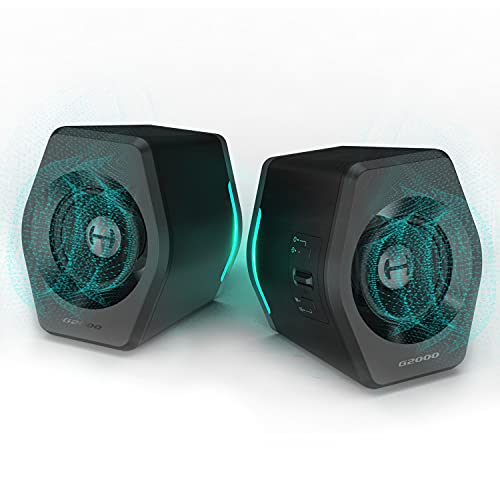
The Edifier G2000 32W PC Gaming Speakers are an excellent choice for gamers and multimedia enthusiasts seeking a compact audio solution without sacrificing sound quality. With 16W RMS and a surprising bass performance for their size, these speakers deliver HiFi sound across three modes: Game, Music, and Movie. Their unique design, featuring RGB lighting and a compact build, fits perfectly on small desks. You’ll enjoy versatile connectivity options, including Bluetooth and AUX. While some users note minor sound muddiness, overall, the G2000 offers great value for a stylish, well-performing 2.0 speaker set, priced around $95.
Best For: Gamers and multimedia enthusiasts looking for a compact speaker solution with good sound quality and versatile connectivity options.
Pros:
- High-quality HiFi sound with strong bass and three sound modes: Game, Music, and Movie.
- RGB lighting effects enhance aesthetics and can be customized or turned off.
- Multiple connectivity options including Bluetooth, USB, and AUX for added versatility.
Cons:
- Some users report minor muddiness in sound compared to higher-end systems.
- Volume control buttons may be less convenient than a traditional knob.
- Price point around $95 is considered a bit high for a 2.0 speaker set by some users.
MEREDO Sound Bar for Smart TV with Subwoofer and RGB Lighting

Designed for those who crave an immersive audio experience without cluttering their desk, the MEREDO Sound Bar offers a sleek 3.1 channel setup that includes a wired subwoofer and dynamic RGB lighting. Its 160W peak power and BassMax technology guarantee deep, rich sound, perfect for gaming or movie nights. You can easily connect via Bluetooth 5.3, AUX, or USB, while the dedicated headphone jack is great for quick switches. With customizable EQ modes, you can tailor the audio to your liking. Plus, its stylish design and sync features create an engaging atmosphere, making it a fantastic addition to your setup.
Best For: The MEREDO Sound Bar is best for gamers and movie enthusiasts seeking an immersive audio experience with customizable features and RGB lighting.
Pros:
- High-quality sound with BassMax technology for enhanced bass performance.
- Multiple connectivity options including Bluetooth 5.3, AUX, and USB for easy integration with various devices.
- Dynamic RGB lighting that syncs with audio to create an engaging atmosphere.
Cons:
- Some users reported minor connectivity issues during setup.
- Setup can be challenging for those unfamiliar with audio equipment.
- Limited warranty may not provide enough coverage for long-term use.
Computer Speakers with Subwoofer, 2.1 Gaming Speaker System for Desktop PC

If you’re looking to elevate your audio experience while gaming or enjoying media on your desktop PC, the ZQMMSPK Computer Speakers with Subwoofer make an excellent choice. This 2.1 gaming speaker system features a powerful 6.5-inch subwoofer and dual satellite speakers, delivering immersive surround sound with rich clarity. With Bluetooth 5.3 support and multiple wired connections, setup is hassle-free. The premium wooden cabinet enhances durability and sound quality, while customer reviews highlight its impressive performance, rating it 4.9 out of 5 stars. Transform your audio landscape and enjoy deep, room-filling bass that truly elevates your gaming sessions.
Best For: Gamers and multimedia enthusiasts seeking an immersive audio experience with deep bass and versatile connectivity options.
Pros:
- Exceptional sound quality with a powerful 6.5-inch subwoofer and dual satellite speakers for rich audio depth.
- Versatile connectivity options including Bluetooth 5.3 and various wired connections for compatibility with multiple devices.
- Durable design featuring a premium wooden cabinet and thickened iron mesh protection for long-lasting use.
Cons:
- Fixed RCA connections on satellite speakers may limit flexibility in setup.
- Some users reported interference issues that require additional solutions like ferrite ring cores.
- The relatively heavy weight (16.26 pounds) may make it less portable compared to lighter speaker systems.
Razer Leviathan V2 X PC Soundbar

Looking for a compact sound solution that enhances your gaming or multimedia experience without cluttering your desk? The Razer Leviathan V2 X PC Soundbar is your answer. With its sleek design, it easily fits under your monitor, while delivering impressive audio through two full-range drivers and passive radiators. You’ll enjoy dynamic sound with up to 90 dB volume, perfect for gaming or movies. Bluetooth 5.0 guarantees seamless connection with your devices, and the customizable Chroma RGB lighting adds a stylish touch. Plus, setup is a breeze with USB Type C—just plug it in and enjoy enhanced sound right away!
Best For: Gamers and multimedia enthusiasts seeking a compact soundbar that fits seamlessly on their desk while delivering high-quality audio.
Pros:
- Compact design allows for easy placement under monitors, saving desk space.
- Bluetooth 5.0 connectivity provides fast and reliable wireless connections with multiple devices.
- Customizable Chroma RGB lighting enhances the aesthetic appeal and allows for personal expression.
Cons:
- Limited traditional audio ports may restrict connectivity options for some users.
- Customization relies on software, which may not appeal to those preferring hardware controls.
- Sound performance may not satisfy audiophiles looking for more advanced audio features.
OHAYO 60W Bluetooth Computer Speakers for Music and Gaming

The OHAYO 60W Bluetooth Computer Speakers stand out as an excellent choice for gamers and music enthusiasts alike, thanks to their powerful 30W x 2 distortion-free sound output. Their compact design fits perfectly on your desk, maximizing space while complementing any décor in black or white. With Bluetooth 5.3, RCA, AUX, and USB inputs, you can easily connect your devices. Users rave about the deep bass and crisp highs, making these speakers ideal for immersive gaming and music experiences. Plus, their durable MDF enclosure enhances sound clarity, ensuring you enjoy quality audio without breaking the bank.
Best For: Those seeking quality sound for gaming and music without exceeding their budget.
Pros:
- Versatile connectivity options including Bluetooth 5.3, RCA, AUX, and USB for easy device pairing.
- Compact and stylish design that seamlessly fits into modern home or office environments.
- Powerful sound performance with deep bass and crisp highs, enhancing the listening experience.
Cons:
- Bass depth may be limited compared to dedicated subwoofers, which could affect bass enthusiasts.
- Bluetooth performance can be optimal with only one connected device, potentially causing issues with multiple connections.
- Weight of 5.37 pounds may make them less portable for users who need to move their speakers frequently.
Factors to Consider When Choosing Compact Subwoofers for Desk PC
When you’re picking a compact subwoofer for your desk PC, there are a few key factors to keep in mind. Size and power output are essential for fitting your space and delivering the sound you want. Don’t forget to contemplate connectivity options and design aesthetics, as they can greatly enhance your overall setup.
Size and Dimensions
Choosing the right size and dimensions for a compact subwoofer is essential to guarantee it fits seamlessly into your desk setup. Compact subwoofers generally range from 4 to 10 inches in diameter, making them perfect for tight spaces. Weighing around 5 to 10 pounds, these models are easy to manage alongside your computer. However, keep in mind that smaller subwoofers may struggle to produce deep bass, which might impact your overall audio experience. Many designs feature a height that lets them sit unobtrusively beside or beneath your monitor, enhancing space efficiency. Plus, down-firing ports optimize sound output, ensuring you still enjoy quality audio even in a smaller enclosure.
Power Output Considerations
Finding the right compact subwoofer isn’t just about size; power output plays a significant role in your audio experience. When shopping for a desktop subwoofer, pay attention to the RMS power output, which typically ranges from 9W to 30W. This directly impacts sound quality at different volume levels. Avoid being misled by peak power ratings—focus on RMS values for consistent performance. For adequate bass response, aim for at least 18W RMS. Also, check the frequency response; a good subwoofer should operate between 20Hz to 200Hz. Remember, the best sound experience comes from a subwoofer that balances its power output with your satellite speakers, ideally resulting in a combined output of 50W or more for immersive gaming or multimedia enjoyment.
Connectivity Options Available
One of the key aspects to evaluate for your compact subwoofer is its connectivity options. You’ll want to reflect on both wired connections, like 3.5mm aux, RCA, and optical, as well as wireless options like Bluetooth. Many subwoofers offer multiple input types, ensuring compatibility with your PC, laptop, smartphone, or gaming console. If you choose Bluetooth, check the version—newer versions like Bluetooth 5.0 or 5.3 provide better reliability and range. Some subwoofers even come with dedicated headphone jacks for private listening, which is great if you don’t want to disturb others. Finally, opt for a subwoofer with simple plug-and-play capabilities to make setup a breeze, allowing for easy connections and disconnections.
Sound Quality Features
When it comes to sound quality features, you’ll want to prioritize a balanced audio experience that enhances your enjoyment of music, movies, and gaming. Look for subwoofers that deliver crisp highs, warm mid-tones, and deep bass for an immersive sound. Check the RMS power rating; aim for 25W or greater for cleaner sound at high volumes without distortion. A dedicated driver diameter of at least 4 inches is essential to enhance low-end frequencies and provide fuller sound. Evaluate the signal-to-noise ratio (SNR); a higher SNR of 85 dB or more guarantees lower background noise and better clarity. Features like adjustable bass controls or equalizers let you customize the sound output to fit your preferences and room acoustics.
Design and Aesthetics
As you consider compact subwoofers for your desk PC, the design and aesthetics play an essential role in how well they integrate into your workspace. Look for sleek designs that maximize available space, like those with dimensions around 6.25D x 13W x 1H inches. Premium materials, such as MDF wooden enclosures, not only enhance sound quality but also add elegance to your setup. Some models offer customizable RGB lighting, allowing you to personalize your experience and create an immersive audio-visual environment. Finally, pay attention to the color scheme and finish—options in black or neutral tones can seamlessly complement various desktop styles, ensuring your subwoofer enhances both sound and visual appeal.
Price and Value
Finding the right compact subwoofer for your desk PC involves more than just aesthetic appeal; price and value are key factors that can greatly impact your experience. Start by evaluating the price-to-performance ratio, ensuring that the sound quality justifies the cost. Most compact subwoofers range from $30 to $150, so set a budget based on the features and sound fidelity you want. Pay attention to warranty options and customer reviews for insights into long-term reliability. Additionally, consider the RMS power rating—higher ratings like 25W to 66W usually indicate better sound quality. Finally, compare specifications such as driver size and frequency response to determine if a subwoofer offers good value regarding audio clarity and depth.