If you’re in the market for 8-inch studio monitors for your PC in 2025, you’re in for a treat. These monitors offer impressive sound quality, catering to both professionals and music enthusiasts alike. With options like the PreSonus Eris Studio 8 and JBL Professional 308P MkII, you’ll find clarity and bass response that elevate your audio experience. But what should you really consider before making a choice? Let’s explore the top contenders and vital factors.
PreSonus Eris Studio 8 Active Studio Monitors

If you’re looking for studio monitors that deliver exceptional sound quality without breaking the bank, the PreSonus Eris Studio 8 Active Studio Monitors are an excellent choice. With an 8-inch woven-composite low-frequency driver, you’ll enjoy accurate bass response while the 1.25-inch silk-dome high-frequency transducer guarantees clear highs. The 140W Class AB biamplification lets you push up to 105 dB SPL, perfect for any production environment. Designed for stability and clarity, they work well in small spaces and larger rooms, especially when paired with a subwoofer. User feedback highlights their impressive performance for both music production and casual listening.
Best For: The PreSonus Eris Studio 8 Active Studio Monitors are best for music producers, audio engineers, and casual listeners seeking high-quality sound in small to medium-sized spaces.
Pros:
- Exceptional sound quality with accurate bass and clear highs for professional audio production.
- Effective in small spaces, yet versatile enough for larger rooms when paired with a subwoofer.
- Positive user feedback highlights significant improvements over previous monitor models at an affordable price.
Cons:
- Some users reported hum issues, which may require additional equipment to resolve.
- Not ideal for whole-area sound; optimal performance is achieved at specific distances and angles.
- Setup may necessitate careful consideration of space due to power plug placement.
JBL Professional 308P MkII Powered Active Monitor Speaker
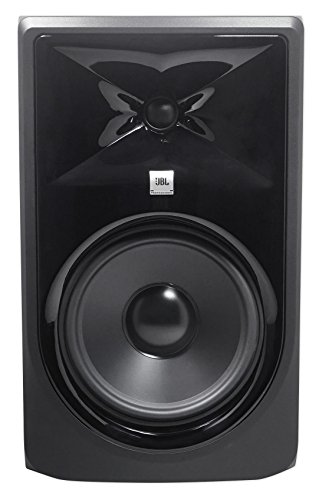
The JBL Professional 308P MkII Powered Active Monitor Speaker stands out as an excellent choice for music producers and audio professionals who demand high-quality sound in their studio setups. With an 8” woofer and 1” tweeter powered by dual Class-D amplifiers, it delivers 112 watts of pristine audio. You’ll appreciate its neutral frequency response and superior bass performance, thanks to the patented JBL Image Control Waveguide. The adjustable volume and connectivity options, including balanced XLR inputs, guarantee compatibility with various devices. Weighing just under 18 pounds, it’s perfect for desktop use, enhancing your music production experience effortlessly.
Best For: The JBL Professional 308P MkII is best for music producers and audio professionals seeking high-quality sound and versatility in their studio setups.
Pros:
- Superior bass performance and crystal-clear highs due to advanced driver technology.
- Compact design and lightweight build make it ideal for desktop use.
- Wide compatibility with various devices, enhancing usability in different audio setups.
Cons:
- Sold individually, requiring purchase of two for stereo sound.
- Some users may find the price point higher compared to entry-level monitors.
- Optimal sound quality may require additional stands for best placement.
Rockville APM8D Active Powered Studio Monitor Speakers (Pair)

For music producers and gamers seeking an immersive audio experience, the Rockville APM8D Active Powered Studio Monitor Speakers stand out with their impressive 500W peak power and versatile connectivity options. Featuring an 8-inch woofer and a 1.5-inch tweeter, they deliver a frequency response from 30Hz to 20kHz, ensuring deep bass and clear highs. With inputs like XLR, ¼” TRS, RCA, and USB, you can easily connect to your setup. The rear-firing bass port enhances low-end response, while the durable MDF cabinet minimizes vibrations. Overall, users appreciate the clean sound and aesthetic design, making them a solid choice for any audio project.
Best For: The Rockville APM8D Active Powered Studio Monitor Speakers are best for music producers, gamers, and anyone seeking high-quality audio for their projects.
Pros:
- Impressive 500W peak power for powerful sound output.
- Versatile connectivity options including XLR, TRS, RCA, and USB for seamless integration with various setups.
- Durable MDF cabinet design minimizes vibrations and enhances overall sound quality.
Cons:
- Some users report a bass-heavy sound that may not be suitable for critical mixing.
- Occasional complaints about hiss noise and the location of the power switch.
- Quality control issues and shipping errors have been noted by a few customers.
KRK RP8G5 ROKIT 8 Generation Five 8 Powered Studio Monitor Pair, 8 Inches

Designed for musicians and audio engineers seeking precise sound reproduction, the KRK RP8G5 ROKIT 8 Generation Five studio monitors deliver exceptional acoustic performance with their 8-inch woven Kevlar woofer. You’ll appreciate the 25 boundary and tuning EQ combinations, which minimize acoustical issues for a clearer sound. The low diffraction baffle design reduces distortion and enhances stereo imaging, ensuring your mixes translate well. Plus, the included acoustic foam wedge isolation pads help minimize resonance for better clarity. With XLR and 1/4” TRS combo inputs, these monitors offer wide compatibility, making them a versatile addition to your setup.
Best For: Musicians and audio engineers seeking precise sound reproduction and clarity in their mixes.
Pros:
- Exceptional acoustic performance with an 8-inch woven Kevlar woofer for tight low and low-mid frequencies.
- Wide compatibility with XLR and 1/4” TRS combo inputs for various audio devices.
- Customizable sound with 25 boundary and tuning EQ combinations to address acoustical issues.
Cons:
- Size may be cumbersome for smaller studio spaces or home setups.
- Price point may be higher compared to entry-level studio monitors.
- Limited portability due to their weight and size, making them less ideal for mobile setups.
KRK RP8 Rokit 8 G4 Professional Bi-Amp Studio Monitor Pair
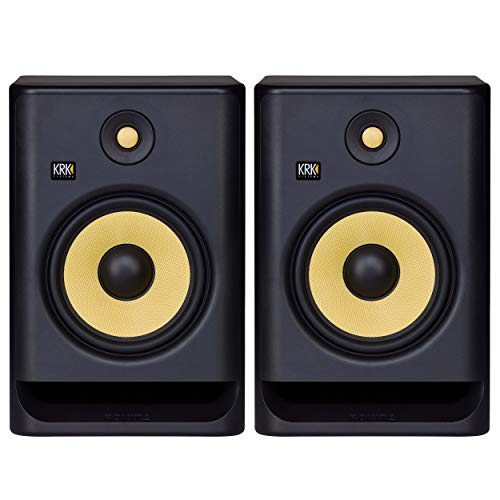
If you’re an aspiring producer or musician seeking studio monitors that deliver exceptional sound accuracy, the KRK RP8 Rokit 8 G4 is an excellent choice. These bi-amp monitors are designed for all genres, ensuring versatile and sonically accurate performance. With a matching driver design, they maintain sonic integrity across frequencies, minimizing listening fatigue while providing stunning clarity. The DSP-driven Graphic EQ offers 25 settings for acoustic conditioning, enhancing your monitoring experience. Plus, the high-quality enclosure features a front-firing port for exceptional low-end extension. Powered by a custom Class D amp, these monitors efficiently deliver impressive sound without overheating.
Best For: Aspiring producers and musicians seeking versatile studio monitors that deliver exceptional sound accuracy across all genres.
Pros:
- Exceptional clarity and sound reproduction minimize listening fatigue.
- DSP-driven Graphic EQ with 25 settings allows for effective acoustic conditioning.
- High-quality enclosure with a front-firing port enhances low-end extension and accuracy.
Cons:
- May be considered expensive for beginner producers on a tight budget.
- Requires adequate space for optimal room positioning due to size.
- Some users may find the setup process complex with numerous EQ settings.
KRK Kreate 8 Powered Studio Monitor

The KRK Kreate 8 Powered Studio Monitor stands out with its impressive 8” glass aramid woofer and textile dome tweeter, making it an ideal choice for musicians, engineers, and content creators seeking exceptional sound quality. This monitor delivers clear midrange and tight bass, while the textile dome tweeter guarantees pristine highs. With Bluetooth input and multiple audio inputs, it offers versatile connectivity for any studio setup. Weighing 24.5 pounds and measuring 19.6 x 13.8 x 13.8 inches, the Kreate 8 is designed to reproduce sound nuances accurately. Rated 5.0 out of 5 stars, it’s a top pick for audio professionals.
Best For: Musicians, engineers, producers, and content creators seeking high-quality sound reproduction in a studio monitor.
Pros:
- Clear sound reproduction: The 8” glass aramid woofer and textile dome tweeter provide excellent midrange, bass, and high frequencies.
- Versatile connectivity: Features Bluetooth input and multiple audio inputs for seamless integration into various studio setups.
- Accurate sound nuances: Designed to deliver precise sound clarity, making it suitable for critical listening and mixing.
Cons:
- Weight: At 24.5 pounds, it may be less portable compared to lighter studio monitor options.
- Size: Its dimensions (19.6 x 13.8 x 13.8 inches) might require ample space in smaller studio environments.
- Limited customer feedback: Currently has only one rating, which may not provide a comprehensive view of long-term performance.
PreSonus Eris Pro 8 2-Way Biamped, Active, 8-inch Coaxial Studio Monitor

For audio professionals seeking precise sound reproduction, the PreSonus Eris Pro 8 2-Way Biamped Studio Monitor stands out with its innovative coaxial design. This 8-inch monitor features a powerful 140W Class AB biamplification and offers deep, tight bass response down to 35 Hz. With a frequency range of 35 Hz to 20 kHz, you’ll appreciate its rich audio quality. The coaxial setup guarantees superior imaging and consistent sweet spots, while adjustable acoustic tuning controls let you customize your listening environment. Weighing 24.76 pounds, it’s versatile for wall, ceiling, or desktop mounting, making it an excellent choice for your studio.
Best For: Audio professionals and enthusiasts seeking high-quality, precise sound reproduction in studio environments.
Pros:
- Exceptional sound quality with deep bass response down to 35 Hz.
- Innovative coaxial design provides superior imaging and consistent sweet spots.
- Flexible mounting options and adjustable acoustic tuning controls enhance versatility in various studio setups.
Cons:
- Weighs nearly 25 pounds, which may limit portability.
- Limited color options available, as it only comes in black.
- Higher price point compared to some entry-level studio monitors.
PreSonus Eris 3.5 Studio Monitors (Pair)

Designed for those who crave studio-quality sound in a compact package, the PreSonus Eris 3.5 Studio Monitors are an excellent choice for music production and multimedia listening. With 50 watts of Class AB dual amplification, these monitors deliver accurate audio with tight bass and refined highs, thanks to their 3.5-inch woven-composite woofers and 1-inch silk-dome tweeters. You’ll appreciate the versatile connectivity options, including TRS, RCA, and aux inputs, plus a headphone output for convenience. Acoustic tuning controls let you customize the sound to fit your space, making these monitors perfect for desktops and smaller setups.
Best For: Users seeking accurate sound reproduction in compact settings such as home studios, desktops, or multimedia setups.
Pros:
- Accurate sound stage with a powerful low end and refined highs.
- Versatile connectivity options including TRS, RCA, and aux inputs.
- Acoustic tuning controls for customized audio output based on environment.
Cons:
- Included cables are considered mediocre in quality.
- Build quality may feel cheap to some users.
- Not recommended for use in large rooms due to limited sound coverage.
M-AUDIO BX3 Pair Studio Monitors for PC

M-AUDIO BX3 Pair Studio Monitors stand out as an excellent choice for gamers, podcasters, and streamers seeking high-quality sound without the bulk. With 120W of power, these compact monitors deliver impressive audio through their 3.5” Kevlar low-frequency drivers and 1” silk dome tweeters. The rear ports enhance bass response, while high and low EQ adjustments let you customize your sound. Plus, their versatile connectivity options—1/4”, 1/8”, and RCA inputs—make them compatible with various devices. Weighing only 8 pounds, they’re easy to set up, ensuring you can immerse yourself in your projects without hassle.
Best For: Gamers, podcasters, and streamers looking for compact studio monitors that deliver high-quality sound.
Pros:
- Compact and attractive design, making them easy to install in any setup.
- Versatile connectivity options with multiple input types for compatibility with various devices.
- Customizable sound with high and low EQ adjustments for tailored audio experience.
Cons:
- Some users have reported issues with auto sleep mode, which can interrupt use.
- Concerns about the reliability of the thin jumper cable included in the package.
- Lacks Bluetooth connectivity, limiting wireless options for some users.
Ortizan C7 Dual-Mode Studio Monitors (Pair, White)

The Ortizan C7 Dual-Mode Studio Monitors stand out as a fantastic choice for budding music producers and casual listeners alike, thanks to their versatile connectivity options, including Bluetooth 5.3, RCA, and 3.5mm AUX. With a compact design, these monitors house a 3.5-inch carbon fiber speaker and a 0.75-inch silk dome tweeter, delivering impressive clarity and a balanced sound. You can easily adjust bass and treble to suit your preferences. Weighing just 7.1 pounds, they’re perfect for any setup. With a 4.6-star rating, users rave about their sound quality, making them a solid investment for your audio needs.
Best For: The Ortizan C7 Dual-Mode Studio Monitors are best for budding music producers, gamers, and casual listeners seeking high-quality sound in a compact design.
Pros:
- Versatile connectivity options including Bluetooth, RCA, and AUX for various devices.
- Impressive sound quality with a well-balanced frequency response and adjustable bass and treble controls.
- Compact and stylish design that fits well in any environment while providing durability.
Cons:
- Some users have noted sensitivity issues with volume control, making fine adjustments challenging.
- Minor complaints about the finish quality of the speakers, which may not meet all aesthetic preferences.
- Limited wireless range of 18 meters for Bluetooth connectivity may not suit all setups.
Factors to Consider When Choosing 8 Inch Studio Monitors for PC
When you’re choosing 8-inch studio monitors for your PC, you need to reflect on several key factors. Sound quality, connectivity options, and power output all play a vital role in your decision. Don’t forget to contemplate the design and how well they’ll fit in your room, too.
Sound Quality Importance
Sound quality stands as a cornerstone in the domain of studio monitors, especially when it comes to music production and mixing on your PC. The accuracy and clarity of audio reproduction directly impact your work. Look for monitors with a frequency response that spans from 35 Hz to 20 kHz, ensuring you capture both low and high frequencies effectively. Quality drivers, like 8-inch woven-composite woofers paired with silk-dome tweeters, provide well-defined bass and crisp highs. A signal-to-noise ratio above 75 dB is essential for minimizing background noise, enhancing your listening experience. Additionally, consider acoustic tuning features such as EQ settings and waveguide technology, which can optimize sound quality based on your room’s acoustics, creating an ideal listening environment.
Connectivity Options Available
Choosing the right connectivity options is essential for maximizing the functionality of your 8-inch studio monitors. Many models provide balanced XLR and 1/4″ TRS inputs, which are vital for connecting professional audio interfaces and mixers. If you prefer a straightforward setup, look for monitors with USB connectivity, allowing direct connection to your computer for seamless integration into digital audio workstations. Additionally, RCA and AUX inputs enhance versatility, making it easy to connect consumer electronics. Bluetooth connectivity is also gaining traction, enabling wireless audio streaming for added convenience. Finally, some monitors come with front-panel headphone outputs, allowing you to monitor audio without disconnecting from the main source, improving your overall user experience.
Power Output Considerations
Power output plays an essential role in the performance of 8-inch studio monitors, directly impacting your listening experience. When choosing, consider options ranging from 140W to 500W peak power, as higher output means better volume and clarity, especially at elevated sound levels. Look for bi-amped systems that separate power between low-frequency and high-frequency drivers, which can enhance sound quality and reduce distortion. It’s also vital to pay attention to the signal-to-noise ratio (SNR); higher values, like 91 dB, indicate cleaner sound with less background noise. Finally, verify the monitors’ frequency response matches your audio needs, with many 8-inch models offering a range from 30 Hz to 20 kHz, providing robust lows and clear highs.
Design and Aesthetics
When it comes to 8-inch studio monitors, design and aesthetics aren’t just about looks; they can greatly influence your workspace. High-quality materials like MDF wood cabinets minimize vibrations and enhance sound reproduction, making both style and functionality important. Many models boast modern, sleek designs that fit seamlessly into various home studio setups. Consider monitors with rear-mounted controls; they keep the appearance clean while providing easy access to volume and EQ settings. The size and orientation of your monitors also matter, as larger models may need more space and strategic positioning for ideal acoustics. Plus, color options—like black, white, or wood grain—allow you to match your studio decor and personal style effortlessly.
Room Compatibility Factors
To get the most out of your 8-inch studio monitors, it’s essential to evaluate how well they fit into your room’s dimensions and layout. Larger monitors need more space; cramming them into small areas can lead to overwhelming bass. Pay attention to your room’s acoustics—hard surfaces can create reflections and echoes, while soft furnishings help absorb sound, enhancing clarity. Position your monitors and listening spot to form an equilateral triangle for ideal stereo imaging. While placing monitors near walls can boost bass response, it might also introduce muddiness; consider boundary EQ settings to counteract this. Finally, set your monitors at ear level when seated to guarantee accurate sound reproduction and minimize fatigue during long sessions.