When you’re working on video editing, the right monitor speakers can make all the difference in sound clarity and precision. You want options that not only enhance your audio experience but also fit your specific editing needs. From studio monitors to compact speakers with strong bass, there’s a range that caters to various setups. Let’s explore the best choices that can elevate your editing process and help you make informed decisions.
PreSonus Eris 3.5 Studio Monitors (Pair)

If you’re looking for studio-quality sound without breaking the bank, the PreSonus Eris 3.5 Studio Monitors are an ideal choice for video editors and multimedia creators. With their compact design, these powered monitors fit perfectly on your desktop. You’ll enjoy accurate audio thanks to 50 Watts of Class AB amplification and woven-composite woofers, providing tight bass and clear highs. The ultra-wide stereo imaging enhances your listening experience from any angle. Plus, their easy connectivity options let you connect various devices effortlessly. Just remember to position them in an equilateral triangle for peak sound. You won’t be disappointed!
Best For: Video editors and multimedia creators seeking studio-quality sound in a compact design.
Pros:
- Accurate sound stage with neutral audio quality ideal for music production.
- Compact design fits well on desktops and bookshelves, making it versatile for any workspace.
- Easy connectivity options allow for seamless integration with various devices.
Cons:
- Some users have reported mediocre cable quality that may require upgrades.
- A few customers noted that the cabinet build quality feels somewhat cheap.
- Requires careful positioning for optimal sound, which may not be intuitive for all users.
Nylavee Hi-Fi Stereo Computer Speakers with LED Lighting

For those seeking high-quality audio in a compact design, the Nylavee Hi-Fi Stereo Computer Speakers with LED Lighting stand out as an ideal choice for video editing PCs. Weighing just 2.18 pounds and featuring a sleek black finish, these speakers deliver 10W of clear stereo sound with enhanced bass. The plug-and-play setup is hassle-free, compatible with various devices, and powered via USB or Type-C. Plus, the vibrant LED lighting offers nine modes to customize your workspace ambiance. With an impressive 4.7-star rating, users rave about the sound quality and modern design, making them perfect for gaming, movies, and music.
Best For: The Nylavee Hi-Fi Stereo Computer Speakers are best for users looking for high-quality audio in a compact design, ideal for gaming, movies, and music.
Pros:
- Clear stereo sound with enhanced bass and minimal distortion.
- Compact and modern design that fits well in any workspace.
- Easy plug-and-play setup with compatibility across multiple devices.
Cons:
- Lacks Bluetooth connectivity for wireless audio streaming.
- Limited to wired connections via 3.5mm AUX cable.
- Some users may prefer additional features such as remote control.
BLUEDDEE Bluetooth Soundbar Speakers for Desktop and Laptops

The BLUEDDEE Bluetooth Soundbar Speakers are an excellent choice for video editors seeking a compact and versatile audio solution. With a slim design measuring 16.4 inches wide, they fit perfectly under your monitor, keeping your workspace tidy. Enjoy Hi-Fi sound quality thanks to dual drivers that deliver rich bass and clear highs. Connecting via Bluetooth 5.0 or a 3.5mm Aux-in jack, you can easily pair them with your desktop or laptop. Plus, the USB-powered design means no extra drivers are needed. While some users note minor Bluetooth lag, overall, these speakers offer great sound and reliable support.
Best For: Video editors and users looking for a compact, high-quality audio solution for their desktops or laptops.
Pros:
- Hi-Fi sound quality with dual drivers delivering rich bass and clear highs.
- Compact design fits neatly under monitors, conserving desk space.
- Versatile connectivity options with Bluetooth 5.0 and 3.5mm Aux-in jack for easy pairing.
Cons:
- Minor Bluetooth lag reported by some users.
- Persistent LED lights can be distracting for some users.
- Limited maximum Bluetooth range of 10 meters may not be suitable for all setups.
Dell SP3022 USB Computer Speaker for PC and Laptop

Ideal for professionals engaged in video editing or virtual meetings, the Dell SP3022 USB Computer Speaker stands out with its MS-Teams certification and full-duplex audio feature. This mini soundbar, weighing just 0.72 pounds, offers excellent clarity for voice calls and effective AI noise cancellation. Its compact design fits neatly on your monitor base, and it easily connects via USB-A or USB-C. While it performs well for calls, keep in mind that the audio quality for music may not satisfy bass enthusiasts. With quick setup and organized cable management, it’s a solid choice for any video editing setup.
Best For: Professionals engaged in video editing or virtual meetings seeking a compact and effective audio solution.
Pros:
- Excellent clarity for voice calls with full-duplex audio and AI noise cancellation.
- Compact design that fits neatly on a monitor base, ideal for saving desk space.
- Quick plug-and-play setup with USB-A and USB-C connectivity options.
Cons:
- Sound quality for music lacks bass, which may disappoint audiophiles.
- Some users have reported connectivity issues with certain systems.
- Higher price point compared to similar products on the market.
Computer Speakers for Desktop PC and Laptop

If you’re looking for compact, budget-friendly speakers that deliver clear audio for video editing, the OGUPGX Computer Speakers might be your best choice. Weighing only 0.31 kilograms, these speakers fit neatly on your desktop or clip onto your monitor. With two 1.4-inch internal speakers, you’ll enjoy high-quality sound, perfect for movies, music, and gaming. They’re compatible with Mac, Windows, and select Android devices, featuring plug-and-play functionality. Plus, the easy-access volume controls let you adjust settings intuitively. Though the bass isn’t as powerful as subwoofer-equipped models, their clarity and design make them a strong addition to your setup.
Best For: Those seeking compact, budget-friendly speakers that provide clear audio for desktop or laptop use.
Pros:
- High sound clarity with dual internal speakers, enhancing audio experience for movies, music, and gaming.
- Compact design allows for easy attachment to monitors or placement on desktops, saving space.
- Plug-and-play functionality ensures compatibility with most computer systems and easy setup.
Cons:
- Bass performance may not satisfy users looking for deep, powerful sound typically provided by subwoofers.
- Volume control placement can lead to accidental adjustments when repositioning the speakers.
- Limited compatibility with devices like TVs and gaming consoles that require a 3.5mm audio cable.
Bluetooth 5.0 Hi-Fi Stereo Computer Speakers
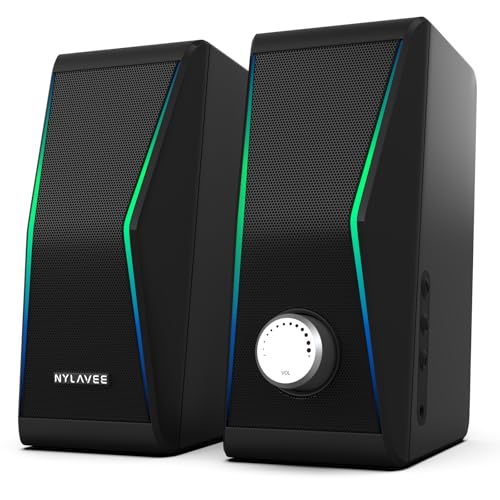
Bluetooth 5.0 Hi-Fi stereo computer speakers like the Nylavee model are perfect for anyone seeking exceptional sound quality in a compact design. With a powerful 14W RMS output and four dual-magnetic speaker units, these speakers deliver clear audio and strong bass across music, movies, and gaming. Their sleek dimensions fit seamlessly on your desk, while dynamic RGB lighting enhances your setup. Connecting via Bluetooth 5.0 or AUX is a breeze, and the touch volume control adds convenience. Though some users note minor issues with bass performance and volume sensitivity, overall satisfaction remains high with an average rating of 4.3 stars.
Best For: Anyone looking for high-quality audio experiences for gaming, movies, or music in a compact and stylish setup.
Pros:
- Excellent sound quality with strong bass and clear audio performance.
- Sleek design with dynamic RGB lighting that enhances any setup.
- Easy connectivity via Bluetooth 5.0 or AUX and simple plug-and-play setup.
Cons:
- Some users report minor issues with bass performance.
- Volume control sensitivity may vary, leading to inconsistent adjustments.
- Occasional Bluetooth connectivity problems noted by a few customers.
LENRUE G11 Computer Speakers for Desktop

The LENRUE G11 Computer Speakers are a fantastic choice for those who need compact, high-quality audio for video editing and other multimedia tasks. With a sleek design, these USB-powered speakers fit easily under your monitor, reducing clutter. You’ll enjoy distortion-free sound thanks to the 2.0 surround sound channel, making them perfect for music, videos, and games. The top volume knob allows effortless sound adjustments, while the touch lights add a modern flair. Compatible with various devices and operating systems, the G11s offer great value for casual use, delivering clear audio that enhances your editing experience.
Best For: Those seeking compact and affordable desktop speakers that deliver clear audio for casual use in multimedia tasks like music, videos, and gaming.
Pros:
- Attractive, compact design that fits under monitors and reduces desktop clutter.
- Easy plug-and-play setup with USB power and 3.5mm audio connection.
- Distortion-free sound quality with a top volume knob for simple adjustments.
Cons:
- Some users may find the sound volume not loud enough for their preferences.
- Lack of advanced equalizer options for personalized sound tuning.
- Occasional buzzing reported by some users under certain conditions.
Computer Speakers for PC Desktop with Bluetooth & USB Input
For those seeking an affordable yet stylish audio solution for their video editing setup, the ST200 soundbar stands out with its convenient USB and Bluetooth connectivity. This compact soundbar delivers clear and well-balanced audio through its upgraded 2x5W technology, making it perfect for movies, music, and gaming. Its sleek design fits neatly under your monitor, enhancing your workspace without being distracting. You’ll appreciate the easy-access control knob for volume and input switching, along with customizable LED lighting options. With an average rating of 4.4 stars, this soundbar offers great value for budget-conscious buyers.
Best For: Budget-conscious buyers seeking a stylish and compact audio solution for casual listening, video calls, and gaming.
Pros:
- Clear and well-balanced sound quality with upgraded 2x5W technology.
- Compact design fits neatly under monitors, enhancing workspace aesthetics.
- Customizable LED lighting options and easy-access control knob for user convenience.
Cons:
- Lacks deep bass, which may not satisfy audiophiles or those seeking rich sound.
- Bluetooth connectivity may face occasional pairing issues with certain devices.
- Limited compatibility with devices requiring 3.5mm AUX input.
Amazon Basics Stereo 2.0 Speakers for PC or Laptop

Compact and portable, the Amazon Basics Stereo 2.0 Speakers are an excellent choice for video editors seeking reliable sound without taking up too much desk space. These speakers feature a sleek metal finish and a padded base, ensuring stability and style. With USB power and a 3.5mm aux input, setup is a breeze. You’ll enjoy clear audio across a frequency range of 80 Hz to 20 KHz, enhanced by a bottom radiator for respectable bass. While they deliver balanced sound for everyday use, some users wish for louder output and the ability to disable the blue LED lights.
Best For: Video editors and users seeking compact, reliable sound solutions for desktop setups.
Pros:
- Compact design makes them ideal for small workspaces.
- Clear and balanced audio quality suitable for various media.
- Easy setup with USB power and 3.5mm aux input.
Cons:
- Limited loudness may not satisfy users seeking stronger audio output.
- Bass performance, while respectable, may not meet the expectations of bass enthusiasts.
- Inability to turn off blue LED lights may be a drawback for some users.
PreSonus Eris 3.5BT Studio Monitors (Pair)
Offering studio-quality sound in a sleek design, the PreSonus Eris 3.5BT Studio Monitors are perfect for video editors seeking accurate audio reproduction. With 50 Watts of Class AB amplification, these 3.5-inch powered speakers deliver tight bass and clarity, thanks to woven-composite woofers. You’ll appreciate the Bluetooth 5.0 connectivity for easy integration with your devices, as well as flexible wired options like ¼-inch TRS and RCA inputs. The ultra-wide listening sweet spot enhances your stereo imaging, while high- and low-frequency tuning controls let you customize the sound. Compact and versatile, these monitors fit perfectly on desktops or bookshelves.
Best For: Video editors and music producers seeking accurate audio reproduction in a compact design.
Pros:
- Studio-quality sound with tight bass and clarity from woven-composite woofers.
- Bluetooth 5.0 connectivity allows for seamless wireless integration with devices.
- High- and low-frequency tuning controls enable customization for different environments.
Cons:
- Limited bass response due to the small 3.5-inch woofers.
- May not be loud enough for larger rooms or professional studio environments.
- Lack of built-in DSP or advanced features compared to some higher-end monitors.
Factors to Consider When Choosing Monitor Speakers for Video Editing PC
When choosing monitor speakers for your video editing PC, you need to contemplate several key factors. Sound quality accuracy, connectivity options, and size will greatly impact your editing experience. Don’t forget to reflect on power output and design, as these elements can affect both functionality and your workspace aesthetics.
Sound Quality Accuracy
Because sound quality accuracy is crucial for effective video editing, choosing the right monitor speakers can greatly impact your workflow. You’ll want studio-quality monitors that feature a flat frequency response; this guarantees the sound is reproduced without coloration, allowing you to hear subtle details clearly. Look for models with quality drivers, like woven-composite woofers and silk-dome tweeters, which enhance clarity across lower and higher frequencies. Adjustable high- and low-frequency tuning controls let you customize the output based on your room’s acoustics, improving overall sound accuracy. Additionally, consider monitors with wide stereo imaging capabilities, as they provide an immersive listening experience, essential for spatial audio editing and achieving a balanced mix across various playback systems.
Connectivity Options Available
Selecting monitor speakers with the right connectivity options is essential for a smooth video editing experience. Look for models that offer multiple inputs, such as ¼-inch TRS balanced inputs, unbalanced RCA inputs, and ⅛-inch TRS stereo aux inputs, ensuring compatibility with various audio devices. Bluetooth connectivity adds convenience, allowing seamless integration with smartphones and other wireless devices. USB-powered speakers simplify setup and reduce cable clutter, making them perfect for desktop environments. Additionally, 3.5mm AUX inputs provide straightforward connections to computers and laptops without needing adapters. Don’t forget to check for headphone outputs on the front panel, giving you easy access for private listening during your editing sessions without disconnecting the speakers.
Size and Placement
After ensuring you have the right connectivity options for your monitor speakers, size and placement play an essential role in optimizing your video editing setup. The dimensions of your speakers can greatly affect their placement; compact models, for instance, typically measure around 5.5D x 6W x 8.3H inches, making them perfect for small desks. Positioning your speakers to form an equilateral triangle with your listening spot is vital for achieving accurate audio reproduction. Keep in mind the weight of your speakers, as heavier models require stable surfaces to prevent tipping. Also, consider wider designs for better stereo imaging. Compact speakers can fit neatly under monitors, allowing you to maximize desk space while maintaining sound quality.
Power Output Requirements
When choosing monitor speakers for your video editing PC, power output is essential. Typically measured in watts, you’ll find a range of 10 to 50 watts common for studio monitors. Higher power output, like 50 watts, allows for louder levels without distortion, vital for precise audio editing. Opt for active monitors with built-in amplification for convenience and consistent performance, as they eliminate the need for external amplifiers. Additionally, consider your room size; larger spaces may require speakers with higher wattage to effectively fill the area. Finally, verify the speaker’s power output aligns with your audio interface or mixer to prevent potential damage from mismatched levels. Balancing these factors will enhance your editing experience markedly.
Design and Aesthetics
While functionality is essential, the design and aesthetics of monitor speakers shouldn’t be overlooked in your video editing setup. Choose speakers that complement your workspace’s style, with a variety of colors and finishes available. Compact designs work best for maintaining a tidy environment while delivering excellent audio performance. You might also consider models with ambient lighting options, which can enhance your setup’s visual appeal and create an immersive editing atmosphere. Ergonomic features like accessible volume controls and effective cable management can greatly improve your experience during long sessions. Finally, prioritize speakers made from high-quality materials that not only look professional but also guarantee durability and superior sound performance, making your investment worthwhile.
Acoustic Tuning Features
Choosing monitor speakers with effective acoustic tuning features is essential for achieving accurate sound reproduction in your video editing setup. These features allow you to adjust high- and low-frequency responses, optimizing sound quality based on your room size and speaker orientation. Customizable tuning controls enable you to tailor sound characteristics to your preferences or acoustic environment, improving your overall listening experience. Adjusting the frequency response can help mitigate room acoustics issues, leading to a more neutral and accurate sound. Additionally, some studio monitors offer ultra-wide stereo imaging, which enhances spatial awareness, helping you place audio elements precisely in your projects. Effective acoustic tuning greatly boosts clarity and detail, empowering you to make informed decisions during sound mixing and mastering.