If you want a cleaner, more ergonomic workspace, a desk with a keyboard tray can make a big difference. It helps free up desktop space while improving typing posture and keeping essentials within reach.
In this roundup, we focus on practical computer desks with keyboard tray designs for home offices, gaming setups, and compact rooms, including storage-heavy models and adjustable standing desks.
Best 10 Computer Desks with Keyboard Tray Picks for 2026
Compact Storage Pick
Bestier 47" Desk with Drawers and Keyboard Tray

- Open storage, drawer, and file drawer
- Flexible keyboard tray with cable management
- Reversible layout for small spaces
Best For: Small home offices that need storage and typing comfort
Ergonomic Standing Pick
OffiGo 55" U Shaped Desk with Keyboard Tray

- Electric height adjustment with 3 presets
- 3 outlets, 2 USB ports, and monitor stand
- Keyboard tray plus hooks for added convenience
Best For: Standing desk users who want ergonomic comfort and extra workspace
Best Value Organizer
Bestier 48" Gray Desk with Keyboard Tray

- Drawer, file drawer, and open storage
- Keyboard tray with cable management hole
- Two hooks for headphones or accessories
Best For: Organized home offices on a compact footprint
Feature-Rich Standout
AODK 55" Standing Desk with Drawers and Keyboard Tray

- Electric height adjustment with 3 memory presets
- 2 drawers, keyboard tray, and cable tray
- Built-in outlets, USB ports, and LED lights
Best For: Feature-heavy workspaces that want storage and sit-stand flexibility
Modern Executive Pick
Bestier 55" Walnut Desk with Keyboard Tray

- Built-in outlet, USB, and Type-C ports
- Keyboard tray plus open storage compartment
- File drawer fits Letter, Legal, and A4 folders
Best For: Stylish home offices that need charging and file storage
Compact Ergonomic Pick
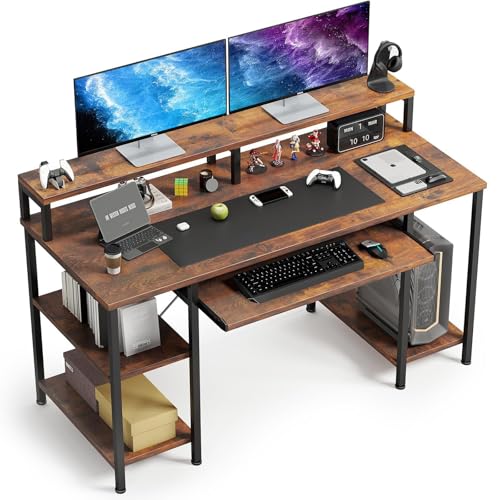
- Pull-out tray fits 108- or 87-key keyboards
- Monitor stand helps raise screen height
- Two-tier shelves plus CPU stand add storage
Best For: Small offices, study spaces, and gaming setups
Large Storage Pick
Bestier 59" Cherry Desk with Tray

- 59" x 22" desktop offers generous workspace
- Keyboard tray with two cable management holes
- File drawer and two storage drawers improve organization
Best For: Large home offices that need storage and a sturdy work surface
Rolling Small-Space Desk
Tangkula Mobile Desk Cart with Keyboard Tray

- Rolling base with locking casters
- Pull-out keyboard tray and storage shelf
- Compact footprint for small rooms
Best For: Small rooms and mobile workstations
Adjustable Standing Desk
HUANUO 55-inch Desk with Large Keyboard Tray

- Large keyboard tray fits keyboard and mouse
- Two drawers and deep desktop for organization
- Electric sit-stand frame with 4 presets
Best For: Ergonomic offices needing storage and a tray
Compact Ergonomic Desk
ErGear Standing Desk with Keyboard Tray

- Compact 44 x 24-inch standing desk
- Large tray for keyboard and mouse
- Stable steel frame with memory presets
Best For: Simple home offices with ergonomic typing needs
Compact Storage Pick – Bestier 47" Desk with Drawers and Keyboard Tray
If you want computer desks with keyboard tray support plus real storage, this Bestier 47-inch model is built for small work areas that still need organization. It combines a reversible layout, file storage, and a flexible tray in a footprint that works well in apartments, bedrooms, and dorms.
Best For: Small-space home offices that need drawers, file storage, and a keyboard tray.
Pros:
- Includes an open storage compartment, storage drawer, and file drawer for letter, A4, or legal folders.
- Keyboard tray and cable management hole help keep typing comfortable and cords under control.
- Reversible design gives you flexibility for different room layouts.
- Sturdy build supports up to 150 lbs on the desktop.
Cons:
- At 47.2 inches wide, it is compact rather than expansive.
- Assembly is required, even though instructions and video help are provided.
This is a practical choice if your priority is efficient storage without giving up the convenience of a keyboard tray. It favors organization and flexibility over oversized desktop space.
Ergonomic Standing Pick – OffiGo 55" U Shaped Desk with Keyboard Tray
This OffiGo model stands out among computer desks with keyboard tray features because it pairs a tray with electric height adjustment and a U-shaped surface. It is aimed at users who want more working room, dual-monitor support, and a sit-stand setup in one desk.
Best For: Users who want a standing desk with a keyboard tray, charging ports, and extra workspace.
Pros:
- Electric height adjustment from 28.3″ to 46.5″ with 3 presets.
- Built-in 3 outlets and 2 USB ports for convenient device charging.
- Full-size monitor stand can accommodate 2 monitors and saves desktop space.
- Keyboard tray and hooks add comfort and storage options.
Cons:
- Standing desk design may be more than some basic office setups need.
- Assembly requires following detailed instructions and is recommended for 2 people.
If you want a more ergonomic workstation, this desk offers a strong mix of adjustability, connectivity, and surface space. The keyboard tray is one part of a broader feature set built for productivity.
Best Value Organizer – Bestier 48" Gray Desk with Keyboard Tray
For buyers comparing computer desks with keyboard tray options, this Bestier 48-inch desk is a straightforward storage-first pick. It brings together drawers, a file drawer, a cable hole, and accessory hooks in a compact design that suits home offices and studios.
Best For: Workspaces that need organized storage, accessory hooks, and a comfortable keyboard tray.
Pros:
- Includes an open storage compartment, storage drawer, and file drawer.
- Flexible keyboard tray and cable management hole help keep the desktop tidy.
- Two hooks provide extra spots for headphones or accessories.
- Rated to support up to 150 lbs on the desktop.
Cons:
- The 48-inch size is compact, so it is not ideal for oversized setups.
- Storage is useful, but the desk remains a single-seat workstation.
This desk makes sense if you want a clean, organized workstation without paying for extra bells and whistles. It focuses on the essentials: storage, stability, and a usable keyboard tray.
Feature-Rich Standout – AODK 55" Standing Desk with Drawers and Keyboard Tray
This AODK desk is one of the more feature-packed computer desks with keyboard tray support, combining adjustable height, built-in power, drawers, and a monitor shelf. It is designed for users who want storage and convenience along with a more ergonomic sit-stand setup.
Best For: Users who want a standing desk with drawers, charging, lighting, and a keyboard tray.
Pros:
- Electric height adjustment from 29.9″ to 46.1″ with 3 memory settings.
- Built-in 3 outlets and 2 USB ports for charging devices.
- Includes 2 cloth drawers, a keyboard tray, and a cable management tray.
- Monitor shelf and LED lighting add extra utility and atmosphere.
Cons:
- With many features, it may be more desk than a simple office setup needs.
- Assembly is required, though parts are labeled and instructions are detailed.
For shoppers who want a single desk to do a lot, this AODK model has a compelling mix of storage, power access, and ergonomic design. The keyboard tray fits naturally into a build that is clearly aimed at everyday productivity.
Modern Executive Pick – Bestier 55" Walnut Desk with Keyboard Tray
If you want one of the more polished computer desks with keyboard tray, this Bestier model is built for a clean home-office setup with extra everyday convenience. The 55-inch surface, built-in power options, and storage mix make it a practical fit for people who want a desk that looks refined while still handling cables, files, and peripherals.
Best For: A stylish office or study setup that needs built-in charging, file storage, and a keyboard tray.
Pros:
- Built-in outlet, USB port, and Type-C port help reduce desktop clutter.
- Keyboard tray and open storage compartment support a tidier work area.
- File drawer fits Letter, Legal, and A4 hanging folders with an adjustable metal bar.
- Walnut-and-black finish with fluted drawer fronts gives it a more modern executive look.
Cons:
- Assembly is recommended for two people.
- Single-sided drawer layout may not suit everyone’s preferred storage setup.
Overall, this is a strong choice if you want the convenience of a keyboard tray without giving up storage or style. It works especially well for a bedroom, office, or study room where organization matters as much as appearance.
Compact Ergonomic Pick – VERMESS 48" Desk with Tray
This VERMESS model is a practical option if you’re comparing computer desks with keyboard tray for a smaller office or gaming setup. It pairs a pull-out tray with a monitor stand, CPU shelf, and two-tier shelving, so you can keep essentials close while still maintaining a more ergonomic screen height.
Best For: Smaller workspaces, study areas, or gaming setups that need monitor elevation and extra storage.
Pros:
- Pull-out keyboard tray is sized for 108- or 87-key keyboards and a mouse.
- Monitor stand helps raise the screen and improve viewing comfort.
- Two-tier shelves and a CPU stand add useful storage for gear and supplies.
- Metal legs, X-frame crossbar, and adjustable feet are designed for stability.
Cons:
- The desk is still relatively compact, so surface space is more limited than on larger models.
- Assembly is required, with step-by-step instructions included.
For buyers who want a budget-friendly, space-conscious desk with keyboard tray features, this one is easy to justify. The added monitor stand and storage shelves make it especially useful when you want better ergonomics without moving up to a larger executive desk.
Large Storage Pick – Bestier 59" Cherry Desk with Tray
Among computer desks with keyboard tray, this Bestier 59-inch model stands out for sheer workspace and storage. The wide desktop, file drawer, two storage drawers, and cable management holes make it a solid choice if you need a desk that can handle multiple work items while staying organized.
Best For: Larger home offices or multitasking setups that need storage, cable control, and a sturdy work surface.
Pros:
- Spacious 59″ x 22″ desktop gives you room for monitors, documents, and accessories.
- Keyboard tray and two cable management holes support a cleaner setup.
- File drawer fits Letter, A4, and Legal folders, with two storage drawers for extras.
- Heavy-duty build is rated to support up to 200 lbs on the desktop.
Cons:
- At 95.8 pounds, it is a heavier desk to move and set up.
- Two-person assembly is recommended for an easier build.
If you need a more substantial workstation, this desk offers a good balance of capacity and organization. The keyboard tray is only part of the appeal here; the real advantage is having enough room and storage to keep a busy workspace under control.
Rolling Small-Space Desk – Tangkula Mobile Desk Cart with Keyboard Tray
If you need one of the more flexible computer desks with keyboard tray options for tight rooms, this rolling Tangkula cart is built around mobility and compact storage. It combines a pull-out keyboard tray, bottom shelf, CPU stand, and hooks in a small footprint that can fit a bedroom, dorm, or living room workspace.
Best For: Small-space users who want a mobile desk that can roll away when not in use.
Pros:
- Four 360° casters make it easy to move, and two lock for stability.
- Pull-out keyboard tray plus bottom shelf and 3 removable hooks add useful storage.
- Metal frame supports up to 180 lbs for a sturdy compact workstation.
- Rounded corners and easy-clean wood grain top help it work well in everyday spaces.
Cons:
- Small 31.5″ x 19.5″ footprint limits desktop room.
- Best suited to lighter, space-conscious setups rather than larger multi-monitor builds.
This is a practical pick if portability and organization matter more than a large desk surface. It delivers the keyboard tray feature in a mobile design that can adapt to changing room layouts.
Adjustable Standing Desk – HUANUO 55-inch Desk with Large Keyboard Tray
Among computer desks with keyboard tray features, this HUANUO standing desk stands out for combining sit-stand adjustability with a large under-desk tray. The deeper desktop, two drawers, and C-clamp-friendly rear edge make it a strong choice if you want an organized, ergonomic office setup.
Best For: Buyers who want a sit-stand desk with a roomy keyboard tray and extra storage.
Pros:
- Large 24.4″ x 9.8″ keyboard tray fits a full-size keyboard and mouse.
- Two drawers help keep office supplies organized and off the desktop.
- Height adjusts from 28.3″ to 46.5″ with four memory presets.
- Steel construction is tested for long-term durability and stability.
Cons:
- Electric frame makes it less simple than a basic fixed desk.
- Larger 55-inch size may be more desk than some small spaces need.
This model is a good fit if you want more than just a tray—its storage, height adjustment, and monitor-friendly design make it a well-rounded workstation.
Compact Ergonomic Desk – ErGear Standing Desk with Keyboard Tray
If you want a compact standing option among computer desks with keyboard tray support, this ErGear model focuses on ergonomics and stability in a 44 x 24-inch footprint. The tray keeps your keyboard and mouse in a comfortable typing position while freeing up the desktop for a cleaner home office layout.
Best For: Home office users who want a compact standing desk with a dedicated keyboard tray.
Pros:
- Spacious keyboard tray supports a large keyboard and mouse.
- Electric height adjustment moves from 28.35″ to 46.46″.
- Steel frame and lifting column connectors are built for stability.
- Three memory settings make it easy to return to preferred heights.
Cons:
- No drawers, so storage is limited to the tray and desktop.
- Smaller 44″ x 24″ size may feel tight for larger setups.
This desk makes sense if you value a straightforward standing workspace with a keyboard tray over extra storage features. It keeps the layout simple while still covering the essentials for typing and daily work.
How We Picked the Best Computer Desks with Keyboard Tray
We looked for desks that balance typing comfort, useful storage, solid construction, and real-world layout flexibility. Since these desks serve different needs, we favored a mix of fixed-height and standing options, along with models that offer drawers, shelves, cable management, and compact footprints.
We also considered how well the keyboard tray integrates with the rest of the workstation. A good tray should slide smoothly, sit at a comfortable height, and not interfere with legroom or monitor placement.
Quick Comparison
For storage-first buyers, look for larger desks with file drawers and multiple compartments. If you want better ergonomics, adjustable-height models with a large tray are the better fit. Compact and rolling designs work best when mobility and space savings matter more than maximum surface area.
Key Buying Factors for Computer Desks with Keyboard Tray
Tray Size and Placement
Check whether the tray is wide enough for your keyboard and mouse, especially if you use a full-size layout or prefer extra mouse movement. Tray height matters too: too low can feel awkward, while too high reduces the ergonomic benefit.
Storage and Organization
Many Computer Desks with Keyboard Tray include drawers, shelves, hooks, or file storage. Choose based on what you need to keep off the desktop. If you use documents, a file drawer is valuable; if you use peripherals, look for open shelves and cable pass-throughs.
Desk Type
Standard desks are usually simpler and often more affordable. Standing desks add flexibility for alternating between sitting and standing, which may be worth it if you spend long hours at your workstation. Rolling desks are ideal for small apartments, dorms, or multi-use rooms.
Fit for Your Setup
Measure your monitor stand, tower, printers, and chair clearance before buying. Some keyboard trays may conflict with under-desk CPU shelves or clamp-on accessories, so confirm compatibility if you use monitor arms or large peripherals.
Who Should Buy Which Computer Desks with Keyboard Tray?
Choose a storage-focused desk if you want an organized home office with room for paperwork and accessories. Pick a standing desk if comfort and posture matter most during long work sessions. Go with a compact or mobile model if you need flexibility in a small space. For gaming or multi-monitor setups, prioritize width, cable management, and a tray that won’t crowd your legs or mouse area.