Finding the right setup for three screens is about more than just size. The best computer desks for triple monitors need the right depth, stability, and layout so your displays feel comfortable to use all day.
Below, we focus on desks and monitor-support solutions that make triple-screen setups easier for work, gaming, and content creation in 2026.
Best 10 Computer Desks for Triple Monitors Picks for 2026
Switchable L-Shape Workstation
PRAISUN 66" L Shaped Gaming Desk
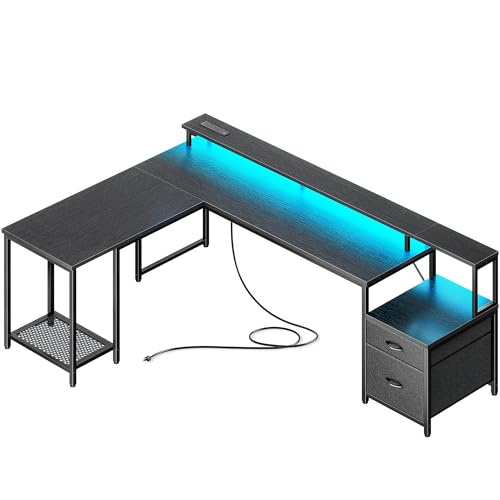
- Converts from L-shape to a long straight desk
- Built-in power with AC, USB-C, and USB-A ports
- Includes drawers, printer stand, and monitor riser
Best For: Users who need a flexible corner desk with built-in storage and charging
Adjustable Triple Riser
WESTREE Triple Dual Monitor Stand Riser

- Supports 2 to 3 monitors
- Length adjusts from 29 to 56 inches
- Includes a 13-inch slide-out drawer
Best For: Existing desks that need a wide ergonomic riser for multiple monitors
Storage-Heavy Reversible Desk

- Reversible into an L-shape or 96-inch straight desk
- Includes outlet, LED strip, pegboard, and shelves
- Large work area supports multiple computers
Best For: Organized home offices and gaming setups that need flexible storage
Triple Arm Monitor Mount

- Holds three monitors up to 27 inches
- Full-motion tilt, swivel, rotation, and height adjustment
- Offers freestanding or grommet-base mounting
Best For: Desk setups that need a flexible triple-monitor mount without adding clutter
Ultimate Multi-Task L-Desk
SEDETA 108" L Shaped Computer Desk

- 108-inch L-shape fits multi-device setups.
- Monitor shelf helps improve viewing comfort.
- Built-in drawers, file storage, and power strip.
Best For: Large home offices and gaming stations with multiple screens.
Desk-Space Saver

- Holds three 17-32 inch VESA monitors.
- Frees up desktop space by lifting screens.
- Offers swivel, tilt, rotation, clamp, and grommet options.
Best For: Clean triple-monitor setups with VESA-compatible displays.
Showcase Gaming Station
AODK 59" Reversible Gaming Desk

- Built-in stand showcases panoramic glass PC cases.
- RGB lighting adds a strong gaming look.
- Three drawers help hide cables and accessories.
Best For: Style-forward gaming setups with a featured PC build.
Stacked Ergonomics Pick
MOUNT PRO Triple Monitor Mount

- Fits most 13" to 32" displays with VESA 75x75/100x100.
- Tall 28-inch pole reaches up to 36.3 inches.
- Supports stacked triple-screen layouts with cable management.
Best For: stacked three-monitor setups with adjustable height
Space-Saving Workhorse

- Supports 17" to 32" monitors with VESA 75x75/100x100.
- Clamp and grommet mounting fit a range of desks.
- Claims over 80% desk-space savings with cable concealment.
Best For: users who want an adjustable, clutter-reducing triple mount
Heavy-Duty Value Pick
ErgoFocus Triple Monitor Desk Mount

- Holds up to 19.8 lbs per arm with VESA 75x75/100x100.
- Rotates 360°, swivels 180°, and tilts +90°/-90°.
- Clamp and grommet mounts suit many desk setups.
Best For: buyers who want a sturdy, easy-to-install triple-monitor mount
Switchable L-Shape Workstation – PRAISUN 66" L Shaped Gaming Desk
If you’re comparing computer desks for triple monitors, this PRAISUN L-shaped option stands out for flexibility and built-in organization. It can run as a corner desk or stretch into a long 94.9-inch straight layout, giving you room for multiple screens, peripherals, and daily work gear without feeling cramped.
Best For: Corner setups, mixed work-and-gaming spaces, and users who want a desk that can adapt to different room layouts.
Pros:
- Switches between an L-shape and a long straight desk
- Built-in charging station with 4 AC outlets, USB-C, and USB-A ports
- Includes monitor riser, printer stand, CPU stand, and 2 fabric drawers
- Scratch-resistant, water-resistant desktop with metal frame support
Cons:
- L-shaped footprint may be more desk than some small rooms need
- Assembly is required
- Triple-monitor users may still need separate mounting hardware for best positioning
This is a practical pick if you want one desk to handle work, gaming, and device charging in a single setup. The flexible shape and storage features make it especially useful when you need a clean, multi-monitor workspace with less cable clutter.
Adjustable Triple Riser – WESTREE Triple Dual Monitor Stand Riser
For computer desks for triple monitors, this WESTREE riser is a straightforward way to lift multiple screens and free up usable desktop space. It supports 2 to 3 monitors, adjusts in length and angle, and adds a slide-out drawer for keeping small office items close at hand.
Best For: Users who already have a desk and want a wider, ergonomic monitor riser for 2-3 screens.
Pros:
- Designed to hold 2 to 3 monitors
- Adjustable length from 29 to 56 inches with +/-90 degree angle changes
- Includes a 13-inch slide-out drawer for supplies and devices
- Rated for up to 100 pounds of load capacity
Cons:
- It is a riser, not a full desk, so it does not add work surface depth
- Best suited to flat desktops with enough room for a wide base
- Monitor arms are not included
This is a good fit if your current desk is solid but needs better screen height and more organization. The adjustable width and angle make it easier to arrange multiple displays in a more comfortable viewing position.
Storage-Heavy Reversible Desk – SEDETA L Shaped Gaming Desk
This SEDETA model is a strong option if you’re shopping for computer desks for triple monitors and want more than just a tabletop. It offers a reversible L-shape that can also become a 96-inch long desk, plus storage and cable-friendly features that help keep a multi-screen setup usable and organized.
Best For: Users who want a reversible desk with lots of storage for a home office or gaming setup.
Pros:
- Reversible design can switch between L-shape and a long two-person desk
- Includes power outlet, LED strip, keyboard tray, pegboard, and storage shelves
- Large work area can hold two desktop computers and one notebook
- 3-tier storage can be placed on either side
Cons:
- At 59.01 inches wide in the listed dimensions, space planning matters
- Assembly will take time because of the many included parts
- Triple-monitor setups may need careful layout to avoid crowding accessories
Overall, this desk is best when storage and layout flexibility matter as much as screen space. It gives you a lot of built-in organization for peripherals, books, and office gear while still supporting a substantial multi-monitor workspace.
Triple Arm Monitor Mount – WALI Triple Monitor Stand
If your goal is a cleaner triple-screen layout on one of the computer desks for triple monitors, this WALI stand is the kind of accessory that can make a big difference. It supports three screens up to 27 inches each and gives you full-motion adjustments, so you can dial in a more ergonomic viewing angle without sacrificing desk space.
Best For: Users who want a freestanding triple-monitor mount for a desk setup with flexible positioning.
Pros:
- Supports three monitors up to 27 inches and 22 lbs per arm
- Full-motion adjustment with tilt, swivel, rotation, and height changes
- Includes both free-standing and grommet-base installation options
- Helps reduce neck and eye strain by raising screens to a better viewing height
Cons:
- Only works with VESA 75×75 or 100×100 compatible monitors
- Does not add desk storage or workspace
- Large monitors or unusually heavy displays may exceed the per-arm limits
This is a practical choice if you already have a desk and simply need a better way to hold three monitors. The flexible mounting options and broad adjustment range make it well suited to workstations that need a tidy, efficient screen arrangement.
Ultimate Multi-Task L-Desk – SEDETA 108" L Shaped Computer Desk
If you need computer desks for triple monitors, this SEDETA L-shaped setup is built for serious screen real estate. The 108-inch design can hold three desktop computers and one notebook computer, while the monitor shelf helps keep viewing height more comfortable during long work or gaming sessions. With integrated storage, power, and lighting, it suits users who want a full workstation rather than just a tabletop.
Best For: Home offices, gaming setups, or shared workstations that need room for multiple monitors plus extra hardware.
Pros:
- Large L-shaped desktop can support three desktop computers and one notebook computer.
- Built-in monitor shelf is designed to reduce neck and back strain.
- Includes 6 fabric drawers, a file drawer, and a printer cabinet for storage.
- Power strip with 4 outlets and 2 USB ports adds convenient charging access.
Cons:
- At 108 inches wide, it needs a lot of floor space.
- The 19-inch desk depth may feel narrow for some deep-monitor arrangements.
- Assembly and setup may take more effort than a basic desk.
This is a strong choice if your priority is maximum surface area, built-in organization, and an ergonomic layout for a multi-screen desk. The LED lighting and sturdy frame are nice extras, but the main appeal is how much gear it can handle without feeling cramped.
Desk-Space Saver – HUANUO Triple Monitor Mount
For computer desks for triple monitors, this HUANUO mount is the easiest way to reclaim surface space and keep three screens organized. It lifts monitors off the desk and gives you swivel, tilt, and rotation adjustments so you can dial in a comfortable viewing angle. If your desk is already big enough but feels cluttered, this kind of mount can make the whole workstation work better.
Best For: Users with three VESA-compatible monitors who want a cleaner, more adjustable desk layout.
Pros:
- Supports three monitors from 17 to 32 inches with 75x75mm or 100x100mm VESA holes.
- Reclaims desk space by elevating all three screens off the tabletop.
- Swivel, tilt, and rotation adjustments help fine-tune screen position.
- Includes both C-clamp and grommet mounting options.
Cons:
- Monitor size, VESA pattern, and weight must all match the stated limits.
- Not compatible with screens larger than 32 inches.
- Desk thickness has to fall within the mounting ranges for each installation method.
This is less of a desk and more of a workstation upgrade, but it belongs in any triple-monitor buying plan. If your current setup is solid and you just need better ergonomics and more usable desktop space, this mount is the practical choice.
Showcase Gaming Station – AODK 59" Reversible Gaming Desk
If you want computer desks for triple monitors with a more visual, gaming-focused layout, this AODK desk stands out with its elevated PC showcase stand and RGB lighting. The 59-inch surface is reversible, and the elevated stand is designed for panoramic tempered-glass cases like the Lian Li O11 and Hyte Y60. Triple fabric drawers help keep cables, controllers, and other clutter out of sight so the setup stays clean.
Best For: Gamers who want a compact but stylish desk that highlights a showpiece PC and organizes accessories.
Pros:
- Elevated stand is designed for panoramic PC cases and keeps the rig at eye level.
- RGB LED strip adds a gaming-focused ambient look.
- Three fabric drawers help manage cables, controllers, and clutter.
- Reversible 59-inch design adds flexibility for room layout.
Cons:
- Much smaller than a full 108-inch workstation desk.
- The 19.69-inch depth may feel tight for very large multi-monitor arrangements.
- Best suited to users prioritizing style and showcase space over maximum surface area.
This desk makes the most sense when you want your PC to be part of the display, not hidden under the table. It balances storage and presentation well, but buyers planning a wide triple-monitor layout should check the available width carefully.
Stacked Ergonomics Pick – MOUNT PRO Triple Monitor Mount
If you’re comparing computer desks for triple monitors, this MOUNT PRO arm is built for a stacked three-screen setup rather than a side-by-side bar. It supports 13″ to 32″ flat or curved displays, offers full-motion adjustment, and helps lift your screens off the desk for a cleaner, more flexible workspace.
Best For: Users who want a stacked triple-monitor setup with a taller pole and flexible positioning.
Pros:
- Supports most 13″ to 32″ monitors with 75x75mm and 100x100mm VESA patterns.
- Full-motion arms tilt, swivel, and rotate for landscape or portrait use.
- 28-inch pole reaches up to 36.3 inches for higher viewing placement.
- Includes cable management plus both C-clamp and grommet mounting options.
Cons:
- Not compatible with 1000R curved screens.
- Designed for a stacked arrangement, not a three-across layout.
Overall, this is a practical choice if you want triple-monitor support with more vertical flexibility and a tidy desk footprint. The tall pole and strong weight rating make it a capable option for multi-screen productivity setups.
Space-Saving Workhorse – MOUNTUP Triple Monitor Mount
For computer desks for triple monitors, this MOUNTUP stand focuses on compatibility, adjustability, and desk space savings. It fits most 17″ to 32″ screens, supports both clamp and grommet mounting, and uses articulating arms to help you set a comfortable viewing position.
Best For: Buyers who want an adjustable triple-monitor mount that keeps a desk clear and is easy to set up.
Pros:
- Fits most flat or curved monitors from 17″ to 32″.
- Full motion adjustment allows height, tilt, swivel, and rotation changes.
- Claims to save more than 80% of desktop space versus individual stands.
- Includes cable covers and clips for cleaner wire management.
Cons:
- Thin desks may need a reinforcement plate, which is not included.
- Best suited to VESA-compatible monitors only.
This is a strong all-around option if your priority is reclaiming desk space while keeping all three monitors easy to position. The durability testing and 3-year support also add peace of mind for long-term use.
Heavy-Duty Value Pick – ErgoFocus Triple Monitor Desk Mount
If you need computer desks for triple monitors and want a straightforward heavy-duty mount, this ErgoFocus model covers the essentials well. It supports most 13″ to 32″ flat or curved screens, offers broad adjustment, and is designed to free up desk space with integrated cable management.
Best For: Buyers looking for a durable, easy-to-install triple-monitor mount with flexible positioning.
Pros:
- Supports up to 19.8 lbs per arm and VESA 75x75mm or 100x100mm.
- Arms rotate 360°, swivel 180°, and tilt +90°/-90°.
- Clamp and grommet mounting options work with many desk thicknesses.
- Includes step-by-step instructions and all necessary hardware.
Cons:
- Designed for VESA-mountable monitors only.
- Its feature set is more functional than premium.
This mount makes sense if you want a solid triple-screen setup without overcomplicating the installation. With broad monitor support and dependable adjustability, it should fit well in most productivity or gaming desk setups.
How We Picked the Best Computer Desks for Triple Monitors
We looked for options that support a true triple-screen workflow without turning your desk into clutter. That means enough surface area, dependable weight support, sensible cable management, and layouts that help keep all three displays usable at once. We also favored designs that work for both productivity and gaming, since many buyers need one setup to do both.
Quick Comparison
When comparing Computer Desks for Triple Monitors, think in terms of total setup style. Some products are full desks with built-in storage, shelves, and power features. Others are monitor mounts or risers that improve an existing desk. If your current surface is already large and sturdy, a triple monitor arm may be the smarter upgrade. If you need a fresh workstation, a larger corner or L-shaped desk usually gives you better long-term comfort and organization.
Key Buying Factors for Computer Desks for Triple Monitors
Desk size and depth: Triple monitors need more room than most single-screen setups. Prioritize depth first so your main screen is not uncomfortably close, then make sure the width can support the span of all three displays.
Weight capacity and stability: Three monitors can put a surprising amount of stress on a desk or stand. Look for solid frames, reinforced corners, and balanced support that minimizes wobble.
Mounting compatibility: If you plan to use an arm or stand, check VESA support, screen size limits, and per-monitor weight ratings. This is especially important for larger ultrawide or heavier displays.
Storage and cable control: Drawers, shelves, power outlets, and pegboards can reduce desktop clutter, which matters even more when three monitors already dominate the workspace.
Ergonomics: Triple-screen setups should keep your neck and shoulders comfortable. Height-adjustable mounts, tilt, and swivel matter if you spend long hours at the desk.
Who Should Buy Which Computer Desks for Triple Monitors?
Gamers: Choose a larger desk or a gaming-focused model with lighting, power access, and room for peripherals.
Remote workers and professionals: Prioritize stability, storage, and a clean layout that supports focus and daily use.
Creators and multitaskers: Look for flexible monitor mounting and wide work surfaces so you can edit, reference, and communicate at the same time.
Small-space users: A triple monitor stand or riser can be the best upgrade if you already have a sturdy desk and want to save floor space.
The best choice depends on whether you need a complete workstation or just a better way to organize and support your screens. For most buyers, the ideal Computer Desks for Triple Monitors balance size, strength, and practical features rather than chasing the most extras.