If you’re expanding your PC lighting or fan setup, the right controller keeps everything tidy, synced, and easy to manage. The best motherboard sync RGB controllers for PC help you add more ARGB devices without overloading headers or creating cable clutter.
This roundup focuses on practical hubs and controllers that balance compatibility, power delivery, and straightforward installation for modern gaming and showcase builds.
Best 10 Motherboard Sync RGB Controllers for PC Picks for 2026
Magnetic 9-Port Hub
9-Port ARGB PWM Fan Hub Controller

- Runs up to 9 PWM fans with synced ARGB lighting.
- Magnetic mount and compact body simplify installation.
- SATA power helps keep operation stable.
Best For: Large PC builds needing fan and ARGB syncing in one compact hub.
Software-Sync ARGB Hub
Nollie 8-Port ARGB Controller Hub

- Eight 5V 3-pin ARGB ports for expanded lighting.
- Works with SignalRGB and OpenRGB.
- Dual SATA power helps avoid voltage drops.
Best For: Builders who want app-controlled ARGB expansion for bigger lighting setups.
Basic 10-Way Splitter

- Turns one 5V 3-pin header into up to 10 ports.
- SATA power helps keep lighting stable.
- Acrylic shell and adhesive support easy placement.
Best For: Users who want a simple ARGB splitter for expanding motherboard lighting headers.
Large ARGB expansion
Airgoo 16-Port ARGB Controller
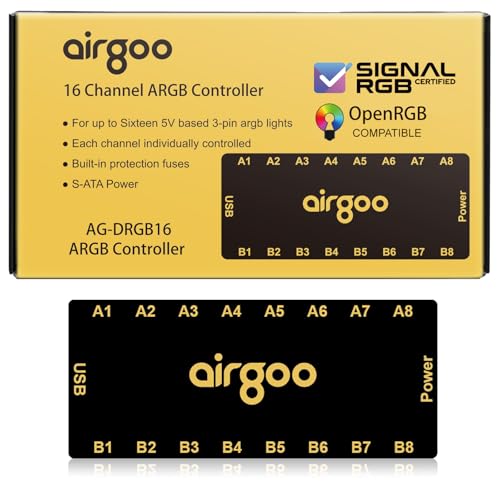
- Controls up to 16 ARGB devices
- Supports SignalRGB and OpenRGB
- SATA-powered with magnetic mounting
Best For: Big RGB builds that need lots of synchronized ARGB ports
Fan and lighting hub

- Handles ARGB and PWM fan control
- Supports up to 12 fan groups
- Includes remote control for lighting
Best For: Builders who want one hub for fan speed and ARGB sync
Compact ARGB expansion

- Controls up to 8 ARGB devices
- Works with SignalRGB and OpenRGB
- Slim magnetic design for smaller cases
Best For: Compact PC builds that need ARGB syncing without a bulky hub
Magnetic ARGB/PWM Hub
10-Port Self-Lighting Controller

- Controls 10 PWM fans and 10 ARGB devices.
- Offers remote, chassis key, and motherboard sync control.
- Magnetic mount simplifies installation and repositioning.
Best For: Builders wanting one flexible hub for lighting and fan speed
Thermalright Expansion Hub

- Adds 8 fan groups and ARGB expansion ports.
- Uses SATA power with adhesive or magnetic mounting.
- Focuses on expansion, not lighting or speed adjustment.
Best For: Simple fan and ARGB expansion with tidy cable management
Magnetic 9-Port Hub – 9-Port ARGB PWM Fan Hub Controller
If you’re building a clean, synchronized lighting setup, this motherboard sync rgb controllers for pc option gives you a compact way to run multiple fans and ARGB devices from one place. The 9-port layout is useful for larger cases, while SATA power helps keep fan performance stable without leaning too hard on the motherboard.
Best For: PC builders who want one hub for both PWM fan control and synchronized 5V ARGB lighting.
Pros:
- Supports up to 9 fans with individual PWM speed control.
- Works with 5V 3-pin ARGB fans and LED strips.
- Magnetic backing makes installation quick and repositionable.
- SATA power helps reduce voltage loss under load.
Cons:
- 12V 4-pin fans must still connect to the motherboard for PWM control.
- Lighting control is the main hub function; it is not a full standalone fan controller.
Overall, this is a practical choice if you want a tidy hub that combines fan distribution with ARGB syncing. The compact metal-bodied design is especially helpful in cases where cable clutter and space are both concerns.
Software-Sync ARGB Hub – Nollie 8-Port ARGB Controller Hub
For builders who want software-based control, this motherboard sync rgb controllers for pc pick expands a 5V 3-pin ARGB setup with eight ports and support for SignalRGB and OpenRGB. It is designed for larger lighting layouts, and the dual SATA power setup is there to keep voltage steady when multiple channels are in use.
Best For: Users who want a compact ARGB expansion hub with ecosystem software support.
Pros:
- Eight ARGB ports extend motherboard lighting headers.
- Compatible with SignalRGB and OpenRGB.
- Dual SATA power supports larger lighting arrays.
- Includes USB 9-pin cable and adapter pins for setup.
Cons:
- Designed for 5V 3-pin ARGB only, not 12V 4-pin RGB.
- Best suited to lighting expansion rather than fan-speed control.
This is a strong fit if your priority is broad lighting synchronization rather than fan management. The small form factor and included cables make it easier to drop into a custom build without much extra planning.
Brand-Backed 6-Fan Hub – ASUS TUF ARGB PWM Fan Hub
This motherboard sync rgb controllers for pc option is built for straightforward fan and lighting expansion, with support for up to six case fans and synchronized RGB connection. Clear indicators and dual SATA power make it easier to monitor and run a stable setup in a gaming case.
Best For: ASUS-focused builds that want a simple, branded hub for six fans and RGB sync.
Pros:
- Connects up to six case fans with PWM and RGB support.
- Visible power and operation indicators simplify status checks.
- Magnetic mounting makes placement easy on metal case surfaces.
- Dual SATA power supports stable input under load.
Cons:
- Only supports up to six fans, so it may be small for bigger builds.
- It is focused on fan and lighting syncing, not extra software features.
For users who want a dependable hub with clear indicators and easy mounting, this is a sensible pick. The dual SATA setup and brand-backed warranty add a little extra peace of mind for daily use.
Basic 10-Way Splitter – 10-Way 5V 3Pin ARGB Hub
If your goal is simply to expand motherboard RGB headers, this motherboard sync rgb controllers for pc hub gives you up to 10 ways to distribute 5V 3-pin ARGB lighting. The SATA-powered design helps maintain stable output, and the acrylic shell plus adhesive backing make it easy to place inside a clean-looking build.
Best For: Builders who need a basic ARGB splitter to add more lighting devices to one motherboard header.
Pros:
- Expands one 5V 3-pin ARGB header into up to 10 ports.
- Additional SATA power helps avoid insufficient power supply.
- 3M adhesive backing supports simple installation on flat surfaces.
- Transparent acrylic cover helps block dust.
Cons:
- Not compatible with 12V 4-pin RGB devices.
- Designed for ARGB expansion only, not fan control.
This is the most straightforward option in the group if you mainly need more ARGB connection points. It keeps the focus on header expansion and stable lighting distribution rather than advanced control features.
Large ARGB expansion – Airgoo 16-Port ARGB Controller
If you’re building a PC that needs motherboard sync rgb controllers for pc, this Airgoo 16-port ARGB hub is built for larger lighting setups that outgrow a typical motherboard header count. It supports 5V 3-pin ARGB devices, uses SATA power to help prevent flicker under load, and works with SignalRGB or OpenRGB for software-based control.
Best For: Users who want one internal controller to sync many ARGB fans, strips, and AIO lights across a bigger case.
Pros:
- Controls up to 16 ARGB devices with independent channel support.
- Supports SignalRGB and OpenRGB for cross-platform lighting control.
- SATA power and USB 2.0 connection are designed for stable, low-lag syncing.
- Built-in magnets make internal case mounting simple on steel surfaces.
Cons:
- Requires installing the correct software before configuration works.
- Only supports 5V 3-pin ARGB devices, not 12V 4-pin RGB.
This is a strong fit if you want to unify several lighting accessories into one software-controlled setup without running out of motherboard headers. The tradeoff is that it’s aimed at ARGB-only builds and depends on the right software setup.
Fan and lighting hub – Thermalright X12 IR Black
For buyers comparing motherboard sync rgb controllers for pc, this Thermalright hub stands out because it handles both lighting and fan control in one compact unit. It connects up to 12 fan groups, supports 5V 3-pin ARGB synchronization plus PWM speed control, and uses SATA power to help keep cable management clean.
Best For: PC builders who want to sync ARGB lighting and PWM fan control from one hub.
Pros:
- Supports both ARGB lighting devices and PWM fan interfaces.
- Can connect up to 12 groups of CPU fans for cleaner cable routing.
- Includes a light remote control for easier color adjustment.
- Compact black design with a top linear ARGB accent.
Cons:
- Does not support 12V 4-pin RGB devices.
- Only the fan in the red header is recognized for speed reading.
This is a practical choice if you need one hub to organize both fan power and ARGB lighting in a desktop build. Just make sure your gear is 5V 3-pin ARGB compatible and that you do not mix in unsupported RGB hardware.
Compact ARGB expansion – Airgoo 8-Port ARGB Controller
If you need motherboard sync rgb controllers for pc but do not want a large hub taking up case space, this Airgoo 8-port ARGB controller is the smaller alternative. It supports 5V 3-pin ARGB devices, uses SATA power for stable operation, and works with SignalRGB or OpenRGB for software-driven lighting control inside mini and mid-tower builds.
Best For: Mini- and mid-tower PC builders who want simple ARGB expansion with software syncing.
Pros:
- Controls up to 8 ARGB devices for smaller to mid-size setups.
- Supports SignalRGB and OpenRGB for flexible lighting software control.
- Magnetic design makes internal mounting easy on steel surfaces.
- Compact slim body fits better in tighter cases.
Cons:
- Requires the correct software installation before configuration.
- Only supports 5V 3-pin ARGB devices, not 12V 4-pin RGB.
This model makes sense when you want the same software-based ARGB syncing as larger hubs, but in a smaller footprint. It’s best suited to compact builds where fewer ports are needed and easy mounting matters.
EZDIY-FAB Sync Hub – 10-Port RGB Fan Hub with Remote
If you want motherboard sync rgb controllers for pc with simple fan and lighting expansion, this EZDIY-FAB hub is built around centralized control for compatible 6-pin EZDIY-FAB fans. It adds two 5V 3-pin ARGB headers for extra lighting devices, while SATA power is used to keep operation stable when multiple fans or effects are running.
Best For: Builders using compatible EZDIY-FAB 6-pin fans who want remote control plus motherboard sync in one hub.
Pros:
- Supports up to 10 EZDIY-FAB fans with stable SATA-powered operation.
- Remote lets you adjust lighting effects, colors, brightness, and speed.
- Can switch to motherboard sync mode with the M/B button.
- Includes two extra 5V 3-pin ARGB headers for additional devices.
Cons:
- No fans are included, only the hub and remote control.
- Designed for compatible EZDIY-FAB 6-pin fans rather than universal fan use.
- Requires careful connection of ARGB devices to the correct 5V headers.
This is a practical pick if your build already uses EZDIY-FAB-compatible fans and you want a hub that combines remote adjustment with motherboard synchronization. It is less of a universal controller and more of a focused expansion piece for a matching ecosystem.
Magnetic ARGB/PWM Hub – 10-Port Self-Lighting Controller
For motherboard sync rgb controllers for pc that combine fan speed and lighting control, this 10-port hub is built as an integrated ARGB and PWM management center. It supports 10 PWM case fans and 10 ARGB devices, includes SATA power, and adds remote, chassis key, and motherboard sync options for flexible setup and daily use.
Best For: PC builders who want one hub for synchronized ARGB lighting and PWM fan control with flexible mounting.
Pros:
- Manages 10 PWM fans and 10 ARGB devices from one hub.
- Supports remote control, chassis key control, and motherboard sync.
- Magnetic base makes installation and repositioning easy.
- SATA-powered design helps keep multi-device operation stable.
Cons:
- ARGB plugs must be aligned carefully with the 5V mark.
- Does not support 12V 4-pin RGB devices.
- PWM function setup requires connecting the red PWM port first.
This hub stands out if you want a cleaner all-in-one controller for both cooling and lighting, especially in larger builds. The magnetic mount and multiple control methods make it a strong fit for builders who like easy access without sacrificing motherboard sync.
Thermalright Expansion Hub – 8-Port ARGB Fan Controller
If you are comparing motherboard sync rgb controllers for pc and mainly need a compact expansion hub, this Thermalright unit focuses on adding more fan and ARGB connections. It supports up to 8 fan groups and 5V 3-pin ARGB devices, uses SATA power, and mounts with either strong adhesive or magnetic suction.
Best For: Users who need a straightforward 8-port fan and ARGB expansion hub with tidy cable management.
Pros:
- Supports 8 groups of fans for easier wiring expansion.
- Works with 5V 3-pin ARGB fans and light bars.
- Can be mounted with strong paste or magnetic suction.
- SATA power helps maintain stable output under load.
Cons:
- Does not support 12V 4-pin RGB devices.
- Claims no speed or lighting adjustment function beyond expansion.
- PWM speed reading is limited to the single fan in the red interface.
This is the most basic option in the group, so it makes sense if you mainly want more ports and cleaner wiring rather than extra control features. It is useful for expanding a build, but it is not the best choice if you want a feature-rich synced controller.
How We Picked the Best Motherboard Sync RGB Controllers for PC
We focused on Motherboard Sync RGB Controllers for PC that offer solid ARGB compatibility, dependable SATA power, and enough ports to handle real-world fan and lighting upgrades. We also prioritized models with useful mounting options, clear header support, and broad software compatibility where available.
Quick Comparison
Some controllers are better for simple ARGB expansion, while others combine fan power, PWM control, and lighting sync in one hub. If your build needs only extra lighting channels, a compact ARGB splitter may be enough. If you are running multiple fans, a combined fan-and-RGB hub is usually the cleaner choice.
Key Buying Factors for Motherboard Sync RGB Controllers for PC
Port Count and Expansion
Check how many ARGB or fan connections you actually need today, then leave room for future upgrades. A 5-port or 8-port hub may suit smaller builds, while 10-port and 16-port options are better for full showcase systems.
Power and Signal Stability
SATA-powered hubs are generally the safer choice for larger setups because they reduce load on the motherboard header. Stable power delivery matters for consistent lighting effects and reliable fan behavior.
ARGB, PWM, or Both
Choose an ARGB-only controller if your main goal is lighting expansion. Pick a combined PWM and RGB hub if you want synchronized fan speed control and lighting in one place. For many builders, that is the most practical setup.
Software and Sync Support
If you use motherboard lighting software or open-source tools, confirm compatibility before buying. Some Motherboard Sync RGB Controllers for PC support common ecosystem tools, while others are designed mainly for basic motherboard header sync.
Mounting and Build Quality
Magnetic bases, adhesive backing, and compact shells can make installation easier in tight cases. Good labeling and clear indicator lights also help during setup and troubleshooting.
Who Should Buy Which Motherboard Sync RGB Controllers for PC?
If you are building a clean gaming PC with a few RGB fans, a compact 8-port or 10-port hub is often the best fit. If you are running many fans or a larger showcase build, consider a higher-capacity controller with both PWM and ARGB support. For users who want the simplest upgrade path, a straightforward motherboard-sync splitter is usually enough. For builders who want fewer cables and more control, an integrated hub is the smarter long-term choice.