Choosing the right controller can make a big difference in how your PC looks, sounds, and stays organized. The best RGB controllers for multiple PC fans help you manage lighting and fan power from one clean setup.
In this roundup, we focused on practical options for builders who want reliable control, broad compatibility, and easier cable routing without overcomplicating the build.
Best 10 RGB Controllers for Multiple PC Fans Picks for 2026
Dual-Control Magnetic Hub
upHere 9-Port PWM + ARGB Fan Hub

- Controls 9 PWM fans and 5V ARGB devices
- Magnetic mounting and compact layout
- Includes remote, SATA cable, and sync cables
Best For: Builders wanting one tidy hub for fans and ARGB lighting
Simple SATA ARGB Hub
Thermalright 10-Port 3-Pin Fan Controller

- Supports up to 10 ARGB devices
- SATA-powered for stable output
- Double-sided sticker makes mounting easy
Best For: PC builders needing more 5V ARGB headers
Remote-Control RGB Kit
GSCOLER ARGB Controller with 21-Key Remote

- Wireless 21-key remote control
- Supports 12 static colors and dynamic effects
- SATA-powered, no motherboard ARGB needed
Best For: Users wanting simple remote control of ARGB lighting
Dual-Function X8 Hub
Thermalright 8-Port PWM and ARGB Controller

- Supports 8 PWM fans and 8 ARGB fans
- SATA-powered for stable output
- Mounted with strong double-sided stickers
Best For: Builders who need combined PWM and ARGB fan control
Best Overall Central Hub
9-Port ARGB PWM Fan Hub with Remote
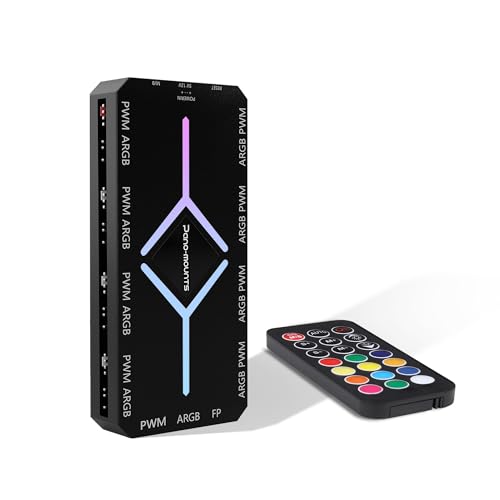
- Controls up to 9 fans and 9 ARGB ports
- Includes remote plus motherboard RGB sync support
- SATA power helps keep output stable
Best For: Builders wanting one hub for speed, lighting, and remote control
Best Budget Expansion
Thermalright 8-Port ARGB PWM Hub
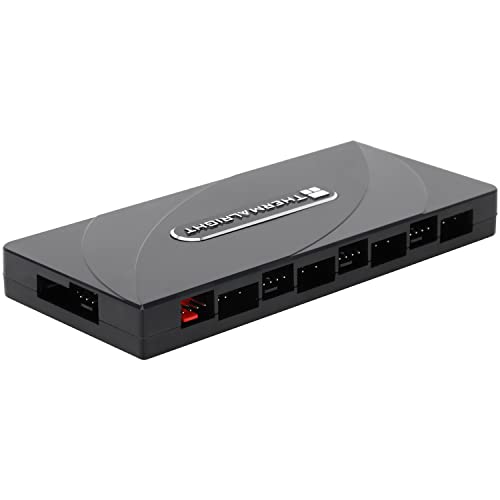
- Expands fan and ARGB connections up to 8 groups
- Uses SATA power for stable output
- Does not control speed or lighting itself
Best For: Users who only need more headers for a motherboard-managed build
Best Magnetic Splitter
ShakingTank 9-Port ARGB PWM Hub

- Holds up to 9 fans with PWM and ARGB support
- Magnetic mounting makes placement easy
- Compact design helps reduce cable clutter
Best For: Builders who want a magnetic, space-saving fan and lighting hub
Thermalright 12-Group Hub
RGB Controllers for Multiple PC Fans With Built-In Remote Control

- Supports up to 12 fan groups
- Works with 5V 3-pin ARGB and 4-pin PWM
- Includes a light remote control
Best For: large ARGB/PWM builds that need one compact hub
Magnetic Dual SATA Fan Hub
RGB Controllers for Multiple PC Fans With RF Remote
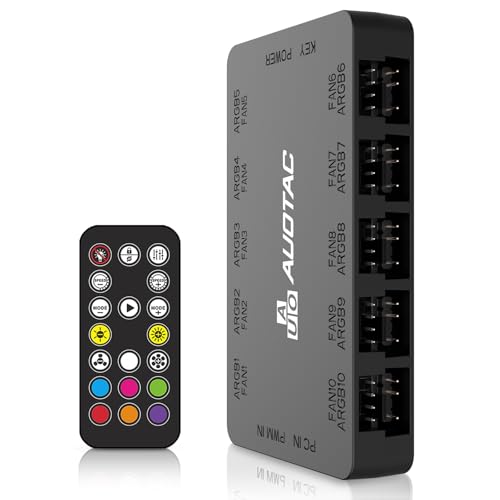
- Supports up to 10 ARGB fan groups
- RF remote for fan and light control
- Dual SATA power input with magnetic mount
Best For: builders who want remote control and stable power
Thermalright 8-Port Expansion Hub
RGB Controllers for Multiple PC Fans With SATA Power

- Supports 8 fan groups
- Uses SATA power with tidy mounting options
- Works with 5V 3-pin ARGB and PWM
Best For: straightforward fan and ARGB expansion in smaller builds
Dual-Control Magnetic Hub – upHere 9-Port PWM + ARGB Fan Hub
If you’re looking for rgb controllers for multiple pc fans, this upHere hub is built to manage both PWM fan power and 5V ARGB lighting from one compact unit. It combines 9 fan ports with synchronized lighting control, making it a practical pick for cleaner cable routing and simpler case wiring.
Best For: Builders who want one SATA-powered hub for multiple PWM fans and synced 5V ARGB devices.
Pros:
- Supports up to 9 PWM fans plus 5V ARGB devices
- Magnetic mounting makes placement inside the case easy
- Remote control adds convenient RGB effect switching
- SATA power helps keep output stable at higher loads
Cons:
- Designed for 5V ARGB, not 12V RGB
- Best suited to builds that can use a hub rather than motherboard-only control
Overall, this is a flexible all-in-one option if you want to reduce clutter while keeping fan speed and lighting in sync. The included cables and magnetic design make it especially friendly for custom PC builds.
Simple SATA ARGB Hub – Thermalright 10-Port 3-Pin Fan Controller
For buyers comparing rgb controllers for multiple pc fans, this Thermalright hub is a straightforward way to add 5V ARGB support to a system that may be short on motherboard headers. It focuses on lighting synchronization and stable SATA-powered distribution, which makes it a clean solution for ARGB-only fan and lighting setups.
Best For: Users who need a compact 5V ARGB hub for up to 10 lighting devices.
Pros:
- Supports up to 10 ARGB devices
- SATA power input helps maintain stable output
- Built-in double-sided sticker simplifies installation
- Syncs 3-pin 5V ARGB effects with the motherboard
Cons:
- Does not adjust ARGB colors on its own
- Not designed for 12V RGB interfaces
This is a good fit if your priority is reliable ARGB expansion rather than standalone lighting customization. It keeps the setup simple and is especially useful when the motherboard lacks enough ARGB headers.
Remote-Control RGB Kit – GSCOLER ARGB Controller with 21-Key Remote
If you want rgb controllers for multiple pc fans with easy lighting changes, this GSCOLER kit stands out for its wireless 21-key remote and multiple lighting modes. It runs from SATA power and works independently of motherboard ARGB support, making it useful for quick customization in a variety of case builds.
Best For: Builders who want remote-based control of ARGB lighting without relying on motherboard software.
Pros:
- 21-key remote for fast mode, color, speed, and brightness changes
- Supports dynamic effects and 12 static colors
- SATA-powered design works without motherboard dependency
- Compatible with 5V 3-pin ARGB fans and accessories
Cons:
- Limited to 5V 3-pin ARGB devices
- Focuses on lighting control, not PWM fan speed management
This is a practical pick for users who want the convenience of a remote and don’t want to deal with software setup. It’s best when lighting control matters more than advanced fan-speed routing.
Dual-Function X8 Hub – Thermalright 8-Port PWM and ARGB Controller
When you need rgb controllers for multiple pc fans that can handle both lighting and fan speed, this Thermalright X8 hub is built for combined management. It supports up to eight ARGB fans and eight PWM fans, helping reduce cable clutter while keeping synchronized control through a SATA-powered design.
Best For: Users who need one hub for both PWM fan control and 5V ARGB synchronization.
Pros:
- Supports 8 ARGB fans and 8 PWM fans at the same time
- SATA power provides stable output under load
- Strong double-sided stickers simplify case mounting
- Helps tidy both lighting and fan cables in one hub
Cons:
- Does not support 12V 4-pin RGB devices
- Requires compatible 3-pin 5V ARGB and PWM connections
This hub is a strong choice for more organized builds that need both speed control and ARGB syncing. It is especially useful if your motherboard lacks enough fan or lighting headers and you want one central controller.
Best Overall Central Hub – 9-Port ARGB PWM Fan Hub with Remote
If you want rgb controllers for multiple pc fans in one tidy package, this 9-port hub is built for centralized control. It manages both fan speed and lighting, supports mainstream RGB software sync, and uses SATA power to help keep output stable across all connected ports.
Best For: Builders who want a single hub to handle up to 9 fans with remote control and motherboard RGB sync.
Pros:
- Controls up to 9 PWM fans and 9 ARGB ports from one hub
- Includes a remote for easier lighting and fan management
- SATA-powered design helps avoid voltage drops and unstable output
- Magnetic backplate makes installation cleaner on metal chassis
Cons:
- Designed for 5V 3-pin ARGB fans, not 12V RGB setups
- Best results depend on proper motherboard sync connections
Overall, this is the most full-featured option here if you want centralized control and a cleaner cable layout. The included remote, software compatibility, and complete accessory kit make it especially practical for multi-fan builds.
Best Budget Expansion – Thermalright 8-Port ARGB PWM Hub
This Thermalright hub is a straightforward choice if you need rgb controllers for multiple pc fans without adding extra lighting control complexity. It expands your fan and ARGB connections, uses SATA power for stable output, and is meant to sync with the motherboard rather than actively adjust speed or lighting on its own.
Best For: Builders who want a simple expansion hub for adding more fans and ARGB devices to a motherboard-controlled setup.
Pros:
- Supports up to 8 groups of fans and ARGB devices
- SATA power input is designed for stable output under load
- Works with 5V 3-pin ARGB and PWM fan connections
- Compact size and double-sided stickers make installation simple
Cons:
- Does not control fan speed or lighting by itself
- SATA cable is not included
- Not compatible with 12V 4-pin RGB
This is best viewed as a dependable expansion piece rather than a controller. If your motherboard already handles the effects and speed settings, this hub gives you more ports with a tidy, low-profile install.
Best Magnetic Splitter – ShakingTank 9-Port ARGB PWM Hub
The ShakingTank hub is a practical pick for rgb controllers for multiple pc fans when you want a compact, magnetic splitter with SATA power. It supports up to 9 fans, keeps cable management neat, and is meant to work with 4-pin PWM fans plus 5V 3-pin ARGB devices for synchronized cooling and lighting.
Best For: PC builders who want a magnetic 9-port hub that simplifies cable routing and supports synchronized ARGB setups.
Pros:
- Supports up to 9 fans with individual PWM speed control and synchronized ARGB lighting
- Magnetic backing allows quick attachment to metal case surfaces
- SATA power helps prevent voltage loss and supports higher-power fans
- Compact footprint helps reduce cable clutter inside the case
Cons:
- Lighting control is handled through the controller, while PWM control still depends on motherboard connection
- Limited to 5V 3-pin RGB/ARGB devices, not 12V 4-pin RGB
For builds that prioritize neat routing and easy placement, this hub offers a solid balance of port count and convenience. It is especially appealing if you want a magnetic mount and a simple, compact layout around multiple fans.
Thermalright 12-Group Hub – RGB Controllers for Multiple PC Fans With Built-In Remote Control
If you need rgb controllers for multiple pc fans, this Thermalright hub is built for straightforward expansion. It combines ARGB lighting distribution and PWM fan support in one compact unit, making it easier to wire up a larger fan setup while keeping 5V 3-pin lighting synchronized.
Best For: Builders who want a combined ARGB and PWM hub for up to 12 fans with included light remote control.
Pros:
- Supports up to 12 groups of CPU fans for larger multi-fan builds.
- Handles both 3-pin 5V ARGB lighting and 4-pin PWM fan connections.
- Includes a light remote control for easier color control.
- Compact black design with cable-management friendly layout.
Cons:
- Does not support 12V 4-pin RGB devices.
- Only the fan plugged into the red PWM recognition port reports speed.
Overall, this is a practical pick if your main goal is to centralize fan and lighting connections in one hub. Just be sure your lighting gear is 5V 3-pin ARGB, since that compatibility limit is important here.
Magnetic Dual SATA Fan Hub – RGB Controllers for Multiple PC Fans With RF Remote
For rgb controllers for multiple pc fans, this ARGB PWM hub focuses on simple control and stable power delivery. It supports up to 10 case fans, combines 5V 3-pin ARGB with 12V 4-pin PWM connections, and adds an RF remote plus magnetic mounting for easier installation.
Best For: Users who want remote-controlled fan and lighting adjustment with stable dual SATA power input.
Pros:
- Connects up to 10 groups of case ARGB fans.
- Includes RF remote for adjusting fan speed and lighting.
- Dual SATA power input is designed for stable operation under full load.
- Magnetic suction mounting makes case placement simple.
Cons:
- Bullets do not list detailed per-port speed reading behavior.
- Meant for case fan expansion, not a full standalone lighting ecosystem.
This hub makes sense if you want a cleaner setup with remote control and stronger power input than a basic splitter. The magnetic mount and included sync cables also make it easier to integrate into a motherboard-controlled build.
Thermalright 8-Port Expansion Hub – RGB Controllers for Multiple PC Fans With SATA Power
If you’re comparing rgb controllers for multiple pc fans, this Thermalright hub is a simple expansion option for 8-fan setups. It supports 5V 3-pin ARGB and 4-pin PWM fan connections, uses SATA power, and keeps wiring tidy with either strong paste or magnetic-style mounting.
Best For: Users who mainly need an 8-port ARGB and PWM expansion hub for cable management.
Pros:
- Supports 8 groups of fans for compact to mid-size builds.
- Works with 5V 3-pin ARGB devices and PWM fan regulation.
- SATA power helps maintain stable output under load.
- Strong paste and double-sided sticker make installation easy.
Cons:
- Does not support 12V 4-pin RGB devices.
- Product notes say it does not actually control speed or lighting adjustment itself.
- Only one fan speed is recognized through the red interface.
As a wiring-expansion hub, this is a solid no-frills choice for keeping multiple fans and ARGB devices organized. It is best treated as a distribution hub rather than an advanced controller, so motherboard support still matters.
How We Picked the Best RGB Controllers for Multiple PC Fans
We looked for RGB Controllers for Multiple PC Fans that offer a useful mix of fan support, RGB/ARGB compatibility, and simple power delivery. SATA-powered models earned extra attention because they reduce motherboard header strain and are often better suited to multi-fan builds.
We also prioritized controller designs that are easy to mount, support both PWM and addressable lighting where possible, and provide enough ports for common mid-tower and full-tower setups.
Quick Comparison
Most options here fall into two groups: fan-and-lighting hubs for builders who want one central control point, and lighting-focused controllers for users who care more about RGB effects than advanced software tuning. If you need to run many fans from a single source, look for higher port counts and SATA power. If your priority is simpler lighting customization, remote-controlled hubs can be the easier choice.
Key Buying Factors for RGB Controllers for Multiple PC Fans
Port Count and Expansion
Check how many fans and ARGB devices the controller can support. A 6- to 8-port hub is enough for many systems, while 10- or 12-port options make more sense for larger builds or future upgrades.
Power Type
SATA power is the safest bet for multi-fan setups because it helps distribute load directly from the power supply. This is especially important when you are controlling several fans and lighting devices at once.
PWM Vs. ARGB Compatibility
Make sure the controller matches your hardware. PWM hubs are for 4-pin fan speed control, while 5V 3-pin ARGB hubs handle addressable lighting. Some of the best RGB Controllers for Multiple PC Fans combine both functions in one unit.
Control Method
Remote controls are simple and convenient, especially if your motherboard has limited headers. Motherboard-sync support is better if you want lighting effects tied to your software ecosystem.
Mounting and Cable Management
Magnetic or adhesive-backed hubs can save time during installation and help keep cables hidden. A tidy layout improves airflow and makes future maintenance much easier.
Who Should Buy Which RGB Controllers for Multiple PC Fans?
If you want the simplest upgrade for a busy build, choose a high-port SATA-powered hub with both PWM and ARGB support. If you only need lighting control, a remote-based ARGB controller may be enough. If you are planning a larger fan array, focus on the highest port count you can fit comfortably, and verify the exact connector type before buying.
For most PC builders, the best choice is the controller that matches your fan count, lighting standard, and preferred control style without forcing extra adapters or guesswork.