Choosing the right controller can make a big difference in how clean, quiet, and easy to manage your build feels. The best rgb fan controllers for pc help you sync lighting, control fan speeds, and reduce cable clutter without turning setup into a guessing game.
Whether you want app control, remote control, or a simple hub for multiple fans, this roundup focuses on practical options for different case sizes and cooling needs.
Best 10 RGB Fan Controllers for PC Picks for 2026
NZXT CAM-Controlled Hub
Compact 9-Fan RGB and fan controller
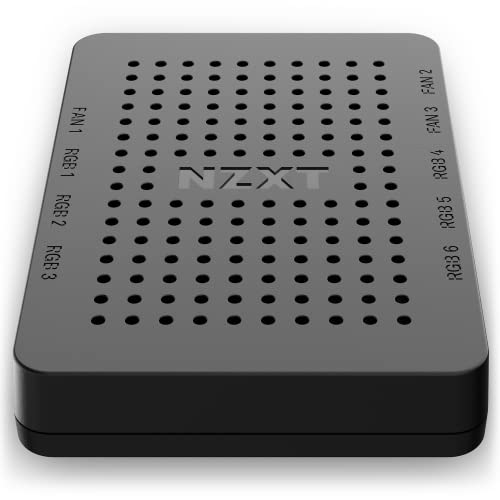
- Up to 9 PWM fan connections
- 6 RGB lighting channels
- Magnetic or adhesive mounting
Best For: NZXT users wanting unified CAM control for fans and lighting
ASUS TUF ARGB Hub

- Supports up to 6 case fans
- Dual SATA power for stability
- Status indicators and magnetic mounting
Best For: Builders who want a stable six-fan ARGB syncing hub
Thermalright ARGB Expansion Hub
8-port ARGB and fan expansion hub

- Supports 8 groups of fans
- 5V 3-pin ARGB compatibility
- SATA power with adhesive or magnetic install
Best For: Builders who mainly need more fan and ARGB headers
Remote-Control ARGB Hub
GSCOLER 21-Key SATA Controller

- 21-key remote for effects and static colors
- SATA-powered plug-and-play setup
- Works with 5V 3-pin ARGB fans and accessories
Best For: easy ARGB lighting control without motherboard software
ARGB + PWM Combo Hub

- Combines ARGB lighting and PWM fan hub functions
- Supports up to 12 fan groups
- SATA-powered with included light remote
Best For: combined fan power and ARGB synchronization
Magnetic 9-Port ARGB Hub
ShakingTank 9-Port ARGB PWM Hub

- Magnetic mount for easy placement
- Supports up to 9 fans with PWM control
- SATA-powered with 5V 3-pin ARGB support
Best For: clean installs with flexible hub placement
Compact SATA ARGB Controller

- SATA-powered, no motherboard support needed
- Dozens of built-in ARGB lighting modes
- Compact body with extended cables
Best For: Standalone 5V 3-pin ARGB lighting in smaller builds
Remote-Control Fan Hub
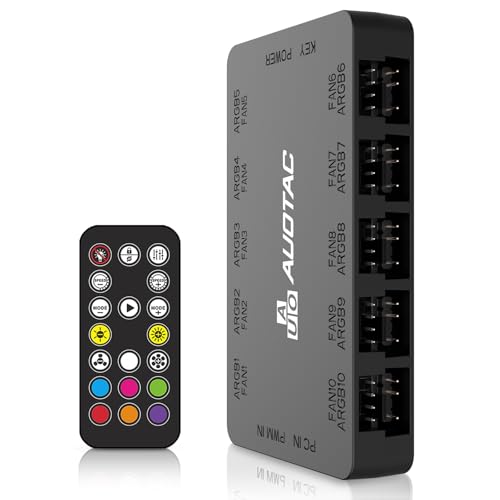
- Supports up to 10 groups of case fans
- RF remote plus motherboard sync support
- Dual SATA power for stable input
Best For: Larger PC builds needing centralized fan and lighting control
Magnetic 2-in-1 Fan Hub
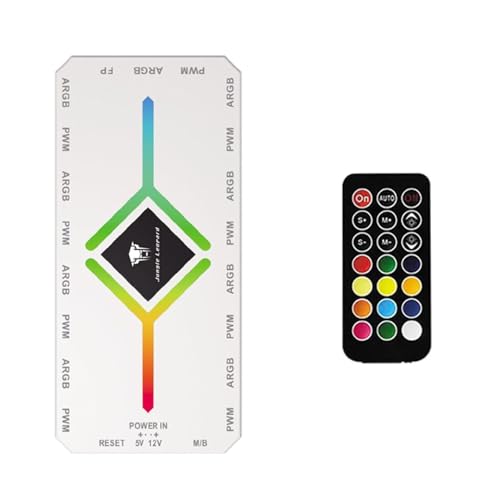
- Supports up to 9 fans with ARGB and PWM ports
- Magnetic back for easy case mounting
- SATA power helps keep fan operation smooth
Best For: Neat, compact expansion for multiple case fans
NZXT CAM-Controlled Hub – Compact 9-Fan RGB and fan controller
If you’re comparing rgb fan controllers for pc builds, the NZXT RGB & Fan Controller is a clean option for users who want software-based control in one compact unit. It manages up to nine PWM fans and adds six RGB lighting channels, so it can centralize both cooling and lighting through NZXT CAM.
Best For: Builders already using NZXT RGB accessories who want a simple, CAM-controlled hub for fans and lighting.
Pros:
- Supports up to nine PWM fans for broad fan management.
- Six RGB lighting channels help expand a compatible NZXT lighting setup.
- Built-in magnets and adhesive strips make installation easier.
- Can also be secured with 2.5-inch drive bay mounting screw holes.
Cons:
- Relies on NZXT CAM for fan and lighting customization.
- Best fit for compatible NZXT accessories rather than mixed ecosystems.
Overall, this controller makes sense when you want a straightforward hub with a polished software workflow and don’t mind staying inside NZXT’s ecosystem. It balances fan capacity and RGB expansion well for a tidy desktop build.
ASUS TUF ARGB Hub – Six-fan PWM and ARGB sync hub
For buyers looking at rgb fan controllers for pc systems with solid power support, the ASUS TUF Gaming ARGB PWM Fan Hub is built around six fan connections and synchronized RGB/PWM control. It adds visible status indicators and uses dual SATA power inputs, which makes it a practical pick for builds that want stable operation under load.
Best For: PC builders who want a six-fan ARGB hub with easy status checking and strong power input.
Pros:
- Connects up to six case fans with PWM and RGB syncing.
- Dual SATA power connectors are designed for stable input under full load.
- Clear power and operation indicators help with quick status checks.
- Magnetic mounting simplifies attachment to a metal case surface.
Cons:
- Limited to six case fans, so it may not suit larger builds.
- Designed as a hub for syncing rather than advanced standalone software control.
This is a sensible choice if you want dependable fan and lighting synchronization with simple hardware conveniences. The dual SATA power design and visible indicators make it especially useful in practical, no-fuss gaming builds.
NZXT CAM Control Hub – PWM and digital RGB controller hub
If you want rgb fan controllers for pc builds centered on NZXT hardware, this Control Hub is made to manage both PWM fan speeds and digital RGB lighting through NZXT CAM. It can control up to five PWM fans or four NZXT single-frame fans, and it also supports synchronized lighting across up to five NZXT RGB components.
Best For: NZXT builders using single-frame fans or multiple NZXT RGB components who want CAM-based control.
Pros:
- Controls up to five PWM fans, including support for single-frame fans.
- Can manage up to four NZXT single-frame fans through combo headers.
- Zero RPM mode helps keep the system quiet during low loads.
- Magnetic mounting or 3M Dual Lock fasteners make installation flexible.
Cons:
- Depends on NZXT CAM software for setup and adjustments.
- Primarily suited to NZXT-compatible components.
As a central hub, this model is best when your build is already based around NZXT fans and lighting. It combines fan control, RGB sync, and low-noise operation in a neat software-managed package.
Thermalright ARGB Expansion Hub – 8-port ARGB and fan expansion hub
When shopping for rgb fan controllers for pc setups, the Thermalright ARGB Fan HUB Controller is more of a compact expansion hub than a full controller. It supports up to eight groups of fans and syncs 5V 3-pin ARGB devices, while also offering PWM fan regulation and speed reading for compatible setups.
Best For: Users who need a budget-friendly fan and ARGB expansion hub with simple SATA-powered wiring.
Pros:
- Supports up to eight groups of fans for easier cable management.
- Works with 5V 3-pin ARGB accessories like fans and light bars.
- SATA power and strong adhesive/magnetic mounting help keep installation simple.
- Supports PWM fan regulation and fan speed reading on compatible connections.
Cons:
- Does not support 12V 4-pin RGB devices.
- The product notes state it does not control speed or lighting by itself, acting mainly as an expansion hub.
This hub is a practical choice if your goal is to expand headers and tidy wiring rather than get advanced standalone control. Just make sure your lighting gear is 5V ARGB-compatible before buying.
Remote-Control ARGB Hub – GSCOLER 21-Key SATA Controller
If you want a simple way to manage rgb fan controllers for pc builds without relying on motherboard software, this GSCOLER ARGB controller is built for straightforward control. It powers from SATA and supports 5V 3-pin ARGB devices, so you can run case fans, LED strips, coolers, and other lighting accessories from one compact hub.
Best For: Builders who want remote-controlled ARGB lighting for multiple 5V 3-pin devices without motherboard dependency.
Pros:
- 21-key wireless remote for switching effects, static colors, brightness, and speed.
- SATA-powered, plug-and-play setup with no software required.
- Supports a wide range of 5V 3-pin ARGB devices, including fans, coolers, and LED bars.
- Compact design with durable copper wiring for cleaner installs.
Cons:
- Only works with 5V 3-pin ARGB devices, not 12V 4-pin RGB.
- Lighting control is remote-based rather than motherboard-synced.
For users who mainly want easy lighting control and broad ARGB compatibility, this is a practical hub-style option. It keeps setup simple while covering the essentials most custom-PC builders need.
ARGB + PWM Combo Hub – Thermalright X12 IR Black Hub
This Thermalright hub is a solid pick if you need rgb fan controllers for pc setups that also manage fan power. It combines ARGB lighting support with PWM fan hub functionality, letting you connect up to 12 fans while keeping both cables and lighting connections tidier inside the case.
Best For: Users who want one hub for both PWM fan control and 5V ARGB lighting synchronization.
Pros:
- Supports both ARGB lighting and PWM fan connections in one unit.
- Can connect up to 12 groups of CPU fans for cleaner cable management.
- SATA power input helps simplify power delivery.
- Includes a light remote for easier color control.
Cons:
- Does not support 12V 4-pin RGB devices.
- Only one fan on the red interface is recognized for speed reading.
For builds that need both lighting sync and fan distribution, this hub is more versatile than a basic RGB splitter. It is especially useful when motherboard headers are limited and you want a neater internal layout.
Magnetic 9-Port ARGB Hub – ShakingTank 9-Port ARGB PWM Hub
For builders looking for rgb fan controllers for pc cases with flexible placement, this ShakingTank hub stands out thanks to its magnetic mounting and 9-port layout. It supports 4-pin PWM fans and 5V 3-pin ARGB devices, with SATA power for stable operation and less strain on the motherboard.
Best For: PC users who want an easy-to-mount 9-port hub for synchronized fan speed and ARGB lighting.
Pros:
- Supports up to 9 fans with individual PWM speed control.
- Magnetic backing makes installation and repositioning easy.
- SATA power helps prevent voltage loss and supports higher-power fans.
- Compact design helps reduce cable clutter and improve airflow.
Cons:
- Lighting is the main controller function; PWM control depends on the motherboard connection for 12V 4-pin fans.
- Only supports 5V 3-pin ARGB, not 12V 4-pin RGB lighting.
If you want a neat, low-fuss hub that is easy to place inside the case, this model is a strong choice. Its magnetic mounting and balanced feature set make it especially convenient for clean builds.
Compact SATA ARGB Controller – Mini 5V 3Pin Lighting Hub
If you need rgb fan controllers for pc builds that work without motherboard ARGB support, this mini SATA-powered controller is a simple fix. It converts 5V 3-pin ARGB devices to a standalone controller and includes built-in lighting effects, so you can add synced-looking lighting to a system that otherwise lacks software control.
Best For: Builders who want a compact, motherboard-independent ARGB controller for 5V 3-pin lighting.
Pros:
- Runs directly from a SATA power connection, so it does not depend on motherboard ARGB support.
- Includes dozens of built-in lighting modes such as monochrome, running effects, and rainbow patterns.
- Small controller body and extended cable lengths help with tighter PC cases.
- Offers multi-button control for mode, speed, color, reverse cycling, and brightness.
Cons:
- Does not support motherboard software synchronization.
- Only works with 5V 3-pin ARGB products, not 12V RGB gear.
Overall, this is a practical pick if you mainly want hands-on lighting control without extra software or board compatibility concerns. The built-in modes and compact size make it especially useful for straightforward case lighting setups.
Remote-Control Fan Hub – 10-Channel ARGB PWM Hub
For rgb fan controllers for pc systems that need both fan and lighting management, this ARGB PWM hub is built for bigger case layouts. It supports up to 10 groups of case fans, uses dual SATA power for stable input, and adds RF remote control for quick adjustments without relying only on the motherboard.
Best For: PC builders who want a larger fan hub with remote access, ARGB sync, and PWM support.
Pros:
- Supports up to 10 groups of case ARGB fans for larger builds.
- Includes RF remote control for easier fan speed and lighting changes.
- Dual SATA power inputs are designed for stable power delivery under load.
- Supports fan speed reading, PWM adjustment, and motherboard sync.
Cons:
- Best suited to builds that can use both 5V 3-pin ARGB and 12V 4-pin PWM connections.
- Magnetic mounting is useful, but the hub is still a dedicated add-on component.
This is a solid choice if you want a centralized controller for a multi-fan case and prefer the convenience of a remote. The included sync cables and dual power design make it a functional option for more demanding setups.
Magnetic 2-in-1 Fan Hub – 9-Port ARGB PWM Splitter
This 2-in-1 hub is a practical option for rgb fan controllers for pc users who want to expand fan connections while keeping wiring tidy. It supports up to 9 fans, uses SATA power input, and combines ARGB and PWM functions in one compact magnetic design for easier case installation.
Best For: Builders who want a compact magnetic hub for up to 9 ARGB and PWM case fans.
Pros:
- Combines 9-port ARGB and 9-port PWM support in one splitter hub.
- Magnetic back design makes placement on a metal case surface simple.
- SATA power input helps avoid voltage loss and supports smoother fan operation.
- Small form factor helps keep internal cabling neat.
Cons:
- The notes state the controller is for light switching only; PWM function still needs the motherboard 12V 4-pin interface.
- Not ideal if you need full software-based lighting control from the hub itself.
In practice, this hub is best when you want a tidy expansion solution for multiple case fans and ARGB accessories. Its magnetic mounting and compact size make installation easy, but it is still important to wire PWM correctly through the motherboard.
How We Picked the Best RGB Fan Controllers for PC
We focused on controller types that solve real-world build problems: enough ports for typical case layouts, support for both PWM fan control and ARGB lighting where possible, and dependable power delivery from SATA-powered hubs. We also favored models that are easier to mount, label, and wire cleanly inside modern cases.
Quick Comparison
If you want the simplest setup, a basic hub is usually best. If you need synchronized lighting plus fan-speed control, look for an all-in-one PWM and ARGB controller. For larger builds, choose a higher-port model so you do not outgrow the controller as you add front, top, or radiator fans.
Key Buying Factors for RGB Fan Controllers for PC
Fan and RGB Support
Check whether the controller handles 4-pin PWM fans, 3-pin ARGB devices, or both. Matching the controller to your exact headers is essential, since ARGB and standard RGB are not interchangeable.
Port Count and Expansion
Count every fan you plan to connect, including future upgrades. A 5- or 6-port hub may be enough for compact systems, while larger gaming towers and custom cooling layouts often benefit from 8 to 12 ports.
Power and Stability
SATA power is the safest choice for multi-fan setups because it reduces strain on the motherboard. That matters more as you add hubs, splitters, and higher-draw lighting.
Control Method
Some controllers use motherboard software, while others add a remote or physical controls. Software is best for unified profiles; remote-based controllers are useful when you want quick hardware access without opening software.
Mounting and Cable Management
Magnetic backs, compact housings, and clearly marked ports make installation easier and improve airflow around the hub location. Good cable layout also makes troubleshooting far simpler later.
Who Should Buy Which RGB Fan Controllers for PC?
Pick a compact hub if you only need to clean up a few fans and keep lighting basic. Choose an all-in-one PWM and ARGB controller if you want synchronized control across the whole build. Larger systems, RGB-heavy cases, and future-proof builds should lean toward higher-port controllers with SATA power and flexible mounting.
For most builders, the best choice is the controller that matches your fan standard first, then adds the control method and port count you actually need. That approach keeps your RGB Fan Controllers for PC search focused on compatibility, not just features.