Choosing the right fan hub can make a big difference in both airflow and cable management. The best pc fan hubs with rgb control help you power multiple fans, sync lighting, and keep your build cleaner.
Below, we focus on hubs that balance compatibility, power delivery, and easy installation so you can match the right controller to your case and cooling setup.
Best 10 PC Fan Hubs with RGB Control Picks for 2026
Magnetic 9-Port ARGB Hub
ShakingTank 9-Port ARGB PWM Fan Hub

- 9 PWM fan ports with ARGB sync
- SATA power for stable operation
- Magnetic mount simplifies installation
Best For: Large desktop builds that need a compact fan-and-RGB hub
Compact 6-Port Hub
Cooler Master ARGB & PWM HUB 1 to 6 Port

- Up to 6 ARGB and 6 PWM connections
- Built-in magnets for easy mounting
- SATA power keeps output stable
Best For: Neat, space-saving cooling and RGB expansion in smaller builds
Dual-Ecosystem Controller
CORSAIR Commander Duo iCUE Link RGB Controller

- Supports ARGB PWM fans and iCUE LINK
- Two channels, up to six daisy-chained fans each
- iCUE enables custom curves and sync
Best For: Corsair builds needing unified fan and lighting control
SignalRGB 8-Channel Hub
Airgoo 2-in-1 ARGB Controller & PWM Fan Hub
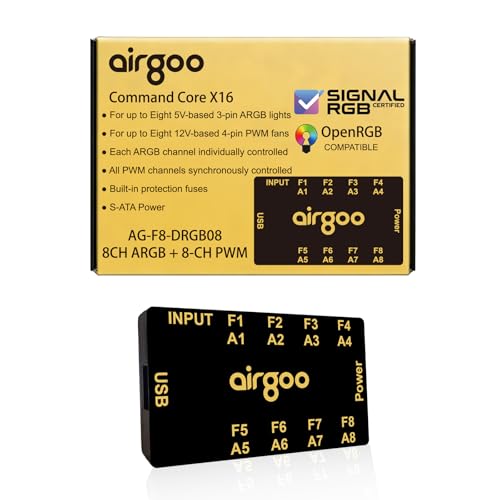
- 8 ARGB channels and 8 PWM channels
- Supports SignalRGB and OpenRGB
- Magnetic mount with safety fuse
Best For: Software-controlled builds with lots of RGB and fan expansion
ASUS TUF Gaming ARGB PWM Fan Hub
Six-Fan Sync Hub With Status Indicators

- Supports up to six case fans
- PWM and RGB connections for sync
- Dual SATA power with clear indicators
Best For: Six-fan builds that need simple ARGB and PWM syncing
Thermalright ARGB Fan HUB Controller

- Handles up to 8 fan groups
- Supports 5V 3-pin ARGB syncing
- SATA power with adhesive and magnetic mounting
Best For: Eight-fan builds using 5V ARGB lighting
upHere PWM & ARGB Magnetic Fan Hub

- Supports 9 PWM fans and 5V ARGB
- Includes remote and front RGB panel
- Magnetic mounting with SATA power
Best For: Bigger custom builds needing remote RGB control
8-Port Cable Management Hub
Thermalright Fan and ARGB HUB X8

- Supports 8 PWM fans and 8 ARGB fans
- SATA-powered for stable output
- Helps tidy fan and lighting cables
Best For: builders needing a tidy all-in-one fan and ARGB expansion hub
Simple ARGB Expansion Hub
Thermalright ARGB Fan HUB Controller
- Expands ARGB fan connections up to 8 groups
- SATA-powered with strong paste and magnetic mounting
- Supports speed reading on one red interface
Best For: compact builds that need simple ARGB expansion and tidy wiring
SATA-Powered ARGB/PWM Hub
Thermalright Fan and ARGB HUB×8
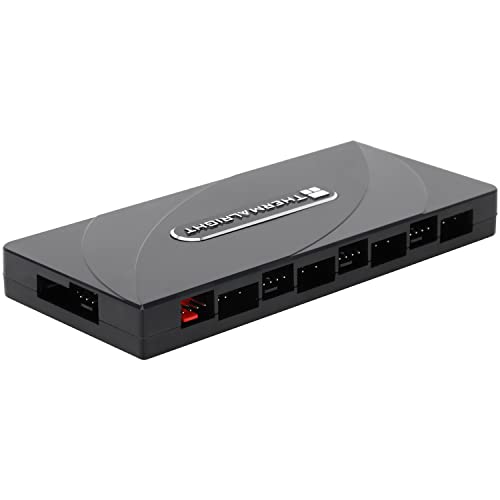
- Expands both ARGB and PWM connections
- SATA direct input for stable output
- Single red port handles fan speed recognition
Best For: builders needing compact ARGB and PWM header expansion
Magnetic 9-Port ARGB Hub – ShakingTank 9-Port ARGB PWM Fan Hub
If you want pc fan hubs with rgb control that keep wiring simple, this ShakingTank unit is built for larger builds. It combines 9-port PWM fan support with synchronized 5V 3-pin ARGB output, plus SATA power for stable operation without leaning too hard on the motherboard.
Best For: Mid- to full-size desktop builds that need lots of fan and ARGB connections in a compact, magnetic hub.
Pros:
- Supports up to 9 fans with individual PWM speed control.
- Synchronizes ARGB lighting for 5V 3-pin RGB fans and LED strips.
- Magnetic backing makes placement inside a metal case easy.
- SATA power helps maintain stable output and reduce motherboard load.
Cons:
- Lighting control is handled by the controller, while 12V 4-pin fans still connect to the motherboard for PWM control.
- Best suited to cases with metal surfaces for magnetic mounting.
This is a practical pick if you need more headers without adding clutter. The compact design and SATA power make it a straightforward way to manage both cooling and lighting in one place.
Compact 6-Port Hub – Cooler Master ARGB & PWM HUB 1 to 6 Port
For builders comparing pc fan hubs with rgb control, this Cooler Master hub keeps things simple and tidy. It supports up to six addressable RGB and PWM connections, uses SATA power for stable output, and includes built-in magnets for easy placement inside the case.
Best For: Smaller to mid-size builds that need a clean 6-port hub with easy magnetic mounting.
Pros:
- Supports up to 6 ARGB headers and 6 PWM headers.
- Built-in magnets help it attach to metal surfaces inside the case.
- SATA power supports stable output even when fully loaded.
- Compact size helps with cable management.
Cons:
- Only offers 6 ports, so it is not ideal for larger fan-heavy builds.
- Designed for desktop use, so it is not a universal lighting controller.
This hub is a solid fit if you value a straightforward layout and enough ports for a modest build. It focuses on dependable power delivery and neat installation rather than advanced software control.
Dual-Ecosystem Controller – CORSAIR Commander Duo iCUE Link RGB Controller
If you’re shopping for pc fan hubs with rgb control and want one controller for multiple Corsair ecosystems, the Commander Duo is aimed at that job. It supports both ARGB PWM fans and iCUE LINK devices, with two channels that can each handle up to six daisy-chained fans and software control through iCUE.
Best For: Corsair-focused builds that want unified control over fan speed and RGB across two systems.
Pros:
- Works with both ARGB PWM fans and iCUE LINK devices.
- Two channels support up to six daisy-chained fans each.
- iCUE software allows custom fan curves and group speed control.
- Supports synchronized RGB lighting with up to 50 LEDs per ARGB channel.
Cons:
- Best suited to Corsair ecosystems rather than mixed-brand simplicity.
- Its software-centered control may be more than basic users need.
This controller stands out when you want one interface for more than one fan ecosystem. The channel design and software features make it especially useful for larger Corsair builds that need coordinated cooling and lighting.
SignalRGB 8-Channel Hub – Airgoo 2-in-1 ARGB Controller & PWM Fan Hub
This Airgoo hub is a strong option for pc fan hubs with rgb control when you want software-driven customization across a bigger setup. It offers 8 channels for ARGB and 8 channels for PWM, works with SignalRGB or OpenRGB, and uses SATA power plus a magnetic mount for straightforward installation.
Best For: Builders who want wide ARGB and fan expansion with SignalRGB or OpenRGB support.
Pros:
- 8 ARGB channels and 8 PWM channels support larger setups.
- Works with SignalRGB and OpenRGB for software control.
- Magnetic fixture makes installation easy on steel surfaces.
- Includes an auto-resetting fuse for overload and short-circuit protection.
Cons:
- Correct software must be installed before configuration is available.
- Fan speed monitoring is only supported on a single fan connected to port F1.
For users who want broad expandability and flexible software control, this hub offers a lot in a compact package. The tradeoff is that setup depends on the right software and some monitoring limits apply, so it suits enthusiasts more than casual installers.
ASUS TUF Gaming ARGB PWM Fan Hub – Six-Fan Sync Hub With Status Indicators
If you’re building around pc fan hubs with rgb control, this ASUS TUF Gaming hub is a straightforward way to sync cooling and lighting from one compact unit. It supports up to six case fans and includes both PWM fan and RGB connection support, plus dual SATA power for stable input under load.
Best For: Builders who want a simple six-fan hub with synced RGB and clear power/status feedback.
Pros:
- Connects up to six case fans for cleaner cable management
- Supports PWM fan control plus RGB connection for synchronized effects
- Dual SATA power connectors help keep power delivery stable under load
- Clear power and operation indicators make status checks easy
Cons:
- Limited to six fans, so it may be too small for larger builds
- Designed around ASUS TUF-style hub functionality rather than extra features
This is a practical pick if you want a no-fuss hub that keeps fan control and lighting in step. The magnetic mounting also makes installation easier if your case has a suitable metal surface.
Thermalright ARGB Fan HUB Controller – 8-Port 5V ARGB Fan Hub
For pc fan hubs with rgb control focused on clean expansion, this Thermalright hub gives you an 8-port layout for fans plus 5V 3-pin ARGB devices. It uses SATA power for stable output and includes a compact body with strong adhesive and magnetic suction for mounting inside the case.
Best For: Builders who need an eight-fan hub for 5V ARGB devices and neat cable management.
Pros:
- Supports up to 8 groups of fans with PWM fan regulation
- Synchronizes 5V 3-pin ARGB devices such as fans and light bars
- SATA-powered design is meant to maintain stable output under load
- Strong paste plus magnetic suction helps secure the small hub in place
Cons:
- 12V 4-pin RGB is not supported
- Only the fan in the red interface is recognized for speed reading under the noted limitation
This is a solid match if your lighting gear uses 5V ARGB and you want a compact controller with room for multiple fans. Just make sure your accessories match the supported 5V 3-pin standard before buying.
UpHere PWM & ARGB Magnetic Fan Hub – 9-Port Remote-Control RGB Hub
If you want pc fan hubs with rgb control that can handle a bigger build, this upHere hub combines 9x PWM fan support with 5V ARGB devices in one compact package. It also adds a front-facing RGB panel and remote control, while SATA power helps keep output stable when everything is connected.
Best For: Custom PC builders who want a nine-port hub with remote-controlled RGB and magnetic mounting.
Pros:
- Manages 9 PWM fans plus 5V ARGB devices from one hub
- Remote control and front-facing RGB panel add lighting customization
- Magnetic mounting offers flexible placement inside the case
- SATA-powered design is intended for reliable full-load performance
Cons:
- Requires matching 5V ARGB devices for lighting sync
- Designed around a bundled setup, so it may be more than needed for small builds
This is the most feature-packed option here for builders who want more fan capacity and easy RGB control in one hub. The included cables and remote should make setup more convenient for a custom build.
8-Port Cable Management Hub – Thermalright Fan and ARGB HUB X8
If you’re shopping for pc fan hubs with rgb control, this Thermalright hub is aimed at builders who want to centralize both fan power and ARGB wiring in one compact module. It supports up to 8 PWM fans and 8 ARGB fans, with SATA power for stable output and dual-side connectors that help keep cables cleaner inside the case.
Best For: Builders who want one hub to manage both fan power and ARGB lighting while improving cable tidiness.
Pros:
- Supports 8 groups of PWM fans and 8 ARGB fans at the same time
- SATA-powered design is built for stable output under load
- Strong double-sided stickers make chassis mounting simple
- Dual-side connectors help simplify cable management
Cons:
- Does not support 12V 4-pin RGB devices
- Requires compatible 5V 3-pin ARGB and PWM motherboard connections
Overall, this is a practical all-in-one expansion hub if your main goal is cleaner wiring and straightforward ARGB/PWM distribution. It’s especially useful when motherboard headers are limited and you want a tidy, SATA-powered solution.
Simple ARGB Expansion Hub – Thermalright ARGB Fan HUB Controller
This Thermalright option fits buyers looking for pc fan hubs with rgb control as a straightforward expansion piece rather than a full controller. It supports up to 8 groups of ARGB fans, uses SATA direct power for stable output, and includes strong paste plus magnetic suction mounting for easier installation.
Best For: Users who need a compact ARGB and fan interface expander with easy mounting and clean wiring.
Pros:
- Supports 8 groups of ARGB fans for easier cable organization
- SATA power direct transmission helps maintain stable output
- Strong paste and magnetic suction simplify installation
- Supports fan speed reading and PWM fan regulation, with one red port for speed recognition
Cons:
- Does not support 12V 4-pin RGB devices
- Not a full speed or lighting controller
- Only a single fan in the red interface is recognized for speed reading
For compact builds that mainly need more headers and neater wiring, this hub keeps things simple. Just note that it expands your connections rather than giving you independent control over fan speed or lighting effects.
SATA-Powered ARGB/PWM Hub – Thermalright Fan and ARGB HUB×8
Among pc fan hubs with rgb control, this Thermalright hub is built for users who want both ARGB and PWM expansion in a small SATA-powered unit. It supports 8 groups of fans, syncs with 5V 3-pin ARGB headers, and uses a red PWM interface for speed recognition on a single fan.
Best For: Builders who want a compact SATA-powered hub for expanding ARGB and PWM connections.
Pros:
- Supports both ARGB lighting and PWM fan connections
- SATA direct input is designed for stable output
- Strong double-sided stickers make mounting easy
- Can sync lighting with 5V 3-pin ARGB motherboard headers
Cons:
- Does not support 12V 4-pin RGB devices
- Cannot adjust fan speed or lighting color on its own
- Only a single fan in the red interface is recognized for speed reading
This is a good fit if you mainly need more ARGB and fan headers with stable power delivery. It’s less about advanced control and more about dependable expansion and cleaner internal cable routing.
How We Picked the Best PC Fan Hubs with RGB Control
For this roundup, we prioritized hubs that combine stable PWM fan control with addressable RGB support, plus practical features like SATA power, magnetic mounting, and clear channel labeling. We also looked for models that suit different build sizes, from compact mid-tower systems to larger multi-fan setups.
Quick Comparison
Most PC Fan Hubs with RGB Control fall into two main groups: basic splitters and more feature-rich controllers. Basic hubs are best when you mainly need to expand headers and keep installation simple. More advanced controllers add app or software integration, multiple zones, remote control, or broader ecosystem support for lighting and fan tuning.
Key Buying Factors for PC Fan Hubs with RGB Control
Fan Count and Port Layout
Check how many fans and lighting channels you actually need today, then leave room for future upgrades. Some hubs are ideal for six-fan builds, while others are better for eight or more devices.
Power Delivery
SATA-powered hubs are usually the safer choice for multi-fan setups because they reduce strain on the motherboard header. This matters even more when you are running several PWM fans or bright ARGB strips.
ARGB Compatibility
Make sure the hub supports the correct lighting standard, usually 5V 3-pin ARGB. Mixing 5V ARGB and 12V RGB can cause compatibility problems, so verify your components before buying.
Software and Control Options
Some users want simple motherboard sync, while others prefer ecosystem software or third-party support. If you plan to tune effects frequently, look for hubs that work with the control platform you already use.
Build Quality and Mounting
Magnetic mounting, strong adhesive backing, and compact footprints can make installation easier. A well-designed hub should stay secure, route cables cleanly, and remain accessible for adjustments.
Who Should Buy Which PC Fan Hubs with RGB Control?
If you want the simplest upgrade, choose a straightforward SATA-powered splitter hub for clean expansion. If you are building a showpiece PC with synchronized lighting, pick a hub with richer RGB control and broader software support. For larger or more complex systems, a higher-port controller is the better fit because it gives you more headroom, better organization, and fewer header limitations.
In short, the best PC Fan Hubs with RGB Control depend on how many fans you run, how much lighting customization you want, and whether you prefer basic motherboard sync or more advanced software-based control.