Professional gaming setups, shared workspaces, and tournament stations need more than a loose collection of charging cables. The right controller charging dock keeps compatible pads powered, visible, and ready without adding unnecessary desk clutter.
This roundup compares 10 charging docks for Xbox, Nintendo Switch, Switch 2, and PS5 controllers, including single-platform and multi-console designs. Use the guide below to narrow your choice by compatibility, capacity, connection type, and everyday convenience.
Best 10 Controller Charging Docks for Professionals Picks for 2026
Best Xbox Single-Controller Dock

- Officially licensed for Xbox Series X|S and Xbox One
- Magnetic charging with amber/white status LEDs
- Includes 1100 mAh battery pack and two battery doors
Best For: Xbox users needing a compact single-controller dock
Best Multi-Platform 6-in-1 Dock

- Charges four Joy-Cons plus two Pro or PS5 controllers
- USB-C powered from a console, hub, or wall charger
- Protection against overcharging and electrical faults
Best For: Multi-platform desks with several Nintendo and PlayStation controllers
Dual-Console Workstation
HEATFUN 2-Port Controller Charging Dock

- Charges two compatible controllers at once
- Includes removable USB-C adapters and LED status
- Requires a suitable 5V/2A adapter; third-party limits apply
Best For: Multi-console desks using official Switch Pro, PS5, or Xbox controllers
Compact Desk Station
HEATFUN Dual USB-C Controller Dock
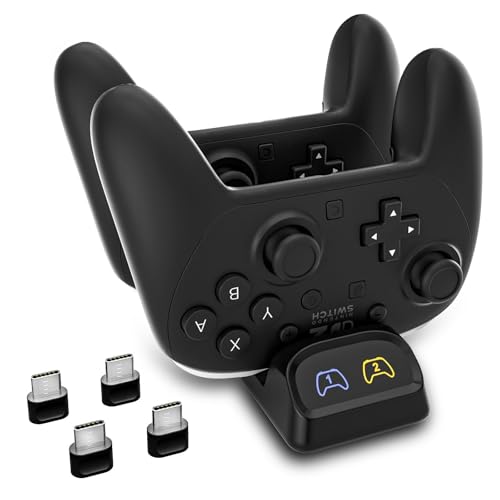
- Charges two controllers together
- Includes two USB-C adapters and a charging cable
- Compact design with LED indicators and one-year warranty
Best For: Organized desktop charging for compatible official USB-C controllers
Multi-Platform Stand
ECHZOVE Dual Controller Charger

- Charges two controllers simultaneously
- Supports Switch, PS5, and Xbox controller platforms
- Detachable adapter and orange/blue status LED
Best For: Compact multi-console stations that need organized dual charging
Compact Switch Organizer

- Charges two Pro Controllers and four Joy-Cons
- LED status indicators and safety protection
- Designed for original Switch Pro Controllers
Best For: Switch-focused desks and TV setups
Multi-Platform Workstation
6-in-1 Universal Controller Dock

- Supports Switch, PS5, Xbox, and third-party controllers
- Charges six compatible controllers simultaneously
- Includes 2.4A output and anti-slip protection
Best For: Multi-console setups and shared gaming spaces
Safety-Focused Station

- Charges four Joy-Cons and two Pro or PS5 controllers
- 2.5–3 hour simultaneous charging claim
- Multiple smart protection features and LED status lights
Best For: Organized Switch and PS5 controller stations
Best Xbox Single-Controller Dock – 8BitDo Xbox Charging Dock
For professionals seeking controller charging docks for professionals, this officially licensed 8BitDo model offers a tidy, dedicated charging setup for one Xbox wireless controller. Its magnetic connection, status lighting, included battery pack, and storage compartment make it practical for an organized desk or gaming station.
Best For: Xbox Series X|S and Xbox One users who need a compact single-controller charging solution.
Pros:
- Officially licensed and compatible with Xbox Series X|S and Xbox One wireless controllers.
- Magnetic secure charging helps keep the controller seated.
- Includes a 1100 mAh rechargeable battery pack and two battery doors.
- Amber and white LED indicators show charging status, with adjustable lighting.
Cons:
- Charges one controller at a time.
- Designed specifically for Xbox wireless controllers rather than multi-platform use.
This is a focused, space-conscious choice when reliability and a clean Xbox-matched design matter more than charging multiple controllers simultaneously.
Best Multi-Platform 6-in-1 Dock – PURBHE Switch and PS5 Charger
Among controller charging docks for professionals, this PURBHE station stands out for accommodating several Nintendo and PlayStation controllers in one footprint. It can charge four Joy-Cons plus two Nintendo Pro or PS5 controllers at the same time, with USB-C power and built-in protection circuitry.
Best For: Multi-platform setups that need simultaneous charging for Joy-Cons, Switch Pro controllers, and PS5 DualSense controllers.
Pros:
- Supports four Joy-Cons and two Nintendo Pro or PS5 controllers simultaneously.
- USB-C input supports power from a console, USB hub, or wall charger.
- Built-in protection covers overcharging, over-voltage, over-current, and short circuits.
- Plug-and-play design includes an 80 cm USB-C charging cable.
Cons:
- Controllers are not included.
- A wall charger is not specified as included.
- Its broad compatibility may be unnecessary for a single-console setup.
With six charging positions and cross-platform support, this dock is a practical workspace organizer for teams or households using both Nintendo and PlayStation controllers.
Best Dual Xbox Dock – 8BitDo Dual Magnetic Charging Station
Professionals managing more than one Xbox controller can use this dual 8BitDo station to keep both units charged and stored together. The officially licensed dock uses magnetic contacts, provides individual charging indicators, and includes two rechargeable battery packs with four battery doors.
Best For: Xbox Series and Xbox One users who regularly keep two wireless controllers ready.
Pros:
- Officially licensed and compatible with Xbox Series and Xbox One wireless controllers.
- Dual charging design supports two controllers at once.
- Includes two 1100 mAh rechargeable battery packs and four battery doors.
- Magnetic contacts and amber/white LEDs make placement and status easy to monitor.
Cons:
- Limited to Xbox wireless controllers.
- No power plug is included, so the USB-C power setup requires a compatible source.
This is a strong choice for shared workstations, tournaments, or households where two Xbox controllers need a consistent home and charging routine.
Best Nintendo 6-in-1 Stand – NEWDERY Switch Controller Dock
This NEWDERY station combines charging and storage for Nintendo Switch controllers, making it useful for organized controller charging docks for professionals. It supports four Joy-Cons and two Pro controllers at once, while separate LED indicators and built-in safety protection simplify daily use.
Best For: Nintendo Switch users who want a compact six-position charging and storage stand.
Pros:
- Charges four Joy-Cons and two Pro controllers simultaneously.
- Separate indicators turn red while charging and green when charged or on standby.
- Built-in protection helps guard against overheating, short circuits, and over-power conditions.
- Includes a USB-C charging cable and supports plug-and-play slide-in charging.
Cons:
- AC adapter is not included.
- Designed for original Switch controllers; third-party compatibility may vary.
- Not compatible with Switch 2 Joy-Cons, though it fits the Switch 2 Pro Controller.
Its combination of six charging positions, clear per-port indicators, and tabletop storage makes it a sensible choice for keeping a Nintendo controller collection accessible and orderly.
Dual-Console Workstation – HEATFUN 2-Port Controller Charging Dock
For professionals managing more than one gaming platform, this option among controller charging docks for professionals charges two compatible controllers at once. Its removable USB-C adapters, status LED, and compact tabletop design suit an organized desk or TV setup, provided you use the recommended power source and verify controller compatibility.
Best For: Multi-console setups using official Switch Pro, PS5, Xbox Series X|S, or Xbox Elite Series 2 controllers.
Pros:
- Charges two controllers simultaneously.
- Includes removable USB-C adapters for drop-in charging.
- LED changes from red while charging to green when full.
- Built-in short-circuit and smart protection features.
Cons:
- Not compatible with PowerA, Luna, or other listed third-party pro controllers.
- USB wall adapter is not included.
- Thick protective cases may need to be removed.
This is a practical shared charging base for a mixed-console workspace, but compatibility checking and a suitable 5V/2A adapter are essential before purchase.
Compact Desk Station – HEATFUN Dual USB-C Controller Dock
This compact HEATFUN dock is a straightforward choice among controller charging docks for professionals who want two controllers charging in a tidy desktop or TV-stand setup. It supports several official USB-C controllers and includes the adapters and cable needed for a convenient drop-in routine.
Best For: Everyday charging of two official Switch Pro, PS5, Xbox Series X|S, or Xbox Elite Series 2 controllers.
Pros:
- Charges two controllers simultaneously.
- Supports several official USB-C controller models.
- Includes two USB-C charging adapters and a cable.
- Compact, lightweight desktop design with charging indicators.
Cons:
- Not compatible with PowerA, Luna, or some third-party controllers.
- Lower-power USB ports may charge slowly or intermittently.
- Bulky controller cases may interfere with the adapters.
With a stated 5V/2A input and a one-year warranty, this model fits routine professional or shared gaming setups when the listed controller limitations are acceptable.
Multi-Platform Stand – ECHZOVE Dual Controller Charger
The ECHZOVE dual charger is designed for multi-console users who want a compact stand that keeps two controllers powered and organized. As controller charging docks for professionals, its detachable Type-C adapter, clear status lighting, and desktop footprint make it useful for a streamlined gaming or testing station.
Best For: Multi-console gaming setups using Switch 2 Pro, Switch Pro, PS5, and Xbox Series X/S controllers.
Pros:
- Charges two controllers at the same time.
- Supports several Type-C controller platforms.
- Detachable Type-C adapter helps reduce repeated port wear.
- Orange and blue LED states make charging status easy to check.
Cons:
- The supplied notes do not specify compatibility with all third-party controllers.
- Power adapter details beyond the corded USB design are not provided.
- Charging status uses orange and blue rather than a universal color scheme.
This is a space-saving option for a mixed-console desk, especially where two controllers need a consistent home between sessions; confirm your exact controller model before ordering.
Compact Switch Organizer – 6-in-1 Pro and Joy-Con Dock
For professionals who need tidy, dependable controller charging docks for professionals, this tabletop station combines charging and storage for up to two original Switch Pro Controllers and four Joy-Cons. Its USB-powered design, charging indicators, and built-in safety protections suit a dedicated desk or TV setup.
Best For: Nintendo Switch users who need a compact, organized dock specifically for original Switch Pro Controllers and Joy-Cons.
Pros:
- Charges two Pro Controllers and four Joy-Cons at the same time.
- Includes blue and red LED indicators for charging status.
- Built-in overcharge and short-circuit protection.
- Acrylic and ABS construction helps keep the setup organized.
Cons:
- Only compatible with original Switch Pro Controllers and Joy-Cons.
- Requires careful placement of Joy-Cons against the charger end.
- USB power adapter is not specified as included.
This is a straightforward choice for a Switch-focused workspace, but its limited controller compatibility makes it less suitable for mixed-console setups.
Multi-Platform Workstation – 6-in-1 Universal Controller Dock
This versatile option stands out among controller charging docks for professionals because it supports Switch Joy-Cons, Pro Controllers, PS5 controllers, Xbox controllers, and most third-party Pro Controllers. It can charge four Joy-Cons plus two Pro or PS5 controllers simultaneously while keeping devices arranged on an anti-slip stand.
Best For: Multi-console users and shared gaming spaces that need broad controller compatibility and simultaneous charging.
Pros:
- Supports Switch, PS5, Xbox, and many third-party Pro Controllers.
- Charges four Joy-Cons and two Pro or PS5 controllers simultaneously.
- Offers up to 2.4A output with overcharge and short-circuit protection.
- Anti-slip rubber surface and LED indicators improve everyday usability.
Cons:
- Not compatible with PowerA Pro Controllers.
- Only one USB port is listed.
- Controllers and Joy-Cons are not included.
With its wider compatibility and stated 2.5–3 hour charging time, this is the most flexible pick for professionals managing controllers from several platforms.
Safety-Focused Station – Fast 6-in-1 Gamepad Charger
For organized workspaces and gaming stations, this 6-in-1 model is one of the practical controller charging docks for professionals. It charges four Switch Joy-Cons and two Switch Pro or PS5 controllers in about 2.5–3 hours, with track-style slots, status LEDs, and multiple charging protections.
Best For: Users prioritizing organized storage, quick setup, and safety features for Switch and PS5 controllers.
Pros:
- Charges four Joy-Cons and two Switch Pro or PS5 controllers together.
- Red and blue LEDs show charging and completion status.
- Smart IC protection covers overcharging, over-voltage, over-current, and short circuits.
- Compact dock design keeps controllers stored and ready.
Cons:
- Compatibility details are centered on Switch, PS5, and Xbox controllers rather than a broad range of devices.
- Controllers and Joy-Cons are not included.
- Supplied charging cable uses USB Type-A.
This dock offers a useful balance of capacity, organization, and protective circuitry, making it a solid choice for a neat, frequently used controller station.
How We Picked These Controller Charging Docks for Professionals
We focused on docks that address the practical demands of frequent use: dependable controller compatibility, straightforward installation, stable placement, useful charging capacity, and clear status indicators. The selection includes dedicated Xbox and Nintendo options alongside multi-console docks designed for mixed gaming environments.
Because charging performance depends on the included cable, power adapter, controller battery, and device model, compatibility is more important than headline charging claims. We also considered whether each dock helps keep controllers organized and whether its design suits a desk, entertainment center, office, or gaming room.
Quick Comparison
| Best For | Look For | Why It Matters |
|---|---|---|
| Xbox-focused setups | Xbox One and Series X|S support | Ensures the dock fits the controller generation you use |
| Nintendo Switch | Joy-Con, Pro Controller, or both | Prevents buying a dock with the wrong charging cradle |
| Mixed-console workspaces | Explicit PS5, Xbox, and Switch compatibility | Reduces the need for several separate chargers |
| Shared or professional stations | Two or more charging positions | Keeps multiple controllers ready at once |
| Compact desks | Vertical, low-footprint construction | Preserves workspace while keeping cables controlled |
Key Buying Factors for Controller Charging Docks for Professionals
Compatibility Comes First
Check the exact controller model before ordering. “Switch controller” can mean a Joy-Con, original Switch Pro Controller, or Switch 2 Pro Controller, while Xbox docks may distinguish between Xbox One and Series X|S controllers. A PS5-compatible cradle may also require a particular orientation or included insert.
Capacity and Charging Access
Choose a single-slot dock for a personal setup and a dual- or multi-slot model for teams, households, testing areas, or tournament stations. Multi-device docks are convenient, but verify that all listed positions can charge simultaneously and identify whether the dock uses USB-C, a proprietary connector, or a supplied cable.
Power, Indicators, and Stability
LED indicators are useful when several controllers are charging, but brightness and behavior vary. Look for a weighted or non-slip base, secure alignment, and a cable arrangement that will not pull the dock off the desk. Treat advertised charging speed as a convenience claim unless the manufacturer provides clear power specifications.
Durability and Maintenance
Professionals should favor simple designs with accessible connectors and replaceable standard cables where possible. Avoid forcing controllers into tight cradles, and keep contacts free of dust. A dock that is easy to wipe down and reposition is better suited to shared environments.
Who Should Buy Which Controller Charging Docks for Professionals?
Choose a dedicated 8BitDo Xbox dock if your setup centers on Xbox One or Series X|S controllers and you want a tidy, purpose-built charging position. Nintendo Switch owners should select a Joy-Con, Pro Controller, or combination dock based on the devices they actually use. If your workspace includes Xbox, PlayStation, and Nintendo hardware, a clearly labeled multi-console dock can reduce cable clutter, but confirm support for every specific controller.
For esports rooms, offices, and shared gaming stations, prioritize dual or six-in-one designs with stable bases and visible status lights. For a minimalist personal desk, a smaller dock with one or two positions is usually easier to place and maintain. Whatever you choose, verify the package contents, required power source, and controller compatibility before purchase.