A reliable charging dock keeps controllers ready without adding another tangle of cables to your desk. The best options also make it easier to store gaming gear neatly between sessions.
Our roundup covers dedicated docks for Switch, PlayStation, and Xbox controllers, along with flexible multi-device stations that suit shared work and gaming spaces.
Best 10 Controller Charging Docks for Home Offices Picks for 2026
Flexible Multi-Console Pick

- Charges two compatible controllers simultaneously
- Supports select Switch, PS5, and Xbox controllers
- Removable USB-C adapters and status LEDs
Best For: Multi-console gaming desks using supported first-party controllers
Official DualSense Choice

- Officially licensed for DualSense controllers
- Snap-down design simplifies docking
- Includes a two-year limited warranty
Best For: Single-controller PS5 home office setups
Largest Capacity Pick
6-in-1 Switch Controller Charger

- Charges up to four Joy-Cons and two Pro controllers
- Supports a stated two-PS5-controller setup
- Offers LED status indicators and safety protection
Best For: Multiplayer Switch setups with several controllers
Compact Dual Charger
Switch 2 Pro Controller Charging Stand

- Charges two Switch 2 Pro Controllers simultaneously
- LEDs indicate charging and full-charge status
- Compact stand includes charging safety protections
Best For: Switch 2 owners organizing two Pro Controllers on a desktop
Secure Magnetic Dock
8BitDo Xbox Controller Charging Station

- Officially licensed for Xbox controllers
- Magnetic charging secures the controller
- Includes a 1100 mAh battery pack and two battery doors
Best For: Xbox owners wanting a dedicated tabletop charging dock
Multi-Device Organizer
KDD 4-Port Controller and Headset Dock

- Offers three USB-A ports and one USB-C port
- Includes controller and rotating headset holders
- Supports up to 2.4A per port with safety protections
Best For: Users organizing controllers, headphones, and mobile devices together
Fast PS4 Pick

- Charges two PS4 controllers in about 1.8 hours
- Works with PS4, PS4 Slim, and PS4 Pro
- Red/green LED status and charging protection
Best For: PS4 owners charging two controllers at a desk
Workspace Organizer

- Holds up to five devices
- Removable dividers customize slot widths
- Includes cable-management slots and non-slip feet
Best For: Multi-device home-office desks
Safety-Focused PS4 Option
NBGame Controller Charging Dock
- Charges a PS4 controller in about two hours
- USB power works with console or PC
- LED status plus multiple protection features
Best For: PS4 users wanting a protected single-controller dock
Flexible Multi-Console Pick – Dual Controller Charging Dock
For home offices that double as gaming spaces, this controller charging dock supports select Switch Pro, PS5, Xbox Series X|S, and Xbox Elite Series 2 controllers. Its two-port design keeps a pair of compatible controllers charging in a compact desktop station.
Best For: Gamers who use compatible first-party controllers across multiple console platforms.
Pros:
- Charges two compatible controllers at once.
- Includes removable USB-C adapters for drop-in charging.
- LEDs show charging and full-charge status.
- Built-in protection helps guard against short circuits and related charging issues.
Cons:
- Not compatible with PowerA, Luna, or other third-party pro controllers.
- USB wall adapter is not included.
- Thick protective cases may need to be removed.
This is a versatile option when your controller collection spans several supported systems. Confirm compatibility and use a recommended 5V/2A adapter for the most stable charging.
Official DualSense Choice – PowerA Solo Charging Station
This PowerA charging dock is a straightforward choice for a home office with a PS5 setup. It is officially licensed for the DualSense Wireless Controller and uses a snap-down design to make placing the controller on the stand simple.
Best For: PS5 owners who want a dedicated, compact DualSense charging stand.
Pros:
- Officially licensed for DualSense Wireless Controllers.
- Snap-down charging design is easy to use.
- Charges and displays the controller between gaming sessions.
- Includes a two-year limited warranty.
Cons:
- Designed for a single DualSense controller.
- Its compatibility is focused on Sony’s DualSense ecosystem.
- White and gray styling may not suit every desk setup.
For a PS5-focused workstation, this dock prioritizes a clean, dedicated charging routine rather than multi-console flexibility. Its single-controller format works well when one DualSense is all you need to keep ready.
Largest Capacity Pick – 6-in-1 Switch Controller Charger
Among controller charging docks for home offices, this multiport station stands out for its capacity. It can charge up to four Joy-Cons plus two Nintendo Pro controllers, or two PS5 controllers, making it useful for shared gaming areas and multiplayer setups.
Best For: Nintendo Switch households and multiplayer desks with several compatible controllers.
Pros:
- Supports up to four Joy-Cons and two Pro controllers at once.
- Also supports two PS5 DualSense controllers in the stated configuration.
- Can draw power from a console, USB hub, or wall charger.
- Includes LED charging indicators and built-in protection features.
Cons:
- Controllers are not included.
- Its larger multiport design takes more desk space than a single-controller dock.
- Requires a separate compatible power source.
This is the practical choice when your home office also serves as a multiplayer gaming station. Its broad capacity reduces cable clutter, provided you have the required controllers and USB power source available.
Desk Organization Alternative – 6-Port USB Charging Dock
Although it is not a dedicated game-controller dock, this six-port USB charging station can help organize a home office that charges phones, tablets, and other USB devices. Built-in dividers and cable-management space keep multiple devices arranged on a tabletop.
Best For: Home offices that need centralized charging for phones and general smart devices alongside gaming gear.
Pros:
- Charges up to six devices simultaneously.
- Built-in dividers help keep devices and cables organized.
- Smart IC technology manages power distribution.
- Includes protection against overcharging, overheating, and short circuits.
Cons:
- It is not a dedicated controller charging dock.
- Listed compatibility excludes iPhone 15 and later models according to the supplied notes.
- Its usefulness depends on having compatible cables for your devices.
Choose this station when desk organization and general USB charging matter more than controller-specific drop-in charging. It can complement a gaming setup, but dedicated controller compatibility is not its focus.
Compact Dual Charger – Switch 2 Pro Controller Charging Stand
This compact dual charger is a practical choice among controller charging docks for home offices. It charges two Switch 2 Pro Controllers at once, keeps them upright on a desktop, and uses status LEDs to make charging progress easy to check.
Best For: Switch 2 owners who want an organized, dedicated desktop charger for two Pro Controllers.
Pros:
- Charges two Switch 2 Pro Controllers simultaneously.
- Red and green LEDs show charging and full-charge status.
- Compact stand design combines storage and charging.
- Includes protection against overcharging, overheating, overcurrent, and short circuits.
Cons:
- Compatible with Switch 2 Pro Controllers rather than a range of controller types.
- Requires a USB-C connection and 5V/2A input for its specified charging performance.
With its two-controller capacity and straightforward indicators, this stand is well suited to a tidy home-office gaming corner. Its usefulness is greatest for Switch 2 Pro Controller owners who do not need a multi-device charging hub.
Secure Magnetic Dock – 8BitDo Xbox Controller Charging Station
For Xbox users comparing controller charging docks for home offices, this officially licensed 8BitDo station focuses on secure placement and simple status monitoring. Its magnetic charging connection supports Xbox Series X|S and Xbox One wireless controllers while also providing a storage compartment.
Best For: Xbox controller owners who want a dedicated, officially licensed tabletop charging dock with a rechargeable battery pack.
Pros:
- Compatible with Xbox Series X|S and Xbox One wireless controllers.
- Magnetic charging helps secure the controller in place.
- Amber and white lighting indicates charging and full-charge status.
- Includes a 1100 mAh rechargeable battery pack and two battery doors.
Cons:
- Designed for compatible Xbox wireless controllers rather than universal controller use.
- Provides one USB-C charging connection.
This dock is a focused solution for an Xbox-centered desk setup. The magnetic design, included battery pack, and storage compartment make it more than a simple cable, while the tabletop form keeps the controller ready and visible between sessions.
Multi-Device Organizer – KDD 4-Port Controller and Headset Dock
This KDD station expands the idea of controller charging docks for home offices by combining device charging with accessory storage. It provides three USB-A ports and one USB-C port, plus a detachable controller holder and a rotating headset hanger for a tidier desk.
Best For: Home-office users who need one station for controllers, headphones, smartphones, tablets, and other USB-powered devices.
Pros:
- Combines four charging ports with controller and headphone storage.
- Supports smartphones, tablets, controllers, headphones, and smartwatches.
- USB ports automatically detect devices and offer charging up to 2.4A per port.
- Rubber feet, protective pads, and built-in safety circuitry help protect the desk and devices.
Cons:
- It is a charging and organization station, not a dedicated controller-specific charging cradle.
- Ships without a power plug, so an appropriate power source is needed.
- Its 180-day warranty is shorter than the one-year warranties listed for the other products.
Choose this model when desk organization matters as much as controller charging. Its broader port selection and accessory holders make it the most versatile option here, although the lack of an included power plug adds a setup consideration.
Fast PS4 Pick – Dual Controller Charging Dock
For PS4-focused controller charging docks for home offices, this tabletop station offers dual charging, a stated 1.8-hour full-charge time, and a compact place to store two controllers. It connects to a PS4, PS4 Slim, or PS4 Pro console through USB.
Best For: PS4 owners who want to charge two controllers and keep them neatly stored on a desk.
Pros:
- Charges two controllers simultaneously, with a stated 1.8-hour full-charge time.
- Compatible with PS4, PS4 Slim, and PS4 Pro controllers.
- LED changes from red while charging to green when full or on standby.
- Built-in protection covers overcharging, over-voltage, and short circuits.
Cons:
- Designed specifically for PlayStation 4 controllers rather than multiple device types.
- Requires a USB connection to a compatible console or power source.
This is a practical choice when your home-office gaming setup centers on PS4 and you regularly need two controllers ready. Its storage-oriented dock design can also help reduce desktop clutter between sessions.
Workspace Organizer – Five-Device Charging Rack
Unlike controller-only charging docks for home offices, this wooden organizer is designed to manage a broader device collection. Its five removable dividers create slots for smartphones, tablets, e-readers, and potentially laptops, while cable-management openings help keep the charging area orderly.
Best For: Home-office users who need one low-profile organizer for several phones, tablets, and other devices.
Pros:
- Accommodates up to five devices with removable dividers.
- Extra-wide slots fit smartphones, tablets, and e-readers.
- Cable-management slots and space for power strips up to 11 inches help reduce clutter.
- Non-slip rubber feet and a black wooden finish suit desk or counter use.
Cons:
- This is an organizer and rack; charging cables or a power strip are not listed among the included contents.
- Its larger 12.5-by-8-by-6-inch footprint may take more desk space than a controller-only dock.
- Compatibility details specifically name smartphones and tablets rather than gaming controllers.
This rack is the more versatile option for a shared workspace with several devices. It does not provide a dedicated controller charging system, but its adjustable layout may make a busy charging station easier to manage.
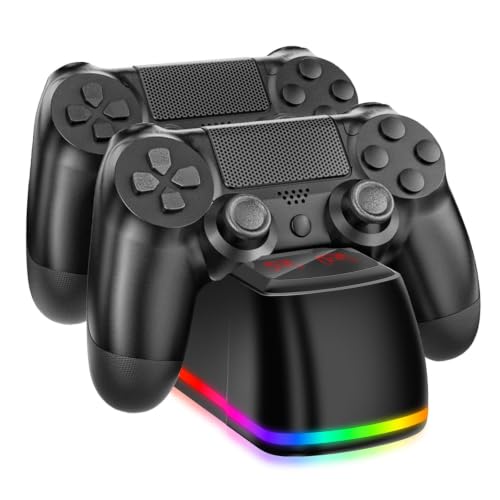
Safety-Focused PS4 Option – NBGame Controller Charging Dock
For controller charging docks for home offices, the NBGame dock provides a dedicated storage and charging spot for PS4 controllers. It claims a two-hour full-charge time, uses USB power from a PS4, PS4 Slim, PS4 Pro, or PC, and includes a front LED for charging status.
Best For: PS4 players who want a straightforward single-dock solution with broad built-in charging protections.
Pros:
- Stated two-hour full-charge time for a PS4 controller.
- Works through USB with PS4, PS4 Slim, PS4 Pro, or a PC.
- LED shows red while charging and blue when fully charged.
- Protection features include safeguards against overcharge, over-discharge, heat, voltage, current, and short circuits.
Cons:
- Designed for PS4 controllers and is not presented as a multi-device charging organizer.
- Only one USB port is listed, so it is oriented toward a single-controller dock setup.
The NBGame model is a compact fit for a PS4-centered desk where charging safety and clear status feedback matter. Its included USB cable and manual make it a simple replacement-style dock for keeping one controller ready.
How We Picked the Best Controller Charging Docks for Home Offices
We focused on charging docks that offer a practical balance of compatibility, charging convenience, footprint, and organization. The selection includes single-console stands, dual-controller chargers, and multi-device docks for households or home offices with several devices. We also considered useful details such as LED indicators, magnetic alignment, USB port configuration, controller storage, and advertised charging speed.
Compatibility is especially important. A dock designed for a DualSense, Xbox wireless controller, Switch Pro Controller, or Joy-Con may use a different connector or contact layout, so buyers should verify the supported model before ordering. Multi-device stations can be more flexible, but they may require your own charging cables and power adapter.
Quick Comparison
| Dock type | Best for | What to check |
|---|---|---|
| Dedicated console dock | One controller family | Exact controller compatibility |
| Dual-controller charger | Couples or multiplayer setups | Charging contacts and included adapters |
| Multi-device dock | Mixed home-office gear | Port count, cable routing, and power output |
| Stand with storage | Organized desks | Footprint and headset or accessory support |
Key Buying Factors for Controller Charging Docks for Home Offices
Compatibility and Charging Method
Confirm whether the dock supports your exact controller generation. Some models charge through dedicated contact points, while others provide USB ports for removable cables. Contact charging is usually tidier, but proprietary layouts can limit future compatibility.
Capacity and Power
Choose capacity based on how many controllers need to be ready at once. A dual dock works well for a main console, while a four- to six-port station is better for mixed devices. Check the power adapter and total output when charging several devices simultaneously; a high port count does not always mean every port delivers maximum speed.
Desk Organization and Visibility
For a home office, stability and cable management matter as much as charging speed. Look for a weighted or non-slip base, a compact footprint, and LED indicators that are visible without being distracting during work. A stand that stores controllers vertically can free valuable desk space.
Safety and Everyday Usability
Prefer products with clear charging-status indicators and reputable electrical specifications. Easy docking, accessible ports, and sensible heat dissipation make a bigger difference in daily use than a short advertised charge time.
Who Should Buy Which Controller Charging Docks for Home Offices?
Choose a dedicated PlayStation dock if you mainly use PS4 or PS5 controllers and want the cleanest, simplest setup. Choose a Switch-focused charger for Joy-Con or Switch Pro Controller storage and charging. Choose an Xbox-specific dock when secure magnetic alignment and controller fit are priorities.
Choose a multi-device charging station if your home office also charges phones, tablets, headsets, or several controller types. These docks are generally the most adaptable, though they may need separate cables. For a shared desk or family gaming area, prioritize capacity and organization; for a compact personal workspace, a smaller dedicated stand is usually the better fit.