A reliable charging dock keeps your controllers ready without scattered cables, occupied USB ports, or last-minute battery checks. The best portable controller charging docks balance compact design, secure connections, charging speed, and compatibility with your console and controller generation.
This roundup covers options for Nintendo Switch and Switch 2, PlayStation, Xbox, PlayStation Portal, and mixed-controller households. Use the guide below to narrow the selection by portability, capacity, power source, and everyday convenience.
Best 10 Portable Controller Charging Docks Picks for 2026
Most Versatile
6-in-1 Switch and PS5 Controller Charging Dock

- Charges up to four Joy-Cons plus two Pro or PS5 controllers
- USB-C power works with consoles, hubs, or wall chargers
- Includes status LEDs and multiple protection features
Best For: Multi-platform households with several compatible controllers
Best Official Fit
PowerA Solo DualSense Charging Station

- Officially licensed for the DualSense controller
- Snap-down design supports quick placement and removal
- Backed by a two-year limited warranty
Best For: PS5 owners charging one DualSense controller
Best Lightweight Pick
FASTSNAIL Joy-Con Charging Dock

- Charges up to four Joy-Cons at once
- Portable slide-in design with individual LEDs
- Also works as a storage and display stand
Best For: Switch owners organizing and charging multiple Joy-Cons
Best for PlayStation Portal
PowerA Lumectra Charging Station
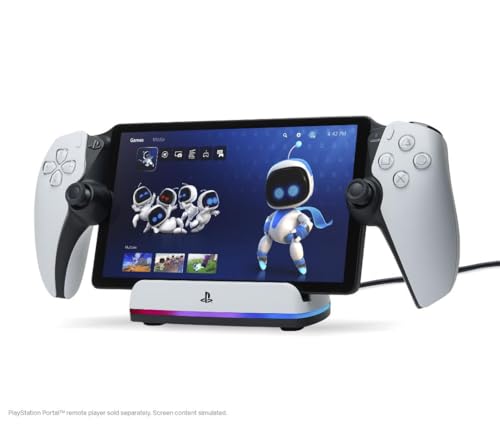
- Purpose-built and officially licensed for PlayStation Portal
- Magnetic USB-C charging with a weighted base
- RGB lighting offers several selectable modes
Best For: Portal owners wanting a stable, illuminated display dock
Best Travel Pick
FYOUNG Switch 1/2 Joy-Con Dock

- Supports Switch 1, OLED, and Switch 2 Joy-Con controllers
- Charges up to four controllers simultaneously
- Foldable, lightweight design with safety protection
Best For: Switch owners who need cross-generation compatibility and portability
Best Xbox Bundle
Nyko Xbox Dual Controller Station

- Charges two Xbox Series X/S or Xbox One controllers
- Includes two 1100 mAh rechargeable batteries
- Adds LED indicators and an extra USB port
Best For: Xbox users seeking a dual-controller dock with batteries
Best Fast-Charging Stand
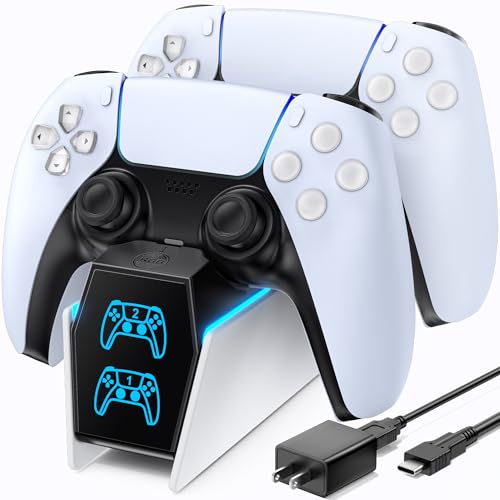
- Charges two PS5 controllers in about two hours
- Includes an AC adapter and on/off switch
- Uses status lights to show charging progress
Best For: PS5 owners prioritizing quick dual-controller charging and storage
Xbox Magnetic Pick

- Officially licensed for Xbox Series X|S and Xbox One
- Magnetic dock with amber/white charging indicator
- Includes 1100 mAh battery pack and two battery doors
Best For: Xbox players wanting a secure, dedicated charging dock
PS4 Fast-Charge Pick

- Charges two PS4 controllers simultaneously
- Advertised 1.8-hour full charging time
- Includes overcharge and short-circuit protection
Best For: PS4 households charging two controllers
Multi-Platform Pick

- Charges two compatible controllers simultaneously
- Supports selected Switch, PS5, and Xbox controllers
- Includes removable USB-C adapters and LED status lights
Best For: Multi-console setups using compatible first-party controllers
Most Versatile – 6-in-1 Switch and PS5 Controller Charging Dock
This multi-device dock is a practical choice among portable controller charging docks if your gaming setup includes Nintendo Switch Joy-Cons, a Switch Pro Controller, and PS5 DualSense controllers. It can charge up to four Joy-Cons plus two Pro or PS5 controllers at the same time and connects through USB-C.
Best For: Gamers who use multiple compatible controller types and want one charging station.
Pros:
- Charges four Joy-Cons and two Pro or PS5 controllers simultaneously.
- Supports power from a console, USB hub, or wall charger.
- Includes charging-status LEDs and built-in overcharge, over-voltage, over-current, and short-circuit protection.
Cons:
- Controllers are not included.
- Its multi-device design may take more space than a single-controller stand.
With broad compatibility and several charging options, this is the most flexible pick in the group. The included USB-C cable and one-year quality promise add practical value.
Best Official Fit – PowerA Solo DualSense Charging Station
The PowerA Solo is a focused option among portable controller charging docks for PlayStation 5 owners who want a simple place to charge and display one DualSense Wireless Controller. Its snap-down design is intended for quick placement and removal, while the officially licensed construction complements a PS5 setup.
Best For: PS5 players who need a dedicated charging stand for one DualSense controller.
Pros:
- Officially licensed for charging the DualSense Wireless Controller.
- Snap-down charging design makes placement straightforward.
- Includes a two-year limited warranty.
Cons:
- Designed for one controller rather than multiple controllers.
- Uses a Micro USB connector according to the supplied specifications.
This is a streamlined, single-controller solution rather than a high-capacity dock. Choose it when ease of use, a compact desktop form, and official licensing matter more than charging several controllers at once.
Best Lightweight Pick – FASTSNAIL Joy-Con Charging Dock
The FASTSNAIL dock keeps portable controller charging docks simple: slide in up to four Nintendo Switch Joy-Cons, connect the included cable to a USB port, and check each controller’s individual LED indicator. Its lightweight design also doubles as a storage and display stand.
Best For: Switch and Switch OLED owners who want to charge and organize four Joy-Cons.
Pros:
- Charges up to four Joy-Cons simultaneously.
- Lightweight, portable construction with a slide-in setup.
- Individual LEDs indicate charging status and the stand keeps controllers organized.
Cons:
- Joy-Cons are not included.
- Its listed warranty is 180 days.
This stand is a practical, space-conscious choice for Joy-Con users. It prioritizes straightforward charging and storage, making it less suitable if you need support for Pro or PS5 controllers.
Best for PlayStation Portal – PowerA Lumectra Charging Station
Designed specifically for the PlayStation Portal remote player, this PowerA station combines charging with a dedicated display position. It uses a magnetic USB-C charging adapter, a weighted base, and USB power, while built-in RGB lighting lets you change the station’s visual modes.
Best For: PlayStation Portal owners who want a stable charging display with customizable lighting.
Pros:
- Officially licensed for the PlayStation Portal remote player.
- Magnetic USB-C adapter supports easy slide-in charging.
- Weighted base and selectable RGB modes add stability and personalization.
Cons:
- Compatible with the PlayStation Portal rather than general-purpose controllers.
- Cases should be removed while charging for the best user experience.
This is a specialized dock rather than a universal controller charger. Its weighted base, display-focused design, included five-foot USB-C cable, and RGB controls make it a strong fit for a dedicated Portal setup.
Best Travel Pick – FYOUNG Switch 1/2 Joy-Con Dock
The FYOUNG dock is a flexible choice for Switch owners comparing portable controller charging docks. It supports Switch 1, Switch OLED, and Switch 2 Joy-Con controllers, with four magnetic ports for Joy-Con 2 and four slide-in ports for standard Joy-Con controllers.
Best For: Nintendo Switch households that use both Switch generations and want a compact, travel-friendly charging stand.
Pros:
- Charges up to four controllers simultaneously, with separate support for Joy-Con 2 and standard Joy-Con controllers.
- Foldable, lightweight design weighs about 0.17 kg and fits easily in a backpack.
- Includes charging indicators, overcharge protection, short-circuit protection, and four anti-slip pads.
Cons:
- Designed specifically for Nintendo Switch Joy-Con controllers rather than Xbox or PlayStation controllers.
- Requires a USB-C power connection and compatible power source.
Choose this model if cross-generation Switch compatibility and portability matter most. Its compact foldable stand is especially useful for moving between rooms or taking a charging setup on the go.
Best Xbox Bundle – Nyko Xbox Dual Controller Station
The Nyko Charging Station is a practical option among portable controller charging docks for Xbox users. Its drop-and-charge base holds two Xbox Series X/S or Xbox One controllers, while the included rechargeable batteries help reduce dependence on disposable batteries.
Best For: Xbox households that want a two-controller dock with included rechargeable batteries and clear charging indicators.
Pros:
- Charges two compatible Xbox controllers at the same time.
- Includes two 1100 mAh rechargeable batteries rated for up to 15 hours of playtime per charge.
- Features LED indicators, a USB-C charging cable, and an extra USB port.
Cons:
- The tabletop base is more stationary than foldable travel-oriented docks.
- Compatibility is focused on Xbox Series X/S and Xbox One controllers.
- The listed power plug is a North American Type A two-pin plug.
This is a strong fit for a shared Xbox setup where two controllers need a dedicated home. The included batteries and simple drop-in design make it convenient for keeping controllers ready between sessions.
Best Fast-Charging Stand – OIVO PS5 DualSense Dock
The OIVO PS5 dock is a convenient choice for shoppers comparing portable controller charging docks for PlayStation 5. Its dedicated cradle charges two PS5 wireless controllers simultaneously in about two hours and includes an AC adapter for a complete charging setup.
Best For: PS5 owners who want fast dual-controller charging, organized storage, and visible charging status.
Pros:
- Charges up to two PS5 controllers in approximately two hours.
- Includes a designated AC power adapter and an on/off switch.
- Provides red and blue charging indicators and a tabletop stand for storage.
Cons:
- Designed for PS5 and PS5 Edge controllers rather than multiple console brands.
- Uses a tabletop charging base, so it is less packable than a foldable dock.
- The supplied notes specify a North American Type A power plug.
Consider the OIVO when charging speed and keeping two DualSense controllers organized are higher priorities than ultra-light travel. Its included adapter and status lights make it a straightforward dedicated PS5 accessory.
Xbox Magnetic Pick – 8BitDo Xbox Charging Dock
For Xbox owners comparing portable controller charging docks, the 8BitDo Charging Dock offers a dedicated, tidy charging spot for Xbox Series X|S and Xbox One wireless controllers. Its magnetic connection, included battery pack, and clear charging light make it practical for everyday desk or TV setup.
Best For: Xbox players who want an officially licensed dock with magnetic charging and included rechargeable power.
Pros:
- Officially licensed for Xbox Series X|S and Xbox One wireless controllers.
- Includes a 1100 mAh rechargeable battery pack and two battery doors.
- Magnetic secure charging with amber and white status lighting.
- Built-in storage compartment and adjustable lighting.
Cons:
- Designed specifically for compatible Xbox wireless controllers.
- Only one controller charging position is listed.
This is a polished choice for Xbox users who prioritize secure placement and a seamless first-party-style appearance. The included battery hardware adds convenience, while the single-controller design may be less suitable for households charging multiple gamepads at once.
PS4 Fast-Charge Pick – Dual PS4 Controller Dock
This P4 Controller Charger Dock is a straightforward option among portable controller charging docks for PS4 users. It charges two compatible controllers simultaneously, draws power through USB from the console, and uses status lights to show when charging is complete.
Best For: PS4, PS4 Slim, and PS4 Pro owners who need an affordable dual-controller charging station.
Pros:
- Compatible with PS4, PS4 Slim, and PS4 Pro controllers.
- Charges two controllers at the same time.
- Full charging is advertised at approximately 1.8 hours, with faster charging separately.
- Built-in protection against overcharging, over-voltage, and short circuits.
Cons:
- Designed for PS4 controllers rather than multiple console platforms.
- Requires a USB connection to the PS4 console or another compatible power source.
With dual charging bays, clear red-and-green indicators, and protective charging circuitry, this dock suits PS4 households that regularly use two controllers. Its platform-specific design is a limitation if you need one dock for several console ecosystems.
Multi-Platform Pick – 2-Port USB-C Controller Dock
For shoppers seeking portable controller charging docks that support more than one console family, this HEATFUN station offers two charging positions for selected Switch Pro, PS5, Xbox Series X|S, and Xbox Elite Series 2 controllers. Removable USB-C adapters make drop-in charging convenient, but compatibility should be checked carefully before purchase.
Best For: Multi-console households with compatible first-party controllers and a suitable 5V/2A USB power adapter.
Pros:
- Charges two compatible controllers at once.
- Supports selected Switch Pro, Switch 2 Pro, PS5, Xbox Series X|S, and Xbox Elite Series 2 controllers.
- Includes removable USB-C adapters for drop-in charging.
- LED changes from red while charging to green when full, with smart protection.
Cons:
- Not compatible with PowerA, Luna, or other listed third-party pro controllers.
- USB wall adapter is not included.
- A 5V/2A adapter is recommended for faster, stable charging.
This is the most flexible option of the three for users with compatible controllers across several platforms. Its broad support and dual bays are useful, but the adapter requirement and detailed compatibility exclusions make model verification especially important.
How We Picked These Portable Controller Charging Docks
We focused on docks that make controller charging simpler while remaining practical to move between rooms, take on trips, or keep beside a compact gaming setup. Our comparison considers stated compatibility, the number of controllers supported, charging indicators, connection design, included power equipment, footprint, and useful extras such as USB ports or RGB lighting.
Compatibility comes first. A dock designed for Joy-Con controllers may not fit a Switch Pro Controller, while PlayStation, Xbox, and third-party controllers often use different battery contacts or mounting shapes. Always confirm the exact controller generation before ordering.
Quick Comparison
| Best For | Look For | Notable Options |
|---|---|---|
| Nintendo Switch or Switch 2 | Joy-Con and Pro Controller support | FASTSNAIL, FYOUNG, and multi-platform docks |
| PS5 and PlayStation Portal | DualSense fit, magnetic alignment, or Portal-specific support | PowerA and OIVO |
| Xbox controllers | Series X|S or Xbox One compatibility | Nyko and 8BitDo |
| Mixed households | Multiple charging standards and broad compatibility | Universal dual-port options |
Key Buying Factors for Portable Controller Charging Docks
Compatibility and Fit
Check whether the dock supports your precise controller model, not just the console family. Pay attention to Switch versus Switch 2, standard versus Elite Xbox controllers, and DualSense versus older PlayStation pads. A secure fit prevents charging interruptions when the dock is moved.
Portability and Power
For travel, prioritize a small footprint, durable charging contacts, and USB power. USB-powered docks are easy to use with a console, laptop charger, or power bank, but some fast-charging models require a dedicated AC adapter. Consider cable length and whether the power brick adds bulk.
Capacity and Indicators
Dual-controller docks are useful for households or multiplayer sessions, while single-controller designs can save space. LED indicators should clearly show charging and completion status without being distracting in a bedroom or living room.
Charging Speed and Extras
Faster charging is helpful when play sessions are frequent, but advertised times depend on battery condition, power input, and controller usage. Extra USB ports, magnetic connectors, removable cables, and RGB lighting can be convenient, though they should not outweigh reliable compatibility.
Who Should Buy Which Portable Controller Charging Docks?
Choose a Switch-focused dock if your priority is charging Joy-Con controllers or a Switch Pro Controller in a compact Nintendo setup. PS5 owners should favor a DualSense-specific stand, while PlayStation Portal users should choose a model explicitly designed for the Portal rather than assuming a standard controller dock will fit.
Xbox owners should select a dock that names their controller generation and, for Elite users, confirms fit for the Elite 2. If your household uses several platforms, a broad-compatibility dual-port dock can reduce cable clutter, but verify that each controller uses the included charging contacts or adapters.
For frequent travelers, select the smallest USB-powered model that supports your controller. For a permanent entertainment-center setup, prioritize capacity, stable seating, clear indicators, and convenient access over the absolute smallest footprint.