A reliable charging dock keeps controllers ready without scattered cables, loose battery packs, or last-minute charging before a gaming session. The best budget controller charging docks balance compatibility, charging speed, capacity, and a tidy footprint without adding unnecessary cost.
This roundup compares affordable options for Nintendo Switch, Xbox, and PlayStation users, including single-controller bases, multi-device docks, and models with rechargeable battery packs. Use the guide below to narrow the choices by console, setup, and everyday charging needs.
Best 10 Budget Controller Charging Docks Picks for 2026
Best Budget PS4 Dock

- Charges two PS4 controllers
- 1.8-hour claimed full charge
- LED and safety protection
Best For: PS4, PS4 Slim, and PS4 Pro owners
Best Budget Joy-Con Dock
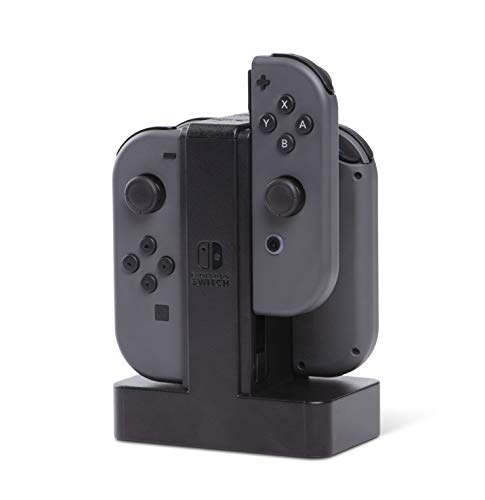
- Charges four Joy-Cons at once
- Individual charge-level LEDs
- Weighted stable base
Best For: Nintendo Switch owners with multiple Joy-Cons
Best Budget Xbox Dock

- Two charging slots
- Includes two 2200mAh batteries
- Up to 40–45 hours per charge
Best For: Xbox Series and Xbox One players
Best Budget Multi-Console Dock

- Charges Joy-Cons and PS5 controllers
- Six controllers supported at once
- USB-C power with safety protection
Best For: Multi-console Nintendo Switch and PS5 households
Best Official DualSense Pick

- Officially licensed for DualSense
- Snap-down charging and display design
- Two-year limited warranty
Best For: PS5 owners charging one DualSense controller
Best Budget Joy-Con Organizer
Switch Controller Charging Dock

- Charges up to four Joy-Cons
- Individual LED charge indicators
- Stores and displays controllers
Best For: Nintendo Switch and Switch OLED owners with multiple Joy-Cons
Best Xbox Charging Station Value

- Officially licensed by Xbox
- Magnetic secure charging connection
- Includes 1100 mAh battery pack
Best For: Xbox Series X|S and Xbox One controller owners
PowerA Charging Base
Switch Controller Charging Dock

- Charges Joy-Con and wireless controllers simultaneously
- LED indicators show charging status
- Compatible with Pro and PowerA wireless Switch controllers
Best For: Nintendo Switch owners with multiple compatible controllers
PURBHE 4-in-1 Dock

- Charges up to four Joy-Con controllers together
- Works with console, USB hub, or wall-charger power
- Includes cable and charging-protection circuitry
Best For: Switch households with multiple Joy-Con controllers
NealGamefy Dual Station
Xbox Controller Battery Charger

- Includes two 4320mWh rechargeable battery packs
- Charges two controllers with the included dock
- Provides Xbox One and Xbox Series battery covers
Best For: Xbox players needing batteries and a dual charging dock
Best Budget PS4 Dock – Fast Dual Charging
If you need budget controller charging docks for a PS4 setup, this compact dual-controller station focuses on quick charging and simple status monitoring. It charges two compatible PS4 controllers at once, with a claimed full-charge time of 1.8 hours when charging separately.
Best For: PS4, PS4 Slim, and PS4 Pro owners who want an affordable dual charging dock.
Pros:
- Charges two compatible controllers simultaneously.
- LEDs show charging and standby or full-charge status.
- Built-in protection covers overcharging, over-voltage, and short circuits.
- Uses the console’s USB port and helps keep controllers stored in one place.
Cons:
- Designed specifically for PS4-family controllers.
- Charging can be faster when controllers are charged separately.
- It does not include a wall power adapter.
This is a straightforward value pick for PS4 households that want two charging positions, clear LEDs, and basic charging safeguards without a more elaborate station.
Best Budget Joy-Con Dock – Four-Controller Charging
Among budget controller charging docks, the PowerA Joy-Con Charging Dock stands out for its four-slot capacity and individual charge indicators. Its slide-in design is intended to make charging multiple Nintendo Switch Joy-Con controllers quick and organized.
Best For: Nintendo Switch owners who regularly charge up to four Joy-Con controllers.
Pros:
- Charges up to four Joy-Con controllers simultaneously.
- Individual LEDs indicate the charge level for each controller.
- Weighted base provides added stability.
- Officially licensed for Nintendo Switch and backed by a two-year limited warranty.
Cons:
- Supports Joy-Con controllers rather than a broad mix of controller types.
- Power is supplied through USB, so a compatible power source is required.
Choose this dock when capacity matters most. It is especially practical for households with several Joy-Cons, while the weighted base and per-controller LEDs add everyday convenience.
Best Budget Xbox Dock – Dual Dock With Batteries
This Fosmon dock is one of the more complete budget controller charging docks for Xbox users because it combines two charging slots with two rechargeable batteries. The included 2200mAh NiMH batteries are rated for up to 40–45 hours of play time per charge.
Best For: Xbox Series X|S and Xbox One players who want rechargeable batteries included with a dual dock.
Pros:
- Charges two compatible Xbox controllers.
- Includes two 2200mAh rechargeable batteries and battery doors for listed Xbox models.
- Individual LEDs show the charging status of each slot.
- Automatic shutoff, overheating protection, and short-circuit protection are built in.
Cons:
- Not compatible with the Xbox Elite 2 controller.
- Uses a Micro USB connection.
- Battery life is a manufacturer-provided estimate.
For Xbox players trying to move away from disposable AA batteries, this package offers useful extras in one box. Confirm your controller model before buying, especially if you use an Elite 2.
Best Budget Multi-Console Dock – 6-in-1 Charging Station
If versatility is your priority in budget controller charging docks, this 6-in-1 station supports Nintendo Switch Joy-Cons, Switch Pro controllers, and PS5 DualSense controllers. It can charge four Joy-Cons plus two Switch Pro or PS5 controllers at the same time.
Best For: Multi-console households that need one dock for Switch and PS5 controllers.
Pros:
- Supports four Joy-Cons and two Switch Pro or PS5 controllers simultaneously.
- Can receive power from a console, USB hub, or wall charger.
- USB-C input and LED charging-status indicators simplify setup and monitoring.
- Protection covers overcharging, over-voltage, over-current, and short circuits.
Cons:
- Controllers are not included.
- It is a charging dock rather than a replacement controller bundle.
- Only an 80cm USB-C charging cable is listed in the package.
This is the most flexible option in the group for gamers with both Nintendo and PlayStation hardware. Its broad compatibility and six-device capacity are useful, provided you already have a suitable USB power source.
Best Official DualSense Pick – Solo Charging Station
If you want a simple, budget-friendly way to keep one PS5 controller ready, the PowerA Solo Charging Station offers a compact solution. It is officially licensed for the DualSense Wireless Controller and uses a snap-down charging design that also displays the controller.
Best For: PS5 owners who want a straightforward single-controller charging stand.
Pros:
- Officially licensed for the DualSense Wireless Controller
- Snap-down design makes placement simple
- Charges and displays the controller in one stand
- Includes a two-year limited warranty
Cons:
- Designed to charge one controller
- Uses a Micro USB charging connector
This is a practical choice among budget controller charging docks when you value official compatibility, a tidy tabletop setup, and minimal fuss over multi-controller capacity.
Best Budget Joy-Con Organizer – Switch Controller Charging Dock
The FASTSNAIL Charging Dock is a flexible option for Nintendo Switch and Switch OLED owners who need to charge multiple Joy-Con controllers at once. Its slide-in design connects through USB and includes individual LED indicators to show charging status.
Best For: Switch gamers who want simultaneous charging for up to four Joy-Con controllers and a dedicated storage stand.
Pros:
- Charges up to four Joy-Con controllers simultaneously
- Slide-in, plug-and-play operation
- Individual LED indicators show charge level
- Also stores and displays the controllers
Cons:
- Joy-Con controllers are not included
- Warranty period is 180 days
- Requires connection to a USB port
For shoppers comparing budget controller charging docks, this model stands out for capacity and organization. It is especially useful when several Joy-Cons need a consistent place to charge between sessions.
Best Xbox Charging Station Value – 8BitDo Xbox Charging Dock
The 8BitDo Charging Dock is an officially licensed option for Xbox Series X|S and Xbox One wireless controllers. It combines magnetic secure charging with a rechargeable battery pack, replacement battery doors, a storage compartment, and charging-status lighting.
Best For: Xbox players who want a secure charging dock with an included rechargeable battery solution.
Pros:
- Officially licensed by Xbox
- Compatible with Xbox Series X|S and Xbox One wireless controllers
- Magnetic secure charging helps keep the controller seated
- Includes a 1100 mAh rechargeable battery pack and two battery doors
Cons:
- Designed for Xbox wireless controllers only
- Includes one rechargeable battery pack
- Storage compartment and lighting may add more features than some users need
Among budget controller charging docks, this is a strong fit for Xbox users who want more than a charging cradle. The included battery pack and magnetic connection make it a convenient all-in-one setup.
PowerA Charging Base – Switch Controller Charging Dock
The PowerA Controller Charging Base is a practical choice for shoppers comparing budget controller charging docks for Nintendo Switch setups. It can charge Joy-Con and compatible wireless controllers simultaneously, while LED indicators show charging status.
Best For: Nintendo Switch owners who want a compact tabletop dock for Joy-Con, Pro Controllers, and compatible PowerA wireless controllers.
Pros:
- Charges Joy-Con and wireless controllers at the same time.
- Works with Nintendo Switch Pro Controllers and PowerA wireless Switch controllers.
- LED lights indicate when controllers are charged.
- Includes a two-year limited warranty.
Cons:
- Compatibility is focused on Nintendo Switch controllers and PowerA wireless models.
- Uses a single USB-C connection and has a 1A current rating.
Its simultaneous charging and broad Switch-focused compatibility make it a well-rounded option for a gaming setup that uses several supported controllers.
PURBHE 4-in-1 Dock – Four Joy-Con Charging Station
The PURBHE Switch Joy-Con Charging Dock is a budget-friendly controller charging dock designed to charge up to four Nintendo Switch or Switch OLED Joy-Con controllers at once. Its USB-C input, status indicators, and included cable make it simple to add to a tabletop setup.
Best For: Nintendo Switch and Switch OLED households that need simultaneous charging or organized storage for up to four Joy-Con controllers.
Pros:
- Supports charging four Joy-Con controllers simultaneously.
- Can draw power from a console, USB hub, or wall charger.
- Includes a USB-A-to-USB-C charging cable.
- Built-in protection covers overcharging, over-voltage, over-current, and short circuits.
Cons:
- Joy-Con controllers are not included.
- Designed for Joy-Con controllers rather than a wider range of gamepads.
- The listed 500mA output current may be modest for users prioritizing faster charging.
With four charging slots, anti-slip feet, and multiple power-source options, this dock is a sensible value pick for families or groups with several Joy-Con controllers.
NealGamefy Dual Station – Xbox Controller Battery Charger
The NealGamefy Controller Charger Station combines a dual charging dock with two 4320mWh rechargeable battery packs, making it a useful option among budget controller charging docks for compatible Xbox controllers. The package also includes battery covers for Xbox One and Xbox Series controllers.
Best For: Xbox players who want rechargeable battery packs, a dual charging station, and replacement covers in one package.
Pros:
- Includes two 4320mWh rechargeable battery packs.
- Provides a dual-controller charging station.
- Includes covers for Xbox One and Xbox Series controllers.
- Features charging indicators and short-circuit protection.
Cons:
- Compatibility is limited to the original compatible Xbox controllers described by the manufacturer.
- The package uses a USB-C cable but does not list a wall adapter.
- Battery covers are split between Xbox One and Xbox Series models, so buyers should verify fit before ordering.
This package offers more than a basic dock by bundling batteries and covers, but checking your exact controller model is essential before purchase.
How We Picked the Best Budget Controller Charging Docks
We focused on docks that offer practical value for everyday gaming rather than prioritizing extra features alone. Our comparison considers console compatibility, the number and type of controllers supported, charging convenience, indicator lights, included batteries, magnetic or guided connections, and the amount of desk or entertainment-center space required.
Compatibility is the first filter. Nintendo Switch Joy-Con and Pro Controller docks are not interchangeable with Xbox or PlayStation charging bases, while multi-console products may have different limitations depending on the included cables or adapters. We also considered whether each dock is best for one primary controller, multiple controllers, or a household that regularly shares a console.
Quick Comparison
- Best for Joy-Con users: Choose a Switch-specific dock with slots that match the controllers you use most.
- Best for Xbox owners: Look for secure contact points and included rechargeable battery packs, especially for Series X|S or Xbox One controllers.
- Best for PlayStation users: A DualSense-specific charging base offers a more stable fit than a generic USB cable.
- Best for mixed setups: A broadly compatible dock can reduce clutter, but confirm exactly which controllers and adapters are supported.
- Best for families or multiplayer: Prioritize dual or multi-controller charging capacity over maximum charging speed.
Key Buying Factors for Budget Controller Charging Docks
Compatibility and Fit
Check the exact console generation and controller model before buying. A dock designed for Xbox Series X|S may also support Xbox One controllers, but the battery door, contact points, and included battery packs still matter. For Switch products, verify whether the dock supports Joy-Con, the Pro Controller, or both.
Charging Capacity and Convenience
Single-controller docks are compact and often simpler, while dual and multi-controller models are more useful for shared gaming. LED indicators can make charging status easy to check, but they do not necessarily mean the dock charges faster. Consider whether controllers can remain docked between sessions without blocking other ports or accessories.
Battery Packs and Charging Speed
Some Xbox docks include rechargeable battery packs, which can be more convenient than repeatedly connecting a cable. Check the advertised battery capacity, charging time, and whether the packs preserve access to the controller’s normal ports. Fast-charging claims should be weighed against the charger and cable included with the product.
Desk Space and Build Quality
A stable base, guided slots, and secure magnetic contacts help prevent misalignment. Measure the available space near your console, especially for docks holding several controllers. A slightly larger dock may be worthwhile if it replaces multiple cables or keeps controllers upright and organized.
Who Should Buy Which Budget Controller Charging Docks?
Buy a compact single-controller dock if you mainly use one PlayStation or Xbox controller and want a clean charging spot. Choose a Joy-Con-focused dock for Nintendo Switch multiplayer households that need several controllers ready at once. Choose a battery-pack bundle if replacing disposable batteries is your main concern. For mixed gaming rooms, select the option with clearly confirmed compatibility rather than assuming one dock supports every controller. The best Budget Controller Charging Docks are the ones that match your hardware closely and simplify charging every day.