USB power meters make it easier to see what is happening between a charger, cable, power bank, and device. The best models for beginners show key readings such as voltage, current, power, capacity, and sometimes temperature or resistance without requiring advanced test equipment.
We compared 10 USB-A and USB-C testers with different displays, measurement ranges, connector options, and monitoring features. This guide explains what to look for so you can choose a meter that matches your chargers, devices, and comfort level.
Best 10 USB Power Meters for Beginners Picks for 2026
Versatile Monitor

- Seven display modes for voltage, current, power, and capacity
- USB-A testing from 3.2–30V and up to 5A
- PD/QC 3.0 support with safety alarms
Best For: Beginners wanting broad USB-A testing and multiple readouts
Jobsite-Ready Pick
Klein Tools ET920 USB Power Meter

- Tests USB-A and USB-C voltage and current
- Stores up to 10 readings for comparison
- Rugged housing with overload detection and drop protection
Best For: Beginners needing a durable meter for both USB connector types
Simple Starter
diymore USB-A Voltage and Current Tester
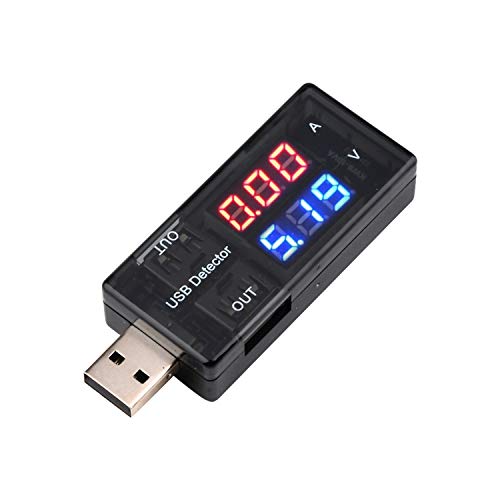
- Clear color display for voltage and current
- Measures 3.0–7.5V and up to 2.5A
- Compact plug-in design for basic USB-A checks
Best For: Beginners who only need simple charger and cable testing
Feature-Rich USB-C Choice

- Measures power, capacity, temperature, resistance, and timing
- Supports USB-A, USB-C, PD, QC, and BC 1.2 testing
- Nine IPS display interfaces for detailed monitoring
Best For: Beginners exploring USB-C, fast charging, cables, and power banks
Best Beginner-Friendly USB Power Meter

- Measures 3.7–30V and 0–4A
- Tracks capacity, power, impedance, and temperature
- Stores data after power loss
Best For: First-time users checking chargers, cables, and power banks
Most Versatile USB Power Meter
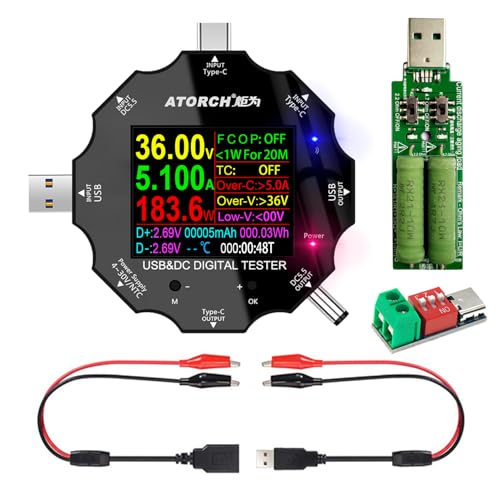
- Works with four USB and DC interface types
- Supports PD and QC fast-charge recognition
- Includes safety protections and a load
Best For: Testing mixed USB-C, USB, and DC equipment
Best for Power-Bank Testing

- Measures up to 30V and 5.1A
- Stores capacity results across power interruptions
- Recognizes multiple fast-charging protocols
Best For: Checking USB-A chargers, cables, and power-bank capacity
Versatile Starter Meter

- Measures voltage, current, capacity, power, and more
- Supports USB-A, USB-C, PD, QC, and BC1.2
- Color display with protective shutdown features
Best For: Beginners needing broad USB-A and USB-C testing
Protocol Testing Pick

- Measures up to 12A across a 4–30V range
- Supports numerous USB-C fast-charging protocols
- Adds curve views for real-time voltage and current
Best For: USB-C fast-charging and higher-current testing
Power-Tracking Choice

- Tracks maximum voltage, current, and wattage
- Measures up to 12A across a 4–30V range
- Stores capacity and energy data after power-off
Best For: USB-C testing with peak tracking and saved results
Versatile Monitor – DROK 7-Mode USB Tester
For beginners choosing USB power meters, the DROK USB Tester offers a straightforward way to view voltage, current, power, and capacity. Its single-button interface and seven display modes make it practical for checking chargers, power banks, USB cables, and compatible solar-panel setups.
Best For: Beginners who want broad USB-A testing with fast-charge protocol support and multiple readouts.
Pros:
- Seven selectable display modes show voltage, current, power, and capacity.
- Supports devices from 3.2–30V and up to 5A.
- Supports PD and QC 3.0 protocols and includes dual USB-A output ports.
- Offers overvoltage, undervoltage, overcurrent, and short-circuit alarms.
Cons:
- Uses USB-A connections rather than a native USB-C meter interface.
- The wide measurement range and extra functions may be more than beginners need for basic voltage checks.
This is a flexible choice for learning the basics while retaining useful capacity and safety-monitoring features. It is especially appealing if you work with USB-A chargers, power banks, or small solar systems.
Jobsite-Ready Pick – Klein Tools ET920 USB Power Meter
The Klein Tools ET920 is a strong option among USB power meters for beginners who want clear measurements without sacrificing durability. It supports both USB-A and USB-C testing, while its LCD, overload detection, and stored readings make routine comparisons easier.
Best For: Beginners who need a durable USB-A/USB-C meter for chargers, devices, and repeated measurements.
Pros:
- Measures voltage, current, capacity, energy, and calculated resistance.
- Supports USB-A current up to 3A and USB-C current up to 5A.
- Stores and recalls up to 10 readings for comparison.
- Has overload detection, a high-resolution LCD, and 6.6-foot drop protection.
Cons:
- Does not list the broader 24V or 30V range offered by some meters.
- Its measurement and data-storage features may be unnecessary for very occasional checks.
The ET920 balances beginner-friendly operation with a rugged design suited to regular use. Its native USB-A and USB-C compatibility makes it a convenient all-around choice for modern charging setups.
Simple Starter – diymore USB-A Voltage and Current Tester
If you want USB power meters for beginners that focus on the essentials, the diymore USB Tester keeps the task simple. Plug it into a USB source to read voltage and current, making it useful for checking phone chargers, cables, and other USB-powered equipment.
Best For: Beginners who need an inexpensive, compact USB-A tester for basic voltage and current checks.
Pros:
- Displays voltage and current in an easy-to-read color format.
- Measures 3.0–7.5V and 0–2.5A.
- Small, portable, and ready to use by simply plugging it in.
- Designed for chargers, mobile devices, USB cables, and other USB-powered equipment.
Cons:
- Its voltage and current ranges are narrower than those of more advanced meters.
- Does not list capacity, energy, temperature, or fast-charge protocol monitoring.
- Designed for USB-A rather than native USB-C testing.
This is a sensible entry-level tool when you only need to confirm basic USB output. Its limited range and feature set are tradeoffs for a compact, uncomplicated design.
Feature-Rich USB-C Choice – KJ-KayJI 2-in-1 USB Tester
The KJ-KayJI 2-in-1 is suited to beginners who want USB power meters for beginners but expect to explore more than basic voltage and current. Its color IPS display provides multiple screens for power, resistance, temperature, capacity, timing, and fast-charge information across USB-A, USB-C, and supported cable setups.
Best For: Beginners ready to investigate USB-C charging, cable performance, power-bank capacity, and fast-charge support.
Pros:
- Monitors voltage, current, power, resistance, temperature, capacity, and charging time.
- Offers nine IPS color-screen display interfaces with button-controlled navigation.
- Supports PD 2.0/3.0, QC 2.0/3.0, and BC 1.2 testing.
- Works with USB-A, USB-C, Micro-USB, and several cable configurations when used with the included adapter.
Cons:
- The many screens and testing procedures may feel complex for someone wanting only a quick reading.
- Some capacity and fast-charge tests require a load and specific setup steps.
- The supplied notes specify use of the included OTG adapter for the broadest compatibility.
This model has the widest feature set in the group and leaves room to grow from simple readings into cable, charger, and power-bank analysis. Choose it if USB-C and protocol testing matter more than minimal operation.
Best Beginner-Friendly USB Power Meter – MakerHawk AT34 USB 3.0 Tester
For shoppers comparing USB power meters for beginners, the MakerHawk AT34 offers a readable display and a broad set of measurements without requiring a separate multimeter. It monitors 3.7–30V and 0–4A while showing charging and power-related data in real time.
Best For: Beginners who want an all-in-one meter for checking chargers, cables, power banks, and USB 3.0 devices.
Pros:
- Displays voltage, current, capacity, power, impedance, and temperature.
- Supports several fast-charging identification protocols, including QC2.0 and QC3.0.
- Power-off storage preserves capacity and power data for continued testing.
- IPS color display has a wide viewing angle and supports screen brightness.
Cons:
- Current measurement is limited to 4A.
- The 3.7V minimum may not suit lower-voltage testing.
The AT34 is a practical starting point if you want clear, live readings and useful charging diagnostics in one compact USB tester. Its power-off memory is especially helpful for longer power-bank capacity tests.
Most Versatile USB Power Meter – USB C 3-in-1 Tester with Load
This 3-in-1 tester is a flexible choice for beginners who need to measure more than standard USB charging. It supports USB, USB-C, DC5.5, and micro USB connections, with a color IPS screen for monitoring voltage, current, power, resistance, and capacity.
Best For: Beginners testing several connector types, DC equipment, and fast-charging setups with the included clip cable and load.
Pros:
- Supports USB, Type-C, DC5.5, and micro USB interfaces.
- Recognizes PD2.0, PD3.0, QC2.0, and QC3.0 fast-charging protocols.
- Includes over-voltage, over-current, low-voltage, charging-time, and auto-off protections.
- Offers screen flipping, two-way current measurement, and phone-based data viewing.
Cons:
- The temperature probe is not included.
- Its many modes may take longer for a complete beginner to learn.
Choose this model when connector flexibility is more important than the simplest possible interface. Its protections and included load make it useful for controlled testing across phones, notebooks, routers, and other DC products.
Best for Power-Bank Testing – Eversame USB 3.0 Tester
For beginners evaluating USB power meters, the Eversame USB 3.0 Tester combines a wide 3.6–30V, 0–5.1A range with a bright IPS color screen. It is designed to help monitor charging performance and estimate power-bank capacity over extended testing sessions.
Best For: Beginners who want to test USB-A chargers, cables, power banks, and fast-charging compatibility.
Pros:
- Measures voltage, current, capacity, power, and elapsed time in real time.
- Power-off memory can accumulate capacity data across multiple sessions.
- Stores up to nine data sets for easier power-bank capacity comparisons.
- Automatically identifies several Apple, Android, Huawei, Samsung, and Qualcomm charging protocols.
Cons:
- The listed compatibility focuses on USB-A port devices.
- Its 5.1A maximum still limits testing of higher-current setups.
The Eversame stands out for capacity testing because its memory function can preserve results between sessions. The rotating display and clear color screen also make it approachable for routine charger and cable checks.
Versatile Starter Meter – YOJOCK USB-C Tester
For beginners comparing USB power meters, this YOJOCK model is a flexible starting point for checking voltage, current, power, capacity, temperature, resistance, and charging time. Its USB-A and USB-C support, color display, and broad 3.6–32V, 0–8A range make it useful for chargers, cables, phones, and power banks.
Best For: Beginners who want broad measurements and compatibility in one compact USB-C tester.
Pros:
- Measures multiple electrical values, including voltage, current, power, capacity, and temperature.
- Supports USB-A, USB-C, PD 2.0/3.0, QC 2.0/3.0, and BC1.2 devices.
- Uses an IPS color display with multiple viewing interfaces and larger-font mode.
- Includes over-voltage, over-current, under-voltage, and low-energy protection.
Cons:
- Its 0–8A current range is lower than the 12A range of the other meters in this roundup.
- Power-bank capacity testing requires a full charge, continuous discharge, and manual calculation.
- The supplied notes do not specify a warranty process beyond contacting the seller.
This is the most approachable option for general-purpose testing, especially if you need USB-A compatibility as well as USB-C support. Its protective features and readable display add convenience for first-time users.
Protocol Testing Pick – KWS-2303C USB-C Power Meter
This KWS-2303C is a strong choice among USB power meters for beginners who want higher current capacity and fast-charging protocol coverage. It measures 4–30V and up to 12A, while its color screen and curve function help users observe charging behavior over time.
Best For: Beginners and electronics hobbyists testing USB-C fast-charging systems and higher-current loads.
Pros:
- Offers a 4–30V voltage range and current measurement up to 12A.
- Supports PD, QC, FCP, SCP, AFC, PE, DASH, VOOC, and Super VOOC protocols.
- Records real-time voltage and current through selectable five-minute to two-hour curve views.
- Includes a 1.06-inch IPS color display, storage case, and user manual.
Cons:
- It is designed around USB-C devices and compatible charging protocols rather than broad USB-A testing.
- The 4V minimum operating range may not suit measurements below that level.
- Its many display readings and protocol settings may take time for a complete beginner to learn.
Choose this model if monitoring charging trends matters as much as reading a single voltage or current value. The 12A terminal and extensive protocol support give it room to grow with more advanced USB-C testing.
Power-Tracking Choice – YOJOCK 360W USB-C Tester
For beginners seeking USB power meters with more detailed charging records, this YOJOCK 360W tester combines a 4–30V, 0–12A measurement range with maximum voltage, current, and wattage tracking. It also stores capacity and energy data after power-off, which is useful for reviewing power-bank tests.
Best For: Beginners who want USB-C protocol testing with peak-value tracking and saved measurement data.
Pros:
- Measures voltage, current, capacity, energy, power, temperature, and charging time.
- Supports PD, QC, FCP, SCP, AFC, PE, DASH, VOOC, and Super VOOC protocols.
- Handles up to 12A and records maximum wattage, current, and voltage during charging.
- Stores capacity and energy data when power is turned off.
Cons:
- The supplied details focus on Type-C devices, so USB-A compatibility is not specified.
- The 4V minimum measurement range may exclude lower-voltage applications.
- Its advanced tracking features may be more than a beginner needs for simple charger checks.
This is the better fit when a basic live reading is not enough and you want peak measurements or retained capacity data. It offers the same broad protocol coverage and 12A range as the other KWS-2303C option, with an emphasis on recording results.
How We Picked the Best USB Power Meters for Beginners
We focused on usability, measurement coverage, connector compatibility, display clarity, and practical testing ranges. The lineup includes straightforward USB-A meters, USB-C models for newer chargers and power banks, and higher-range testers designed for fast-charging or higher-power applications. We also considered whether a meter reports more than basic voltage and current, including accumulated capacity, energy, resistance, temperature, and protocol information.
For USB Power Meters for Beginners, readable results and simple operation matter as much as maximum specifications. A feature-rich tester is useful only if its ports, controls, and measurement modes are easy to understand.
Quick Comparison
| Best For | Look For | Why It Matters |
|---|---|---|
| Basic USB-A checks | Voltage, current, power | Quick charger and cable troubleshooting |
| USB-C devices | USB-C plugs and PD support | Works with modern chargers and power banks |
| Battery capacity testing | Capacity and energy tracking | Helps compare real-world power-bank performance |
| Higher-power charging | Broad voltage and current range | Provides more headroom for fast-charging tests |
Key Buying Factors for USB Power Meters for Beginners
Connector and Protocol Compatibility
Start with the devices you actually use. USB-A meters suit older chargers, cables, and accessories, while USB-C testers are preferable for current phones, laptops, power banks, and USB Power Delivery equipment. Some models offer multiple connection types or adapters, but verify the exact port arrangement before buying.
Measurements and Range
Voltage and current are the essential readings. Power helps show the instantaneous charging rate, while capacity and energy measurements are useful for longer tests. Check the stated voltage and amperage limits, especially if you plan to test fast chargers. A meter rated for more power is not automatically more accurate at low-power devices.
Display and Controls
A color IPS display can make several readings easier to scan, but a simpler screen may be faster for occasional checks. Look for clear units, useful modes, and controls that do not require repeatedly guessing which button changes the display. Remember that most inline meters draw a small amount of power and may introduce a small voltage drop.
Safety and Testing Habits
Use a tester within its published limits and avoid forcing incompatible plugs or connecting unknown power sources. Basic inline meters are monitoring tools, not substitutes for a properly rated electronic load or laboratory multimeter. For USB-C PD testing, confirm that the meter is designed for the profiles and power levels you intend to examine.
Who Should Buy Which USB Power Meters for Beginners?
Choose a basic USB-A tester if you mainly troubleshoot older chargers, cables, and small accessories. Pick a USB-C meter with capacity and energy tracking if you test power banks or modern phone chargers. A dual-port or multi-function model is a practical middle ground for households with mixed equipment. If you regularly test fast-charging systems, choose a USB-C model with a wider voltage and current range, clear protocol support, and sufficient power headroom.
Beginners should prioritize compatibility and readable measurements over the largest feature list. The right meter should connect directly to your common devices, show the readings you need, and remain easy to interpret during everyday charging tests.