If you’re a creator looking for the best tools to enhance your workflow, 2025’s lineup of laptops featuring NVIDIA Studio technology is worth considering. These machines promise to combine powerful processors and graphics with high-resolution displays and efficient storage solutions. With options designed for portability and performance, you might find the perfect fit for your creative needs. Let’s explore the top contenders that could elevate your work.
MSI Creator M14 14” Laptop (A13VE-083US)

The MSI Creator M14 14” Laptop (A13VE-083US) is tailor-made for creative professionals who demand power and precision in their work. With an Intel Core i7-13620H processor, you’ll experience seamless multitasking and impressive performance. The NVIDIA GeForce RTX 4050 graphics card enhances your creative projects with stunning ray tracing capabilities. Plus, the 14” 2.8K QHD+ display delivers vibrant colors and crisp details, perfect for design work. It comes equipped with 16GB DDR5 RAM and a 1TB NVMe SSD, ensuring you’ve got speed and storage when you need it. Enhanced security features like Windows Hello make accessing your laptop quick and secure.
Best For: Creative professionals seeking a powerful and portable laptop for design and multimedia tasks.
Pros:
- High-performance Intel Core i7-13620H processor for efficient multitasking and productivity.
- Stunning graphics with NVIDIA GeForce RTX 4050, providing exceptional ray tracing capabilities for creative projects.
- Vibrant display with a 14” 2.8K QHD+ screen, ensuring accurate color representation and detail.
Cons:
- Limited refresh rate of 60Hz may not satisfy gamers looking for high-frame-rate performance.
- Potentially higher price point compared to similar laptops without premium features.
- Windows 11 Home may not have all the business features that some users require, as MSI recommends Windows 11 Pro for business use.
MSI Creator 16 Gaming Laptop

If you’re a creative professional seeking powerful performance and stunning visuals, the MSI Creator 16 Gaming Laptop stands out as an excellent choice in the “Best Creator Laptops for 2025.” With its AMD Ryzen AI 9 365 processor and NVIDIA GeForce RTX 4060, you’ll experience seamless multitasking and exceptional graphics, making it perfect for demanding tasks like video editing or 3D rendering. The 16-inch WQXGA display offers a 240Hz refresh rate and 100% DCI-P3 color gamut for ultra-crisp visuals. Plus, the 2TB SSD guarantees fast bootups and rapid data transfers, enhancing your creative workflow considerably.
Best For: Creative professionals who require powerful performance and stunning visuals for demanding tasks like video editing and 3D rendering.
Pros:
- Exceptional multitasking capabilities with AMD Ryzen AI 9 365 and 32GB RAM.
- Ultra-crisp 16-inch WQXGA display with a 240Hz refresh rate and 100% DCI-P3 color gamut.
- Fast bootups and data transfers with a 2TB PCIe NVMe SSD.
Cons:
- The high-performance hardware may lead to increased battery consumption.
- The weight and size might not be ideal for frequent travel.
- Limited upgrade options for RAM and storage post-purchase.
Acer Nitro V 16S AI Gaming Laptop (ANV16S-41-R2AJ)

For creators who demand high performance in both gaming and AI-driven tasks, the Acer Nitro V 16S AI Gaming Laptop (ANV16S-41-R2AJ) stands out with its powerful AMD Ryzen 7 260 CPU and NVIDIA GeForce RTX 5060 GPU. With 572 AI TOPS and support for DLSS 4, it enhances frame rates and image quality seamlessly. The 16″ WUXGA display delivers vibrant colors and a swift 180Hz refresh rate, making every detail pop. Coupled with advanced cooling, robust connectivity options, and a three-month PC Game Pass, this laptop is designed to elevate your creative and gaming experiences to unparalleled heights.
Best For: Creators and gamers seeking high performance for demanding tasks with exceptional graphics and smooth gameplay.
Pros:
- Powerful Hardware: Equipped with AMD Ryzen 7 260 CPU and NVIDIA GeForce RTX 5060 GPU for seamless gaming and AI-driven tasks.
- High Refresh Rate: 180Hz refresh rate on a 16″ WUXGA display provides ultra-smooth visuals during fast-paced action.
- Robust Connectivity: Multiple ports including USB4 and HDMI 2.1 ensure versatile connectivity options for peripherals and displays.
Cons:
- Weight and Portability: The laptop may be heavier compared to ultra-portable options, making it less convenient for travel.
- Battery Life: High-performance components may lead to shorter battery life during intensive gaming sessions.
- Price Point: Premium features come at a higher price, which may not fit all budgets.
Acer Nitro V Gaming Laptop (ANV15-52-586Z)

Designed for gamers and creators alike, the Acer Nitro V Gaming Laptop (ANV15-52-586Z) stands out with its powerful Intel Core i5-13420H processor and NVIDIA GeForce RTX 4050 graphics, guaranteeing you can tackle demanding tasks like high-FPS gaming and content creation seamlessly. Its 15.6″ FHD display with a 165Hz refresh rate offers immersive visuals, while 8GB DDR5 memory (upgradable to 32GB) guarantees smooth multitasking. With a 512GB PCIe Gen 4 SSD, you’ll enjoy rapid load times. Equipped with innovative cooling, Wi-Fi 6, and multiple ports, this laptop keeps you connected and performing at your best, making it an ideal choice for creators.
Best For: Gamers and content creators seeking a powerful laptop with high-performance capabilities for gaming and multitasking.
Pros:
- High-performance hardware with Intel Core i5 and NVIDIA GeForce RTX 4050 for demanding tasks.
- Upgradable memory allows for future-proofing, accommodating up to 32GB of RAM.
- Innovative cooling system ensures optimal performance during intense gaming sessions.
Cons:
- Weight of 4.66 lbs may be less portable for users who need to carry it frequently.
- Limited base memory of 8GB could be insufficient for some heavy multitasking scenarios without an upgrade.
- Average battery life typical of gaming laptops, which may require frequent charging during extended use.
GIGABYTE AERO X16 Laptop (Space Gray)

The GIGABYTE AERO X16 Laptop (Space Gray) stands out as an ideal choice for creators who demand high performance without sacrificing portability. Weighing just 1.9 kg and only 16.75 mm thick, it’s easy to carry. Its stunning 16-inch WQXGA display with a 165Hz refresh rate guarantees vibrant visuals, perfect for creative projects. Powered by an AMD Ryzen AI 9 HX 370 processor and NVIDIA GeForce RTX 5070 GPU, it excels in both productivity and gaming. With up to 14 hours of battery life and advanced cooling technology, you can work efficiently while enjoying a noise-free experience.
Best For: Creators and professionals seeking a high-performance laptop that combines portability with powerful graphics capabilities.
Pros:
- High Performance: Equipped with an AMD Ryzen AI 9 HX 370 processor and NVIDIA GeForce RTX 5070 GPU for seamless multitasking and gaming.
- Impressive Display: Features a 16-inch WQXGA display with a 165Hz refresh rate, ensuring vibrant visuals ideal for creative work.
- Long Battery Life: Offers up to 14 hours of battery life, allowing for extended use without frequent recharging.
Cons:
- Weight: At 1.9 kg, it may be slightly heavier compared to some ultra-portable laptops.
- Price Point: Premium features may come at a higher price, making it less accessible for budget-conscious consumers.
- Limited Upgradeability: Potential limitations in upgrading components due to the slim design.
HP ZBook Studio G11 16″ Workstation Laptop
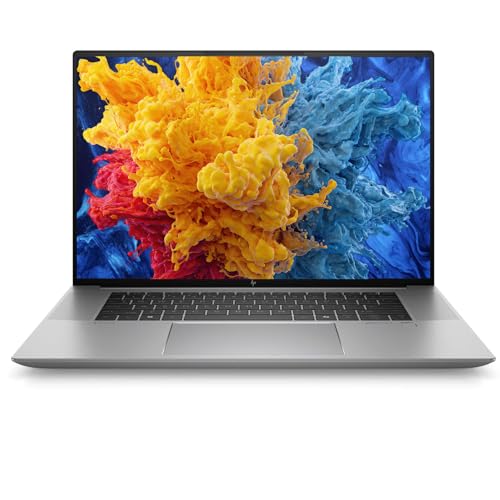
Engineers and creators will find the HP ZBook Studio G11 16″ Workstation Laptop to be an exceptional choice, thanks to its powerful Intel Core Ultra 7 processor and NVIDIA RTX A3000 GPU. This lightweight workstation, weighing just 3.8 lbs and boasting a slim 0.71” profile, is perfect for on-the-go professionals. With a 16-inch FHD+ anti-glare display, it’s designed for multitasking across CAD and 3D modeling. Featuring 32GB DDR5 RAM and a 512GB SSD, you’ll experience rapid performance. Plus, its enterprise-grade security and advanced connectivity options guarantee your data stays protected and you remain connected wherever you are.
Best For: Professionals such as engineers, architects, and creators who require a powerful, portable workstation for demanding applications.
Pros:
- Lightweight and portable design at just 3.8 lbs, making it easy to carry for on-the-go professionals.
- Powerful performance with Intel Core Ultra 7 processor and NVIDIA RTX A3000 GPU, ideal for 3D rendering and CAD applications.
- Robust security features including FIPS 140-2 compliance and TPM 2.0 to protect sensitive data.
Cons:
- Higher price point compared to standard laptops, which may not be suitable for casual users.
- Limited upgrade options due to its compact design, which could restrict future enhancements.
- Battery life may vary significantly under heavy workloads, potentially requiring frequent charging during intensive tasks.
MSI Creator A16 AI+ Mobile Workstation (A3HVFG-037US)

For creative professionals seeking powerful performance, the MSI Creator A16 AI+ Mobile Workstation (A3HVFG-037US) stands out with its impressive 16″ WQXGA display and a blazing-fast 240Hz refresh rate. You’ll appreciate the AMD Ryzen AI 9 365 processor, clocking at 2.0GHz, paired with 32GB of RAM and a 1TB SSD for seamless multitasking. The NVIDIA GeForce RTX 4060 GPU with 8GB GDDR6 VRAM guarantees stunning graphics and efficient AI performance—321 AI TOPS to be exact. Plus, the MSI AI Engine optimizes your system settings automatically, enhancing your creative workflow with ease and precision.
Best For: Creative professionals who require high-performance computing for graphic design, video editing, and AI-driven tasks.
Pros:
- Powerful Performance: AMD Ryzen AI 9 365 processor and NVIDIA GeForce RTX 4060 GPU ensure seamless multitasking and stunning graphics.
- High-Quality Display: The 16″ WQXGA display with a 240Hz refresh rate delivers exceptional visual clarity and responsiveness.
- Optimized Workflow: MSI AI Engine automatically adjusts system settings for enhanced performance tailored to user needs.
Cons:
- Weight and Portability: The mobile workstation may be heavier compared to traditional laptops, affecting portability.
- Price Point: Higher-end specifications can come with a premium price, making it less accessible for budget-conscious users.
- Limited Upgrade Options: Some components may have limited upgradeability, potentially restricting future enhancements.
Microsoft Surface Laptop Studio 2 (2023) – 14.4″ Touchscreen

With its powerful Intel Core i7 processor and up to 64GB of RAM, the Microsoft Surface Laptop Studio 2 (2023) is a game-changer for creators who need top-tier performance on the go. The NVIDIA GeForce RTX 4050 enhances your creative workflow, while the 14.4” PixelSense Flow touchscreen offers stunning visuals with a 120Hz refresh rate. You’ll enjoy up to 18 hours of battery life, ensuring you stay productive throughout the day. The dynamic woven hinge allows seamless shifts from laptop to creative canvas, and with multiple ports, you can easily connect all your essential accessories. It’s designed for your creative journey.
Best For: Creators and professionals seeking a powerful, portable device for multitasking and content creation.
Pros:
- Exceptional Performance: Equipped with Intel Core i7 and NVIDIA GeForce RTX 4050 for high-demand tasks.
- Long Battery Life: Up to 18 hours of use, allowing for all-day productivity without needing a charge.
- Versatile Design: Dynamic woven hinge enables easy transitions between laptop and creative modes.
Cons:
- Price Point: Higher cost may be a barrier for budget-conscious users.
- Weight: Slightly heavier compared to traditional laptops, potentially affecting portability.
- Limited Upgrade Options: RAM and storage upgrades are not user-serviceable, requiring purchase of higher tiers upfront.
MSI Stealth 18 AI Studio Gaming Laptop

The MSI Stealth 18 AI Studio Gaming Laptop stands out for creators who demand top-tier performance and stunning visuals. With its 18” QHD+ display boasting a 240Hz refresh rate and 100% DCI-P3 color accuracy, your work will pop like never before. Powered by the Intel Ultra 9-185H processor, it efficiently tackles demanding tasks, while the NVIDIA G-Force RTX 4080 GPU guarantees breathtaking graphics. You’ll appreciate the 64 GB DDR5 RAM and 2 TB PCIe SSD for lightning-fast performance and ample storage. Plus, with advanced connectivity options like Thunderbolt 4 and Killer WiFi 7, you’re set for seamless creativity.
Best For: Creators and gamers who demand exceptional performance and stunning visuals in their work and play.
Pros:
- Powerful Performance: Equipped with an Intel Ultra 9-185H processor and NVIDIA G-Force RTX 4080 GPU for seamless multitasking and gaming.
- Vibrant Display: 18” QHD+ display with a 240Hz refresh rate and 100% DCI-P3 color accuracy delivers stunning visuals.
- Ample Storage and Memory: Features 64 GB DDR5 RAM and a 2 TB PCIe SSD for fast performance and plenty of storage space.
Cons:
- Weight: The larger 18” form factor may be less portable compared to smaller laptops.
- Price Point: High-performance specifications come with a premium price, which may not fit all budgets.
- Battery Life: Intensive usage of high-end components may lead to shorter battery life during heavy tasks.
MSI Creator 17 Professional Laptop (B11UE-471)

Creatives seeking a powerful and portable workstation will find the MSI Creator 17 Professional Laptop (B11UE-471) an ideal companion. Its stunning 17.3″ UHD 120Hz display covers 100% of the DCI-P3 color gamut, guaranteeing vibrant visuals. Powered by an 11th Gen Intel Core i7-11800H processor, it smoothly handles demanding applications. The NVIDIA GeForce RTX 3060 graphics card enhances your creative workflows and gaming experiences. With a lightweight chassis and a 99Whr battery, you can work on the go. Plus, MSI’s Cooler Boost Technology keeps it cool, while a variety of I/O ports, including Thunderbolt 4, guarantees seamless connectivity.
Best For: Creatives and professionals seeking a high-performance, portable workstation with exceptional display quality and powerful graphics capabilities.
Pros:
- Stunning 17.3″ UHD 120Hz display with 100% DCI-P3 color gamut for vibrant visuals.
- 11th Gen Intel Core i7-11800H processor enables efficient handling of demanding tasks.
- Lightweight chassis and 99Whr battery provide excellent portability and extended usage.
Cons:
- Higher price point compared to entry-level laptops.
- Potentially limited upgradeability due to compact design.
- May generate noticeable fan noise under heavy loads despite cooling technology.
Factors to Consider When Choosing Creator Laptops With Nvidia Studio
When you’re choosing a creator laptop with Nvidia Studio, you need to focus on a few key factors. Performance capabilities, graphics power, and display quality are essential for your creative tasks. Don’t forget to take into account memory, storage options, and portability to find the perfect fit for your workflow.
Performance Capabilities and Specs
To guarantee your creative workflow runs smoothly, it’s vital to choose a laptop that boasts high-performance components. Look for models equipped with powerful processors like the AMD Ryzen 9 or Intel Core i7/i9, as they can efficiently handle demanding applications and multitasking. Opt for graphics cards featuring dedicated NVIDIA Studio Drivers, such as the GeForce RTX series, optimized for tasks like 3D rendering and video editing. Confirm you have at least 32GB of RAM for smooth operation when juggling multiple applications or large files. A high-resolution display with a wide color gamut, like 100% DCI-P3, is fundamental for accurate color representation. Finally, prioritize fast storage options, such as a 1TB or more PCIe NVMe SSD, for quick access to your projects.
Graphics Power and Performance
Choosing a laptop with robust graphics power is essential for tackling demanding creative tasks with ease. Creator laptops featuring Nvidia Studio utilize powerful GPUs like the RTX 30 and 40 series, delivering advanced graphics capabilities vital for 3D modeling, video editing, and rendering. These GPUs support real-time ray tracing and DLSS, which enhance image quality and performance in intensive applications. With high VRAM capacities, such as 8GB or more, you can manage large projects smoothly, ensuring efficient workflows. Additionally, the integration of AI-driven features optimizes performance and resource management, speeding up multitasking and rendering times. Pairing these powerful GPUs with a high refresh rate display (120Hz or more) guarantees ultra-smooth visuals, enhancing your creative experience.
Display Quality and Features
Display quality is an essential factor in selecting a creator laptop, especially one equipped with Nvidia Studio technology. Look for high-resolution displays like 2.8K QHD+ or WQXGA to guarantee sharp visuals and detailed imagery for photo and video editing. A high refresh rate, such as 120Hz or 240Hz, enhances motion fluidity, perfect for gaming and creative tasks requiring smooth visuals. Wide color gamut support, ideally 100% DCI-P3, assures accurate color reproduction, critical for visual professionals. Additionally, consider anti-glare finishes and high brightness levels to improve usability in various lighting conditions, allowing you to work comfortably. Finally, touchscreen capabilities in some models can enhance interactivity, making it easier to manipulate designs and edit content directly on your display.
Memory and Storage Options
When you’re diving into the world of creator laptops, memory and storage options play an essential role in your overall experience. Aim for at least 16GB of RAM to guarantee smooth multitasking and efficient handling of demanding applications. If you want enhanced performance, consider upgrading to 32GB or more. SSD storage is vital; a 1TB PCIe NVMe SSD is recommended for fast boot times and quick access to large files. Look for laptops with DDR5 RAM, as it offers higher bandwidth for intensive tasks. Additionally, make sure you have expandable storage options like extra M.2 slots to accommodate growing project files and creative assets. This combination allows seamless running of software like video editing suites and graphic design tools.
Portability and Weight Considerations
While you may prioritize performance in a creator laptop, portability and weight are equally important for your on-the-go lifestyle. Look for models weighing around 4 to 4.5 pounds, striking a balance between portability and performance. Sleek designs under 0.8 inches in thickness enhance mobility without sacrificing screen size. A lightweight chassis combined with a robust battery (99Whr or higher) can provide up to 14-18 hours of usage, perfect for extended creative sessions away from power sources. Opt for laptops featuring a slim bezel design to maximize your screen real estate while keeping overall weight manageable. Remember, lightweight designs should still include efficient cooling solutions to guarantee peak performance during intensive tasks.
Cooling Systems and Efficiency
Choosing a creator laptop with an effective cooling system is crucial for maintaining performance during demanding tasks like 3D rendering or video editing. Advanced cooling technologies, such as dual-fan designs and heat pipe systems, can boost airflow by up to 15%, ensuring your laptop runs efficiently. Look for AI-powered cooling features that adjust fan speeds based on system demands, enhancing performance while keeping noise levels low. Efficient cooling not only improves immediate performance but also prolongs the lifespan of internal components, reducing the risk of overheating and hardware failures during extended use. Since high-performance GPUs equipped with Nvidia Studio Drivers generate significant heat, robust cooling solutions are essential for maintaining ideal temperatures and delivering superior graphics capabilities.
Connectivity and Port Availability
Connectivity and port availability are vital considerations for anyone looking to maximize their creative potential with a laptop. You’ll want to verify your laptop has multiple USB ports, including USB Type-C and USB 3.2 Gen 2, for faster data transfer and versatile peripheral connections. Look for models with Thunderbolt 4 ports, allowing high-speed data transfers up to 40 Gbps, video output, and power delivery. HDMI 2.1 ports are also beneficial, supporting resolutions up to 8K for external displays. Built-in Wi-Fi 6 or Wi-Fi 7 capabilities will enhance wireless connectivity and reduce latency, essential for online collaboration. Finally, having an Ethernet port is key for stable internet connections, especially during large file transfers or intensive content creation tasks.
Security Features and Compliance
When it comes to selecting a creator laptop equipped with Nvidia Studio capabilities, security features shouldn’t be overlooked. Many of these laptops incorporate enterprise-grade security measures like TPM 2.0, Smart Card Readers, and FIPS 140-2 compliance to safeguard your sensitive data. Features such as Windows Hello allow for instant login using facial recognition or fingerprint scanning, making security convenient. Look for advanced protocols like Device Guard and Intel vPro, which bolster defenses against malware and cyber threats. Frequent software updates and preinstalled security drivers guarantee protection against the latest vulnerabilities. Additionally, hardware-based measures like secure boot and encrypted storage offer further security for your confidential projects, giving you peace of mind while you create.