As you explore the best hybrid gaming workstation PCs of 2025, you’ll find options that redefine performance and versatility. These machines not only cater to gamers but also meet the demands of content creators. From powerful processors to advanced graphics, each model offers unique features designed for seamless multitasking. But which one suits your needs best? Let’s break down the top contenders and their standout characteristics.
CyberPowerPC Gamer Xtreme VR Gaming PC (GXiVR8080A39)
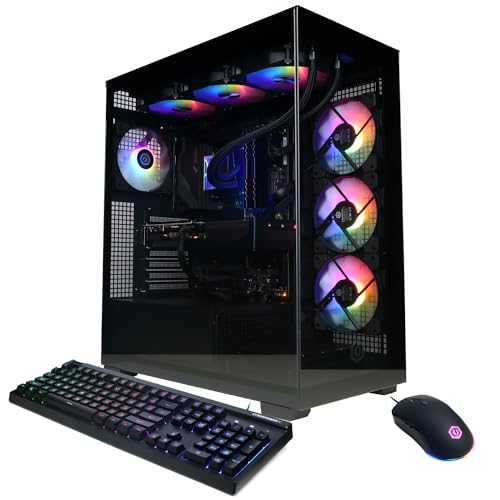
If you’re a gamer or content creator looking for top-tier performance, the CyberPowerPC Gamer Xtreme VR Gaming PC (GXiVR8080A39) is a standout choice for 2025. Powered by an Intel Core i9-14900KF and NVIDIA GeForce RTX 5070, it delivers exceptional graphics and processing speed. With 32GB of DDR5 RAM and a 2TB PCIe 4.0 NVMe SSD, you’ll experience seamless multitasking and ample storage for your projects and games. Its liquid cooling system keeps temperatures in check, while the tempered glass side panel and RGB lighting add a stylish touch. Plus, enjoy lifetime tech support and a solid warranty.
Best For: Gamers and content creators seeking high-performance computing with top-tier graphics and multitasking capabilities.
Pros:
- High-performance hardware with an Intel Core i9 processor and NVIDIA GeForce RTX 5070 for outstanding gaming and creative tasks.
- Ample memory and storage, featuring 32GB DDR5 RAM and a 2TB PCIe 4.0 NVMe SSD for seamless multitasking and extensive storage.
- Stylish design with a tempered glass side panel and customizable RGB lighting, along with a liquid cooling system for optimal performance.
Cons:
- High price point may not be suitable for budget-conscious consumers.
- Limited upgrade options due to proprietary components in some configurations.
- Potential noise from the cooling system under heavy load, which may be distracting in quiet environments.
iBUYPOWER Y40 PRO Gaming PC Desktop Computer

The iBUYPOWER Y40 PRO Gaming PC is an exceptional choice for gamers and content creators seeking powerful performance in a sleek design. With its AMD Ryzen 9 7900X processor and NVIDIA GeForce RTX 5070Ti graphics, you’ll experience top-tier gaming and seamless multitasking. It boasts 32GB of DDR5 RAM and a 2TB NVMe SSD, ensuring quick load times and ample storage. Connectivity options include six USB 3.1 ports and Wi-Fi 802.11AC, making it versatile for any setup. Plus, its stunning RGB lighting and included gaming keyboard and mouse enhance your gaming experience. Get ready to elevate your performance!
Best For: Gamers and content creators looking for high-performance computing capabilities in a stylish gaming PC.
Pros:
- High-performance hardware: Equipped with an AMD Ryzen 9 7900X CPU and NVIDIA GeForce RTX 5070Ti GPU for exceptional gaming and multitasking.
- Ample memory and storage: 32GB DDR5 RAM and a 2TB NVMe SSD ensure quick load times and plenty of space for games and files.
- Aesthetic design: Features a tempered glass RGB gaming case with customizable lighting to enhance your gaming setup.
Cons:
- Price point: May be on the higher end compared to other gaming PCs with similar specs.
- Weight: The gaming PC may be heavier and less portable due to its robust components.
- Wi-Fi performance: While it has Wi-Fi 802.11AC, it may not support the latest Wi-Fi 6 standards for maximum connectivity speed.
Alienware Aurora Gaming Desktop ACT1250

Designed for gamers and content creators alike, the Alienware Aurora Gaming Desktop ACT1250 stands out with its powerful NVIDIA GeForce RTX 5070 graphics, making it an ideal choice for those who demand top-tier performance in gaming and multitasking. Powered by an Intel Core Ultra 7 265F and 32GB of DDR5 RAM, this system guarantees smooth gameplay and efficient multitasking. The sleek matte basalt black design features customizable AlienFX lighting, allowing you to personalize your setup. With a 1TB SSD and a 1000W Platinum Rated PSU, the ACT1250 combines speed and reliability, making it a formidable workstation for any task.
Best For: Gamers and content creators seeking high-performance technology for gaming, livestreaming, and multitasking.
Pros:
- Powerful NVIDIA GeForce RTX 5070 graphics for superior gaming and content creation.
- Customizable AlienFX lighting to personalize your gaming setup.
- 1TB SSD with 32GB DDR5 RAM ensures fast load times and smooth multitasking.
Cons:
- High price point may not be suitable for budget-conscious consumers.
- Limited upgrade options due to the optimized chassis design.
- Weight and size may make it less portable compared to smaller desktops.
CyberPowerPC Gamer Xtreme VR Gaming PC (GXiVR8060A40)

For gamers and content creators seeking powerful performance without breaking the bank, the CyberPowerPC Gamer Xtreme VR Gaming PC (GXiVR8060A40) stands out as an ideal choice. Its Intel Core i5-13400F processor and NVIDIA GeForce RTX 5060 graphics deliver impressive performance for both gaming and content creation. With 16GB DDR5 RAM and a 1TB PCIe 4.0 NVMe SSD, you’ll experience rapid load times and seamless multitasking. The connectivity options, including USB-C, WiFi 6, and Bluetooth 5.3, guarantee you stay connected. Plus, with custom RGB lighting and a tempered side panel, it looks as good as it performs.
Best For: Gamers and content creators seeking a high-performance PC at an affordable price.
Pros:
- Powerful Performance: Equipped with an Intel Core i5-13400F and NVIDIA GeForce RTX 5060 for smooth gaming and multitasking.
- Rapid Storage: Features a 1TB PCIe 4.0 NVMe SSD for fast load times and ample storage.
- Connectivity Options: Offers modern connectivity with USB-C, WiFi 6, and Bluetooth 5.3 for versatile connections.
Cons:
- Limited Graphics Card: The RTX 5060 may not handle the latest AAA titles at ultra settings.
- No Optical Drive: Lacks a built-in optical drive for those who still use CDs/DVDs.
- Stock Cooling Solutions: The standard cooling may not be sufficient for overclocking enthusiasts.
iBUYPOWER Slate MESH Gaming PC Desktop Computer

With its powerful Intel Core i7 14700F CPU and NVIDIA GeForce RTX 5070 GPU, the iBUYPOWER Slate MESH Gaming PC is an excellent choice for gamers and content creators alike. You’ll enjoy lightning-fast performance with 32GB of DDR5 RAM and a 1TB NVMe SSD, ensuring quick load times and ample storage. Its striking tempered glass case features customizable RGB lighting, making it visually appealing. Plus, with Windows 11 Home pre-installed, you can dive straight into gaming or creative projects. With a solid customer rating of 4.4 stars, this desktop delivers the performance and aesthetics you need.
Best For: Gamers and content creators seeking high-performance computing with stunning visuals and efficient multitasking capabilities.
Pros:
- Powerful hardware: Equipped with an Intel Core i7 CPU and NVIDIA GeForce RTX 5070 GPU for excellent gaming and content creation performance.
- Ample memory and storage: Features 32GB of DDR5 RAM and a 1TB NVMe SSD for fast load times and plenty of storage space.
- Customizable aesthetics: Comes with RGB lighting and a tempered glass case for an eye-catching design.
Cons:
- Weight: At 36 pounds, it may be less portable compared to lighter gaming PCs.
- Price point: Higher-end specifications may come at a premium price that could be a consideration for budget-conscious buyers.
- Limited upgradeability: Depending on the case design and layout, some components may be difficult to upgrade in the future.
The Horizon Autherium I9 RTX Gaming PC

The Horizon Autherium I9 RTX Gaming PC caters perfectly to gamers and content creators seeking high-end performance without compromise. Powered by an open Core i9 CPU and 64GB of RAM, it handles demanding tasks effortlessly. The NVIDIA GeForce RTX 5070, with real-time ray tracing and DLSS 4.0 support, guarantees stunning visuals and smooth frame rates. With a 1TB M.2 SSD and 4TB HDD, storage is never an issue. Its advanced cooling system keeps everything running quietly, while multiple connectivity options, including USB-C and WiFi, enhance versatility. Built with premium components, this PC assures reliability and exceptional customer support.
Best For: Gamers and content creators seeking high-end performance and reliability in their computing experience.
Pros:
- Exceptional performance with a Core i9 CPU and 64GB RAM, ideal for demanding tasks.
- Stunning graphics capabilities with NVIDIA GeForce RTX 5070, featuring real-time ray tracing and DLSS 4.0 support.
- Advanced cooling system and premium build quality ensure quiet and reliable operation.
Cons:
- Higher price point compared to average gaming PCs due to premium components.
- Large size may not fit in all setups or desks comfortably.
- Potentially excessive power consumption due to high-performance components.
Thermaltake LCGS Quartz i1460 Gaming Desktop (S2QT-B760-560-LCS)

Offering an impressive blend of performance and design, the Thermaltake LCGS Quartz i1460 Gaming Desktop (S2QT-B760-560-LCS) is perfect for gamers and content creators alike. With its Intel Core i5-14400F CPU and NVIDIA GeForce RTX 5060 graphics, you’ll experience smooth gameplay and stunning visuals. The 16GB DDR4 3600MHz RGB memory and 1TB NVMe M.2 storage guarantee fast load times and ample space for your projects. The ARGB tower air cooler and tempered glass side panel add a stylish touch, while Windows 11 Home and WiFi capability provide modern connectivity. This desktop truly meets your hybrid gaming needs.
Best For: Gamers and content creators seeking a powerful and stylish desktop for demanding applications and smooth performance.
Pros:
- Impressive performance with Intel Core i5-14400F CPU and NVIDIA GeForce RTX 5060 for smooth gameplay and visuals.
- Ample memory and storage with 16GB DDR4 3600MHz RGB memory and 1TB NVMe M.2 storage for fast load times and plenty of space.
- Stylish design featuring ARGB tower air cooler and tempered glass side panel for an eye-catching setup.
Cons:
- Limited upgrade options due to pre-built nature, which may restrict future enhancements.
- Potentially high price point compared to custom-built systems with similar specifications.
- Noise levels may increase under heavy load, depending on cooling performance.
LXZ Gaming PC Desktop with Ryzen 7 8700F

Gamers and creative professionals looking for a powerful hybrid solution will find the LXZ Gaming PC Desktop with Ryzen 7 8700F an exceptional choice. With its 8-core AMD Ryzen 7 8700F and GeForce RTX 5060 graphics card, you can enjoy 1440p gaming and tackle AI-driven creative tasks effortlessly. The 32GB DDR5 RAM and 1TB NVMe SSD guarantee fast loading times and ample storage for your games and media. Plus, its sleek white tower design and WiFi 6 connectivity enhance both aesthetics and performance. Fully assembled and ready to go, this PC is designed for your gaming and creative needs.
Best For: Gamers and creative professionals seeking a powerful all-in-one solution for 1440p gaming and AI-driven tasks.
Pros:
- Exceptional performance with an 8-core Ryzen 7 8700F and GeForce RTX 5060 graphics card.
- Ample 32GB DDR5 RAM and 1TB NVMe SSD for fast loading times and sufficient storage.
- Sleek design with a panoramic view case and WiFi 6 connectivity for enhanced aesthetics and performance.
Cons:
- The white tower design may show dirt and dust more easily than darker colors.
- Limited upgrade options may restrict future hardware enhancements.
- The 1TB storage, while sufficient for many, may not be enough for extensive game libraries or large media files for some users.
Skytech Gaming King 95 Desktop PC

For those seeking a powerful blend of gaming and productivity, the Skytech Gaming King 95 Desktop PC stands out with its Intel i7 14700F processor and NVIDIA RTX 5070 Ti graphics card. With 32GB of lightning-fast DDR5 RAM and a 2TB Gen4 NVMe SSD, you’ll experience exceptional performance and storage speed. This setup runs games at Ultra settings in stunning 1440p Quad HD, delivering smooth gameplay over 60 FPS. The sleek black case, enhanced with RGB lighting, adds style to your workspace. Plus, it comes with a 1-year warranty and free technical support, ensuring peace of mind with your investment.
Best For: Gamers and content creators looking for a high-performance desktop PC that excels in both gaming and productivity tasks.
Pros:
- Exceptional gaming performance at Ultra settings with 1440p Quad HD resolution.
- Ample storage with a 2TB Gen4 NVMe SSD for quick loading times and large file storage.
- Aesthetically pleasing design with RGB lighting that enhances the overall look of your setup.
Cons:
- Higher price point compared to entry-level gaming PCs.
- Limited upgrade options due to specific component choices.
- Might be overkill for casual gamers or users with basic computing needs.
Skytech King 95 Gaming PC Desktop

The Skytech King 95 Gaming PC Desktop is designed for enthusiasts who crave high-performance computing without compromise. Powered by an AMD Ryzen 7 9700X CPU and an NVIDIA RTX 5070 graphics card, it effortlessly handles gaming at Ultra settings in 1440p Quad HD. With a blistering 1TB Gen4 NVMe SSD and 32GB DDR5 RAM, you’ll experience lightning-fast load times and seamless multitasking. The advanced AIO liquid cooling system guarantees peak performance, eliminating thermal throttling. Plus, its striking black case and included gaming peripherals make it a stylish addition to any setup. Enjoy a year of warranty and free technical support, too.
Best For: Gamers and content creators looking for a high-performance desktop capable of running demanding applications and games at optimal settings.
Pros:
- Exceptional Performance: Equipped with a powerful AMD Ryzen 7 9700X CPU and NVIDIA RTX 5070 graphics card for smooth gameplay and multitasking.
- Fast Storage: The 1TB Gen4 NVMe SSD provides rapid load times and ample storage for games and applications.
- Advanced Cooling: The AIO liquid cooling system ensures efficient thermal management, preventing overheating during intense gaming sessions.
Cons:
- Price Point: The high-performance components may come at a premium price, making it less accessible for budget-conscious gamers.
- Weight and Size: The large case and cooling system might require more space and could be heavier than standard desktops.
- Limited Upgradeability: Some components, like the proprietary cooling system, may restrict future upgrades or replacements.
Factors to Consider When Choosing Hybrid Gaming Workstation PCs
When you’re choosing a hybrid gaming workstation PC, consider a few key factors that can make or break your experience. You’ll want to evaluate the processor performance, graphics card capabilities, and memory and storage needs to match your workflow. Don’t forget about cooling efficiency and connectivity options, as they can greatly impact your system’s overall performance.
Processor Performance Requirements
Choosing the right processor is vital for achieving peak performance in a hybrid gaming workstation PC. Look for CPUs with higher core counts, ideally 24 cores or more, to enhance multitasking and performance in demanding applications. The clock speed, measured in GHz, also matters; higher base and turbo speeds improve responsiveness and frame rates during gaming. It’s important to strike a balance between single-core and multi-core performance since many games depend on single-core speed while creative applications thrive on multi-core capabilities. Additionally, consider processors with liberated overclocking features and effective thermal management for extra performance boosts. Finally, the CPU architecture—like Intel’s latest generations or AMD’s Ryzen series—significantly influences efficiency and performance in modern tasks.
Graphics Card Capabilities
Achieving high-quality performance in a hybrid gaming workstation goes beyond just selecting the right processor; the graphics card plays a pivotal role in shaping your overall experience. It directly impacts visual fidelity and performance in demanding games and applications. Opt for modern graphics cards, like those with NVIDIA’s RTX architecture, which support real-time ray tracing and DLSS for enhanced graphics. Pay attention to the dedicated video memory (VRAM); 12GB or more guarantees smoother performance at higher resolutions with complex textures. Compatibility with the latest graphics APIs, such as DirectX 12 and Vulkan, optimizes performance in newer titles. Finally, don’t overlook the cooling solution of your graphics card to maintain peak performance during long gaming sessions and prevent thermal throttling.
Memory and Storage Needs
Memory and storage are critical components that can make or break your hybrid gaming workstation’s performance. For best results, aim for at least 32GB of DDR5 RAM, which smooths multitasking and enhances data processing speeds. High-speed storage is equally important; consider NVMe SSDs with a minimum capacity of 1TB for rapid boot times and quick game loading. A smart setup combines an SSD for your operating system and frequently used applications, while a larger HDD serves as additional storage. If you can, look for systems with 6000 MHz RAM to greatly boost performance in memory-intensive tasks like gaming and video editing. Always verify compatibility of these components with your motherboard and CPU for maximum stability and efficiency.
Cooling Solutions Efficiency
When it comes to optimizing your hybrid gaming workstation, effective cooling solutions play an essential role in maintaining peak performance. Efficient options like liquid cooling systems can greatly lower CPU temperatures, enhancing stability during intense gaming or content creation. Don’t overlook airflow design; proper ventilation guarantees heat dissipates efficiently, thanks to optimized case designs and strategic fan placements. Using high-quality thermal paste also improves thermal performance by facilitating better heat transfer between your CPU/GPU and their coolers. Keep an eye on real-time temperature readings with monitoring software, allowing you to adjust cooling settings as needed. Finally, hybrid systems that combine air and liquid cooling strike a balance between cost-effectiveness and performance, giving you powerful cooling without the added complexity.
Connectivity Options Available
Selecting the right connectivity options can considerably enhance your hybrid gaming workstation experience. Look for a range of USB ports, including USB 2.0, 3.0, and 3.2, to guarantee seamless connections with your peripherals. Multiple HDMI and DisplayPort outputs are essential for connecting several monitors, boosting your multitasking capabilities. Don’t overlook Ethernet and Wi-Fi options like Wi-Fi 5 or Wi-Fi 6; fast internet is important for online gaming and productivity. Additionally, having USB-C ports will provide quicker data transfer and support modern devices. Finally, check for good onboard audio options and extra audio jacks to elevate your gaming and streaming experience. These features will help you make the most of your hybrid workstation.
Aesthetic Design Preferences
Aesthetic design preferences play an essential role in choosing the perfect hybrid gaming workstation PC that suits your style and environment. Look for features like tempered glass side panels and customizable RGB lighting to enhance visual appeal. The color scheme and material choices, such as matte finishes or metallic accents, can greatly impact your workstation’s aesthetic. You’ll want to take into account case dimensions and layouts to guarantee your PC fits seamlessly into your gaming or workspace. Unique design elements, like custom chassis shapes or integrated cooling solutions, not only elevate style but also improve functionality. Plus, the ability to personalize lighting effects and color combinations helps create an immersive atmosphere that complements your gaming or working experience.
Warranty and Support Options
Choosing a hybrid gaming workstation PC goes beyond just looks; warranty and support options are essential for safeguarding your investment. Make sure the warranty covers parts and labor for at least one year. This protection is vital for any unexpected repairs. Look for systems that offer free lifetime tech support; it’s invaluable for troubleshooting throughout your PC’s life. Check the return policy, aiming for a full refund within 30 days for defective items, ensuring you’re covered if issues arise early on. Onsite service as part of the warranty can save you the hassle of shipping your PC back. Finally, evaluate coverage terms for software issues or user-induced damage, as these vary widely between manufacturers.