The best high-performance conference room cameras make hybrid meetings easier to follow by combining sharp video, intelligent tracking, capable microphones, and flexible installation options.
This roundup compares 10 models across 4K and 1080p resolution, PTZ control, 360-degree coverage, speaker tracking, zoom, connectivity, and built-in audio to help you choose the right fit for your room.
Best 10 High-Performance Conference Room Cameras Picks for 2026
All-in-One 4K PTZ Pick
TONGVEO 4K AI-Tracking Camera System

- 4K/30fps video with 20x optical zoom
- AI facial and human tracking
- Includes Bluetooth speakerphone and LAN/PoE support
Best For: Large rooms, streaming, lectures, and events
Small-Room Simplicity
Logitech MeetUp 4K Conference Camera

- 4K sensor with 120° field of view
- Motorized pan and tilt up to 170° coverage
- Beamforming microphones with optional expansion
Best For: Huddle and small conference rooms
360-Degree Collaboration Choice
Meeting Owl 3 Conference Camera

- 360° 1080p video and 18-foot audio pickup
- AI speaker tracking with room-wide view
- Plug-and-play USB setup and broad platform compatibility
Best For: Hybrid meetings with collaborative seating
Reliable PTZ Workhorse
Logitech PTZ Pro 2 1080p Camera

- 1080p video with 90° viewing angle
- 3x optical and 10x digital zoom
- Smooth pan, tilt, and preset movement
Best For: Conference rooms, training spaces, and events
Best for Hybrid Collaboration

- 4K 360-degree video and audio coverage
- Automatic speaker focus and framing
- Expandable ecosystem for larger rooms
Best For: Hybrid meetings requiring room-wide coverage and hands-free speaker focus
Best PTZ Versatility
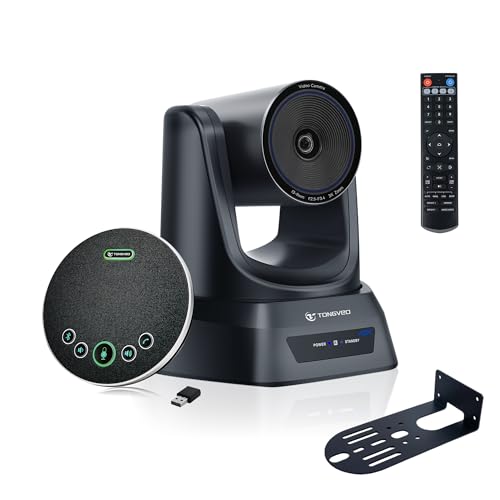
- 3X optical zoom with broad pan and tilt range
- Presenter Tracking and Auto Framing modes
- Includes wireless 360-degree speakerphone
Best For: Presentations and boardrooms needing directional camera control
Best for Privacy-Focused 360° Meetings
COOLPO PANA 360° Conference Camera

- 360-degree UHD room coverage
- Eight microphones with voice tracking
- Local AI processing and USB plug-and-play setup
Best For: Small rooms prioritizing immersive coverage and on-device processing
Best All-in-One 4K Pick
Gesture-Control PTZ Camera System

- 4K at 30fps with a 120° wide-angle view
- AI tracking with gesture and remote controls
- Includes speakerphone with noise-reduction microphones
Best For: Teams wanting a complete 4K video and audio meeting kit
Best 360-Degree Coverage
TOUCAN SC360 Conference Camera

- 360° room-wide video capture
- 1080p video with four noise-reduction microphones
- Built-in speaker and Bluetooth connectivity
Best For: Small rooms with participants seated around a table
All-in-One 4K PTZ Pick – TONGVEO 4K AI-Tracking Camera System
For teams comparing high-performance conference room cameras for large meetings, this TONGVEO system combines a 4K PTZ camera with AI tracking and a Bluetooth speakerphone. Its 20x optical zoom, multiple video outputs, and integrated audio make it a flexible option for conferencing, streaming, lectures, and events.
Best For: Large meeting rooms, lecture spaces, worship services, and live-streaming setups that need integrated video and audio.
Pros:
- Captures up to 4K video at 30fps with 20x optical zoom.
- Supports HDMI, USB 3.0, LAN, RTSP, RTMP, and PoE connectivity.
- AI facial and human tracking helps keep speakers in view.
- Included speakerphone offers USB, Bluetooth 5.0, and wireless dongle connections.
Cons:
- The extensive features may be more than small rooms require.
- The speakerphone’s listed pickup range is 5 meters, so larger spaces may need planning.
This is the most feature-rich choice in the group for buyers who want 4K PTZ performance, tracking, networking, and a companion speakerphone in one package. Its broad installation and software compatibility also support more specialized room designs.
Small-Room Simplicity – Logitech MeetUp 4K Conference Camera
The Logitech MeetUp is a practical choice for high-performance conference room cameras in huddle and small rooms. It pairs a 4K sensor with a wide 120-degree field of view, motorized pan and tilt, and built-in beamforming microphones for straightforward room coverage.
Best For: Huddle rooms and small conference rooms using USB bring-your-own-device meetings.
Pros:
- 4K sensor and 120-degree field of view help capture the room clearly.
- Motorized pan and tilt can expand viewing coverage up to 170 degrees.
- Beamforming microphones capture voices from up to 4 meters.
- Supports plug-and-play USB use and room deployments for Teams, Zoom, and Google Meet.
Cons:
- The expansion microphone is sold separately.
- Its design is aimed at small and huddle rooms rather than large spaces.
MeetUp emphasizes easy installation and manageable coverage instead of long-range PTZ zoom. It is a strong fit when a compact all-in-one device and simple BYOD connectivity matter more than extensive networking or integrated speakerphone features.
360-Degree Collaboration Choice – Meeting Owl 3 Conference Camera
For hybrid teams seeking high-performance conference room cameras with an immersive room view, the Meeting Owl 3 captures 360-degree 1080p video and 360-degree audio. Its AI-driven speaker tracking automatically focuses on active in-room speakers while maintaining a view of the room.
Best For: Hybrid discussions where participants sit around a table and remote attendees need an active view of the room.
Pros:
- Captures 360-degree video in 1080p HD and audio up to 18 feet.
- AI uses visual and audio cues to focus on in-room speakers.
- Plug-and-play USB setup is designed for quick deployment.
- Can pair with additional Owl devices or an expansion microphone for larger spaces.
Cons:
- Video resolution is 1080p rather than 4K.
- Expansion for larger rooms requires additional compatible Owl devices or microphones.
The Meeting Owl 3 stands apart from conventional front-facing cameras by showing the full room and dynamically highlighting speakers. It is especially compelling for collaborative seating layouts, while its ecosystem provides a path to broader room coverage.
Reliable PTZ Workhorse – Logitech PTZ Pro 2 1080p Camera
Logitech PTZ Pro 2 Camera – USB HD 1080P Video Camera for Conference Rooms | Conference Rooms
Check Price On AmazonThe Logitech PTZ Pro 2 is a dependable option for high-performance conference room cameras in conference rooms, training environments, and professional video applications. Its 1080p imaging, wide viewing angle, optical zoom, and smooth pan, tilt, and preset movement support flexible room framing.
Best For: Conference rooms, training spaces, and large events that need a conventional USB PTZ camera.
Pros:
- Delivers 1080p video with sharp resolution and color reproduction.
- Offers a 90-degree viewing angle with 3x optical and 10x digital zoom.
- Smoother pan, tilt, and preset movement helps reposition the camera.
- Processes video within the camera to help provide smoother streams.
Cons:
- It does not provide 4K video.
- Connectivity is centered on USB rather than HDMI or LAN outputs.
- The listed package is a camera system without integrated microphones or speakers.
PTZ Pro 2 is a focused camera choice for buyers who already have room audio covered and want straightforward control over framing. Its optical zoom and preset movement make it more adaptable than a fixed webcam for training and presentation spaces.
Best for Hybrid Collaboration – Meeting Owl 4+
The Meeting Owl 4+ is a strong choice among high-performance conference room cameras for teams that want an all-in-one 4K, 360-degree video and audio system. Its automatic speaker focus and broad ecosystem support are designed to keep remote participants engaged without requiring manual camera control.
Best For: Hybrid meetings in small to large rooms where automatic speaker framing and room-wide coverage matter.
Pros:
- Captures 360-degree video in 4K and 360-degree audio up to 18 feet.
- Automatically focuses on active in-room speakers using visual and audio cues.
- Plug-and-play USB setup, Microsoft Teams certification, and compatibility with Zoom, Google Meet, Webex, and other platforms.
- Can expand with additional Meeting Owls, an Owl Bar, or an Expansion Mic.
Cons:
- Its 360-degree design may be more capability than smaller, front-facing meeting spaces require.
- Some expansion and enterprise features require additional ecosystem hardware or accessories.
Choose the Meeting Owl 4+ if your priority is a polished, collaborative room experience with minimal manual adjustment and a clear upgrade path for larger spaces.
Best PTZ Versatility – TONGVEO 4K PTZ Camera System
The TONGVEO system combines a 4K PTZ camera, 3X optical zoom, and a wireless Bluetooth speakerphone, making it a flexible option among high-performance conference room cameras. It suits rooms that need directional camera control, presenter tracking, and integrated wireless audio.
Best For: Boardrooms, presentations, and online classrooms that benefit from optical zoom and selectable tracking modes.
Pros:
- Offers 3X optical zoom, 350-degree pan, and 180-degree tilt for flexible room coverage.
- Supports 4K UHD output through HDMI and 1080p at 30fps through USB 3.0.
- Includes Presenter Tracking and Auto Framing modes.
- Bundled wireless speakerphone provides 360-degree voice pickup and noise cancellation.
Cons:
- USB video output is limited to 1080p at 30fps, according to the supplied details.
- PTZ controls and multiple connection options may require more setup than an all-in-one 360-degree camera.
This package is a practical pick when you want presentation-friendly PTZ control and optical zoom without sourcing a separate conference speakerphone.
Best for Privacy-Focused 360° Meetings – COOLPO PANA 360° Conference Camera
The COOLPO PANA is an all-in-one 360-degree camera and microphone designed for straightforward room coverage. As one of the high-performance conference room cameras with local AI processing, it automatically tracks speakers while keeping its algorithms and firmware on the device.
Best For: Small meeting spaces that need immersive 360-degree coverage, automatic speaker tracking, and a USB setup with local processing.
Pros:
- Provides a 360-degree view with UHD resolution and no image stitching requirement.
- Voice tracking and intelligent zoom automatically adjust attention to active speakers.
- Eight microphones capture voices within a stated 15-foot range.
- USB plug-and-play connection and edge-based AI processing support a simple, privacy-conscious setup.
Cons:
- USB is the listed connectivity option, so it may be less suited to installations needing HDMI output.
- The supplied details identify digital zoom rather than optical zoom.
The PANA makes sense for teams seeking an uncomplicated 360-degree meeting device with speaker tracking and local AI processing rather than a remotely controlled PTZ system.
Best All-in-One 4K Pick – Gesture-Control PTZ Camera System
For buyers seeking high-performance conference room cameras with built-in audio, this TONGVEO system combines 4K video, PTZ movement, AI auto-tracking, and a speakerphone. Its 120-degree field of view, USB 3.0 connection, and multiple control options make it practical for hybrid meetings, presentations, and remote collaboration.
Best For: Teams that want a versatile 4K camera and speakerphone kit for small to medium-sized conference rooms.
Pros:
- Records or streams UHD 4K video at 30fps with a 120-degree wide-angle view.
- Offers AI tracking, gesture controls, remote control, and RS232/RS485 joystick support.
- Includes a speakerphone with two noise-reduction microphones and a claimed 16.4-foot pickup range.
- Supports USB and dongle connections, with compatibility across Windows, Mac OS, and Chrome OS.
Cons:
- Its 5X zoom is digital rather than optical.
- Some remote focus buttons do not apply to this camera version.
- 4K requires compatible meeting equipment and software.
This is a feature-rich choice when both video quality and room audio matter. The combination of 4K capture, tracking, flexible mounting, and included speakerphone makes it especially useful for teams that want one coordinated meeting setup.
Best 360-Degree Coverage – TOUCAN SC360 Conference Camera
The TOUCAN SC360 is one of the more room-oriented high-performance conference room cameras, using 360-degree capture to help include participants around a table. It pairs 1080p video with four noise-reduction microphones, a speaker, Bluetooth, and USB plug-and-play setup.
Best For: Small meeting rooms where participants sit around the camera and need broad visual and audio coverage.
Pros:
- Captures a full 360-degree view for flexible seating arrangements.
- Provides 1080p HD video and four noise-reduction microphones.
- Includes a built-in speaker and Bluetooth capability.
- Works with PCs, laptops, MacBooks, tablets, Zoom, and Microsoft Teams.
Cons:
- Video resolution is limited to 1080p rather than 4K.
- The fixed-focus and compact design may offer less framing control than a PTZ camera.
- Its broad coverage is better suited to room-wide views than distant close-ups.
The SC360 prioritizes inclusive room coverage and simple setup over advanced optical zoom or motorized positioning. It is a sensible option for collaborative rooms where participants may face different directions during a meeting.
Best Optical Zoom – 20X PTZ Conference Camera
For presentations, large rooms, and streaming setups, this TONGVEO model stands out among high-performance conference room cameras for its 20X optical zoom and 1080p video at 60fps. HDMI and USB 3.0 outputs, AI tracking, quiet PTZ movement, and extensive preset support give operators flexible control over distant subjects.
Best For: Large conference rooms, churches, classrooms, and streaming environments that need detailed long-distance framing.
Pros:
- 20X optical zoom preserves detail better than digital zoom when framing distant subjects.
- Captures 1080p video at 60fps for smoother motion.
- Supports single-person tracking, multi-person auto-framing, HDMI, and USB 3.0.
- Provides up to 350 degrees of pan, 180 degrees of tilt, and 255 recallable presets.
Cons:
- It provides Full HD rather than 4K resolution.
- The listed focus type is manual, so setup may require more operator adjustment.
- The stationary PTZ unit is heavier and less compact than a basic webcam.
This model is built for controlled, long-range camera work rather than casual desk meetings. Its optical zoom, 60fps capture, tracking modes, and preset recall make it a strong fit when consistent framing and room-wide reach are priorities.
How We Picked These High-Performance Conference Room Cameras
We focused on features that have the greatest effect on real-world meetings: image resolution, field of view, tracking behavior, microphone pickup, speaker quality, zoom capability, and connection options. The selection includes PTZ cameras for targeted framing, 360-degree systems for collaborative rooms, and all-in-one units that simplify setup.
We also considered compatibility with common platforms such as Zoom, Microsoft Teams, and Google Meet, along with USB, HDMI, LAN, and wireless connectivity where listed. Because room size and meeting style vary, no single camera is best for every buyer.
Quick Comparison
- Best for large rooms: Choose a PTZ model with optical zoom, such as a 20x system, for clear views of presenters and distant participants.
- Best for group discussions: A 360-degree camera can show the entire table and automatically focus on active speakers.
- Best for compact rooms: An all-in-one bar or wide-angle camera reduces installation complexity and keeps equipment discreet.
- Best for detailed video: Select a 4K camera when cropping, digital zoom, or presentation clarity matters.
- Best for simple deployment: Look for integrated microphones and speakers, USB plug-and-play setup, and broad conferencing compatibility.
Key Buying Factors
Resolution and Low-Light Performance
4K provides extra detail and flexibility for digital cropping, but a good 1080p camera can be sufficient for standard meeting layouts. Check the camera’s field of view and image quality in the lighting conditions of your room, not just its headline resolution.
PTZ, 360-Degree Coverage, and Tracking
PTZ cameras are useful when participants sit at different distances or when presenters move around. Optical zoom generally preserves more detail than digital zoom. A 360-degree camera is often more convenient for table-based meetings, while AI speaker tracking can keep the active participant visible without manual control.
Audio Pickup and Room Size
Built-in microphones and speakers are convenient, but confirm their stated pickup range against your table length and seating arrangement. Larger rooms may need expansion microphones, a separate audio system, or a camera with stronger directional pickup and echo control.
Connections, Controls, and Compatibility
USB is the simplest choice for a computer-based meeting room. HDMI and LAN connections add flexibility for displays, hardware codecs, streaming, or permanent installations. Verify operating-system support, conferencing-platform compatibility, remote-control features, and whether the camera can be mounted where you need it.
Who Should Buy Which High-Performance Conference Room Cameras?
Choose a 4K PTZ camera for boardrooms, classrooms, churches, or streaming setups where zoom range and precise framing matter. Choose a 360-degree smart camera for round tables and collaborative teams that want automatic speaker focus with minimal operator involvement. Choose an all-in-one conference bar for small rooms where quick installation, integrated audio, and a clean setup are more important than long-range zoom.
Before buying, measure the room, seating distance, display position, and available connection points. Matching those practical details to the camera’s coverage and audio range will usually matter more than choosing the highest resolution alone.