The right conference room camera can make hybrid meetings feel more natural by showing the room clearly, emphasizing active speakers, and keeping voices intelligible.
We compared 10 premium conference room cameras across video quality, room coverage, microphone performance, tracking features, connectivity, and setup needs to help you choose confidently.
Best 10 Premium Conference Room Cameras Picks for 2026
Best 4K 360° Pick

- 4K 360-degree video and audio
- Automatic speaker focus and zooming
- Expandable for larger rooms
Best For: Hybrid teams needing intelligent room-wide coverage
Best for Huddle Rooms

- 4K video with 120° field of view
- Motorized pan and tilt
- Beamforming microphones included
Best For: Small rooms and huddle spaces
Best Value 360° Camera

- 1080p 360-degree video
- AI-driven speaker tracking
- 18-foot audio pickup
Best For: Teams prioritizing room awareness over 4K resolution
Best for Large Rooms

- 4K UHD video
- 15x optical zoom
- Professional fixed-installation design
Best For: Dedicated conference rooms needing long-range framing
Best Panoramic Pick

- 180° panoramic coverage with selectable viewing angles
- Three 13MP cameras and automatic video stitching
- Plug-and-play support for Teams, Zoom, and more
Best For: Meeting rooms needing broad coverage and automatic framing
Best PTZ System

- 4K video with 120° wide-angle coverage
- AI tracking, gesture controls, and 350° pan range
- Includes a wireless speakerphone for room audio
Best For: Small and medium rooms needing flexible camera control
Best 360-Degree Design

- 360° all-in-one video capture
- Voice tracking with intelligent zoom
- Eight microphones and local AI processing
Best For: Huddle rooms needing immersive coverage and privacy-focused processing
Best Wide-Coverage Pick
Jabra PanaCast 180° 4K Conference Camera
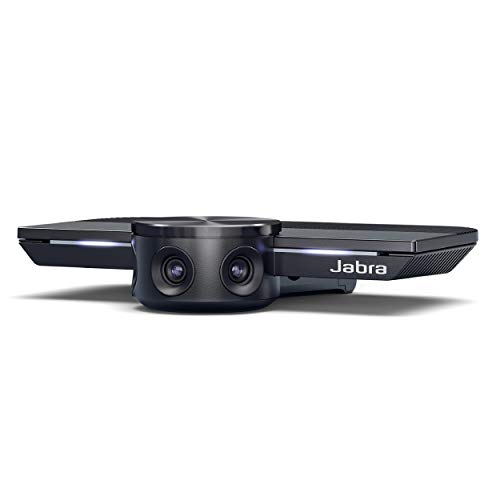
- Three-camera 180° panoramic view
- 4K video with automatic zoom
- Simple USB plug-and-play setup
Best For: Huddle rooms needing full participant coverage
Best Heavy-Duty Pick

- 4K video with 20x optical zoom
- AI face and humanoid tracking
- Camera and Bluetooth speakerphone included
Best For: Large rooms, events, and hybrid meetings
Best All-in-One 360° Option
TOUCAN SC360 Conference Camera

- 360° room coverage
- Four microphones and built-in speaker
- USB plug-and-play compatibility
Best For: Flexible meeting rooms needing integrated video and audio
Best 4K 360° Pick – Meeting Owl 4+
For teams seeking premium conference room cameras, the Meeting Owl 4+ combines 4K 360-degree video, room-wide audio, and automatic speaker focus in one compact device. Its plug-and-play setup and broad platform compatibility make it a practical choice for hybrid meetings.
Best For: Hybrid teams that want an intelligent all-in-one camera for small to large meeting spaces.
Pros:
- Captures 360-degree video in 4K and 360-degree audio up to 18 feet.
- Automatically focuses and zooms on in-room speakers using visual and audio cues.
- Supports room expansion with additional Owls, an Owl Bar, or an Expansion Mic.
- Includes enterprise-oriented management and connectivity features.
Cons:
- Some expansion accessories are additional purchases.
- Its 360-degree design may be more capability than smaller rooms require.
The Meeting Owl 4+ is a strong premium option when clear room-wide coverage and automated speaker framing matter more than a conventional forward-facing camera layout.
Best for Huddle Rooms – Logitech MeetUp 4K
The Logitech MeetUp is a practical premium conference room camera for huddle and small rooms. It pairs a 4K sensor with a 120-degree field of view, motorized pan and tilt, and integrated beamforming microphones for a tidy all-in-one setup.
Best For: Small conference rooms and huddle spaces using a forward-facing camera arrangement.
Pros:
- Provides 4K video, a 120-degree field of view, and 5x HD zoom.
- Motorized pan and tilt can extend viewing coverage up to 170 degrees.
- Beamforming microphones capture voices from up to 4 meters.
- Supports USB BYOD use and room deployments for major meeting platforms.
Cons:
- The Expansion Mic is sold separately.
- Its listed microphone pickup is more limited than room-wide 360-degree systems.
MeetUp is well suited to organizations that want high-resolution video and straightforward mounting in compact rooms without moving to a larger modular system.
Best Value 360° Camera – Meeting Owl 3
The Meeting Owl 3 offers a simpler route into premium conference room cameras, combining 1080p 360-degree video, 360-degree audio, and AI-driven speaker tracking. It is designed for quick USB deployment and works with common conferencing platforms.
Best For: Teams that want automatic speaker tracking and complete room visibility without requiring 4K resolution.
Pros:
- Captures a 360-degree view and audio pickup up to 18 feet.
- Automatically focuses on speakers with Owl Intelligence System features.
- Can be paired with other Owl devices or an Expansion Mic for broader coverage.
- Plug-and-play setup is designed to take about six minutes.
Cons:
- Video resolution is 1080p rather than 4K.
- Additional room-expansion components may be needed for larger spaces.
The Meeting Owl 3 remains a capable choice for collaborative rooms where speaker awareness and room-wide participation are priorities, while 1080p video is sufficient.
Best for Large Rooms – Logitech Rally Plus
For larger professional installations, Logitech Rally Plus brings studio-quality 4K video, autofocus, and optical zoom to premium conference room cameras. Its fixed-installation design is better suited to a dedicated room setup than casual desktop use.
Best For: Professional conference rooms that need high-resolution video and substantial optical zoom capability.
Pros:
- Records video in 4K UHD at up to 30 frames per second.
- Offers 15x optical zoom for bringing distant participants into view.
- Includes autofocus, automatic exposure, and low-light functionality.
- Professional fixed-installation form factor suits dedicated room deployments.
Cons:
- Its 17-pound fixed-installation design is less portable than compact all-in-one cameras.
- The supplied notes identify one white microphone pod, so additional audio coverage may require further equipment.
Rally Plus is the most installation-oriented option in this group, making it a logical fit when optical zoom and professional room integration take precedence over portability.
Best Panoramic Pick – Jabra PanaCast 50
Jabra PanaCast 50 180° Panoramic-4K Meeting Room Webcam, 4 Kilopixel Video Resolution, Black
Check Price On AmazonFor teams comparing premium conference room cameras, the Jabra PanaCast 50 stands out with three 13MP cameras, real-time video stitching, and a selectable field of view up to 180 degrees. Its automatic framing and low-light support make it a practical choice for rooms where participants need to stay visible without constant camera adjustments.
Best For: Medium-to-large meeting rooms that need broad panoramic coverage, automatic participant framing, and compatibility with Teams and Zoom.
Pros:
- Offers selectable 90-, 120-, 140-, and 180-degree fields of view.
- Combines three cameras, eight microphones, and automatic video stitching.
- Supports plug-and-play USB setup and leading conferencing platforms.
- Includes room occupancy insights for meeting-room safety monitoring.
Cons:
- Its 7.4-pound, 25.59-inch-wide design may require careful placement.
- Digital zoom is limited to 6x rather than optical zoom.
The PanaCast 50 is a polished all-in-one option for organizations prioritizing wide coverage and simple deployment. It is especially compelling when room visibility and platform compatibility matter more than pan-and-tilt control.
Best PTZ System – TONGVEO 4K AI PTZ Camera Kit
The TONGVEO kit is a flexible alternative among premium conference room cameras, pairing a 4K PTZ camera with a wireless speakerphone. AI auto-tracking, gesture control, a 120-degree view, and extensive pan-and-tilt movement give meeting hosts several ways to keep the discussion in frame.
Best For: Small and medium-sized meetings that benefit from active speaker tracking, remote or gesture control, and a separate portable speakerphone.
Pros:
- Captures 4K video at 30fps with a 120-degree wide-angle field of view.
- Supports face tracking, gesture control, remote presets, and 5x digital zoom.
- Provides 350 degrees of horizontal and 180 degrees of vertical movement.
- Includes a speakerphone with two noise-reducing microphones and a 5-meter pickup range.
Cons:
- Requires compatible equipment and software to display 4K video.
- The listed remote focus buttons do not apply to this version.
- The separate camera and speakerphone components create a more involved setup than an all-in-one bar.
This system offers strong control and positioning flexibility for users who want more than fixed framing. Its combination of PTZ movement, AI tracking, and included audio hardware makes it versatile, though buyers should plan for a slightly more complex installation.
Best 360-Degree Design – COOLPO AI Huddle Pana
The COOLPO AI Huddle Pana takes a different approach to premium conference room cameras with a 360-degree all-in-one design. Its local AI processing can track active speakers and optimize the displayed frame, while eight microphones capture voices from within a stated 15-foot range.
Best For: Huddle rooms and collaborative spaces where participants sit around the camera and need an immersive, all-around view.
Pros:
- Provides 360-degree capture in an all-in-one conference camera.
- Uses voice tracking and intelligent zoom to focus on active participants.
- Eight microphones capture voices within a stated 15-foot range.
- Processes algorithms and firmware locally for a privacy-focused setup.
Cons:
- USB connectivity means the camera must be physically connected to the host computer.
- The 360-degree format may be less suitable for rooms that need conventional front-facing framing.
- Its listed digital zoom is 3x.
The COOLPO is a strong fit for teams that want everyone around a table represented without manually positioning a camera. Local processing and driver-free USB setup further support straightforward deployment in privacy-conscious huddle spaces.
Best Wide-Coverage Pick – Jabra PanaCast 180° 4K Conference Camera
For teams comparing premium conference room cameras, the Jabra PanaCast stands out for its intelligent 180° panoramic coverage. Its three-camera system stitches together a full-room view, while automatic exposure and zoom help keep participants visible in changing conditions.
Best For: Huddle rooms and small meeting spaces where inclusive, wide-angle coverage matters.
Pros:
- Three 13 MP cameras provide 180° room coverage with real-time video stitching.
- Captures video in up to 4K and automatically adjusts zoom to include participants.
- Plug-and-play USB setup works with leading conferencing platforms, including Microsoft Teams and Zoom.
Cons:
- It is primarily a camera, so a separate audio solution may be needed for a complete room system.
- The wide-angle design is better suited to room coverage than tightly framed single-presenter shots.
The PanaCast is a practical premium option when the main priority is showing everyone in the room without complicated installation. Pairing it with Jabra Speak audio can create a more complete conferencing setup.
Best Heavy-Duty Pick – TONGVEO 4K PTZ Camera System
Among premium conference room cameras, the TONGVEO system is built for larger spaces that need flexible framing, long-range zoom, and integrated audio. Its 4K PTZ camera combines AI subject tracking with 20x optical zoom, while the included Bluetooth speakerphone supports two-way room audio.
Best For: Large meeting rooms, lecture spaces, events, and hybrid meetings requiring PTZ control and multiple outputs.
Pros:
- Records or streams up to 4K at 30fps with 20x optical zoom and a 63° wide-angle lens.
- AI facial and humanoid tracking helps keep speakers framed during presentations.
- Supports HDMI, USB 3.0, LAN, PoE, RTSP, and RTMP for flexible conferencing and streaming setups.
- Includes a Bluetooth speakerphone with four microphone arrays, full-duplex audio, and up to 5 m pickup distance.
Cons:
- The broader feature set may be more equipment than a small room needs.
- Its more advanced installation options can require additional setup compared with a basic USB webcam.
This is the most versatile choice of the three for professional rooms that need zoom, tracking, networking, and integrated audio in one package. It is especially compelling for large-room meetings and live production workflows.
Best All-in-One 360° Option – TOUCAN SC360 Conference Camera
The TOUCAN SC360 offers a straightforward alternative among premium conference room cameras by combining 360° video capture, a speaker, and four noise-reduction microphones. Its plug-and-play USB design is intended to simplify meetings across PCs, Macs, tablets, Zoom, Microsoft Teams, and other conferencing platforms.
Best For: Teams that want an all-in-one 360° camera and audio device for flexible room layouts.
Pros:
- 360° coverage helps show participants around the room without repositioning the camera.
- Includes four microphones and a built-in Bluetooth speaker for integrated audio.
- Plug-and-play USB connectivity supports PCs, laptops, MacBooks, and tablets.
- Supports common platforms such as Zoom and Microsoft Teams.
Cons:
- Its listed video resolution is 1080p, below the 4K output offered by the other cameras here.
- Fixed-focus and autofocus specifications are both listed, so framing behavior may vary by use.
The SC360 is a convenient choice when complete room awareness and simple setup are more important than maximum resolution. Its integrated speaker and microphone array reduce the number of separate devices needed for everyday meetings.
How We Picked the Best Premium Conference Room Cameras
We focused on cameras designed for shared meeting spaces rather than standard desktop webcams. The comparison considered resolution, field of view, speaker tracking, microphone pickup, built-in speakers, connection options, software compatibility, and installation flexibility.
We also included several camera styles because no single design suits every room. 360-degree cameras can capture participants around a table, panoramic models provide broad front-facing coverage, and PTZ systems offer adjustable framing and optical or digital zoom. Certification for platforms such as Microsoft Teams, Zoom, and other common conferencing services was also considered where available.
Quick Comparison
| Camera type | Best for | Main advantage |
|---|---|---|
| 360-degree | Small and medium meeting rooms | Shows participants around the table with minimal setup |
| 180-degree panoramic | Huddle rooms and front-facing layouts | Wide room coverage without a rear-facing view |
| PTZ | Large rooms and flexible installations | Remote control, zoom, and adjustable framing |
| Modular systems | Medium to large conference rooms | More control over microphones, speakers, and expansion |
Key Buying Factors for Premium Conference Room Cameras
Room Size and Camera Placement
Start with the room layout. A 360-degree model works well when attendees sit around one central table. A 180-degree camera is usually better when everyone faces a display or presenter. Larger spaces may need a PTZ camera, multiple cameras, or a modular system mounted above or below the screen.
Video Coverage and Tracking
4K resolution can improve clarity, but coverage and framing matter just as much. Look for automatic speaker tracking, group framing, and smooth transitions if participants move or speak from different locations. Digital zoom is useful, while optical zoom generally preserves more detail at distance.
Audio Performance
Check microphone pickup range, noise reduction, echo cancellation, and whether the system includes a speakerphone. Built-in audio may be sufficient for smaller rooms, whereas larger rooms benefit from expandable microphones or separate room-audio equipment.
Connectivity and Compatibility
USB makes many cameras easy to use with a computer or room appliance. HDMI, Ethernet, Bluetooth, and wireless options can provide more installation flexibility. Confirm compatibility with your conferencing platform and operating system before buying.
Installation and Management
Consider mounting hardware, cable length, power requirements, remote controls, firmware updates, and centralized device management. A camera with strong features is less valuable if installation is difficult or users cannot operate it reliably.
Who Should Buy Which Premium Conference Room Cameras?
Choose a 360-Degree Camera for Shared Tables
Meeting Owl, COOLPO, and similar models suit teams that want an all-in-one camera, microphone, and speaker with minimal configuration.
Choose a Panoramic Camera for Huddle Rooms
Jabra PanaCast models and Logitech MeetUp are strong fits for compact, front-facing rooms where a wide view is more useful than rear coverage.
Choose a PTZ System for Larger or Specialized Rooms
TONGVEO PTZ systems are worth considering when you need remote positioning, zoom, HDMI or LAN connectivity, or more control over presentation framing.
Choose a Modular System for Room Expansion
Logitech Rally Plus is better suited to organizations that need dedicated microphones, speakers, and a scalable conference-room setup. Prioritize the model that matches your room dimensions, platform, and installation plan—not simply the highest resolution.