The best smart ultrawide productivity monitors combine expansive desktop space with modern features such as streaming apps, USB-C connectivity, built-in speakers, and split-screen support. That makes them useful for hybrid work, creative projects, research, and entertainment without requiring multiple displays.
Our selection includes practical 34-inch models, high-resolution super ultrawides, and large-format smart monitors. Use the guide below to compare screen size, resolution, connectivity, ergonomics, and the features that matter most for your setup.
Best 10 Smart Ultrawide Productivity Monitors Picks for 2026
Best Smart Streaming Ultrawide

- 34-inch curved 3440x1440 workspace
- Built-in webOS streaming and LG Channels
- AirPlay 2, HDMI, and USB connectivity
Best For: Hybrid work and entertainment setups
Best Work-Focused Ultrawide

- 34-inch curved 3440x1440 display
- USB-C with up to 65W power delivery
- Picture-by-Picture and adjustable stand
Best For: Laptop-based office multitasking
Best High-Refresh Productivity Ultrawide

- 34-inch curved QHD 21:9 display
- High-refresh performance with FreeSync
- Eye Saver Mode and built-in speakers
Best For: Smooth office work and occasional gaming
Best USB-C Value
Philips 34-Inch Curved Ultrawide

- 3440 x 1440 workspace for multitasking
- USB-C with notebook power delivery
- 100Hz refresh and Adaptive-Sync
Best For: Laptop users needing one-cable connectivity and occasional gaming
Best for Multitasking
Samsung ViewFinity S50GC 34-Inch

- 3440 x 1440 workspace with matte finish
- PBP and PIP support two sources
- Eye-care features and 100Hz refresh
Best For: Users comparing projects or managing multiple input sources
Best Smart Features
LG 34-Inch Smart Curved Monitor

- webOS streaming built into the monitor
- USB-C with up to 65W power delivery
- AirPlay 2, speakers, HDR10, and 100Hz
Best For: Home offices that also serve as entertainment spaces
Best for Business Multitasking
Samsung 49-inch Dual QHD Ultrawide

- 49-inch 5120×1440 Dual QHD workspace
- USB-C with up to 90W charging
- 120Hz, HDR 400, and built-in speakers
Best For: Professionals needing a broad, dock-like workstation display
Best Smart Entertainment Hybrid
LG 34-inch UltraWide Smart Monitor
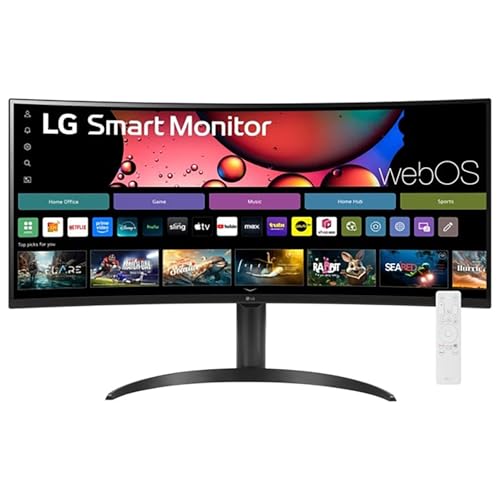
- 34-inch 3440×1440 curved display
- Built-in webOS streaming platform
- Magic Remote, HDR10, and 100Hz refresh rate
Best For: Home offices that double as streaming and entertainment spaces
Best for Split-Screen Workflows

- 45-inch 5120×1440 32:9 display
- PIP/PBP for two simultaneous sources
- USB-C, 120Hz, HDR400, and adaptive sync
Best For: Multitaskers managing multiple devices or source feeds
Best Smart Streaming Ultrawide – LG 34SR60QC-W Smart Monitor
The LG 34SR60QC-W combines a 34-inch curved QHD display with webOS streaming, making it a flexible choice among smart ultrawide productivity monitors. Its 21:9 layout gives you extra horizontal workspace for multitasking, while built-in apps and wireless casting support help it transition from work to entertainment.
Best For: Hybrid workspaces that also need built-in streaming and wireless device casting.
Pros:
- 34-inch 3440×1440 curved display provides a wide multitasking canvas.
- webOS offers access to streaming apps and more than 300 free LG Channels.
- 100Hz refresh rate, HDR10, and up to 99% sRGB coverage support smooth, colorful viewing.
- Includes two HDMI ports, three USB ports, AirPlay 2, and HomeKit compatibility.
Cons:
- Its 300-nit brightness may be modest for very bright rooms.
- The included stand offers tilt adjustment, but the supplied details do not indicate height adjustment.
This is a particularly convenient pick if you want one screen for cloud-based work, streaming, and laptop or console connections without adding a separate TV or streaming device.
Best Large-Screen Smart Monitor – Samsung M7 43-Inch 4K
The Samsung M7 offers a large 43-inch 4K UHD canvas with built-in streaming and smart-home features. While its 16:9 shape is not a conventional ultrawide, its expansive resolution and USB-C, HDMI, and USB-A connectivity make it worth considering alongside smart ultrawide productivity monitors for broad workspace and media use.
Best For: Users who prefer a very large 4K screen for documents, media, gaming, and smart-home control.
Pros:
- 43-inch 3840×2160 display provides generous screen area and detailed 4K imagery.
- Streams content directly and includes Samsung TV Plus live and on-demand programming.
- AI Picture Optimizer adjusts visuals for documents and gaming.
- USB-C, HDMI, USB-A, Wi-Fi, and Bluetooth support flexible connectivity.
Cons:
- Its 60Hz refresh rate is lower than several productivity-focused ultrawide options.
- The 16:9 aspect ratio does not provide the side-by-side panoramic layout of a 21:9 monitor.
- The glossy finish may reflect light in bright rooms.
Choose this model when sheer screen size and 4K detail matter more than an ultrawide aspect ratio. Its streaming, voice-related audio features, and smart-home integration add versatility beyond a standard computer monitor.
Best Work-Focused Ultrawide – LG 34WR55QK-B
The LG 34WR55QK-B is a practical productivity display built around a 34-inch curved WQHD panel. Its 21:9 layout, Picture-by-Picture support, USB-C connectivity, and adjustable stand make it a strong conventional alternative when comparing smart ultrawide productivity monitors for office work and multitasking.
Best For: Office users who want flexible window management, multiple inputs, and laptop charging.
Pros:
- 3440×1440 resolution and a 21:9 format support multiple windows on one screen.
- USB-C provides up to 65W power delivery for compatible laptops.
- Picture-by-Picture can display two separate input sources simultaneously.
- Height and tilt adjustment, Reader Mode, and a matte finish support longer work sessions.
Cons:
- It does not include the built-in webOS streaming platform found on LG’s smart monitor model.
- The 5ms response time and 100Hz refresh rate are capable for general use but not gaming-focused.
For productivity-first buyers, this LG prioritizes useful desk features over smart-TV functions. Its broad port selection and 65W USB-C charging can help simplify a laptop-centered workstation.
Best High-Refresh Productivity Ultrawide – Samsung ViewFinity S5
The Samsung ViewFinity S5 pairs a 34-inch 1800R curved QHD panel with a fast refresh rate and productivity-oriented eye-care features. It is a good fit for shoppers comparing smart ultrawide productivity monitors who want smooth motion and a focused office display with a straightforward HDMI and DisplayPort setup.
Best For: Professionals who want a smooth 21:9 office monitor with eye-care features and occasional gaming support.
Pros:
- Ultrawide 3440×1440 resolution provides room for side-by-side applications.
- 120Hz is listed in the product title, while supplied specifications list up to 144Hz refresh capability.
- AMD FreeSync support helps reduce choppiness and tearing with compatible systems.
- HDR10, Eye Saver Mode, flicker reduction, and built-in speakers add useful everyday features.
Cons:
- Connectivity is limited to one HDMI port and one DisplayPort in the supplied details.
- It lacks the built-in streaming and smart-platform features of dedicated smart monitors.
- The included stand features are not specified in the supplied notes.
This Samsung emphasizes fluid performance and comfortable extended use rather than streaming functionality. It is a sensible choice for office work that occasionally includes gaming, video, or other motion-heavy content.
Best USB-C Value – Philips 34-Inch Curved Ultrawide
The Philips 346E2CUAE is a practical choice for shoppers seeking smart ultrawide productivity monitors with a large 3440 x 1440 workspace, a curved VA panel, and single-cable USB-C connectivity. Its 100Hz refresh rate and wide color coverage also make it suitable for light gaming and media work.
Best For: Laptop users who want USB-C charging, a spacious multitasking display, and occasional gaming capability.
Pros:
- 3440 x 1440 UltraWide resolution provides generous room for side-by-side applications.
- USB-C supports notebook charging and display connectivity through one cable.
- 100Hz refresh rate, Adaptive-Sync, and 1ms MPRT response support smoother motion.
- Curved VA panel offers wide viewing angles and up to 121.3% sRGB coverage.
Cons:
- Its listed specific use is gaming, so professional productivity features are more limited than on office-focused models.
- The glossy screen finish may reflect ambient light more readily than a matte display.
Choose this Philips when USB-C convenience and strong all-around display performance matter more than built-in smart-TV features. It is a well-equipped ultrawide for a laptop-centered desk.
Best for Multitasking – Samsung ViewFinity S50GC 34-Inch
The Samsung ViewFinity S50GC is built for smart ultrawide productivity monitors shoppers who want maximum screen real estate without adding a second display. Its Ultra-WQHD resolution, matte finish, PBP/PIP modes, and eye-care features support extended desktop work.
Best For: Multitaskers who need to view two input sources, compare projects, or keep multiple applications visible at once.
Pros:
- 21:9, 3440 x 1440 display provides a broad workspace for desktop productivity.
- PBP and PIP allow simultaneous viewing of two sources in flexible layouts.
- Ambient light sensing, Eye Saver Mode, and Flicker Free technology support comfortable viewing.
- HDR10, 3000:1 contrast, and 100Hz refresh add depth and smoother motion.
Cons:
- It does not list USB-C connectivity or power delivery for laptop charging.
- The response time is 5ms, rather than the faster response figures offered by some gaming-oriented models.
- Its warranty is listed as one year.
The S50GC stands out when workflow flexibility is the priority. PBP and PIP make it especially useful for comparing content or managing two systems, while the matte panel and eye-care tools suit long work sessions.
Best Smart Features – LG 34-Inch Smart Curved Monitor
The LG 34SR63QA-W combines a 3440 x 1440 ultrawide workspace with webOS streaming, wireless casting, speakers, and USB-C power delivery. For shoppers considering smart ultrawide productivity monitors, it offers a flexible setup for working, streaming, and connecting compatible devices.
Best For: Home offices that double as entertainment spaces and users who want built-in streaming without a separate TV or streaming device.
Pros:
- Built-in webOS provides access to major streaming services and LG Channels.
- USB-C supports data transfer and up to 65W power delivery for compatible laptops.
- 34-inch 21:9 curved display offers 3440 x 1440 resolution and a 100Hz refresh rate.
- Includes built-in speakers, AirPlay 2, screen sharing, HDR10, and a 99% sRGB color gamut.
Cons:
- Its 1800R curve and VA panel may not suit shoppers who prefer a flat display.
- The listed focus is multimedia, so it may be less specialized for demanding professional color workflows.
- The Magic Remote is compatible but available separately.
This LG is the strongest pick for a hybrid workspace where entertainment matters as much as productivity. Its webOS platform and casting features add convenience, while USB-C and the ultrawide resolution keep it practical for laptop work.
Best for Business Multitasking – Samsung 49-inch Dual QHD Ultrawide
For shoppers comparing smart ultrawide productivity monitors, the Samsung S95UA stands out as a 49-inch workspace designed to replace a multi-monitor setup. Its 32:9 Dual QHD resolution, 1000R curve, USB-C connectivity, and built-in hub support make it especially practical for demanding desk work.
Best For: Professionals who need extensive workspace for business tasks, creative work, and occasional gaming.
Pros:
- 49-inch 5120×1440 Dual QHD display provides substantial room for multitasking.
- USB-C supports up to 90W charging and works with DisplayPort, HDMI, USB, and Ethernet connections.
- 120Hz refresh rate, HDR 400 support, built-in speakers, and a height-adjustable stand add versatility.
Cons:
- Its 45.18-inch width and 32.2-pound weight require a spacious, sturdy desk.
- The large 32:9 format may be excessive for smaller workspaces or simpler setups.
The Samsung is a strong all-in-one productivity display when you want maximum horizontal space and fewer desk cables. Its docking-style connectivity and ergonomic stand make it a particularly capable choice for a business workstation.
Best Smart Entertainment Hybrid – LG 34-inch UltraWide Smart Monitor
The LG 34SR65QC-B combines an ultrawide work display with built-in webOS streaming, making it a flexible option among smart ultrawide productivity monitors. Its 34-inch 3440×1440 screen provides useful multitasking space without the footprint of a 49-inch model.
Best For: Home offices that also serve as entertainment spaces for streaming, casual gaming, and everyday computing.
Pros:
- 34-inch 21:9 WQHD display offers a 34% wider view than a typical 16:9 screen.
- Built-in webOS provides access to major streaming services and more than 300 LG Channels.
- Includes a Magic Remote, HDR10, up to 99% sRGB color expression, and a 100Hz refresh rate.
Cons:
- USB-C connectivity is not listed among its supplied connection options.
- Its 300-nit brightness is more modest than the brighter HDR 400 models in this roundup.
- The one-year manufacturer warranty is shorter than the Samsung’s listed three-year warranty.
This LG is a practical pick when convenience matters as much as screen space. The integrated smart platform and remote make it easier to transition from work to streaming without adding a separate TV or media device.
Best for Split-Screen Workflows – INNOCN 45-inch 5K2K Ultrawide
The INNOCN 45C1R is built for users who want a large, high-resolution canvas with flexible input management. Its 45-inch 32:9 display, PIP/PBP modes, USB-C connectivity, and 120Hz refresh rate make it a compelling productivity-focused option among smart ultrawide productivity monitors.
Best For: Multitaskers, creators, and users who need to view content from two separate source devices on one screen.
Pros:
- 5120×1440 resolution on a 45-inch 32:9 panel supports expansive side-by-side workflows.
- PIP/PBP lets you display content from two input sources simultaneously.
- Offers USB-C connectivity, a 90W-class power-delivery design described in the title, multiple USB ports, RJ45, built-in speakers, and an adjustable stand.
- 120Hz refresh rate, 1ms response time, HDR400, and adaptive sync add gaming versatility.
Cons:
- The supplied specifications list a one-year manufacturer warranty.
- Its 45-inch, 32:9 design may need substantial desk space.
- The VA panel and 400-nit brightness may be less suitable for viewers seeking a higher-brightness or different panel technology.
The INNOCN makes the most sense when your workflow involves multiple computers, consoles, or other sources. PIP/PBP is the key differentiator, while the dense Dual QHD resolution keeps the expansive layout useful for detailed work.
How We Picked the Best Smart Ultrawide Productivity Monitors
We focused on monitors that improve productivity through a wide workspace, clear text, useful multitasking features, and flexible connectivity. The lineup includes 34-inch UltraWide displays, larger 43- and 49-inch options, and a 45-inch 5K2K model for users who want maximum horizontal resolution.
We also considered refresh rate, USB-C power delivery, HDR support, built-in speakers, smart-TV platforms, picture-by-picture modes, eye-care features, and compatibility with laptops and desktop computers. Because needs vary, the list balances affordable everyday displays with premium models for demanding workflows.
Quick Comparison
| What to Compare | Best For |
|---|---|
| 34-inch, 3440×1440 | Balanced multitasking and comfortable desk setups |
| 43-inch 4K | Large text, spreadsheets, and TV-style viewing |
| 49-inch Dual QHD | Replacing two side-by-side monitors |
| 45-inch 5K2K | Maximum horizontal workspace and sharp detail |
| USB-C with power delivery | One-cable laptop connection and charging |
Key Buying Factors for Smart Ultrawide Productivity Monitors
Screen Size and Resolution
A 34-inch 3440×1440 monitor is the most versatile choice for most desks. It provides room for multiple windows while retaining good pixel density. Larger 43- and 49-inch displays offer more workspace but need greater viewing distance and a wider desk. For crisp text across an especially wide panel, consider 5K2K resolution.
Connectivity and Laptop Support
USB-C is one of the most useful productivity features because a single cable can carry video, data, and power. Check the charging wattage before buying: 65W or 90W is more practical for many laptops than a lower-power connection. HDMI and DisplayPort remain important for desktops, while PIP and PBP are valuable for viewing two sources at once.
Smart Features and Ergonomics
WebOS or another smart platform can provide streaming without a separate device, but it should complement—not replace—your computer connections. Also check height adjustment, tilt, VESA compatibility, curve radius, speaker quality, and available desk depth. A bright HDR panel is helpful for video, but HDR labels alone do not guarantee premium contrast or color performance.
Refresh Rate and Comfort
A 100Hz or 120Hz refresh rate makes scrolling and window movement feel smoother than standard 60Hz. Reader modes, flicker reduction, low-blue-light settings, and an adjustable stand can make a greater difference during long work sessions than gaming-focused specifications.
Who Should Buy Which Smart Ultrawide Productivity Monitors?
Choose a 34-inch QHD model for a balanced home-office setup and the easiest fit on a typical desk. Select a USB-C model if you regularly connect a laptop and want fewer cables. A 43-inch 4K monitor suits users who prioritize large text, spreadsheets, or mixed work and entertainment. A 49-inch Dual QHD display is best for replacing a dual-monitor setup with one continuous workspace. For professional multitasking and the sharpest ultra-wide canvas, consider the 45-inch 5K2K option.