When it comes to maximizing your PC’s performance and aesthetics, choosing the right custom water cooling kit is essential. With options like the CORSAIR Hydro X Series and Thermaltake Pacific, you can find a blend of efficiency and style that suits your setup. But what factors should you consider when making your choice? Let’s explore the top kits on the market and what makes them stand out.
CORSAIR Hydro X Series iCUE Link XH405i Custom Cooling Kit

If you’re a PC enthusiast looking to elevate your cooling game, the CORSAIR Hydro X Series iCUE Link XH405i Custom Cooling Kit is an excellent choice. This hardline water cooling loop includes everything you need: the XC7 Elite CPU water block, XD5 Elite D5 pump/reservoir, XR5 360mm radiator, and three QX120 RGB fans. With iCUE LINK technology, connecting components simplifies your build. The intelligent D5 pump automatically adjusts cooling based on temperature, ensuring efficient performance. Plus, with 148 addressable RGB LEDs, your system will look stunning. Rated 4.3 stars, it’s a top pick for reliable, stylish cooling.
Best For: PC enthusiasts seeking a high-performance and visually appealing cooling solution for their desktop computers.
Pros:
- Complete kit includes all necessary components for easy installation.
- iCUE LINK technology allows for simple connectivity and management of components.
- Dynamic RGB lighting with 148 addressable LEDs enhances the aesthetic appeal of your build.
Cons:
- Requires space for installation due to the size of the components.
- Higher price point compared to traditional air cooling solutions.
- May require maintenance to ensure optimal performance over time.
Thermaltake Pacific CL360 Max D5c Water Cooling Kit

The Thermaltake Pacific CL360 Max D5c Water Cooling Kit is ideal for PC enthusiasts seeking powerful cooling with stunning RGB aesthetics. With 16.8 million color options, you can customize your setup effortlessly. This complete kit includes everything you need: a CPU water block, reservoir/pump combo, radiator, fans, fittings, tubing, and coolant. The W5 Plus CPU block fits all modern sockets and features a built-in temperature sensor for real-time monitoring. The PR22-D5 Plus combo offers a 300ml reservoir and an integrated D5 pump, while the 64mm thick copper radiator ensures excellent cooling performance for your system.
Best For: PC enthusiasts looking for high-performance cooling solutions with customizable RGB lighting.
Pros:
- Complete kit includes all essential components for an efficient cooling loop, simplifying installation.
- Universal CPU water block fits all modern sockets and features a built-in temperature sensor for real-time monitoring.
- Stunning RGB lighting with 16.8 million color options, compatible with voice control via Alexa and synchronization with Razer Chroma.
Cons:
- Installation may require advanced knowledge of PC building, which could be challenging for beginners.
- Size and thickness of the radiator may limit compatibility with certain case designs.
- Potential noise from the pump and fans, depending on the system configuration and usage.
Corsair iCUE Link XH505i RX 360 RGB Custom Cooling Kit

For PC enthusiasts seeking a blend of high-performance cooling and aesthetic appeal, the Corsair iCUE Link XH505i RX 360 RGB Custom Cooling Kit is an excellent choice. It features an iCUE LINK XC7 RGB ELITE CPU block, XD6 RGB pump reservoir combo, and three RX120 RGB fans, all designed for efficient thermal management. The 360mm radiator and XT hardline tubing simplify assembly while delivering exceptional cooling performance. Plus, with dynamic RGB lighting and customizable fan settings, you can tailor the look and sound of your setup. Utilize the iCUE software for seamless control and synchronization across your devices.
Best For: PC enthusiasts looking for high-performance cooling solutions with customizable RGB lighting for aesthetic appeal.
Pros:
- Efficient Thermal Management: The kit includes a 360mm radiator and quality components for superior cooling performance.
- Customizable Aesthetics: Dynamic RGB lighting allows for personalized visual customization and synchronization with other iCUE-compatible products.
- User-Friendly Assembly: The XT hardline tubing and fittings simplify the installation process, making it accessible even for beginners.
Cons:
- Higher Price Point: Custom cooling kits can be more expensive compared to standard air cooling solutions.
- Space Requirements: The large 360mm radiator may not fit in all cases, limiting compatibility.
- Potential Noise: Although designed for low-noise operation, high-performance settings could still produce noticeable sound levels.
24-Piece Silver Chrome G1/4 Fittings Kit for PC Water Cooling Systems

Looking to upgrade your PC water cooling system? The 24-Piece Silver Chrome G1/4 Fittings Kit is a fantastic choice for custom setups. Compatible with standard G1/4 ports on radiators, pumps, and reservoirs, it includes six essential fitting types. The durable electroplated finish not only resists corrosion but also adds a sleek look to your rig. Plus, the hand-tighten design guarantees easy installation without tools. At a cost-effective price, you can seal or reconfigure your cooling loops without overspending. With an impressive 4.5-star rating, this kit is praised for its solid construction and value. Upgrade your cooling today!
Best For: Custom PC builders and enthusiasts looking for a reliable and cost-effective solution to enhance their water cooling systems.
Pros:
- Durable electroplated finish provides corrosion resistance and an attractive appearance.
- Tool-free installation with hand-tighten design ensures a secure and leak-proof seal.
- Comprehensive kit with multiple fitting types offers great value and flexibility for cooling loop configurations.
Cons:
- Some customers reported missing parts upon delivery.
- Concerns about potential future leaks with certain fittings.
- Discontinued by the manufacturer, which may affect future availability or support.
DIY 240mm Water Cooling Kit for CPU/GPU
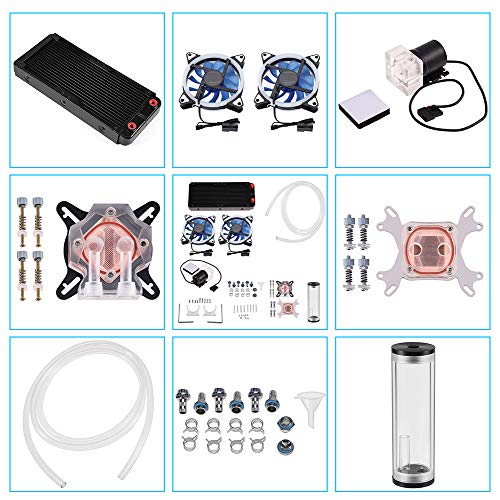
Designed with gamers and performance enthusiasts in mind, the DIY 240mm Water Cooling Kit for CPU/GPU offers an impressive cooling solution that keeps temperatures below 50°C during intense gaming sessions. This kit includes a 240mm heat sink, two LED fans, and universal blocks for both CPU and GPU. The high static pressure fans operate quietly, ensuring effective cooling for overclocked processors. While installation is mostly straightforward, some users report compatibility issues and a lack of instructions. Though aesthetics and value are praised, be cautious of potential leaks and noise, testing thoroughly for peak performance before diving into your gaming adventure.
Best For: Gamers and performance enthusiasts seeking an efficient cooling solution for their CPU/GPU during intense gaming sessions.
Pros:
- Excellent cooling efficiency with temperatures maintained below 50°C during heavy use.
- High static pressure fans operate quietly while providing effective airflow.
- Aesthetically pleasing design with LED fans and transparent reservoir.
Cons:
- Potential compatibility issues with certain motherboards and outdated power connectors.
- Reports of pump leaks and noise after a few months of use.
- Lack of clear installation instructions may lead to setup challenges for some users.
Corsair Hydro X Series Hardline Bending Toolkit

The Corsair Hydro X Series Hardline Bending Toolkit is an essential companion for PC enthusiasts keen to create stunning custom water cooling loops. Designed for 12mm and 14mm tubing, this toolkit includes a fine-toothed hacksaw for clean cuts, a deburring tool for smoothing edges, and an ambidextrous cutting jig for accuracy. The 30cm silicone insert helps maintain tubing shape while heating, and the adjustable bending mandrel allows for precise bends at 45°, 90°, and 180°. With an average rating of 4.2 stars, this toolkit is a must-have for achieving both performance and style in your build.
Best For: PC enthusiasts and modders looking to create custom water cooling loops with high-quality hardline tubing.
Pros:
- High precision tools: Includes a hacksaw, deburring tool, and cutting jig for accurate cuts and smooth edges.
- Versatile bending options: Adjustable mandrel allows for various bend angles (45°, 90°, and 180°) to suit different builds.
- Durable materials: Constructed with high-quality acrylic and silicone for longevity and reliability.
Cons:
- Requires additional equipment: A heat gun is necessary for optimal use, which may be an extra cost for some users.
- Learning curve: May take time for beginners to master the bending technique and achieve desired results.
- Limited tubing sizes: Designed specifically for 12mm and 14mm tubing, which may not accommodate other sizes.
CORSAIR Hydro X Series XD7 RGB Pump/Reservoir Combo

For PC enthusiasts seeking a blend of style and performance, the CORSAIR Hydro X Series XD7 RGB Pump/Reservoir Combo stands out with its unique 360mm distribution plate system. Featuring a powerful D5 PWM pump and a 140ml integrated reservoir, it guarantees exceptional flow balance. The combination of crystal-clear acrylic and heavy-duty nylon not only enhances durability but also provides an unobstructed view of your coolant and customizable RGB lighting. Easy to install, it fits most cases with vertical triple 120mm radiator mounting points. Plus, with iCUE compatibility, you can synchronize lighting effects effortlessly for a stunning visual display.
Best For: PC enthusiasts looking for high-performance cooling solutions with customizable aesthetics.
Pros:
- High-performance D5 PWM pump ensures exceptional flow balance for optimal cooling.
- Customizable RGB lighting with 36 addressable LEDs, compatible with CORSAIR iCUE for synchronized effects.
- Durable construction with crystal-clear acrylic and heavy-duty nylon for resilience and visibility.
Cons:
- Limited compatibility may restrict use to cases with specific vertical radiator mounting points.
- Requires additional components for a complete liquid cooling loop, potentially increasing overall cost.
- Installation complexity may be challenging for beginners without prior experience in PC building.
Joyzan Computer Heat Exchanger, 12 Tubes Cooler Pipe Water Cooling Radiator

If you’re looking to enhance your PC’s cooling performance, the Joyzan Computer Heat Exchanger is an excellent choice. With its 12 tubes design, this 360mm radiator accelerates water flow for quick heat dissipation, keeping your CPU stable. The combination of a red copper fin and brass water tank guarantees efficient cooling, which translates to smooth operation. Installation is straightforward, thanks to its user-friendly screws. Plus, the built-in water separator safeguards your components by preventing any mixing. Versatile enough for beauty apparatus and industrial use, this radiator meets a variety of cooling needs while maintaining peak performance.
Best For: Gamers and PC enthusiasts seeking efficient cooling solutions for high-performance systems.
Pros:
- High cooling efficiency with 12 tubes design for rapid heat dissipation.
- User-friendly installation with screws for easy setup.
- Versatile applications for both computer cooling and industrial uses.
Cons:
- Requires additional components such as pumps and fans for optimal performance.
- May take up significant space in smaller PC cases due to its 360mm size.
- Initial cost could be higher compared to standard air coolers.
Thermaltake Pacific DIY Water Cooling PETG Hard Tube Bending Kit

Looking to elevate your custom water cooling setup? The Thermaltake Pacific DIY Water Cooling PETG Hard Tube Bending Kit is your go-to solution. Designed for ID 12mm x OD 16mm hard tubes, this kit includes essential tools like 45°, 90°, 180°, and 360° mandrels made from durable anodized aluminum. You’ll appreciate the professional-grade pipe cutter for precise beveled edges and the silicone insert that prevents kinks during bends. With a high user rating of 4.7 stars, it’s ideal for both beginners and experienced builders. Although it’s a bit pricey, the quality and efficiency make it worth the investment.
Best For: Custom PC builders and enthusiasts looking for high-quality tools to create precise bends in hard tubing for water cooling systems.
Pros:
- High-quality anodized aluminum mandrels ensure durability and precision during bending.
- Includes a professional-grade pipe cutter for clean, beveled edges, enhancing the overall finish of your build.
- User-friendly design with silicone inserts and recommended lubrication makes it suitable for both beginners and experienced users.
Cons:
- The kit is considered expensive compared to other options on the market.
- Requires some practice to master the bending technique, which may be challenging for complete beginners.
- Limited to specific tube sizes (ID 12mm x OD 16mm), restricting its use with other tubing dimensions.
DIY Water Cooling Kit with CPU/GPU Block

The DIY Water Cooling Kit with CPU/GPU Block is an excellent choice for enthusiasts who want to push their systems to the limits with overclocking. This kit includes a copper CPU/GPU block, a cylindrical reservoir, a quiet pump, and a 240mm heat sink, all designed for effective cooling. It’s compatible with various Intel and AMD CPUs, although not with AMD4. The LED fans provide high static pressure while keeping noise low. While installation is straightforward, guarantee proper routing for ideal cooling. Users have noted some issues with pump noise and leaks, but overall, it’s a cost-effective solution for serious gamers.
Best For: Enthusiasts looking to effectively cool their overclocked systems with a budget-friendly DIY solution.
Pros:
- Cost-effective option for high-performance cooling.
- Compatible with a variety of Intel and AMD CPU models (except AMD4).
- LED fans provide high air pressure with low noise levels.
Cons:
- Reports of loud pump operation affecting overall noise levels.
- Potential for leaks from the plastic pump block.
- Issues with micro cracks in the reservoir impacting durability.
Factors to Consider When Choosing Custom Water Cooling PC Kits
When choosing a custom water cooling PC kit, you need to think about several key factors. Cooling performance, compatibility with your components, and how easy it is to install all play a big role in your decision. Plus, aesthetics and noise levels can greatly enhance your overall experience.
Cooling Performance Efficiency
To achieve ideal cooling performance in your custom water cooling PC kit, consider several key factors that greatly impact efficiency. First, focus on the design of the water block; a high-quality copper base enhances heat transfer and minimizes thermal resistance. Next, assess radiator thickness and fin density—thicker radiators with higher fins-per-inch (FPI) offer better heat dissipation. Pay attention to the pump’s flow rate, as higher rates, measured in liters per hour (L/H), guarantee adequate coolant circulation and improved performance. Additionally, integrating temperature sensors can optimize cooling by adjusting pump speeds based on coolant temperature. Finally, the quality and design of the tubing and fittings can affect flow restrictions and pressure loss, which are vital for overall effectiveness.
Component Compatibility Requirements
Achieving ideal cooling performance isn’t just about efficiency; it’s also about guaranteeing that all components work seamlessly together. First, check that your CPU water block matches your specific socket type, like LGA 1700 or AM4. Next, verify the fittings and tubing sizes align with your components, typically using G1/4 threads. Don’t forget to examine radiator dimensions; larger sizes like 360mm or 240mm need adequate space in your case. Additionally, ascertain the pump’s flow rate and power specs suit your cooling system—insufficient flow can hinder performance. Finally, if you’re adding RGB lighting, confirm compatibility with your motherboard or software for unified control over lighting effects. These factors will help you build a reliable and efficient custom cooling system.
Installation Complexity and Support
Although custom water cooling kits can offer superior thermal performance, the complexity of installation can vary greatly. Some kits demand advanced knowledge of PC components and water flow dynamics, while others come equipped with tools for easier assembly. It’s essential to review manuals and installation guides, as some users have faced confusion due to inadequate instructions. Additionally, verify compatibility with your motherboard and CPU/GPU sockets, since not all kits support every model. Support options, such as online tutorials, customer service, and community forums, can be invaluable for troubleshooting. Finally, consider user feedback regarding product reliability, especially concerning potential leaks and cooling effectiveness, before making your ultimate decision on a kit.
Aesthetic Customization Options
When selecting a custom water cooling kit, aesthetic customization options play a crucial role in creating a visually stunning PC build. Many kits offer individually addressable RGB LEDs, allowing you to create dynamic lighting effects that sync with your components for a cohesive look. Clear acrylic tubing and reservoirs enhance the visual appeal by showcasing coolant flow and RGB lighting, making your build truly stand out. You can also customize components like interchangeable fittings and tubing colors to match your overall design. Hardline tubing kits allow for intricate bends, giving you the freedom to create unique layouts. Plus, user-friendly software integration enables real-time adjustments to lighting and cooling performance, further elevating your PC’s aesthetic experience.
Noise Level Considerations
Noise level considerations are essential in selecting a custom water cooling PC kit, especially if you want a quiet computing environment. The pump and fan specifications play a significant role in this aspect. Look for intelligent pump controls that adjust automatically based on temperature sensors for quieter operation. Fan rotational speeds, often reaching up to 1800 RPM, can generate noise if not managed well. D5 pumps are generally quieter than DDC models due to their advanced features. Opt for low-noise fans that maintain airflow without excessive sound. Customizable settings in software allow you to fine-tune fan and pump speeds, prioritizing quieter performance during less demanding tasks. Balancing performance and noise is key for your ideal setup.
RGB Lighting Integration
Choosing a custom water cooling PC kit isn’t just about performance and noise levels; aesthetics play a significant role too, especially with the growing popularity of RGB lighting integration. Many kits come with individually addressable RGB LEDs that create stunning dynamic lighting effects, enhancing your setup’s visual appeal. You can synchronize these lights with software applications, allowing you to control colors and patterns across all components for a cohesive look. Some advanced kits even support voice control and sync with gaming peripherals, making your experience even more immersive. With options featuring over 100 addressable LEDs, effective RGB lighting not only beautifies but can also indicate system performance or temperature changes, merging functionality with style seamlessly.
Material Quality and Durability
While aesthetics are important, the material quality and durability of components in custom water cooling PC kits are critical for ensuring reliable performance. Choosing copper for water blocks maximizes thermal conductivity, while acrylic or polycarbonate tubing provides both visibility and durability. You’ll want corrosion-resistant materials, like brass and nickel-plated fittings, to prevent degradation over time. Consider the finish of fittings; an electroplated finish not only looks great but also helps resist wear. Additionally, the wall thickness of tubing, typically between 12mm and 16mm, affects structural integrity and bending ease. Finally, investing in high-quality seals and gaskets is essential to prevent leaks, ensuring your water cooling setup remains dependable and performs at its best.
Price and Value Analysis
Investing in a custom water cooling PC kit involves more than just picking aesthetically pleasing components; understanding price and value is key to making the right choice for your setup. Basic kits start around $50, while high-end options can exceed $300, reflecting differences in quality and features. Look for kits that include essential components—like pumps, reservoirs, and radiators—as these bundled options often provide better value than buying separately. While cheaper kits might skimp on cooling efficiency, premium models often justify their price with advanced features like RGB lighting. Don’t forget to take into account warranties and customer reviews; they can provide insight into performance and reliability, helping you make an informed decision that aligns with your budget and expectations.