A good all-in-one liquid cooler can keep a demanding CPU under control without making your build unnecessarily complicated. But radiator fit, socket support, fan noise, and cable routing matter as much as the size printed on the box.
These 10 selections cover compact 240mm and larger 360mm options, including RGB and non-RGB designs. Use the guide below to narrow down which type makes sense for your case and priorities.
Best 10 Aio Coolers for PC Picks for 2026
CPU Hotspot Focus
ARCTIC Liquid Freezer III Pro 360 A-RGB

- 360 mm radiator with P12 Pro fans
- Offset mounting and integrated VRM fan
- Concealed fan cabling; six-year warranty
Best For: Builds prioritizing hotspot-focused cooling and VRM airflow
Compact ARGB Pick
Thermalright Aqua Elite 240 V3

- 240 mm radiator with two PWM fans
- 5V three-pin motherboard ARGB sync
- AM4/AM5 and listed Intel socket support
Best For: Builds seeking a 240 mm AIO with synchronized lighting
Streamlined 360 RGB
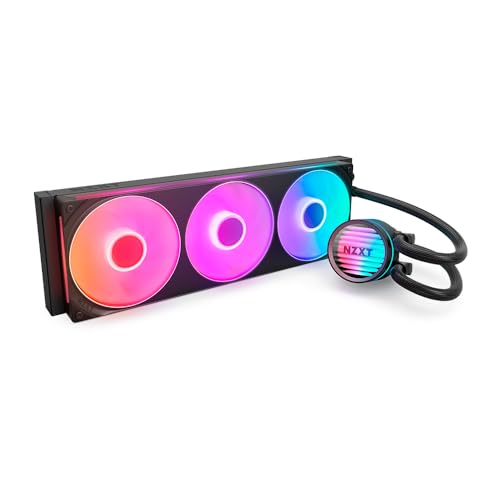
- 360 mm radiator and RGB fans
- Single-frame assembly reduces screws and cables
- Direct motherboard connection; five-year warranty
Best For: Builders wanting simpler installation for a 360 mm RGB AIO
Three-Fan ARGB Option
Thermalright Aqua Elite 360 V3

- 360 mm radiator with three PWM fans
- ARGB pump head and fan lighting
- 5V three-pin motherboard lighting sync
Best For: Builds with 360 mm space seeking three-fan ARGB cooling
Best for VRM Cooling
ARCTIC Liquid Freezer III Pro 360

- Integrated PWM VRM fan
- Offset cold-plate mounting
- Concealed radiator-fan PWM cables
Best For: 360 mm builds needing extra VRM airflow
Best for Easy ARGB Wiring

- Three RS120 ARGB fans
- Daisy-chained motherboard connections
- Pre-applied thermal paste
Best For: White builds with motherboard-controlled ARGB
Best for White ARGB Builds
ARCTIC Liquid Freezer III Pro 360 A-RGB

- White A-RGB model
- Integrated PWM VRM fan
- Offset cold-plate mounting
Best For: White 360 mm builds wanting lighting and VRM airflow
Broad Socket Support
Thermalright Frozen Notte 360 Black ARGB V2

- 397 × 120 × 27 mm radiator
- Three 120 mm PWM ARGB fans
- Broad listed Intel and AMD support
Best For: Black 360 mm builds needing broad socket support
White Build Pick
Thermalright Frozen Notte 360 White ARGB V2

- White 360 mm radiator
- Three matching PWM ARGB fans
- Lists AM4/AM5 and LGA 1700/1851
Best For: White-themed builds with supported sockets
Mirror-Lighting Option
Thermaltake TH360 ARGB Sync V2

- Infinity-mirror water-block cap
- Three 500–2,000 RPM PWM fans
- Two-year manufacturer warranty
Best For: Black builds prioritizing synchronized mirror lighting
CPU Hotspot Focus – ARCTIC Liquid Freezer III Pro 360 A-RGB
Among aio coolers for pc builds, the ARCTIC Liquid Freezer III Pro 360 A-RGB stands out for its native offset mounting, which positions the cold plate toward the CPU hotspot. Its 360 mm radiator, P12 Pro fans, and integrated VRM fan make it a feature-rich choice for a compatible build.
Best For: Builders who want a 360 mm AIO with hotspot-focused mounting and additional VRM airflow.
Pros:
- Supports Intel LGA1851 and LGA1700, with a contact frame for those sockets.
- Integrated PWM-controlled VRM fan adds airflow around the voltage converters.
- Fan PWM cables run through the hose sheathing, leaving one visible motherboard cable.
- Includes a six-year warranty.
Cons:
- The roughly 15.7-inch-long radiator assembly requires a case with suitable 360 mm mounting space.
- Its listed weight of 2,020 g makes it worth planning around during installation.
The offset mount and VRM fan distinguish this cooler from simpler radiator-and-pump designs. Check case clearance and socket compatibility before buying.
For shoppers comparing aio coolers for pc builds with room for a 240 mm radiator, the Thermalright Aqua Elite 240 V3 pairs two 120 mm PWM fans with an ARGB-lit pump head. Its motherboard-synchronized lighting and stated AMD and Intel socket support make it a practical option for a smaller radiator setup.
Best For: Builders seeking a 240 mm AIO with two PWM fans and motherboard-synced ARGB.
Pros:
- 240 mm radiator uses two 120 mm PWM ARGB fans.
- Pump head and fans support synchronization through a 5V three-pin ARGB connection.
- Product notes list AMD AM4/AM5 and several Intel LGA sockets in its installation support.
Cons:
- Requires a compatible 5V three-pin ARGB header for motherboard lighting synchronization.
- The title lists LGA1851, but the installation bullet does not; verify the included mounting hardware if using that socket.
This is the two-fan choice in the lineup. Confirm radiator clearance and your motherboard’s lighting connection before ordering.
The NZXT Kraken Core 360 RGB suits shoppers looking at aio coolers for pc builds who want a 360 mm radiator without a separate lighting controller. It connects directly to the motherboard and uses a single-frame RGB fan assembly designed to reduce installation screws and cables.
Best For: Builders who want a 360 mm RGB AIO with straightforward motherboard connectivity.
Pros:
- Single-frame fan design simplifies mounting compared with installing separate fans.
- Direct motherboard connection does not require an extra controller.
- PWM fan control allows fan-speed adjustments.
- Includes a five-year manufacturer warranty.
Cons:
- Requires a case that accommodates a 360 mm radiator.
- Listed noise level is 31.9 dB; consider fan settings if noise is a priority.
Its main appeal is a cleaner installation path for a three-fan RGB cooler. Check your case’s radiator support before committing.
The Thermalright Aqua Elite 360 V3 is a three-fan option among aio coolers for pc builds with space for a 360 mm radiator. It combines PWM-controlled 120 mm ARGB fans with an illuminated pump head that can synchronize through a motherboard’s 5V three-pin ARGB connection.
Best For: Builders who want a 360 mm AIO with three ARGB fans and motherboard lighting sync.
Pros:
- 360 mm radiator comes with three 120 mm PWM ARGB fans.
- Fan and pump-head lighting support 5V three-pin motherboard synchronization.
- Installation notes list AMD AM4/AM5 and several Intel LGA sockets.
Cons:
- Needs 360 mm radiator clearance and a compatible ARGB connection for lighting sync.
- The title lists LGA1851, but the installation bullet omits it; confirm mounting hardware for that socket.
Choose this over the Aqua Elite 240 V3 if your case supports the larger radiator and you want a three-fan layout. Verify socket hardware before installation.
Best for VRM Cooling – ARCTIC Liquid Freezer III Pro 360
Among aio coolers for pc builds, the ARCTIC Liquid Freezer III Pro 360 stands out for its integrated VRM fan and offset mounting, which positions the cold plate toward the CPU hotspot. Its three P12 Pro fans are designed for strong cooling under load.
Best For: Builders who want a 360 mm AIO with additional VRM airflow and minimal visible fan wiring.
Pros:
- Integrated PWM-controlled VRM fan cools the voltage converters.
- Offset mounting and an Intel LGA1851/LGA1700 contact frame target efficient CPU contact.
- Radiator-fan PWM cables run through the hose sheathing, leaving one visible motherboard cable.
Cons:
- The 360 mm radiator requires a case with suitable mounting space.
- Check socket compatibility beyond the specified Intel LGA1851/LGA1700 contact frame before buying.
Choose this model if practical cooling features matter more to you than lighting; confirm radiator clearance and your socket before ordering.
Best for Easy ARGB Wiring – CORSAIR Nautilus 360 RS ARGB
If you’re comparing aio coolers for pc builds with lighting, the white CORSAIR Nautilus 360 RS ARGB pairs three RS120 ARGB fans with straightforward motherboard connections. Its fan daisy-chain reduces the headers needed for PWM and lighting control.
Best For: White-themed builds that need a 360 mm AIO with motherboard-controlled ARGB and simpler fan wiring.
Pros:
- Three included RS120 ARGB fans support control through a compatible motherboard.
- Daisy-chained fans use one 4-pin PWM header and one 5V ARGB header.
- Convex cold plate comes with pre-applied thermal paste for quicker installation.
- Supports Intel LGA1851/LGA1700 and AMD AM5/AM4.
Cons:
- ARGB control requires a compatible motherboard and 5V ARGB header.
- The 360 mm radiator needs appropriate case clearance.
This is a practical pick when you want lighting without a separate fan-control system. The stated 20 dBA figure applies to the pump, not necessarily the complete cooler.
Best for White ARGB Builds – ARCTIC Liquid Freezer III Pro 360 A-RGB
For shoppers seeking aio coolers for pc builds with a white finish, the ARCTIC Liquid Freezer III Pro 360 A-RGB combines lighting with an integrated VRM fan and offset cold-plate mounting. Its P12 Pro fans are designed to deliver stronger cooling than the P12, including at low speeds.
Best For: White-themed 360 mm builds that call for A-RGB styling and dedicated VRM airflow.
Pros:
- PWM-controlled VRM fan provides airflow around the voltage converters.
- Offset mounting shifts the cold plate toward the CPU hotspot.
- Includes an Intel LGA1851/LGA1700 contact frame.
- Radiator-fan PWM cables are routed inside the hose sheathing.
Cons:
- Its 360 mm radiator needs a compatible case mounting location.
- Confirm your motherboard’s A-RGB connection and socket compatibility before purchase.
Pick this version if you want the Liquid Freezer III Pro’s mounting and VRM-cooling features in a white A-RGB build; check fit and connections first.
Broad Socket Support – Thermalright Frozen Notte 360 Black ARGB V2
Among aio coolers for pc builds, the black Frozen Notte 360 V2 is worth considering if you want a 360 mm radiator, three PWM fans, and motherboard-synced ARGB lighting. Check your case clearance before choosing it: the radiator measures 397 × 120 × 27 mm.
Best For: Builders seeking a black 360 mm liquid cooler with broad listed Intel and AMD socket support.
Pros:
- Includes three 120 mm PWM fans rated up to 2,000 RPM.
- Copper-base water block and 450 mm woven-protected tubing.
- Lists support for Intel LGA 1851/1700 and AMD AM5/AM4, among other sockets.
Cons:
- Requires room for a 397 mm radiator; the listing recommends a case width over 250 mm.
- Lighting needs a compatible 5V 3-pin ARGB header.
Its main appeal is the combination of a large radiator, ARGB, and extensive listed socket compatibility. Confirm both mounting space and motherboard headers before ordering.
White Build Pick – Thermalright Frozen Notte 360 White ARGB V2
If you’re comparing aio coolers for pc builds with white components, this Frozen Notte 360 V2 pairs a white 360 mm radiator with three matching PWM ARGB fans. Its listed radiator dimensions are 397 × 120 × 27 mm, so verify your case’s mounting space.
Best For: White-themed desktops using a listed Intel LGA 115x/1200/1700/1851 or AMD AM4/AM5 socket.
Pros:
- White radiator and three matching 120 mm PWM ARGB fans.
- Full-copper water-block base and 450 mm tubing.
- Fans are rated up to 2,000 RPM, with a stated noise level of 27.7 dBA or less.
Cons:
- Its 397 mm radiator needs suitable case clearance; the listing recommends a case width over 250 mm.
- The listed socket range is narrower than the black model’s, particularly for older AMD platforms.
Choose it primarily for its coordinated white appearance and listed modern-socket support. Check radiator fit and your exact socket before purchase.
Mirror-Lighting Option – Thermaltake TH360 ARGB Sync V2
For shoppers comparing aio coolers for pc builds where lighting matters, the Thermaltake TH360 ARGB Sync V2 offers an infinity-mirror water-block cap and synchronization with several motherboard RGB platforms. Its three 120 mm PWM fans are rated for 500–2,000 RPM.
Best For: Builders who want a black 360 mm cooler with mirror-style lighting and motherboard RGB synchronization.
Pros:
- Infinity-mirror lighting and a rotatable cap for visual customization.
- Lists synchronization with ASUS Aura Sync, GIGABYTE RGB Fusion, MSI Mystic Light, and ASRock Polychrome.
- Copper base plate and support for Intel LGA 1700 and AMD AM5/AM4, among other sockets.
- Includes a two-year manufacturer warranty.
Cons:
- Its approximately 15.59-inch-long radiator requires compatible 360 mm case mounting space.
- The stated manufacturer warranty is two years.
This model stands out for its mirror-effect lighting and specified RGB-platform support. Confirm case clearance and your motherboard’s lighting connections before buying.
How We Picked the Best Aio Coolers for PC
We focused on practical choices across the selected 240mm and 360mm coolers, including different lighting styles, finishes, and connection approaches. Rather than treating radiator size or fan speed as a guarantee of performance, we prioritized the details buyers can verify before ordering: case clearance, CPU socket support, included fans, lighting controls, and installation requirements. Prices and regional bundles can change, so confirm the current listing before buying.
Quick Comparison
The main decision is size. The Thermalright Aqua Elite 240 V3 is the 240mm option in this group and is worth considering when a 360mm radiator will not fit. The remaining selections are 360mm coolers, which need three adjacent 120mm fan positions and adequate radiator clearance. Within that larger group, ARCTIC offers RGB and non-RGB Liquid Freezer III Pro configurations; Thermalright includes Aqua Elite and Frozen Notte variants; and NZXT, CORSAIR, and Thermaltake provide other styling and connection choices. The repeated ARCTIC A-RGB listing should not be mistaken for a distinct model.
Key Buying Factors for Aio Coolers for PC
Case Fit and Radiator Clearance
Check your case’s radiator support for the exact mounting position you intend to use. A case that accepts three 120mm fans does not necessarily have room for a radiator plus fans. Also measure clearance around the motherboard heatsinks, RAM, GPU, and front-panel cables. Check radiator thickness on the exact model: a thicker assembly can limit top mounting even when a case advertises 360mm support.
Socket Support and Installation
Match the cooler’s included mounting hardware to your exact CPU socket, not just the AMD or Intel brand name. Socket support can differ between product revisions and listings. Review the manual for pump power, fan headers, and any controller or USB connection before purchasing, especially if your motherboard has few available headers.
Noise, Lighting, and Upkeep
Larger radiators can provide more surface area, but actual temperatures and noise depend on the CPU, fan settings, case airflow, and mounting. Look for PWM fan and pump control if you want to tune acoustics. For ARGB builds, verify the connector type and motherboard compatibility; a lighting label alone does not confirm software control. AIOs are typically sealed, but you should still periodically clean radiator dust and listen for unusual pump or fan noise.
Who Should Buy Which Aio Coolers for PC?
Choose a 240mm model if your case cannot accommodate 360mm or you prefer a less demanding installation. Choose a 360mm model if it fits comfortably and you want more radiator area for a higher-power CPU or quieter fan settings. Pick an RGB variant for a visible build; consider the non-RGB ARCTIC option if lighting is unnecessary. If appearance is the deciding factor, compare the black and white Frozen Notte listings against your case color. Above all, buy the cooler whose mounting hardware, dimensions, and connections you have confirmed for your PC.