When it comes to enhancing your gaming setup in 2025, choosing the right RGB PC case is essential. With options like the LIAN LI LANCOOL 216 and the NZXT H9 Flow RGB+, you’ll find a blend of style and performance that suits your needs. But how do you know which case is the best fit for you? Let’s explore the top contenders and what makes them stand out.
LIAN LI LANCOOL 216 E-ATX PC Case

If you’re a gamer looking for a blend of performance and aesthetics, the LIAN LI LANCOOL 216 E-ATX PC Case is an exceptional choice. This mid-tower case features a sturdy steel frame and sleek tempered glass, making it both durable and visually appealing. With ample space for E-ATX, ATX, and Micro-ATX motherboards, you can easily install high-performance components. The innovative cooling design, complete with pre-installed ARGB fans and fine mesh panels, guarantees peak airflow. Plus, its user-friendly installation features and effective cable management keep your setup tidy. You’ll appreciate the striking RGB options that elevate your gaming rig’s look.
Best For: Gamers and PC builders seeking a high-performance, aesthetically pleasing mid-tower case with excellent cooling capabilities.
Pros:
- Ample space for various motherboard sizes (E-ATX, ATX, Micro-ATX) and large GPUs.
- Exceptional cooling with pre-installed ARGB fans and fine mesh panels for improved airflow.
- User-friendly design featuring effective cable management and easy installation options.
Cons:
- Limited control for RGB lighting as some users noted the absence of a power switch for the front fans.
- Weighty build at 23.1 pounds may make it less portable for frequent movers.
- Potential compatibility issues with some larger cooling setups, depending on configuration.
Lian Li O11D EVO RGB Gaming Case (O11DERGBX.US)

The Lian Li O11D EVO RGB Gaming Case (O11DERGBX.US) is an ideal choice for gamers seeking a harmonious blend of aesthetics and performance. Its dual chamber design enhances airflow and cable management, while the customizable RGB strips elevate your setup’s visual appeal. With room for a 420mm radiator and graphics cards up to 455.7mm, this case supports high-end components effortlessly. The removable motherboard tray simplifies builds, and the silent operation at max speeds guarantees a quiet gaming experience. Highly rated for its build quality and modularity, it’s an excellent option for anyone focused on both style and functionality.
Best For: Gamers and PC enthusiasts looking for a stylish, high-performance case with excellent airflow and cable management features.
Pros:
- Exceptional build quality and modular design for easy assembly and upgrades.
- Customizable RGB lighting strips enhance the aesthetic appeal of any gaming setup.
- Dual chamber layout improves airflow and cable management, promoting efficient cooling.
Cons:
- Lacks external bays for additional drives, limiting expansion options.
- Does not include fans, necessitating separate purchases for optimal cooling.
- Limited hard drive mounts may require additional solutions for storage needs.
NZXT H9 Flow RGB+ ATX Mid-Tower Airflow PC Case

For gamers seeking an exceptional blend of aesthetics and performance, the NZXT H9 Flow RGB+ ATX Mid-Tower Airflow PC Case stands out with its dual-chamber design that enhances airflow and cable management. Weighing 29.5 pounds and measuring 20.08 x 19.29 x 12.6 inches, it houses seven RGB fans for peak cooling. The tempered glass panels display your build beautifully, while perforated steel guarantees efficient airflow. With user-friendly features like extra-wide cable channels and a control hub for RGB management, this case makes assembly a breeze. Rated 4.8 out of 5 stars, it’s a favorite for its stunning aesthetics and performance.
Best For: Gamers and PC builders looking for a visually appealing case with excellent airflow and cooling capabilities.
Pros:
- High-quality construction with a premium finish and stunning tempered glass panels.
- Optimized airflow with seven RGB fans and perforated steel panels for efficient cooling.
- User-friendly design with extensive cable management features and ample space for large components.
Cons:
- Potential issues with GPU clearance, which may limit compatibility for larger graphics cards.
- Limited space for additional 3.5 drives, which might be a drawback for users needing more storage options.
- Some users may find the price point higher compared to basic models with fewer features.
NZXT H6 Flow RGB Mid-Tower Airflow Case

Designed with gamers in mind, the NZXT H6 Flow RGB Mid-Tower Airflow Case offers exceptional airflow and aesthetic appeal, making it ideal for those who prioritize both performance and style. Its wraparound tempered glass panels provide a stunning view of your components, while the compact dual-chamber design enhances thermal efficiency. With three pre-installed RGB fans and an airflow-optimized perforation pattern, cooling is effective and visually striking. Plus, the intuitive cable management system keeps your setup neat. Weighing 20.7 pounds, this case supports large components and is easy to assemble, making it a top choice for your gaming rig.
Best For: Gamers and PC builders looking for a stylish case that combines excellent airflow with a modern aesthetic.
Pros:
- Features three pre-installed RGB fans for optimal cooling and vibrant lighting.
- Compact dual-chamber design enhances thermal performance while keeping a clean look.
- Intuitive cable management system allows for easy organization and a tidy setup.
Cons:
- The PSU chamber may feel tight for some users, potentially complicating installations.
- Lacks rubber grommets in cable pass-through holes, which could affect rear cable management.
- RGB fan splitters may be needed depending on the capabilities of the motherboard.
CORSAIR 4000D RS ARGB Mid-Tower ATX PC Case

Combining sleek aesthetics with robust functionality, the CORSAIR 4000D RS ARGB Mid-Tower ATX PC Case is an ideal choice for gamers and PC enthusiasts alike. Weighing in at 18.04 pounds and featuring a modern black design, this case showcases your build through its tempered glass panel. With three pre-installed ARGB fans and extensive cooling options, it guarantees maximum airflow and quiet operation. The modular design allows for customization, while ample GPU clearance supports powerful graphics cards. Though some users mention minor downsides, its spaciousness and ease of installation make it highly recommended for both newcomers and seasoned builders.
Best For: Gamers and PC enthusiasts seeking a balance of aesthetics and functionality in their builds.
Pros:
- Modular design allows for extensive customization of panels and components.
- Excellent airflow and cooling options with multiple fan and radiator support.
- Visually appealing with tempered glass side panel and pre-installed ARGB fans.
Cons:
- Some users report the thinness of the side panel as a concern.
- Lack of a dust filter for the top panel may lead to dust accumulation.
- Assembly instructions could be clearer for easier installation.
NZXT H5 Flow RGB Compact ATX Mid-Tower Gaming Case

The NZXT H5 Flow RGB Compact ATX Mid-Tower Gaming Case is an ideal choice for gamers seeking high performance and stunning aesthetics. With exceptional GPU cooling thanks to its perforated PSU shroud, you’ll enjoy superior airflow. It supports up to a 360mm radiator in front and a 240mm on top, ensuring powerful liquid cooling. Pre-installed fans enhance both cooling and RGB lighting. The ultra-fine mesh panels allow for maximum airflow and dust filtration, while the seamless cable management system keeps your build tidy. Plus, you can add two more 120mm fans for even better cooling.
Best For: Gamers looking for a high-performance, aesthetically pleasing compact ATX mid-tower case with excellent cooling capabilities.
Pros:
- Exceptional GPU cooling with a perforated PSU shroud for optimal airflow.
- Supports powerful liquid cooling configurations with ample radiator space.
- Seamless cable management system for a clean and organized build.
Cons:
- Limited to 3-pin DC fans, which may not be suitable for users seeking PWM fan control.
- Additional fans are not included, requiring extra purchases for enhanced cooling.
- Compact design may limit compatibility with larger components or upgrades.
Mid-Tower Gaming PC Case with ARGB Fans and Tempered Glass

If you’re a gamer seeking a perfect blend of style and functionality, the AMANSON H9 Mid-Tower Gaming PC Case stands out with its panoramic tempered glass panels and nine pre-installed PWM ARGB fans. This case not only showcases your components beautifully but also guarantees ideal cooling with space for additional fans. It supports various motherboard sizes and has ample room for high-performance GPUs and CPU coolers. With an easy-to-use I/O panel and effective cable management features, building your dream setup becomes straightforward. Despite some mixed reviews, its sleek design and airflow capabilities make it a solid choice for any gaming enthusiast.
Best For: Gamers looking for a stylish and functional mid-tower case that supports extensive cooling and component compatibility.
Pros:
- Attractive panoramic tempered glass design that showcases RGB lighting and components.
- Pre-installed 9 PWM ARGB fans for excellent cooling performance.
- Compatible with various motherboard sizes and ample space for high-performance GPUs and CPU coolers.
Cons:
- Some users report difficulties with cable management and hard drive installation.
- Limited space behind the motherboard tray for cables can lead to clutter.
- Mixed reviews regarding the quality of RGB fans and overall build quality.
CORSAIR 3500X ARGB Mid-Tower ATX PC Case
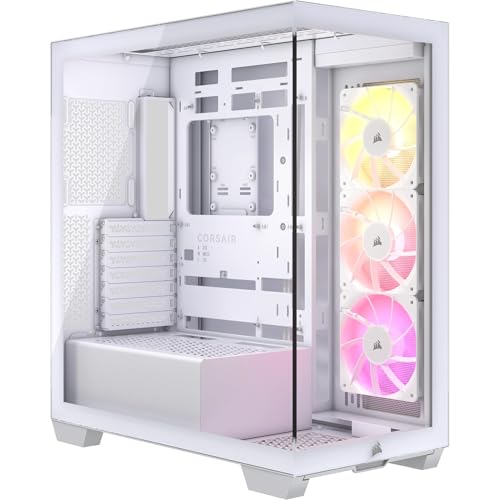
Looking for a stylish yet functional case for your gaming rig? The CORSAIR 3500X ARGB Mid-Tower ATX PC Case combines aesthetic appeal with impressive performance. Its panoramic tempered glass design showcases your components beautifully, while compatibility with Mini-ITX to EATX motherboards offers versatility. With high cooling capacity, you can mount up to 10x 120mm fans, ensuring ideal airflow without sacrificing style. Three pre-installed CORSAIR RS120 ARGB fans light things up, and the +5V ARGB header makes control a breeze. Plus, removable panels grant easy access, keeping your setup neat and visually stunning. Upgrade your gaming experience with this eye-catching case!
Best For: Gamers and PC builders seeking a stylish, high-performance case that offers excellent cooling capabilities and easy accessibility.
Pros:
- Spacious design supports a wide range of motherboard sizes from Mini-ITX to EATX, enhancing versatility.
- High cooling capacity with the ability to mount up to 10x 120mm fans, ensuring optimal airflow for performance.
- Panoramic tempered glass panels provide an aesthetically pleasing view of components while allowing easy access for upgrades.
Cons:
- Limited pre-installed fans may require additional purchases for optimal cooling performance.
- Glass panels can be prone to fingerprints and smudges, necessitating regular cleaning.
- Potential cable management challenges if not using validated motherboards, which may affect visual appeal.
FOIFKIN F600 PC Case with 7 PWM ARGB Fans

For gamers seeking a stylish and efficient solution, the FOIFKIN F600 PC Case stands out with its 270° panoramic tempered glass panel, showcasing your components in stunning detail. Weighing 17.51 pounds and measuring 16.5 x 11.2 x 17.3 inches, it’s compact yet spacious. The case features seven pre-installed PWM ARGB fans for ideal cooling and aesthetics. You can easily access your build through the hinged glass side panel, making upgrades a breeze. With ample compatibility for ATX, M-ATX, and ITX motherboards, you’ll have plenty of room for customization. Plus, FOIFKIN offers reliable customer support for your peace of mind.
Best For: Gamers and PC enthusiasts looking for a stylish, customizable, and efficient mid-tower case with excellent cooling capabilities.
Pros:
- Stunning Design: Features a 270° panoramic tempered glass panel for an impressive view of components.
- Effective Cooling: Comes with seven pre-installed PWM ARGB fans for optimal airflow and cooling performance.
- Easy Access: The hinged glass side panel allows for quick and tool-free access to your build for upgrades.
Cons:
- Weight: At 17.51 pounds, it may be heavier compared to some other mid-tower cases.
- Limited Storage Options: Only supports one HDD and one SSD mount or two HDDs, which may not be sufficient for users with extensive storage needs.
- Size Constraints: Maximum cooler height and GPU length limits may restrict compatibility with larger components.
Fractal Design Pop Air RGB Black Tempered Glass Clear Tint

The Fractal Design Pop Air RGB Black Tempered Glass Clear Tint is perfect for gamers who want both performance and aesthetics in their setup. Weighing 19.14 pounds and measuring 21.6 x 20.5 x 12.1 inches, it accommodates ATX, mATX, and Mini ITX motherboards. You’ll appreciate its cooling capabilities with three included 120 mm RGB fans and space for two more. Supporting up to three HDDs and six SSDs, it offers ample storage. The tempered glass side panel showcases your components beautifully, while vivid accents in Cyan, Magenta, Green, and Orange enhance the overall look, making it a standout choice for any gaming rig.
Best For: Gamers looking for a stylish and high-performance computer case that supports various motherboard sizes and offers excellent cooling options.
Pros:
- Ample Storage: Supports multiple HDDs and SSDs for extensive data storage.
- Cooling Efficiency: Comes with three RGB fans and space for additional cooling options to maintain optimal temperatures.
- Aesthetic Appeal: Features a tempered glass side panel and vibrant color accents for a visually striking build.
Cons:
- Weight: At 19.14 pounds, it may be heavier than other cases, making it less portable.
- Limited USB Ports: Only one USB 2.0 and two USB 3.0 ports may not be sufficient for users with multiple peripherals.
- Size Constraints: Larger radiators may not fit in all positions, potentially limiting advanced cooling setups.
Factors to Consider When Choosing Rgb Pc Cases
When picking an RGB PC case, you need to contemplate several key factors. Cooling efficiency is essential for keeping your components safe, while aesthetic design and RGB customization options help express your style. Don’t forget to take into account cable management features and compatibility with your components to guarantee everything fits and functions perfectly.
Cooling Efficiency
Choosing an RGB PC case with ideal cooling efficiency is essential if you want to keep your components running smoothly and at lower temperatures. Look for cases that feature optimized airflow designs, like mesh panels and strategically placed fans, to enhance heat dissipation. Pre-installed fans, typically in configurations like 3x120mm or 2x140mm, can greatly boost cooling performance right out of the box. If you prefer liquid cooling, verify the case supports radiators up to 360mm or more. Pay attention to airflow patterns that direct air toward critical components like the GPU and CPU. Finally, consider cases that allow for future upgrades, such as adding fans or additional radiator mounts, to tailor your cooling solution to your specific needs.
Aesthetic Design
While aesthetic design might seem secondary to performance, it plays an essential role in creating an immersive gaming experience. When choosing an RGB PC case, consider features like tempered glass panels that showcase your internal components and vibrant RGB lighting. Customizable lighting options, including integrated RGB strips and fans, allow you to match your setup’s color scheme effortlessly. Look for modern design elements, such as clean lines and minimalist aesthetics, which contribute to a sleek, contemporary look. Dual-chamber designs not only enhance airflow and cable management but also provide a cleaner appearance. A well-designed RGB case accommodates various RGB components, enabling you to craft a cohesive and visually striking build that stands out in any gaming environment.
RGB Customization Options
How can you elevate your gaming setup with RGB customization options? Choosing a case with pre-installed RGB fans not only boosts cooling but also enhances visual appeal. Look for adjustable RGB lighting settings that let you select colors and effects to match your style. Some cases feature RGB strips along tempered glass edges, adding vibrant lighting that highlights your components. Compatibility with RGB control software from motherboard manufacturers is a game-changer, allowing synchronized lighting across your setup for a cohesive look. Finally, consider how easy it is to access RGB controls; dedicated buttons or user-friendly software can simplify customization, making your experience enjoyable and stress-free.
Cable Management Features
Effective cable management is essential for creating a clean and efficient gaming setup. When choosing an RGB PC case, look for features like wide channels, Velcro straps, and dedicated routing paths behind the motherboard tray. These elements help you keep your cables organized and out of sight. Removable panels and grommet holes allow easy access for cable routing, minimizing visible clutter. Additionally, cable management clips and hooks can secure cables, preventing tangles and improving airflow. Many mid-tower cases support various motherboard sizes, giving you flexibility in your cable management strategy. Remember, proper cable management not only enhances aesthetics but also greatly improves airflow and cooling performance, contributing to a more efficient system overall.
Compatibility With Components
When you’re selecting an RGB PC case, compatibility with your components is essential to confirm everything fits and functions seamlessly. First, check that the case supports your motherboard size—ATX, Micro-ATX, or Mini-ITX. Next, pay attention to GPU clearance; many cases accommodate graphics cards up to 392mm or more. You should also consider the height clearance for CPU coolers, as some cases limit this to around 170mm, which could restrict your cooling options. Additionally, verify the case offers adequate storage solutions, like space for multiple HDDs and SSDs. Finally, look for good airflow features, such as options for multiple fans or radiator mounts, to keep your system cool during intense gaming sessions.
Build Quality
While choosing an RGB PC case, build quality is essential as it directly impacts both the durability of the case and the performance of your components. Look for cases made from heavy-duty steel frames and tempered glass panels, which enhance both strength and aesthetics. A sturdy design minimizes flex and vibration, ensuring your setup lasts longer. Pay attention to details like smooth edges and well-aligned panels, as these factors ease assembly and improve your overall experience. High-quality cases often feature removable panels, tool-less designs, and effective cable management systems, all contributing to a cleaner build. Finally, check user feedback—average ratings between 4.6 and 4.8 can indicate reliable performance and solid build quality.
Airflow Design
Airflow design plays a vital role in keeping your components cool and performing at their best. To achieve ideal temperatures, look for RGB PC cases that feature perforated panels and strategically placed fan mounts. Many cases allow for custom fan configurations, supporting multiple 120mm or 140mm fans to match your system’s cooling needs. Consider dual-chamber designs that separate heat-producing components, improving cooling efficiency for your CPU and GPU. Pre-installed fans with high static pressure ratings can enhance airflow while minimizing noise. Additionally, confirm your case has sufficient intake and exhaust points, with support for radiators up to 420mm, as this maximizes airflow dynamics, keeping your gaming setup running smoothly.
Size and Dimensions
Choosing the right size and dimensions for your RGB PC case is essential for ensuring compatibility with your components and achieving a perfect build. Start by checking the form factor compatibility; you’ll typically find options for ATX, Micro-ATX, Mini-ITX, or E-ATX motherboards. Measure the case dimensions, as mid-tower options often range from 480mm to 491.7mm in height and 235mm to 250mm in width. Don’t forget to verify the maximum GPU length and CPU cooler height; some cases support GPUs up to 455.7mm and coolers up to 170mm. Finally, consider weight and cooling configurations, ensuring there’s enough space for radiators and fans to keep your build performing effectively while looking stunning.