Dell OptiPlex desktops can be a practical choice for office work, multitasking, and space-conscious setups, but the name covers very different generations and case sizes. A newer Micro PC may suit a crowded desk, while an older tower may offer more room for upgrades.
These 10 options span renewed and newer configurations. Use the buying guide below to weigh performance, Windows compatibility, ports, and seller details before you choose.
Best 10 Dell Optiplex Workstations Picks for 2026
Best Wi-Fi 6E SFF
Dell OptiPlex 7070 with 1TB NVMe SSD

- Eight-core i7-9700 with 32GB RAM
- 1TB NVMe SSD and built-in Wi-Fi 6E
- Two DisplayPort outputs
Best For: Office multitasking with dual monitors and Wi-Fi 6E
Best Port Selection

- Eight-core i7-9700 and 32GB RAM
- 1TB SSD and internal Wi-Fi 6 adapter
- USB-C, DisplayPort and legacy ports
Best For: Office setups with varied wired peripherals
Best Compact Pick
Dell OptiPlex 7010 Micro with 13th Gen i5

- 14-core, 20-thread i5-13500T
- 16GB RAM and 256GB PCIe SSD
- Wi-Fi 6 and dual DisplayPort 1.4a
Best For: Space-conscious business desks
Best No-Optical SFF
Dell OptiPlex 7070 with Core i7-9700
- Eight-core i7-9700 and 32GB RAM
- Two DisplayPort outputs
- SSD capacity conflicts in the listing
Best For: Small-form-factor office use with verified storage capacity
Compact Renewed Pick

- Six-core i5-9500 with 16GB RAM
- 500GB SSD and Windows 11 Pro
- Wi-Fi and Bluetooth in a small PC
Best For: Space-conscious everyday office work
Modern Multitasking Pick
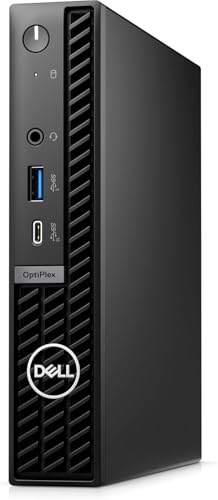
- 14th-gen i5 with 32GB DDR5
- 1TB NVMe SSD
- Supports up to three 4K displays
Best For: Compact multi-monitor business setups
SFF Office Pick

- Quad-core i7-7700 with 16GB RAM
- 512GB NVMe SSD
- DVD drive and wired peripherals
Best For: Everyday office work needing a DVD drive
Best Space-Saving Pick

- Compact 7 x 7 x 1.4-inch chassis
- Six-core i5, 16GB RAM, 512GB SSD
- Renewed; stated 30-day warranty
Best For: Compact everyday office setups
Best Multitasking Value

- Six-core i7-8700 with 32GB RAM
- 512GB NVMe SSD
- Dual DisplayPort; renewed unit
Best For: Multitasking across two office monitors
Best Newer-Generation Tower

- 14-core Core i5-14500
- DDR5, Wi-Fi 6, and USB-C listed
- Verify conflicting RAM specifications
Best For: Business users prioritizing a newer tower PC
Best Wi-Fi 6E SFF – Dell OptiPlex 7070 with 1TB NVMe SSD
Among renewed dell optiplex workstations, this 7070 SFF is a practical pick for a desk setup that needs fast storage and modern wireless connectivity. It pairs an eight-core Core i7-9700 with 32GB of RAM and a 1TB NVMe SSD.
Best For: Office multitasking and dual-monitor setups where built-in Wi-Fi 6E is useful.
Pros:
- 32GB RAM and a 1TB NVMe SSD provide room for applications and files.
- Built-in AX210 Wi-Fi 6E and a wireless keyboard and mouse are included.
- Two DisplayPort outputs support two displays.
Cons:
- Integrated Intel UHD Graphics 630 is not a dedicated graphics card.
- The listed warranty is 90 days.
Choose this configuration if wireless connectivity and NVMe storage matter more than dedicated graphics. Check that your monitors accept DisplayPort before ordering.
Best Port Selection – Dell OptiPlex 7070 with USB-C
If your shortlist of dell optiplex workstations depends on connecting several peripherals, this renewed 7070 configuration deserves a look. Its listed ports include USB-C, nine USB-A ports, two DisplayPort outputs, Ethernet, serial and PS/2 connections.
Best For: Business desks that need varied wired connections, 32GB of RAM and a 1TB SSD.
Pros:
- Eight-core i7-9700 and 32GB DDR4 suit everyday multitasking.
- 1TB SSD provides substantial primary storage.
- Internal Wi-Fi 6 adapter adds wireless connectivity alongside Ethernet.
- USB-C and legacy ports offer flexible peripheral hookups.
Cons:
- Intel HD Graphics 630 is integrated rather than dedicated graphics.
- The supplied dimensions describe a compact chassis despite the tower title; verify the case size if expansion is important.
This is the connectivity-focused choice for a mixed set of newer and older office accessories. For graphics-intensive creative work, the integrated GPU is the key limitation to weigh.
Best Compact Pick – Dell OptiPlex 7010 Micro with 13th Gen i5
For buyers comparing dell optiplex workstations with limited desk space, the renewed 7010 Micro offers a newer processor in a mini-PC format. Its 13th-generation Core i5-13500T has 14 cores and is paired with 16GB DDR4 RAM and a 256GB PCIe SSD.
Best For: Space-conscious business desks that want a 13th-generation CPU and dual DisplayPort outputs.
Pros:
- 14-core, 20-thread i5-13500T supports demanding multitasking.
- Wi-Fi 6 AX211, Bluetooth and Ethernet provide connection options.
- Two DisplayPort 1.4a outputs accommodate two displays.
- Wireless keyboard and mouse are listed in the bundle.
Cons:
- 256GB SSD offers less built-in storage than the 1TB models here.
- Integrated Intel UHD Graphics is not a dedicated GPU.
Its newer processor and small form factor are the draw; plan for external or upgraded storage if your files will exceed the included 256GB SSD.
Best No-Optical SFF – Dell OptiPlex 7070 with Core i7-9700
This renewed 7070 SFF is a straightforward option among dell optiplex workstations for office tasks. It combines an eight-core i7-9700, 32GB RAM and Windows 11 Pro, but its listing gives conflicting SSD capacities: 1TB in the title and 512GB NVMe in the bullets.
Best For: Buyers who want a small-form-factor office desktop and can confirm the storage capacity before purchase.
Pros:
- Eight-core i7-9700 and 32GB RAM support multitasking.
- Two DisplayPort outputs support a dual-monitor setup.
- Wireless keyboard, mouse and mouse pad are listed as included.
Cons:
- SSD capacity conflicts between the title and product bullets.
- No optical drive, as stated in the title.
It covers the essentials for a dual-display office setup. Confirm whether the delivered SSD is 512GB or 1TB, since that difference could change its value for your needs.
Compact Renewed Pick – Dell OptiPlex 3070 Micro
Among dell optiplex workstations for tight desks, this renewed 3070 Micro is a practical choice for everyday office work. Its six-core Intel Core i5-9500, 16GB of RAM, and 500GB SSD suit browsing, documents, and routine multitasking.
Best For: Space-conscious home offices and business desks that need a compact Windows 11 Pro PC.
Pros:
- Small footprint leaves more room on the desk.
- 16GB DDR4 RAM and a 500GB SSD support responsive everyday use.
- Includes Wi-Fi and Bluetooth connectivity.
Cons:
- Integrated Intel UHD Graphics 630 is not a dedicated graphics card.
- Listed warranty is 30 days.
Choose this one for straightforward productivity rather than graphics-heavy work, and check the renewed unit’s condition and warranty terms before ordering.
Modern Multitasking Pick – Dell OptiPlex 7020 MFF
If you are comparing dell optiplex workstations for a compact, multi-monitor office, the 7020 MFF offers a newer configuration: a 14th-gen Intel Core i5-14500T, 32GB DDR5 RAM, and a 1TB SSD in a micro form factor.
Best For: Business users who want substantial multitasking capacity and multiple displays without a full-size tower.
Pros:
- 14-core processor, 32GB RAM, and 1TB NVMe SSD suit demanding productivity workloads.
- Listed support for up to three 4K displays via two DisplayPort outputs and one HDMI output.
- Wi-Fi 6E, Ethernet, USB-C, and included wired keyboard and mouse ease office setup.
Cons:
- Intel UHD Graphics 770 is integrated rather than dedicated graphics.
- Micro chassis is less suitable if a roomy desktop enclosure is a priority.
This is the strongest fit here for a space-saving, multi-display productivity setup; confirm your monitors’ connections and the seller’s configuration before purchase.
SFF Office Pick – Dell OptiPlex 5050 SFF
For shoppers browsing dell optiplex workstations who prefer a small-form-factor desktop over a micro PC, this renewed 5050 SFF pairs a quad-core Intel Core i7-7700 with 16GB DDR4 RAM and a 512GB NVMe SSD.
Best For: Office users who want a compact desktop with wired peripherals and a DVD drive.
Pros:
- 16GB RAM and a 512GB NVMe SSD provide a useful everyday productivity configuration.
- Includes a wired keyboard and mouse.
- Small-form-factor chassis includes an optical drive.
Cons:
- Older, seventh-generation quad-core processor.
- Intel HD Graphics 630 is integrated graphics.
- Listed limited warranty is 90 days.
Consider it when the SFF layout and DVD drive matter more than having a newer processor; verify the renewed unit’s exact ports and condition with the seller.
Best Space-Saving Pick – Dell OptiPlex 3080 Micro
Among dell optiplex workstations for a crowded desk, this renewed 3080 Micro pairs a six-core Core i5-10500T with 16GB of RAM and a 512GB SSD in a 7 x 7 x 1.4-inch chassis. It comes with Windows 11 Pro and a monitor mount.
Best For: Office users who want a compact PC for everyday productivity and multitasking.
Pros:
- Six-core processor, 16GB RAM, and SSD suit routine business workloads.
- Small chassis and included monitor mount save desk space.
- Wi-Fi and Bluetooth connectivity are supplied via an included USB dongle.
Cons:
- Integrated Intel UHD Graphics 630 is not aimed at graphics-intensive work.
- The stated warranty is 30 days.
Choose this model when footprint matters more than expansion or dedicated graphics. Its renewed condition and short stated warranty are worth weighing against the compact design.
Best Multitasking Value – Dell OptiPlex 7060 SFF
If you are comparing dell optiplex workstations for a dual-monitor office, this renewed 7060 SFF offers a six-core Core i7-8700, 32GB of DDR4 RAM, and a 512GB NVMe SSD. Windows 11 Pro and a wireless keyboard and mouse are included.
Best For: Home or business users who keep multiple office applications open across two displays.
Pros:
- 32GB RAM and a six-core i7 provide room for multitasking.
- 512GB NVMe SSD supports quick boots and file access.
- Two DisplayPort connections support dual monitors; Wi-Fi and Bluetooth are built in.
Cons:
- Renewed rather than new.
- Small-form-factor case may be less convenient for expansion than a full-size tower.
This is a practical pick when memory capacity and dual-display connectivity matter more than getting a new PC. Check the space available for any upgrades you plan before buying.
Best Newer-Generation Tower – Dell Pro Business Desktop
For buyers seeking a newer tower among dell optiplex workstations and related Dell business desktops, this Dell Pro model lists a 14th-generation Core i5-14500 with 14 cores and 20 threads. The title specifies 32GB RAM and a 1TB SSD, though the supplied details list 16GB RAM, so verify the configuration before ordering.
Best For: Business users who want a newer processor, modern connectivity, and a tower-style desktop.
Pros:
- Core i5-14500 offers 14 cores and 20 threads.
- DDR5 memory, Wi-Fi 6, Bluetooth, USB-C, HDMI, and DisplayPort are listed.
- Windows 11 Pro, TPM security chip, and a wireless keyboard and mouse are included.
Cons:
- RAM specifications conflict between the title and product details.
- Integrated Intel UHD Graphics 770 is not a dedicated graphics card.
This tower is the stronger fit if processor generation and port selection take priority. Confirm the installed RAM and SSD with the seller, and do not assume that “new OptiPlex version” means this Dell Pro model carries OptiPlex branding.
How We Picked These Dell Optiplex Workstations
We compared the listed processor generation, memory, storage, chassis size, connectivity, and whether each configuration is described as renewed. The selection covers Micro, small-form-factor (SFF), and tower desktops, with both older Core i7 systems and newer Core i5 models. Specifications in marketplace listings can vary by seller, so treat the exact configuration, included accessories, and warranty as details to confirm before checkout. We have not treated an advertised benchmark claim as independently verified performance.
Quick Comparison: Micro, SFF, or Tower?
Micro and MFF: These are the easiest to place on a small desk or behind a compatible monitor. The 7010 Micro with a 13th-generation i5 and the 7020 MFF with a 14th-generation i5 are newer-generation choices; the 3070 and 3080 Micro listings offer older hardware in the same space-saving category. Expansion is generally more limited than in larger cases.
SFF: The 7070, 7060, and 5050 SFF options balance desk space and serviceability. Check the available drive bays, ports, and low-profile expansion support on the specific unit rather than assuming all SFF configurations match.
Tower: The 7070 Tower is the clearest fit here if interior access and potential expansion matter more than a compact footprint. Verify its power supply, slots, and clearance before planning any graphics-card upgrade.
Key Buying Factors for Dell Optiplex Workstations
Processor Generation and Your Workload
For web apps, documents, video calls, and routine multitasking, a capable Core i5 or i7 with enough RAM is usually more useful than a high core count on paper alone. Newer 13th- and 14th-generation options are worth considering for longer-term use. Older systems may still be economical for basic tasks, but check your software’s requirements. In particular, verify Windows 11 compatibility and licensing on older configurations rather than relying solely on an installed-OS claim.
Memory, Storage, and Connections
Sixteen gigabytes of RAM is a sensible starting point for general office use; 32GB gives more headroom for many browser tabs, large spreadsheets, or heavier multitasking. Compare SSD capacity as well as type: a 256GB drive fills faster than a 1TB drive, regardless of processor speed. Confirm the number and type of display outputs, USB ports, Ethernet, Wi-Fi, and Bluetooth on the exact listing. If you need a DVD drive, note that at least one listed 7070 SFF explicitly has no optical drive.
Condition and Total Cost
With renewed Dell Optiplex Workstations, inspect the stated condition, return window, warranty, and what’s included. Budget for any missing monitor cables, keyboard, Wi-Fi adapter, or storage upgrade. An older, inexpensive PC is only a bargain if it meets your software and support needs.
Who Should Buy Which Dell Optiplex Workstations?
Choose a newer 7010 Micro or 7020 MFF when desk space and a recent processor are priorities. Consider a 7070 SFF or Tower with 32GB of RAM for an office setup that needs substantial memory and storage out of the box. The 3070 or 3080 Micro may suit a budget-conscious, light-duty workspace if the condition and support terms check out. For expansion plans, start with the tower and confirm the required hardware will physically and electrically fit; for a simple ready-to-use desktop, prioritize verified ports, OS status, and seller support over headline specs.