A ThinkCentre can free up desk space without giving up the ports and everyday performance an office needs. The catch: these listings span new and older generations, several case sizes, and configurations that can vary by seller.
These 10 selected listings cover mini PCs, a small-form-factor tower, and an all-in-one. Use the guide below to narrow the field by workspace, upgrade needs, and total cost.
Best 10 Lenovo Thinkcentre Desktops Picks for 2026
Compact Office Starter
ThinkCentre neo 50q Gen 5 with 8GB RAM

- Compact 1L-style desktop
- 8GB DDR5 and 512GB SSD
- Dual displays and Wi-Fi 6E
Best For: Space-limited everyday office setups
AMD Wireless Pick
ThinkCentre 55q Gen 6 with Ryzen 5

- Ryzen 5 220 and 16GB DDR5
- Dual 4K display support
- Wi-Fi 7; seller-upgraded storage and RAM
Best For: Compact AMD-powered business workstations
Secure Mini Workstation
ThinkCentre neo 50q Gen 5 with 16GB RAM

- Core 5 210H and 16GB DDR5
- Dual 4K-capable outputs
- TPM 2.0 and Windows 11 Pro
Best For: Small, security-minded dual-monitor offices
Intel Multitasking Pick
ThinkCentre M70q Tiny with i5-14400T

- 10-core Intel i5-14400T
- 16GB DDR5 and 512GB SSD
- Wi-Fi 6 and Windows 11 Pro
Best For: Compact Intel-powered office multitasking
Space-Saving Office Pick
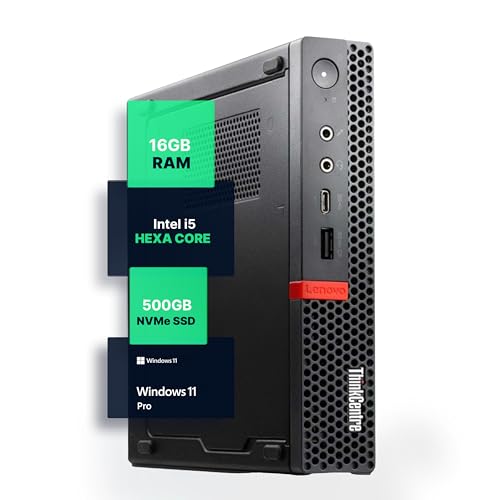
- Compact renewed micro desktop
- 16GB RAM and 500GB NVMe SSD
- Windows 11 Pro with Wi-Fi and Bluetooth
Best For: Space-conscious home offices
Performance-Focused SFF Pick
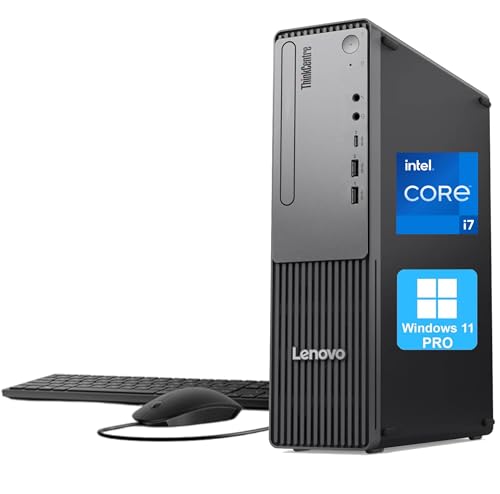
- 10-core Core i7-13620H processor
- Compact chassis with broad port selection
- Windows 11 Pro; verify installed RAM
Best For: Processor-heavy office multitasking
Ready-to-Use Tiny Pick

- Six-core i5-8500T and 16GB RAM
- Includes wireless keyboard and mouse
- 256GB NVMe SSD; verify model number
Best For: Compact everyday setups with peripherals
Best DDR5 Tiny Desktop

- Eight-core Core 5-210H and DDR5 memory
- Compact, roughly 2.5-pound chassis
- DisplayPort and HDMI for two monitors
Best For: Small business desks needing a compact DDR5 PC
Best All-in-One

- 27-inch FHD IPS display at 100Hz
- Core i5-13420H, 16GB DDR5, 512GB SSD
- HDMI input and output
Best For: Offices wanting a desktop with an integrated 27-inch display
Best DDR4 Mini Desktop
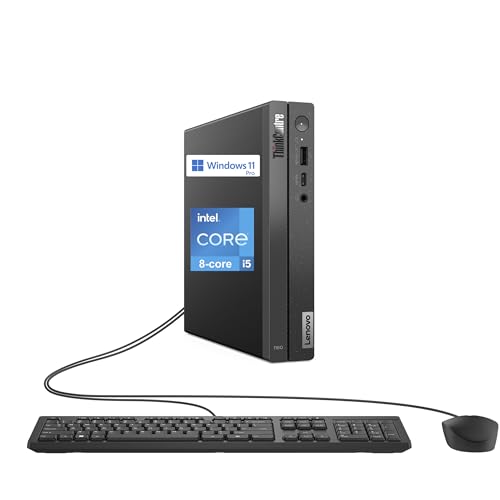
- Core i5-13420H with 16GB DDR4 RAM
- DisplayPort and HDMI monitor connections
- Six USB ports, Wi-Fi 6, and Ethernet
Best For: Compact business setups with two external monitors
Compact Office Starter – ThinkCentre neo 50q Gen 5 with 8GB RAM
Among lenovo thinkcentre desktops, this neo 50q Gen 5 is a compact choice for everyday office work. Its listed configuration pairs 8GB of DDR5 memory with a 512GB NVMe SSD, Windows 11 Pro, and a chassis measuring about 7.05 by 7.2 inches.
Best For: Space-limited workstations running routine business apps and two monitors.
Pros:
- HDMI 2.1 and DisplayPort 1.4 support a dual-display workspace.
- Wi-Fi 6E, Gigabit Ethernet, USB-C, and multiple USB ports offer flexible connectivity.
- Windows 11 Pro includes business features such as BitLocker and Remote Desktop.
Cons:
- 8GB RAM is less headroom than the 16GB configurations elsewhere in this roundup.
- The notes conflict on the processor, naming a Core 5 210H in the title and an i5-13420H in the bullets; confirm the exact CPU before buying.
Choose this one for its small footprint and useful ports, but verify the processor listing if CPU specifications matter to your purchase.
AMD Wireless Pick – ThinkCentre 55q Gen 6 with Ryzen 5
For shoppers comparing lenovo thinkcentre desktops for a small business workspace, the ThinkCentre 55q Gen 6 offers a six-core Ryzen 5 220, 16GB DDR5 RAM, and a 512GB NVMe SSD. This seller-upgraded configuration includes Windows 11 Pro and a wired keyboard and mouse.
Best For: Office users who want 16GB RAM, modern wireless networking, and a compact AMD desktop.
Pros:
- Six-core, 12-thread Ryzen 5 220 and 16GB DDR5 suit everyday multitasking.
- Integrated Radeon graphics support two 4K displays.
- Wi-Fi 7, Bluetooth, and Gigabit Ethernet provide several networking options.
Cons:
- Memory and storage are custom upgrades by Oemgenuine rather than an unchanged factory configuration.
- The stated three-year upgrade warranty covers memory and storage; other components retain the original manufacturer warranty.
This is a sensible pick if its AMD platform and Wi-Fi 7 appeal to you. Check the seller’s warranty terms and exact port configuration before ordering.
Secure Mini Workstation – ThinkCentre neo 50q Gen 5 with 16GB RAM
This neo 50q Gen 5 is one of the lenovo thinkcentre desktops suited to offices that need a small PC without settling for 8GB of memory. Its Core 5 210H, 16GB DDR5 RAM, and 512GB PCIe NVMe SSD come in a 1L-class chassis that can be VESA-mounted.
Best For: Space-conscious business setups that need dual displays and hardware-backed security.
Pros:
- Eight-core, 12-thread Core 5 210H and 16GB RAM provide room for office multitasking.
- HDMI 2.1 and DisplayPort 1.4b support dual 4K displays.
- Windows 11 Pro, discrete TPM 2.0, and a Kensington slot address business security needs.
- Wi-Fi 6E, Gigabit Ethernet, and front USB-C offer practical connectivity.
Cons:
- Its 512GB SSD may call for external or network storage if you keep many large files locally.
- The compact chassis prioritizes desk space over the expandability of a larger tower.
Compared with the 8GB neo 50q listing in this roundup, this configuration offers more memory and clearly specified security features while retaining a similarly small footprint.
Intel Multitasking Pick – ThinkCentre M70q Tiny with i5-14400T
Among lenovo thinkcentre desktops for business multitasking, this M70q Tiny stands out for its 10-core Intel Core i5-14400T. The listed configuration combines 16GB DDR5 memory, a 512GB NVMe SSD, and Windows 11 Pro in a chassis measuring roughly 7.05 by 7.2 by 1.4 inches.
Best For: Office users seeking a compact Intel desktop for multitasking and presentations.
Pros:
- Ten-core i5-14400T pairs with 16GB DDR5 for responsive everyday workloads.
- DisplayPort and HDMI accommodate external displays.
- Wi-Fi 6, Ethernet, and Bluetooth 5.1 cover wired and wireless connections.
- The listing describes three-year Lenovo and Oemgenuine warranty coverage.
Cons:
- Intel UHD 770 is integrated graphics, not a dedicated graphics card.
- Memory and storage are described as upgraded; review the product description for full warranty details.
This configuration makes sense if you value its 10-core Intel processor in a tiny PC. Confirm the upgrade and warranty specifics before purchase.
Space-Saving Office Pick – ThinkCentre M720Q Micro
Among Lenovo ThinkCentre desktops, this renewed M720Q is a practical choice when desk space matters. Its 16GB of DDR4 memory and 500GB NVMe SSD suit everyday office work, browsing, and multitasking.
Best For: Home offices and compact workstations that need Windows 11 Pro.
Pros:
- Compact micro-desktop design weighs about 2.9 pounds.
- 16GB RAM and a 500GB NVMe SSD provide a useful everyday configuration.
- Includes Windows 11 Pro, Wi-Fi, Bluetooth, HDMI, and DisplayPort connectivity.
Cons:
- Renewed unit lists a 30-day warranty.
- Product information conflicts on the processor: the title says i5-8400T, while the bullets say i5-8500T.
The M720Q makes the most sense as a small productivity PC. Confirm the exact CPU with the seller before buying if that specification matters to you.
If you are comparing Lenovo ThinkCentre desktops for a busy office, the Neo 30s Gen 5 pairs a 10-core Intel Core i7-13620H with DDR5 memory in a small-form-factor chassis. The listing describes a 512GB PCIe SSD, though its memory specifications disagree on the installed RAM.
Best For: Business users who want a compact desktop with a stronger processor and Windows 11 Pro.
Pros:
- Core i7-13620H has 10 cores and a listed boost speed up to 4.9GHz.
- Offers USB-C, multiple USB-A ports, HDMI, VGA, Ethernet, and Wi-Fi.
- Includes a wired keyboard and mouse and lists a one-year manufacturer warranty.
Cons:
- Integrated Intel UHD Graphics is not a dedicated graphics card.
- The title lists 16GB RAM, while the details list 32GB installed; confirm the configuration before ordering.
This is the most processing-oriented option here, but check the seller’s exact RAM and storage configuration to ensure the shipped system matches your needs.
For shoppers seeking Lenovo ThinkCentre desktops with a very small footprint, this renewed M920q Tiny combines a six-core Core i5-8500T, 16GB RAM, and a 256GB NVMe SSD. It also comes with a wireless keyboard and mouse.
Best For: Everyday desktop setups where compact size and included peripherals are priorities.
Pros:
- Tiny chassis measures approximately 7.2 by 7.05 by 1.36 inches.
- Includes HDMI, DisplayPort, USB Wi-Fi/Bluetooth adapter, wireless keyboard, and mouse.
- 16GB DDR4 memory and NVMe storage suit routine productivity tasks.
Cons:
- 256GB SSD offers less listed storage than the other two systems here.
- The listing title calls it an M920q, while the model-number field says M920x.
The included accessories make it convenient for a fresh desk setup, but verify the exact model and available storage before purchasing.
Best DDR5 Tiny Desktop – ThinkCentre neo 50q Gen 5
Among Lenovo ThinkCentre desktops, this neo 50q Gen 5 is a compact option for offices that need capable everyday computing without a full-size tower. It pairs an eight-core Intel Core 5-210H with DDR5 memory and Windows 11 Pro in a roughly 2.5-pound chassis.
Best For: Space-constrained business desks that need DDR5 memory and two-monitor connectivity.
Pros:
- Compact 7.2 x 7.05 x 1.44-inch footprint.
- DisplayPort and HDMI support a two-monitor setup.
- Five USB-A ports, USB-C, Ethernet, Wi-Fi 6, and Bluetooth 5 provide flexible connections.
Cons:
- Uses integrated graphics rather than a dedicated graphics card.
- Seller says the new computer is resealed for memory or SSD upgrades; the stated one-year warranty is from Issaquash Highlands Tech.
Check the selected RAM and SSD configuration before buying, since the listing offers several capacities. Its main advantage is fitting a well-connected Windows 11 Pro workstation into a very small space.
Best All-in-One – ThinkCentre neo 50a 27 Gen 5
If you want a screen included with your Lenovo ThinkCentre desktop, the neo 50a 27 Gen 5 combines a 27-inch display and PC in one unit. This configuration lists an eight-core Intel Core i5-13420H, 16GB DDR5 RAM, a 512GB SSD, and Windows 11 Pro.
Best For: Offices that want a ready-to-use desktop with a large integrated display and fewer separate components.
Pros:
- 27-inch anti-glare IPS display with 100Hz refresh rate and 99% sRGB coverage.
- HDMI input and output offer more setup flexibility.
- Includes a wired keyboard and mouse, plus USB-C and Ethernet.
Cons:
- The 27-inch display is FHD (1920 x 1080), not 4K.
- Integrated Intel UHD Graphics is not aimed at demanding graphics workloads.
This is the most straightforward pick here if an included monitor matters more than a tiny PC footprint. Note that the listing specifies a one-year seller warranty.
Best DDR4 Mini Desktop – ThinkCentre neo 50q Gen 4
The neo 50q Gen 4 is a small-footprint choice among Lenovo ThinkCentre desktops for routine business work. It lists an eight-core Intel Core i5-13420H, 16GB DDR4 RAM, a 512GB SSD, and Windows 11 Pro, with a wired keyboard and mouse included.
Best For: Business workstations that need a compact PC and connections for two external monitors.
Pros:
- DisplayPort and HDMI provide two monitor connections.
- Six USB ports include one USB-C port.
- Wi-Fi 6, Bluetooth 5.3, and Ethernet cover common network and peripheral needs.
Cons:
- Uses DDR4 memory rather than DDR5.
- Integrated graphics may limit graphics-intensive work.
Its practical appeal is the combination of a compact chassis and ample everyday ports. The listing specifies a one-year limited seller warranty, so confirm coverage before ordering.
How We Picked the Best Lenovo Thinkcentre Desktops
We compared the 10 selected listings by processor generation, stated memory and storage, chassis type, display connectivity, and likely office use. We also considered whether a configuration leaves room for future upgrades. These are listing-based comparisons, not hands-on benchmarks: confirm the exact specifications, operating system, warranty, and seller before ordering. Two entries name the neo 50q Gen 5 with a Core 5 210H, so check their configuration details rather than assuming they are different models.
Quick Comparison
Smallest footprint: The neo 50q, 55q, M70q, M720q, and M920q are compact choices for crowded desks or monitor-mounted setups. More conventional desktop layout: The neo 30s Gen 5 small-form-factor PC suits buyers who prefer a separate, less space-constrained chassis. Display included: The 27-inch ThinkCentre all-in-one combines the PC and screen, but is less flexible if you later want to replace either one. Older-generation options: The M720q and M920q may appeal on price, provided their condition, support, and return terms check out.
Key Buying Factors for Lenovo Thinkcentre Desktops
Size, Ports, and Monitors
Choose a Tiny or 1L system when desk space matters most; choose small-form-factor when accessibility and expansion matter more. Check the exact video outputs against your monitors. HDMI and DisplayPort are not interchangeable without the right cable or adapter, and the number of supported displays can depend on the specific configuration. Confirm USB-C capabilities, wired Ethernet, Wi-Fi, and Bluetooth rather than relying on a broad model-family description.
Performance, Memory, and Storage
For email, browser tabs, documents, and video calls, a recent Core 5, Core i5, or Ryzen 5 configuration with 16GB of RAM is a sensible starting point. Heavier multitasking may justify more memory, but check whether a seller-installed upgrade affects the warranty. A 512GB SSD is comfortable for many offices; 256GB can fill quickly. CPU marketing claims such as “beat i7” are not a substitute for comparing your actual software requirements.
Condition and Total Cost
Older mini PCs can be good values, but verify whether they are new, refurbished, or renewed. Check Windows licensing, included power adapter and accessories, warranty coverage, and return policy. Mini PCs generally need a separate monitor, keyboard, and mouse, so include those in your budget.
Who Should Buy Which Lenovo Thinkcentre Desktops?
For a current, space-saving office setup, start with a neo 50q Gen 5, 55q Gen 6, or M70q configuration and compare their exact ports and prices. Pick the neo 30s if a separate desktop chassis better suits your workspace; pick the 27-inch all-in-one if you need a matching screen and PC together. Consider the neo 50q Gen 4 when it is meaningfully cheaper than newer configurations. Look at an M720q or M920q for basic tasks on a tighter budget, after checking condition and support. Across all Lenovo Thinkcentre Desktops here, the best choice is the configuration that fits your peripherals and workload—not the most ambitious processor claim in the listing.