If you’re looking to enhance your Mac Mini setup, finding the right keyboard and mouse combo can make a significant difference. With so many options available, it’s essential to contemplate factors like comfort, connectivity, and design. Whether you’re after wireless freedom or a reliable wired option, the right choice can elevate your productivity. Let’s explore some of the top contenders that promise a seamless experience for your workspace.
Macally Wireless Keyboard and Mouse Combo for Mac
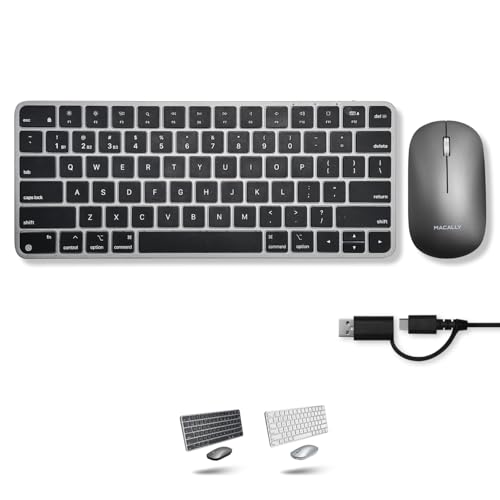
If you’re looking for a versatile and efficient setup, the Macally Wireless Keyboard and Mouse Combo is an excellent choice for Mac users. This combo connects via Bluetooth for a clutter-free workspace or you can use the included USB C and USB A cables for reliable performance. You can effortlessly switch between three devices, like your MacBook, iPad, and iPhone, enhancing your multitasking ability. With built-in rechargeable batteries, you’ll enjoy all-day power. Its minimalistic design fits perfectly into any home or office, and the macOS shortcuts improve usability. Choose from elegant space gray or silver finishes to match your style.
Best For: Mac users seeking a compact and versatile wireless keyboard and mouse combo that enhances multitasking across multiple devices.
Pros:
- Multi-device capability allows seamless switching between MacBook, iPad, and iPhone.
- Minimalistic design maximizes workspace efficiency and complements any setup.
- Rechargeable batteries provide all-day power without the hassle of frequent replacements.
Cons:
- Limited compatibility primarily focused on Apple devices, which may not suit non-Mac users.
- Compact size may not be comfortable for users with larger hands or those who prefer full-sized keyboards.
- Bluetooth connection may experience occasional latency or connectivity issues compared to wired options.
Incase Wired Desktop Keyboard & Mouse Combo

The Incase Wired Desktop Keyboard & Mouse Combo is an ideal choice for Mac Mini users seeking a reliable and user-friendly setup. You’ll appreciate the plug-and-play convenience—just connect it, and you’re ready to go. The keyboard features quiet, responsive keys with a thin profile, plus four media control hotkeys and a dedicated calculator key for quick access. The ambidextrous optical mouse, with an 800 DPI sensor, offers precise control and effortless navigation. Its spill-resistant design guarantees durability, so you can work confidently without worrying about accidental spills. This combo brings both functionality and comfort to your workspace.
Best For: Mac Mini users looking for a reliable, user-friendly keyboard and mouse setup that offers comfort and functionality.
Pros:
- Plug-and-Play Convenience: Easy to set up with no software required.
- Quiet and Responsive Keys: Comfortable typing experience with a thin profile.
- Durable Spill-Resistant Design: Provides peace of mind against accidental spills.
Cons:
- Wired Connection: Limited mobility compared to wireless options.
- Basic Features: Lacks advanced functions or customizable keys.
- No RGB Lighting: May not appeal to users looking for customizable aesthetics.
seenda Bluetooth Keyboard and Mouse for Mac (SKM64-2)

Seenda’s Bluetooth Keyboard and Mouse combo (SKM64-2) stands out as an excellent choice for Apple users seeking a reliable, multi-device setup. With its sleek stainless steel design and ultra-thin profile, it’s lightweight and portable. You can easily connect to three devices thanks to the advanced Bluetooth modes, perfect for multitasking. The whispered-quiet typing and satisfying tactile feel enhance your experience during long sessions. Plus, with up to 200 hours of battery life, you won’t be constantly charging. While it has minor quirks like no backlighting, it’s still a great value compared to pricier options like the Apple Magic Keyboard.
Best For: Apple users looking for a reliable, multi-device Bluetooth keyboard and mouse combo that offers great value and portability.
Pros:
- Sleek stainless steel design with an ultra-thin profile for easy portability.
- Advanced Bluetooth connectivity allows typing across three devices seamlessly.
- Excellent battery life with up to 200 hours of standby time and auto-sleep mode.
Cons:
- No backlighting, which may be a drawback for some users.
- Minor quirks such as slight lag with caps lock and key placements differing from standard Apple keyboards.
- Mouse design is functional but less ergonomic compared to the keyboard, with potential scrolling issues.
Macally Apple Wireless Keyboard and Mouse Combo for Mac
For those seeking a versatile and efficient workspace, the Macally Apple Wireless Keyboard and Mouse Combo for Mac stands out as a top choice. This dual-mode device connects via Bluetooth or USB, allowing you to switch seamlessly between your MacBook, iPad, and iPhone. With built-in rechargeable batteries, you’ll enjoy all-day power and can easily recharge with the included USB-C cable. Its minimalistic design maximizes your workspace, making it perfect for home, office, or travel. Plus, macOS shortcuts enhance usability, and the elegant space gray or silver finish complements your Apple devices beautifully. Experience a new level of productivity today!
Best For: Those who need a versatile and efficient input solution for multiple Apple devices, including MacBooks, iPads, and iPhones.
Pros:
- Dual connectivity options: Easily switch between Bluetooth and wired connections for flexibility.
- Rechargeable batteries: Built-in 400 mAh batteries provide all-day power with convenient USB-C charging.
- Minimalistic design: Compact form enhances workspace efficiency and is ideal for home, office, or travel.
Cons:
- Limited to Apple devices: Full functionality may not be available for non-Apple products.
- Battery life may vary: Depending on usage, the longevity of the rechargeable batteries can differ.
- Size may not suit everyone: The compact design might feel cramped for users accustomed to larger keyboards.
Logitech Pebble 2 Combo for Mac – Wireless Keyboard and Mouse

Looking for a sleek and portable keyboard and mouse combo tailored for your Mac devices? The Logitech Pebble 2 Combo is just what you need. Its minimalist design is lightweight and made from recycled materials, making it eco-friendly too. You can connect it via Bluetooth to up to three Apple devices and switch seamlessly with a button press. Customize the 10 Fn keys for quick access to essential functions, while the mouse’s Silent Touch Technology reduces noise by 90%. With a long battery life—up to three years for the keyboard—you’ll enjoy a quiet and efficient experience wherever you go.
Best For: Individuals seeking a portable and quiet keyboard and mouse combo specifically designed for Mac devices.
Pros:
- Eco-friendly construction with a significant percentage of recycled materials.
- Seamless connectivity to multiple devices with easy-switch functionality.
- Long battery life, offering up to three years for the keyboard and two years for the mouse.
Cons:
- Limited customization options compared to some high-end keyboards and mice.
- Silent mouse clicks may not provide tactile feedback preferred by some users.
- Not designed for gaming, as it may lack advanced features typical in gaming peripherals.
ProtoArc Backlit Bluetooth Keyboard and Mouse for Mac

The ProtoArc Backlit Bluetooth Keyboard and Mouse combo is perfect for Mac users who value versatility and comfort in their workspace. Designed for Mac OS 10.12 and later, it connects to three devices simultaneously, making multitasking a breeze. The keyboard features backlit keys with adjustable brightness, ensuring visibility in dim environments. With its flat design, it promotes a neutral wrist position, reducing discomfort during long typing sessions. The responsive mouse offers adjustable DPI levels for precision. Users appreciate its battery life and overall performance, making it a reliable choice for any Mac setup.
Best For: Mac users seeking a versatile and comfortable keyboard and mouse combination that enhances multitasking and typing efficiency.
Pros:
- Backlit keys with adjustable brightness for easy visibility in low-light environments.
- Multi-device connectivity allows seamless switching between three devices, ideal for multitaskers.
- Ergonomic flat design promotes a neutral wrist position, reducing discomfort during extended use.
Cons:
- Not fully compatible with Windows, limiting functionality for non-Mac users.
- Some users may find the flat design requires an adjustment period for comfort.
- Backlight visibility may vary from different angles, potentially affecting usability in certain situations.
Macally Premium Bluetooth Keyboard and Mouse Combo for Mac

Designed specifically for Mac users, the Macally Premium Bluetooth Keyboard and Mouse Combo offers seamless compatibility with MacBook Pro, Air, and iMac. This combo features a full-size keyboard with 110 scissor switch keys and 20 shortcut keys, ensuring efficient typing. The mouse includes three DPI modes for versatile control. You’ll appreciate the multi-device Bluetooth capability, allowing easy switching between three devices. With built-in rechargeable batteries, you can keep working while charging. Users report impressive battery life, lasting 2-3 weeks. Plus, Macally’s responsive customer service and two-year warranty add extra peace of mind for your purchase.
Best For: Mac users seeking a reliable and ergonomic keyboard and mouse combo with multi-device Bluetooth capability.
Pros:
- Premium design with an aluminum body and full-size layout, ensuring durability and comfort.
- Multi-device pairing allows easy switching between three devices, enhancing productivity.
- Built-in rechargeable batteries provide long battery life, lasting 2-3 weeks on a single charge.
Cons:
- Charging via micro-USB may be less convenient for users who prefer USB-C.
- The mouse may drain its battery faster than the keyboard, requiring more frequent charging.
- Some users may find the key height and responsiveness not suited for their typing preferences.
TECKNET Wireless Keyboard and Mouse Combo

For anyone seeking a reliable and compact solution for their Mac Mini, the TECKNET Wireless Keyboard and Mouse Combo stands out with its 2.4GHz wireless technology, providing a stable connection up to 15 meters. Weighing just 1.06 pounds, its mini design is perfect for home, office, or travel. You’ll appreciate the scissor-key design for quiet, comfortable typing, plus 12 multimedia hotkeys for quick access. The mouse offers adjustable DPI settings to match your needs. With a 36-month warranty and positive customer reviews, this combo is a fantastic choice, though it requires AAA batteries, which aren’t included.
Best For: Those looking for a portable and efficient keyboard and mouse combo for their Mac Mini or similar devices.
Pros:
- Compact and lightweight design ideal for home, office, or travel use.
- Quiet scissor-key design enhances typing comfort and reduces noise.
- Adjustable DPI settings on the mouse cater to various sensitivity preferences.
Cons:
- Requires AAA batteries which are not included in the package.
- USB receiver may be less preferred by some users compared to Bluetooth connectivity.
- Initial battery installation may be needed before use, which some users find inconvenient.
Bluetooth Keyboard and Mouse Combo for Mac
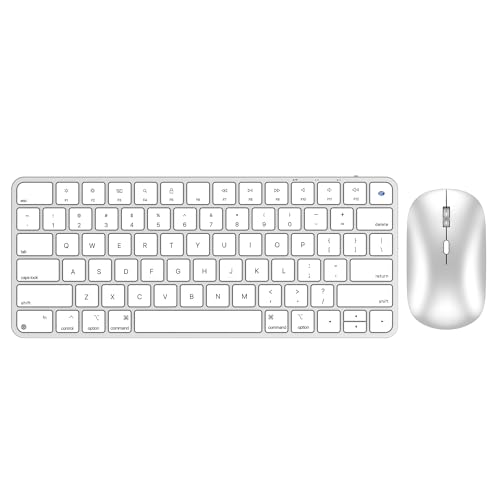
If you’re a Mac user looking for a seamless and stylish input solution, the Bluetooth Keyboard and Mouse Combo for Mac is an excellent choice. This mini-sized combo pairs effortlessly with your Mac devices, including iPads and MacBooks, thanks to its Bluetooth connection—no dongles needed. The keyboard features scissor-switch keys for quiet typing and includes multimedia shortcuts for added convenience. The responsive mouse offers adjustable DPI settings, perfect for any task. With a rechargeable battery lasting up to three months and a sleek design, it enhances your workspace while ensuring portability. Enjoy a reliable input experience tailored for your Mac.
Best For: Mac users seeking a portable and stylish Bluetooth keyboard and mouse combo that enhances their productivity.
Pros:
- Compact design allows for easy portability and fits well in any workspace.
- Quiet scissor-switch keys provide a comfortable typing experience with minimal noise.
- Rechargeable battery lasts up to three months, making it convenient and eco-friendly.
Cons:
- Some users report lag during reconnection after the device goes into sleep mode.
- A few customers received products that did not match the description, such as requiring a USB dongle.
- Limited compatibility may not appeal to users with non-Mac devices.
OMOTON Ultra-Slim Wireless Keyboard and Mouse Combo for Mac

The OMOTON Ultra-Slim Wireless Keyboard and Mouse Combo stands out as an excellent choice for Mac users seeking a seamless and stylish productivity boost. This combo is fully compatible with various Mac devices, including MacBook Pro, Air, and iMac. Its scissor-switch keys provide a sensitive response and silent typing experience, while the compact design makes it easy to carry. You’ll appreciate the ergonomic adjustable slope that prevents wrist strain during long sessions. Plus, with adjustable DPI settings for the mouse and an energy-saving mode, you can work efficiently while extending battery life. Just pop in a few batteries, and you’re ready to go!
Best For: Mac users looking for a stylish and efficient wireless keyboard and mouse combo that enhances productivity.
Pros:
- Compact and portable design makes it easy to carry for on-the-go use.
- Ergonomic adjustable slope helps prevent wrist strain during extended typing sessions.
- Energy-saving automatic sleep mode extends battery life and efficiency.
Cons:
- Requires batteries for operation, which are not included in the package.
- Limited compatibility with non-Mac devices, reducing versatility for mixed environments.
- Scissor-switch keys may not appeal to users who prefer a different key feel.
Factors to Consider When Choosing a Mac Mini Keyboard and Mouse Combo
When choosing a keyboard and mouse combo for your Mac Mini, you’ll want to evaluate compatibility with your Apple devices and the available connectivity options. It’s also important to ponder design and ergonomics for comfort, along with battery life to guarantee long-lasting performance. Finally, if you use multiple devices, look for options that support multi-device functionality to enhance your workflow.
Compatibility With Apple Devices
Choosing the right keyboard and mouse combo for your Mac Mini involves several key factors to confirm compatibility with your Apple devices. First, ascertain the combo works with macOS versions 10.12 or higher for peak functionality. Look for multi-device capability, which lets you switch effortlessly between your MacBook, iPad, and iPhone. It’s also vital to check for macOS shortcuts on the keyboard, as these enhance usability and provide quick access to essential functions. Consider the design and layout; a keyboard resembling the Magic Keyboard can offer a familiar experience. Finally, verify the connection method—whether Bluetooth or wired—matches your device’s specifications, especially if you’re using a model without USB ports.
Connectivity Options Available
Consider how connectivity options can considerably enhance your experience with a Mac Mini keyboard and mouse combo. Look for Bluetooth connectivity, which offers a wireless setup that keeps your workspace clutter-free. Some combos even provide dual connectivity modes, allowing you to switch between Bluetooth and wired USB connections based on your needs. Multi-device connectivity is another fantastic feature, letting you seamlessly switch between your MacBook, iPad, or iPhone. Rechargeable options with built-in batteries often last for weeks, minimizing the hassle of battery replacements. Finally, consider plug-and-play convenience with wired options, enabling you to connect immediately without installing extra software. These features can truly elevate your overall user experience.
Design and Ergonomics
The design and ergonomics of a Mac Mini keyboard and mouse combo play a significant role in your overall user experience. A compact and lightweight design is essential for maximizing workspace efficiency, especially in small setups. Look for ergonomic features like adjustable slopes and scissor-switch keys to reduce wrist strain during long typing sessions. Rubberized feet or non-slip surfaces can enhance stability, preventing the keyboard from sliding around. Key height and responsiveness also matter; quieter keys provide a more pleasant atmosphere for shared workspaces. Finally, a slim profile makes it easier to transport your keyboard and mouse combo, ensuring you can maintain comfort and efficiency whether you’re at home or on the go.
Battery Life Considerations
When selecting a Mac Mini keyboard and mouse combo, battery life is an essential factor that can greatly impact your daily productivity. Look for models with rechargeable batteries, like the Macally and seenda keyboards, which can last up to 200 hours on standby. Energy-saving modes are also important; they automatically put your devices to sleep after inactivity, extending battery life between charges. Pay attention to battery capacity, as built-in rechargeable batteries range from 300mAh to 800mAh, influencing how long you can use them. Additionally, consider charging options; USB-C is often more convenient for quicker recharging than older micro-USB alternatives. Finally, be mindful of combos that use standard batteries, which can lead to recurring costs and environmental concerns.
Multi-Device Functionality
How often do you switch between devices while working? If it’s frequent, then multi-device functionality is essential for your setup. Look for keyboard and mouse combos that let you connect and switch between at least three devices effortlessly. This feature is especially handy if you juggle a MacBook, iPad, and iPhone. Many models now offer advanced Bluetooth connectivity, providing reliable performance without the clutter of dongles or extra USB ports. Easy-switch buttons can make changes between devices a breeze, allowing you to maintain your workflow without interruption. Make sure the combo you choose is compatible with modern operating systems so you can fully utilize it across your Apple devices. This functionality can greatly enhance your productivity.
Key Features and Shortcuts
Choosing the right keyboard and mouse combo for your Mac Mini involves considering key features and shortcuts that can enhance your workflow. Look for keyboard shortcuts tailored for macOS to boost your productivity. Scissor-switch keys offer a comfortable typing experience and quieter operation, making them ideal for office settings. If you use multiple Apple devices, opt for a combo with multi-device capability to switch seamlessly between them. A full-size layout with a numeric keypad is great for frequent number input, while compact designs suit portable setups. Finally, consider battery life and charging options; rechargeable keyboards can save you from constant battery replacements, ensuring you stay focused on your tasks without interruption.
Price and Value Comparison
While evaluating your options for a Mac Mini keyboard and mouse combo, it’s vital to contemplate both price and value. You’ll find prices ranging from about $20 for budget models to over $100 for premium ones. Assess their features, such as multi-device connectivity, battery life, and ergonomic design, against what you’re willing to spend. Mid-range options between $40 and $70 often strike a balance, offering essential features like Bluetooth and rechargeable batteries. Premium combos may justify their cost with customizable keys and backlighting, enhancing usability. Finally, don’t overlook customer ratings and reviews; products priced around $50-$80 frequently emerge as wise investments for Mac users, ensuring long-term satisfaction and performance.