A Mac mini external SSD can add room for photos, video projects, games, and backups without replacing your computer. The right choice depends on how much space you need and how quickly you move files.
These 10 options cover everyday USB-C drives, larger 2TB models, and a faster-rated portable SSD. Check the connection and capacity before paying extra for speed you may not use.
Best 10 Mac Mini External SSD Picks for 2026
Best Desktop Expansion
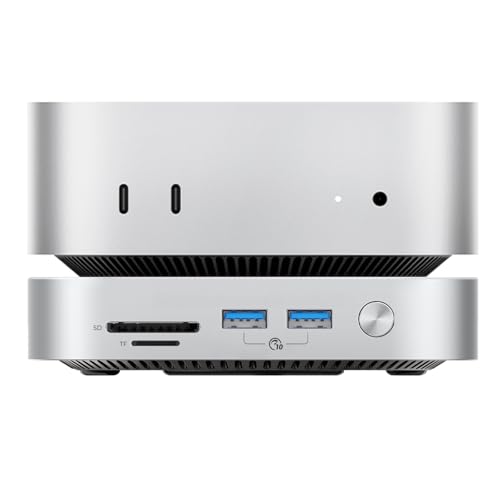
- 2TB integrated storage
- Three USB ports plus SD/TF reader
- Conflicting listed speed figures
Best For: Mac mini users seeking storage and extra ports
Best All-Around Portable

- Up to 1,050MB/s reads
- Compact aluminum housing
- 1TB capacity
Best For: Portable storage across Mac and other devices
Best Travel Capacity

- 2TB portable capacity
- Up to 800MB/s reads
- Two-meter drop protection rating
Best For: Taking larger backups and files on the go
Best Compact Starter Drive

- Up to 1,050MB/s reads
- USB-C and USB-A cables included
- Smallest capacity here at 500GB
Best For: Compact storage for selected files and transfers
Best for Travel
SanDisk Extreme Portable SSD 1TB

- Up to 2,000MB/s claimed speeds
- IP65 rating; 3m drop protection
- Password protection with AES encryption
Best For: Portable Mac mini storage for files on the go
Best for Flexible Connections

- 2TB storage capacity
- USB-C/USB-A cable included
- Up to 1,050MB/s claimed reads
Best For: Sharing storage between a Mac mini and USB-A devices
Best for Creative Files
- 2TB for projects and backups
- Up to 1,050MB/s claimed reads
- AES hardware encryption listed
Best For: Portable Mac mini storage for creative work
Best Compact Pick

- 1TB capacity; up to 1050MB/s reads
- USB-C and USB-A cables included
- Lightweight aluminum case with activity LED
Best For: Compact storage with flexible cable options
Best for File Privacy

- 1TB capacity; up to 1050MB/s reads
- DataShield 256-bit AES encryption software
- Slim design with included USB-C cable
Best For: Portable files with software-based encryption
Best Rugged 2TB Pick

- 2TB capacity; up to 1050MB/s reads
- IP65 rating and up to 3-meter drop protection
- 256-bit AES hardware encryption
Best For: Higher-capacity storage that travels
Best Desktop Expansion – ORICO 2TB Mac mini SSD Hub
For a mac mini external ssd that also expands your desk setup, this ORICO model combines 2TB of storage with three USB ports and an SD/TF card reader. Its aluminum body and anti-slip base suit a setup that stays put.
Best For: Mac mini users who want storage and peripheral connections in one desktop unit.
Pros:
- Includes a 2TB SSD.
- Adds three USB ports and an SD/TF card reader.
- Aluminum body has thermal channels; a three-year warranty is included.
Cons:
- Mac mini-focused design is less versatile than a pocketable drive.
- Listed speeds conflict: the bullets cite 3200MB/s, while the details list 1000MB/s read speed.
Choose it for an integrated Mac mini workspace rather than a guaranteed speed figure. Check the connection and performance specifications for your particular Mac mini before buying.
Best All-Around Portable – Samsung T7 1TB
The Samsung T7 is a straightforward mac mini external ssd option if you also need to carry files between devices. This 1TB USB 3.2 Gen 2 drive is rated for up to 1,050MB/s reads and 1,000MB/s writes.
Best For: Users who want a portable working drive for a Mac mini and other compatible devices.
Pros:
- Compact aluminum design weighs 2.08 ounces.
- Rated up to 1,050MB/s read and 1,000MB/s write.
- Includes 256-bit AES hardware encryption and a three-year limited warranty.
Cons:
- Its 1TB capacity is smaller than the 2TB options here.
- Does not add USB ports or a card reader to the Mac mini.
It makes sense when portability and broad Mac, PC, and mobile compatibility matter more than a Mac mini-shaped expansion hub.
Best Travel Capacity – SanDisk 2TB Portable SSD
If your mac mini external ssd also needs to leave the desk, this 2TB SanDisk portable drive offers room for files in a carry-friendly design. It is rated for up to 800MB/s reads and includes a rubber hook for attaching it to a bag.
Best For: Users who want 2TB of portable storage for backups and files away from their desk.
Pros:
- 2TB capacity in a portable drive.
- Rated for up to two-meter drop protection.
- Rubber hook provides an attachment point for a belt loop or backpack.
Cons:
- Up to 800MB/s read rating is below the listed ratings of the Samsung and SSK drives.
- The included cable is USB-C to USB-A; check whether it suits your intended Mac mini connection.
This is a capacity-and-portability pick, not the fastest-rated drive in the group. Actual transfer speeds depend on the host and usage conditions.
Best Compact Starter Drive – SSK 500GB Portable SSD
For a small mac mini external ssd dedicated to selected files or transfers, the SSK provides 500GB in a compact aluminum case. It includes both USB-C-to-C and USB-C-to-A cables and is rated for up to 1,050MB/s reads.
Best For: Users who prioritize a tiny drive and flexible cable connections over maximum capacity.
Pros:
- Rated up to 1,050MB/s read and 1,000MB/s write.
- Includes both USB-C-to-C and USB-C-to-A cables.
- Compact aluminum housing with an activity LED.
Cons:
- 500GB is the smallest capacity in this roundup.
- Its stated high-speed SLC cache uses 25% of currently available capacity, so sustained performance beyond that cache is not established by the notes.
Pick this one for a space-saving transfer drive. For larger media libraries or backups, the 1TB and 2TB options offer more room.
Best for Travel – SanDisk Extreme Portable SSD 1TB
If your mac mini external ssd also needs to travel with you, this 1TB SanDisk pairs a pocket-sized body with a claimed read speed of up to 2,000MB/s. It is compatible with Mac and includes a USB cable.
Best For: Mac mini users who want a compact drive for moving files between their desk and other locations.
Pros:
- Claimed transfer speeds of up to 2,000MB/s.
- IP65 rating and drop protection up to 3 meters.
- Supports password protection with 256-bit AES encryption.
Cons:
- 1TB capacity is less than the 2TB alternatives in this roundup.
- Actual transfer speeds depend on the connection used.
Choose this one when portability and protection matter as much as speed; check your Mac mini’s USB connection before expecting the advertised maximum.
Best for Flexible Connections – Lexar ES3 External SSD 2TB
For a mac mini external ssd that can move between different devices, the 2TB Lexar ES3 includes a USB-C/USB-A cable and supports plug-and-play use with Mac. Its claimed speeds reach 1,050MB/s read and 1,000MB/s write.
Best For: Mac mini users who need roomy storage and a cable that also connects to USB-A devices.
Pros:
- 2TB capacity for backups and file storage.
- Included USB-C/USB-A cable broadens connection options.
- Graphite sheets aid heat dissipation, and the drive is rated for drops up to 2 meters.
Cons:
- Lower advertised maximum read speed than the SanDisk drive in this roundup.
- No encryption feature is specified in the supplied notes.
The ES3 is a practical pick when capacity and connection flexibility take priority over the highest advertised speed.
Best for Creative Files – Samsung T7 Portable SSD 2TB
The 2TB Samsung T7 is a mac mini external ssd option for keeping photo, video, and other working files close at hand. It supports Mac and offers claimed read and write speeds of up to 1,050MB/s and 1,000MB/s, respectively.
Best For: Mac mini users who want portable space for creative projects and backups.
Pros:
- 2TB capacity accommodates sizable working files.
- Claimed speeds of up to 1,050MB/s read and 1,000MB/s write.
- Aluminum unibody construction with fall protection up to 6 feet.
- 256-bit AES hardware encryption is listed among its features.
Cons:
- Lower advertised maximum read speed than the SanDisk drive in this roundup.
- Actual speeds depend on the connection used.
The T7 balances capacity, portability, and file-protection features without requiring the highest advertised transfer rate in this group.
Best Compact Pick – SSK SD500 1TB Portable SSD
If you want a small mac mini external ssd for file transfers and backups, the SSK SD500 pairs 1TB of storage with USB 3.2 Gen 2 speeds rated up to 1050MB/s read and 1000MB/s write. It includes both USB-C and USB-A cables, giving you options when moving files between devices.
Best For: Mac mini users who want a compact 1TB drive with both USB-C and USB-A connection options.
Pros:
- Rated for up to 1050MB/s reads and 1000MB/s writes.
- Includes USB-C and USB-A cables.
- Lightweight aluminum enclosure with an activity LED.
Cons:
- Its advertised high-speed SLC cache depends on available capacity and covers transfers within the cache.
- At 1TB, it offers less storage than the 2TB SanDisk option.
The SSK is a practical choice when desk space and cable flexibility matter. For large transfers, keep its capacity-dependent cache in mind rather than assuming every write will run at the rated peak.
Best for File Privacy – Lexar ES3 1TB Portable SSD
The Lexar ES3 is a slim mac mini external ssd option if you want 1TB of portable storage and a way to protect files. Its USB 3.2 Gen 2 connection is rated for up to 1050MB/s reads and 1000MB/s writes, and Lexar includes DataShield software with 256-bit AES encryption.
Best For: Users who want a thin 1TB drive with included file-encryption software.
Pros:
- Rated for up to 1050MB/s reads and 1000MB/s writes.
- Includes Lexar DataShield 256-bit AES encryption software.
- Slim, pocketable design with an included USB-C cable.
Cons:
- Performance may be lower on Macs that do not support USB 3.2 Gen 2.
- This version does not include MagSafe.
Choose the ES3 if its thin shape and encryption software are more useful to you than a second cable type. Check your Mac mini’s USB capabilities before counting on the advertised peak speeds.
Best Rugged 2TB Pick – SanDisk Extreme Portable SSD
If you need more room in a mac mini external ssd and plan to carry it away from your desk, the 2TB SanDisk Extreme Portable SSD combines USB 3.2 Gen 2 speeds rated up to 1050MB/s read and 1000MB/s write with IP65 water and dust resistance. It also has a carabiner loop for attaching the drive to a bag.
Best For: Users who want 2TB of portable storage with added protection for travel.
Pros:
- 2TB capacity and rated speeds up to 1050MB/s read and 1000MB/s write.
- IP65 water and dust resistance plus up to 3-meter drop protection.
- Includes password protection with 256-bit AES hardware encryption.
Cons:
- Advertised speeds may vary with the host device and other factors.
- Rugged features may be less relevant if the drive stays beside a Mac mini.
This is the strongest fit of the three for storage that moves between a desk and a bag. Its larger capacity and stated protection ratings are the reasons to choose it over a smaller, simpler 1TB drive.
How We Picked These Mac Mini External SSDs
We focused on the listed capacities, advertised transfer speeds, USB connection, and features that affect everyday use. The selection spans 500GB to 2TB, including multiple 1TB and 2TB choices for different budgets. Advertised speeds are useful for narrowing the field, but they are not guaranteed speeds on your Mac mini: the port, cable, workload, and drive conditions all matter.
Quick Comparison
The 500GB SSK is the smallest-capacity choice here. At 1TB, the Samsung T7, SSK, Lexar ES3, and SanDisk Extreme cover common storage needs; the SanDisk Extreme 1TB has the highest stated transfer-speed ceiling in this group at up to 2,000MB/s. For 2TB, the Samsung T7, Lexar ES3, ORICO, and two SanDisk models offer more room for large libraries. The 2TB SanDisk Extreme lists IP65 water and dust resistance, while the older-model 2TB SanDisk Portable SSD lists a lower read-speed ceiling of up to 800MB/s.
Key Buying Factors for a Mac Mini External SSD
Capacity and Purpose
Choose 500GB for a modest file collection or a dedicated project drive. A 1TB SSD is a flexible starting point for documents, photos, and active work; 2TB gives larger media libraries and backups more breathing room. If you plan to use Time Machine, consider reserving a drive for backups rather than mixing backup data with files you edit daily.
Connection and Real-World Speed
Match the drive and cable to an available Mac mini port. A USB-C connector alone does not tell you the connection speed. Most drives in this list advertise up to roughly 1,050MB/s, while one advertises up to 2,000MB/s; check whether your Mac mini port and the supplied cable can support the faster drive’s required connection mode. For occasional backups, a lower-rated SSD may be sufficient. Frequent transfers of large video files make speed more valuable.
Desk Use, Travel, and Setup
Consider cable length and placement if the SSD will live beside your Mac mini. If you carry it between locations, a stated durability rating may matter more. Before use, check its format: APFS is generally a good choice for Mac-only storage, while exFAT can be useful when sharing files with Windows. Formatting erases existing data, so copy anything important first.
Who Should Buy Which Mac Mini External SSD?
Pick a 500GB or 1TB model for basic storage expansion and smaller active projects. Look at the 2TB options if capacity is your main constraint, then compare current prices per terabyte. Consider the faster-rated 1TB SanDisk Extreme if you regularly move large files and have confirmed a compatible connection. For travel, weigh the 2TB SanDisk Extreme’s stated IP65 rating; for a stationary desk setup, prioritize the capacity and price that fit your workload.