A good Mac mini stand should make your desk easier to use without crowding the computer’s vents or ports. Some options simply raise the machine for airflow; others add a fan, a powered cooler, or easier access to the power button.
These five picks cover different approaches. The right choice depends on your Mac mini model, available desk space, and whether you need active cooling or just a practical place to set it.
Best 5 Mac Mini Cooling Stand Picks for 2026
Active Cooling Pick
Iesooy Aluminum Stand with Adjustable USB Fan

- 120mm fan with adjustable speed
- 5V USB power with pass-through
- Replaceable fan; cable included
Best For: Adjustable, fan-assisted airflow beneath a compatible device
Vertical Desk-Saver

- Upright design exposes bottom vents
- Makes the power button easier to reach
- Weighted base with silicone padding
Best For: A space-saving upright setup without a powered fan
Raised Platform Pick
Qwiizlab Aluminum Mac mini Stand
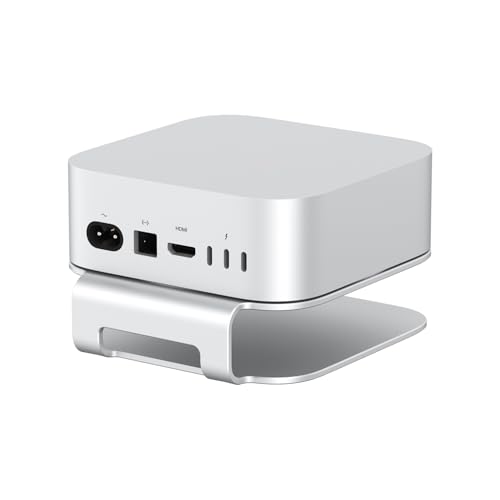
- Raises the Mac mini 1.42 inches
- Power-button access cutout
- Silicone pads on top and base
Best For: Simple under-device clearance and power-button access
Best for Easy Access
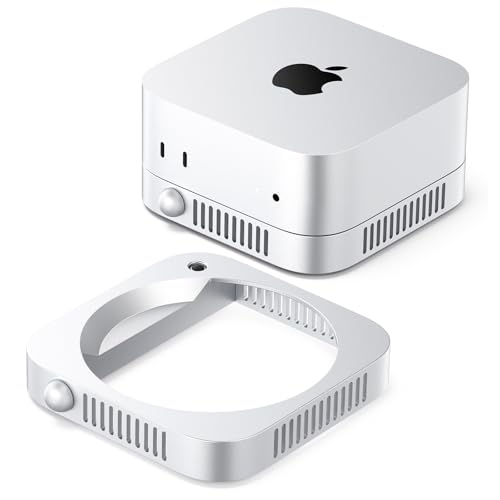
- Built-in power switch
- Through-airflow ventilation
- Compact silver ABS build
Best For: Passive ventilation with convenient power-button access
Best for Easy Setup

- TEC cooler and seven-blade fan
- Alloy cooling fins
- Transparent, RGB-accented design
Best For: M4 or M4 Pro setups seeking active cooling
Active Cooling Pick – Iesooy Aluminum Stand with Adjustable USB Fan
If you want a mac mini cooling stand with a powered fan, this silver aluminum platform raises your device and circulates air underneath it. Its 120mm USB fan has a speed-control knob, so you can adjust airflow and noise to suit your workspace.
Best For: Buyers who want adjustable, fan-assisted airflow beneath a compatible Mac mini or other small electronic device.
Pros:
- 120mm fan offers adjustable speeds up to 2000 RPM.
- Runs on 5V USB power and includes a USB pass-through connection.
- Replaceable fan design; USB cable and spare parts kit are included.
Cons:
- Requires a compatible USB power source.
- Fit depends on the device’s footprint and ventilation layout.
This is the most direct option here for adding active airflow. Check your Mac mini’s dimensions and vent placement before choosing it.
Vertical Desk-Saver – SNANSHI Metal Mac mini Stand
This mac mini cooling stand takes a passive approach: it holds a compatible Mac mini upright to expose its bottom ventilation area while freeing desk space. The vertical position also puts the bottom-mounted power button on an easier-to-reach side.
Best For: Owners of compatible Mac mini models who prioritize desk space and easier power-button access without adding a fan.
Pros:
- Vertical orientation exposes the bottom ventilation area.
- Weighted metal base helps resist cable pull.
- Silicone padding cushions the device and helps keep the stand from sliding.
Cons:
- Provides passive airflow rather than powered cooling.
- Compatibility is limited to the Mac mini models specified in the listing.
Choose this stand if a compact upright setup matters more to you than a built-in fan. Verify your exact Mac mini model against the listed compatibility before buying.
Raised Platform Pick – Qwiizlab Aluminum Mac mini Stand
For a low-profile mac mini cooling stand, this Qwiizlab aluminum platform lifts a compatible Mac mini 1.42 inches above the desk to leave more room for ventilation. An opening in the stand keeps the bottom power button accessible.
Best For: Owners of the specified Mac mini models who want a simple raised platform with power-button access.
Pros:
- Raises the Mac mini by 1.42 inches for ventilation space.
- Includes a cutout for accessing the bottom power button.
- Silicone pads on top and underneath help prevent scratches and slipping.
Cons:
- No fan or adjustable cooling controls.
- Not intended for Mac mini models outside those specified in the listing.
This is a straightforward choice when you want clearance under the computer without a powered accessory. Confirm your Mac mini model before ordering.
Best for Easy Access – ORICO Mac mini Airflow Stand
If you want a mac mini cooling stand that keeps the setup simple, the ORICO ST01 raises your computer on a compact base with a through-airflow design. Its built-in power switch also lets you turn the Mac mini on or off without lifting it.
Best For: Mac mini owners who want passive ventilation and easier access to the power button.
Pros:
- Through-airflow design leaves room for ventilation.
- Built-in switch makes power-button access more convenient.
- Compact silver ABS stand complements a streamlined desk setup.
Cons:
- Relies on open airflow rather than a built-in fan.
- Metallic finish is painted ABS, not metal construction.
This is a practical pick if everyday convenience matters as much as ventilation. Choose it for a tidy, low-complexity stand rather than active cooling.
Best for Easy Setup – Fallinep TEC Mac mini Stand
For shoppers seeking a mac mini cooling stand with active hardware, this Fallinep model combines a semiconductor cooler, a seven-blade fan and alloy cooling fins. Its transparent acrylic holder and RGB-lit cooler make it a more visible desk accessory than a plain riser.
Best For: Mac mini M4 or M4 Pro users who want an active-cooling setup with a distinctive look.
Pros:
- TEC cooler and fan provide active cooling rather than ventilation alone.
- Alloy fins are designed to help transfer and distribute heat.
- Two cooling settings offer a choice of operation.
Cons:
- Fan-powered cooling adds hardware compared with a passive stand.
- Claims about frost formation and sub-25 dB operation are manufacturer-stated, not independently verified here.
Consider this one if you specifically want active cooling and like the transparent, RGB-accented design. The supplied information does not establish how much it lowers Mac mini operating temperatures.
How We Picked These Mac Mini Cooling Stands
We compared the five selected products by the cooling approach described in their listings, access to the Mac mini’s power button and ports, materials, and likely desk setup. Because a raised stand, a USB fan, and a semiconductor cooler work differently, we did not treat every cooling claim as equivalent. We also considered model fit: a stand marketed for one Mac mini generation should not be assumed to fit another simply because the name is similar. Product names alone do not establish measured temperature reductions or noise levels.
Quick Comparison
For straightforward airflow, consider the aluminum stand with a 120 mm USB fan if you want active air movement, or the Qwiizlab aluminum stand if your priority is elevation and power-button access. The Mac Mini M4 Stand is another access-focused option worth checking against your exact model. ORICO’s stand combines an airflow-oriented design with a built-in power switch. The acrylic holder adds RGB lighting and a 15 W semiconductor cooler, making it the most feature-heavy option here. Verify the current listing before relying on any claimed model compatibility or cooling specification.
Key Buying Factors for a Mac Mini Cooling Stand
Fit and Button Access
Confirm the stand’s supported Mac mini generation, dimensions, and orientation. In particular, check whether you can reach the power button without lifting the computer and whether front and rear ports remain convenient. Listings that mention newer models should be checked against the manufacturer’s current compatibility information.
Airflow Versus Active Cooling
A basic raised stand creates clearance; it does not actively move air. A USB fan can increase airflow but needs power and may add audible noise. A semiconductor cooler adds another powered component and should be evaluated for contact, heat dissipation, and condensation precautions stated by its manufacturer. For most everyday workloads, choose based on your setup rather than assuming extra cooling will improve performance.
Desk Practicality
Look at footprint, cable routing, stability, and whether the stand blocks the Mac mini’s ventilation path. Metal, ABS plastic, and acrylic each offer a different feel, but construction quality and a secure fit matter more than material alone. Account for any USB port or outlet a powered stand will occupy.
Who Should Buy Which Mac Mini Cooling Stand?
Choose the 120 mm USB-fan stand if you specifically want active airflow and can accommodate its power cable. Pick the Qwiizlab or Mac Mini M4 stand if easy power-button access and a simpler setup are your main goals; compare their stated fit before deciding. The ORICO stand suits buyers who want an accessible switch without adding a separate fan. Consider the acrylic RGB cooler only if you want its lighting and powered cooling features and are comfortable checking its setup requirements. If your Mac mini already has clear ventilation and runs as expected, a simple stand may be all you need.