If you’re looking to enhance your Mac Studio setup, choosing the right docking station is essential. With so many options available, it can be tough to find one that meets your needs. The best docking stations not only maximize connectivity but also boost performance. From versatile designs to high-speed data transfer capabilities, a well-chosen dock can transform your workflow. Let’s explore the top contenders that can elevate your experience and streamline your tasks.
iVANKY 23-in-1 FusionDock Max 2 for MacBook
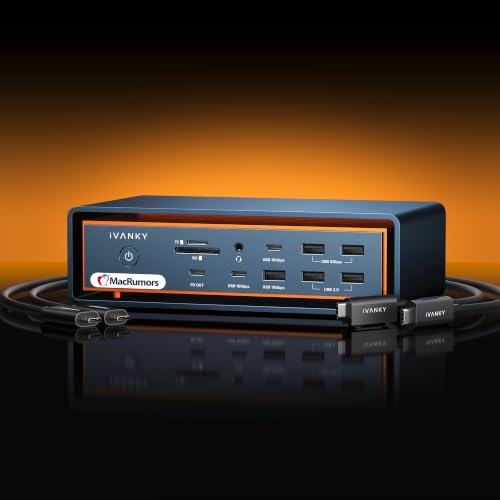
The iVANKY 23-in-1 FusionDock Max 2 for MacBook is the ultimate solution for creative professionals and power users who demand robust display capabilities and seamless connectivity. You can support triple displays up to 6K@60Hz, allowing for stunning visuals and multitasking efficiency. With a multi-layer cooling system, it guarantees stable performance during extended use. The 240W power adapter efficiently charges your laptop and other devices. Plus, enjoy lightning-fast data transfers with Thunderbolt 5 ports and a Gigabit Ethernet connection for reliable internet. Backed by a 24-month warranty, you’ll have peace of mind while elevating your workspace.
Best For: Creative professionals and power users seeking exceptional display capabilities and seamless connectivity for their MacBook.
Pros:
- Supports triple displays up to 6K@60Hz, enhancing multitasking and visual experience.
- Efficient cooling system ensures stable performance during prolonged use.
- Comprehensive connectivity with multiple Thunderbolt 5 ports and USB options for fast data transfers.
Cons:
- High price point may not be suitable for casual users.
- Limited compatibility with non-Mac devices, restricting user base.
- Bulky design might not be ideal for those seeking portability.
Mac Docking Station Dual Monitor for MacOS and Windows

For professionals seeking seamless dual monitor functionality, the Mac Docking Station Dual Monitor 2 HDMI stands out as an excellent choice. Compatible with both MacOS and Windows, it supports dual 4K displays using MST technology. With dimensions of 5.67 x 2.64 x 0.7 inches and weighing just 11.2 ounces, it’s portable yet powerful. You’ll find multiple ports, including USB-C, HDMI, and Ethernet, enhancing your connectivity. While it’s plug-and-play for basic tasks, you’ll need to install drivers for full dual monitor capabilities on Mac. Despite some concerns about software privacy and performance, its versatility makes it a strong contender for your setup.
Best For: Professionals and users who need seamless dual monitor functionality on MacOS and Windows devices.
Pros:
- Versatile Connectivity: Offers multiple ports including USB-C, HDMI, and Ethernet for enhanced connectivity options.
- Supports Dual 4K Displays: Utilizes MST technology to easily extend displays for better multitasking.
- Portable Design: Lightweight and compact, making it easy to transport for on-the-go professionals.
Cons:
- Software Installation Required: Advanced features on Mac necessitate driver installation, which some users may find inconvenient.
- Inconsistent Performance: Reports of unreliable HDMI connectivity and power delivery, leading to mixed experiences.
- Privacy Concerns: Some users express discomfort regarding the privacy implications of required software.
ULANZI QT03 Docking Station & Stand with NVME SSD Enclosure

Designed specifically for high-volume data creators like videographers and 3D artists, the ULANZI QT03 Docking Station & Stand with NVME SSD Enclosure offers essential connectivity and performance features. This 10-in-1 docking station supports multiple devices, including Mac Mini and various PCs. You’ll enjoy 40Gbps data transfer speeds and dual SSD capabilities, allowing for seamless file access and storage expansion up to 8TB. Plus, its built-in fan guarantees efficient cooling during demanding tasks. With a solid rating of 4.7 stars, users appreciate its build quality and speed, making it a top choice for enhancing your workstation setup.
Best For: The ULANZI QT03 Docking Station is best for high-volume data creators such as videographers, designers, and 3D artists seeking efficient connectivity and storage solutions.
Pros:
- 10-in-1 connectivity offering versatile ports including USB-C/A, audio, 4K HDMI, and dual SSD support.
- High-speed performance with 40Gbps data transfer rates, allowing for rapid file transfers.
- Efficient cooling with a built-in high-speed fan, ensuring optimal performance during intensive tasks.
Cons:
- Some users have reported the need for longer cables for stacked configurations.
- Occasional connection drops with SSDs have been noted in user feedback.
- Compatibility may be limited for devices outside the specified range, such as specific models of older computers.
Plugable USB C Triple Display Docking Station

Experience seamless multitasking with the Plugable USB C Triple Display Docking Station, perfect for professionals who rely on multiple monitors for data analysis, presentations, and conferencing. With support for three extended HDMI displays, you can easily bypass single-display limitations, especially on Apple M1/M2 MacBooks. It features 100W Power Delivery, ensuring your devices stay charged while you work. The six USB 5Gbps ports provide ample connectivity options. Compatible with Windows, macOS, and ChromeOS, this dock is ideal for hybrid teams. Users rave about its reliability and quick installation, making it a top choice for enhancing your workspace productivity.
Best For: Professionals needing reliable multi-monitor support for data analysis, presentations, and hybrid work environments.
Pros:
- Supports up to three extended HDMI displays, ideal for multitasking and presentations.
- 100W Power Delivery keeps devices charged during use.
- Easy setup with clear instructions and quick installation process.
Cons:
- Some users reported device failures after a few months of use.
- Not compatible with Linux systems or HDCP.
- The dock can get warm during extended use, though not excessively.
Satechi Mac mini Hub & Stand with SSD Enclosure

The Satechi Mac mini Hub & Stand with SSD Enclosure is an ideal solution for Mac mini users seeking to boost their device’s functionality and storage capacity. This sleek, brushed silver aluminum hub not only complements your setup but also supports M.2 SSDs with speeds up to 10Gbps. You’ll enjoy a 7-in-1 docking station featuring USB-C and USB-A ports, micro/SD card readers, and a headphone jack, giving you easy access to essential peripherals. Built-in air vents guarantee efficient cooling, while included accessories make installation a breeze. Plus, it’s backed by a 2-year warranty, guaranteeing peace of mind.
Best For: Mac mini users looking to expand their device’s storage and connectivity options with a sleek and functional design.
Pros:
- Versatile Storage: Supports a range of M.2 SSDs with high speeds up to 10Gbps for fast data transfer.
- Comprehensive Connectivity: Features multiple USB ports and card readers for easy access to peripherals.
- Effective Cooling: Built-in air vents ensure optimal performance by regulating temperature during extended use.
Cons:
- Limited Compatibility: Not compatible with Mac Mini M4 and SSDs with pre-installed heatsinks.
- SSD Not Included: Requires separate purchase of M.2 SSD for storage expansion.
- Potential for Clutter: The hub may take up additional desk space, which could be a concern for minimalistic setups.
Mac Studio Dock & Stand with USB-C and NVMe SSD Slots
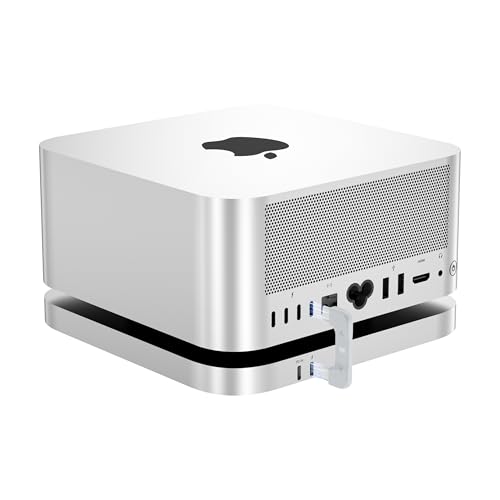
For creative professionals and tech enthusiasts who demand high-speed data transfer and expansive storage, the Mac Studio Dock & Stand with USB-C and NVMe SSD slots stands out as an exceptional choice. With dual M.2 2280 NVMe SSD slots, you can expand your storage up to 16TB, ensuring you have ample space for large files. The 80Gbps USB-C port allows super-fast data transfers, making it perfect for 4K/8K video editing and 3D rendering. Plus, its sleek design and efficient cooling system keep it looking and performing great, while compatibility with various devices adds versatility to your setup.
Best For: Creative professionals and tech enthusiasts who require high-speed data transfer and extensive storage capacity.
Pros:
- High Storage Capacity: Supports dual M.2 2280 NVMe SSDs with a total of up to 16TB.
- Ultra-Fast Data Transfer: 80Gbps USB-C port enables rapid data transfers, ideal for demanding tasks.
- Sleek Design: Slim aluminum shell with effective cooling and a stylish appearance.
Cons:
- Limited PCIe Performance: Although PCIe 5.0 is recognized, performance is capped at x2 speeds due to the design.
- Power Limitations for Some Devices: Only supports peripherals below 15W directly, requiring a higher power supply for more demanding devices.
- Compatibility Restrictions: While it works with various devices, it primarily supports Thunderbolt 3/4/5 or USB 4 ports.
Plugable USB-C Triple Monitor Docking Station (UD-ULTCDL)

Designed for professionals who need to maximize productivity, the Plugable USB-C Triple Monitor Docking Station (UD-ULTCDL) supports a powerful triple monitor setup, allowing you to extend your workspace effortlessly. With 100W charging for your laptop and 20W for your devices, you won’t run out of power during essential tasks. Enjoy stunning visuals with up to 4K resolution on the main display, utilizing DisplayLink technology for seamless performance on M1/M2/M3/M4 Macs. Plus, with multiple connectivity options, including USB 3.0 ports and Gigabit Ethernet, you’ll have everything you need to stay connected and efficient.
Best For: Professionals and multitaskers who need a robust docking solution to enhance productivity with multiple monitors and extensive connectivity.
Pros:
- Offers 100W charging for laptops and an additional 20W for other devices, ensuring you stay powered throughout your workday.
- Supports a triple monitor setup with high-resolution displays, providing an expansive workspace for multitasking.
- Includes a variety of connectivity options, such as USB 3.0 ports and Gigabit Ethernet, making it versatile for different devices and networks.
Cons:
- Requires DisplayLink drivers for full functionality, which may add setup complexity for some users.
- Limited to 4K at 30Hz on the main display, which may not meet the needs of users requiring higher refresh rates for gaming or intensive tasks.
- The dock’s performance can vary based on the host device and its compatibility with DisplayLink technology, potentially leading to inconsistent experiences.
Mate Studio Stand-A SSD Expansion Dock for Mac Studio
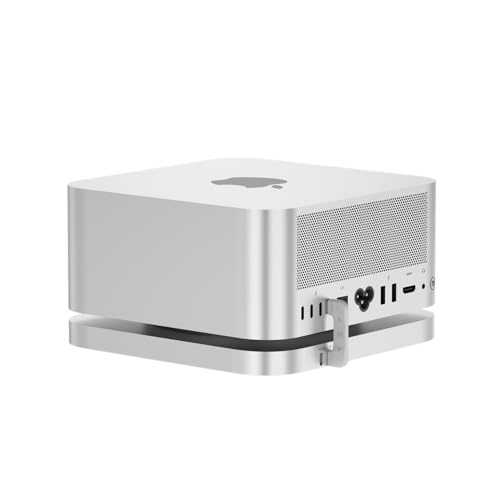
Looking to supercharge your Mac Studio’s capabilities? The Mate Studio Stand-A SSD Expansion Dock is your answer. With dual PCIe x2 M.2 slots, it supports up to 16TB of storage, making it perfect for your demanding workloads. You’ll enjoy impressive sequential read speeds of up to 3600MB/s, ideal for 4K/8K video editing and AI datasets. Plus, its integrated PD 3.0 port powers your SSDs while external power support caters to high-demand drives. The aluminum chassis guarantees peak cooling, so you can rely on this dock for effective, scalable storage expansion without any internal modifications.
Best For: Professionals in video editing, CAD, and AI development seeking high-capacity and high-speed storage solutions for their Mac Studio.
Pros:
- High Storage Capacity: Supports up to 16TB, making it suitable for large files and projects.
- Impressive Speed: Offers sequential read speeds up to 3600MB/s, enhancing productivity for demanding applications.
- Effective Cooling: Designed with ventilation slots to optimize heat dissipation during extensive use.
Cons:
- Limited Internal Modifications: Requires external upgrades rather than internal modifications, which may not appeal to all users.
- Power Requirement: High-demand drives need external power, which could complicate setup.
- Price Point: May be considered expensive for casual users or those with less intensive storage needs.
TobenONE DisplayLink Docking Station for Triple Monitor
The TobenONE DisplayLink Docking Station stands out as an ideal solution for professionals who demand seamless multitasking across multiple displays. With support for triple 4K monitors and a single USB-C connection, you can streamline your workspace and enhance productivity. Its 120W power adapter not only charges your Mac Studio but also powers additional devices, eliminating clutter. You’ll appreciate the 18 available ports, including USB-C and HDMI, for all your accessories. Installation is straightforward, though you’ll need to install DisplayLink drivers. Rated 4.4 out of 5 stars, it’s praised for reliable performance and robust build quality.
Best For: Professionals and creatives who require seamless multitasking with multiple high-resolution displays.
Pros:
- Supports triple 4K monitors and simplifies cable management with a single USB-C connection.
- Includes a powerful 120W power adapter that charges devices while providing ample connectivity options with 18 ports.
- Highly rated for reliable performance, robust build quality, and effective multitasking capabilities.
Cons:
- Requires installation of DisplayLink drivers, which may not be plug-and-play for all users.
- Some users have noted a need for clearer instructions regarding port usage.
- Limited compatibility with Linux/Unix operating systems.
Baseus Docking Station, Spacemate 11 in 1 for Windows

If you’re a Windows user seeking seamless connectivity, the Baseus Docking Station, Spacemate 11 in 1, stands out with its impressive array of 11 expansion ports. You’ll enjoy dual HDMI and DisplayPort outputs, allowing for triple display support at 4K resolution. With USB 3.2 Gen 2 ports, data transfer speeds reach up to 10Gbps, letting you move 20GB files in just 20 seconds. Its compact design guarantees portability, while the magnetic base adds stability. Plus, with 100W power delivery, you can charge your devices efficiently. Overall, it’s a robust choice for enhancing your workstation experience.
Best For: Windows users looking for a versatile docking station to enhance productivity with multiple display support and high-speed data transfer.
Pros:
- 11 expansion ports including dual HDMI and DisplayPort for versatile connectivity options.
- Fast data transfer speeds of up to 10Gbps, allowing for quick file transfers.
- Compact and portable design with a magnetic base for added stability.
Cons:
- Power adapter not included, which may require additional purchase for full functionality.
- Unit may get warm under heavy load, potentially affecting long-term use.
- Some concerns about built-in cable and quality control, as noted in user feedback.
Factors to Consider When Choosing a Mac Studio Docking Station
When you’re choosing a Mac Studio docking station, you’ll want to take into account several key factors. Think about display support capabilities, connectivity options, and power delivery specifications to guarantee compatibility with your setup. Don’t forget to evaluate build quality, design, and data transfer speed for peak performance.
Display Support Capabilities
Choosing a Mac Studio docking station requires careful consideration of its display support capabilities, especially since your productivity can hinge on how well it handles multiple monitors. Look for a dock that supports multiple displays, such as dual 4K@60Hz or even dual 6K@60Hz, depending on the model. Verify it utilizes Multi-Stream Transport (MST) technology for efficient extension of displays, particularly with MacOS. Check the total number of HDMI, DisplayPort, or Thunderbolt outputs available; more ports mean more extensive setups. Additionally, confirm the maximum resolution and refresh rates supported, as some docks may fall short. Finally, make certain the docking station is compatible with the latest M-series Mac chips to avoid any limitations in display output capabilities.
Connectivity Options Available
Connectivity is a essential aspect to take into account in a Mac Studio docking station, as it directly impacts your ability to connect various devices and peripherals. Look for a docking station with a variety of ports, including USB-C, USB-A, HDMI, and Ethernet, ensuring compatibility with your setup. Prioritize options that support high-speed data transfer rates, ideally reaching up to 80Gbps, which is critical for intensive tasks. Check for support for multiple display configurations, enabling dual or triple monitor setups at resolutions up to 4K or higher. Finally, consider the docking station’s cooling system; effective heat dissipation is essential for maintaining performance during extended use, especially during high-volume data transfers.
Power Delivery Specifications
Power delivery specifications play an essential role in your decision-making process for a Mac Studio docking station, as they determine how effectively your devices will be charged. Look for docking stations that support up to 100W for laptops, along with additional power for peripherals. An integrated power delivery feature guarantees your host device remains charged while powering other devices, cutting down on the need for multiple adapters. Pay attention to the power output limits for individual ports, as some might provide less power, impacting charging efficiency. Opt for models with power distribution capabilities to charge both your host device and peripherals simultaneously, and verify compatibility with USB Power Delivery standards for safe, efficient charging negotiations.
Build Quality and Design
When evaluating a Mac Studio docking station, build quality and design are just as important as power delivery specifications. You should prioritize durable materials like aluminum alloy, ensuring longevity and resistance to wear during regular use. A well-designed station will feature effective heat dissipation, with ventilation slots or built-in fans to maintain performance during intensive tasks. Consider the dimensions and weight for a compact footprint, making it easy to integrate into your workspace without clutter. An aesthetically pleasing design, often sleek and modern, enhances your environment and complements your devices. Finally, user accessibility is essential; strategically placed ports and easy access to SSD slots create a seamless experience when connecting and disconnecting devices.
Data Transfer Speed
Data transfer speed is essential when choosing a Mac Studio docking station, especially if you regularly handle large files or work with multiple peripherals. Prioritize models that offer high speeds, like 80Gbps, to boost your productivity. Look for docking stations that support USB 4 or Thunderbolt technology, as these provide remarkably faster data transfer rates than standard USB connections. Make sure the station accommodates PCIe 4.0 x4 SSDs for exceptional performance, achieving sequential read speeds up to 3600MB/s—perfect for tasks like 4K video editing. Additionally, consider the number of USB ports and their capabilities; USB 3.2 Gen 2 ports can transfer data at up to 10Gbps, enhancing your connectivity experience even further.
Compatibility With Devices
Compatibility is an essential factor to evaluate when choosing a Mac Studio docking station. First, make certain the dock works with your specific Mac Studio model, as not all docks support every version. Look for options that utilize Thunderbolt 3/4 or USB 4 ports to assure ideal data transfer speeds. Confirm that the docking station is compatible with macOS 11 or higher for smooth performance. Additionally, consider docks that offer dual M.2 NVMe SSD slots, allowing you to expand your storage for demanding tasks. Finally, verify compatibility with your peripheral devices, including monitors and external storage, so you have all the necessary connections for your setup. A well-matched dock can enhance your overall experience considerably.
Cooling and Heat Management
Selecting the right Mac Studio docking station goes beyond just compatibility; effective cooling and heat management are vital for maintaining performance. High-performance components generate significant heat, which can lead to throttling or hardware failures if not properly managed. Look for docking stations with built-in fans and multi-layer heat dissipation designs that guarantee stable performance during extended use. Elevated structures promote airflow, helping to mitigate overheating, especially during intensive tasks. Advanced cooling solutions, like internal copper plates, enhance thermal conductivity and overall heat dissipation efficiency. Continuous cooling mechanisms are imperative when utilizing features like multiple high-resolution displays or extensive data transfers. Prioritizing these factors will keep your setup running smoothly and efficiently.