A good desk mat does more than fill space. For a PC gaming setup, it can improve mouse control, protect your desk, and help your keyboard and mouse stay put during long sessions.
Below, we’ve rounded up ten of the best options for gamers who want better coverage, cleaner cable management, and a more polished battlestation look.
Best 10 Desk Mats for PC Gaming Setup Picks for 2026
Extended XL Control Pad

- 31.5 x 11.8 inch extended layout
- Micro-weave cloth for control and glide
- Non-slip base with water-resistant coating
Best For: Players who want a simple extended mat for gaming and work
Esports XXL Coverage
SteelSeries QcK Gaming Mouse Pad

- 35 x 16 inch XXL desktop coverage
- Smooth cloth surface for accurate tracking
- Non-slip rubber base for stability
Best For: Competitive gamers wanting a proven full-size cloth mat
RGB Feature Pick
BladeHawks Extra Large LED Mouse Pad
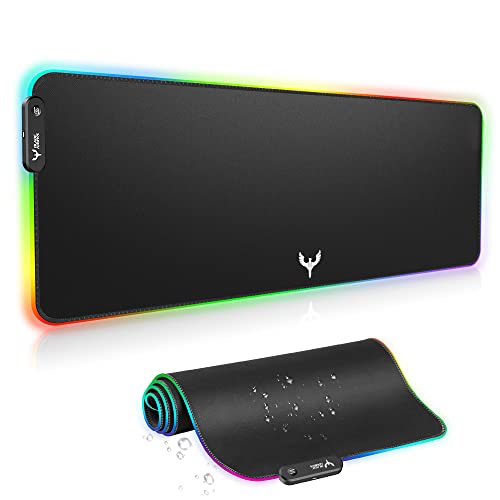
- 31.5 x 12 inch extended gaming surface
- 14 RGB lighting modes with memory
- Anti-slip base and waterproof cloth surface
Best For: Gamers who want RGB lighting with a large mouse pad
Topographic Full-Desk Mat
Rinaze Extra Large Gaming Mouse Pad

- 35.4 x 15.7 inch roomy desk coverage
- Smooth woven cloth with silent glide
- Anti-fray edges and non-slip rubber base
Best For: Anyone wanting a large, durable mat with a unique design
RGB Glow Desk Mat

- 12 lighting modes with memory function
- 31.5 x 11.8 inch extended surface
- Non-slip base, stitched edges, water-resistant top
Best For: PC gamers who want an RGB-lit desk mat with easy USB setup
Minimal Line Desk Mat

- Black topographic look with stitched edges
- 31.5 x 11.8 inch extended layout
- Water-resistant surface and non-slip base
Best For: Minimalist gaming setups needing a simple, practical desk mat
Tech Pattern XL Desk Mat
Circuit Board Gaming Mouse Pad

- Oversized 35.4 x 15.7 inch coverage
- Microfiber surface with stitched edges
- Waterproof and non-slip rubber base
Best For: Large gaming desks that need maximum surface coverage
RGB Immersion Pick
TIDALSOIL RGB Gaming Mouse Pad, 31.5 x 11.8 Inch

- 12 RGB light modes with memory function
- Oversized surface for keyboard and mouse
- Non-slip rubber base and stitched edges
Best For: Gamers who want lighting effects and wide desk coverage
Clean Coverage Pick
Topographic Large Gaming Mouse Pad, 31.5 x 11.8in

- Large surface for keyboard and mouse
- Waterproof coating for easy cleaning
- Non-slip base with stitched edges
Best For: Users who want a simple, spill-resistant desk mat
Wide Desk Pick
Hsmienk Large Extended Gaming Mouse Pad, 31.5 x 15.7in

- Extra-wide 31.5 x 15.7-inch coverage
- Waterproof coating and stitched edges
- Natural rubber base for stable grip
Best For: People who want maximum desk coverage without RGB
Extended XL Control Pad – KTRIO Large Gaming Mouse Pad
If you want desk mats for pc gaming setup that keep a keyboard and mouse in one clean space, the KTRIO XL is a straightforward choice. Its 31.5 x 11.8 inch layout gives you room for low-DPI aim, daily work, and a tidy desktop without taking over the whole desk.
Best For: Gamers and office users who want a simple extended mat with control, stability, and easy cleanup.
Pros:
- Extended 31.5 x 11.8 inch surface fits a keyboard, mouse, and desk accessories.
- Micro-weave cloth is designed for balanced glide and stopping power.
- Non-slip natural rubber base helps keep the mat flat and steady.
- Water-resistant coating makes spills easier to wipe away.
Cons:
- No RGB lighting or extra visual features.
- Smaller than full-desk XXL pads if you want maximum coverage.
Overall, the KTRIO focuses on practical performance rather than extras. It is a solid pick if you want a durable, easy-to-maintain desk mat that supports both gaming and everyday desk use.
Esports XXL Coverage – SteelSeries QcK Gaming Mouse Pad
For desk mats for pc gaming setup, the SteelSeries QcK XXL is built around broad coverage and dependable tracking. Its 35 x 16 inch size is meant to cover your keyboard, mouse, and even monitor area, giving you a clean battlestation layout with a stable surface under your gear.
Best For: Competitive players and large setups that need full desktop coverage and reliable mouse control.
Pros:
- XXL size offers complete desktop coverage for a cleaner setup.
- High thread count cloth is tuned for pinpoint mouse accuracy.
- Non-slip rubber base helps prevent unwanted movement.
- Trusted esports-style design with a long performance track record.
Cons:
- Plain black design with no RGB or decorative elements.
- Very large footprint may be more than smaller desks need.
If you care most about consistency and a roomy surface, the QcK XXL stays focused on the essentials. It is a strong fit for gamers who want a proven cloth pad that supports precision and stability.
RGB Feature Pick – BladeHawks Extra Large LED Mouse Pad
If you want desk mats for pc gaming setup with a visual edge, the BladeHawks RGB mouse pad adds lighting while still handling the basics well. The 31.5 x 12 inch surface is sized for a keyboard and mouse, and the USB-powered lighting gives you 14 modes to match a themed battlestation.
Best For: Gamers who want extended desk coverage plus customizable RGB lighting.
Pros:
- Extended 31.5 x 12 inch size fits keyboard and mouse comfortably.
- 14 lighting modes include 7 static and 7 dynamic options.
- Micro-textured cloth surface supports smooth, precise mouse movement.
- Anti-slip natural rubber base helps it stay in place.
Cons:
- Needs USB power to run the lighting.
- Lighting adds complexity if you only want a basic mat.
This is a good option if you want your desk mat to do more than cover the desktop. The BladeHawks balances gaming-friendly size and tracking with the added appeal of RGB effects.
Topographic Full-Desk Mat – Rinaze Extra Large Gaming Mouse Pad
The Rinaze extra large pad is a practical choice for desk mats for pc gaming setup when you want both size and a more distinctive look. At 35.4 x 15.7 inches, it offers full-desk-style coverage for a keyboard, mouse, and other desktop items, while the smooth woven surface is made for quiet, easy movement.
Best For: Users who want a roomy, durable desk mat with a unique black topographic design.
Pros:
- Large 35.4 x 15.7 inch size handles keyboards, mice, and desk items.
- Soft woven cloth is designed for effortless, silent glide.
- Flat-stitch anti-fray edges and non-slip rubber base add durability and stability.
- Wipe-clean surface makes maintenance simple.
Cons:
- No RGB or other lighting features.
- Design is more subdued than flashy gaming mats.
For buyers who value coverage, durability, and easy upkeep, this Rinaze mat checks the right boxes. The topographic styling gives it a little personality without sacrificing everyday usability.
RGB Glow Desk Mat – Gerlos RGB Gaming Mouse Pad
If you want desk mats for pc gaming setup with a more immersive look, this extended RGB mouse pad adds lighting while still giving you a usable surface for keyboard and mouse. Its 31.5 x 11.8 inch footprint, water-resistant cloth top, and anti-slip base make it practical for everyday play and work.
Best For: Gamers who want an illuminated desk mat with roomy coverage and simple USB plug-and-play setup.
Pros:
- 12 lighting modes, including 9 static colors and 3 dynamic effects
- Large 31.5 x 11.8 inch surface fits a keyboard and mouse
- Non-slip rubber base and stitched edges for better stability and durability
- Water-resistant surface helps with spills and easy cleanup
Cons:
- Requires USB power for the lighting
- Lighting may be unnecessary if you want a plain desk mat
This is a strong pick if visual flair matters as much as function. The memory function and one-button controls make it easy to live with, while the extended layout keeps it useful as a full desktop mat.
Minimal Line Desk Mat – DIGSOM Topographic Mouse Pad
For desk mats for pc gaming setup that lean clean and understated, this extended mouse pad offers a simple black topographic design with practical everyday features. The 31.5 x 11.8 inch size, smooth cloth surface, and spill-resistant coating make it suitable for both gaming and office use.
Best For: Players and desk users who want a minimalist large mouse mat with a subtle design.
Pros:
- Large 31.5 x 11.8 inch size fits keyboard and mouse
- Smooth cloth surface supports accurate mouse control
- Water-resistant coating helps protect against spills and stains
- Non-slip rubber base keeps the mat stable
Cons:
- 3 mm thickness is relatively slim compared with thicker desk mats
- Design is subtle, so it may not stand out in a themed setup
This is a sensible choice if you want a desk mat that looks clean without giving up the basics. It focuses on size, easy cleaning, and steady performance rather than extra features.
Tech Pattern XL Desk Mat – Circuit Board Gaming Mouse Pad
If you want desk mats for pc gaming setup with extra coverage, this oversized 35.4 x 15.7 inch mat gives you more room than many standard extended pads. The microfiber surface, stitched edges, and waterproof build make it a useful option for gaming desks and office spaces alike.
Best For: Users who need a very large desk mat with a tech-style design and durable everyday construction.
Pros:
- Oversized 35.4 x 15.7 inch surface offers expansive coverage
- Microfiber top is made for smooth, precise tracking
- Reinforced stitched edges help resist fraying
- Waterproof surface and rubber base add practicality and stability
Cons:
- Large footprint may take up most of a smaller desk
- Thicker size may be more mat than some basic mouse users need
This model stands out for sheer size and a more detailed circuit-board look. It makes sense when you want a desk mat that protects a wide work area while still supporting gaming precision.
RGB Immersion Pick – TIDALSOIL RGB Gaming Mouse Pad, 31.5 x 11.8 Inch
If you’re shopping for desk mats for pc gaming setup, this oversized RGB mouse pad gives you both a full keyboard-and-mouse surface and a lighting upgrade in one piece. The 31.5 x 11.8-inch layout is built for broad desk coverage, while the smooth cloth top and rubber base focus on stable, precise use.
Best For: Gamers who want an extended mat with RGB lighting and easy plug-and-play setup.
Pros:
- 12 light modes, including dynamic and static RGB effects
- Oversized 31.5 x 11.8-inch surface fits keyboard and mouse
- Non-slip natural rubber base helps keep the mat in place
- Memory function remembers your last lighting mode
Cons:
- Needs USB power for the lighting feature
- RGB styling may not suit minimalist desks
Overall, this is a strong pick if you want your desk mat to do more than just protect the desktop. It combines wide coverage, stable tracking, and a more immersive gaming look without requiring software or drivers.
Clean Coverage Pick – Topographic Large Gaming Mouse Pad, 31.5 x 11.8in
For desk mats for pc gaming setup, this extended mat is a practical option if you want a wide surface without extra features. It offers a smooth cloth top for fast movement, a non-slip rubber base for stability, and a waterproof coating that makes cleanup easier after spills.
Best For: Gamers and office users who want a simple, large desk mat with easy maintenance.
Pros:
- Large 31.5 x 11.8-inch size suits keyboard and mouse use
- Smooth stitched surface supports speed and control
- Waterproof coating helps resist spills and stains
- Non-slip rubber base keeps the mat steady
Cons:
- No RGB or other visual extras
- Thinner 2 mm build may feel more basic than thicker mats
This is a straightforward extended desk mat that focuses on function first. If you want a clean, easy-to-wipe surface with dependable grip, it covers the essentials well.
Wide Desk Pick – Hsmienk Large Extended Gaming Mouse Pad, 31.5 x 15.7in
If you want desk mats for pc gaming setup with extra room, this extended pad stands out for its wider 31.5 x 15.7-inch footprint. It uses a smooth surface for accurate tracking, a natural rubber base for grip, and a waterproof coating to help protect against spills.
Best For: Gamers and home-office users who need a wider-than-average desk mat for more desktop coverage.
Pros:
- Extra-wide 31.5 x 15.7-inch size covers more of the desk
- Natural rubber base provides non-slip stability
- Waterproof coating helps liquids bead up and slide off
- Stitched edges add durability for longer use
Cons:
- Black-only, no design or lighting features
- Larger size may be more than needed for compact desks
This pad is a smart choice if desk coverage matters more than flashy extras. The wider format is especially useful when you want room for a keyboard, mouse, and a cleaner-looking workspace.
How We Picked the Best Desk Mats for PC Gaming Setup
We focused on Desk Mats for PC Gaming Setup that balance size, surface consistency, and durability. The best picks typically offer enough room for both keyboard and mouse, a stable non-slip base, and stitched or reinforced edges to reduce fraying over time.
We also considered whether each mat suits different priorities, including smooth glide for fast mouse movement, water resistance for everyday protection, and RGB lighting for users who want a more customized gaming look.
Quick Comparison
If you want a simple way to narrow things down, think in terms of use case. Extra-large flat mats are usually best for clean, minimalist setups and wide mouse movement. RGB models are better for users who want visual impact. Topographic, circuit-board, and other printed designs are ideal if you want style without extra lighting.
Key Buying Factors for Desk Mats for PC Gaming Setup
Size and Desk Coverage
Measure your available desk space before buying. A larger mat can unify your keyboard and mouse area, but it should not crowd your monitor stand, speakers, or armrests. For most players, extended-width mats are the sweet spot.
Surface Texture and Tracking
A smoother surface generally supports quick, low-friction mouse movement, while a slightly textured weave may offer more control. Pick the feel that matches your game genre and sensitivity settings.
Base Grip and Stability
A reliable rubber base matters more than many buyers expect. If the mat shifts during intense play, it can affect accuracy and comfort. Non-slip backing is especially important on smooth or glass desks.
Edges, Spill Resistance, and Maintenance
Stitched edges help extend lifespan, while water-resistant surfaces make cleanup easier after spills or heavy daily use. If you snack or drink at your desk, that protection is worth prioritizing.
Lighting and Aesthetic Features
RGB mats can elevate the look of a gaming desk, but they are not essential for performance. Choose lighting only if it fits your setup and you are willing to manage an extra USB connection.
Who Should Buy Which Desk Mats for PC Gaming Setup?
Buy a large plain mat if you want maximum function with a clean look. Choose an RGB desk mat if presentation matters as much as performance. Go for printed designs if you want something stylish but understated. If you play competitive games, prioritize tracking consistency, grip, and edge durability over flashy extras.
In short, the best desk mat is the one that fits your desk, matches your play style, and stays comfortable through long gaming sessions.