RGB desk mats can do more than add color. The best options give you a larger, smoother surface for your keyboard and mouse while tying your gaming setup together visually.
For this roundup, we focused on rgb desk mats for gaming pc that balance lighting effects, size, surface quality, and everyday usability.
Best 10 RGB Desk Mats for Gaming PC Picks for 2026
BladeHawks Pick
Extra-Large 31.5x12" LED Mouse Pad
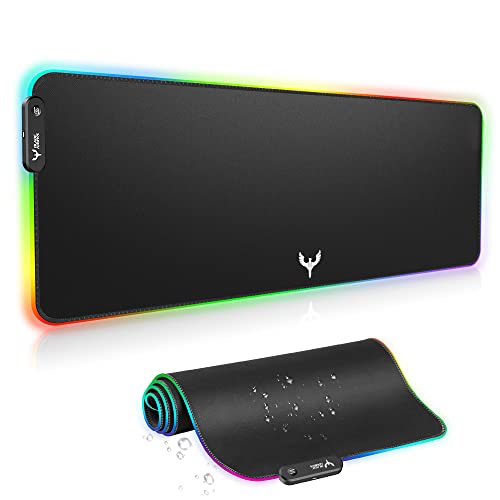
- 31.5 x 12 inch extended surface
- 14 RGB lighting modes with memory
- Waterproof top and anti-slip rubber base
Best For: Gamers wanting a wide, simple RGB desk mat
Gimars Charging Pick
15W Wireless Charging RGB Mousepad
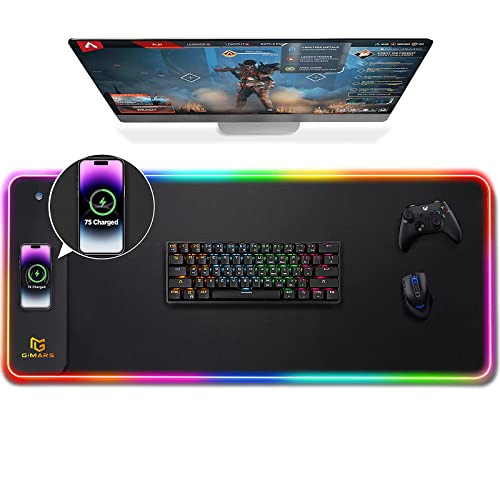
- Built-in 15W Qi wireless charging
- 10 RGB lighting modes with memory
- 800 x 300 mm waterproof extended mat
Best For: People who want lighting plus phone charging
rnairni Wide Pick
Extra-Large 31.5x15" RGB Gaming Mat
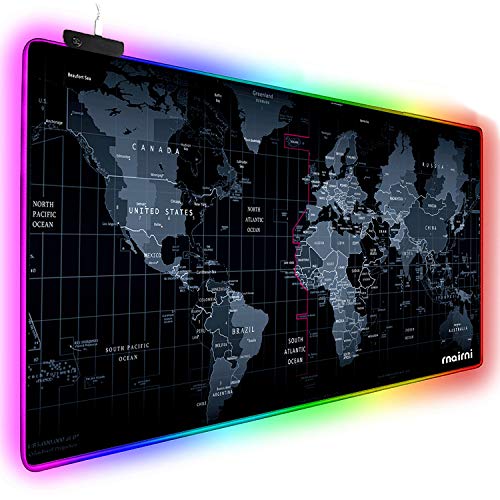
- Wider 31.5 x 15 inch desk coverage
- 10 RGB lighting modes
- Waterproof surface with anti-slip base
Best For: Users who want the widest mat in this group
Gerlos Durability Pick
Stitched-Edge 31.5x11.8" RGB Pad

- 12 lighting modes with memory
- Stitched edges for added durability
- Water-resistant surface and non-slip base
Best For: Daily users who want a durable RGB mat
Massive Coverage RGB Desk Mat
Corsair MM700 3XL Cloth Gaming Mouse Pad

- 48" x 24" surface for full-desk coverage
- 360° three-zone RGB lighting
- Two USB ports for added convenience
Best For: large gaming setups that need desk-wide coverage and RGB lighting
Balanced Size RGB Desk Mat
TIDALSOIL 31.5 x 11.8 Inch RGB Mouse Pad

- 12 RGB modes with memory function
- Plug-and-play USB setup
- Anti-slip base with stitched edges
Best For: users who want easy RGB lighting and a compact keyboard-plus-mouse surface
Feature-Packed RGB Desk Mat
BladeHawks RGB Mouse Pad with USB Hub
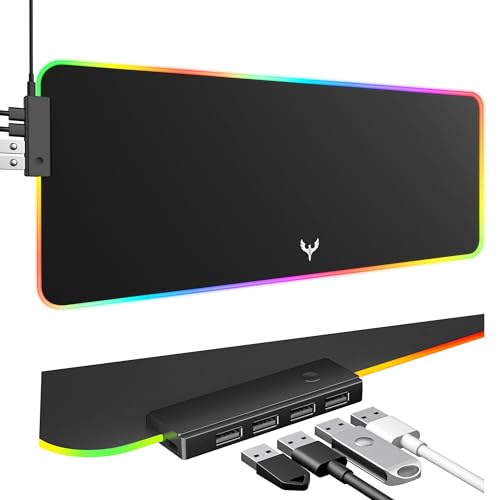
- 14 lighting modes for varied RGB effects
- Built-in 4-port USB hub
- Waterproof-coated microfiber surface
Best For: users who want RGB lighting and a hub for extra peripherals
RGB Wireless Charging Desk Mat
Large RGB Gaming Mousepad with 10W Charging

- 10 RGB lighting modes with memory function
- Built-in 10W wireless phone charging
- Large waterproof surface with non-slip base
Best For: Gamers who want charging and RGB in one full-desk mat
13-Mode RGB Gaming Mat
Oversized 31.5 x 11.8 Desk Pad

- 13 lighting modes with touch-button control
- 31.5 x 11.8 inch oversized gaming surface
- Smooth top and non-slip rubber base
Best For: Gamers who want a big, easy-to-use RGB desk mat
13-Color Waterproof RGB Desk Mat
Large 31.5 x 11.8 Waterproof Mouse Pad

- 13 RGB light modes with memory function
- Waterproof coating for easier cleanup
- Large surface with smooth, non-slip build
Best For: Gamers who want spill resistance and a big RGB desk mat
BladeHawks Pick – Extra-Large 31.5×12" LED Mouse Pad
If you want rgb desk mats for gaming pc that give you a wider play area and simple lighting control, the BladeHawks mat is built around the basics that matter. Its 31.5 x 12 inch surface leaves room for a keyboard, mouse, and a few extras, while the USB-powered RGB strip adds 14 lighting modes for a more polished setup.
Best For: Gamers who want a wide, waterproof desk mat with simple plug-and-play RGB lighting.
Pros:
- Extra-large 800 x 300 mm surface fits keyboard, mouse, and peripherals
- 14 lighting modes with power-off memory
- Anti-slip natural rubber base helps keep the mat in place
- Micro-textured waterproof surface supports smooth mouse movement
Cons:
- USB powered only, so it needs a port on your PC or hub
- No wireless charging or extra desk features
Overall, this is a straightforward RGB desk mat that focuses on size, stability, and easy lighting control. It suits gaming setups that need a clean extended surface without extra complexity.
Gimars Charging Pick – 15W Wireless Charging RGB Mousepad
For rgb desk mats for gaming pc that also cut down on cable clutter, the Gimars mat adds a built-in 15W wireless charging area to a large extended surface. It combines 10 RGB lighting modes, a 31.5 x 11.8 inch layout, and a waterproof micro-textured top for everyday gaming or office use.
Best For: Users who want an RGB desk mat with wireless phone charging built in.
Pros:
- Built-in 15W Qi wireless charging with raised charging platform
- 10 lighting modes with memory function
- Large 800 x 300 mm desk mat size covers keyboard and mouse
- Water-resistant, easy-to-clean surface with anti-slip rubber base
Cons:
- Fast charging needs a compatible power adapter, which is not included
- Charging feature adds complexity if you only want a basic mouse pad
This is the best fit if you want your desk mat to do more than light up. The charging platform makes it especially practical for streamlined gaming desks and shared workspaces.
Rnairni Wide Pick – Extra-Large 31.5×15" RGB Gaming Mat
If you are comparing rgb desk mats for gaming pc and want maximum width, the rnairni mat stands out with a 31.5 x 15 inch surface. It gives you more lateral room than many standard extended pads, and it adds 10 lighting modes plus a waterproof, anti-slip design for gaming or office use.
Best For: Gamers and office users who want a wider-than-average RGB desk mat.
Pros:
- Very wide 31.5 x 15 inch size for keyboard, mouse, and desk coverage
- 10 lighting modes including rainbow, solid colors, and flowing effects
- Anti-slip base helps keep the mat steady during use
- Waterproof surface protects the desk and is easy to maintain
Cons:
- Only basic USB lighting control, with no advanced smart features
- The map design may not suit every setup style
This mat is a practical pick if desk width matters more than extras. It gives you a bigger working area while still delivering the RGB look many gaming setups want.
Gerlos Durability Pick – Stitched-Edge 31.5×11.8" RGB Pad
For rgb desk mats for gaming pc that focus on durability as much as lighting, the Gerlos pad is a balanced choice. It pairs 12 lighting modes with stitched edges, a water-resistant cloth surface, and a 31.5 x 11.8 inch format that works well for both gaming and office setups.
Best For: Buyers who want stitched edges and a durable RGB desk mat for daily use.
Pros:
- 12 lighting modes with memory function
- Reinforced stitched edges help reduce fraying
- Water-resistant surface is smooth and easy to clean
- Non-slip rubber base keeps the mat stable on the desk
Cons:
- Smaller than some extra-wide RGB desk mats at 31.5 x 11.8 inches
- Fewer lighting modes than a few competing options
This is a solid everyday desk mat if you want a neat finish and dependable performance. The stitched edges make it a good long-term pick for frequent gaming and work sessions.
Massive Coverage RGB Desk Mat – Corsair MM700 3XL Cloth Gaming Mouse Pad
If you want rgb desk mats for gaming pc setups that cover nearly the entire work area, the Corsair MM700 is built for that purpose. Its 48″ x 24″ cloth surface gives your keyboard, mouse, and other gear room to spread out, while the three-zone RGB lighting adds a clean border around the desk. The woven textile top is designed for control, and the rubber build helps keep the mat comfortable on uneven surfaces.
Best For: Gamers who want a very large RGB desk mat with built-in USB convenience.
Pros:
- Massive 1,220mm x 610mm surface covers a full desk setup.
- 360° three-zone RGB lighting with onboard control or CORSAIR iCUE.
- Two USB ports add useful hub-style connectivity.
- Glide-enhanced woven textile surface supports precise mouse tracking.
Cons:
- Large size may be more than smaller desks can comfortably handle.
- RGB control is geared toward CORSAIR ecosystem use for full customization.
Overall, this is the most desk-filling option in the group and the easiest pick if you want your gaming surface to feel like part of the lighting setup. It balances size, lighting, and practical USB access better than a basic mouse mat.
Balanced Size RGB Desk Mat – TIDALSOIL 31.5 x 11.8 Inch RGB Mouse Pad
The TIDALSOIL pad is a straightforward option for rgb desk mats for gaming pc users who want lighting without going oversized. Its 31.5″ x 11.8″ footprint gives enough room for a keyboard and mouse, and the 12 lighting modes make it easy to match a setup. The smooth surface, rubber base, and stitched edges make it practical for everyday gaming or office use.
Best For: Buyers who want a simple RGB desk mat with plug-and-play setup.
Pros:
- 12 RGB light modes include both dynamic and static options.
- Plug & play USB connection needs no software or drivers.
- Memory function recalls the last lighting mode used.
- Anti-slip rubber base and edge stitching help with stability and durability.
Cons:
- Smaller than full-desk mats, so it covers less of the desktop.
- Lighting options are good, but it does not add USB hub features.
This model works well if you want RGB visuals and a comfortable surface without committing to a massive extended mat. It offers the core features most people need in a clean, easy-to-use package.
Feature-Packed RGB Desk Mat – BladeHawks RGB Mouse Pad with USB Hub
BladeHawks targets rgb desk mats for gaming pc users who want extra utility along with lighting. It offers 14 lighting modes, a waterproof-coated microfiber surface, and an oversized layout that gives your keyboard and mouse plenty of room. The built-in 4-port USB hub is the standout feature here, especially if you like keeping accessories close at hand.
Best For: Gamers and desk users who want RGB lighting plus extra USB connectivity.
Pros:
- 14 RGB lighting modes provide plenty of visual variety.
- 4-port USB hub adds useful desktop connectivity.
- Waterproof and dustproof microfiber surface is built for durability.
- Non-slip rubber base helps keep the mat in place.
Cons:
- Listed dimensions are large, but not as expansive as full 3XL mats.
- No software control is mentioned for lighting customization.
If USB ports matter as much as lighting, this is the most feature-rich pick of the three. It combines a roomy surface, practical protection, and desk-friendly utility in one mat.
RGB Wireless Charging Desk Mat – Large RGB Gaming Mousepad with 10W Charging
If you want rgb desk mats for gaming pc that do more than light up your setup, this option adds 10W wireless charging to a large, full-desk surface. It pairs an ultra-smooth micro-textured cloth top with a non-slip rubber base, so it is built for both mouse control and everyday desk use.
Best For: Gamers who want an RGB desk mat with wireless phone charging and a roomy surface for a keyboard and mouse.
Pros:
- 10 lighting modes, including dynamic breathing and static colors
- 10W wireless charging built into the mat
- Large 31.49 x 11.81 inch surface for keyboard, mouse, and more
- Waterproof top, anti-slip base, and stitched edges for durability
Cons:
- Power adapter is not included
- Charging and RGB functions are separate, which may not suit everyone
Overall, this is a practical pick if you want a gaming desk mat that combines lighting, charging, and a full-width layout. The feature set is especially useful for streamlined setups where desk space matters.
13-Mode RGB Gaming Mat – Oversized 31.5 x 11.8 Desk Pad
For shoppers comparing rgb desk mats for gaming pc, this oversized pad focuses on lighting variety and simple plug-and-play use. The 31.5 x 11.8 inch surface is sized for a gaming mouse plus keyboard, while the smooth top and non-slip rubber base aim to keep movement controlled.
Best For: Gamers who want a large RGB mouse mat with lots of lighting modes and an easy setup.
Pros:
- 13 lighting modes, including 7 static and 6 flashing effects
- Large 31.5 x 11.8 inch size for keyboards and mice
- Ultra-smooth surface designed for precise mouse control
- USB-powered plug-and-play operation with touch controls
Cons:
- No waterproofing is listed in the supplied details
- Model notes include limited sizing details in the listing
This is a straightforward RGB desk mat choice if you care most about lighting effects and a roomy gaming layout. It keeps the feature set simple while still covering the essentials for a gaming desk.
13-Color Waterproof RGB Desk Mat – Large 31.5 x 11.8 Waterproof Mouse Pad
This RGB desk mat for gaming pc is built around a waterproof coating, a micro-textured cloth surface, and a non-slip rubber base. It offers a large 31.5 x 11.8 inch layout with 13 lighting modes, making it a solid fit for gaming setups that also need easy cleanup and reliable mouse movement.
Best For: Gamers who want a washable-feeling RGB desk mat with a large surface and spill resistance.
Pros:
- 13 lighting modes, including 9 static and 4 dynamic options
- Waterproof coating that helps liquid bead and wipe away
- Large 31.5 x 11.8 inch size for a keyboard, mouse, and accessories
- USB-powered with memory function for the last lighting mode
Cons:
- Only one control button, so customization is basic
- No stitched edge feature is mentioned in the supplied notes
Among rgb desk mats for gaming pc, this one stands out for being easy to clean without giving up size or lighting variety. It is a sensible option for busy desks where spills and clutter are real concerns.
How We Picked the Best RGB Desk Mats for Gaming PC
We looked for mats that make sense for real gaming desks, not just flashy lighting. That means usable surface space, reliable non-slip backing, durable edge stitching where available, and lighting that is easy to control. We also favored models with practical extras such as waterproof coatings, USB hubs, and wireless charging when they added real value.
Quick Comparison
Most RGB Desk Mats for Gaming PC fall into three broad groups: basic extended mats with multiple lighting modes, feature-rich models with charging or USB expansion, and premium extra-large desk mats built for full desktop coverage. If you want simple style and good value, basic extended mats are usually enough. If you want fewer cables and more desk utility, look at charging or hub-equipped designs. If you need maximum coverage, the largest cloth desk mats are the best fit.
Key Buying Factors for RGB Desk Mats for Gaming PC
Size and Desk Coverage
Measure your desk before buying. A mat that is too small can feel cramped, while an oversized mat can interfere with your monitor stand, speakers, or arm movement. Most gamers are well served by extended sizes, but full-desktop models are better if you want your keyboard, mouse, and accessories all on one surface.
Surface Feel and Control
The surface should glide smoothly for fast mouse movement without feeling slippery or inconsistent. A balanced cloth finish is usually the safest choice for gaming, especially if you switch between precision work and fast-paced play.
Lighting Features
Lighting modes vary widely. More modes do not always mean a better mat, so look for steady brightness, easy controls, and a layout that complements your desk. For RGB Desk Mats for Gaming PC, lighting should enhance the setup without becoming distracting.
Stability and Durability
A strong rubber base helps keep the mat from shifting during gameplay. Stitched edges and water-resistant surfaces can also extend the mat’s life, especially if you use your desk every day.
Extra Functions
Wireless charging and USB hubs are useful only if they fit your workflow. They can reduce clutter, but they may also add cost. Choose them for convenience, not just because they sound advanced.
Who Should Buy Which RGB Desk Mats for Gaming PC?
If you want the simplest upgrade, choose a standard extended RGB mat with solid anti-slip support. If you need desk organization and fewer cables, a model with USB ports or wireless charging makes more sense. If your main priority is creating a dramatic visual centerpiece, go for a larger premium desk mat with multi-zone lighting. For most gamers, the best choice is the one that fits the desk, supports the mouse well, and matches how you actually use your setup.