Keeping tablets, laptops, and phones charged is easier when every device has a designated space. The best device charging cabinets combine secure storage, organized cables, and a charging layout that fits your daily workflow.
This roundup compares 10 options across capacities, locking styles, portability, and installation formats so you can choose a cabinet that suits a classroom, office, library, or shared workspace.
Best 10 Device Charging Cabinets Picks for 2026
Best Wall-Mount Option
Learniture 12-Device Charging Cabinet

- Charges and stores 12 devices
- Lockable steel wall-mount design
- Includes dividers and cable clips
Best For: Space-saving classroom or office storage
Best Fully Assembled Pick
16-Device Combination-Lock Cabinet
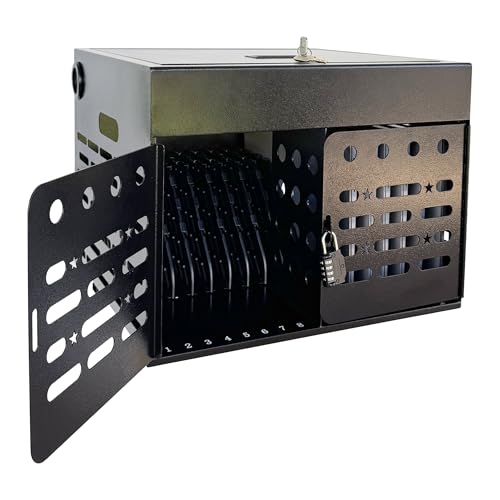
- Holds devices up to 15.6 inches
- Combination lock and ventilated steel body
- Ships assembled with mounting hardware
Best For: Schools and offices needing quick deployment
Best Mobile Cart
VEVOR 16-Device Charging Station

- Holds 16 devices up to 15.6 inches
- Wheels and locking casters improve mobility
- Adds surge protection and ventilation
Best For: Shared spaces moving devices between rooms
Best Tabletop Storage

- Fits devices up to 17 inches
- Padded slots and locking front door
- Side handles and cable-management shelf
Best For: Tabletop storage for larger laptops
Best Wall-Mountable Option
Meteteel 8-Tablet Charging Lock Box

- Stores and charges up to eight devices
- Fits screens up to 14 inches
- Includes locks, ventilation, and wall mounting
Best For: Classrooms, offices, and hospitals with up to eight larger devices
Best High-Capacity Cart

- Charges up to 30 USB devices
- Lockable steel cabinet with ventilation
- Wheels and brakes support mobile use
Best For: Shared spaces managing large groups of phones and USB devices
Best Compact 12-Slot Cabinet
12-Device Tablet Charging Lock Box

- Charges up to 12 small devices
- Supports desktop or wall installation
- Includes keyed lock, glass window, and cable slots
Best For: Classrooms, libraries, and offices with smaller phones or tablets
Best Overall
VEVOR 8-Device Charging Cabinet

- Stores up to eight devices up to 15.6 inches
- Dual key-and-combination lock security
- Vented steel cabinet with overload protection
Best For: Small classrooms and offices
Best High-Capacity Pick
AQNIEGEP 16-Device Charging Station

- Stores and charges up to 16 devices
- Separate compartments support organization
- Wall-mountable steel cabinet arrives assembled
Best For: Schools and offices with larger device collections
Best for Cable Management
Volcora 12-Device Charging Cabinet

- 12 slots with UL-certified surge protection
- Combination lock with emergency keyhole
- Detachable organizer helps prevent tangled cords
Best For: Medium-sized device groups needing tidy cable storage
Best Wall-Mount Option – Learniture 12-Device Charging Cabinet
For classrooms or offices needing compact device charging cabinets, the Learniture Structure Series combines wall-mounted storage with charging for 12 laptops, Chromebooks, or tablets. Its lockable steel cabinet and organized interior are designed for secure, everyday device management.
Best For: Classrooms and offices that want a wall-mounted, lockable cabinet for up to 12 devices.
Pros:
- Stores and charges up to 12 devices with a rotated 12-outlet power strip.
- Interior dividers and cable clips help keep devices and wires organized.
- French-cleat wall mounting saves floor space, while grommet holes support charging while locked.
- 65-pound capacity and spacious 1.25-inch-wide slots accommodate many laptops and tablets.
Cons:
- Mounting hardware is not included.
- It is not water resistant.
- Its 12-device capacity is smaller than the 16-device alternatives.
This cabinet is a practical choice when floor space is limited and secure wall-mounted storage matters. Confirm your device dimensions and plan for the required mounting hardware before installation.
Best Fully Assembled Pick – 16-Device Combination-Lock Cabinet
This 16-device cabinet is a convenient option for schools, offices, libraries, and shared workspaces comparing device charging cabinets. It arrives fully assembled and combines enclosed steel storage, combination-lock security, cable organization, and ventilation for devices up to 15.6 inches.
Best For: Organizations that need ready-to-use storage for 16 laptops, Chromebooks, iPads, or tablets.
Pros:
- Stores and charges up to 16 devices up to 15.6 inches.
- Built-in combination lock and enclosed steel construction help limit unauthorized access.
- Ventilated side panels and cable-routing slots support more organized charging.
- Fully assembled and suitable for desktop or wall-mounted installation with included hardware.
Cons:
- The 16-inch depth may require substantial placement space.
- Its two-door design and combination-lock setup may be less convenient for users who prefer a simple key lock.
With a two-year manufacturer warranty and no complicated assembly, this cabinet emphasizes deployment convenience. It is especially useful when a shared facility needs a larger capacity than a 12-device unit.
Best Mobile Cart – VEVOR 16-Device Charging Station
For facilities that move equipment between rooms, the VEVOR mobile charging cart offers a flexible alternative among device charging cabinets. It holds 16 laptops or tablets up to 15.6 inches and adds wheels, surge protection, ventilation, cable management, and lockable storage.
Best For: Classrooms, offices, libraries, hospitals, and exhibitions that need movable 16-device charging.
Pros:
- Sixteen dedicated slots accommodate laptops and tablets up to 15.6 inches.
- Four swivel wheels and two locking casters support mobility and stable positioning.
- Integrated power strip and cable management provide plug-and-play setup.
- Ventilation, surge protection, and a lockable design add practical charging and storage features.
Cons:
- At 52.8 pounds, the cart is relatively heavy before devices are added.
- It requires floor space and is less suited to permanent wall-mounted storage.
- The listed dimensions may be bulky for tight rooms or narrow pathways.
The VEVOR stands out when portability is more important than a compact desktop footprint. Its locking casters help keep a fully loaded cart in place, while the integrated charging setup reduces installation effort.
Best Tabletop Storage – Pearington 16-Device Cabinet
The Pearington is a portable tabletop choice for buyers comparing device charging cabinets for larger laptops and tablets. Its 16 padded slots fit devices up to 17 inches, while side handles, a locking front door, cable clips, and a bonus shelf support organized storage.
Best For: Offices, classrooms, and other indoor spaces needing tabletop storage for larger devices.
Pros:
- Charges and stores 16 devices at once.
- Accommodates laptops, Chromebooks, and iPads up to 17 inches.
- Padded slots help protect stored devices, and the locking front door supports secure access.
- Side handles and cord-management slots make relocation and cable organization easier.
Cons:
- Its 17-inch depth and 20-inch height require adequate tabletop or floor space.
- The notes identify a key-fob entry system rather than a combination lock.
- The cabinet is intended for indoor use.
This is a strong fit when device size is the priority and a tabletop cabinet is more practical than wall mounting. Its 17-inch capacity gives it an advantage for larger laptops, while the handles help with occasional repositioning.
Best Wall-Mountable Option – Meteteel 8-Tablet Charging Lock Box
For schools, offices, and healthcare settings, the Meteteel is a compact device charging cabinet for organizing and securing up to eight tablets, Chromebooks, or laptops. Its steel construction, ventilation, and flexible tabletop or wall-mount installation make it practical where space and device security matter.
Best For: Classrooms, offices, and hospitals needing secure storage for devices with screens up to 14 inches.
Pros:
- Stores and charges up to eight devices in individual 1.5-inch divider slots.
- Fits devices up to 14 inches and includes an 8-outlet, 120V/15A power strip.
- Provides key and combination-lock security, ventilation, and tabletop or wall mounting.
- Arrives fully assembled with drywall-mounting hardware included.
Cons:
- Its 40-pound maximum weight capacity limits especially heavy equipment.
- It is not water resistant.
- Eight slots may be insufficient for larger device collections.
This is a strong choice when you want a ready-to-use, lockable charging cabinet that accommodates larger tablets and compact laptops without requiring assembly.
Best High-Capacity Cart – 30-Device USB Charging Locker
This 30-device charging cabinet is designed for shared spaces that need centralized phone and small-device management. Its wheeled steel cabinet provides 30 USB charging positions, lockable storage, ventilation, and brakes for moving it between rooms or securing it in place.
Best For: Classrooms, offices, gyms, conference centers, and shared workspaces managing up to 30 phones or USB devices.
Pros:
- Offers 30 USB charging ports, each rated at 5V/2A.
- Supports phones, tablets, and Bluetooth headsets with five-layer security protection.
- Thickened cold-rolled steel construction and a lockable transparent magnetic door provide durable, controlled storage.
- 360-degree silent wheels with brakes make the cabinet portable while allowing secure parking.
Cons:
- The USB charging format may be less suitable for devices requiring other charging connections.
- Its 30-slot capacity and floor-mounted design require more space than a small desktop cabinet.
- Assembly instructions are indicated, so setup may be required.
Choose this model when capacity and mobility are priorities. It is particularly useful for organizations that regularly move a large group of phones or USB-powered devices between shared areas.
Best Compact 12-Slot Cabinet – 12-Device Tablet Charging Lock Box
The 12-device charging cabinet is a compact device charging cabinet for phones and tablets smaller than eight inches. It combines keyed security, a tempered-glass viewing window, cable-management slots, and desktop or wall installation for organized charging in public or shared environments.
Best For: Classrooms, libraries, and offices storing and charging up to 12 smaller phones or tablets.
Pros:
- Charges up to 12 compatible devices simultaneously.
- Key-lock design helps prevent unauthorized access in public settings.
- Tempered-glass windows make it easy to identify stored devices.
- Desktop or wall installation and cable slots support flexible, tidy placement.
Cons:
- It is designed for phones and tablets smaller than eight inches.
- The supplied notes do not specify the charging output or power-strip details.
- Its 12-device capacity may not suit larger groups.
This cabinet is a sensible fit when you need more compartments than a small eight-device box but still want a relatively compact, lockable unit with visible storage and built-in cable organization.
Best Overall – VEVOR 8-Device Charging Cabinet
For smaller classrooms, offices, and shared workspaces, the VEVOR 8-Device Charging Cabinet is a practical device charging cabinet that combines organized storage, charging access, and physical security. It accommodates laptops, tablets, and similar devices up to 15.6 inches, and arrives fully assembled.
Best For: Classrooms and offices needing compact, lockable storage for up to eight devices.
Pros:
- Holds up to eight devices, including laptops and tablets up to 15.6 inches.
- Dual-lock design combines two key locks with an independent combination lock.
- Vented side panels support airflow, while the power strip includes leakage and overload protection.
- Can be wall-mounted or placed on a desktop, with mounting hardware included.
Cons:
- Eight-device capacity may be limited for larger groups.
- The 21.8-pound steel cabinet is less convenient to move frequently.
Choose this VEVOR model when security and flexible placement matter more than maximum capacity. Its fully assembled design also makes setup straightforward.
Best High-Capacity Pick – AQNIEGEP 16-Device Charging Station
The AQNIEGEP 16-Device Charging Station is a high-capacity device charging cabinet for classrooms, libraries, and offices managing larger collections of Chromebooks, laptops, or tablets. Its separated compartments help organize devices while the steel enclosure supports wall or desktop-style use.
Best For: Schools and offices that need organized charging and secure storage for up to 16 devices.
Pros:
- Charges and stores up to 16 laptops, tablets, or Chromebooks at once.
- Individual 1.2-inch compartments help separate devices and support cable organization.
- Steel construction is easy to clean and designed for wall mounting when desktop space is limited.
- Arrives fully assembled and includes keys, mounting accessories, and a 70-inch external power cord.
Cons:
- The larger 24-by-15.8-by-15-inch footprint requires more installation space.
- Its stationary, wall-mountable design is not intended for frequent relocation.
With twice the capacity of many compact cabinets, this AQNIEGEP station is a sensible choice for shared device pools. Confirm the available wall or desktop space before purchasing.
Best for Cable Management – Volcora 12-Device Charging Cabinet
The Volcora 12 Device Charging Cabinet offers a middle-ground capacity for classrooms and offices. This device charging cabinet includes 12 charging slots, surge protection, a combination lock, and a detachable cord organizer for keeping charging cables under control.
Best For: Classrooms and home offices that want 12-slot storage with combination-lock access and organized cables.
Pros:
- Provides 12 charging slots with US plugs and UL-certified surge protection.
- Three-digit combination lock includes an emergency keyhole for access recovery.
- Detachable cord organizer helps reduce wire tangling and can be assembled or removed as needed.
- Wall-mounting tools are included, and the cabinet fits devices with screens up to 14 inches.
Cons:
- Its 14-inch screen-size limit is narrower than cabinets designed for larger laptops.
- Wall installation and cord organization still require setup according to the included instructions.
The Volcora is a strong fit when cable control and keyless everyday access are priorities. Its 12-slot layout suits medium-sized device groups without moving up to a larger 16-device cabinet.
How We Picked the Best Device Charging Cabinets
We focused on the features that matter most in shared-device environments: storage capacity, compatibility with laptops and tablets, charging organization, physical security, and ease of placement. The selection includes wall-mounted cabinets, portable carts, tabletop units, and compact lock boxes for different room layouts and device fleets.
We also considered whether each design supports cable management, includes a lock or key system, offers surge protection, and accommodates larger screens. Because charging needs vary widely, capacity alone was not treated as the deciding factor.
Quick Comparison
| Best For | Typical Capacity | Format | Notable Consideration |
|---|---|---|---|
| Small classrooms or offices | 8–12 devices | Wall-mounted or compact cabinet | Saves floor space |
| Large shared-device fleets | 16–30 devices | Cabinet or charging locker | Higher capacity needs more room and power planning |
| Flexible room layouts | 12–16 devices | Portable cart or tabletop cabinet | Easier to relocate |
| Phones and smaller tablets | 12–30 devices | Locker-style station | Check compartment dimensions carefully |
Key Buying Factors for Device Charging Cabinets
Capacity and Device Fit
Choose capacity based on the number of devices that must be stored simultaneously, not just the current count. Confirm the interior slot dimensions, especially if you use protective cases, Chromebooks, or laptops with screens larger than 15 inches.
Locking and Physical Security
A key lock, combination lock, or individual compartment system can help prevent unauthorized access. For classrooms and public areas, prioritize a sturdy enclosure and a locking method staff can manage easily.
Charging and Cable Management
Look for separated charging bays, routing channels, and enough room for power adapters. Built-in cable organization reduces tangles and makes it easier to identify a missing or disconnected cable. Verify whether charging adapters are included; many cabinets provide storage and routing but require your own chargers.
Installation, Mobility, and Ventilation
Wall-mounted units conserve floor space but require suitable mounting hardware and a secure wall surface. Portable carts are more flexible, while tabletop cabinets work well where counter space is available. Ventilation is important when multiple devices charge together, so avoid blocking vents or placing the cabinet in a confined area.
Power Requirements
Check the cabinet’s total electrical load, outlet requirements, surge protection, and cord length before installation. A high-capacity station may need a dedicated outlet or a carefully planned power strip arrangement.
Who Should Buy Which Device Charging Cabinets?
Choose an 8- or 12-device cabinet for a small classroom, home office, or department with a modest device pool. A 16-device model is a practical middle ground for many schools and offices. Select a 30-device locker when phones or tablets are shared across a larger group and maximum capacity matters more than portability.
Wall-mounted options suit permanent installations and tight rooms. Pick a portable or tabletop design if the station must move between rooms. Before ordering, measure the devices with their cases, confirm the charging hardware you already own, and verify that the cabinet’s lock, power layout, and mounting method match your environment.