When you’re looking to build a high-performance workstation, selecting the right E-ATX case is essential. It not only impacts your system’s cooling and expandability but also its overall aesthetic. With options like the DARKROCK Classico Max and Rosewill Thor NAS, you’ll find impressive features tailored for serious professionals. But what should you prioritize in your search? Let’s explore the top contenders that balance functionality and style.
DARKROCK Classico Max E-ATX Computer Case

If you’re a power user needing ample storage and efficient cooling, the DARKROCK Classico Max E-ATX Computer Case is an excellent choice. With dimensions of 18.3 x 9.06 x 18.78 inches and a weight of 19.71 pounds, it’s built to impress. You can install up to 13 hard drives, including 10 x 3.5” HDDs and 3 x 2.5” SSDs, ensuring you never run out of space for your games and data. Its mesh panels and support for a 360 mm radiator provide exceptional cooling. Plus, it accommodates various motherboard sizes, making it versatile for your setup.
Best For: Power users who require extensive storage capacity and efficient cooling solutions in their computer setups.
Pros:
- Supports a large number of hard drives (up to 13), providing ample storage for games and data.
- Excellent cooling capabilities with mesh panels and the option to install a 360 mm radiator.
- Compatible with multiple motherboard sizes, including E-ATX, ATX, M-ATX, and ITX.
Cons:
- Requires the removal of hard drive cages for E-ATX motherboard installation, which may be inconvenient.
- Weighs nearly 20 pounds, making it less portable than lighter cases.
- Limited USB ports (only 2 x USB 2.0 and 2 x USB 3.0) may not be sufficient for users with multiple peripherals.
Thermaltake View 270 Plus TG ARGB Mid Tower E-ATX Case

The Thermaltake View 270 Plus TG ARGB Mid Tower E-ATX Case stands out as an ideal choice for gamers and content creators who prioritize aesthetics and cooling performance. Its full view front and side tempered glass design lets you showcase your build beautifully. With dual tempered glass panels, your components are on full display. Cooling is a breeze, supporting up to a 360mm radiator at the top and including three 120mm ARGB fans. You’ll appreciate the I/O ports, featuring USB 3.2 Type-C and USB 3.0 connections. Plus, it accommodates a max VGA length of 420mm, ensuring compatibility with powerful GPUs.
Best For: The Thermaltake View 270 Plus TG ARGB Mid Tower E-ATX Case is best for gamers and content creators who value aesthetics and require effective cooling solutions for high-performance builds.
Pros:
- Stylish full view tempered glass design showcases your components.
- Excellent cooling support with the ability to install a 360mm radiator and three included ARGB fans.
- Convenient I/O ports including USB 3.2 Type-C for fast data transfer.
Cons:
- The case may be more expensive compared to standard models without tempered glass.
- Limited airflow options if additional fans are not installed.
- Heavier than some alternatives due to glass panels, which may hinder portability.
Rosewill Thor NAS Full Tower Workstation Case

For those seeking a robust solution for high-density storage and enterprise workloads, the Rosewill Thor NAS Full Tower Workstation Case stands out with its impressive capacity to support up to 11 x 3.5″ HDDs or 13 x 2.5″ SSDs. Its optimized airflow design and a 140mm PWM fan keep your components cool, while the generous maximum expansion card length of 400mm allows for powerful configurations. With connectivity options including a USB 3.2 Type-C and two USB 3.0 ports, you’ll experience rapid data transfers. Weighing in at 34.6 pounds, this case is built for serious performance and versatility in any setup.
Best For: The Rosewill Thor NAS Full Tower Workstation Case is best for users looking to build high-density storage solutions for AI servers, DIY NAS systems, and media hubs.
Pros:
- Ample Storage Capacity: Supports up to 11 x 3.5″ HDDs or 13 x 2.5″ SSDs for extensive data storage.
- Efficient Cooling System: Features optimized airflow design with a 140mm PWM fan to keep components cool during heavy workloads.
- Versatile Connectivity: Equipped with a USB 3.2 Type-C port and two USB 3.0 ports for rapid data transfers.
Cons:
- Weight: At 34.6 pounds, it may be cumbersome for some users to move or install.
- Size: The full tower design may not fit well in smaller spaces or setups.
- Limited Cooling Fans: Only comes with one pre-installed fan, which may require additional fans for optimal cooling in high-performance configurations.
NZXT H5 Flow Compact ATX Mid-Tower PC Gaming Case

Designed for gamers and content creators who demand high performance and efficient cooling, the NZXT H5 Flow Compact ATX Mid-Tower PC Gaming Case stands out with its exceptional airflow capabilities. With two 120mm quiet airflow fans and ultra-fine mesh panels, it guarantees peak GPU cooling. You can support large radiators up to 360mm in front for powerful liquid cooling. Seamless cable management keeps your setup organized, while the tempered glass side panel showcases your components beautifully. Compact yet spacious, it fits various setups effortlessly. Plus, with a stellar 4.7-star rating, you know you’re making a solid choice.
Best For: Gamers and content creators seeking high performance and efficient cooling in a compact design.
Pros:
- High airflow design ensures exceptional GPU cooling with included quiet airflow fans.
- Versatile radiator support allows for powerful liquid cooling options up to 360mm in the front.
- Seamless cable management features help keep your setup organized and aesthetically pleasing.
Cons:
- Limited space for additional drives due to the compact form factor.
- Tempered glass panel may require regular cleaning to maintain visibility.
- Weight of 17.6 pounds might be cumbersome for frequent transport.
CORSAIR 4000D RS Frame Mid-Tower PC Case

Looking for a high-performance case that balances airflow and customization? The CORSAIR 4000D RS Frame Mid-Tower PC Case is your answer. Weighing 18.04 pounds and measuring 19.17 x 9.41 x 19.13 inches, it supports powerful graphics cards and reverse connector motherboards. With its FRAME Modular Case System, you can easily upgrade components. The InfiniRail Fan Mounting System allows for versatile cooling configurations and comes with three CORSAIR RS PWM fans. Plus, it features a 3D Y-Pattern Airflow front panel for ideal airflow and a near-silent Zero RPM mode. Experience top-tier performance with this highly-rated case!
Best For: Gamers and PC builders seeking a customizable and high-performance case with excellent airflow.
Pros:
- Flexible Cooling Options: The InfiniRail Fan Mounting System allows for various fan configurations and includes three high-quality CORSAIR RS PWM fans.
- Modular Design: The FRAME Modular Case System enables easy upgrades and customization of components, including motherboard trays and I/O panels.
- Optimized Airflow: The 3D Y-Pattern Airflow front panel and support for multiple radiators ensure superior cooling performance.
Cons:
- Weight: At 18.04 pounds, it may be heavier than some other mid-tower cases, making it less portable.
- Limited RGB Features: Lacks integrated RGB lighting options, which may be a downside for users looking for aesthetic customization.
- Price Point: It may be considered pricey compared to other mid-tower cases with similar features.
CORSAIR 3500X ARGB Mid-Tower ATX PC Case

The CORSAIR 3500X ARGB Mid-Tower ATX PC Case is an exceptional choice for gamers and creators seeking a blend of style and functionality. With its panoramic tempered glass design and three included CORSAIR RS120 ARGB fans, your setup will shine. You’ll appreciate the ample cooling capacity, supporting up to 10x 120mm fans, and the spacious interior for large graphics cards and CPU coolers. Plus, its compatibility with Mini-ITX to EATX motherboards, along with reverse connection support, guarantees clean cable management. Weighing 20 pounds, this case balances aesthetics and performance, making it a top contender for your next build.
Best For: Gamers and creators looking for a stylish yet functional PC case with ample cooling options and cable management features.
Pros:
- Spacious interior accommodates large graphics cards and CPU coolers, enhancing compatibility with high-performance components.
- Panoramic tempered glass design provides a visually stunning showcase for your build.
- Excellent cooling capacity supports up to 10x 120mm fans, ensuring optimal airflow and temperature management.
Cons:
- Weight of 20 pounds may make it less portable for users who frequently transport their systems.
- Limited USB ports with only 2 USB 2.0 options might not be enough for users with multiple peripherals.
- Availability date set for June 4, 2024, may delay purchasing for those eager to upgrade their setup immediately.
Thermaltake AX500 TG Full Tower Case

For gamers and content creators needing ample space and advanced cooling options, the Thermaltake AX500 TG Full Tower Case stands out as an excellent choice. Weighing 29.3 pounds and measuring 21.57 x 9.76 x 21.65 inches, it supports various motherboard sizes, including E-ATX and mITX. With room for up to 9 fans and a 420mm radiator, your system stays cool under pressure. You can fit up to five 3.5” drives or six 2.5” drives, ensuring plenty of storage. Plus, with a customer rating of 4.3 out of 5 stars, it’s a reliable option for your high-performance needs.
Best For: Gamers and content creators looking for a spacious full tower case with advanced cooling options and extensive storage capacity.
Pros:
- Supports multiple motherboard sizes, including E-ATX and mITX, providing flexibility for various builds.
- Excellent cooling potential with support for up to 9 fans and a 420mm radiator, ensuring optimal performance during intensive tasks.
- High storage capacity, accommodating up to five 3.5” drives or six 2.5” drives for ample data storage.
Cons:
- Weighs 29.3 pounds, which may be cumbersome for some users when moving the case.
- Limited color options, as it is available only in black, which may not appeal to all aesthetic preferences.
- Customer feedback indicates room for improvement in build quality, as some users reported issues with assembly.
Zalman T6 ATX Mid Tower Computer PC Case
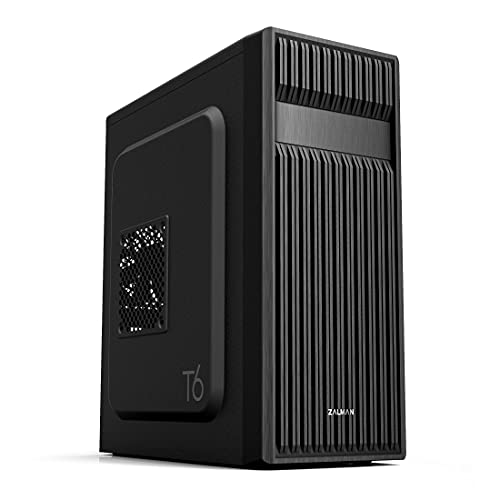
Designed for versatility, the Zalman T6 ATX Mid Tower Computer PC Case is an excellent choice for gamers, office workers, and home workstation builders alike. With a sleek black design and a patterned mesh front, it guarantees superior airflow while accommodating ATX, mATX, and mini-ITX motherboards. You’ll appreciate the pre-installed 120mm fan and the capacity for up to four additional fans for enhanced cooling. The case offers multiple drive bays and convenient I/O ports, including USB 3.0. Weighing just 8 pounds, it’s both lightweight and durable, crafted from high-strength steel for long-lasting performance.
Best For: The Zalman T6 ATX Mid Tower Computer PC Case is best for gamers, office workers, and home workstation builders looking for a versatile and well-ventilated PC case.
Pros:
- Optimal Airflow: Features a patterned mesh design for superior air circulation and includes a pre-installed 120mm fan.
- Versatile Compatibility: Supports various motherboard sizes, including ATX, mATX, and mini-ITX, making it suitable for different builds.
- Ample Drive Bays: Offers multiple drive bays, including space for both 2.5” and 3.5” drives, along with an external bay for a 5.25” drive.
Cons:
- Limited Fan Capacity: Although it supports up to four fans, the cooling potential may still be limited compared to larger cases.
- SATA Port Limitations: Does not accommodate ATX motherboards with side-facing SATA ports, which may restrict compatibility with certain setups.
- Heavier than Some Alternatives: At 8 pounds, it may be heavier than some other mid tower cases available on the market.
CTE E600 MX Snow Mid Tower E-ATX Case
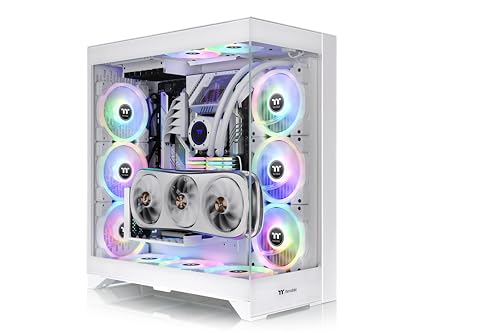
Crafted with a centralized thermal efficiency and a dual chamber layout, the CTE E600 MX Snow Mid Tower E-ATX Case is ideal for gamers and professionals seeking peak cooling solutions. Its striking Hydrangea Blue finish and 4mm tempered glass panels guarantee a stylish look. With dimensions of 558.5 x 270 x 513 mm, it supports various motherboards up to E-ATX size. You’ll appreciate the extensive fan and radiator support, accommodating up to 14 fans and multiple radiator sizes. Plus, with ample drive bays and expansion slots, this case offers everything you need for an efficient, powerful build.
Best For: Gamers and professionals seeking a stylish and efficient case with superior cooling capabilities.
Pros:
- Extensive Cooling Options: Supports up to 14 fans and various radiator sizes for optimal thermal performance.
- Stylish Design: Features a striking Hydrangea Blue finish and 4mm tempered glass side panels for a modern look.
- Versatile Compatibility: Accommodates multiple motherboard sizes up to E-ATX and offers ample drive bays and expansion slots.
Cons:
- Weight: At 16 kg (35.27 lbs), it may be heavier than some other mid tower cases, making it less portable.
- DIY Radiator Installation: Bottom radiator support is DIY only, which may require additional effort for setup.
- Limited PSU Length: Maximum PSU length of 220mm may restrict options for high-capacity power supplies.
Thermaltake View 270 Plus TG ARGB Mid Tower E-ATX Case

The Thermaltake View 270 Plus TG ARGB Mid Tower E-ATX Case stands out with its striking Hydrangea Blue color and impressive tempered glass panels, making it a perfect choice for enthusiasts who want to showcase their builds. With dimensions of 456 x 230 x 454 mm and a weight of just 6.35 kg, it provides ample space for your hardware. You can accommodate up to nine fans and a 360mm radiator for ideal cooling. The versatile I/O ports, including USB 3.2 Type-C, enhance connectivity. Plus, with a solid customer rating of 4.7 stars, it’s a highly recommended option for your workstation.
Best For: Enthusiasts looking for a stylish and spacious case that supports extensive cooling options and showcases their hardware.
Pros:
- Spacious design allows for multiple fan and radiator configurations, ensuring optimal cooling.
- Tempered glass panels provide a full view of your build, enhancing aesthetics.
- Versatile I/O ports including USB 3.2 Type-C for modern connectivity options.
Cons:
- Limited color options may not suit all preferences, as it is only available in Hydrangea Blue.
- Weight of 6.35 kg could be a consideration for those needing a lightweight case.
- Potentially cramped space for cable management due to the full-view design.
Factors to Consider When Choosing E ATX Workstation Cases
When you’re choosing an E-ATX workstation case, there are several key factors to keep in mind. You’ll want to evaluate storage capacity, cooling efficiency, and compatibility with your components, as these elements can greatly impact performance. Additionally, design and cable management features play an essential role in both aesthetics and functionality.
Storage Capacity Options
Choosing an E-ATX workstation case means carefully considering the storage capacity options available to meet your needs. Look for cases that support a high number of hard drives, ranging from 10 x 3.5” HDDs to multiple 2.5” SSDs. Some models can accommodate up to 13 drives, which is perfect for extensive data storage. Flexible drive bay configurations allow you to mix HDDs and SSDs, optimizing both storage performance and space efficiency. Also, think about the ease of installation and accessibility; modular designs make adding or swapping drives simpler in busy setups. Finally, while focusing on storage, confirm the case has adequate cooling solutions to manage heat generated by high-capacity setups.
Cooling System Efficiency
To guarantee your E-ATX workstation operates efficiently during demanding tasks, prioritizing an effective cooling system is essential. Look for cases that support multiple fan configurations, as this optimizes airflow and temperature management, preventing overheating. The ability to accommodate large radiators, like 360mm or larger, enhances liquid cooling for superior performance. Designs with mesh panels greatly improve airflow, facilitating better heat dissipation compared to solid panels. Pay attention to the placement of intake and exhaust fans, ensuring there’s room for multiple units to maintain consistent airflow. Additionally, consider cases that allow mounting extra cooling components, such as GPU mounts and heatsinks, to boost overall cooling efficiency, especially in high-performance builds. Your workstation’s longevity depends on it.
Compatibility With Components
Ensuring compatibility with components is essential for the best performance of your E-ATX workstation. First, you’ll want to confirm that your case supports larger motherboards, typically measuring 12 x 13 inches. Next, check for enough clearance for graphics cards, as many modern GPUs exceed 400mm in length. Adequate cooling options are vital, so look for cases that support multiple fans and large radiators—up to 360mm or more. Additionally, consider the number of drive bays available; many E-ATX cases offer space for multiple 3.5” and 2.5” drives to meet your extensive storage needs. Finally, verify there are enough expansion slots for additional PCIe cards, especially if you plan to use multiple GPUs or other expansions.
Design and Aesthetics
While functionality is essential for E-ATX workstation cases, design and aesthetics play a significant role in creating an appealing setup. Consider cases with tempered glass panels that offer a sleek, modern look, showcasing your internal components. RGB lighting features can add a customizable and vibrant touch, enhancing your overall theme. Pay attention to airflow design; models with mesh panels or optimized ventilation not only improve cooling performance but also contribute to style. Assess the layout and space utilization to guarantee efficient cable management, keeping your setup clean and organized. Finally, choose a color scheme that aligns with your personal preferences, as many cases come in various colors and finishes to match your existing decor.
Cable Management Features
When selecting an E-ATX workstation case, effective cable management features are essential for maintaining a clean and organized setup. Look for wide channels, hooks, and straps that help you route cables neatly, enhancing airflow and aesthetics. Modular panels can be a game-changer, allowing you to customize cable routing paths and optimize internal organization. Integrated cable management systems simplify component installation by minimizing clutter and providing clear pathways for cables. Dedicated compartments help conceal cables and prevent tangling, making maintenance and upgrades a breeze. Additionally, cases with ample space behind the motherboard tray accommodate thicker cables or extra components without compromising airflow. Prioritize these features to guarantee your workstation remains efficient and visually appealing.
Warranty and Support
Selecting the appropriate E-ATX workstation case involves more than just design and features; it’s crucial to take into account warranty and support options too. Start by checking the warranty duration—some cases come with a 3-year warranty, while others have standard return policies. Many manufacturers also offer a 30-day return policy for defective items, ensuring customer satisfaction. Look for customer support availability, as some brands provide direct assistance for warranty claims, which can be essential when issues arise. Don’t forget to read customer ratings regarding support experiences; higher ratings often indicate better post-purchase service. Finally, understand the warranty terms, especially regarding accidental damage, to help protect your investment in a workstation case.