When you’re tackling high-resolution video editing, the right 10GbE NAS can make all the difference. With rapid data transfer rates and ample storage, these systems are designed for efficiency. You’ll find options that cater to diverse needs, from powerful processors to customizable storage solutions. But how do you choose the best one for your setup? Let’s explore some top contenders and what you should consider before making your decision.
QNAP TS-932PX-4G 5+4 Bay High-Speed NAS with Two 10GbE and 2.5GbE Ports

If you’re a video editor or content creator in need of fast, reliable storage, the QNAP TS-932PX-4G is an ideal choice. This high-speed NAS features five 3.5-inch and four 2.5-inch SATA bays, allowing you to customize your storage setup. Powered by a 1.7GHz quad-core ARM processor and equipped with 4GB of DDR4 memory, which you can expand to 16GB, it guarantees smooth performance. With two 10GbE SFP+ and two 2.5GbE ports, you’ll enjoy lightning-fast data transfers. Plus, three USB 3.2 Gen 1 ports provide additional connectivity options, making it versatile for your editing needs.
Best For: Video editors and content creators who require fast, reliable storage solutions.
Pros:
- High-speed data transfer capabilities with two 10GbE SFP+ and two 2.5GbE ports.
- Customizable storage options with five 3.5-inch and four 2.5-inch SATA bays.
- Expandable memory up to 16GB for enhanced performance.
Cons:
- Diskless configuration requires additional purchase of hard drives.
- Initial setup may be complex for users unfamiliar with NAS systems.
- Limited built-in memory at 4GB, which may not suffice for demanding applications without expansion.
GMKtec G9 Plus Mini PC NAS

The GMKtec G9 Plus Mini PC NAS is an ideal choice for video editors and creative professionals who need robust storage and fast processing power. With its Intel N150 processor and 12GB DDR5 RAM, you’ll experience impressive performance improvements. The dual 2.5GbE ports guarantee speedy networking, while the 1TB M.2 SSD and four expansion slots provide ample storage options. You can easily set up your NAS for file backup and video streaming. Enjoy versatile connectivity with USB 3.2 and HDMI ports, plus WiFi 6 for seamless wireless access. Backed by a one-year warranty, it’s a reliable investment for your creative workflow.
Best For: The GMKtec G9 Plus Mini PC NAS is best for video editors and creative professionals seeking powerful processing and extensive storage options.
Pros:
- High-performance Intel N150 processor with improved speed and efficiency.
- Versatile connectivity options including USB 3.2, HDMI, and WiFi 6 for seamless access.
- Ample storage capacity with a 1TB SSD and four M.2 NVMe slots for expansion.
Cons:
- Limited to a one-year warranty, which may not cover all potential issues.
- Requires additional NAS software for full network storage functionality.
- Compact design may limit upgrade possibilities compared to larger systems.
TERRAMASTER F8 SSD NAS Storage (Diskless)

For creative professionals and small to medium-sized businesses looking for high-speed data transfer, the TERRAMASTER F8 SSD NAS Storage stands out with its impressive 10GbE network port, delivering transfer speeds up to 1024MB/s. This 8-bay diskless NAS supports up to 64TB of M.2 NVMe SSDs, ensuring you have plenty of space for your projects. With a compact design and weighing just 1.32 pounds, it’s easy to place anywhere. Its tool-free installation means you can set it up in minutes. Plus, the whisper-quiet operation and advanced cooling features keep your workspace comfortable during heavy workloads.
Best For: Creative professionals and small to medium-sized businesses seeking high-speed data transfer and efficient storage solutions.
Pros:
- High-speed performance with a 10GbE network port, allowing for transfer speeds up to 1024MB/s.
- Compact and lightweight design makes it easy to place in any workspace without taking up much room.
- Tool-free installation allows for quick setup and easy expansion of storage.
Cons:
- Diskless design requires users to purchase SSDs separately, which may increase initial costs.
- Limited to M.2 NVMe SSDs, potentially restricting users who prefer other storage formats.
- Performance may vary based on the type and quality of SSDs used, impacting overall user experience.
UGREEN NASync DXP2800 2-Bay Desktop NAS

Designed for content creators and PC editors, the UGREEN NASync DXP2800 2-Bay Desktop NAS stands out with its powerful Intel N100 Quad-core processor and 2.5GbE network capability. You’ll appreciate the 8GB DDR5 RAM and support for up to 76TB of storage, allowing you to handle massive files effortlessly. With two M.2 NVMe slots for expansion and 4K HDMI output, it enhances your multimedia experience. The user-friendly app simplifies setup and file sharing across various devices. Plus, its AI-powered photo album organizes your images while ensuring data security with advanced encryption. Enjoy the two-year warranty for peace of mind.
Best For: Content creators and PC editors seeking a powerful and expandable storage solution for large files.
Pros:
- High Performance: Equipped with a 12th Gen Intel N100 processor and 2.5GbE network for fast file transfers and multitasking.
- Expandable Storage: Supports up to 76TB of storage and includes two M.2 NVMe slots for future upgrades.
- User-Friendly: Simple setup and easy file sharing across various devices enhance the user experience.
Cons:
- Diskless Design: Storage drives are not included, requiring an additional purchase.
- No Built-in Backup: Users need to set up their own backup solutions for data redundancy.
- Limited Software Ecosystem: May not have as many third-party applications as some cloud-based storage solutions.
Asustor Lockerstor 10 AS6510T – 10 Bay NAS
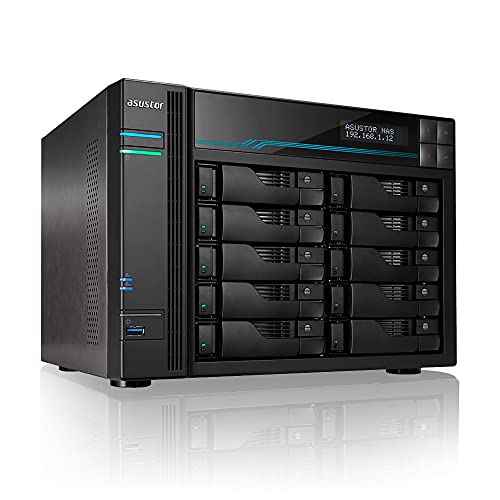
With its powerful Intel Atom Quad-core C3538 CPU and dual 10GbE ports, the Asustor Lockerstor 10 AS6510T stands out as an exceptional choice for video editors and creative professionals who demand high-speed data transfer. You’ll appreciate its 10-bay design, supporting up to 180TB of storage with both 2.5 and 3.5 SATA SSD/HDD drives. Plus, the expandable 8GB DDR4 RAM lets you boost performance up to 64GB. Dual 10GbE connections enable speeds up to 20 Gbps, ensuring smooth workflow during intensive editing tasks. With a 3-year warranty, you’re covered for any potential issues.
Best For: Video editors and creative professionals who require high-speed data transfer and extensive storage capacity.
Pros:
- High performance: Equipped with an Intel Atom Quad-core C3538 CPU and expandable RAM for demanding tasks.
- Massive storage options: Supports up to 180TB with 10 bays for both SSDs and HDDs.
- Fast connectivity: Dual 10GbE ports allow for speeds up to 20 Gbps, enhancing workflow efficiency.
Cons:
- Diskless unit: Requires separate purchase of drives, which can increase initial setup costs.
- Limited to SATA drives: No support for other drive interfaces beyond SATA, potentially limiting future upgrades.
- Complex setup: May require advanced networking knowledge for optimal configuration and performance.
QNAP TS-h973AX-8G 9-Bay QuTS Hero NAS with 10GbE/2.5GbE Connectivity
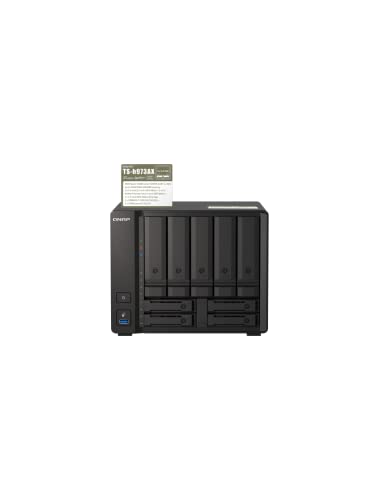
The QNAP TS-h973AX-8G stands out as an ideal solution for creative professionals engaged in collaborative video editing, thanks to its robust 10GbE and 2.5GbE connectivity. Powered by an AMD Ryzen Embedded V1500B quad-core processor, it guarantees smooth performance for demanding tasks. With nine drive bays, including options for both SATA and NVMe SSDs, you can easily expand your storage while benefiting from SSD caching for enhanced IOPS. The ZFS-based QuTS Hero OS offers advanced data management features like inline deduplication and real-time SnapSync, making it perfect for mission-critical applications and seamless teamwork.
Best For: Creative professionals engaged in collaborative video editing and those needing robust data management for mission-critical applications.
Pros:
- High-speed connectivity with 10GbE and 2.5GbE for seamless data transfer.
- Flexible storage options with nine drive bays, accommodating both SATA and NVMe SSDs.
- Advanced data management features such as inline deduplication and real-time SnapSync enhance performance and reliability.
Cons:
- Higher initial cost compared to entry-level NAS solutions.
- Limited support for certain drive types may restrict flexibility in storage configurations.
- Weight and size may be cumbersome for users with limited space or those needing portability.
BUFFALO LinkStation 710 4TB NAS Network Attached Storage

If you’re looking for a reliable and efficient solution for home cloud storage, the BUFFALO LinkStation 710 4TB NAS is an excellent choice. With up to 7x faster performance than its predecessor, it seamlessly supports both Windows and macOS. You’ll enjoy subscription-free personal cloud storage for your videos, music, and photos, while SSL encryption keeps your data secure. The NAS Navigator utility simplifies automated backups, and you can easily configure access restrictions for privacy. Weighing just 3 pounds, it’s compact yet powerful, and comes with a 2-year warranty, ensuring peace of mind for your storage needs.
Best For: Individuals and families looking for a user-friendly and secure home cloud storage solution.
Pros:
- Fast Performance: Up to 7x faster than the previous model, enhancing data transfer efficiency.
- Cross-Platform Compatibility: Works seamlessly with both Windows and macOS systems.
- Subscription-Free Storage: Offers personal cloud capabilities without ongoing fees for videos, music, and photos.
Cons:
- Single Bay Design: Limited to 4TB storage with no option for expansion beyond the included hard drive.
- Mechanical Hard Drive: The 5400 RPM HDD may not offer the speeds of SSD alternatives.
- Average Customer Ratings: With an average of 3.9 out of 5 stars, some users may have experienced issues.
Asustor Drivestor 2 Lite AS1102TL – 2 Bay NAS

For home and small office users seeking a reliable and budget-friendly NAS solution, the Asustor Drivestor 2 Lite AS1102TL stands out with its efficient performance and user-friendly features. Powered by a 1.7GHz quad-core processor and 1 GB DDR4 RAM, it handles tasks smoothly. Its 1GbE port supports Wake on LAN, making it easy to manage remotely. Plus, you’ll appreciate its media capabilities, including 4K transcoding for seamless streaming. With Btrfs/iSCSI snapshots and tool-free installation, it offers a personal cloud and a solid backup solution to meet your storage needs without breaking the bank.
Best For: Home and small office users looking for an affordable and efficient NAS solution for storage and media streaming.
Pros:
- Affordable option for users needing a budget-friendly NAS.
- Supports 4K transcoding for smooth media streaming.
- Tool-free installation makes setup quick and easy.
Cons:
- Limited to 1 GB DDR4 RAM, which may restrict performance for demanding tasks.
- Only has a single 1GbE port, potentially limiting network speed.
- Diskless design requires users to purchase drives separately.
Aiffro K100 All-SSD NAS Storage

Aiffro K100 All-SSD NAS Storage stands out as an ideal choice for professionals in video editing and photography, thanks to its full-flash architecture and high-performance Intel N100 processor. With its four bays for M.2 SSDs, you can support up to 16TB of storage, ensuring quick data access. The 2.5GbE RJ45 connectivity enhances your workflow, while the low power consumption keeps your energy costs down. Built-in backup options and RAID technology protect your files, and its compact mini design fits anywhere. Plus, it’s compatible with multiple operating systems, making it a versatile solution for your editing needs.
Best For: The Aiffro K100 All-SSD NAS Storage is best for professionals in video editing and photography seeking high-performance data storage solutions.
Pros:
- High-speed data access with full-flash architecture and 2.5GbE connectivity.
- Compact mini design allows for versatile placement in various environments.
- Built-in backup options and RAID technology ensure data protection and redundancy.
Cons:
- Limited to M.2 SSDs, which may restrict storage upgrade options for some users.
- Higher initial investment compared to traditional HDD-based NAS systems.
- May require technical knowledge for setup and optimal configuration across multiple operating systems.
QNAP 10GbE SFP+ Network Adapter to USB 4 Type-C & Thunderbolt 3/4 (QNA-UC10G1SF)

The QNAP 10GbE SFP+ Network Adapter to USB 4 Type-C & Thunderbolt 3/4 (QNA-UC10G1SF) is an ideal solution for content creators who need to enhance their editing workflow. This adapter features a single 10Gb SFP+ port, ensuring high-speed connections to your network. It’s compatible with Windows, macOS, and Linux, making it versatile for different systems. With a fanless design, it operates quietly, reducing distractions during your work. Plus, it comes with a 1-meter USB 4 cable for easy setup. Weighing just 13.4 ounces, it’s a portable addition that boosts your productivity without the hassle.
Best For: The QNAP 10GbE SFP+ Network Adapter is best for content creators and professionals seeking to enhance their network performance for demanding tasks.
Pros:
- High-speed connectivity with a 10Gb SFP+ port for efficient data transfer.
- Fanless design ensures quiet operation, minimizing distractions during work.
- Wide compatibility with Windows, macOS, and Linux, making it versatile for various systems.
Cons:
- Driver installation required for compatibility with certain operating systems.
- Customer reviews indicate mixed feedback, with an average rating of 3.5 out of 5 stars.
- Limited to a single port, which may not be sufficient for users needing multiple connections.
Factors to Consider When Choosing a 10GBE NAS for PC Editing
When choosing a 10GbE NAS for PC editing, you need to take into account key factors that will impact your workflow. Think about performance specifications, storage capacity, and networking capabilities to guarantee smooth operation. You should also assess cooling and noise levels, along with compatibility with your editing software, to find the best fit for your needs.
Performance Specifications
Selecting the right performance specifications is essential for optimizing your 10GbE NAS for PC editing. Look for devices with powerful quad-core processors to handle intensive tasks efficiently, especially during simultaneous file transfers and editing operations. Make sure the NAS has at least 8GB of RAM, ideally expandable to 16GB or more, to support multitasking and heavy data processing needs.
Consider models with dual 10GbE ports for maximum data transfer rates, reducing latency when accessing large media files. Evaluate storage configurations like multiple M.2 NVMe SSD slots for faster read/write speeds, enhancing your editing applications. Finally, check for advanced features like SSD caching and real-time snapshots to improve workflow efficiency and data protection throughout your editing projects.
Storage Capacity Options
Choosing the right storage capacity for your 10GbE NAS can considerably impact your editing workflow, especially as file sizes continue to grow. Start by evaluating your total storage needs; entry-level models offer a few terabytes, while high-end options exceed 180TB. Look for NAS systems with multiple drive bays, allowing for easy expansion with SATA or NVMe SSDs to boost both speed and capacity. Confirm your NAS supports RAID configurations for data redundancy and enhanced performance. Also, opt for units that accommodate M.2 NVMe SSDs, as they provide the fast data transfer speeds essential for high-resolution video editing. Finally, check the maximum individual drive size supported to guarantee scalability as your storage demands increase.
Networking Capabilities
Networking capabilities play an essential role in maximizing the performance of your 10GbE NAS for PC editing. With 10GbE ports delivering speeds up to 10 Gbps, you’ll considerably cut down file transfer times for large media files. Look for NAS devices that feature dual 10GbE ports, as they can aggregate bandwidth to reach up to 20 Gbps, enhancing data access and sharing even further. Compatibility with 2.5GbE ports offers flexibility, improving speeds over standard 1GbE connections without major infrastructure changes. Additionally, consider NAS units with SFP+ ports for fiber optic connections, extending your network reach. Advanced features like link aggregation and network redundancy will boost performance and reliability in demanding editing environments.
Cooling and Noise Levels
When you’re working with a 10GbE NAS for PC editing, effective cooling and low noise levels are essential for maintaining a productive environment. During heavy workloads, heat generation can spike, making advanced cooling systems vital. Look for NAS devices with multiple fans or convection designs that can keep noise levels below 19dB, ensuring a quieter workspace. The choice of materials, like heat sinks on SSDs, can also improve cooling efficiency and performance stability. Proper ventilation and airflow management prevent thermal throttling, which can slow down data transfer speeds and compromise reliability. Ultimately, selecting a NAS with fanless or low-noise designs enhances your editing experience, allowing you to focus on your work without distractions.
Compatibility With Software
As you consider a 10GbE NAS for PC editing, compatibility with your software is an essential factor that can greatly impact your workflow. Make certain the NAS supports operating systems that align with your editing software, as this affects performance. Look for NAS options that work seamlessly with popular software like Adobe Premiere Pro, Final Cut Pro, and DaVinci Resolve to improve efficiency. Advanced file management capabilities, such as ZFS or Btrfs, can enhance data integrity and offer version control through snapshots. Additionally, check for support of specific file formats and codecs to avoid compatibility issues. Finally, verify the NAS meets the necessary bandwidth requirements for high-resolution video files, particularly when utilizing 10GbE connections for faster data transfers.
Expandability and Upgrades
Choosing a 10GbE NAS for PC editing means not just guaranteeing software compatibility but also considering how the system can grow with your needs. Look for models that allow expandable RAM, ideally supporting up to 64GB, enhancing performance during resource-intensive tasks like video editing. Multiple M.2 slots are vital, enabling you to add SSDs as your storage requirements increase, markedly improving data access speeds. Confirm the NAS supports RAID configurations for data redundancy and performance during high-demand sessions. Ease of upgrading internal components, such as processors and hard drives, is essential for adapting to evolving workflows. Opt for a modular design that allows tool-free installation, making it simple to expand storage or memory without needing technical expertise.