Ergonomic standing desk converters make it easier to alternate between sitting and standing without replacing your existing desk. The best models provide enough surface area for your monitor, keyboard, and accessories while adjusting smoothly to a comfortable working height.
This roundup compares 10 options ranging from compact laptop risers to wide electric workstations, helping you match the converter to your equipment, workspace, and budget.
Best 10 Ergonomic Standing Desk Converters Picks for 2026
Compact Lift
VIVO 32-Inch Standing Desk Converter

- 31.5-inch surface for dual monitors
- 4.5- to 20-inch pneumatic height range
- Synchronized keyboard tray with minimal assembly
Best For: Compact home-office workstations
Flexible Worktop
TechOrbits 32-Inch Desk Converter

- 32-inch surface for monitors and accessories
- 4.3- to 19.9-inch manual adjustment
- 33-pound capacity with aluminum frame
Best For: Flexible home-office or study setups
Extra-Wide Surface
VIVO 42-Inch Standing Desk Converter

- 42-inch-wide desktop for larger setups
- 4.5- to 20-inch height adjustment
- Steel frame and synchronized keyboard tray
Best For: Dual-monitor and laptop workstations
Light Home-Office Pick

- White 32-inch two-tier workstation
- 4.9- to 19.3-inch height adjustment
- Removable synchronized keyboard tray
Best For: Light home-office and study setups
Best Large Dual-Monitor Pick

- 37.5-inch surface for two monitors
- Stable 15-inch vertical adjustment
- Fully assembled with five-year warranty
Best For: Dual-monitor office setups
Best Spacious Value
FLEXISPOT 40-Inch Desk Converter
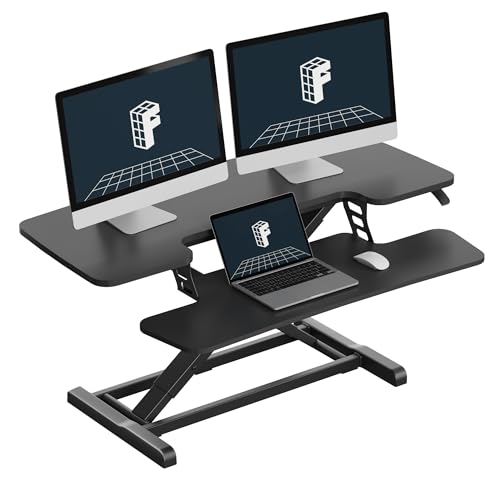
- Extra-wide 40-inch workspace
- Mechanical spring height adjustment
- Supports up to 33 pounds
Best For: Multi-device home-office workstations
Best Compact Laptop Pick

- Compact 31-by-21-inch surface
- 12.5-inch no-sway height adjustment
- Integrated phone and tablet slot
Best For: Small desks and laptop workstations
Best Manual Dual-Monitor Pick
FLEXISPOT 36-Inch Spring-Lift Converter

- Smooth mechanical spring adjustment
- Dual-monitor-friendly 36-inch surface
- Supports up to 33 pounds
Best For: Stable manual sit-stand workstations
Best Electric Feature-Rich Pick
FLEXISPOT 37-Inch Electric Converter

- Four electric height presets
- Wireless and wired device charging
- Anti-collision movement sensors
Best For: Convenient tech-focused home offices
Best Walnut Finish
FLEXISPOT 36-Inch Walnut Converter

- Walnut-finish desktop design
- Spring-assisted manual adjustment
- Dual-monitor-ready 36-inch surface
Best For: Stylish manual home-office setups
Compact Lift – VIVO 32-Inch Standing Desk Converter
The VIVO DESK-V000K is a practical choice among ergonomic standing desk converters for users who want a compact, dual-monitor-capable workstation. Its pneumatic lift raises the platform from about 4.5 to 20 inches, while the keyboard tray moves with the desktop for a more consistent sitting-to-standing setup.
Best For: Home-office users who need a space-efficient 32-inch riser with a synchronized keyboard tray.
Pros:
- 31.5-by-15.7-inch surface can accommodate dual monitors.
- 33-pound lift assist and height range up to 20 inches support flexible positioning.
- Minimal assembly and a steel frame simplify setup and everyday use.
- Includes a wide keyboard tray and a 3-year manufacturer warranty.
Cons:
- The desktop and tray support a combined workstation capacity that may not suit especially heavy equipment.
- The manual lift requires users to squeeze the handle and adjust the platform.
Choose this model if you want a straightforward, compact converter with a useful keyboard tray and enough surface area for a dual-monitor arrangement.
Flexible Worktop – TechOrbits 32-Inch Desk Converter
The TechOrbits 32-inch model is one of the ergonomic standing desk converters designed for users who want a broad work area without replacing their existing desk. Its squeeze-handle adjustment covers roughly 4.3 to 19.9 inches, and the surface is sized for a computer, dual monitors, keyboard, mouse, and accessories.
Best For: Home offices, study rooms, and users who want a versatile 32-inch workstation with minimal setup.
Pros:
- 32-inch-wide work area provides room for dual monitors and peripherals.
- Adjusts from approximately 4.3 to 19.9 inches for sitting or standing use.
- Pneumatic lift and aluminum frame support up to 33 pounds.
- Mostly assembled and includes the tools needed to attach the keyboard tray.
Cons:
- The engineered-wood construction may be less premium than a fully metal desktop.
- The keyboard tray requires installation before use.
This converter is a sensible option when surface area and multipurpose use matter more than advanced features or powered adjustment.
Extra-Wide Surface – VIVO 42-Inch Standing Desk Converter
The VIVO DESK-V042KB stands out among ergonomic standing desk converters for its extra-wide 42-inch desktop. It provides ample room for dual monitors and a laptop, while the synchronized keyboard tray and straight-up lift make it easier to alternate between seated and standing work.
Best For: Users with multiple displays or larger desktop setups who have enough existing desk depth and width.
Pros:
- 42-by-15.7-inch top offers more horizontal space than the 32-inch alternatives.
- Adjusts from 4.5 to 20 inches with a manual lift-assist mechanism.
- Steel frame supports up to 33 pounds on the desktop.
- Wide keyboard tray raises in sync and supports up to 4.4 pounds.
Cons:
- The wider footprint requires substantial desk space.
- Manual adjustment may be less convenient than an electric converter.
- The keyboard tray and desktop have separate weight limits.
If your priority is maximum usable width for multiple screens, this VIVO model offers a strong fit, provided your existing desk can accommodate its 42-inch span.
Light Home-Office Pick – JOY worker 32-Inch Desk Riser
The JOY worker 32-inch riser is a practical entry in the ergonomic standing desk converters category, combining a white desktop with a two-tier design. Its handle-operated lift adjusts from 4.9 to 19.3 inches, while the removable keyboard tray provides a dedicated lower tier for keyboard and mouse placement.
Best For: Residential users who want a white 32-inch converter for studying or everyday home-office work.
Pros:
- 31.5-by-15.7-inch top accommodates up to a dual-monitor setup.
- Height adjusts smoothly from 4.9 to 19.3 inches.
- Removable 24.4-by-11.8-inch keyboard tray raises with the top board.
- Requires only a two-step keyboard-tray installation.
Cons:
- The top tier supports up to 28.6 pounds, less than the 33-pound capacity of some alternatives.
- The engineered-wood frame and desktop may be less rugged than steel-frame models.
- The lower tier has a separate 4.4-pound capacity.
This model makes sense for lighter home-office or study equipment, especially if you prefer a white finish and want a removable keyboard tray.
Best Large Dual-Monitor Pick – Ergotron WorkFit-TL
The Ergotron WorkFit-TL is a strong choice among ergonomic standing desk converters for users who need a broad, stable workstation. Its 37.5-inch surface, included keyboard tray, and 10- to 40-pound capacity make it well suited to dual-monitor or monitor-and-laptop setups.
Best For: Dual-monitor users who want a spacious, ready-to-use tabletop workstation.
Pros:
- Large 37.5-by-23-inch worksurface accommodates two monitors or a monitor and laptop.
- 15 inches of straight, no-sway height adjustment with a hand-brake lever.
- Arrives fully assembled and includes cable-management accessories.
- Backed by a five-year warranty and expert technical support.
Cons:
- Its 61.6-pound weight may make repositioning difficult.
- The 40-pound maximum load is lower than the workspace size might suggest.
The WorkFit-TL prioritizes stability, capacity, and generous space over portability. It is a practical upgrade for a permanent office setup, particularly when two displays and a full keyboard-and-mouse arrangement are required.
Best Spacious Value – FLEXISPOT 40-Inch Desk Converter
The FLEXISPOT 40-Inch Desk Converter is one of the more spacious ergonomic standing desk converters for multitaskers. It offers room for dual monitors, a laptop, and accessories, while its mechanical spring system provides smooth height adjustment without relying on a gas spring.
Best For: Home-office users who need a large work surface for multiple devices.
Pros:
- 40-inch desktop provides ample room for dual monitors, laptops, and accessories.
- Patented mechanical spring system is designed for smooth, stable adjustment.
- Reinforced steel frame supports up to 33 pounds on the desktop.
- Requires only keyboard-tray attachment before use.
Cons:
- The desktop load limit is 33 pounds, with the keyboard tray limited to 4.4 pounds.
- It is listed as almost fully assembled rather than completely ready out of the box.
With its extra-wide surface and sturdy steel construction, this FLEXISPOT model is geared toward users who value workspace more than compactness. It is a sensible fit for a multi-device desk, provided the total equipment weight stays within its limits.
Best Compact Laptop Pick – Ergotron WorkFit-Z Mini
The Ergotron WorkFit-Z Mini is a compact option among ergonomic standing desk converters, designed for laptops or a single monitor in tighter work areas. Its 31-by-21-inch surface, integrated device slot, and no-assembly setup make it easy to add sit-stand flexibility to a small tabletop.
Best For: Laptop users and compact home offices with limited desk space.
Pros:
- Compact 31-by-21-inch worksurface fits one monitor or a laptop.
- 12.5 inches of straight, no-sway lift with a hand-brake lever.
- Integrated slot keeps a phone or tablet within reach.
- Ready to use without assembly and covered by a two-year warranty.
Cons:
- Its 25-pound capacity is intended for lighter equipment.
- The smaller surface is not designed for a dual-monitor setup.
The WorkFit-Z Mini focuses on a smaller footprint and straightforward usability. Choose it when a laptop or single-monitor station is enough and preserving tabletop space matters more than maximum capacity.
Best Manual Dual-Monitor Pick – FLEXISPOT 36-Inch Spring-Lift Converter
For shoppers comparing ergonomic standing desk converters, this 36-inch FLEXISPOT model offers a spacious, manually adjustable workstation for switching between sitting and standing. Its spring-lift mechanism, keyboard tray, and dual-monitor-friendly surface make it a practical fit for a home office or remote-work setup.
Best For: Users who want a stable, wide manual converter for dual monitors without relying on a gas spring.
Pros:
- Mechanical spring system provides smooth, stable height adjustment and avoids common gas-spring air-leak concerns.
- 36-inch surface accommodates dual monitors with room for accessories.
- Reinforced steel frame supports up to 33 pounds on the desktop.
- Arrives almost assembled, requiring only keyboard-tray attachment.
Cons:
- Manual height adjustment is less convenient than an electric converter.
- The keyboard tray supports 4.4 pounds, so it is intended for a keyboard and mouse rather than heavier equipment.
- At 34.5 pounds, it is relatively heavy to reposition.
This is a straightforward choice when stability, workspace, and dependable manual adjustment matter more than powered controls. The included keyboard tray also supports a more natural arm position while standing or sitting.
Best Electric Feature-Rich Pick – FLEXISPOT 37-Inch Electric Converter
This FLEXISPOT is a strong option among ergonomic standing desk converters for shoppers who want powered height changes and built-in device charging. Its four memory presets, anti-collision sensors, wide desktop, and charging ports create a convenient sit-stand workstation on an existing desk.
Best For: Home-office users who prioritize one-touch height control, dual-monitor space, and integrated charging.
Pros:
- Electric lift adjusts from 4.9 to 19.7 inches and includes four programmable memory presets.
- Charging station includes 15W wireless charging, two 45W USB-C ports, and USB connectivity.
- Anti-collision sensors can stop and reverse movement when resistance is detected.
- 37-inch workspace and keyboard tray support a complete dual-monitor setup.
Cons:
- Powered features require access to a power source.
- Its 36.4-pound weight may make moving the converter cumbersome.
- The work surface supports 44 pounds, while the keyboard tray supports 11 pounds, requiring attention to load placement.
The motorized controls make this the most convenient choice of the three, particularly for users who frequently alternate positions. Its charging features can also reduce cable clutter, while the sensor system adds protection during adjustments.
Best Walnut Finish – FLEXISPOT 36-Inch Walnut Converter
For a warmer-looking workspace, this walnut FLEXISPOT combines the ergonomic benefits of a sit-stand riser with a 36-inch dual-monitor surface. Its mechanical spring lift, keyboard tray, and reinforced frame provide a practical manual setup for home-office work.
Best For: Buyers who want a dual-monitor converter with a walnut finish and simple spring-assisted adjustment.
Pros:
- Walnut finish adds a warmer alternative to a conventional black converter.
- Mechanical spring system delivers smooth, stable adjustment without common gas-spring leakage concerns.
- 36-inch surface fits dual monitors and additional accessories.
- Reinforced structure supports up to 33 pounds on the main surface.
Cons:
- Height adjustment is manual rather than electric.
- The keyboard tray has a 4.4-pound capacity.
- The 34.5-pound unit may be difficult to move frequently.
This model offers the same practical dual-monitor layout and spring-assisted design as a straightforward ergonomic workstation, with walnut styling as its main distinction. It is a sensible fit when appearance and reliable manual adjustment are both priorities.
How We Picked the Best Ergonomic Standing Desk Converters
We focused on practical features that affect everyday comfort and usability: desktop width and depth, height-adjustment range, lifting method, keyboard-tray design, monitor support, stability, and useful extras. The selection includes manual and electric models, compact converters for smaller desks, and wide platforms designed for dual-monitor setups.
We also considered how easily each style can fit an existing workstation. A converter should leave enough room for your chair and accessories when lowered, remain stable at standing height, and support your equipment without forcing awkward monitor or keyboard positions.
Quick Comparison
| Best For | Look For | Recommended Style |
|---|---|---|
| Small workspaces | Compact footprint and laptop support | Small manual or mini riser |
| One monitor | Balanced width and simple adjustment | 32- to 36-inch manual converter |
| Dual monitors | Wide, stable surface and high weight capacity | 37- to 42-inch converter |
| Frequent height changes | Low-effort controls and memory settings | Electric converter |
| Shared workstations | Broad height range and easy operation | Adjustable sit-stand riser |
Key Buying Factors for Ergonomic Standing Desk Converters
Size and Equipment Layout
Measure your desk before buying. Check the converter’s footprint, then account for monitor stands, speakers, notebooks, and cable clearance. A 32-inch model may suit a laptop or single monitor, while wider models are more practical for two monitors or larger keyboards.
Adjustment Method and Range
Manual converters are generally simpler and may cost less, but they can require more effort when changing positions. Electric models are convenient for frequent transitions and may include memory presets. Confirm that the height range lets you keep your elbows near 90 degrees and your screen near eye level.
Stability, Capacity, and Ergonomics
Look for a sturdy base, smooth movement, and a weight rating that exceeds the combined weight of your monitors, laptop, and accessories. A keyboard tray can improve wrist and shoulder positioning, but make sure it has enough room for your preferred keyboard and mouse.
Features and Cable Management
Memory presets, anti-collision protection, device slots, and cable-routing features can make a converter easier to use. These extras are most valuable when they solve a specific workspace problem rather than simply adding complexity.
Who Should Buy Which Ergonomic Standing Desk Converters?
Choose a compact converter if you work from a small desk, primarily use a laptop, or need a portable secondary workstation. Choose a mid-size manual model for a straightforward single-monitor setup and occasional sit-stand changes. Choose a wide converter if you use dual monitors, a full-size keyboard, or several desk accessories.
Choose an electric model if you change positions often, share the workstation, or want programmable height settings. Before ordering, compare the converter’s dimensions and weight capacity with your desk and equipment, then position your monitor and keyboard so both sitting and standing positions remain comfortable.