Content creators often need more than a keyboard and monitor: editing timelines, microphones, cameras, lighting controls, and notebooks can quickly crowd a fixed desk. A standing desk converter can add sit-stand flexibility without replacing your entire workstation.
We selected 10 desktop risers in different widths, lifting styles, and layouts to help you match your setup to your equipment, available space, and daily workflow.
Best 10 Standing Desk Converters for Content Creators Picks for 2026
Best Overall
VIVO 32 in Standing Desk Converter

- 31.5-inch surface for dual monitors
- 4.5–20-inch height adjustment
- Synchronized keyboard tray
Best For: Creators building a spacious dual-monitor workstation
Best for Dual Monitors
VIVO 32 in Converter with Monitor Stand

- Dual arms support two 13–30-inch screens
- Flexible tilt, swivel, and rotation
- 4.5–20-inch riser adjustment
Best For: Creators using two adjustable displays
Best for Flexible Workstations
TechOrbits 32 in Standing Desk Converter

- 32-inch work area for devices and accessories
- 4.3–19.7-inch pneumatic adjustment
- Keyboard tray and dual monitor stand included
Best For: Creators wanting one multipurpose desktop setup
Best Compact Pick
VIVO 26 in Ultra-Slim Desk Riser

- Compact surface for small desks
- Five lockable height settings
- No assembly required
Best For: Single-monitor and laptop-based creator setups
Best Electric Upgrade
VIVO 42-inch Electric Desk Converter

- Electric adjustment from 5.7 to 19.5 inches
- 42-inch surface for dual monitors and a laptop
- Supports up to 50 pounds on the desktop
Best For: Creators with larger, heavier workstation setups
Best Compact Balance
SANODESK 36-inch Standing Desk Converter

- 36-inch workspace for dual monitors
- Mechanical spring lift needs no motor
- Supports 33 pounds on the main tier
Best For: Creators wanting dual-monitor space in a smaller footprint
Best Large Manual Riser
VIVO 42-inch Standing Desk Converter

- 42-inch by 22-inch desktop
- Smooth pneumatic spring adjustment
- 33-pound desktop capacity
Best For: Creators seeking a spacious non-electric workstation
Best Heavy-Duty Pick
FLEXISPOT 32-Inch Standing Desk Converter
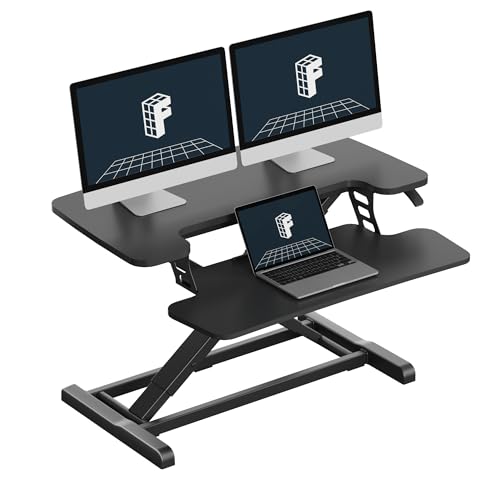
- Mechanical spring lift for smooth adjustment
- 33-pound desktop capacity
- Dual-monitor-friendly work surface
Best For: Creators building a stable dual-monitor workstation
Best for Corner Desks
VIVO 38-Inch Corner Standing Desk Converter

- Spacious 37.5-inch-wide surface
- Raises up to 20 inches
- 33-pound desktop capacity
Best For: Creators with corner desks and multi-screen setups
Best Space-Saving Option
VIVO 28-Inch Standing Desk Converter

- Compact 28-inch desktop
- 28.6-pound weight capacity
- 4.9-to-17.2-inch height range
Best For: Creators working at compact desks
Best Overall – VIVO 32 in Standing Desk Converter
For content creators comparing standing desk converters for content creators, this VIVO riser is a practical all-around option for switching between seated and standing work. Its 31.5-inch surface accommodates dual monitors, while the synchronized keyboard tray keeps the workstation together as you adjust the height.
Best For: Creators who want a spacious dual-monitor setup with a built-in keyboard tray.
Pros:
- 31.5-inch surface provides room for dual monitors.
- Height adjusts from 4.5 to 20 inches with a lift-assist mechanism.
- Includes a wide keyboard tray that raises with the desktop.
- Requires minimal assembly and includes a 3-year manufacturer warranty.
Cons:
- The 33-pound weight capacity may limit heavier multi-device setups.
- The 26-pound riser occupies substantial desk space.
This is a strong default choice when you need a stable, straightforward riser for monitor-heavy editing, streaming, or general production work without installing a new desk.
Best for Dual Monitors – VIVO 32 in Converter with Monitor Stand
This VIVO model is one of the more purpose-built standing desk converters for content creators who work with two displays. It combines a 32-inch riser with a dual monitor mount, giving you height adjustment plus flexible screen positioning for editing timelines, reference material, or live production tools.
Best For: Dual-monitor creators who want adjustable screen tilt, swivel, rotation, and portrait-orientation support.
Pros:
- Dual mount supports two 13- to 30-inch monitors up to 17.6 pounds each.
- Monitor arms offer tilt, swivel, rotation, and height adjustment.
- Riser adjusts from 4.5 to 20 inches.
- Includes a 31.5-inch work surface and wide keyboard tray.
Cons:
- VESA 75x75mm or 100x100mm compatibility is required.
- The monitor-mount setup involves more assembly than a basic riser.
- It is designed for a dual-monitor configuration, which may be unnecessary for single-screen users.
If monitor positioning is central to your workflow, the integrated arms make this a more capable choice than a basic desktop riser, provided your displays meet the mount requirements.
Best for Flexible Workstations – TechOrbits 32 in Standing Desk Converter
The TechOrbits 32-inch riser offers a roomy platform for a laptop, monitors, keyboard, mouse, and accessories while keeping the setup relatively simple. Its pneumatic lift and squeeze-handle adjustment suit creators who frequently change positions during office, study, or gaming sessions.
Best For: Creators who want a broad, multipurpose workstation with quick manual height adjustment.
Pros:
- 32-inch-wide work area accommodates a computer or laptop and dual monitors.
- Adjusts from 4.3 to 19.7 inches using a squeeze handle and pneumatic lift.
- Includes a keyboard tray and dual monitor stand.
- Arrives mostly assembled, requiring only keyboard-tray installation.
Cons:
- The particle-board work surface may feel less premium than a solid-material desktop.
- The 33-pound capacity leaves limited headroom for especially heavy equipment.
- Monitor mounting details are less extensive than on the VIVO dual-arm model.
This riser makes sense for creators who want one adaptable platform for work, gaming, and study, especially when a large surface matters more than advanced monitor articulation.
Best Compact Pick – VIVO 26 in Ultra-Slim Desk Riser
For smaller studios and compact editing spaces, this VIVO riser is a space-conscious option among standing desk converters for content creators. Its 26.4-inch surface fits a single monitor-and-laptop setup with a full-size keyboard, and the pre-assembled design is ready to use almost immediately.
Best For: Single-monitor or laptop creators working at a smaller desk.
Pros:
- Compact 26.4-inch surface suits limited work areas.
- Five lockable height settings provide quick ergonomic adjustments.
- Supports up to 17.6 pounds on the desktop.
- Requires no assembly and includes a 3-year warranty.
Cons:
- Its smaller surface is not intended for a dual-monitor setup.
- Maximum height is 15.9 inches, less than the larger VIVO risers.
- The 17.6-pound capacity limits heavier equipment arrangements.
This is the most practical fit when desk space is tight and your content setup centers on one monitor, a laptop, and a keyboard rather than multiple displays.
Best Electric Upgrade – VIVO 42-inch Electric Desk Converter
For content creators seeking standing desk converters, the VIVO DESK-VE42B offers a spacious 42-inch work surface and powered height adjustment. Its electric lift makes switching between sitting and standing simple, while the synchronized keyboard tray supports a dual-monitor and laptop setup.
Best For: Creators who want a wide, electric riser for heavier monitor and laptop configurations.
Pros:
- 42-inch surface provides room for dual monitors and a laptop.
- Electric lift adjusts from 5.7 to 19.5 inches with a push button.
- Supports up to 50 pounds on the main desktop.
- Requires minimal assembly, with the keyboard tray included.
Cons:
- The electric design requires access to power.
- The keyboard tray is only 12 inches deep.
This is the strongest choice in the group for creators prioritizing lifting power and effortless adjustments. Its broad surface and 50-pound capacity suit substantial setups, though its powered mechanism may be more than needed for lighter gear.
Best Compact Balance – SANODESK 36-inch Standing Desk Converter
Among standing desk converters for content creators, the SANODESK 36-inch model balances workspace and footprint. Its mechanical spring lift provides smooth adjustment without a motor, while the large synchronized keyboard tray keeps typing equipment aligned as the main surface moves.
Best For: Creators who need dual-monitor space without filling an entire desk.
Pros:
- 36-inch surface offers room for dual monitors in a moderate footprint.
- Mechanical spring lift adjusts from 4.7 to 19.6 inches.
- Reinforced steel structure supports up to 33 pounds on the main tier.
- Wide keyboard tray raises in sync and supports up to 4.4 pounds.
Cons:
- Assembly requires attaching the keyboard tray with a screwdriver.
- Its main-tier capacity is lower than the 50-pound electric VIVO model.
The SANODESK is a practical middle-ground option for home studios and offices. It supplies useful monitor space and a broad keyboard tray while avoiding the need for a powered lift, making it well suited to creators who value a compact, straightforward workstation.
Best Large Manual Riser – VIVO 42-inch Standing Desk Converter
The VIVO DESK-V000VL is a strong manual option for content creators comparing standing desk converters. Its 42-inch desktop accommodates single- or dual-monitor setups, and the pneumatic spring lift provides smooth sit-to-stand movement without an electric motor.
Best For: Creators who want a large, manually adjusted surface with a dual-tier layout.
Pros:
- 42-inch by 22-inch desktop offers generous monitor and laptop space.
- Pneumatic spring lift adjusts from 6 to 17 inches.
- Steel frame supports up to 33 pounds on the desktop.
- Includes a synchronized keyboard tray and requires minimal assembly.
Cons:
- The keyboard tray supports only 4 pounds.
- Manual adjustment requires lift assistance rather than a button.
- Maximum height is lower than the electric VIVO model.
This model fits creators who need a roomy platform but prefer a non-electric riser. It offers a generous 42-inch layout and simple pneumatic adjustment, although the lighter keyboard-tray capacity and lower height range may limit some setups.
Best Heavy-Duty Pick – FLEXISPOT 32-Inch Standing Desk Converter
For content creators comparing standing desk converters for content creators, the FLEXISPOT 32-inch riser offers a stable workspace for monitors, laptops, and everyday accessories. Its mechanical spring lift is designed for smooth height changes without the air-leak concerns associated with gas springs, while the included keyboard tray supports a more comfortable typing position.
Best For: Creators who need a sturdy dual-monitor workstation for editing, streaming, or general home-office work.
Pros:
- Mechanical spring lift provides smooth, stable height adjustment.
- Reinforced steel frame supports up to 33 pounds on the desktop.
- Includes a keyboard tray and arrives almost fully assembled.
- 32-inch surface accommodates dual monitors and accessories.
Cons:
- The keyboard tray supports a lower 4.4-pound maximum.
- At 31.9 pounds, the converter is relatively substantial to move.
- The supplied specifications describe the surface as 32 inches, while one feature note refers to a 36-inch riser.
Choose this FLEXISPOT when stability and long-term daily use matter more than keeping the converter especially light. Its broad work surface and high desktop weight capacity make it a practical foundation for a creator setup.
Best for Corner Desks – VIVO 38-Inch Corner Standing Desk Converter
The VIVO DESK-V000KL is a strong option for content creators looking at standing desk converters for content creators and working from a corner desk. Its wide surface gives dual-monitor and laptop setups room to spread out, while the pneumatic lift raises the keyboard tray with the main platform.
Best For: Creators with corner desks who need generous space for multiple screens, a laptop, and office supplies.
Pros:
- 37.5-by-18-inch top provides ample room for dual monitors or a laptop setup.
- Adjusts from 4.3 to 20 inches with pneumatic spring lift assistance.
- Steel frame supports up to 33 pounds on the desktop.
- Requires very minimal assembly and includes a wide keyboard tray.
Cons:
- The keyboard tray has a 4.4-pound weight limit.
- Its 38-inch footprint may be too large for compact desks.
- The lift mechanism is manual rather than motorized.
For creators who have the desk space, this VIVO converter combines a large working area with a useful 20-inch maximum height. It is particularly well suited to corner layouts and multi-device workflows.
Best Space-Saving Option – VIVO 28-Inch Standing Desk Converter
For smaller workspaces, the VIVO DESK-V028S is a space-conscious choice among standing desk converters for content creators. Its 28-inch platform can accommodate a screen setup while taking up less room than larger risers, and the pneumatic lift moves the surface straight upward.
Best For: Creators working at compact desks with a laptop-monitor or lighter dual-monitor setup.
Pros:
- Compact 27.6-by-15.8-inch surface helps conserve desk space.
- Supports up to 28.6 pounds, suitable for dual monitors or a laptop-monitor setup.
- Pneumatic lift adjusts from 4.9 to 17.2 inches.
- Keyboard tray raises in sync with the desktop and requires minimal assembly.
Cons:
- The smaller surface offers less room for accessories than larger models.
- Its 28.6-pound capacity is lower than the other listed converters.
- The keyboard tray is included, but its separate weight capacity is not specified in the supplied details.
This VIVO model is a sensible fit when desk real estate is limited. It preserves the core sit-stand function and a useful height range while keeping the footprint more manageable for compact creator workstations.
How We Picked the Best Standing Desk Converters for Content Creators
We focused on desktop converters that can support common creator setups, including laptops, single or dual monitors, keyboards, microphones, and other desk accessories. The lineup includes compact risers for smaller desks, wide platforms for multi-monitor workstations, electric models for easier height changes, and corner-friendly designs.
We also considered usable surface area, monitor compatibility, lifting convenience, stability, footprint, and the practical trade-offs between a single-level platform and models with a separate monitor shelf. A converter’s stated width is only part of the story, so measure the actual work surface and check its rated capacity before buying.
Quick Comparison
| Best for | Look for | Recommended size or style |
|---|---|---|
| Single-monitor editing | Stable keyboard area and monitor clearance | 26- to 32-inch riser |
| Dual-monitor creators | Wide platform, adequate depth, strong capacity | 36- to 42-inch model |
| Laptop-based workflows | Compact footprint and flexible placement | 26- to 32-inch model |
| Frequent height changes | Electric adjustment or a smooth lifting mechanism | Electric or easy-lift converter |
| Corner desks | Shape that fits the rear corner without wasted space | Corner converter |
Key Buying Factors for Standing Desk Converters for Content Creators
Width, Depth, and Equipment Layout
Measure your desk before choosing a converter. A wider platform may fit two monitors, speakers, and a microphone, while a compact riser may be better for a laptop and one display. Leave room for cables and avoid placing equipment where it can be bumped during height changes.
Monitor and Laptop Support
Check the platform’s dimensions and weight rating against your actual equipment. Dual-monitor users should confirm that both displays can sit comfortably without overhanging the edge. If a model includes a monitor stand, make sure it provides enough clearance for your keyboard and does not force the screen too close or too far away.
Adjustment Method and Stability
Manual converters can be simple and economical, but they require more effort to reposition. Electric models are useful when you alternate frequently between sitting and standing or have a heavier load. In every case, look for smooth movement, a firm base, and minimal wobble at standing height.
Ergonomics and Accessories
Your monitor should sit near eye level, with your elbows relaxed and your wrists reasonably neutral. A converter may also need space for a mouse, drawing tablet, microphone arm, audio interface, or controller. A separate keyboard tray can help, but it may reduce usable depth or limit accessory placement.
Who Should Buy Which Standing Desk Converters for Content Creators?
Choose a compact 26- or 28-inch converter if you have a small desk, use one monitor, or primarily work from a laptop. A 32-inch model is a versatile middle ground for many editors, streamers, and social-video creators. For dual monitors, larger editing timelines, or substantial audio and camera equipment, a 36- or 42-inch platform generally offers more practical workspace.
Choose an electric converter if convenience and frequent adjustments matter most. A corner model is the better fit for an L-shaped or corner workstation. Before ordering, compare the converter’s dimensions, capacity, height range, and return policy with your complete equipment setup—not just the computer itself.