If you’re looking to enhance your home network in 2025, Ethernet over Powerline adapters could be the solution you need. They provide a reliable and fast internet connection by utilizing your existing electrical wiring. In this guide, we’ll explore the top 10 options available, helping you find the right fit for your setup. But what features should you prioritize to guarantee peak performance? Let’s uncover that.
TP-Link AV2000 Powerline Ethernet Adapter (TL-PA9020P KIT)

If you’re struggling with Wi-Fi dead zones in your multi-story home or basement, the TP-Link AV2000 Powerline Ethernet Adapter (TL-PA9020P KIT) is the perfect solution. This device utilizes your existing electrical wiring to extend Ethernet connections, reaching up to 750ft. Simply plug the adapters into outlets on the same electrical circuit—no drilling or new wiring required. With 2×2 MIMO technology, it guarantees stable and fast connections, ideal for streaming and gaming. Plus, it features two Gigabit ports for secure connections to your devices. Enjoy the passthrough design and dedicated support from TP-Link, making network setup a breeze.
Best For: Those seeking to eliminate Wi-Fi dead zones in multi-story homes or basements while maintaining stable wired connections.
Pros:
- Easy Installation: No drilling or new wiring required; simply plug into existing electrical outlets.
- Stable Connections: 2×2 MIMO technology ensures optimal performance for streaming and gaming.
- Multiple Ports: Features two Gigabit ports for connecting multiple devices securely.
Cons:
- Electrical Circuit Limitation: Adapters must be on the same electrical circuit to function properly.
- Interference Sensitivity: Speed may vary based on wiring quality, adapter distance, and network interference.
- Incompatibility with Surge Protectors: Cannot be used with surge protectors, limiting outlet options.
TP-Link AV1000 Powerline Ethernet Adapter KIT (TL-PA7017 KIT)

The TP-Link AV1000 Powerline Ethernet Adapter KIT (TL-PA7017 KIT) stands out as an excellent choice for users who struggle with unreliable Wi-Fi signals in their homes or offices. This kit leverages your existing electrical wiring to extend your Ethernet connection up to 750 feet, even through thick walls. With AV1000 speeds, you can enjoy secure wired connections via its Gigabit port, perfect for desktops, smart TVs, or game consoles. The Plug Pair & Play design guarantees easy setup with no extra wiring needed. Plus, TP-Link prioritizes security, adhering to the Secure-by-Design pledge for enhanced protection.
Best For: Users seeking a reliable wired internet connection in areas with weak Wi-Fi signals.
Pros:
- Easy Installation: Plug Pair & Play design allows for quick setup without any additional wiring.
- Extended Range: Capable of extending wired connectivity up to 750 feet, even through thick walls.
- Secure Connections: Features a Gigabit port for fast and secure connections to various devices.
Cons:
- Electrical Circuit Limitation: Adapters must be on the same electrical circuit to function properly.
- Direct Outlet Requirement: Cannot be used with surge protectors, limiting installation options.
- Speed Variability: Performance may be affected by wiring quality, network conditions, and distance between adapters.
TP-Link AV600 Powerline Ethernet Adapter Kit (TL-PA4010 KIT)

Looking for a hassle-free way to extend your internet connection? The TP-Link AV600 Powerline Ethernet Adapter Kit (TL-PA4010 KIT) is your answer. With speeds up to 600Mbps, it’s perfect for HD streaming and online gaming. Simply plug one adapter into your router and the other where you need internet—no extra wires or configurations needed. It can cover distances of up to 300 meters using existing electrical circuits. Plus, it features a power-saving mode that can reduce energy consumption by up to 85%. With a 2-year warranty and 24/7 support, you’re well-covered with this reliable adapter.
Best For: Those seeking an easy and efficient way to extend their internet connection without the need for additional wiring or complex setup.
Pros:
- High Speed: Offers speeds up to 600Mbps, suitable for HD streaming and online gaming.
- Easy Installation: Plug and play design allows for quick setup with no configuration required.
- Energy Efficient: Features a power-saving mode that can reduce energy consumption by up to 85%.
Cons:
- Distance Limitations: Performance can vary based on network conditions and electrical noise, especially over longer distances.
- Requires Two Devices: At least two powerline adapters are necessary for a functioning connection.
- Potential Interference: Electrical wiring issues in the home may affect overall performance and speed.
NETGEAR Powerline Adapter Kit (PLP2000-100PAS)

For gamers and streaming enthusiasts, the NETGEAR Powerline Adapter Kit (PLP2000-100PAS) stands out with its impressive 2000 Mbps speeds. This powerline adapter is perfect for 4K HD streaming and lag-free gaming, thanks to its advanced Homeplug AV2 technology. With two Gigabit Ethernet ports and an extra noise-filtered outlet, it allows you to connect multiple devices without sacrificing performance. Plus, the plug-and-play setup means you can get started in minutes, no configuration required. If you need to expand your network, just add more adapters to cover every corner of your home effortlessly. Enjoy seamless connectivity!
Best For: Gamers and streaming enthusiasts seeking high-speed internet connectivity for lag-free gaming and 4K HD streaming.
Pros:
- Extremely fast speeds of up to 2000 Mbps, ideal for bandwidth-intensive activities.
- Easy plug-and-play setup with no configuration required, allowing for quick installation.
- Extra noise-filtered outlet included, enabling connection of additional devices without interference.
Cons:
- Performance may vary based on the electrical wiring and distance between adapters.
- Limited to two Gigabit Ethernet ports, which may not be enough for larger setups.
- May not be compatible with all home electrical systems, potentially limiting effectiveness.
G.hn Powerline Ethernet Adapter Kit (GPL-1200-KIT)

Offering speeds up to 1200 Mbps, the G.hn Powerline Ethernet Adapter Kit (GPL-1200-KIT) is an ideal solution for gamers and streamers seeking a reliable internet connection. With a Gigabit port and the ability to connect up to 16 devices, it guarantees stable performance for multiple users. The advanced LDPC/FEC technology minimizes lag and dropped frames, enhancing your online experience. Installation is a breeze—just plug it into your electrical outlets. While some users report issues over long distances, many are thrilled with the speed and stability. Overall, it’s a dependable choice for households needing robust internet access.
Best For: Gamers and streamers needing a reliable, high-speed internet connection across multiple devices in households with WiFi limitations.
Pros:
- Provides speeds up to 1200 Mbps, ensuring a stable connection for streaming and gaming.
- Easy installation using existing electrical wiring without the need for additional Ethernet cables.
- Connects up to 16 compatible Powerline devices, making it suitable for larger households.
Cons:
- Some users experience connectivity issues over long distances or with specific electrical setups.
- The size of the adapters may obstruct neighboring outlets.
- Certain devices may only register speeds at 100 Mbps, not reaching the advertised speeds.
TP-Link Powerline WiFi Extender TL-WPA7617 KIT
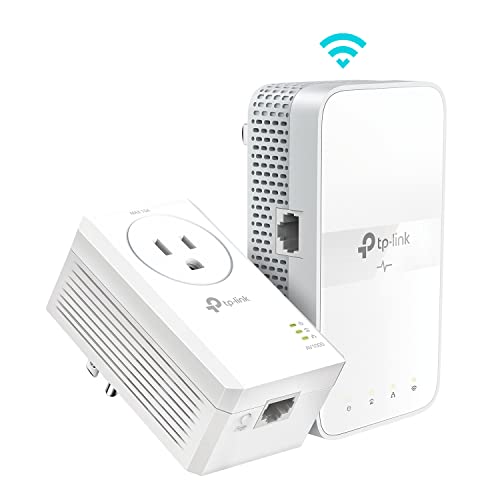
The TP-Link Powerline WiFi Extender TL-WPA7617 KIT is an ideal solution for gamers and streamers seeking reliable internet connectivity in hard-to-reach areas of their homes. This kit combines an AV1000 Powerline Ethernet Adapter with an AC1200 Dual Band Extender, ensuring robust connections. With speeds of up to 867 Mbps on 5GHz and 300 Mbps on 2.4GHz, you’ll enjoy seamless HD streaming and gaming. Its Gigabit Port offers secure wired access for your devices. Plus, installation is a breeze—just plug it in, and you’re set. With advanced security features, your network remains safe while you game or stream.
Best For: Gamers and streamers seeking reliable and high-speed internet connectivity in hard-to-reach areas of their homes.
Pros:
- Easy plug-and-play installation with no configuration required.
- Offers dual-band speeds of up to 867 Mbps on 5GHz, ideal for HD streaming and gaming.
- Includes a Gigabit Port for secure wired connections to devices like smart TVs and gaming consoles.
Cons:
- Requires adapters to be on the same electrical circuit, limiting placement options.
- Performance may vary based on wiring quality and distance between adapters.
- Does not work with surge protectors, which may restrict outlet availability.
TP-Link Powerline WiFi Extender TL-WPA8631P KIT
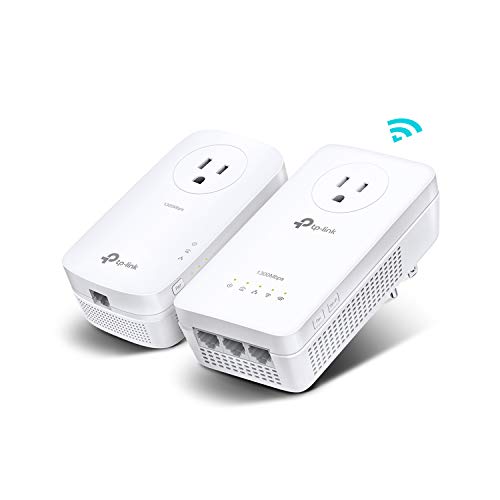
If you’re looking to enhance your home network with reliable connectivity, the TP-Link Powerline WiFi Extender TL-WPA8631P KIT is an excellent choice, especially for gamers and streaming enthusiasts. With AV1300 speeds and dual-band WiFi offering up to 867 Mbps, you’ll enjoy seamless HD streaming and gaming. Its three Gigabit Ethernet ports provide secure connections for your devices, while the passthrough design guarantees you won’t lose an outlet. Setup is a breeze, requiring no configuration. Plus, the built-in noise filter boosts performance, making it ideal for older homes. Experience improved connectivity and support from TP-Link experts whenever you need it.
Best For: This product is best for gamers and streaming enthusiasts seeking reliable and high-speed internet connectivity throughout their home.
Pros:
- Easy Plug & Play Setup: No configuration needed, making installation hassle-free.
- Dual-Band WiFi Speeds: Offers up to 867 Mbps on 5 GHz and 300 Mbps on 2.4 GHz for smooth streaming and gaming experiences.
- Passthrough Design: Allows you to use the outlet while providing network access, preventing loss of power sockets.
Cons:
- Limited to Electrical Circuit: Adapters must be on the same electrical circuit, which may restrict placement options.
- Not Compatible with Surge Protectors: Requires direct outlet plug-in, limiting where the device can be used.
- Speed Affected by Wiring Quality: Performance may vary based on the age and condition of your home’s wiring.
TRENDnet Powerline 500 AV Nano Adapter Kit (TPL-407E2K)

For gamers and smart TV enthusiasts, the TRENDnet Powerline 500 AV Nano Adapter Kit (TPL-407E2K) stands out with its built-in outlet feature, ensuring you won’t lose any power access while connecting your devices. This kit includes two adapters, making it perfect for establishing a stable home network. Installation is a breeze—just plug them in, and they’ll auto-connect through your existing electrical system. Plus, the encrypted signal keeps your connection secure. With NDAA compliance and three years of manufacturer protection, you can count on reliability. Enjoy tech support from English-speaking advisors whenever you need assistance.
Best For: Gamers and smart TV enthusiasts looking for a reliable and easy-to-install networking solution.
Pros:
- Plug and play installation makes it user-friendly and quick to set up.
- Built-in outlet allows for additional devices without losing power access.
- Encrypted Powerline signal ensures a secure connection over existing electrical systems.
Cons:
- Requires two adapters to operate, which may be inconvenient for some users.
- Performance may vary depending on the quality of the electrical wiring in the home.
- Limited range compared to traditional Wi-Fi networks, as it relies on electrical circuits.
Hitron Bonded MoCA 2.5 Network Adapter (2-Pack)

Transforming your home into a wired network has never been easier with the Hitron Bonded MoCA 2.5 Network Adapter (2-Pack), perfect for gamers and streamers seeking reliable connections. This adapter converts coax cables into Ethernet ports, delivering speeds up to 1 Gbps. It extends your existing network, providing stable, low-latency connections with minimal interference. Just remember, it requires a compatible cable or fiber internet setup and won’t work with satellite systems. For peak performance, pair it with other HTEM4 adapters. With Hitron’s trusted reputation, you’re investing in a dependable solution to enhance your home network.
Best For: Gamers and streamers seeking a reliable wired connection for optimal performance.
Pros:
- Converts existing coax cables into Ethernet connections with speeds up to 1 Gbps.
- Provides stable, low-latency connections, ideal for gaming and streaming.
- Easy to set up and extend your existing network without needing additional equipment.
Cons:
- Requires a compatible cable or fiber internet setup; not suitable for satellite systems.
- Limited to homes with coax outlets connected to the same central splitter.
- Performance may be hindered if not paired with other HTEM4 adapters for optimal results.
Comtrend G.hn Powerline Ethernet +PoE Adapter (PG-9172PoE)

The Comtrend G.hn Powerline Ethernet +PoE Adapter (PG-9172PoE) stands out as an excellent choice for those needing reliable connectivity for PoE devices like IP cameras and wireless access points. With speeds up to 1200Mbps and support for 15W power output, it effectively delivers data and power through existing electrical wiring. You can easily connect up to 16 adapters, expanding your network without messy installations. Users appreciate its stability and performance, especially in hard-to-reach areas. Just plug it in, connect your device, and enjoy seamless connectivity, though be mindful of potential challenges with initial setup and technical support.
Best For: Users seeking a reliable Powerline solution to connect PoE devices like IP cameras and wireless access points without the need for additional cabling.
Pros:
- High Speed: Delivers data transfer rates of up to 1200Mbps for efficient connectivity.
- Easy Installation: Simple plug-and-play setup allows for quick network expansion without complex wiring.
- Power Over Ethernet: Provides both data and power through existing electrical wiring, reducing cable clutter.
Cons:
- Initial Setup Challenges: Some users may encounter difficulties with the initial connection and configuration.
- Variable Performance: Performance can vary based on electrical noise and outlet selection, leading to inconsistent connectivity.
- Customer Support Issues: Mixed experiences reported with technical support, including difficulties in resolving issues and unclear documentation.
Factors to Consider When Choosing Ethernet Over Powerline Adapters for PC
When you’re choosing Ethernet over powerline adapters for your PC, consider important factors like speed and performance, ease of installation, and compatibility with your devices. You’ll also want to think about the number of ports you need and the specific powerline technology standards. Keeping these points in mind will help you make an informed decision.
Speed and Performance
Choosing the right Ethernet over Powerline adapter can greatly impact your online experience, especially for high-demand activities like gaming and streaming. Focus on maximum speed ratings, which typically range from 600 Mbps to 2000 Mbps. Remember, actual performance can vary due to electrical wiring quality, distance between adapters, and interference. Advanced features like MIMO can enhance performance by allowing multiple connections and boosting stability during peak usage. Check the effective range, usually up to 750 feet, but expect performance to drop over longer distances. Compatibility with your existing electrical circuit is essential, so avoid using surge protectors or extension cords, as they can hinder connectivity and performance.
Installation Ease
Considering how vital installation ease is, you’ll find that most Ethernet over Powerline adapters come with a simple Plug and Play design. You just need to plug the adapters into electrical outlets, skipping complex configurations. However, verify the adapters are on the same electrical circuit to maintain connectivity. It’s also essential to plug them directly into wall outlets since many models don’t work well with surge protectors. The setup process is usually straightforward, requiring you to pair the adapters with a single button press on each device. This feature allows for quick network expansion, but do check that the adapters are compatible with your existing devices and each other to avoid any connectivity issues.
Compatibility With Devices
After setting up your Ethernet over Powerline adapters, you’ll want to verify they’re compatible with your devices. Start by checking that the adapters work with your existing network equipment, like routers, PCs, and gaming consoles, using standard Ethernet ports. It’s also vital to guarantee they support the same powerline technology, such as HomePlug AV or G.hn, for effective communication. Make sure the adapters can handle the data speeds required by your internet plan, as speed compatibility is essential. Additionally, consider that the adapters need to operate on the same electrical circuit in your home. This guarantees devices on different circuits may not communicate effectively, impacting your network’s overall performance.
Number of Ports
When evaluating Ethernet over Powerline adapters, the number of ports is an essential factor that can greatly impact your setup. The more Ethernet ports an adapter has, the more wired devices you can connect simultaneously, enhancing your network’s flexibility and capacity. Many models come with one or more Gigabit Ethernet ports, perfect for connecting desktops, gaming consoles, or smart TVs. If you have multiple internet-connected devices at home, choosing an adapter with several ports can eliminate the need for additional network switches, simplifying your setup and saving costs. Additionally, some adapters include passthrough power outlets, so you won’t lose valuable outlet space while connecting your devices. Assess your household needs to select the right number of ports.
Powerline Technology Standards
Understanding powerline technology standards is essential for choosing the right Ethernet over Powerline adapter for your PC. Adapters typically use standards like HomePlug AV, HomePlug AV2, and G.hn, which impact speed and device compatibility. HomePlug AV2 supports data rates up to 2000 Mbps and enhances network reliability, making it a great option for high-demand tasks. On the other hand, G.hn offers a unified standard, allowing speeds up to 1200 Mbps and compatibility with a wider range of devices. Verify your chosen adapter complies with IEEE standards, like IEEE 1901, for better interoperability. Additionally, look for models utilizing MIMO technology, as they improve performance by allowing multiple data streams, reducing latency, and boosting overall speed.
Security Features
Choosing the right Ethernet over Powerline adapter for your PC means prioritizing security features that protect your home network. Look for adapters that adhere to advanced security protocols, like the U.S. Cybersecurity and Infrastructure Security Agency’s Secure-by-Design pledge. These guarantee robust protection. Additionally, opt for devices with AES (Advanced Encryption Standard) encryption to safeguard your data from unauthorized access. Automatic encryption setup is a bonus, simplifying your configuration process. Make certain the adapter includes built-in features to prevent unauthorized access, such as user authentication mechanisms. Finally, check for firmware update support from the manufacturer, as these updates can enhance security measures by addressing vulnerabilities over time. Prioritize these features to keep your network secure.
Power Consumption
While evaluating Ethernet over Powerline adapters for your PC, power consumption is essential to take into account. Typically, these adapters consume between 2.3W and 2.5W during normal operation. If you’re looking to save energy, consider models with a power-saving mode that can cut consumption by up to 85% when idle. Be mindful that higher-speed models often use more energy, so weigh your speed needs against efficiency. If you plan to use multiple adapters, assess their cumulative power demand, especially if your home has limited electrical capacity. Some adapters come with built-in power outlets, allowing you to connect other devices without sacrificing socket space, helping you manage overall power consumption effectively.
Warranty and Support
When selecting Ethernet over Powerline adapters for your PC, warranty and support are essential factors. Look for adapters that come with an industry-leading warranty, as this guarantees protection against defects or failures. It’s also important to check if the manufacturer offers reliable technical support, ideally available 24/7, to help with setup and troubleshooting.
Make certain user manuals and online resources are readily available, as these can assist you in understanding installation processes and resolving common issues. Consider the number of customer service channels like phone, email, or live chat, as this impacts how easily you can get help when needed. Finally, read user reviews about warranty claims and support experiences to gauge the manufacturer’s responsiveness and effectiveness.