If you’re serious about gaming, a strong and stable internet connection is essential. The right WiFi extender can greatly enhance your setup, allowing for smoother gameplay and fewer interruptions. In this guide, we’ll explore the ten best WiFi extenders tailored for gaming PCs, detailing their features and benefits. You’ll want to know which options can elevate your gaming experience to the next level, so let’s get started.
TP-Link AC1200 WiFi Extender (RE315)
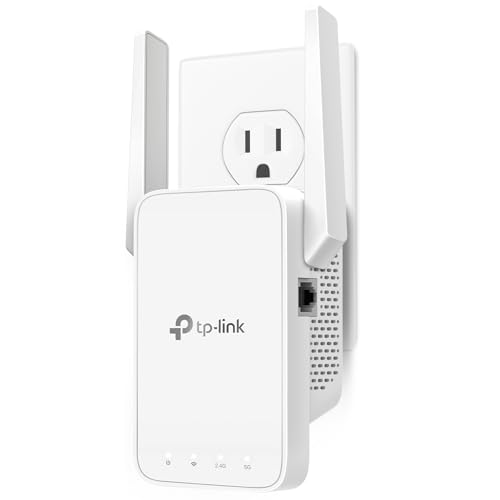
If you’re a gamer looking to enhance your online experience, the TP-Link AC1200 WiFi Extender (RE315) is a fantastic choice. With dual-band speeds of up to 1.2 Gbps, it supports 32 devices, ensuring smooth gameplay. Its coverage extends up to 1,600 sq. ft., ideal for larger homes. The EasyMesh compatibility and Smart Adaptive Roaming automatically connect you to the strongest signal, eliminating frustrating dead zones. Plus, the user-friendly TP-Link Tether app makes setup a breeze, taking under 10 minutes. With advanced security features and a compact design, this extender is perfect for boosting your gaming connection.
Best For: Gamers and users needing reliable WiFi coverage in larger homes or areas with multiple devices.
Pros:
- Dual-band speeds of up to 1.2 Gbps, supporting smooth online gameplay and streaming.
- Coverage of up to 1,600 sq. ft., effectively eliminating dead zones in larger spaces.
- User-friendly setup through the TP-Link Tether app, allowing installation in under 10 minutes.
Cons:
- Limited to one 100 Mbps Ethernet port for wired connections, which may not suffice for multiple wired devices.
- Performance may vary based on the original router’s signal strength and placement.
- Not suitable for extremely large homes or areas requiring extensive coverage beyond 1,600 sq. ft.
Nineplus Wireless USB WiFi Adapter for PC

For gamers seeking a reliable connection, the Nineplus Wireless USB WiFi Adapter for PC stands out with its impressive 1300Mbps speed and dual-band support. You’ll enjoy fast connections with 867Mbps on 5GHz and 400Mbps on 2.4GHz, perfect for gaming and streaming. Its high-gain 5dBi antennas enhance signal stability, ensuring you stay connected even at a distance. Plus, installation is a breeze—just plug it in for Windows 10/11, while Windows 7 may need a manual driver. With a solid 4.3-star rating and excellent customer support, this adapter is a smart choice for boosting your gaming experience.
Best For: Gamers and streamers looking for a high-speed, stable wireless connection with easy installation.
Pros:
- Dual-band technology offers fast connections of up to 867Mbps on 5GHz and 400Mbps on 2.4GHz, ideal for online gaming and streaming.
- High-gain 5dBi antennas ensure improved signal reception and stability over long distances.
- Easy plug-and-play setup for Windows 10/11, with helpful customer support available.
Cons:
- Not compatible with Mac OS, Chromebook, or Linux systems.
- Windows 7 requires manual driver installation, which may be challenging for some users.
- Performance may vary depending on the distance from the router and environmental factors.
TP-Link AC600 USB WiFi Adapter for PC (Archer T2U Plus)

The TP-Link AC600 USB WiFi Adapter (Archer T2U Plus) stands out as an excellent choice for gamers looking to enhance their desktop’s wireless connectivity. With dual-band support, you can enjoy speeds of up to 200 Mbps on 2.4 GHz and 433 Mbps on 5 GHz, ensuring lag-free gaming experiences. Its adjustable 5dBi high-gain antenna improves signal reception, directing the connection toward your router. Installation is a breeze, compatible with various Windows versions and Mac OS. While most users praise its performance, it’s wise to check for potential issues with Realtek chipsets. Upgrade your setup affordably and enjoy seamless online gaming!
Best For: The TP-Link AC600 USB WiFi Adapter is best for gamers and users seeking an affordable upgrade for reliable wireless connectivity on desktop PCs.
Pros:
- Dual-band support allows for speeds of up to 200 Mbps on 2.4 GHz and 433 Mbps on 5 GHz, ideal for lag-free gaming and streaming.
- Adjustable 5dBi high-gain antenna enhances signal reception and transmission by directing the connection toward the router.
- Easy installation with compatibility across various Windows versions and Mac OS ensures a user-friendly setup experience.
Cons:
- Some users have reported intermittent disconnections and issues related to Realtek chipsets.
- Customer support has received complaints regarding responsiveness and helpfulness.
- There are warnings about potential stability and power issues, leading to mixed reliability experiences.
USB WiFi Adapter AX1800 for Desktop PC
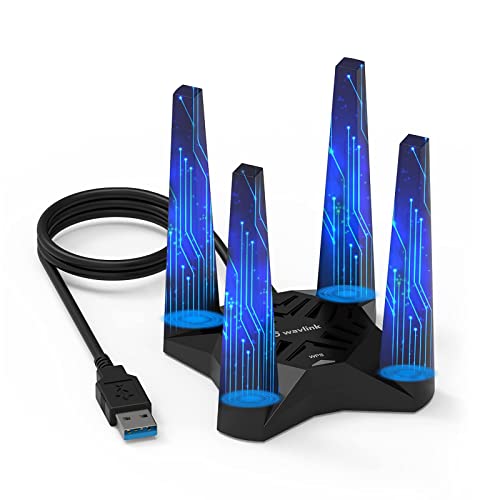
Designed specifically for gamers and streamers, the USB WiFi Adapter AX1800 for Desktop PC delivers ultra-low latency and exceptional speed, making it an ideal choice for those who demand seamless connectivity during intense gaming sessions. With dual-band capabilities, it provides up to 600Mbps on 2.4GHz and 1200Mbps on 5.8GHz, ensuring a stable connection. The four high-gain antennas enhance coverage, while WPA3 encryption secures your network. Easy installation via built-in drivers lets you set it up in no time. Plus, its magnetic base and 3.28ft cable allow optimal positioning, giving you the performance edge you need.
Best For: Gamers and streamers seeking ultra-low latency and high-speed connectivity for seamless online experiences.
Pros:
- Dual-band capabilities providing up to 600Mbps on 2.4GHz and 1200Mbps on 5.8GHz for stable connections.
- Equipped with 4 high-gain antennas for enhanced coverage and signal strength.
- Easy installation with built-in drivers and a magnetic base for optimal positioning.
Cons:
- Some users report connection drops and hardware issues after several months of use.
- Concerns about the durability of the wire housing and the magnetic base affecting computer components.
- Limited compatibility as it only supports Windows 10/11.
TP-Link WiFi 6 USB Adapter (Archer TX20U Plus) AX1800

If you’re looking to elevate your gaming experience, the TP-Link WiFi 6 USB Adapter (Archer TX20U Plus) AX1800 is a standout choice. This dual-band adapter offers impressive speeds of up to 1.8 Gbps, perfect for gaming, downloading, and streaming. With access to 802.11ax technology, you’ll enjoy reduced congestion and faster performance. The dual high-gain antennas enhance your range and signal quality, while WPA3 encryption guarantees your connection remains secure. Setup is a breeze with plug-and-play functionality, and TP-Link provides 24/7 technical support. Upgrade to the Archer TX20U Plus for a seamless gaming experience that rivals wired connections.
Best For: Gamers and heavy internet users seeking high-speed, reliable wireless connectivity for gaming, streaming, and downloading.
Pros:
- High-speed performance with dual-band capabilities offering up to 1.8 Gbps for seamless gaming and streaming.
- Easy plug-and-play installation with preloaded drivers, making setup straightforward for users.
- Enhanced security with WPA3 encryption ensuring a secure connection.
Cons:
- Some users report intermittent disconnections, which may require driver reinstalls.
- Performance may be optimal only with USB 3.0 ports, limiting compatibility with older USB versions.
- Physical size may be a consideration for those with limited space around their USB ports.
2025 WiFi Extender Signal Booster (Dual Band)
For gamers seeking seamless online experiences, the 2025 WiFi Extender Signal Booster (Dual Band) stands out with its impressive performance and speed. It offers a high-speed channel of 1.2Gbps on 5GHz and 300Mbps stability on 2.4GHz, slashing latency by 82%. With four adjustable antennas, you’ll enjoy 360-degree coverage throughout larger areas. Security is exceptional, featuring triple-layer encryption and real-time intrusion detection. Compact in design and low on electricity, it’s eco-friendly too. Plus, setup is a breeze, and tech support is ready to help. With an Ethernet port, you have versatile connectivity options for your gaming setup.
Best For: Gamers and users looking for high-speed, stable Wi-Fi coverage across larger areas with robust security features.
Pros:
- High-speed performance with 1.2Gbps on 5GHz and 300Mbps on 2.4GHz, ideal for online gaming and streaming.
- 360-degree coverage provided by four adjustable antennas, ensuring reliable connections throughout larger spaces.
- Advanced security features including triple-layer encryption and real-time intrusion detection for enhanced safety.
Cons:
- May require technical knowledge for optimal placement and setup, despite simple instructions.
- Performance may vary in extremely large or complex layouts with multiple thick walls.
- Limited features compared to higher-end models, which may include additional functionalities.
Eightwood WiFi 6E Tri-Band Antenna for PC and Router

The Eightwood WiFi 6E Tri-Band Antenna is a game changer for serious gamers and streaming enthusiasts. With support for 2.4GHz, 5GHz, and 6GHz bands, it enhances bandwidth while reducing latency. You’ll experience smoother gameplay and seamless 4K/8K streaming, thanks to improved signal reception and stability. The 6.5ft extension cable lets you position the antenna efficiently, while the magnetic base guarantees secure attachment. Compatible with various devices like routers and PCIe network cards, this antenna boasts a 4.4-star rating from users who’ve seen significant speed improvements. Upgrade your setup and release your PC’s full potential with this powerful antenna.
Best For: Serious gamers and streaming enthusiasts looking to enhance their wireless network performance.
Pros:
- Tri-band support improves bandwidth and reduces latency for smoother gameplay and streaming.
- Long 6.5ft extension cable allows optimal positioning for better signal reception.
- Magnetic base ensures secure attachment to metal surfaces.
Cons:
- Some users report reduced performance compared to original equipment manufacturer (OEM) antennas.
- May require specific connector types (RP-SMA Male) for compatibility.
- Installation may be challenging for users unfamiliar with network equipment.
TP-Link AC1900 WiFi Range Extender RE550

Gaming enthusiasts will appreciate the TP-Link AC1900 WiFi Range Extender RE550 for its impressive dual-band performance, delivering speeds of up to 1300 Mbps on the 5 GHz band. With a total bandwidth of 1.9 Gbps and coverage of up to 2100 sq. ft., this extender eliminates dead zones, supporting up to 32 devices. The gigabit Ethernet port guarantees reliable wired connections, while EasyMesh compatibility allows for seamless integration with compatible routers. Smart Adaptive Roaming assures uninterrupted coverage by connecting you to the strongest signal. Plus, its user-friendly app makes setup a breeze, enhancing your gaming experience effortlessly.
Best For: Gaming enthusiasts and households needing extended WiFi coverage without dead zones.
Pros:
- Dual-band performance with speeds up to 1300 Mbps on the 5 GHz band for gaming and streaming.
- Maximized coverage of up to 2100 sq. ft. with three adjustable external antennas, supporting up to 32 devices.
- Easy setup and management via a user-friendly app, plus seamless integration with compatible routers through EasyMesh.
Cons:
- Does not directly increase internet speed, only improves coverage reliability.
- Potentially limited performance in environments with heavy interference or obstacles.
- May require periodic reconfiguration for optimal performance based on changes in network conditions.
BrosTrend USB WiFi 6 Adapter AX1800 for PC and Laptop

If you’re looking to upgrade your PC’s connectivity, the BrosTrend USB WiFi 6 Adapter AX1800 stands out with its impressive speeds of up to 1201Mbps on 5GHz and 574Mbps on 2.4GHz. This adapter supports Windows 11/10 and features 2x 5dBi antennas for enhanced signal reception. You’ll enjoy ultra-smooth streaming and gaming thanks to its advanced technologies like OFDMA and MU-MIMO. Setup is a breeze with a pre-loaded driver and an included USB 3.0 extension cable. While most users praise its performance, some have reported connectivity issues after initial use. Overall, it’s a strong choice for gamers seeking reliable WiFi.
Best For: Gamers and users seeking high-speed wireless connectivity for streaming and online gaming on Windows 11/10 devices.
Pros:
- Delivers wireless speeds 38% faster than AC1300 USB WiFi adapters.
- Features 2x 5dBi high gain antennas for improved signal reception through walls and floors.
- Easy setup with a pre-loaded driver and a USB 3.0 extension cable for optimal placement.
Cons:
- Some users have reported connectivity issues and frequent disconnections after initial use.
- Hardware issues have been noted, with reports of the adapter failing after a few months.
- Driver installation can be problematic on Linux systems, requiring manual compilation.
9dBi Tri-Band WiFi 6 6E Magnetic Base Gaming Antenna

For gamers seeking to elevate their online experience, the 9dBi Tri-Band WiFi 6 6E Magnetic Base Gaming Antenna is a game-changer. Operating across 2.4GHz, 5GHz, and 6GHz bands, it greatly enhances WiFi speed and stability, eliminating dead zones. With a robust gain of 9dBi, you’ll enjoy seamless 4K/8K streaming and gaming sessions. Installation is a breeze—just swap your old antennas, and adjust the position for ideal performance. This antenna’s strong magnetic base allows you to place it securely on various surfaces. With positive feedback on reliability and range, it’s a must-have for any serious gamer.
Best For: Gamers and streaming enthusiasts looking to enhance WiFi speed, stability, and connectivity in their homes.
Pros:
- Improves WiFi signal strength and eliminates dead zones for a more reliable connection.
- Easy installation and adjustable positioning for optimal performance.
- Strong magnetic base allows for secure placement on various surfaces.
Cons:
- Some users may experience only slight improvements in internet speeds.
- Performance may vary based on individual setups and environmental factors.
- Limited compatibility with devices not supporting Wi-Fi 6/6E technology.
Factors to Consider When Choosing Wifi Extenders for Gaming PC
When choosing a WiFi extender for your gaming PC, you’ll want to take into account several key factors. Speed and bandwidth can make a big difference in your gaming experience, while the coverage area guarantees you get a strong signal wherever you play. Don’t forget to weigh the benefits of dual-band versus tri-band options, along with antenna design and security features to keep your connection safe.
Speed and Bandwidth
Choosing the right WiFi extender for your gaming PC hinges on speed and bandwidth, as these factors directly impact your gaming experience. Look for extenders that offer high bandwidth, ideally up to 1.9 Gbps or higher, to guarantee smooth gameplay without lag. Dual-band extenders greatly enhance performance by allowing simultaneous connections on the 2.4 GHz (up to 600 Mbps) and 5 GHz (up to 1300 Mbps) frequencies. This flexibility caters to various gaming needs. To reduce latency, opt for extenders that maintain high-speed connections, minimizing delays during intense gaming sessions. Additionally, consider models supporting advanced technologies like MU-MIMO and OFDMA to optimize bandwidth distribution, assuring consistent speeds even with multiple devices connected.
Coverage Area
Optimizing your gaming experience goes beyond just speed and bandwidth; coverage area plays a considerable role as well. When choosing a WiFi extender, consider models that enhance connectivity in spaces up to 2100 sq. ft. or more. Look for extenders with adjustable antennas for 360-degree coverage, which helps eliminate dead zones and guarantees stable connections throughout your gaming environment. A dual-band extender can further optimize coverage by using both 2.4GHz for longer range and 5GHz for higher speeds, making it effective across varying distances. Additionally, some extenders support EasyMesh technology for seamless integration with compatible routers, enhancing coverage. Finally, place your extender in a central location to notably improve signal strength and reduce latency during gaming sessions.
Dual-Band vs. Tri-Band
Selecting the right WiFi extender can make a world of difference for your gaming PC, especially when weighing dual-band versus tri-band options. Dual-band extenders operate on 2.4GHz and 5GHz frequencies, offering speeds up to 1.2 Gbps. They’re great for general gaming and streaming but can struggle in crowded environments. On the other hand, tri-band extenders feature an additional 5GHz band, providing dedicated bandwidth for gaming. This helps reduce latency and interruptions, especially when multiple devices are connected. If you’re in a household with heavy internet usage, a tri-band extender can greatly enhance your gaming experience by ensuring consistent, high-speed connections and minimizing lag. Choose wisely to boost your gaming performance.
Antenna Design
When it comes to enhancing your gaming experience, the antenna design of your WiFi extender is a key factor. High-gain antennas, like those with 5dBi or more, boost connectivity over longer distances and through obstacles, which is essential for uninterrupted gaming. Tri-band antennas can enhance bandwidth and reduce latency, making them perfect for online gaming and streaming 4K/8K content. If you want to optimize performance, consider adjustable antennas that let you direct the signal toward your router. For broader coverage, omni-directional designs guarantee 360-degree connectivity, eliminating dead zones. Finally, pay attention to the length of the antenna cable; longer cables offer better positioning flexibility to maximize signal strength and quality.
Security Features
While gaming is all about speed and performance, you can’t overlook the importance of security features when choosing a WiFi extender. Look for extenders that support WPA3 encryption, which offers superior protection against unauthorized access. Advanced features like AI intrusion detection and automatic device isolation are essential for safeguarding your network from potential threats. Models with triple-layer encryption or similar robust measures help prevent data breaches and enhance overall safety. Verify the extender complies with recognized cybersecurity standards, such as the U.S. CISA Secure-by-Design pledge, to confirm its commitment to security. Finally, choose extenders with user-friendly security management options, making it easy for you to adjust settings and monitor connected devices for vulnerabilities.
Ease of Installation
Security features are important, but ease of installation can make or break your experience with a WiFi extender for gaming PCs. Look for extenders with plug-and-play functionality, allowing you to set them up in under 10 minutes. Devices with user-friendly mobile apps for installation guidance simplify the process even more. Make sure the extender is compatible with your existing router and devices to avoid installation headaches and driver issues. Opt for models that support automatic firmware updates, enhancing security and performance without manual intervention. Finally, consider extenders with preloaded drivers for immediate use, minimizing delays and complications from driver downloads. A smooth installation means more time for gaming and less time troubleshooting.
Compatibility With Devices
Compatibility is vital for ideal gaming performance with a WiFi extender. Verify the extender matches your gaming PC’s network adapter type, especially if it supports dual-band or WiFi 6 technology. You’ll want to check if it works with your router’s frequency bands, like 2.4GHz and 5GHz, guaranteeing stable connections during intense gaming sessions. It’s also important that the extender supports the latest wireless standards, such as 802.11ax, to benefit from faster speeds and lower latency. Additionally, confirm that it can efficiently handle multiple devices, allowing your gaming PC to perform flawlessly alongside others without lag. Finally, review the extender’s setup requirements to make sure it installs seamlessly with your operating system and gaming configuration.