A USB-C port makes connecting an external Blu-ray drive convenient, but the connector alone does not tell you which discs it can read or burn—or whether playback will work on your computer.
These nine options include straightforward drives and models with built-in hubs or card readers. Use the guide below to narrow your choice by disc support, software needs, and the ports on your laptop or desktop.
Best 9 External Blu Ray Drive with USB C Picks for 2026
Best Travel Bundle
8-in-1 Blu-ray Burner with Carrying Case

- Burns Blu-ray discs up to 50GB
- USB-C hub plus SD/TF readers
- Pouch and four disc sleeves included
Best For: Portable disc burning and peripheral connections
Best for 100GB Burning
USB-C Blu-ray Burner with Expansion Hub

- Advertised 100GB Blu-ray read/write
- USB and Type-C hub ports
- Includes 0.8m extension cable
Best For: High-capacity disc backups on a desktop or laptop
Best Blu-ray Reader
5-in-1 USB-C Drive for DVD and CD Burning

- Reads Blu-ray, including BD-XL
- Burns DVDs and CDs, not Blu-rays
- Dual USB-A/USB-C connection
Best For: Blu-ray access without Blu-ray recording
Simple Portable Pick

- USB-C and USB-A integrated cable
- 6X Blu-ray reading and writing
- Slim design with cable storage
Best For: Portable disc playback and backups
High-Capacity Hub Pick

- Specified 100GB disc read/write support
- USB-C, USB-A, and card connections
- No 4K UHD Blu-ray playback
Best For: 100GB disc backups with extra ports
Best for Everyday Use

- Blu-ray burning up to 50GB
- Four USB ports plus SD/TF access
- Includes case and four disc sleeves
Best For: Travel setups needing disc access and extra ports
Best for Blu-ray Archiving
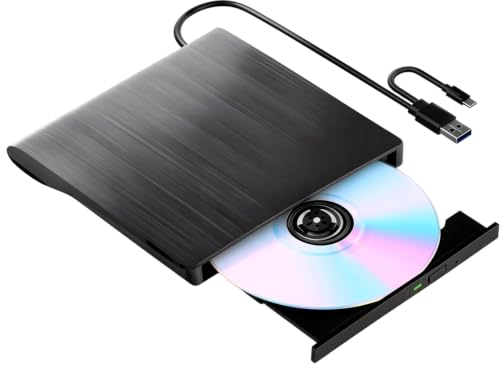
- Up to 6X Blu-ray burning
- Integrated USB-C and USB 3.0 cable
- Windows and Linux support
Best For: Portable Blu-ray writing and backups
Best for Extra USB Power
Dainty Dual-Cable Blu-ray Drive

- Additional USB power cable
- Type-C and USB 3.0 connections
- Windows, macOS, and Linux support
Best For: Laptops that benefit from supplemental USB power
Best for Blu-ray Reading
Alphami USB-A and Type-C Drive

- Up to 6X Blu-ray reading
- USB-A and Type-C connections
- DVD and CD writing; no listed BD writing
Best For: Reading Blu-rays on Mac, Windows, or Linux
Best Travel Bundle – 8-in-1 Blu-ray Burner with Carrying Case
If you need an external blu ray drive with usb c that travels with your laptop, this 8-in-1 model combines disc burning, a USB hub, and card readers in a slim package. Its included pouch and four disc sleeves help keep the kit organized.
Best For: Travelers who want to read Blu-rays, burn discs up to 50GB BD-R DL, and connect peripherals through one portable device.
Pros:
- Reads BD-XL discs up to 100GB and burns supported Blu-ray discs up to 50GB.
- Provides two USB-C ports, USB 3.0 and USB 2.0 ports, and SD/TF card slots.
- Includes a carrying pouch, four disc sleeves, and an auxiliary power cable.
Cons:
- Cannot burn 100GB BD-XL discs or play 4K Blu-rays.
- Blu-ray playback requires third-party software; SD and TF cards cannot be read simultaneously.
This is a practical all-in-one choice if the hub and travel accessories matter as much as the burner. Check the 50GB recording limit before buying it for large archival projects.
Best for 100GB Burning – USB-C Blu-ray Burner with Expansion Hub
For buyers prioritizing disc capacity, this external blu ray drive with usb c is advertised to read and write Blu-ray discs up to 100GB. It also adds USB ports and card readers, so it can serve as a small expansion hub beside your computer.
Best For: Windows, Mac, or Linux users who want high-capacity Blu-ray backups and extra connections at their desk.
Pros:
- Supports up to 100GB Blu-ray read/write capacity, with stated BD write speeds up to 6x.
- Includes USB 3.0, USB 2.0, two Type-C ports, and SD/TF card readers.
- Comes with a 0.8m extension cable and a separate power cord.
Cons:
- Does not support 4K Ultra HD Blu-ray discs.
- No Blu-ray playback software is included, and the SD and TF slots cannot be used together.
The stated 100GB writing support distinguishes this model from lower-capacity burners. Its extension cable is also useful if a built-in cable would leave the drive awkwardly positioned.
Best Blu-ray Reader – 5-in-1 USB-C Drive for DVD and CD Burning
If you mainly watch or access Blu-ray discs rather than record them, this external blu ray drive with usb c is a more focused option. It reads Blu-rays, burns DVDs and CDs, and connects through a dual USB-A/USB-C cable.
Best For: Laptop users who need Blu-ray reading, DVD/CD burning, and a few extra peripheral ports—not Blu-ray recording.
Pros:
- Reads BD-XL discs and supports DVD and CD burning.
- Offers USB 3.0 and USB 2.0 ports plus an SD/TF card slot.
- Stores its data cable in the base and includes an auxiliary power cable.
Cons:
- Cannot burn Blu-ray discs or play 4K Blu-rays.
- Blu-ray playback needs third-party software; SD and TF cards cannot be used simultaneously.
The key buying distinction is simple: choose this drive to read Blu-rays, not to archive files onto them. Its dual-interface cable and compact design suit a laptop setup with limited ports.
Simple Portable Pick – GOOBOX 6X Blu-ray Burner
If you want an external blu ray drive with usb c without extra hub features, this GOOBOX model keeps the focus on discs. Its integrated cable offers USB-C and USB-A connections, and the drive reads and writes Blu-ray, DVD, and CD media.
Best For: Laptop users who want a slim drive for disc playback and backups.
Pros:
- Rated for up to 6X Blu-ray, 8X DVD, and 24X CD reading and writing.
- Integrated dual-connector cable stores beneath the drive.
- Supports Windows, macOS, and Linux.
Cons:
- Blu-ray playback requires separate software.
- Low-power devices may need the included external power cable.
Choose it for straightforward disc handling and easy cable storage. For 3D playback, you will also need compatible software and a 3D-capable display.
High-Capacity Hub Pick – Wbacon 7-in-1 Blu-ray Drive
This external blu ray drive with usb c is a useful option if you need more than an optical burner. Wbacon specifies read/write support for 100GB discs and adds USB, USB-C, SD, and TF connections for moving files through your computer.
Best For: Buyers who want 100GB disc burning and extra peripheral connections in one device.
Pros:
- Specified to read and write 100GB Blu-ray discs.
- Includes two USB-C ports, USB-A ports, and SD/TF card slots.
- Connects with the included USB-A/USB-C cable.
Cons:
- Does not support 4K UHD Blu-ray playback.
- SD and TF cards cannot be used simultaneously.
- Blu-ray playback and writing require suitable software.
Its distinguishing feature is the combination of high-capacity disc support and a built-in hub. Check your planned software and disc format before buying, particularly if you intend to work with 100GB media.
Best for Everyday Use – 8-in-1 Blu-ray Drive and Hub
For an external blu ray drive with usb c that also helps organize a travel setup, this 8-in-1 model combines a dual-connector cable, a four-port USB hub, and SD/TF card access. It comes with a carrying case and four disc sleeves.
Best For: Travelers who want a compact disc drive, extra ports, and a protective storage bundle.
Pros:
- Reads and writes Blu-ray, DVD, and CD discs, with Blu-ray recording up to 50GB.
- Includes two USB-C ports, USB 3.0 and USB 2.0 ports, and SD/TF slots.
- Stowable dual-interface cable, carrying case, and disc sleeves aid packing.
Cons:
- 100GB BD-XL discs are read-only; 4K Blu-ray playback is unsupported.
- SD and TF cards cannot be read at the same time.
- Blu-ray playback requires third-party software.
Pick this one for its port selection and included travel accessories, not for 100GB burning. An included power cable can help if your computer cannot supply sufficient power through the data connection.
Best for Blu-ray Archiving – IVNDUY 6X BD-RE USB-C Drive
If you need an external blu ray drive with usb c for disc backups, this IVNDUY model offers up to 6X Blu-ray burning alongside DVD and CD writing. Its integrated cable provides USB-C and USB 3.0 connections without a separate adapter.
Best For: Windows or Linux users who want a portable drive for Blu-ray writing and media archiving.
Pros:
- Writes Blu-ray discs at up to 6X, DVDs at up to 8X, and CDs at up to 24X.
- Integrated USB-C/USB 3.0 cable stores in the drive for travel.
- Supports BD-R/RE and common DVD and CD formats.
Cons:
- Listed operating-system support covers Windows and Linux, not macOS.
- 3D Blu-ray playback requires compatible third-party software and a 3D-capable display.
Choose this one when writing Blu-ray discs is the priority; its dual-connector cable also makes switching between newer laptops and older USB-A ports simpler.
Best for Extra USB Power – Dainty Dual-Cable Blu-ray Drive
This Dainty external blu ray drive with usb c pairs Type-C and USB 3.0 connectivity with an additional USB power cable. That extra power connection is a useful consideration if your laptop struggles to supply enough power during disc reading or writing.
Best For: Windows, macOS, or Linux laptop users who want dual-connector access and an additional USB power connection.
Pros:
- Includes an additional USB power cable for more stable operation.
- Supports Type-C and USB 3.0 computer connections.
- Listed maximum speeds include 6X Blu-ray reading and BD-R writing, 8X DVD, and 24X CD.
Cons:
- Blu-ray playback and writing require separate software, which is not included.
- Not compatible with TVs, tablets, Chromebooks, game consoles, projectors, or vehicles.
The added power cable sets this model apart, but check your software setup before buying, particularly if Blu-ray playback is your main goal.
Best for Blu-ray Reading – Alphami USB-A and Type-C Drive
If you want an external blu ray drive with usb c mainly to access Blu-ray discs, this Alphami model lists up to 6X Blu-ray reading and USB-A/Type-C connectivity. It also reads and writes DVDs and CDs, making it useful for mixed disc collections.
Best For: Mac, Windows, or Linux users who need Blu-ray reading plus DVD and CD burning.
Pros:
- Reads Blu-ray discs at up to 6X.
- Provides USB-A and Type-C connections without a driver installation.
- Reads and writes DVDs at up to 8X and CDs at up to 24X.
Cons:
- Blu-ray writing is not specified; the listing identifies DVD and CD burning.
- Does not play 4K Ultra HD discs, and Blu-ray playback software is not included.
This is the clearest fit of the three for reading Blu-rays across multiple operating systems. For Blu-ray disc burning, choose a model that explicitly lists BD writing support instead.
How We Picked the Best External Blu Ray Drive with USB C
We focused on the nine selected drives’ advertised connections and functions: USB-C or Type-C support, Blu-ray reading or writing, stated high-capacity disc support, and extras such as USB hubs and card readers. Listings can use terms such as “Blu-ray player,” “burner,” and “100GB support” differently, so treat those claims as a starting point. Confirm the exact disc formats and operating-system support on the current product page before buying.
Quick Comparison: Which Drive Type Fits?
Start by deciding what you need the drive to do, then compare the relevant models above:
- Read-only use: If you mainly want to access discs, prioritize confirmed Blu-ray reading and compatible playback software rather than paying for features you will not use.
- Disc burning: Look for explicit BD-R and BD-RE write support. If you plan to archive to 100GB discs, verify support for the specific high-capacity format you intend to use.
- One-port laptop setup: An 5-in-1, 7-in-1, or 8-in-1 design may add useful ports or a card reader. Check the port list and power requirements instead of assuming every hub offers the same connections.
- Mixed USB ports: A drive supplied with both USB-A and USB-C connections can be easier to move between older desktops and newer laptops.
Key Buying Factors for an External Blu-Ray Drive with USB-C
Disc Compatibility
“Blu-ray compatible” does not automatically mean the drive writes Blu-ray discs. Check whether it reads BD-ROM, writes BD-R, rewrites BD-RE, or supports 100GB BDXL media as needed. If you also use DVDs or CDs, verify those read and write formats separately.
Playback Software and Copy Protection
A drive provides the hardware; commercial Blu-ray movie playback generally requires suitable third-party software and a compatible system. Check software and disc-region requirements before purchasing, particularly if movie playback is your main reason for buying.
Ports, Power, and Practical Setup
Check whether the included cable has a USB-C plug, a USB-A plug, or both. A USB-C connector does not by itself guarantee faster disc operation. Portable optical drives can also be sensitive to limited USB power, so follow the maker’s connection guidance and check whether a second power connection is required or recommended. For hub-style models, confirm that the extra ports remain usable during disc operation.
Who Should Buy Which External Blu Ray Drive with USB C?
For movie collections: Choose a drive with confirmed Blu-ray reading, then budget for compatible playback software. For backups: Choose a clearly specified Blu-ray burner and match its supported formats to your blank discs. For a compact laptop workstation: Consider a hub-and-drive combination if its exact ports meet your needs. For several computers: Favor a model with documented USB-A and USB-C connectivity and support for each operating system you use. When two listings look alike, the clearer format specifications, included cables, and support information are better tie-breakers than the advertised feature count.