A good powered USB-C hub for external drives should do more than add ports. It needs stable power, fast data lanes, and enough headroom to keep SSDs, HDDs, and accessories running reliably.
In this roundup, we focused on hubs that make external storage easier to connect, transfer, and manage without random disconnects or bandwidth bottlenecks.
Best 10 Powered USB C Hub for External Drives Picks for 2026
Best for High-Device USB Expansion
intpw YH9AC 12-Port Powered USB Hub

- Two 10Gbps ports for faster external drive transfers
- 12 ports total for storage and accessory-heavy setups
- 65W adapter helps keep connected devices stable
Best For: People who need a powered hub for external drives and lots of USB peripherals on a desktop or laptop.
Best 2-in-1 Docking Pick
ORICO USB-C Hub with SSD Enclosure
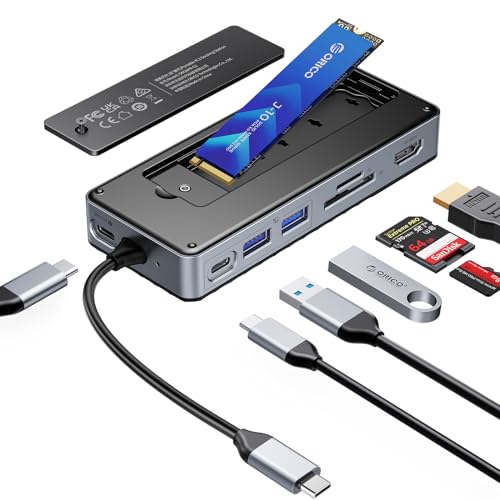
- 2-in-1 hub plus M.2 NVMe/SATA SSD enclosure
- 10Gbps ports for fast external drive transfers
- 4K@60Hz HDMI with 100W pass-through charging
Best For: Laptop users who want one compact hub for an external SSD, display output, and everyday connectivity.
Best for Multi-Device Expansion
LEINSIS 10-Port Powered USB 3.2 Hub

- 10 ports with USB-C and USB-A for mixed setups
- 12V adapter helps support multiple connected devices
- Individual switches make drive and accessory control easy
Best For: People who want one powered hub for external drives, peripherals, and broader desktop expansion.
Best for Fast External Storage

- 10Gbps USB-C data ports for fast drive transfers
- 100W pass-through charging for busy work setups
- Compact aluminum design with braided cable
Best For: Users who want a compact hub for external drives and pass-through charging.
Best for Multi-Device Power
Plugable 7-in-1 Powered USB Hub

- 7 ports with steady 5Gbps data transfers
- Included 60W adapter for powered operation
- USB-C and USB-A cable for wide compatibility
Best For: People who need a dependable powered hub for drives, peripherals, and shared workstations.
Best All-in-One Dock
Sabrent 6-Port Hub with M.2 SSD Slot

- Built-in M.2 slot for portable external storage
- 90W pass-through charging keeps your device powered
- Adds HDMI, Ethernet, and USB-A ports in one compact dock
Best For: Travelers and laptop users who want one compact hub with extra storage and docking ports.
Best for High-Port Expansions
RSHTECH 10-Port Powered USB-C Hub

- 10 ports with both USB-C and USB-A connections
- 3 USB 3.2 ports up to 10Gbps for faster transfers
- 60W external power and individual touch switches
Best For: People who want a desktop hub for external drives and lots of always-connected peripherals.
Best for Heavy-Duty Setups
Powered USB C Hub 3.2 11-Port 48W

- 7 high-speed data ports for SSDs, HDDs, and flash drives
- 48W powered adapter helps keep multi-device use stable
- Individual switches and LED indicators improve control
Best For: People building a high-capacity desktop hub for external drives and accessories.
Best for Fast Multi-Drive Transfers
Minisopuru 9-in-1 Powered USB-C Hub

- 10Gbps USB-C ports speed up SSD and drive transfers
- 72W adapter included for powered operation
- Adds four USB-A ports plus plug-and-play setup
Best For: People who want a powered hub for external drives, SSDs, and mixed USB accessories.
Best for Multi-Device Storage
Rosonway 7-Port 10Gbps Powered USB Hub

- 10Gbps speeds on all seven data ports
- 36W adapter for steadier multi-device power
- 4 USB-C + 3 USB-A with individual switches
Best For: People who need a fast, powered hub for multiple external drives and mixed peripherals.
Best for High-Device USB Expansion – intpw YH9AC 12-Port Powered USB Hub
If you need a powered usb c hub for external drives and a lot of other peripherals, the intpw YH9AC is built for high-capacity desktop setups. It combines 10Gbps USB-C and USB-A data ports with plenty of 5Gbps connections, plus a 65W adapter to help keep multiple devices stable.
Best For: Users who want one powered hub for external SSDs, flash drives, keyboards, and everyday USB expansion on a laptop or PC.
Pros:
- Two 10Gbps USB 3.2 ports help move large files quickly from fast drives.
- 12 total ports make it easy to connect multiple accessories at once.
- Included 65W power adapter supports more stable performance than bus-powered hubs.
- Aluminum build and angled design make desk use more practical and organized.
Cons:
- Not intended for video output, so it won’t replace a display dock.
- Not ideal for running multiple SSDs simultaneously.
- PD ports charge devices only and do not transfer data.
For buyers comparing a powered usb c hub for external drives, this model stands out more for port count and stable multi-device expansion than for portability. It’s a better fit for a fixed workstation than a travel hub, especially if you regularly plug in storage, accessories, and charging cables together.
Best 2-in-1 Docking Pick – ORICO USB-C Hub with SSD Enclosure
If you want a powered usb c hub for external drives that also replaces a basic docking station, this ORICO model is a smart all-in-one choice. It combines an M.2 NVMe/SATA enclosure with extra USB ports, SD/TF card reading, 4K HDMI output, and 100W pass-through charging, so it works well for fast file transfers and desk setups alike.
Best For: Laptop users who want one compact hub for an external SSD, display output, and everyday connectivity.
Pros:
- Built-in M.2 SSD enclosure supports NVMe and SATA drives up to 8TB
- 10Gbps USB-C/USB-A ports handle fast backups and large file transfers
- 4K@60Hz HDMI adds a clean single-cable workstation or travel setup
- 100W PD passthrough keeps a connected laptop charged while in use
Cons:
- Charging adapter and cable are not included for PD passthrough
- SD and TF cards cannot be used at the same time
- HDMI requires a host device with video output support
This is a versatile powered usb c hub for external drives if you want more than just storage expansion. It is especially appealing for users who need both an SSD enclosure and a practical docking station in one compact accessory.
Best for Multi-Device Expansion – LEINSIS 10-Port Powered USB 3.2 Hub
If you need a powered usb c hub for external drives and other high-bandwidth accessories, this LEINSIS model stands out for sheer port count and a mix of USB-A and USB-C connections. The 10Gbps USB 3.2 ports are useful for fast file transfers, while the included 12V adapter helps keep multiple devices running more reliably than bus-powered hubs.
Best For: Laptops, desktops, and mini PCs that need a powered hub with plenty of ports for external drives, flash drives, and everyday peripherals.
Pros:
- 10-port design with 10Gbps USB 3.2, USB-C, and USB 3.0 connections
- Included 12V power adapter supports more stable operation with multiple devices
- Individual on/off switches make it easy to control each connected device
- Aluminum housing and 2-in-1 USB-A/USB-C cable add flexibility and durability
Cons:
- Not the most compact option for travel or tight desks
- Only some ports are 10Gbps, so drive placement matters for top speed
For buyers comparing a powered usb c hub for external drives, this is a strong pick when port variety matters as much as power delivery. It is especially appealing if you want to connect several drives and peripherals at once without constantly swapping cables.
Best for Fast External Storage – Satechi 4-in-1 USB-C Hub
If you need a powered usb c hub for external drives, the Satechi 4-in-1 is built around speed and convenience. Its USB-C 3.2 Gen 2 ports deliver up to 10Gbps, making it a strong fit for quick file transfers, drive backups, and everyday multi-device setups.
Best For: Creators, students, and professionals who want a compact USB-C hub for fast external storage and pass-through charging.
Pros:
- Up to 10Gbps transfer speeds for external SSDs and other USB-C peripherals
- 100W pass-through charging helps keep laptops and tablets powered
- Compact aluminum build with a braided cable for travel-friendly durability
- Wide compatibility with MacBook, iPad, Surface, Chromebook, and more
Cons:
- No HDMI or card reader, so it’s focused on data and charging only
- 4-in-1 layout may feel limiting if you need more expansion options
For buyers who prioritize speed over extra ports, this is a practical powered usb c hub for external drives. It keeps the design simple while still delivering the fast transfers and charging support most portable storage setups need.
Best for Multi-Device Power – Plugable 7-in-1 Powered USB Hub
If you need a powered usb c hub for external drives and other peripherals, this Plugable 7-in-1 model is a practical, plug-and-play option. Its included 60W adapter helps keep performance steady when you’re moving data, charging devices, or running a more permanent desktop setup.
Best For: Laptops, desktops, and shared workstations that need a dependable powered hub for multiple USB devices.
Pros:
- Seven USB ports with up to 5Gbps data transfer for drives, accessories, and syncing
- Included 60W power adapter supports stable operation for powered use
- Hybrid USB-C and USB-A cable works with newer and older computers
- Driverless setup on Windows, macOS, and Linux for easy deployment
Cons:
- USB 3.0 speeds are fine for most accessories, but not as fast as USB-C/Thunderbolt hubs
- Uses USB-A style ports rather than dedicated high-speed USB-C device ports
- Bulkier than a travel hub because of the external power adapter
For buyers who want a straightforward powered usb c hub for external drives, this is a solid pick when reliability and broad compatibility matter more than flashy extras. It’s especially useful for home offices, classrooms, and IT setups that need consistent power across several devices.
Best All-in-One Dock – Sabrent 6-Port Hub with M.2 SSD Slot
If you want a powered usb c hub for external drives that does more than add ports, the Sabrent HB-6PNV is a strong fit. It combines a USB-C hub, 90W pass-through charging, HDMI, Ethernet, and an internal M.2 SSD slot, making it a practical travel dock for laptops, tablets, and handhelds that need both expansion and storage.
Best For: Users who want a compact USB-C dock with built-in SSD expansion for portable storage workflows.
Pros:
- Built-in M.2 slot supports SATA or NVMe drives for on-the-go storage
- 90W USB-C power delivery helps charge a laptop while using the hub
- Includes HDMI 2.0 and gigabit Ethernet for a fuller dock setup
- Multiple USB-A ports cover faster peripherals plus basic accessories
Cons:
- SSD support tops out at 5Gbps, so it is not the fastest enclosure option
- Best results depend on a device with DisplayPort Alt Mode for video output
For buyers who want a powered usb c hub for external drives with docking features built in, this Sabrent model stands out for versatility rather than raw storage speed. It is especially appealing if you want to carry one compact hub instead of separate adapters and an enclosure.
Best for High-Port Expansions – RSHTECH 10-Port Powered USB-C Hub
If you need a powered usb c hub for external drives and a bunch of other peripherals, this RSHTECH model is built for busy desks. It combines a 60W power supply, 10 total ports, and a mix of USB-C and USB-A connections so you can keep SSDs, drives, and accessories plugged in without constantly swapping cables.
Best For: Users who want a high-port desktop hub for external drives, flash drives, keyboards, and other always-connected accessories.
Pros:
- 10 total ports with a mix of USB-C and USB-A for flexible device support
- 3 USB 3.2 ports up to 10Gbps for faster file transfers and drive access
- 60W external power helps keep multiple devices stable at once
- Individual touch switches make it easy to turn ports on or off separately
Cons:
- USB-C ports do not support video output
- More of a desktop expansion hub than a travel-friendly option
- May be overkill if you only need one or two extra ports
This is a strong pick if your setup needs lots of connectivity and dependable power delivery. For a powered usb c hub for external drives, the combination of 10Gbps ports, external power, and per-port switching makes it especially practical for multi-drive workflows.
Best for Heavy-Duty Setups – Powered USB C Hub 3.2 11-Port 48W
If you need a powered usb c hub for external drives and other high-demand peripherals, this 11-port model is built for multitasking. With 10Gbps USB-C and USB-A data ports plus four extra charging-only ports, it’s a practical way to expand a laptop or desktop without constantly swapping devices.
Best For: Users who want a high-capacity, powered hub for SSDs, HDDs, flash drives, and mixed accessories on one desk setup.
Pros:
- 7 data ports, including USB-C and USB-A 10Gbps connections for fast external drive transfers
- 48W powered design with a 12V/4A adapter for more stable multi-device performance
- Individual port switches and LED indicators make it easier to manage several devices
- Includes both USB-C and USB-A host cables for broader compatibility
Cons:
- Bulkier than a simple bus-powered hub
- More than many casual users need if they only connect one or two peripherals
- Charging ports are separate from the data ports, so they won’t help expand drive connections
This is a strong pick if you want a powered usb c hub for external drives and a desk full of accessories, especially when stability and port count matter more than portability.
Best for Fast Multi-Drive Transfers – Minisopuru 9-in-1 Powered USB-C Hub
If you need a powered usb c hub for external drives, this Minisopuru model stands out for its mix of high-speed USB-C data ports, USB-A expansion, and included power adapter. It’s a practical pick for laptops, MacBooks, and iPads when you want to connect SSDs, flash drives, and accessories without relying on bus power alone.
Best For: Users who want a powered hub for external drives and other USB-C accessories with strong data speeds.
Pros:
- Three USB-C 3.2 ports support up to 10Gbps for fast drive transfers.
- Included 72W power adapter helps keep connected devices properly powered.
- Four USB-A 3.0 ports add room for mice, keyboards, and older drives.
- Plug-and-play setup keeps it simple for everyday use.
Cons:
- No video output support, so it’s not for monitor connections.
- Power delivery is for hub-connected devices, not a full dock-style charging solution.
For buyers prioritizing storage performance, this powered usb c hub for external drives is a solid, straightforward option. It makes more sense than a basic passive hub when you want faster file handling and a more stable powered setup.
Best for Multi-Device Storage – Rosonway 7-Port 10Gbps Powered USB Hub
If you need a powered usb c hub for external drives, the Rosonway RSH-H7C4 stands out with 10Gbps data on every port, a 36W power adapter, and a mix of USB-C and USB-A connections. It’s a practical choice when you want faster transfers, stable power, and enough ports for a drive-heavy desktop or laptop setup.
Best For: Users connecting external SSDs, flash drives, and mixed USB-C/USB-A accessories that need stable powered expansion.
Pros:
- Seven 10Gbps data ports help keep external drive transfers fast and responsive.
- 36W external power supply supports more stable multi-device operation.
- Four USB-C and three USB-A ports make it easy to mix newer and older peripherals.
- Individual switches and LED indicators offer simple per-port control.
Cons:
- USB-C ports are data-only, so it does not support video output or PD charging.
- Not every external drive setup will need seven ports, so it may be more hub than some users require.
For buyers prioritizing a powered usb c hub for external drives, this model is a strong fit thanks to its 10Gbps speeds, external power, and flexible port layout. It’s especially useful if you routinely connect multiple storage devices and want a hub that feels more like a compact workstation than a simple splitter.
How We Picked the Best Powered USB C Hub for External Drives
We prioritized models that combine strong power delivery, modern USB 3.2 or 10Gbps support, and practical port layouts for storage-heavy setups. We also looked at whether a hub can support multiple external drives at once, maintain stable connections, and fit common laptop and desktop workflows.
Extra features such as SSD enclosures, HDMI, Ethernet, and card readers were considered, but only when they added real value without compromising core storage performance.
Quick Comparison
If your main goal is plugging in several drives, look first at port count, data speed, and included power adapter wattage. For portable use, a compact hub with pass-through charging may be enough. For a desk setup, a larger powered hub with more USB-A and USB-C ports usually offers better flexibility.
Key Buying Factors for a Powered USB-C Hub for External Drives
Power Delivery and Included Adapter
External drives can draw more power than a bus-powered hub can safely provide. A dedicated adapter helps prevent dropouts, failed mounts, and slow performance, especially with HDDs and multi-drive setups.
Data Speed and Lane Sharing
Look for 10Gbps USB 3.2 support if you transfer large files often. Be aware that some hubs share bandwidth across ports, so multiple fast drives may not all run at peak speed simultaneously.
Port Mix
A powered USB-C hub for external drives should include the right balance of USB-C and USB-A. If you still use older backup drives, dongles, card readers, or peripherals, a mixed-port hub is more versatile than an all-USB-C design.
Build and Layout
Aluminum cases, longer cables, and well-spaced ports can improve durability and reduce clutter. If you plan to leave drives connected all day, physical stability matters as much as raw specs.
Who Should Buy Which Powered USB C Hub for External Drives?
If you need maximum port count for a desktop storage setup, choose a larger powered hub with an external power adapter and several 10Gbps ports. If you want a travel-friendly option for one or two SSDs, a compact pass-through hub is usually the better fit.
Users who want a cleaner all-in-one setup may prefer a hub with an SSD enclosure or extra outputs like HDMI and Ethernet. If your main priority is reliable external drive performance, keep the focus on power, speed, and connection stability before bonus features.