Need to install software from a disc, play a DVD, or back up files to a CD? Most modern laptops lack an optical drive, but a portable external drive can fill the gap without taking up much desk space.
These 10 options span straightforward readers and writers, slim travel-friendly drives, and models with built-in hubs. The right choice depends on your ports, operating system, discs, and whether you need to burn as well as read.
Best 10 External Cd Dvd Drives with USB C Picks for 2026
Best All-in-One
ROOFULL CD/DVD Drive with Hub and Card Reader

- USB hub plus SD and microSD slots
- Reads and burns CDs and DVDs
- Case and supplemental power cord included
Best For: Disc access and extra laptop ports in one device
Best Straightforward Burner
ROOFULL USB-A/USB-C CD/DVD Drive

- Reads, burns and rips CDs and DVDs
- Supports DVD-RAM and dual-layer DVDs
- Built-in dual-connector cable
Best For: Simple disc access without extra hub ports
Best Lightweight Pick

- Stated weight of 0.55 pounds
- Built-in USB-A/USB-C cable
- Up to 8X DVD and 24X CD speeds
Best For: Carrying a basic burner between workspaces
Best Simple Mac-and-PC Option

- Compatible with Windows, macOS and Linux
- Built-in USB-A/USB-C cable
- Direct USB connection recommended
Best For: Occasional CD/DVD use on Mac or Windows laptops
Best for Cable Management

- Built-in 24 cm USB-C cable
- Supports M-DISC archival media
- Windows and macOS compatible
Best For: Laptop users who prefer an attached cable and M-DISC support
Slimmest Pick
ORIGBELIE 13mm USB-A/USB-C Drive

- 13 mm thick and about 0.2 kg
- Integrated USB-A and USB-C connectors
- Includes supplemental power cable
Best For: Travelers using compatible laptops or desktops
Best for Disc Security

- Type-C and USB 2.0 cables included
- M-DISC and DISC Encryption II support
- 13 mm slim design
Best For: Mac and PC users prioritizing disc-security features
Best for Travel
Amicool Ultra-Slim USB-C CD/DVD Drive
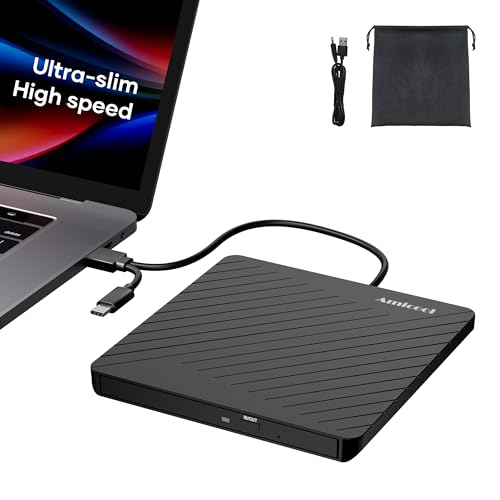
- 0.5-inch profile; 7.35 ounces
- Tuck-away USB-A/USB-C cable
- Separate power cord and storage pouch
Best For: Portable CD/DVD reading and burning
Best Compact Hub

- Two USB 2.0 ports plus SD/TF slots
- Integrated USB-A/USB-C cable
- Separate power cable; 24-month warranty
Best For: Disc access with basic hub and card-reader functions
Most Expansion Ports

- One USB 3.0 and three USB 2.0 hub ports
- USB-C port plus SD/TF card reader
- Extra cable helps with insufficient USB power
Best For: CD/DVD access with several peripheral connections
Best All-in-One – ROOFULL CD/DVD Drive with Hub and Card Reader
Among external cd dvd drives with usb c, this ROOFULL model is the practical pick if you also need extra ports. It combines a CD/DVD reader and burner with a USB hub, SD and microSD slots, and a protective carrying case.
Best For: Laptop users who want disc access and peripheral connections in one travel-friendly device.
Pros:
- Reads and writes common CDs and DVDs, including dual-layer DVD±R DL.
- Includes USB 3.0, USB 2.0 and USB-C ports plus SD and microSD slots.
- Built-in USB-A/USB-C connectors, supplemental power cord and carrying case.
Cons:
- Does not support Blu-ray or 4K discs.
- Not compatible with Chromebooks, tablets, phones or game consoles.
Choose this one when its expansion ports will earn their place on your desk; the extra power cord can help if your computer’s USB port supplies too little power.
Best Straightforward Burner – ROOFULL USB-A/USB-C CD/DVD Drive
If you want external cd dvd drives with usb c without an added hub, this slim ROOFULL drive keeps the focus on discs. Its built-in cable offers both USB-A and USB-C connectors for compatible computers, and it can read, burn and rip CDs and DVDs with appropriate software.
Best For: People who need a compact disc burner for a laptop, desktop or all-in-one computer.
Pros:
- Supports common CD/DVD formats, including DVD-RAM and dual-layer DVDs.
- Integrated USB-A/USB-C cable stores under the drive.
- Supports up to 8X DVD and 24X CD read/write speeds.
Cons:
- No Blu-ray or 4K disc support.
- Not designed for Chromebooks, phones, tablets or TVs.
This is a sensible choice if you value a simple, portable optical drive over extra connection ports. You’ll still need suitable playback or burning software for the task at hand.
Best Lightweight Pick – Portable USB-C CD/DVD Burner
For shoppers comparing external cd dvd drives with usb c for travel, this portable burner emphasizes low weight and easy setup. It weighs a stated 0.55 pounds, has a built-in cable with USB-A and USB-C connections, and supports CD/DVD reading and writing.
Best For: Laptop users who want a lightweight optical drive to carry between home and office.
Pros:
- Built-in USB-A/USB-C cable reduces loose accessories.
- Plug-and-play design requires no separate driver installation.
- Listed speeds reach up to 8X for DVDs and 24X for CDs.
Cons:
- Not intended for Chromebooks, car systems, tablets or TVs.
- Specific supported disc formats are not fully itemized in the supplied notes.
Its main appeal is portability rather than extra features. Check support for any less-common disc format you plan to use before buying.
Best Simple Mac-and-PC Option – Amicool USB-C CD/DVD Drive
Among external cd dvd drives with usb c, the Amicool is a straightforward option for Windows, Linux and macOS computers. Its integrated USB-A/USB-C cable, slim body and plug-and-play setup make it easy to pack alongside a laptop.
Best For: Mac or Windows laptop users who need occasional CD/DVD reading and burning.
Pros:
- Supports CD/DVD reading and writing with up to 8X DVD read and 24X CD read/write speeds.
- Built-in dual-connector cable suits USB-A and USB-C computer ports.
- Slim, portable design with no extra driver required for typical setup.
Cons:
- Does not support DVD-RAM or Blu-ray discs.
- May need a direct, adequately powered USB connection for reliable recognition.
Pick this drive for conventional CD/DVD tasks, but pay attention to power: the seller recommends a direct computer connection rather than an unpowered hub or extension cable.
Best for Cable Management – ASUS ZenDrive V1M
Among external cd dvd drives with usb c, the ASUS ZenDrive V1M is a practical pick if you want fewer loose accessories. Its built-in 24 cm cable tucks into the drive, and it supports reading and writing CDs and DVDs on compatible Windows and macOS laptops.
Best For: Laptop users who want a compact USB-C DVD writer with an attached cable and M-DISC support.
Pros:
- Built-in cable storage makes the connector harder to misplace.
- Supports M-DISC media for long-term archival.
- Works with Windows and macOS; reads DVDs at up to 8x and CDs at up to 24x.
Cons:
- The 24 cm cable may be short for some desk setups.
- ASUS’s drag-and-burn interface is Windows-only.
Choose this model for its tidy, travel-friendly design and archival-disc support; check that the short integrated cable suits your laptop layout.
Slimmest Pick – ORIGBELIE 13mm USB-A/USB-C Drive
If portability is your priority when comparing external cd dvd drives with usb c, this ORIGBELIE model measures just 13 mm thick and weighs about 0.2 kg. Its integrated cable offers both USB-A and USB-C connectors, and the drive is designed to run from a computer’s USB port.
Best For: Travelers who need a slim CD/DVD reader and writer for a compatible laptop or desktop.
Pros:
- Integrated USB-A and USB-C cable accommodates either port type.
- Supports up to 8x DVD and 24x CD read/write speeds.
- Includes a storage bag and a cable for supplemental 5V power when needed.
Cons:
- Some computers may require supplemental power to read discs reliably.
- Does not support Blu-ray discs or Chromebooks.
- The stated warranty is 90 days.
Its slim build and dual connectors make it convenient to carry, but check device compatibility and keep the included power cable handy.
Best for Disc Security – ASUS ZenDrive 13mm
For shoppers considering external cd dvd drives with usb c who also want disc-security features, this 13 mm ASUS ZenDrive includes a Type-C cable alongside a USB 2.0 cable. It reads and writes CDs and DVDs, supports M-DISC, and works with compatible Mac and Windows computers.
Best For: Mac and PC users who want a slim DVD burner with M-DISC and disc-encryption features.
Pros:
- Includes both Type-C and USB 2.0 cables.
- Supports M-DISC media and DISC Encryption II password controls and hidden files.
- Slim 13 mm design suits portable setups.
Cons:
- Its listed hardware interface is USB 2.0, even when using the included Type-C cable.
- The supplied operating-system list names older Windows versions rather than Windows 11.
This is the better fit when disc features matter more than a newer USB interface; confirm compatibility if you use a recent Windows version.
Best for Travel – Amicool Ultra-Slim USB-C CD/DVD Drive
Among external cd dvd drives with usb c, this Amicool model stands out for portability: it is 0.5 inches thick, weighs 7.35 ounces, and stores its dual-ended USB-A/USB-C cable underneath.
Best For: Travelers who need to read or burn CDs and DVDs without carrying a separate data cable.
Pros:
- Reads and writes supported CDs and DVDs at up to 24x CD and 8x DVD speeds.
- Includes a separate power cord and dedicated power port for computers with limited USB power.
- Comes with a soft storage pouch and manual emergency-eject hole.
Cons:
- Does not support Blu-ray discs.
- Not compatible with ChromeOS, phones, tablets, TVs, or cars.
Choose this one when bag space matters more than extra hub ports. Check your computer’s operating system and available USB power before buying.
Best Compact Hub – GODBPNYMU 5-in-1 CD/DVD Drive
If you’re comparing external cd dvd drives with usb c and also need peripheral connections, this GODBPNYMU drive combines CD/DVD reading and burning with two USB 2.0 ports and SD/TF card slots.
Best For: Laptop users who want an optical drive and basic card-reader and USB-hub functions in one device.
Pros:
- Integrated cable offers USB-A and USB-C connections and tucks under the drive.
- Includes a separate power cable for situations where USB power is insufficient.
- Supports Windows, macOS, and Linux computers and includes a 24-month warranty.
Cons:
- The extra USB ports are USB 2.0, not USB 3.0.
- The power cable cannot transfer data; the drive is not compatible with TVs, tablets, or in-car systems.
This is a practical way to add disc access and a few everyday connections without packing a separate hub. For desktop use, the seller recommends a rear-panel USB port for optimal reading performance.
Most Expansion Ports – BPAKDU 8-in-1 CD/DVD Drive
For shoppers considering external cd dvd drives with usb c who want more connections alongside disc access, the BPAKDU 8-in-1 adds USB hub ports and SD/TF card reading to its CD/DVD reader and burner.
Best For: Computer users who need multiple USB connections and a memory-card reader alongside a CD/DVD drive.
Pros:
- Offers one USB 3.0 hub port, three USB 2.0 ports, a USB-C port, and SD/TF card reading.
- Supports USB-A and USB-C computer connections and reads and writes supported CD/DVD formats.
- Includes an extra power cable for troubleshooting insufficient USB power.
Cons:
- SD and TF cards cannot be used at the same time.
- Does not support Blu-ray discs, phones, tablets, TVs, or car systems.
- Some Windows 10/11 recognition problems may require the extra power cable or troubleshooting.
Its main advantage is the range of connections, not just disc playback. Make sure the port layout fits your peripherals, and keep the extra power cable handy if the drive is not recognized.
How We Picked the Best External Cd Dvd Drives with USB C
We focused on External Cd Dvd Drives with USB C connectivity or a listed USB-C connection option, then compared the features that matter in everyday use: disc reading and writing, portability, cable design, extra ports, and stated operating-system compatibility. The lineup includes simple optical drives alongside hub-style models for laptops with limited ports. Product names and listings do not establish real-world speed or reliability, so check current specifications and buyer feedback before purchasing.
Quick Comparison: Which Type Fits?
For a basic disc drive, start with the standard ROOFULL USB 3.0/USB-C model or one of the slim Amicool options. If you want to connect accessories through the drive, consider the ROOFULL model with a hub and SD reader or the listed 5-in-1 and BPAKDU multiport designs. The ASUS ZenDrive V1M stands out for its built-in cable-storage design; the ASUS ZenDrive model with M-DISC support is worth considering if that format is part of your backup plan. Compare the actual port layouts and included cables before choosing a hub model.
Key Buying Factors for External Cd Dvd Drives with USB C
Connection and Power
Confirm whether the drive has a native USB-C plug, includes a USB-C adapter, or offers both USB-A and USB-C connectors. A USB-C connection does not automatically mean faster disc performance: optical media itself sets practical limits. These drives draw power from the computer, so a direct port may work better than an unpowered hub if the drive disconnects or struggles to spin up.
Disc Formats and Writing
Check the formats you need, especially if you plan to burn discs. A drive described as a DVD writer will typically handle common recordable CD and DVD formats, but support for dual-layer discs, rewritable media, and M-DISC varies. None of these CD/DVD drives should be assumed to play Blu-ray discs. For older or damaged media, no new drive can guarantee a successful read.
Software and Everyday Setup
Verify compatibility with your operating system and the task you have in mind. Playing a commercial DVD may require separate playback software, and burning options differ between Windows and macOS. If you rely on bundled software, check its current platform support. Also consider where the laptop’s USB port sits: short integrated cables are tidy for travel but can limit placement.
Who Should Buy Which External Cd Dvd Drives with USB C?
Choose a straightforward slim drive if you occasionally read discs or make backups and want a compact accessory. Pick a hub-equipped model if you need an SD reader or additional USB ports and are comfortable with a larger unit. Frequent travelers may prefer a protected cable or an included case. For long-term disc archiving, look closely at the ASUS model’s stated M-DISC support and confirm that your chosen blank discs are compatible. Whatever you buy, match the connector, disc formats, and software requirements to your own setup before ordering.