Need to open an old disc, install software, or burn a DVD on a Windows 11 laptop without a built-in drive? An external USB drive is a simple solution, but the right connection and disc support matter.
These 10 picks range from straightforward slim drives to models with USB-C connections and extra ports. Use the buying guide below to narrow down what fits your setup.
Best 10 External Dvd Drives for Windows 11 Picks for 2026
Broad Disc Support
KADLUN USB-A/USB-C CD/DVD Drive

- Built-in USB-A and USB-C cable
- Reads and writes CDs and DVDs
- Supports DVD-RAM, not Blu-ray
Best For: Windows 11 users with mixed ports and DVD-RAM discs
Travel-Friendly Pick
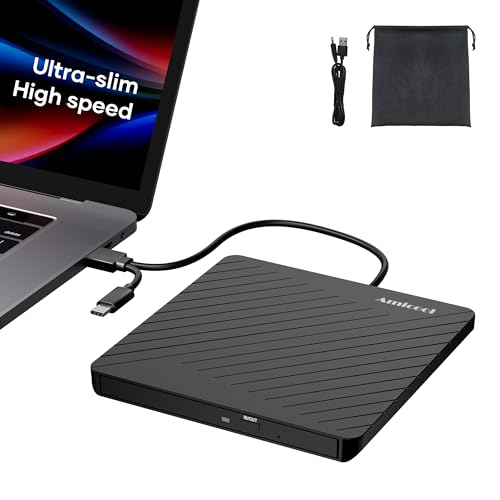
Amicool USB-A/USB-C DVD Burner

- Slim design with built-in cable
- Reads and burns common CDs and DVDs
- Needs adequate USB power; no DVD-RAM
Best For: Laptop users who travel with CD/DVD discs
HP-Branded Option

- Lists Windows 11 support
- 8x DVD read and write speed
- USB-C connector not specified
Best For: Buyers who prefer an HP-branded DVD-RW drive
Slim Notebook Companion

- 14 mm slim, 200 g design
- USB-powered CD/DVD playback and burning
- Windows 11 support not specified
Best For: Notebook owners prioritizing portability and included software
Simple USB-A Pick

- USB-powered, plug-and-play operation
- Up to 24x CD and 8x DVD speeds
- Integrated cable and physical eject button
Best For: Basic disc reading and burning on USB-A Windows 11 PCs
Slim Dual-Connector Pick
ORIGBELIE 13mm External DVD Drive

- Connects through USB-A or USB-C
- 13mm-thick design with storage bag
- Auxiliary power cable included
Best For: Portable disc access across USB-A and USB-C Windows 11 laptops
Ports-and-Cards Pick
BPAKDU 8-in-1 External CD/DVD Drive

- CD/DVD drive with USB hub ports
- SD/TF card reader; one card type at a time
- USB-A and USB-C computer connections
Best For: Disc access plus USB expansion and camera-card transfers
Best for Card Transfers

- Reads and writes CDs and DVDs
- SD/TF slots and two USB 2.0 ports
- Integrated USB-A/USB-C cable
Best For: Disc access and camera-card transfers
Best for Travel
Amicool Ultra-Slim CD/DVD Drive
- 0.5 inches thick; 7.35 ounces
- Stored USB-A/USB-C cable
- Power cord and pouch included
Best For: Portable CD/DVD reading and burning
Best for Extra Ports

- Four USB ports plus SD/TF slots
- Built-in USB-A/USB-C data cable
- Auxiliary power cable included
Best For: Disc access with extra peripheral connections
Broad Disc Support – KADLUN USB-A/USB-C CD/DVD Drive
Among external dvd drives for windows 11, this KADLUN model stands out for its built-in cable with both USB-A and USB-C connectors. It reads and writes CDs and DVDs, including DVD-RAM, without requiring a separate adapter for either port type.
Best For: Windows 11 users who need both connector options and DVD-RAM support.
Pros:
- Built-in USB-A and USB-C connectors are convenient for different computers.
- Supports reading and writing CD and DVD formats, including DVD-RAM.
- Slim, portable design fits in a laptop bag.
Cons:
- Does not support Blu-ray discs.
- Not compatible with Chromebooks, phones, tablets, or TVs.
Choose this drive if its broad disc-format support matters more than Blu-ray capability. You will need appropriate software on your computer for playback, burning, or ripping tasks.
If you are comparing external dvd drives for windows 11 to carry with a laptop, the slim Amicool is an option. Its built-in cable offers USB-A and USB-C connections, and the drive reads and writes common CD and DVD formats.
Best For: Laptop users who want a portable CD/DVD burner with both connector types.
Pros:
- Integrated USB-A and USB-C cable is easy to pack.
- Supports CD and DVD reading and burning.
- Usually connects without installing extra drivers.
Cons:
- Does not support DVD-RAM or Blu-ray.
- May need a direct computer USB port for sufficient power; unpowered hubs can cause recognition problems.
This is a practical choice for common discs on the go. Plan to plug it directly into your computer, particularly if the drive lights up but is not detected.
For shoppers considering external dvd drives for windows 11 who prefer an HP-branded device, this USB DVD-RW drive lists Windows 11 among its supported operating systems. Its specifications give an 8x DVD read and write speed.
Best For: Buyers seeking a straightforward HP USB DVD-RW drive for a Windows 11 PC.
Pros:
- Windows 11 is explicitly listed as supported.
- Reads and writes DVDs at a specified 8x speed.
- Package lists software and documentation.
Cons:
- Supplied specifications do not identify a USB-C connector.
- Disc-format details beyond DVD-RW are limited in the supplied information.
This is the conservative pick if brand and stated Windows 11 support are your priorities. Check the connector and any specific disc-format requirements before ordering.
The Dell DW316 is a slim USB drive to consider when shopping for external dvd drives for windows 11, though the supplied notes do not explicitly list Windows 11 compatibility. It is designed for notebooks and can play or burn CDs and DVDs using power from a USB port.
Best For: Notebook owners who want a compact USB-powered drive with bundled media software.
Pros:
- Low-profile 14 mm body weighs about 200 g.
- USB-powered, with no separate battery or power cord required.
- Includes CyberLink Media Suite for disc playback and burning.
- Covered by a one-year limited hardware warranty.
Cons:
- Supplied notes do not confirm Windows 11 compatibility.
- USB-C connectivity is not specified.
The DW316 makes sense if portability and included disc software appeal to you. Confirm Windows 11 and port compatibility for your particular notebook before buying.
Simple USB-A Pick – Rioddas External CD/DVD Drive
Among external dvd drives for windows 11, the Rioddas is a straightforward choice for a computer with a USB-A port. It reads and burns CDs and DVDs, draws power from USB, and stores its cable in the enclosure.
Best For: Windows 11 laptop or desktop users who want a basic, portable disc drive without a separate power adapter.
Pros:
- Plug-and-play USB 3.0 connection; no additional driver or power adapter required.
- Reads and writes supported CDs and DVDs at up to 24x CD and 8x DVD speeds.
- Built-in cable storage and a physical eject button make everyday handling easier.
Cons:
- USB-A connection may require an adapter on USB-C-only laptops.
- Does not support Blu-ray discs or ChromeOS.
Choose this one for uncomplicated disc access rather than extra ports. On a desktop, the manufacturer recommends connecting it directly to a rear motherboard USB port for adequate power.
Slim Dual-Connector Pick – ORIGBELIE 13mm External DVD Drive
The ORIGBELIE stands out among external dvd drives for windows 11 if you switch between USB-A and USB-C computers. Its 13mm-thick body, integrated data cable, and included storage bag make it particularly easy to carry.
Best For: People who need a slim CD/DVD reader and burner for Windows 11 laptops with either USB-A or USB-C ports.
Pros:
- USB-A and USB-C connectors provide flexible computer connections.
- Reads and writes supported CDs and DVDs at up to 24x CD and 8x DVD speeds.
- Includes a storage bag and an auxiliary power cable for computers that cannot supply enough power through the data connection.
Cons:
- Some computers may need the included cable connected to a separate 5V power source.
- Does not support Blu-ray discs or Chromebooks.
This is the travel-friendly option when port flexibility matters. It normally runs from the computer’s USB port, but keep the auxiliary cable handy if a disc fails to read because of insufficient power.
Ports-and-Cards Pick – BPAKDU 8-in-1 External CD/DVD Drive
If you want external dvd drives for windows 11 that do more than handle discs, the BPAKDU adds USB ports and SD/TF card reading alongside its CD/DVD reader and burner. It connects to a computer through USB-A or USB-C.
Best For: Windows 11 users who want one accessory for discs, extra USB connections, and camera-card transfers.
Pros:
- Combines CD/DVD reading and burning with one USB 3.0 port, three USB 2.0 ports, a USB-C port, and an SD/TF card reader.
- Supports USB-A and USB-C computer connections.
- Includes an extra power cable for troubleshooting recognition issues caused by insufficient power.
Cons:
- SD and TF cards cannot be used simultaneously.
- Windows 11 playback requires suitable media-player software; Blu-ray discs are not supported.
Its main advantage is consolidation: the extra connections are useful if you regularly move files from cards as well as discs. If the drive is not recognized, the seller advises connecting the extra power cable.
Best for Card Transfers – GODBPNYMU 5-in-1 DVD Drive
Among external dvd drives for windows 11, this GODBPNYMU model is a practical pick if you also need SD and TF card access. It reads and writes CDs and DVDs and connects through an integrated USB-A or USB-C cable.
Best For: Windows 11 laptop users who want disc access and camera-card transfers in one compact device.
Pros:
- Reads and writes CDs and DVDs, with stated maximum speeds of 24x for CDs and 8x for DVDs.
- Includes two USB 2.0 ports plus SD and TF card slots.
- Integrated data cable tucks underneath; an extra power cable is included for insufficient USB power.
Cons:
- Accessory USB ports are USB 2.0.
- Not compatible with TVs, tablets, or in-car entertainment systems.
Choose this one for its combination of optical drive and card-reader functions rather than for fast peripheral ports. Desktop users should follow the maker’s advice to connect it to a rear USB port for optimal reading.
Best for Travel – Amicool Ultra-Slim CD/DVD Drive
If portability matters most when comparing external dvd drives for windows 11, the Amicool is worth a look. It measures 0.5 inches thick, weighs 7.35 ounces, and stores its USB-A/USB-C cable in a groove underneath.
Best For: Travelers who need an easy-to-pack drive for reading or burning CDs and DVDs.
Pros:
- Reads and writes supported CD and DVD formats at stated speeds up to 24x CD and 8x DVD.
- USB-A and USB-C connectors work with Windows 11 computers.
- Includes a separate power cord, soft storage pouch, and manual emergency-eject hole.
Cons:
- Does not support Blu-ray discs.
- Not compatible with ChromeOS, tablets, phones, TVs, or cars.
This is the straightforward portable option: its slim build and cable storage make it convenient to carry, while the separate power connection can help when a laptop’s USB port provides insufficient power.
Best for Extra Ports – ORIGBELIE 6-in-1 DVD Drive
For shoppers considering external dvd drives for windows 11 who also need more connections, the ORIGBELIE combines a CD/DVD burner with USB ports and SD/TF card slots. Its built-in data cable offers USB-A and USB-C connections.
Best For: Windows 11 laptop users who want a disc drive, peripheral ports, and memory-card access in one unit.
Pros:
- Reads and writes supported CDs and DVDs at stated maximum speeds of 24x CD and 8x DVD.
- Provides one USB-A 3.0 port, one USB-A 2.0 port, two USB-C ports, and SD/TF slots.
- Includes an auxiliary power cable and a storage bag.
Cons:
- SD and TF slots cannot be used simultaneously.
- Blu-ray discs and Chromebooks are not supported.
- Windows 11 DVD playback requires suitable media-player software, such as VLC, according to the seller.
The range of connections sets this model apart. Just note that its SD and TF slots are alternatives, not two card readers you can use at once.
How We Picked the Best External Dvd Drives for Windows 11
We focused on the practical differences shoppers can check before buying: USB connector type, stated CD and DVD reading or writing support, portability, and whether a drive adds useful ports. We also considered familiar-brand options alongside compact drives from smaller brands. A listing can describe a drive as “plug and play,” but that does not guarantee every disc or playback app will work without additional software.
Quick Comparison
For a straightforward optical drive, start with the HP or Dell models if their connectors suit your computer. If you switch between USB-A and USB-C devices, look at the dual-connector listings, including Amicool and ORIGBELIE options. BPAKDU and the ORIGBELIE model with additional USB and card slots are worth considering when desk space or laptop ports are limited. Check each listing’s current specifications before purchase: similarly named drives can have different connectors or bundled accessories.
Key Buying Factors for External Dvd Drives for Windows 11
Ports and Power
Match the drive’s plug to an available USB-A or USB-C port; “USB 3.0” describes the interface standard, not necessarily the plug shape. A passive adapter may be convenient, but a direct connection is simpler to troubleshoot. Most slim drives draw power over USB. If your drive disconnects, struggles to spin a disc, or fails to burn reliably, try a different computer port and check whether the manufacturer specifies an additional power connection. Avoid relying on an underpowered hub.
Disc Formats and Software
Confirm that the listing explicitly supports the task you need: reading CDs, reading DVDs, or writing CD-R/RW and DVD±R/RW discs. DVD±RW support does not mean the drive reads Blu-ray discs. Windows 11 can recognize many USB optical drives for basic disc access, but DVD movie playback may require a separate compatible app because the drive itself does not supply a DVD-video player. Copy-protected discs and older software can present additional compatibility issues.
Size, Cable, and Extras
A slim drive is easy to pack, but its short attached cable may limit placement beside a desktop PC. Check cable style and length if your USB ports are difficult to reach. Extra USB ports or SD/TF card slots can reduce the need for a separate hub, but verify their supported functions and speeds rather than assuming every port works identically.
Who Should Buy Which External Dvd Drives for Windows 11?
Choose a basic USB DVD writer if you occasionally open archive discs or burn backups. Pick a model with both USB-A and USB-C connectivity if you use multiple laptops. Consider a drive with extra ports if your computer has limited connectivity, provided its layout fits your desk. If you need to watch DVD movies, budget for playback software; if you need Blu-ray, shop for a drive that explicitly lists Blu-ray support instead.