External GPU enclosures can turn a thin laptop into a much more capable machine for gaming, 3D work, and AI acceleration. The right enclosure depends on your port type, power needs, and how much performance you want to preserve.
In this roundup, we focus on practical options for different laptop setups, from Thunderbolt and USB4 to faster OCuLink-based docks, so you can match the enclosure to your workflow with confidence.
Best 10 External GPU Enclosures for Laptops Picks for 2026
Thunderbolt 4 eGPU Dock
External GPU Enclosure Dock (eGPU)

- TB3/TB4 and USB4 compatible
- Supports NVIDIA and AMD GPUs
- Adds 80W USB-C charging
Best For: Laptop and NUC owners who want a flexible dock for modern GPUs
Professional 750W Chassis
Sonnet eGPU Breakaway Box 750ex

- 750W power supply for demanding GPUs
- Adds USB-A ports and Gigabit Ethernet
- Made for TB3 Mac and Windows systems
Best For: Creative professionals who need a powerful Thunderbolt 3 eGPU chassis
OCuLink Power Dock
AOOSTAR AG01 External GPU Docking Station

- 800W PSU with 600W GPU support
- OCuLink-only compatibility
- Open frame fits long graphics cards
Best For: OCuLink laptop owners who want a high-wattage desktop-style GPU dock
Compact Travel eGPU Kit
External eGPU Enclosure with PSU

- Includes PSU, cable, and carrying case
- TB3/TB4 and USB4 compatible
- Compact aluminum build with 85W PD
Best For: Portable laptop and handheld users who want a complete eGPU bundle
Oculink-Only Pick

- OCuLink 4i host connection
- Supports ATX and SFX PSUs
- No Thunderbolt support
Best For: OCuLink-capable laptop or mini PC users who want a direct eGPU dock
Value Dock Bundle
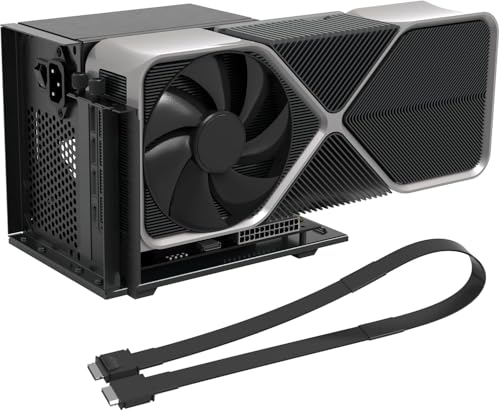
- Cable and screws included
- PCIe 4.0 x4 / 64Gbps link
- Open-frame GPU support
Best For: Users who want an OCuLink eGPU dock bundle with the cable included
OCuLink Performance Dock
PCIe 4.0 x4 External GPU Enclosure

- 64Gbps OCuLink link with native PCIe passthrough
- Supports NVIDIA and AMD cards up to RTX 4090 / RX 7900
- Shielded 50cm cable and side bracket for stability
Best For: OCuLink-capable laptops and mini PCs needing high-bandwidth GPU expansion
Thunderbolt AI Dock

- Thunderbolt 3/4 and USB4 support for portable devices
- 85W PD charging helps simplify single-cable setups
- Open-frame aluminum design with no GPU length limit
Best For: Thunderbolt or USB4 laptops, NUCs, and handhelds that need charging with GPU support
Portable OCuLink Dock
Detachable 64Gbps GPU Enclosure

- PCIe 4.0 x4 64Gbps OCuLink transfer speed
- Detachable design and flat shielded cable for portability
- Supports large GPUs like RTX 4090 and RX 7900 XTX
Best For: Anyone who wants a more portable OCuLink eGPU dock for laptops or mini PCs
Thunderbolt 4 eGPU Dock – External GPU Enclosure Dock (eGPU)
If you’re comparing external gpu enclosures for laptops, this dock is built for users who want a straightforward Thunderbolt 3/4 or USB4 upgrade path. It supports modern NVIDIA and AMD cards, adds 80W USB-C power delivery, and can double as a small hub thanks to its extra ports and daisy-chain support.
Best For: Laptop, NUC, and USB4 users who want a flexible eGPU dock with broad GPU support and charging.
Pros:
- Supports Thunderbolt 3, Thunderbolt 4, and USB4 devices.
- Compatible with NVIDIA and AMD cards, including newer RTX 50 Series and RX 7000 Series mentions.
- Includes 80W PD over USB-C plus extra hub-style connectivity.
- Uses an officially certified JHL7440 controller module.
Cons:
- Graphics card and ATX power supply are not included.
- Requires a TB3/TB4/USB4 port to work.
- Notes warn against incorrect CPU cable insertion during setup.
This is a practical choice if you already have your own PSU and GPU and want a compact, standards-based enclosure for gaming, AI, or rendering workloads.
Professional 750W Chassis – Sonnet eGPU Breakaway Box 750ex
Among external gpu enclosures for laptops, the Sonnet eGPU Breakaway Box 750ex is aimed at users who need a serious Thunderbolt 3 chassis for demanding creative work. It’s designed to accelerate editing, rendering, color grading, animation, and effects while providing a high-capacity power supply and extra peripheral connectivity.
Best For: Mac and Windows users who want a high-power Thunderbolt 3 eGPU chassis for professional workloads.
Pros:
- Thunderbolt 3 connection for Mac and Windows systems.
- 750W power supply supports high-power and future GPU cards.
- Extra connectivity with four USB Type A ports and Gigabit Ethernet.
- Built to improve GPU-accelerated creative application performance.
Cons:
- Not compatible with M1 Macs for GPU use.
- Requires a Thunderbolt 3 port.
- Large chassis compared with compact enclosure options.
If your priority is stable, workstation-style eGPU performance, this Sonnet enclosure stands out for power delivery and expansion rather than portability.
OCuLink Power Dock – AOOSTAR AG01 External GPU Docking Station
If you’re shopping external gpu enclosures for laptops with OCuLink support, the AOOSTAR AG01 is built for high power and wide graphics-card compatibility. Its open metal design, built-in 800W power supply, and 600W maximum GPU power target it toward users who want a desktop-style external GPU setup rather than a compact dock.
Best For: OCuLink-equipped laptops or devices that need a high-wattage external GPU dock.
Pros:
- Built-in 800W power supply with up to 600W GPU power support.
- Compatible with most mainstream NVIDIA and AMD graphics cards.
- Open metal body with unlimited graphics card length.
- Designed for OCuLink devices, with TGX hot-swap noted separately.
Cons:
- Only compatible with devices that have an OCuLink port.
- OCuLink is not hot-pluggable, so power must be turned off when connecting or disconnecting.
- Built-in PSU is for the dock only.
This dock makes sense if your device already supports OCuLink and you want maximum flexibility for larger graphics cards and stronger power headroom.
Compact Travel eGPU Kit – External eGPU Enclosure with PSU
For buyers comparing external gpu enclosures for laptops and handhelds, this compact GODLIY kit is geared toward portability and convenience. It includes the enclosure, a 240W power supply, a Thunderbolt 4 cable, and a carrying case, making it a complete bundle for users who want an easier out-of-box setup.
Best For: Portable Thunderbolt 3/4 and USB4 setups for laptops, mini PCs, and gaming handhelds.
Pros:
- Complete kit includes PSU, TB4 cable, power cable, and carrying case.
- Supports Thunderbolt 4/3 and USB4 devices on Windows 10/11 and Linux.
- Compact anodized aluminum shell with a travel-friendly design.
- Provides 85W PD charging and a DP port.
Cons:
- Graphics card is not included.
- Maximum GPU size is limited by the listed enclosure dimensions.
- Requires TB3/TB4/USB4 support; a plain Type-C port is not enough.
This enclosure is a strong pick if you want a portable, bundled eGPU solution instead of piecing together your own dock and power supply.
Oculink-Only Pick – MINISFORUM DEG1 eGPU Dock
If you’re building external GPU enclosures for laptops around an OCuLink-equipped system, the MINISFORUM DEG1 keeps the setup simple and direct. It uses OCuLink 4i (PCIe 4.0 x4) on the host side and a PCIe x16 slot for the graphics card, with support for ATX and SFX power supplies. Note that this is not a Thunderbolt solution and it does require the machine to be powered off before connecting or disconnecting.
Best For: Users with OCuLink-capable laptops or mini PCs who want a straightforward, no-Thunderbolt external GPU dock.
Pros:
- OCuLink 4i host connection with PCIe 4.0 x4 bandwidth
- Supports ATX and SFX standard power supplies
- Designed for large GPUs, including RTX 4090 and RX 7900 XTX compatibility
- Compact dock size for a clean desk setup
Cons:
- OCuLink only; no Thunderbolt support
- Hot plugging is not supported
- Power supply and GPU are not included
This is a good fit if your priority is a dedicated OCuLink eGPU path rather than a universal one. It’s best viewed as a purpose-built dock for users who already know their host system supports OCuLink and want standard PSU flexibility.
Value Dock Bundle – OCuLink eGPU Dock with Cable
For external GPU enclosures for laptops, this OCuLink dock stands out by including the 19.7-inch cable and a simple open-frame layout. It converts an OCuLink connection to PCIe x16 with PCIe 4.0 x4 bandwidth, and the notes emphasize lower latency than Thunderbolt for compatible systems. Since the GPU and power supply are not included, it works best as a flexible dock for users who already have the rest of the parts.
Best For: Laptop and mini PC owners with OCuLink support who want an open-frame eGPU dock with the cable included.
Pros:
- Includes OCuLink cable and screws in the package
- PCIe 4.0 x4 / 64Gbps bandwidth for compatible devices
- Open-frame design supports GPUs of any size
- Auto-start and forced-start modes add convenience
Cons:
- GPU and power supply are not included
- Hot-plugging is not supported
- Only ATX power is supported
This dock makes sense if you want a more complete starting point without hunting for the cable separately. The included side bracket and indicator lights are practical touches for a stable, easy-to-monitor eGPU setup.
Dual-Link Upgrade – MINISFORUM DEG2 USB4 V2 & OCuLink Dock
If you want external GPU enclosures for laptops that can do more than just GPU duty, the MINISFORUM DEG2 is the most versatile option here. It supports both USB4 V2/TBT5-compatible and OCuLink input, offers up to 80Gbps over the USB4 V2 side, and includes a hardware switch for changing between docking mode and pure GPU mode. The built-in M.2 2280 slot and support for ATX/SFX power supplies make it a strong pick for a cleaner multi-use setup.
Best For: Laptop users who want a dual-link eGPU dock that can also function as a broader desktop-style hub.
Pros:
- Dual-link support: USB4 V2/TBT5-compatible and OCuLink
- Up to 80Gbps over the USB4 V2 side
- Built-in M.2 2280 NVMe slot for storage
- Supports ATX and SFX power supplies
Cons:
- More complex than a single-purpose dock
- Graphics card and power supply are not included
- USB4 V2/TBT5 benefits depend on host compatibility
Compared with the simpler docks, this one is built for users who want flexibility and a single-cable workflow when the host supports it. The storage slot and mode switch make it feel more like a modular desktop expansion station than a basic eGPU enclosure.
OCuLink Performance Dock – PCIe 4.0 x4 External GPU Enclosure
If you want external gpu enclosures for laptops with the lowest-latency style connection in this group, this OCuLink dock is built around PCIe 4.0 x4 64Gbps bandwidth and native PCIe passthrough. It is aimed at users who want desktop-class graphics expansion for gaming, 3D work, rendering, or AI tasks, while keeping setup focused on an ATX-powered open-frame dock.
Best For: Laptops or mini PCs with OCuLink support that need high-bandwidth external GPU expansion.
Pros:
- PCIe 4.0 x4 64Gbps OCuLink connection for strong bandwidth and lower latency than Thunderbolt.
- Supports mainstream NVIDIA and AMD cards, including large GPUs like RTX 4090 and RX 7900.
- Includes a shielded 50cm SFF-8611 cable to help reduce interference during long sessions.
- Built-in side bracket and open-frame layout help secure the GPU and ATX power supply.
Cons:
- Graphics card and power supply are not included.
- Requires an ATX PSU and the notes call for a wattage buffer above full-load GPU power.
- No hot-plugging; connections must be made with power off.
This is a strong choice if your priority is maximum OCuLink throughput and a straightforward dock-style setup rather than a compact, all-in-one enclosure.
Thunderbolt AI Dock – 85W Charging eGPU Enclosure
For buyers comparing external gpu enclosures for laptops over Thunderbolt or USB4, this model focuses on universal compatibility, 40Gbps-class connectivity, and integrated 85W PD charging. It is positioned as a dock for Windows, Linux, and select Mac workflows, with support for compatible NVIDIA and AMD GPUs in a lightweight open-frame chassis.
Best For: Thunderbolt 3/4 or USB4 laptops, NUCs, and handhelds that need charging plus GPU expansion.
Pros:
- Works with Thunderbolt 4/3 and USB4 devices, including laptops, NUCs, and handhelds.
- 85W PD charging can power supported devices through the same connection.
- Certified JHL7540/7440 controllers and PCIe 4.0 x16 mode are designed for stable performance.
- Open-frame aluminum build allows unrestricted GPU length and strong airflow.
Cons:
- Only supports Thunderbolt/USB4 Type-C ports; standard Type-C ports are not compatible.
- The notes say the Apple Silicon Mac/Tinygrad use case is for AI development, not gaming or 3D rendering.
- Graphics card, power supply, and cable-specific setup details still need to be managed separately.
This enclosure makes the most sense if you want one cable for both power and graphics output, especially on portable devices that already support Thunderbolt or USB4.
Portable OCuLink Dock – Detachable 64Gbps GPU Enclosure
If you are shopping for external gpu enclosures for laptops and want an OCuLink dock that emphasizes portability, this option adds a detachable design on both ends and a flexible flat cable. It delivers PCIe 4.0 x4 64Gbps transfer speed, supports large graphics cards, and is built for ATX power supply use in laptop and mini PC expansion setups.
Best For: Users who want an OCuLink eGPU dock that is easier to pack, store, and move between setups.
Pros:
- Detachable design on both ends makes it easier to store and transport.
- 10μ gold-plated contacts are intended to improve conductivity and reduce oxidation-related resistance.
- Flat, shielded 50cm OCuLink cable is designed to reduce port strain and interference.
- Compatible with large cards such as RTX 4090 and RX 7900 XTX, with no length restriction noted.
Cons:
- GPU and power supply are not included.
- Works with standard ATX power supplies only.
- OCuLink does not support hot plugging, so power must be off when disconnecting.
This is a practical pick if you want the bandwidth advantages of OCuLink but also value a more travel-friendly dock layout and a cable that is less rigid than traditional options.
How We Picked the Best External GPU Enclosures for Laptops
We prioritized compatibility, connection speed, power delivery, card support, and enclosure design. For External GPU Enclosures for Laptops, the most important question is not just whether a graphics card fits, but whether your laptop can actually use the dock efficiently.
We also looked at real-world usability: PSU quality, thermals, portability, cable requirements, operating system support, and whether the enclosure is better suited to plug-and-play convenience or maximum performance.
Quick Comparison
Thunderbolt 3/4 and USB4 enclosures are usually the easiest to use with mainstream laptops and offer broad compatibility. OCuLink-based docks tend to deliver higher bandwidth and better performance consistency, but they require a supported port and are often better suited to DIY-style or enthusiast systems.
If you want a simple setup for occasional gaming or creative work, a Thunderbolt or USB4 dock is usually the safer choice. If your goal is the highest possible GPU bandwidth, an OCuLink solution is often the stronger option.
Key Buying Factors for External GPU Enclosures for Laptops
Connection Type
Check whether your laptop supports Thunderbolt 3, Thunderbolt 4, USB4, or OCuLink. This determines compatibility and performance more than almost any other spec.
Power Delivery and PSU
Some enclosures include a built-in power supply, while others rely on an external PSU. Make sure the enclosure can support your GPU’s power draw and, if needed, charge your laptop at the same time.
GPU Size and Clearance
Verify card length, thickness, and slot width. Large modern GPUs may require extra space, especially if you plan to use a triple-slot model.
Performance Expectations
Thunderbolt and USB4 are convenient but have more bandwidth limits than OCuLink. If you are buying for high-FPS gaming or heavy rendering, connection speed matters.
Portability and Build
Some users want a compact dock for a desk setup, while others need a sturdier chassis that can travel. Aluminum construction, included bags, and cable quality can make a difference.
Who Should Buy Which External GPU Enclosures for Laptops?
Choose a Thunderbolt 3/4 or USB4 enclosure if you want the easiest setup, broad laptop support, and a balanced mix of performance and convenience. These are usually best for most mainstream buyers.
Choose an OCuLink enclosure if you have a compatible laptop or mini PC and want the fastest, most direct external GPU connection available in this category. These are often the better fit for enthusiasts and performance-focused users.
If you need a mix of expandability and desktop-like flexibility, look for models with stronger power delivery, room for larger GPUs, and extra features such as NVMe support. That is often the smartest long-term choice for External GPU Enclosures for Laptops.