If your MacBook Pro needs desktop-class graphics for creative work, an external GPU enclosure can be a practical upgrade path. The best setups balance performance, compatibility, cooling, and power delivery.
Below, we’ve narrowed the field to the most useful options for Mac users, from Thunderbolt 3 and 4 models to newer USB4 and Thunderbolt 5 choices.
Best 10 External GPU Enclosures for Macbook Pro Picks for 2026
Thunderbolt 5 flagship
Core X V2 External Graphics Enclosure

- Thunderbolt 5 with up to 80 Gbps bandwidth
- Fits desktop GPUs up to 4 slots wide
- Built-in 120 mm fan and vented steel chassis
Best For: Compatible Windows or USB4 users wanting a modern, high-bandwidth eGPU enclosure
Fast storage alternative
ACASIS 40Gbps NVMe SSD Enclosure

- Not an eGPU; it is an external NVMe SSD enclosure
- Supports Thunderbolt 5/4/3 and USB4
- Built-in fan and aluminum cooling system
Best For: MacBook Pro owners who need fast external storage instead of graphics expansion
Creator-focused classic
Sonnet eGPU Breakaway Box 750ex

- Thunderbolt 3 eGPU chassis for Mac and Windows
- 750W power supply supports high-demand GPUs
- 750ex adds USB Type A ports and Gigabit Ethernet
Best For: Creators who want a proven Thunderbolt 3 eGPU box with extra ports
Compact charging-friendly option
VK-Y900 Thunderbolt 3/4 eGPU Enclosure

- Supports Thunderbolt 3/4 and USB4 hosts
- Includes 85W PD pass-through charging
- Compact aluminum enclosure with dual TB ports
Best For: Portable laptop users who want a compact eGPU enclosure with charging support
Portable NVMe Speed Boost
UGREEN 40Gbps M.2 NVMe Enclosure

- ASM2464PD chip with up to 3600MB/s
- Silent aluminum cooling with double-sided fins
- Supports M.2 NVMe drives up to 8TB
Best For: MacBook Pro users needing compact high-speed external storage
Compact GPU Dock

- JHL7440-based eGPU dock for TB3/TB4/USB4
- Supports NVIDIA and AMD graphics cards
- Adds 85W PD charging and hub ports
Best For: Users wanting a compact eGPU dock with charging and extra ports
High-Power Workstation Choice

- 80 Gbps Thunderbolt 5 eGPU enclosure
- 850W PSU supports power-hungry GPUs
- Includes 5GbE and USB connectivity
Best For: Power users needing a high-wattage eGPU enclosure for demanding workloads
Compact USB4 eGPU Dock
Mini eGPU Enclosure for Thunderbolt 3/4

- Thunderbolt 3/4 and USB4 40Gbps support
- Small dock with USB-A and downstream TB port
- 85W charging with SFX/ATX/FLEX/DC power support
Best For: MacBook Pro users who want a compact eGPU dock and can confirm port compatibility first
Open-Frame 40Gbps GPU Dock
USB4 eGPU Enclosure for Thunderbolt 4

- USB4/TB4 full-function 40Gbps support
- Open frame fits larger PCIe 4.0 x16 GPUs
- macOS support is AMD-only
Best For: MacBook Pro owners who want an open-design USB4/TB4 enclosure and plan to use AMD graphics on macOS
80Gbps TB5 eGPU Dock
High-Bandwidth Enclosure for Mac and Windows
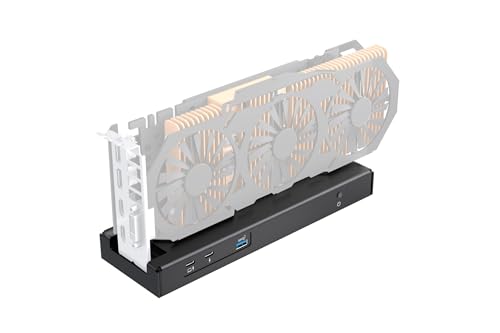
- 80Gbps bandwidth for Thunderbolt 5 and USB4
- 140W PD charging with daisy-chain support
- Works with NVIDIA and AMD PCIe cards on supported hosts
Best For: Power users who want a high-bandwidth eGPU enclosure with charging and daisy chaining
Thunderbolt 5 flagship – Core X V2 External Graphics Enclosure
If you’re comparing external gpu enclosures for macbook pro, the Razer Core X V2 is really a Windows- and Thunderbolt-focused option built for desktop-class graphics cards. It supports NVIDIA and AMD GPUs up to 4 slots wide, uses Thunderbolt 5 with up to 80 Gbps bandwidth, and includes active cooling for sustained loads. Note that Mac devices with M1 or later chipsets do not support eGPUs.
Best For: Users who need a modern Thunderbolt 5 eGPU enclosure for compatible Windows laptops or USB4 devices.
Pros:
- Supports NVIDIA and AMD desktop GPUs up to 4 slots wide.
- Thunderbolt 5 connection offers up to 80 Gbps bandwidth.
- Includes a 120 mm fan and vented steel chassis for cooling.
- Tool-free GPU and PSU swap with included thumbscrews.
Cons:
- Graphics card and power supply are sold separately.
- Mac devices with M1 or later chipsets do not support eGPUs.
- Best fit is limited to compatible Thunderbolt 4/5 or USB4 systems.
The Core X V2 is the most forward-looking enclosure in this group, but its value depends on having a compatible host device and supplying your own GPU and ATX PSU.
Fast storage alternative – ACASIS 40Gbps NVMe SSD Enclosure
For buyers researching external gpu enclosures for macbook pro, this ACASIS model is not an eGPU dock at all—it is an external M.2 NVMe SSD enclosure. It supports Thunderbolt 5/4/3, USB4, and USB standards, and is designed for MacBook Pro, MacBook Air, iPad Pro, Windows, and Linux users who need fast external storage rather than graphics expansion.
Best For: MacBook Pro users who want a fast 40Gbps external SSD enclosure for transfers, editing, and backup.
Pros:
- Supports Thunderbolt 5/4/3, USB4, and older USB versions.
- Built-in silent fan plus aluminum body and thermal pad for cooling.
- Compatible with 2280, 2260, 2242, and 2230 NVMe drives.
- Tested speeds reach up to 2805/2734 MB/s on a MacBook with Samsung 980 Pro.
Cons:
- It is an SSD enclosure, not a graphics enclosure.
- Supports only one drive at a time.
- Speed depends on host connection and installed SSD.
This is a strong pick for portable, high-speed storage, but it should only be considered if your goal is external SSD performance rather than GPU acceleration.
Creator-focused classic – Sonnet eGPU Breakaway Box 750ex
Among external gpu enclosures for macbook pro, the Sonnet eGPU Breakaway Box 750ex is a straightforward Thunderbolt 3 chassis aimed at GPU acceleration for creative workflows. It is compatible with Mac and Windows systems, supports high-power desktop GPUs, and adds extra USB and Ethernet connectivity in the 750ex version.
Best For: Mac and Windows users who want a proven Thunderbolt 3 eGPU enclosure for editing, rendering, and color work.
Pros:
- Designed for Thunderbolt 3 systems with Mac and Windows compatibility.
- 750W power supply supports demanding compatible GPUs.
- Helps speed up editing, rendering, color grading, animation, and effects.
- 750ex model adds four USB Type A ports and Gigabit Ethernet.
Cons:
- M1 Macs are not compatible with GPUs.
- Thunderbolt 3 only, so it is less modern than Thunderbolt 5 options.
- Graphics card is not included.
The 750ex stands out for creators who want an established eGPU chassis with extra I/O, but it still depends on the right host machine and a separately purchased GPU.
Compact charging-friendly option – VK-Y900 Thunderbolt 3/4 eGPU Enclosure
If you’re comparing external gpu enclosures for macbook pro, the VK-Y900 is a compact Thunderbolt 3/4 and USB4 eGPU enclosure built around broad GPU support and laptop charging. It uses an Intel JHL7440/7450 controller, supports NVIDIA and AMD cards, and includes 85W Power Delivery pass-through for a single-cable setup.
Best For: Laptop users who want a compact eGPU enclosure with 85W charging and wide GPU compatibility.
Pros:
- Supports NVIDIA RTX and AMD Radeon cards across multiple generations.
- Compatible with Thunderbolt 3/4 and USB4 host devices.
- 85W PD pass-through can charge the laptop while in use.
- Compact aluminum design with dual Thunderbolt ports and DisplayPort.
Cons:
- Power supply is not included.
- Best suited to laptops and portable setups, not full desktop builds.
- Apple Silicon Mac use is limited to TinyGPU/LLM development scenarios noted by the manufacturer.
This enclosure is appealing if you want a small, flexible eGPU setup with charging support, but its Mac use case is narrow and its intended strengths are on portable PC-style systems.
Portable NVMe Speed Boost – UGREEN 40Gbps M.2 NVMe Enclosure
If you want a fast external storage option to pair with a MacBook Pro, this UGREEN enclosure is a practical pick for turning an M.2 NVMe SSD into a compact USB4/Thunderbolt-compatible drive. It’s built around the ASM2464PD chip and is designed for high-speed transfers, quiet operation, and broad OS support, making it useful for portable project files, backups, and media work.
Best For: MacBook Pro users who want a compact high-speed NVMe enclosure for portable storage and quick file transfers.
Pros:
- Up to 3600MB/s with Thunderbolt 4 cables and devices
- Double-sided fin cooling design for silent, fanless operation
- Supports 2230/2242/2260/2280 NVMe drives up to 8TB
- Works across Windows, Mac OS, Linux, and Android
Cons:
- SSD is not included
- Does not support SATA NGFF or mSATA drives
- Maximum speed depends on the right Thunderbolt 4 cable and device
This is a strong choice if your goal is fast, portable storage rather than GPU expansion. For MacBook Pro owners who need a quiet external drive enclosure with modern connectivity, it covers the basics well.
Compact GPU Dock – ANQ-L336 Mini eGPU Enclosure
For MacBook Pro users looking at external GPU enclosures for macbook pro setups, this ANQ-L336 is a compact Thunderbolt 3/4 and USB4 eGPU dock designed for laptops and mini PCs. It uses an officially certified JHL7440 controller module, supports NVIDIA and AMD cards, and adds extra hub-style connectivity for a more flexible desktop setup.
Best For: Users who want a mini eGPU dock with broad Thunderbolt and USB4 compatibility plus built-in charging and hub ports.
Pros:
- Officially certified JHL7440 controller module
- Compatible with Thunderbolt 3/4 and USB4 systems
- Supports NVIDIA and AMD GPUs, including latest AMD 9000 series
- Includes 85W PD charging, USB-A, and extra Thunderbolt 4 ports
Cons:
- Power supply is not included
- NVIDIA RTX 50-series support is limited
- Designed for laptop and mini PC compatibility, so it’s not the most minimal enclosure
This model makes sense if you want an eGPU dock that can also function as a useful connectivity hub. It’s geared toward users who need more than just a GPU slot and prefer flexible power options.
High-Power Workstation Choice – Sonnet Breakaway Box 850 T5
If you need one of the more capable external GPU enclosures for macbook pro alternatives in a Windows-focused workflow, the Sonnet Breakaway Box 850 T5 is built for serious GPU acceleration. It offers Thunderbolt 5 / Thunderbolt 4 / USB4 compatibility, an 850W built-in power supply, and support for triple-wide cards, making it suited to demanding creative and AI workloads.
Best For: Power users who need a high-wattage eGPU enclosure for heavy GPU-accelerated work on supported systems.
Pros:
- 80 Gbps Thunderbolt 5 bandwidth with Thunderbolt 4 and USB4 support
- 850W built-in power supply for demanding graphics cards
- Supports triple-wide NVIDIA and AMD GPU cards
- Includes extra Thunderbolt, USB-A, and 5GbE connectivity
Cons:
- Listed as external GPU for Windows, not Mac-specific
- Large desktop-style enclosure at 14.1 pounds
- May be more than casual users need
This is the most workstation-oriented option in the group, with power and expansion features to match. If your priority is maximum GPU headroom and built-in connectivity, it stands out clearly.
Compact USB4 eGPU Dock – Mini eGPU Enclosure for Thunderbolt 3/4
If you want external gpu enclosures for macbook pro setups with a compact footprint, this mini dock is built around Thunderbolt 3/4 and USB4 40Gbps hosts. It’s a practical choice for users who already know their MacBook Pro has the right high-speed port and want a straightforward way to add a PCIe GPU, with the added convenience of downstream connectivity and 85W charging support.
Best For: MacBook Pro owners who need a small Thunderbolt/USB4 eGPU dock and are comfortable checking compatibility before buying.
Pros:
- Supports Thunderbolt 3, Thunderbolt 4, and USB4 40Gbps systems.
- Includes a second Thunderbolt port plus a USB-A port for basic daisy-chain/hub use.
- Supports SFX, ATX, FLEX, and DC power input options.
- Built around the JHL7440 controller for a stable expansion experience.
Cons:
- Requires DIY setup and driver/hardware compatibility knowledge.
- DC input is only for PCIe devices that do not need external power.
- Compatibility must be verified first; if your system doesn’t show Thunderbolt/USB4 support, it won’t work.
This is a compact, flexible enclosure for the right MacBook Pro user, but it rewards careful checking before purchase. If your laptop has the correct Thunderbolt or USB4 support, it offers a tidy path into eGPU expansion without taking up much desk space.
Open-Frame 40Gbps GPU Dock – USB4 eGPU Enclosure for Thunderbolt 4
For external gpu enclosures for macbook pro users who want a more open, full-size build, this RIITOP dock targets USB4 and Thunderbolt 4 hosts at 40Gbps. It’s designed for PCIe 4.0 x16 graphics cards and leaves room for larger GPUs, making it a better fit if you want flexibility over compactness and are using macOS with a compatible AMD card.
Best For: MacBook Pro owners who want an open-design USB4/TB4 eGPU dock for AMD GPUs on macOS.
Pros:
- Compatible with USB4 and Thunderbolt 4 full-speed 40Gbps hosts.
- Open design supports large graphics cards with no size restriction.
- Supports Windows, Linux, and macOS, with AMD-only support on Mac OS.
- Works with modern NVIDIA and AMD cards on supported systems.
Cons:
- Mac OS support is AMD-only; NVIDIA is not supported on Mac OS.
- Requires a separate ATX/SFX power supply and PCIe 4.0 x16 GPU.
- Needs a full-function 40Gbps USB4 or Thunderbolt 4 port to operate.
This enclosure is best viewed as a flexible GPU dock for users who already know their MacBook Pro and GPU combination is compatible. If you want maximum physical clearance and macOS AMD support, it’s a strong fit.
80Gbps TB5 eGPU Dock – High-Bandwidth Enclosure for Mac and Windows
If you’re shopping external gpu enclosures for macbook pro and want the highest bandwidth option in this group, this TREBLEET model is built for Thunderbolt 5 and USB4 at up to 80Gbps. It also adds 140W Power Delivery and daisy chaining, so it’s aimed at users who want a single-cable setup with plenty of headroom for demanding graphics work, provided their MacBook Pro and host connection support the required standards.
Best For: Power users who want a Thunderbolt 5/USB4 eGPU enclosure with charging and daisy-chain support.
Pros:
- Up to 80Gbps bandwidth for Thunderbolt 5 and USB4 systems.
- Supports up to 140W PD charging while running the GPU.
- Includes downstream port support for daisy chaining additional devices.
- Compatible with both NVIDIA and AMD PCIe cards on supported hosts.
Cons:
- Requires host-side USB4 or Thunderbolt controller support and proper drivers.
- Still a DIY-oriented enclosure that needs compatibility checking.
- General hardware and setup knowledge is expected before purchase.
This is the most future-facing option here, especially if your MacBook Pro setup can take advantage of Thunderbolt 5 or USB4 bandwidth. For users who want charging, expansion, and stronger performance headroom in one box, it stands out clearly.
How We Picked the Best External GPU Enclosures for Macbook Pro
We focused on enclosures that make sense for real MacBook Pro use: stable Thunderbolt or USB4 connectivity, enough room and power for supported graphics cards, effective cooling, and straightforward setup. For External GPU Enclosures for Macbook Pro, the best choices are the ones that minimize bottlenecks and avoid unnecessary compatibility headaches.
We also gave preference to models with clear power specs, flexible GPU support, and designs that can handle long creative workloads without throttling.
Quick Comparison
If you want the simplest path, choose a Thunderbolt 3 or 4 enclosure with a known-good power supply and broad GPU compatibility. If you want more future-proof bandwidth, look at USB4 and Thunderbolt 5 options, especially if you plan to move the enclosure between laptops or systems.
In practical terms, most MacBook Pro buyers should prioritize reliability over raw feature count. A well-supported 40Gbps enclosure often beats a flashy model with vague compatibility claims.
Key Buying Factors for External GPU Enclosures for Macbook Pro
Connection Standard
Thunderbolt 3, Thunderbolt 4, USB4, and Thunderbolt 5 all matter, but your MacBook Pro and workload should guide the choice. Higher bandwidth can help, but only if the enclosure and GPU are consistently supported.
Power Supply and GPU Support
Check wattage carefully. A larger PSU can support higher-end cards and reduce upgrade limitations. Also confirm whether the enclosure supports full-length cards, dual-slot cards, or only compact GPUs.
Cooling and Noise
Good airflow matters during sustained rendering, video export, 3D work, and AI tasks. Fan design, ventilation, and thermal layout can affect real-world performance more than small spec differences.
Portability and Expansion
Some buyers want a desktop-style enclosure they can leave in one place; others need a smaller, travel-friendly option. If you plan to connect more than just a GPU, look for added ports or docking features, but only if they don’t compromise enclosure stability.
Who Should Buy Which External GPU Enclosures for Macbook Pro?
Choose a premium full-size enclosure if you want maximum GPU compatibility and plan to use your MacBook Pro as a workstation replacement. Go with a compact model if desk space, travel, or lighter workloads matter more than upgrade headroom.
If you’re future-focused, Thunderbolt 5 and high-wattage USB4 designs are worth a look. If you just want dependable performance today, a proven Thunderbolt 3/4 option is usually the safest buy.
For most shoppers, the best External GPU Enclosures for Macbook Pro are the ones that match your GPU size, your power needs, and the ports already on your laptop.