If your desk is tight but your graphics needs are not, the right eGPU enclosure can turn a thin laptop or mini PC into a far more capable workstation.
Below, we focus on compact, practical options that balance size, power, connectivity, and card compatibility without taking over your setup.
Best 10 External GPU Enclosures for Compact Desks Picks for 2026
OCuLink Compact-Desk Pick

- 64Gbps PCIe 4.0 x4 OCuLink link
- Detachable design for easier storage
- Supports large GPUs, ATX PSU required
Best For: Small-desk users with OCuLink laptops or mini PCs
Premium Thunderbolt 5 Pick
Razer Core X V2 eGPU Enclosure

- 80 Gbps Thunderbolt 5 performance
- Fits desktop GPUs up to 4 slots wide
- 120 mm fan and steel chassis
Best For: Windows laptops and USB4 handhelds needing top-tier eGPU performance
Mini Desk-Saver Pick

- Tiny 280 g enclosure for tight desks
- TB3/TB4/USB4 with 85W charging
- Needs compatibility checks and DIY setup
Best For: Compact-workspace users with compatible Thunderbolt or USB4 laptops
High-Power Thunderbolt 5 Pick

- Built-in 850W power supply
- 80 Gbps Thunderbolt 5 support
- Triple-wide GPU and 5GbE port
Best For: Windows 11 users who need maximum GPU power and extra dock connectivity
Highest-bandwidth OCuLink pick
High-Bandwidth Open-Frame eGPU Dock
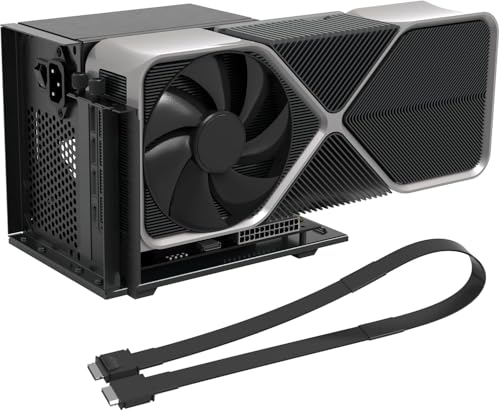
- PCIe 4.0 x4 / 64Gbps OCuLink link
- Supports AMD, Intel, and NVIDIA GPUs
- Open-frame dock with included 19.7-inch cable
Best For: OCuLink-ready mini PCs and laptops that need maximum direct PCIe performance
Clean single-cable Thunderbolt option
Portable 85W PD eGPU Enclosure

- Thunderbolt 3/4 and USB4 support
- 85W PD pass-through charging included
- Official Intel controller for stable transfer
Best For: People who want a tidy one-cable eGPU setup with laptop charging
Ready-to-go compact kit
Aluminum eGPU Enclosure with PSU

- Includes 240W PSU, TB4 cable, and carrying case
- Works with Thunderbolt 4/3 and USB4 systems
- Compact aluminum chassis with 85W PD
Best For: Buyers who want an all-in-one portable eGPU package for a small desk
OCuLink-First Minimal Dock
MINISFORUM DEG1 for ATX/SFX Builds

- OCuLink 4i only; no Thunderbolt support
- Works with ATX and SFX power supplies
- Made for RTX 4090 and RX 7900 XTX class GPUs
Best For: Mini PC owners with OCuLink who want a simple desk-friendly GPU dock
High-Bandwidth M.2 Option
NVMe PCIe 5.0 x4 Dock with 50cm Riser

- PCIe 5.0 x4 with up to 128Gbps bandwidth
- Only works with NVMe M.2 devices
- Fits full-size GPUs and includes a 50cm riser cable
Best For: Users with an NVMe M.2 slot who want maximum bandwidth on a compact desk
OCuLink Performance Dock
RGEEK OCuLink to PCIe x16 eGPU Enclosure

- PCIe 4.0 x4 OCuLink with 64Gbps bandwidth
- Includes a 50cm shielded cable and status LEDs
- Open-frame layout supports ATX PSU and large GPUs
Best For: Users who want a direct, high-bandwidth OCuLink dock for a small desk setup
OCuLink Compact-Desk Pick – PCIe 4.0 x4 OCuLink eGPU Dock
If you want external gpu enclosures for compact desks and already have an OCuLink-ready laptop or mini PC, this dock keeps the footprint small while still targeting PCIe 4.0 x4 / 64Gbps performance. It supports standard ATX power supplies and uses a detachable design that’s meant to be easier to store when desk space is tight.
Best For: Desktop users who want a compact OCuLink eGPU dock for a laptop or mini PC and don’t mind supplying their own ATX PSU.
Pros:
- PCIe 4.0 x4 / 64Gbps OCuLink connection for high-speed external GPU use
- Detachable ends make it easier to pack away or reposition on a small desk
- Supports large cards, including RTX 4090- and RX 7900 XTX-class GPUs
- Gold-plated contacts and status LEDs add durability and easy monitoring
Cons:
- GPU and power supply are not included
- Requires a standard ATX power supply only
- OCuLink does not support hot plugging; shutdown is required before unplugging
This is a practical choice if your system already uses OCuLink and you want a relatively compact dock rather than a larger Thunderbolt enclosure. The tradeoff is that it’s more of a DIY setup than an all-in-one consumer eGPU box.
Premium Thunderbolt 5 Pick – Razer Core X V2 eGPU Enclosure
For external gpu enclosures for compact desks, the Razer Core X V2 is the premium plug-and-play option if you want Thunderbolt 5 bandwidth without a DIY build. It pairs a vented steel chassis with active cooling and supports desktop GPUs up to 4 slots wide, making it a strong fit for a powerful but still tidy desk setup.
Best For: Windows users who want a high-end Thunderbolt 5 eGPU enclosure with simple setup and broad GPU support.
Pros:
- Thunderbolt 5 connection with up to 80 Gbps bandwidth
- Supports PCIe desktop graphics cards up to 4 slots wide
- Includes a built-in 120 mm fan with automatic ramping under load
- Works with Thunderbolt 4/5 laptops and USB4 gaming handhelds
Cons:
- Graphics card and power supply are sold separately
- Mac devices with M1 or later chips do not support eGPUs
- It’s a sizable desktop enclosure, not the smallest compact-desk option
This enclosure makes sense when performance and ease of use matter more than minimizing size. If your desk can handle a full desktop-style enclosure, it delivers a straightforward upgrade path for compatible Windows devices.
Mini Desk-Saver Pick – Mini TB3/4 USB4 eGPU Dock
If you’re shopping external gpu enclosures for compact desks and want something truly small, this mini eGPU dock is one of the most space-efficient options here. It supports Thunderbolt 3, Thunderbolt 4, and USB4 at 40Gbps, while adding PD 85W charging and downstream ports so the setup can stay relatively uncluttered.
Best For: Users with Thunderbolt 3/4 or USB4 laptops who want a compact, lightweight eGPU dock with charging support.
Pros:
- Very small enclosure at 9.45″ x 2.91″ x 1.1″ and 280 grams
- Supports TB3, TB4, and USB4 with a certified JHL7440 controller
- Includes PD 85W charging plus USB-A and downstream TB3 ports
- Compatible with SFX, ATX, FLEX, and certain DC power supplies
Cons:
- Not recommended for handheld game consoles
- Requires some DIY knowledge and compatibility checking
- Power supply is not included
This is the most desk-friendly form factor in the group, especially if you value a small physical footprint over maximum power. Just be ready to confirm compatibility before buying, since the listing emphasizes hardware checks and setup knowledge.
High-Power Thunderbolt 5 Pick – Sonnet Breakaway Box 850 T5
For external gpu enclosures for compact desks where performance matters more than size, the Sonnet Breakaway Box 850 T5 brings a built-in 850W power supply and Thunderbolt 5 bandwidth in a single desktop enclosure. It’s aimed at Windows 11 users who want a serious GPU upgrade for editing, rendering, animation, AI work, or gaming, with extra connectivity built in.
Best For: Power users who need a high-wattage Thunderbolt 5 eGPU enclosure with room for demanding desktop GPUs.
Pros:
- 80 Gbps Thunderbolt 5 support, with compatibility for many Thunderbolt 4 and USB4 Windows 11 systems
- 850W built-in power supply for power-hungry GPU cards
- Supports triple-wide NVIDIA and AMD graphics cards
- Includes one Thunderbolt 5 peripheral port, three USB-A ports, and a 5GbE Ethernet port
Cons:
- Large and heavy compared with mini eGPU docks
- Windows-focused; not positioned as a universal cross-platform option
- Graphics card is not included
This is the right pick when you want a desktop-grade enclosure that can handle larger, more demanding GPUs without separate power planning. It is less about saving space and more about consolidating performance, power, and expansion into one unit.
Highest-bandwidth OCuLink pick – High-Bandwidth Open-Frame eGPU Dock
If you want external gpu enclosures for compact desks with the lowest-latency path possible, this OCuLink dock is built around PCIe 4.0 x4 bandwidth rather than Thunderbolt. It’s a practical choice for mini PCs and laptops that already support OCuLink, especially when you want full-size GPU support without adding a bulky closed chassis.
Best For: Mini PC and laptop users with OCuLink who want a compact, open-frame GPU dock for gaming, rendering, or AI workloads.
Pros:
- PCIe 4.0 x4 / 64Gbps connection for higher bandwidth than Thunderbolt-based options
- Supports AMD, Intel, and NVIDIA cards for gaming, 3D modeling, rendering, and AI use
- Open-frame design with side bracket helps secure the GPU and ATX power supply
- Includes a 19.7-inch OCuLink cable and multiple LED indicators
Cons:
- GPU and power supply are not included
- Hot-plugging is not supported, so connections must be made with the computer powered off
- Requires ATX power only, with PSU wattage sized about 40% above GPU full load
This dock makes sense if your compact setup already has OCuLink and you care more about direct PCIe performance than enclosure polish. It’s less plug-and-play than a USB4 option, but the bandwidth and open compatibility are the main selling points.
Clean single-cable Thunderbolt option – Portable 85W PD eGPU Enclosure
For compact desks, this Thunderbolt 3/4 eGPU enclosure keeps cabling simple while adding external GPU power over a single connection. It supports Thunderbolt 3/4 and USB4 devices, includes 85W PD pass-through charging, and uses an Intel JHL7440/7450 controller for stable data transfer.
Best For: Laptop, handheld, and NUC owners who want a single-cable external GPU enclosure with charging support and broad Thunderbolt/USB4 compatibility.
Pros:
- Compatible with Thunderbolt 3/4 and USB4 systems
- 85W PD charging plus dual Thunderbolt ports help reduce desk clutter
- Supports NVIDIA and AMD cards, including RTX and Radeon families
- Official Intel controller and ENIG PCB are built for stable data handling
Cons:
- Uses an ATX power supply, so it is not an all-in-one self-powered enclosure
- Requires Thunderbolt 3/4 or USB4; a plain USB-C Type-C port is not enough
- The notes state it is intended for AI deep learning development and not gaming or 3D rendering
This is the cleaner desk-friendly choice if your device already has Thunderbolt or USB4 and you want charging plus external graphics in one cable. The compatibility is broad, but the intended use case is narrower than a general gaming-focused dock.
Ready-to-go compact kit – Aluminum eGPU Enclosure with PSU
This external GPU enclosure is aimed at compact desks because it ships as a complete kit, including the enclosure, 240W PSU, Thunderbolt 4 cable, and a carrying case. If you want external gpu enclosures for compact desks without piecing together power and accessories separately, this one is set up to be straightforward.
Best For: Users who want a compact, ready-to-use Thunderbolt eGPU kit with included power supply and carrying case.
Pros:
- Complete bundle includes enclosure, 240W PSU, Thunderbolt 4 cable, and custom bag
- Supports Thunderbolt 4/3 and USB4 devices on Windows 10/11 and Linux
- 85W PD charging plus an additional 15W Thunderbolt port and DP port
- Compact aluminum chassis for portable desk setups
Cons:
- Graphics card is not included
- GPU size is limited to cards up to 205mm long, 150mm high, and 55mm wide
- Type-C ports without Thunderbolt 3/4 or USB4 support are not compatible
Because it includes the PSU and cable, this enclosure is easier to plan around than many barebones docks. Its size limits mean it suits compact GPUs best, but that’s often exactly what a small desk setup needs.
OCuLink-First Minimal Dock – MINISFORUM DEG1 for ATX/SFX Builds
If you’re shopping for external gpu enclosures for compact desks, the MINISFORUM DEG1 is a straightforward OCuLink dock built for users who want desktop GPU support without extra Thunderbolt complexity. It connects only through OCuLink 4i, supports PCIe 4.0 x4 up link and down link, and is designed around ATX or SFX power supplies for flexible desk setups.
Best For: Mini PC users who already have OCuLink and want a simple, open-frame GPU dock for large cards and standard PSUs.
Pros:
- Supports OCuLink 4i with PCIe 4.0 x4 up link and down link
- Compatible with ATX and SFX standard power supplies
- Listed for RTX 4090 and AMD RX 7900 XTX class cards
- Compact open dock format can suit tighter desk spaces
Cons:
- Does not support Thunderbolt
- Power supply is not included
- OCuLink does not support hot plugging
Overall, this is a practical pick if your compact desk setup is built around OCuLink and you want a no-frills external GPU dock rather than a closed enclosure. Just plan for a separate PSU and power-down connections whenever you swap hardware.
High-Bandwidth M.2 Option – NVMe PCIe 5.0 x4 Dock with 50cm Riser
Among external gpu enclosures for compact desks, this NVMe M.2 dock stands out for users who want a PCIe-based GPU path from a laptop, NUC, or mini PC. It supports only NVMe M.2 protocol, uses a 50cm riser cable, and is rated for PCIe 5.0 x4 bandwidth with backward compatibility for newer and older PCIe GPUs.
Best For: Laptop and mini PC users with an NVMe M.2 slot who want a high-bandwidth external GPU dock and room for full-size cards.
Pros:
- PCIe 5.0 x4 design with up to 128Gbps bandwidth
- Includes a 50cm flexible riser cable for easier placement
- Supports full-size high-performance graphics cards without length restrictions
- Includes LED indicators plus auto-start and forced-start modes
Cons:
- Only compatible with NVMe M.2, not SATA, WiFi, or WWAN modules
- ATX power supply and graphics card are not included
- Requires power-off connections; no hot plugging
This is a strong fit if your desk is tight but your source device has an NVMe slot and you want a flexible external GPU setup. The main tradeoff is compatibility: it is specialized hardware, so confirm your M.2 protocol before buying.
OCuLink Performance Dock – RGEEK OCuLink to PCIe x16 eGPU Enclosure
If you’re comparing external gpu enclosures for compact desks, this OCuLink dock is built for higher bandwidth than typical USB or Thunderbolt-style options. It uses an OCuLink SFF-8612 to PCIe x16 path with PCIe 4.0 x4 / 64Gbps bandwidth, includes a 50cm shielded cable, and is aimed at compact laptop and mini PC setups that need a direct GPU connection.
Best For: Compact desktop setups that already have OCuLink and need a stable, open-frame dock for gaming, rendering, or AI work.
Pros:
- PCIe 4.0 x4 OCuLink design with 64Gbps bandwidth
- Includes a 50cm shielded SFF-8611 cable
- Open-frame bracket helps secure ATX power supplies and graphics cards
- Supports auto-start and forced-start modes with LED indicators
Cons:
- Graphics card and power supply are not included
- Requires an ATX power supply
- No hot plugging; connections must be made with power off
This dock makes sense when performance and direct PCIe connectivity matter more than enclosure cosmetics. For a compact desk, the open-frame design can be easier to place and service, as long as you are comfortable managing a separate PSU and cable routing.
How We Picked the Best External GPU Enclosures for Compact Desks
For External GPU Enclosures for Compact Desks, size alone is not enough. We prioritized a small footprint, stable power delivery, good airflow, and broad compatibility with popular GPUs and host connections. We also looked at whether each enclosure suits real desktop constraints like cable clutter, power brick placement, and easy access in tight spaces.
Quick Comparison
The fastest way to narrow the list is by connection type. Thunderbolt 3/4 and USB4 models are the easiest plug-and-play choice for most laptops, while OCuLink and M.2-based docks usually deliver higher bandwidth with more setup tradeoffs. If you want maximum convenience, choose a self-contained enclosure with its own PSU. If you want the smallest possible footprint and already have compatible hardware, a dock-style solution may be a better fit.
Key Buying Factors for External GPU Enclosures for Compact Desks
Connection and Bandwidth
Bandwidth affects how well the GPU performs, especially in games and GPU-heavy workloads. Thunderbolt 4 and USB4 are widely compatible and simple to use, but OCuLink and PCIe-based docks can offer stronger raw throughput. Match the connection to your host device first, then consider speed.
Physical Size and Layout
Compact desks benefit from enclosures with a clean, vertical, or low-profile layout. Check the enclosure length, cable direction, and how much clearance it needs around vents and power inputs. A small chassis can still be awkward if it blocks ports or forces messy cable bends.
Power Supply and GPU Fit
Make sure the enclosure supports your card’s power draw, connector type, and physical length. Bigger GPUs need more room and better cooling, while smaller cards may be easier to fit in a desktop-friendly shell. If you plan to upgrade later, choose extra headroom now.
Noise and Cooling
On a compact desk, fan noise matters more because the enclosure sits closer to you. Look for a design with unobstructed airflow, sensible fan placement, and enough internal space to avoid heat buildup.
Who Should Buy Which External GPU Enclosures for Compact Desks?
If you want the easiest path, choose a Thunderbolt 3/4 or USB4 enclosure. If you are chasing the best performance and your system supports it, look at OCuLink or PCIe-based docks. If your priority is handling larger GPUs or workstation cards, pick a higher-wattage enclosure with more physical clearance. For small-office and dorm-style setups, the best choice is usually the one that combines reliable power, compact dimensions, and the least cable clutter.