If you want desktop-class graphics with fewer cables, external GPU enclosures with USB hub support can turn a laptop, mini PC, or handheld into a far more capable workstation.
These setups are especially useful when you need extra ports, cleaner desk organization, and a simple way to connect a monitor, peripherals, and power through one enclosure.
Best 10 External GPU Enclosures with USB Hub Picks for 2026
Thunderbolt 5 AI Workstation Dock
Plugable TBT5-AI eGPU Enclosure

- 80Gbps Thunderbolt 5 connection
- 850W PSU with 600W GPU power
- USB, Ethernet, and 96W charging built in
Best For: Windows 11 AI and workstation users who want an eGPU enclosure with hub features
Premium TB5 Gaming Expansion
Razer Core X V2 External Graphics Enclosure

- Thunderbolt 5 with up to 80Gbps
- Fits NVIDIA and AMD cards up to 4 slots wide
- Tool-free setup with active cooling
Best For: Gamers and creators who already have a PSU and want a polished TB5 eGPU enclosure
Budget Hub eGPU Dock
GODLIY Thunderbolt 4/3 USB4 Dock

- Thunderbolt 3/4 and USB4 support
- 85W PD plus USB-A and daisy-chain port
- GPU and ATX power supply not included
Best For: Budget buyers who want a basic eGPU dock with light hub functionality
Open-Frame USB4 eGPU Dock
RIITOP 40Gbps PCIe x16 Enclosure

- 40Gbps USB4 and Thunderbolt 4 support
- Open design with no GPU size limit
- Works with Windows, Linux, and macOS
Best For: DIY builders who want an open-frame USB4 eGPU dock for their own GPU and PSU
Compact USB4 eGPU Dock with Hub Features

- Thunderbolt 3/4 and USB4 support
- 85W PD plus 10Gbps USB-A port
- Works with NVIDIA and AMD GPUs
Best For: Compact eGPU buyers who want USB hub-style extras and handheld compatibility
Aluminum Multi-Use Graphics Dock
4 USB4 Compatible External Graphics Dock

- 40Gbps USB4 and Thunderbolt 4 support
- Full-length PCIe 16X slot for GPUs
- Also fits SSD, 10G, and sound cards
Best For: Creators and gamers who want one enclosure for graphics and extra PCIe expansion
Silent PCIe Expansion Dock
Thunderbolt 4/3 USB4 PCIe Enclosure
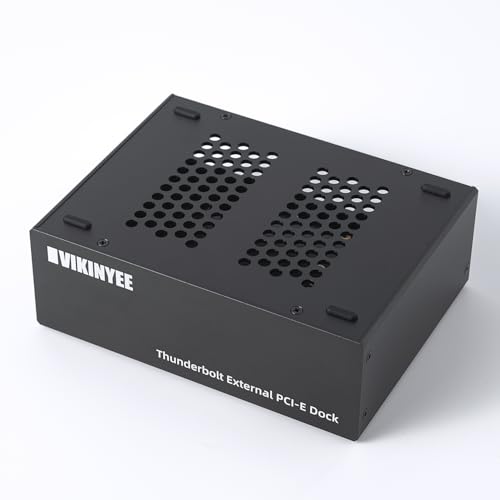
- 40Gbps Thunderbolt 3/4 and USB4 support
- Passive aluminum design for silent operation
- Adds DP 1.4 plus a second TB port
Best For: Quiet workstations needing capture, storage, or network card expansion
Top Pick

- TB3/TB4/USB4 support
- USB-A port plus daisy chain
- Supports wide NVIDIA/AMD card range
Best For: Laptop and NUC users who want an eGPU dock with basic hub features
Compact Choice

- Includes 750W PSU
- USB-A port and daisy chain
- Supports single- and dual-slot GPUs
Best For: Windows 11 users who want a compact eGPU enclosure with included power
Best Budget-Friendly
Mini eGPU Dock with Power Options

- Supports ATX, SFX, FLEX, and DC 12V supplies
- USB-A port and daisy chain
- 85W PD charging support
Best For: Users who want a compact eGPU dock with flexible power options
Thunderbolt 5 AI Workstation Dock – Plugable TBT5-AI eGPU Enclosure
If you want external gpu enclosures with usb hub features for a Windows 11 workstation, the Plugable TBT5-AI goes beyond basic graphics expansion. It pairs an 80Gbps Thunderbolt 5 connection with an included 850W PSU, 96W host charging, 2.5Gbps Ethernet, and USB-A/USB-C ports, making it a strong fit for a compact AI or creative setup.
Best For: Windows 11 users building a high-power AI or productivity eGPU setup with built-in hub features.
Pros:
- Thunderbolt 5 support with 80Gbps bandwidth and included cable
- 850W 80+ Gold PSU with up to 600W dedicated GPU power
- Built-in 96W charging, 2.5Gbps Ethernet, and downstream USB ports
- Supports NVIDIA and AMD cards up to 3.5-slot width
Cons:
- Windows 11 only; not compatible with macOS, Linux, or ChromeOS
- USB4 systems must explicitly support eGPU
- GPU is not included
This is a premium choice if you want a single enclosure to handle graphics, charging, networking, and USB expansion. It is especially appealing for AI model work where local processing and a secure air-gapped setup matter.
Premium TB5 Gaming Expansion – Razer Core X V2 External Graphics Enclosure
The Razer Core X V2 is a straightforward pick among external gpu enclosures with usb hub-style convenience when you want maximum graphics performance and easy device swapping. It uses Thunderbolt 5 up to 80Gbps, fits desktop NVIDIA and AMD cards up to 4 slots wide, and adds a built-in 120 mm fan for cooling during heavy loads.
Best For: Gamers and creators who want a clean Thunderbolt 5 eGPU setup with broad GPU support.
Pros:
- Thunderbolt 5 connection with up to 80Gbps bandwidth
- Supports NVIDIA and AMD desktop GPUs up to 4 slots wide
- Tool-free install with included thumbscrews
- Built-in 120 mm fan for active cooling
Cons:
- Graphics card and power supply are sold separately
- Only one USB port is listed in the specs
- Mac devices with M1 or later chips do not support eGPUs
This enclosure is best when graphics power matters more than extra built-in peripherals. If you already have a PSU and want a polished Thunderbolt 5 shell for a high-end GPU, it is an easy recommendation.
Budget Hub eGPU Dock – GODLIY Thunderbolt 4/3 USB4 Dock
The GODLIY dock is a practical option if you need external gpu enclosures with usb hub features without stepping up to a fully loaded premium model. It supports Thunderbolt 3, Thunderbolt 4, and USB4 devices, includes 85W PD charging, and adds a USB-A port plus a daisy-chain port for a little extra connectivity.
Best For: Users who want a simple Thunderbolt 4/USB4 eGPU dock with basic hub functionality.
Pros:
- Works with Thunderbolt 3, Thunderbolt 4, and USB4 devices
- Includes 85W PD charging
- Built-in USB-A port and daisy-chain port for hub-like use
- Supports NVIDIA and AMD PCIe cards
Cons:
- ATX power supply and graphics card are not included
- Requires a compatible TB3/TB4/USB4 port to function
- Not a high-bandwidth Thunderbolt 5 model
This is a good fit if you want a utility-focused dock for gaming, AI, or workstation tasks and do not need a premium chassis. Just plan on sourcing your own GPU and power supply.
Open-Frame USB4 eGPU Dock – RIITOP 40Gbps PCIe x16 Enclosure
If you are shopping for external gpu enclosures with usb hub features but care more about open compatibility than extras, the RIITOP 40Gbps dock is worth a look. It works with Thunderbolt 4 and USB4 systems, supports current NVIDIA and AMD cards, and uses an open design that avoids tight card-size limits.
Best For: DIY users who want a flexible open-frame eGPU dock for USB4 or Thunderbolt 4 systems.
Pros:
- 40Gbps USB4/TB4 connectivity for compatible devices
- Open design with no restriction on graphics card size
- Supports NVIDIA and AMD GPUs, including recent RTX and RX series
- Compatible with Windows, Linux, and macOS for supported GPU choices
Cons:
- Power supply is not included
- Graphics card is not included
- Requires a full-function Thunderbolt 4 or USB4 port
This enclosure makes the most sense if you already have parts and want a simple frame that is easy to adapt. It is less of an all-in-one dock and more of a practical platform for custom builds.
Compact USB4 eGPU Dock with Hub Features – ANQ-L336 Mini eGPU Enclosure
If you want external gpu enclosures with usb hub functionality in a compact build, the ANQ-L336 is aimed at laptop and handheld users who need both graphics expansion and a few useful extra ports. It supports Thunderbolt 3/4 and USB4 systems, works with NVIDIA and AMD GPUs, and adds 85W PD plus a 10Gbps USB-A port for added convenience.
Best For: Laptop, Mini PC, and handheld owners who want a compact USB4 eGPU enclosure with extra hub-style connectivity.
Pros:
- Officially certified JHL7440 controller for high-performance eGPU use.
- Supports Thunderbolt 3/4 and USB4 devices, including ROG Ally X and MSI Claw 8.
- Includes 85W power delivery and a 10Gbps USB-A port for accessory connection.
- Compatible with ATX, SFX, FLEX, and DC 12V power supply options.
Cons:
- PSU is not included.
- For NVIDIA GPUs, support is limited for RTX 50-series cards.
This is a practical pick if you want a small external GPU enclosure that also behaves a bit like a hub. It is strongest for users who value broad compatibility and straightforward expansion over maximum enclosure size.
Aluminum Multi-Use Graphics Dock – 4 USB4 Compatible External Graphics Dock
Among external gpu enclosures with usb hub-like expansion, this aluminum dock stands out for users who want a 40Gbps USB4 or Thunderbolt 4 connection and a more flexible PCIe slot layout. It supports full-length PCIe 16X cards, and its notes also call out use with PCIe SSDs, 10G network cards, and sound cards for broader workstation expansion.
Best For: Laptop users who need a high-bandwidth external graphics dock that can also handle other PCIe expansion cards.
Pros:
- 40Gbps USB4 and Thunderbolt 4 compatibility for modern laptops.
- Full-length PCIe 16X slot supports powerful desktop GPUs up to 650W.
- Can also accommodate PCIe SSDs, 10G network cards, and sound cards.
- Aluminum alloy construction helps with heat dissipation and portability.
Cons:
- No dedicated hub-style USB port list is provided in the notes.
- Power supply details are not specified in the supplied information.
This is a strong option if your priority is raw expansion flexibility rather than a traditional USB hub layout. It suits creators and gamers who want one enclosure for graphics plus other PCIe-based tools.
Silent PCIe Expansion Dock – Thunderbolt 4/3 USB4 PCIe Enclosure
If your search for external gpu enclosures with usb hub features is really about adding PCIe hardware alongside a clean desktop setup, this VIKINYEE chassis is worth a look. It is designed for Thunderbolt 3/4 and USB4 systems, provides 40Gbps bandwidth, and includes a second Thunderbolt port for daisy-chaining plus a DP 1.4 output for an external monitor.
Best For: Users who need a silent PCIe expansion enclosure for capture cards, storage, or networking gear.
Pros:
- Supports PCIe 3.0 x4 cards up to 145mm long over 40Gbps.
- Driverless operation on macOS, Windows, and Linux.
- Includes a second Thunderbolt port and DP 1.4 output.
- Passive aluminum design runs at 0dB for quiet environments.
Cons:
- It is designed for a single PCIe card, not a multi-slot expansion setup.
- Built for capture cards and similar devices rather than dedicated GPU docking.
This enclosure makes the most sense when silence and compatibility matter more than graphics-first features. It is especially appealing for studio or editing workflows that need a quiet PCIe add-on dock.
Top Pick – eGPU Dock with Built-In Hub
If you want one of the more versatile external gpu enclosures with usb hub features, this GOLDSOUN dock is built around Thunderbolt 3/4 and USB4 compatibility and adds a built-in USB-A port plus a daisy-chain port. It is aimed at users who need an eGPU solution for gaming, AI, or 3D work, while still leaving room to connect an extra peripheral.
Best For: Laptop and NUC users who want an eGPU dock with basic hub functionality and wide GPU support.
Pros:
- Supports Thunderbolt 3, Thunderbolt 4, and USB4 devices.
- Includes a USB-A port and daisy-chain port for extra connectivity.
- Supports NVIDIA RTX 50 series and AMD RX 7000 series cards.
- Uses an officially certified JHL7440 controller module.
Cons:
- Graphics card and ATX power supply are not included.
- Requires a Thunderbolt 3/4 or USB4 port to work.
- Has a 3-slot wide design, so fit depends on card size.
This is a strong pick if you want a straightforward eGPU dock that also functions like a small hub, especially for setups that need both graphics expansion and a couple of extra ports.
Compact Choice – 750W PSU eGPU Dock
Among external gpu enclosures with usb hub features, this ORARA model stands out for including a 750W PSU and a compact enclosure design. It supports Thunderbolt 3/4 and USB4 systems, and its built-in USB-A port and daisy-chain port make it useful when you want an eGPU dock that can also handle a small amount of peripheral expansion.
Best For: Windows 11 laptop and NUC owners who want a compact eGPU enclosure with included power supply support.
Pros:
- Includes a 750W PSU, reducing the need to source one separately.
- Built-in USB-A port and daisy-chain port add hub-like convenience.
- Compatible with Thunderbolt 3, Thunderbolt 4, and USB4.
- Supports single-slot and dual-slot graphics cards.
Cons:
- Does not support three-slot graphics cards.
- Requires Windows 11 for detection, per the notes.
- Not compatible with MacBook models using M1/M2/M3/M4 chips.
If you need a compact external graphics enclosure with a more complete power setup, this is a practical option, but GPU size limits make it better suited to smaller cards.
Best Budget-Friendly – Mini eGPU Dock with Power Options
If you are comparing external gpu enclosures with usb hub features and want flexibility, this mini ORARA dock supports Thunderbolt 3/4 and USB4 while also working with ATX, SFX, FLEX, and DC 12V power supplies. It adds a USB-A port and daisy-chain port, so it can double as a basic expansion dock in a smaller footprint.
Best For: Users who want a compact eGPU dock with multiple power-supply options and simple hub connectivity.
Pros:
- Supports ATX, SFX, FLEX, and DC 12V power supply types.
- Includes an 85W PD charging capability.
- Has a USB-A port and daisy-chain port for added connectivity.
- Compatible with Thunderbolt 3, Thunderbolt 4, and USB4 systems.
Cons:
- Does not include a DC 12V power adapter.
- Graphics card and ATX power are not included.
- Requires a Thunderbolt 3/4 or USB4 port and Windows 11 for best compatibility.
This mini dock makes sense if you want a smaller eGPU enclosure with hub basics and more power-supply flexibility, but you will need to plan your PSU and GPU separately.
How We Picked the Best External GPU Enclosures with USB Hub
We focused on enclosure designs that balance GPU performance, host connection speed, power delivery, and practical expansion. For this roundup, that means looking closely at Thunderbolt 3/4, USB4, and newer high-bandwidth options, along with PSU capacity, physical clearance, and port availability.
We also prioritized compatibility with common use cases like Windows laptops, mini PCs, gaming handhelds, and creator systems. When evaluating External GPU Enclosures with USB Hub features, the goal is not just graphics performance, but a setup that reduces dock clutter and supports real-world accessories.
Quick Comparison: What Matters Most
The best fit depends on how you plan to use the enclosure. High-wattage models make more sense for power-hungry GPUs, while compact units are better for travel-friendly or space-saving setups. If you need to connect storage, keyboards, capture devices, or controllers, integrated USB ports and hub functions can be just as important as raw PCIe bandwidth.
In short: choose bandwidth for performance, PSU for stability, and port layout for everyday convenience.
Key Buying Factors for External GPU Enclosures with USB Hub
Connection Standard
Thunderbolt 4 and USB4 are the most common choices, while Thunderbolt 5-class options offer more headroom for demanding workflows. Faster links help reduce bottlenecks, especially if you plan to game at high settings or run GPU-accelerated editing tasks.
Power Delivery and PSU Size
Check both host-device charging and internal PSU output. A stronger power supply is important for high-end graphics cards, but your laptop or handheld may also benefit from USB-C charging through the enclosure.
USB Hub and I/O Layout
Not all hubs are equal. Look for the ports you actually need, such as USB-A for peripherals, USB-C for fast accessories, or room for capture hardware and external storage. Good port placement can make External GPU Enclosures with USB Hub much easier to use day to day.
Card Size, Cooling, and Noise
Make sure the enclosure supports your GPU length, thickness, and power connectors. Cooling design matters too, since a cramped enclosure can raise temperatures and fan noise.
Who Should Buy Which External GPU Enclosures with USB Hub?
Choose a premium, high-wattage enclosure if you want the best path for a powerful desktop GPU and maximum versatility. Pick a compact USB4 or Thunderbolt model if you value portability, easier setup, or a smaller desk footprint. If your priority is a streamlined all-in-one workstation, focus on enclosures with the strongest mix of GPU support, charging, and hub ports rather than chasing the largest spec sheet.