When choosing the right fan-cooled SSD enclosure, you want to guarantee peak performance and longevity for your storage needs. These enclosures not only enhance heat dissipation but also boost data transfer speeds. With various options available, it can be tough to pinpoint the best choices. However, understanding key features and specifications can greatly impact your decision. Let’s explore the top contenders that could elevate your storage experience.
NVMe Enclosure with Cooling Fan for M.2 SSD

If you’re looking for a reliable solution to keep your M.2 SSD cool during intense workloads, the Xiaobi NVMe Enclosure with Cooling Fan is an excellent choice. This enclosure features a tool-free installation and a durable aluminum alloy design, making it easy to set up your M.2 SSD without any hassle. It supports various sizes and types of NVMe and SATA M.2 SSDs while ensuring high-performance data transfer rates up to 10Gbps. The built-in silent cooling fan and silicone thermal pad provide effective heat management, preventing overheating. This enclosure is compatible with multiple operating systems, backed by a one-year warranty.
Best For: Users seeking an efficient and compact solution to enhance the cooling and performance of their M.2 SSD during demanding tasks.
Pros:
- Tool-free installation allows for quick setup without the need for additional tools or drivers.
- Built-in cooling fan and silicone thermal pad provide superior heat dissipation, ensuring stable performance under heavy workloads.
- High data transfer rates of up to 10Gbps make it ideal for fast data access and transfer.
Cons:
- Limited compatibility as it does not support B-Key SATA or AHCI SSDs.
- M.2 SSDs with heatsinks are not supported, which may limit options for some users.
- Performance may vary depending on SSD specifications and system configuration.
FIDECO Hard Drive Enclosure for 3.5 or 2.5 inch SATA HDD SSD

The FIDECO Hard Drive Enclosure is an ideal choice for anyone looking to enhance their data storage solutions with robust cooling capabilities. It supports both 2.5 and 3.5-inch SATA HDDs and SSDs, making it versatile for different storage needs. With its USB 3.0 interface, you can enjoy data transfer speeds up to 5Gbps, while also being backward compatible with USB 2.0. The enclosure’s plug-and-play design means no extra drivers are needed, and it’s compatible with Windows, Mac, and Linux systems. Plus, FIDECO offers firmware updates and technical support for any questions you might have.
Best For: Users seeking a reliable and versatile hard drive enclosure for both 2.5 and 3.5-inch SATA HDDs and SSDs with efficient cooling.
Pros:
- High data transfer speeds of up to 5Gbps with USB 3.0 interface.
- Plug-and-play design eliminates the need for additional drivers, ensuring easy setup.
- Compatibility with multiple operating systems including Windows, Mac, and Linux.
Cons:
- New HDDs require initialization before they can be recognized by a computer.
- Cooling fan might introduce noise during operation, which could be distracting in quiet environments.
- Limited to SATA HDDs and SSDs, not supporting other types of drives.
ACASIS 40Gbps M.2 NVMe SSD Enclosure (TBU405 Pro)

For professionals engaged in tasks like video editing or large data backups, the ACASIS 40Gbps M.2 NVMe SSD Enclosure (TBU405 Pro) stands out with its impressive read/write speeds of up to 2805/2734 MB/s. This enclosure supports various M.2 sizes and is compatible with Thunderbolt 4, USB4, and multiple USB standards, making it versatile for Mac and PC users. The built-in cooling fan and precision heat dissipation holes prevent thermal throttling, ensuring stability during demanding workloads. Its compact, rugged design makes it easily portable, providing a premium solution for high-speed data access on the go.
Best For: Professionals engaged in video editing and large data backups who require high-speed data access and portability.
Pros:
- High-speed performance: Delivers read/write speeds up to 2805/2734 MB/s, ideal for demanding tasks.
- Versatile compatibility: Works with Thunderbolt 4, USB4, and multiple USB standards, supporting various operating systems.
- Effective cooling system: Features a built-in fan and heat dissipation holes to maintain performance during heavy workloads.
Cons:
- Fan activation required: The cooling fan must be manually activated, which may be inconvenient for some users.
- Limited to M.2 NVMe drives: Only compatible with M.2 drives, excluding other SSD formats.
- Potential thermal noise: The built-in fan may generate noise during operation, which could be distracting in quiet environments.
MOKiN M.2 NVMe SSD Enclosure with LCD Display and Cooling Fan

Designed for high-performance users, the MOKiN M.2 NVMe SSD Enclosure stands out with its impressive 80Gbps transfer rate, making it perfect for those who need to transfer large files quickly. It supports NVMe M.2 SSDs up to 8TB and requires a Thunderbolt 5 port for maximum speed. Its built-in cooling fan activates at 40°C, ensuring peak performance without thermal throttling. The LCD display keeps you informed about real-time temperature and fan speed, alerting you to potential issues. With an 18-month warranty and a solid 4.5-star rating, this enclosure is a reliable choice for any tech enthusiast.
Best For: Tech enthusiasts and professionals who require fast data transfer and efficient thermal management for large file storage needs.
Pros:
- High Transfer Rate: Achieves 80Gbps, allowing for rapid 100GB data transfers in just 15 seconds.
- Effective Cooling System: Built-in silent fan with adjustable speeds prevents overheating and maintains optimal performance.
- User-Friendly LCD Display: Real-time temperature and fan speed monitoring, with alerts for potential issues.
Cons:
- Thunderbolt 5 Requirement: Maximum speed is only achievable with a Thunderbolt 5 port, limiting compatibility with some devices.
- No SATA Support: Does not accommodate SATA M.2 SSDs, which may restrict options for users with older drives.
- Bulkier Design: The enclosure’s design may be less portable compared to simpler, non-fan variants.
SABRENT USB 3.0 to SATA External Hard Drive Docking Station

Looking for an effective way to manage your storage needs? The SABRENT USB 3.0 to SATA External Hard Drive Docking Station is an excellent choice. It supports both 2.5 and 3.5 SATA hard drives and features a built-in cooling fan to keep your drives at ideal temperatures. With hot-swappable functionality, you can easily swap drives without hassle. Plus, it’s plug and play—no drivers needed. Enjoy fast data transfers with a Serial ATA bus that supports up to 6Gbps, and back up drives up to 22TB. You’ll also get Acronis True Image software for effortless cloning.
Best For: Those who need an efficient solution for managing multiple SATA hard drives with ease and speed.
Pros:
- Supports both 2.5 and 3.5 SATA hard drives, offering versatility.
- Built-in cooling fan enhances drive longevity by maintaining optimal temperatures.
- Hot-swappable functionality allows for easy drive management without restarting your system.
Cons:
- Limited to SATA drives, so it won’t accommodate other types of storage.
- The maximum drive capacity support of 22TB may not be sufficient for all users.
- Requires a USB 3.0 port for optimal performance, which may not be available on older devices.
SABRENT USB4 NVMe SSD Enclosure (EC-U4TN)
The SABRENT USB4 NVMe SSD Enclosure (EC-U4TN) stands out with its tool-free installation, making it a top choice for creators and mobile power users who demand quick setup and exceptional performance. You’ll enjoy impressive transfer speeds up to 3,900 MB/s with USB4 and 2,700 MB/s with Thunderbolt 3/4. Its compatibility spans various SSD sizes (2230/2242/2260/2280), ensuring versatility. Constructed from premium aluminum and ABS, it features an integrated active cooling fan to keep your drive cool during large file transfers. This enclosure is perfect for those needing fast, portable storage optimized for PCIe Gen4 x4 SSDs like the Sabrent Rocket 4 Plus.
Best For: Creators, editors, and mobile power users seeking fast, portable external storage with easy installation.
Pros:
- Pros:
- Tool-free installation for quick setup.
- High transfer speeds up to 3,900 MB/s with USB4.
- Integrated active cooling fan for enhanced performance during large file transfers.
Cons:
- Cons:
- Not compatible with SATA M.2 SSDs.
- Limited to PCIe NVMe SSDs, which may restrict options.
- The premium materials may make it pricier than basic enclosures.
Rosewill 40Gbps M.2 NVMe SSD Enclosure with Cooling Fan
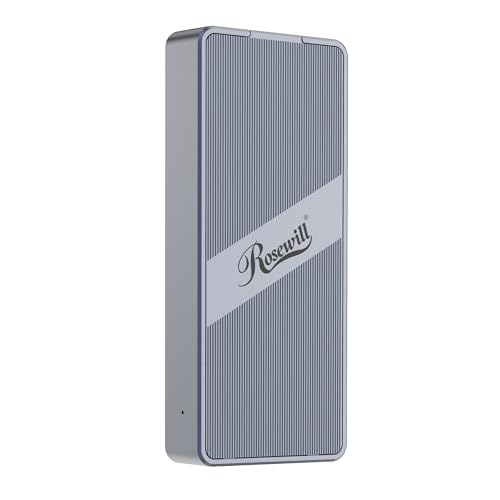
For professionals who need fast and reliable storage solutions, the Rosewill 40Gbps M.2 NVMe SSD Enclosure with Cooling Fan stands out as a top choice. Supporting M.2 NVMe SSDs up to 8TB, it delivers impressive read/write speeds of up to 3187MB/s. The built-in fan guarantees effective heat dissipation, allowing for up to 4 hours of full-speed operation without overheating. Its compact design makes it portable, perfect for mobile professionals. Compatible with various devices, including MacBook and Chrome, it’s powered by a reliable ASM2464PD chip. Plus, you get peace of mind with a 1-year warranty and responsive customer support.
Best For: Mobile professionals and tech enthusiasts seeking fast, reliable external storage solutions for their M.2 NVMe SSDs.
Pros:
- High performance with read/write speeds up to 3187MB/s.
- Effective cooling with a built-in fan, allowing for prolonged high-speed operation.
- Compact and lightweight design, making it easy to transport.
Cons:
- Limited to M.2 NVMe SSDs, which may not suit users with other SSD formats.
- Requires specific compatibility with Thunderbolt 3/4 and USB4 for optimal performance.
- May generate noise from the cooling fan during operation.
GRAUGEAR M.2 NVMe SATA PCIe SSD Enclosure Adapter Docking Station

If you’re a tech enthusiast who values high performance and efficient cooling, the GRAUGEAR M.2 NVMe SATA PCIe SSD Enclosure Adapter Docking Station is an excellent choice. Featuring USB3.2 Gen2 speeds up to 10Gbps, it guarantees rapid data transfer while maintaining compatibility with various M.2 SSD sizes and protocols. The built-in 50 mm cooling fan, combined with an aluminum heatsink, effectively prevents overheating, keeping your SSD running smoothly. Its tool-free design makes installation a breeze, and the plug-and-play functionality lets you switch SSDs effortlessly. Plus, safety features like short-circuit protection assure peace of mind during use.
Best For: Tech enthusiasts and professionals seeking a high-performance SSD enclosure with efficient cooling and easy installation.
Pros:
- Supports data transfer speeds up to 10Gbps with USB3.2 Gen2, ensuring rapid file transfers.
- Built-in cooling fan and aluminum heatsink provide effective heat dissipation, preventing overheating.
- Tool-free design and plug-and-play functionality allow for easy installation and switching of SSDs.
Cons:
- Requires formatting of M.2 SSD before first use, which may be inconvenient for some users.
- Compatibility limited to M.2 SSDs, so it won’t work with other types of drives.
- Active cooling fan may produce noise, which could be a concern in quiet environments.
fanxiang SSD Enclosure with Cooling Fan (MD85)

Designed with gamers and content creators in mind, the fanxiang SSD Enclosure (MD85) stands out for its efficient built-in cooling fan. This M.2 NVMe/SATA enclosure supports SSDs up to 4TB and offers impressive data transfer rates of up to 10 Gbps via USB 3.2 Gen 2. It’s compatible with various devices, including laptops, desktops, and gaming consoles like the PS5 and Xbox Series. The sturdy aluminum alloy construction guarantees durability, while the shock-resistant design protects your data. Plus, with plug-and-play functionality and a three-year warranty, you can enjoy fast, reliable performance without hassle.
Best For: Gamers and content creators seeking efficient storage solutions with high data transfer speeds and enhanced cooling systems.
Pros:
- Supports up to 4TB SSDs for ample storage capacity.
- Built-in cooling fan ensures optimal performance during intensive tasks.
- Plug-and-play installation makes it user-friendly with no additional drivers required.
Cons:
- Limited to one SSD at a time, restricting multi-drive setups.
- Cooling fan operates at 30-40 dB, which may be noticeable in quiet environments.
- Weight of 85 g may be considered slightly heavier compared to other enclosures.
ACASIS 40Gbps M.2 NVMe SSD Enclosure with Cooling Fan

The ACASIS 40Gbps M.2 NVMe SSD Enclosure with Cooling Fan stands out as the ideal choice for professionals who demand high-speed performance and reliability during intensive tasks like video editing and data backup. With support for Thunderbolt 5/4/3 and USB standards, it’s compatible with devices like MacBook and Windows. You’ll enjoy impressive read/write speeds up to 2805/2734 MB/s, making data access swift. The built-in silent cooling fan and aerospace-grade aluminum guarantee your SSD stays cool, enhancing performance. Plus, its compact design makes it easy to carry, perfect for on-the-go professionals seeking a reliable storage solution.
Best For: Professionals needing high-speed, reliable data storage for intensive tasks like video editing and data backup.
Pros:
- High-speed performance with read/write speeds up to 2805/2734 MB/s for efficient data access.
- Versatile compatibility with Thunderbolt and USB standards, making it suitable for various devices including MacBook and Windows.
- Effective cooling system with a built-in silent fan and thermal pad to maintain optimal SSD performance during heavy workloads.
Cons:
- Limited storage size options as it primarily supports M.2 sizes.
- May require additional setup for certain configurations, which could be challenging for less tech-savvy users.
- Price point may be higher compared to standard SSD enclosures, making it less accessible for budget-conscious consumers.
Factors to Consider When Choosing Fan Cooled SSD Enclosures
When you’re choosing a fan-cooled SSD enclosure, you’ll want to reflect on several key factors. Cooling efficiency is essential to keep your SSD performing well, and you need to guarantee compatibility with your specific SSD type. Don’t overlook data transfer speeds, design, portability, and how easy the installation process is for you.
Cooling Efficiency Importance
Although you might not think about it right away, cooling efficiency plays a fundamental role in the performance and longevity of your SSD. Effective cooling is essential during intensive data transfers, as overheating can cause thermal throttling, reducing performance and shortening your drive’s lifespan. Fan-cooled enclosures typically feature active cooling systems, markedly lowering operating temperatures under heavy workloads. Many include silent cooling fans that operate at noise levels as low as 30-40 dB, ensuring a quiet environment without sacrificing cooling efficiency. The combination of active cooling and high-quality materials, like aluminum alloy and silicone thermal pads, enhances heat dissipation. This is especially important for high-speed SSDs used in demanding applications like video editing and gaming, where overheating can compromise performance.
Compatibility With SSD Types
Choosing the right fan-cooled SSD enclosure hinges on understanding compatibility with various SSD types. First, guarantee the enclosure supports specific SSD key types like M-Key or B+M Key, as these have different compatibility needs. Next, check the size compatibility; common M.2 SSD sizes include 2230, 2242, 2260, and 2280, so the dimensions must match. Be aware that not all enclosures support SATA SSDs, especially those made for NVMe SSDs, so verify protocol compatibility before you buy. Also, consider the maximum storage capacity the enclosure can handle, with some supporting up to 4TB or even 8TB. Finally, remember to initialize any new or unformatted SSDs before use, as this is essential for recognition by your operating system.
Data Transfer Speeds
Data transfer speeds are essential to your experience with fan-cooled SSD enclosures, as they can greatly impact performance. Some enclosures offer impressive speeds up to 40Gbps, while others cap at 10Gbps or 5Gbps, depending on their interface and technology. The actual transfer rate hinges on several factors, including your SSD’s performance, the speed of the USB or Thunderbolt interface, and supported protocols like UASP. Enclosures built for high-speed connections, such as Thunderbolt 3 or USB4, provide superior read and write speeds, perfect for video editing or large file transfers. Plus, effective heat dissipation helps maintain consistent performance during heavy workloads, preventing throttling that could slow your data transfer speeds.
Design and Portability
When selecting a fan-cooled SSD enclosure, design and portability are vital factors to take into account. Look for enclosures made from lightweight and durable materials like aluminum alloy; this not only guarantees protection but also enhances portability. Consider compact designs that easily fit into your laptop bag for convenient travel. While you might appreciate tool-free installation features for quick setups, it’s important to evaluate the cooling system. Confirm it includes a fan that prevents overheating during extended use, all while maintaining a portable form factor. Finally, check that the enclosure allows for proper heat dissipation without sacrificing performance, making sure your SSD remains cool and efficient on the go.
Installation Ease
While portability and design play a significant role in selecting a fan-cooled SSD enclosure, installation ease is just as important. Look for tool-free options that let you quickly insert or replace SSDs without needing screws or extra tools. Many enclosures feature a plug-and-play design, so you won’t need drivers or software for immediate compatibility with your system. A sandwich-style design can simplify access to M.2 SSDs, accommodating sizes like 2230, 2242, 2260, and 2280 effortlessly. Make sure to check if the enclosure supports SSDs with heatsinks, as not all do. Finally, clear installation instructions or user manuals can guide you through proper SSD placement and formatting, enhancing your overall setup experience.
Build Material Quality
Build material quality plays an essential role in the performance and longevity of fan-cooled SSD enclosures. Opting for an enclosure made from aluminum alloy is a smart choice, as it offers excellent thermal conductivity and durability. High-quality materials enhance resistance to wear and tear, ensuring your enclosure remains reliable during heavy usage or transport. Enclosures crafted from aviation-grade aluminum excel in heat management, vital for maintaining peak SSD performance under demanding workloads. Additionally, consider the weight and portability of the materials, as lightweight yet sturdy designs make transport easier without sacrificing structural integrity. A well-designed enclosure may also include thermal pads or passive cooling elements, further enhancing heat management alongside the fan.
Warranty and Support Options
Choosing the right fan-cooled SSD enclosure involves more than just performance specs; warranty and support options are equally important. Start by checking the warranty period offered by the manufacturer. A standard 1-year warranty is common, but some brands provide extended warranties up to 3 years, ensuring long-term reliability. Customer support also matters—look for options like technical assistance and firmware updates, which can help you troubleshoot issues that may pop up. Additionally, review the return policy; a generous return window allows you to test the product without hassle. Finally, consider manufacturers with dedicated service channels for warranty claims, as excellent support can greatly enhance your overall user experience and confidence in your purchase.