If you’re looking to maximize the potential of your PCIe 4 SSDs, choosing the right USB4 enclosure is essential. With options that offer up to 40Gbps speeds and versatile compatibility, you’ll find several models that stand out for their design and performance. From tool-free installations to effective thermal management, these enclosures can greatly enhance your storage experience. Let’s explore the top contenders and what makes them worth your consideration.
SABRENT USB4 NVMe SSD Enclosure (Tool-Free, USB 4.0 Compatible)
The SABRENT USB4 NVMe SSD Enclosure is the perfect choice for creators and mobile power users who need fast, reliable external storage. With its tool-free design, you can easily install PCIe NVMe SSDs in various sizes—2230, 2242, 2260, or 2280. Experience lightning-fast transfer speeds up to 3,900 MB/s with USB4, and enjoy backward compatibility with Thunderbolt 3 and USB-C ports. Constructed from premium aluminum and ABS, it features an integrated cooling fan to prevent overheating during large file transfers. This enclosure is optimized for PCIe Gen4 x4 SSDs like the Sabrent Rocket 4 Plus, ensuring excellent performance.
Best For: Creators, editors, and mobile power users requiring fast, portable external storage solutions.
Pros:
- Tool-free installation makes it easy to swap out PCIe NVMe SSDs of various sizes.
- Lightning-fast transfer speeds of up to 3,900 MB/s with USB4 for efficient data handling.
- Integrated active cooling fan helps maintain performance during large file transfers, preventing overheating.
Cons:
- Not compatible with SATA M.2 SSDs, limiting options for users with those drives.
- Requires PCIe NVMe SSDs for optimal performance, which may not be available to all users.
- Premium aluminum and ABS construction may make it less lightweight compared to some plastic enclosures.
UGREEN 40Gbps M.2 NVMe Enclosure for Thunderbolt and USB Compatibility

For tech enthusiasts and professionals who demand lightning-fast data transfer speeds, the UGREEN 40Gbps M.2 NVMe Enclosure stands out as an ideal choice. Its aluminum construction features a unique cooling system, ensuring efficient heat dissipation while supporting NVMe SSD sizes up to 8TB. With compatibility for Thunderbolt 4 and USB4, you’ll experience maximum speeds of 3600MB/s. This ultra-slim, portable design makes it easy to take on the go. Plus, it works seamlessly with various operating systems, including Windows and Mac OS. You can count on UGREEN’s 1-year warranty and solid customer support for peace of mind.
Best For: Tech enthusiasts and professionals seeking high-speed data transfer with portable storage solutions.
Pros:
- High data transfer speeds of up to 3600MB/s with Thunderbolt compatibility.
- Compact and lightweight design for easy portability.
- Supports NVMe SSDs up to 8TB, making it suitable for extensive storage needs.
Cons:
- SSD is not included, requiring an additional purchase.
- Does not support SATA NGFF or mSATA SSDs, limiting compatibility.
- Optimal performance requires Thunderbolt 4 cables/devices, which may not be available to all users.
MOKiN M.2 NVMe SSD Enclosure with LCD Display

With its impressive 80Gbps transfer rate, the MOKiN M.2 NVMe SSD Enclosure with LCD Display is perfect for professionals and enthusiasts who demand rapid data access and large storage capacity. You can easily accommodate NVMe M.2 SSDs up to 8TB, making it ideal for extensive media libraries or project backups. The built-in cooling system, featuring a silent fan, activates at 40°C to prevent overheating, while the LCD display keeps you informed of the temperature and fan speed. Compatible with various operating systems and devices, it’s a solid choice backed by an 18-month warranty and a 30-day return policy.
Best For: Professionals and enthusiasts who require high-speed data transfer and large storage capacity for demanding applications.
Pros:
- High Transfer Rate: Achieves up to 80Gbps, significantly faster than traditional SSD readers.
- Efficient Cooling System: Built-in silent fan with temperature monitoring prevents overheating.
- Wide Compatibility: Works with various operating systems and supports NVMe M.2 SSDs up to 8TB.
Cons:
- Requires Thunderbolt 5: Maximum speed can only be achieved with a Thunderbolt 5 port.
- Limited SSD Type Support: Does not support SATA M.2 SSDs, which may limit options for some users.
- Potential Overheating Alerts: While it has a cooling system, users may still experience alerts for overheating or fan issues.
Plugable M.2 NVMe SSD Enclosure (Tool-Free & Driverless)

Designed for tech enthusiasts and professionals alike, the Plugable M.2 NVMe SSD Enclosure stands out with its tool-free installation feature, making it incredibly user-friendly. You can easily connect M.2 NVMe SSDs from 2230 to 2280 sizes without any tools. With support for both PCIe Gen 3 and 4, this enclosure offers lightning-fast transfer speeds of up to 10Gbps, ensuring efficient data handling. Its compact aluminum design is travel-friendly, and the low-profile heatsink fins help manage heat, protecting your data. Plus, it works across various platforms without needing drivers, ensuring hassle-free compatibility with your devices.
Best For: Tech enthusiasts and professionals looking for a user-friendly, high-speed solution to connect and manage M.2 NVMe SSDs.
Pros:
- Tool-free installation allows for quick and hassle-free SSD setup.
- Supports high transfer speeds of up to 10Gbps for efficient data handling.
- Cross-platform compatibility means it works seamlessly with various operating systems without needing drivers.
Cons:
- Not compatible with M.2 SATA or AHCI drives, limiting options for some users.
- SSD not included, requiring an additional purchase for complete functionality.
- Limited to M.2 NVMe sizes, which may not meet the needs of users with other form factors.
WAVLINK USB4 External M.2 NVMe SSD Enclosure

The WAVLINK USB4 External M.2 NVMe SSD Enclosure stands out as an ideal choice for tech enthusiasts and professionals seeking lightning-fast data transfer speeds. With USB4 speeds reaching 40Gbps and read/write performance up to 3800MB/s, you’ll experience unmatched efficiency. It supports SSD capacities up to 8TB, perfect for extensive file storage. The enclosure features a full aluminum body with advanced cooling, ensuring peak performance during heavy use. Plus, its plug-and-play design makes installation a breeze, while compatibility with multiple operating systems means versatility. Intelligent technology further enhances protection and lifespan, making it a reliable addition to your tech arsenal.
Best For: Tech enthusiasts and professionals who require high-speed data transfer and extensive storage capabilities.
Pros:
- Ultra-fast performance with USB4 speeds up to 40Gbps and read/write rates of up to 3800MB/s.
- Robust cooling system featuring a full aluminum body and built-in fan for optimal temperature management.
- User-friendly design allows for tool-free installation and plug-and-play functionality across various operating systems.
Cons:
- Limited to PCIe NVMe SSDs; does not support AHCI/SATA SSDs, which may restrict compatibility for some users.
- SSD not included, requiring separate purchase of compatible SSD for functionality.
- Compact size may lead to overheating in extremely intensive use cases despite cooling features.
UGREEN M.2 NVMe Enclosure with Cooling Fan

If you’re a MacBook user looking to enhance your storage capabilities, the UGREEN M.2 NVMe Enclosure with Cooling Fan is an excellent choice. This enclosure supports various M/B+M key sizes and features an aluminum casing for superb heat conductivity. Its exclusive triple heat dissipation mechanism includes a silicone thermal pad and a high-speed cooling fan, ensuring your SSD remains cool and stable. With UASP acceleration, it provides impressive performance and compatibility across multiple USB standards. Plus, S.M.A.R.T. technology keeps an eye on your drive’s health, ensuring secure data transfers and extending the lifespan of your SSD.
Best For: MacBook users seeking to expand their storage with a high-performance, reliable M.2 NVMe enclosure.
Pros:
- Excellent heat dissipation with a triple mechanism, including a cooling fan and thermal pad.
- High-speed performance with UASP acceleration and compatibility with various USB standards.
- S.M.A.R.T. technology for monitoring drive health and ensuring secure data transfers.
Cons:
- Does not support SSDs with heatsinks or M.2 PCIe 5.0 SSDs.
- Limited to a maximum capacity of 4TB for M/B+M key NVMe SSDs.
- May generate noise from the cooling fan during operation, depending on usage.
Cable Matters Portable USB4 / Thunderbolt 4 SSD Enclosure for M.2 NVMe SSD
For on-the-go professionals seeking lightning-fast data transfer, the Cable Matters Portable USB4 / Thunderbolt 4 SSD Enclosure is an exceptional choice. With a compact, foldable design, it supports M.2 types 2280, 2260, 2242, and 2230, and offers impressive read speeds up to 3800MB/s and write speeds up to 3600MB/s. Thanks to its temperature-controlled fan, you won’t have to worry about overheating during intense transfers. The tool-free installation guarantees a seamless plug-and-play experience, while the dual-color LED indicator keeps you informed of your connection speed. Just remember, it’s only compatible with single-sided M.2 NVMe SSDs.
Best For: On-the-go professionals who require high-speed data transfer and portability in their SSD storage solutions.
Pros:
- Offers lightning-fast data transfer speeds of up to 40Gbps.
- Compact and foldable design makes it highly portable for travel.
- Equipped with a temperature-controlled fan to prevent overheating during high-speed transfers.
Cons:
- Only compatible with single-sided M.2 NVMe SSDs, excluding double-sided models.
- Limited to M.2 types, which may not suit all SSD users.
- Requires a compatible host with Thunderbolt 4 or USB4 support for optimal performance.
M.2 NVMe SSD Enclosure (Compatible with Thunderbolt and USB)

Designed for tech enthusiasts and professionals alike, the M.2 NVMe SSD Enclosure delivers lightning-fast data transfer rates of up to 40Gbps, making it the perfect choice for anyone needing high-speed storage solutions. Compatible with Thunderbolt 3/4 and USB, it supports various SSD sizes, from 2230 to 2280. The built-in ASM2464PD chip guarantees your data’s safety with short-circuit protection, while the aluminum shell and cooling fan prevent overheating during use. With tool-free installation and universal compatibility across multiple operating systems, this compact enclosure is ideal for on-the-go users. Enjoy peace of mind with an 18-month warranty and responsive customer support.
Best For: Tech enthusiasts and professionals seeking high-speed, reliable storage solutions for their M.2 NVMe SSDs.
Pros:
- Fast data transfer rates of up to 40Gbps, ensuring efficient file transfers and quick access to data.
- Tool-free installation makes it easy to set up and swap SSDs without the need for additional tools.
- Robust cooling system with an integrated fan and aluminum shell to prevent overheating during prolonged usage.
Cons:
- Not compatible with SATA SSDs, limiting its use to specific types of M.2 NVMe SSDs only.
- Compact design may sacrifice some durability if not handled carefully.
- Higher price point compared to basic SSD enclosures, which may deter budget-conscious buyers.
ZIKE ZikeDrive Z666 M.2 NVMe SSD Enclosure

The ZIKE ZikeDrive Z666 M.2 NVMe SSD Enclosure stands out as an excellent choice for gamers and creative professionals who need rapid data access and transfer speeds. With a blazing data transfer rate of up to 40Gbps and read speeds reaching 3,811MB/s, this compact enclosure guarantees swift performance. Its tool-free installation makes assembly a breeze, while the premium aluminum alloy casing provides effective heat dissipation. Compatible with various devices like desktops, laptops, and even PlayStation 5, it’s perfect for storage expansion. Plus, with a 2-year warranty and solid customer ratings, you’ll feel confident in your investment.
Best For: Gamers and creative professionals seeking high-speed data access and efficient storage expansion.
Pros:
- Tool-free installation allows for quick assembly and disassembly.
- Premium aluminum alloy casing ensures effective heat dissipation during use.
- High compatibility with various devices, including desktops, laptops, and PlayStation 5.
Cons:
- Limited to a maximum storage capacity of 1TB.
- Data transfer rate may vary based on device compatibility and conditions.
- Initial cost may be higher compared to traditional storage solutions.
ORICO M.2 NVMe SSD Enclosure (Compatible with Thunderbolt and USB)
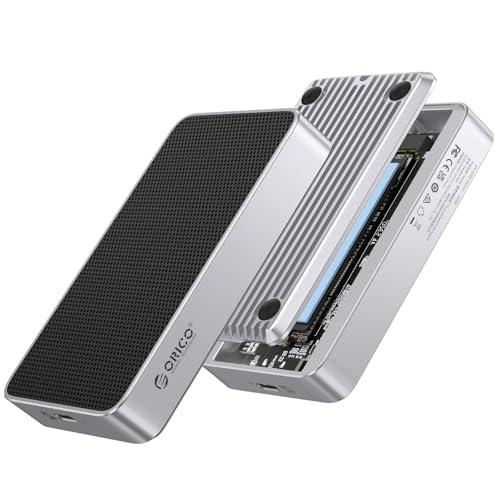
Content creators and gamers seeking lightning-fast data transfer speeds will find the ORICO M.2 NVMe SSD Enclosure an exceptional choice. With compatibility for PCIe Gen 5 and Gen 4 SSDs, it delivers impressive read/write speeds up to 6000 MB/s. The innovative Ice-Sense Silent Cooling technology enhances thermal efficiency by 30%, ensuring your SSD stays cool during intense tasks. It supports NVMe M.2 SSDs up to 8TB and utilizes a smart dual-chip design for USB4 V2.0 performance. Just remember, to achieve the full 80Gbps, you’ll need compatible cables and devices, as Thunderbolt 3 may limit speeds.
Best For: Content creators, gamers, and professionals in need of fast data transfer and efficient cooling for large files.
Pros:
- High-speed performance: Offers read/write speeds up to 6000 MB/s with PCIe Gen 5 and Gen 4 SSD compatibility.
- Advanced cooling technology: Features Ice-Sense Silent Cooling for improved thermal efficiency, keeping your SSD cool under load.
- Large storage capacity: Supports NVMe M.2 SSDs up to 8TB, making it ideal for managing sizable files.
Cons:
- Limited compatibility with Thunderbolt 3: Users may only achieve USB speeds up to 10Gbps instead of the full 80Gbps.
- Not compatible with SATA SSDs: Does not support M.2 (B-KEY) or (M&B)-KEY SATA NGFF SSDs.
- Requires specific cables and devices for optimal performance: To reach 80Gbps speeds, compatible high-speed cables and host devices are necessary.
Factors to Consider When Choosing USB4 SSD Enclosures for PCIe 4 SSDs
When you’re picking a USB4 SSD enclosure for your PCIe 4 SSD, there are several key factors to keep in mind. You’ll want to take into account transfer speed capabilities, cooling mechanisms, and compatibility with your devices. Additionally, the installation process and build quality can greatly impact your overall experience.
Transfer Speed Capabilities
Choosing the right USB4 SSD enclosure for your PCIe 4 SSD can greatly impact your data transfer speeds. USB4 enclosures can reach impressive speeds of up to 40Gbps, making them ideal for PCIe 4 SSDs. You’ll often see read speeds exceeding 3,800 MB/s and write speeds around 3,600 MB/s, maximizing your data efficiency. However, keep in mind that the actual transfer speeds can vary depending on the enclosure’s chipset and compatibility with your device, particularly if you’re using Thunderbolt 3 or 4. If you’re connecting to USB 3.2 or USB 3.1 ports, expect lower speeds, often dropping to 10Gbps or less. Make sure to choose wisely to achieve peak performance.
Cooling Mechanisms
Effective cooling mechanisms are essential for maintaining ideal performance in USB4 SSD enclosures, especially for high-speed PCIe 4 SSDs that can generate substantial heat during data transfers. Look for enclosures made from aluminum alloy with perforated designs, which enhance heat dissipation through passive cooling while keeping the weight down. You might also consider enclosures with active cooling solutions, like built-in fans that can adjust speeds based on thermal conditions. Advanced thermal management features, such as silicone thermal pads and cooling films, help conduct heat away efficiently. Finally, check for real-time temperature monitoring systems with integrated LCDs, as they alert you to overheating risks, allowing you to protect your SSD’s longevity and performance effectively.
Compatibility With Devices
As you explore USB4 SSD enclosures for your PCIe 4 SSDs, compatibility with your devices is essential for maximum performance. First, verify the enclosure supports the specific M.2 NVMe SSD sizes (2230, 2242, 2260, 2280) you plan to use, as compatibility can vary widely. Next, check if it works with your operating system; some enclosures are compatible with Windows, macOS, Linux, and Android, while others may not be. Don’t forget to verify the connection ports—enclosures that support Thunderbolt 3, Thunderbolt 4, USB4, and USB-C will help you achieve superior data transfer speeds. Finally, make sure the enclosure is designed for PCIe NVMe SSDs, as not all support SATA M.2 SSDs. Look for UASP and TRIM support for enhanced performance.
Installation Process
When it comes to installing your USB4 SSD enclosure for PCIe 4 SSDs, ease of use is a key factor to take into account. Many enclosures offer tool-free installation, letting you easily insert and remove M.2 NVMe SSDs without any extra tools. Make sure the enclosure supports your specific SSD dimensions—common sizes include 2230, 2242, 2260, and 2280. Some models even feature a retrieval card pin for quick access, simplifying the whole process. It’s essential to verify that the enclosure is compatible only with PCIe NVMe SSDs, as using SATA M.2 SSDs can lead to installation issues. Additionally, consider enclosures with built-in cooling systems to help manage temperatures during those high-speed data transfers.
Build Quality
Build quality plays a critical role in the performance and longevity of USB4 SSD enclosures for PCIe 4 SSDs. You should look for premium materials like aluminum and ABS, which guarantee durability and effective heat dissipation. A well-constructed enclosure includes thermal management features such as integrated cooling fans or heat sinks to prevent thermal throttling, maintaining peak SSD performance. Tool-free designs enhance usability, allowing you to install or remove SSDs easily without extra tools. While portability is important, confirm the enclosure remains lightweight yet structurally sound. Finally, the quality of internal components like the chipset and connectors greatly impacts performance and compatibility with various SSD types and speeds, so choose wisely to get the best experience.
Portability Features
Selecting a USB4 SSD enclosure isn’t just about build quality; portability features greatly enhance your experience, especially for those who are frequently on the move. Look for a compact and lightweight design to make traveling easier. A tool-free installation feature is essential, allowing you to set up quickly without the hassle of additional tools. Integrated cooling systems can prevent overheating while maintaining a small footprint, balancing performance and portability. Also, consider a durable aluminum casing that protects against physical damage without adding extra weight. Finally, verify the dimensions and weight fit comfortably in your laptop bag or backpack, so you can carry your SSD enclosure effortlessly wherever you go.