A fanless desktop can make a shared office, reception desk, or meeting room quieter without taking up much space. The right choice depends less on size than on whether its processor, memory, storage, and ports fit your daily work.
These 10 picks span everyday Windows mini PCs and industrial-style systems with extra network or serial connections. Use the buying guide below to narrow down which type makes sense for your workspace.
Best 10 Fanless Desktop PC for Office Picks for 2026
Best for Everyday Multitasking

- Eight-core Intel N300
- 16GB RAM and 512GB PCIe SSD
- Fanless design with VESA mount
Best For: Quiet desks and everyday productivity
Best for Three-Monitor Desks
MeLE Business Grade Quieter 4C N150

- Three 4K display outputs
- 16GB RAM and 512GB storage
- USB-C handles video, data, and power
Best For: Quiet, multi-monitor office desks
Best for Legacy Office Devices

- Two RS232 and two Gigabit LAN ports
- Eight USB ports and dual displays
- 16GB RAM and 512GB SSD
Best For: Peripheral-heavy offices and wired setups
Best for Compact Light-Duty Desks

- Slim, fanless 0.7-inch case
- Triple-display support
- 8GB RAM and 128GB eMMC
Best For: Light office work in tight spaces
Best for Legacy Peripherals
Thdeukoty i7-5500U Industrial Mini PC

- 16GB RAM and 256GB SSD
- Two RS232 and two Gigabit LAN ports
- Fanless with HDMI/VGA dual-display support
Best For: Offices using serial peripherals and mixed-generation displays
Best for Multi-Monitor Desks
- N100 with 16GB LPDDR5 and 512GB storage
- Three 4K/60Hz display outputs
- USB-C supports display, data, and power
Best For: Quiet desks with up to three monitors
Best for Industrial Office Stations

- Fanless, full-metal enclosure
- Dual RS232 and dual Gigabit LAN
- Windows 10 Pro with 8GB RAM and 128GB SSD
Best For: Fixed stations connecting industrial or legacy equipment
Best Compact Network Pick

- Fanless 0.34L aluminum chassis
- Dual 2.5G Ethernet ports
- 8GB RAM and expandable SSD storage
Best For: Quiet, space-limited networked offices
Best for Serial-Heavy Workstations
KINGDEL Core i7 Industrial Mini PC
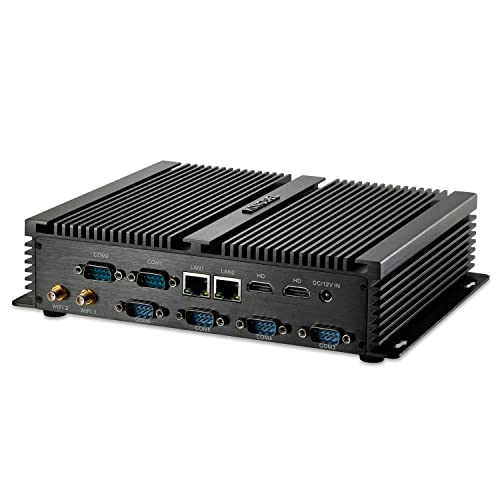
- Six RS232 serial ports
- Dual LAN and two HDMI ports
- Fanless metal enclosure
Best For: Offices connecting several serial devices
Best for Legacy Display Setups
KINGDEL Celeron Industrial Mini PC
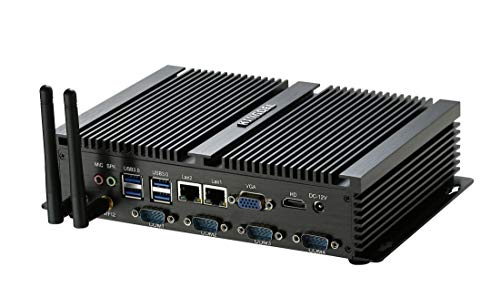
- HDMI and VGA display connections
- Four RS232 ports and dual LAN
- Fanless metal case
Best For: Basic stations with VGA and serial equipment
Best for Everyday Multitasking – MINIX NEO Z300-0dB
The MINIX NEO Z300-0dB is a fanless desktop pc for office work that pairs an eight-core Intel N300 with 16GB of RAM and a 512GB PCIe SSD. It comes with Windows 11 Pro and uses passive cooling to keep a quiet workspace free of fan noise.
Best For: Shared offices or quiet desks running everyday productivity apps, browser tabs, and media.
Pros:
- Eight-core N300 and 16GB RAM support everyday multitasking.
- 512GB SSD; RAM is upgradeable to 32GB, and storage expansion is supported up to 4TB.
- Includes a VESA mount for a compact desk setup.
Cons:
- The top cover can become warm during operation.
- Integrated graphics make it a better fit for routine office work than graphics-heavy tasks.
Choose this model if you want a silent, ready-to-use Windows office PC with more memory and storage headroom than a basic mini PC. Leave room around its case for passive cooling.
Best for Three-Monitor Desks – MeLE Business Grade Quieter 4C N150
For a fanless desktop pc for office setups with multiple screens, the MeLE Business Grade Quieter 4C combines an Intel N150, 16GB of RAM, and 512GB of storage. Two HDMI ports and a full-function USB-C port support three 4K displays at 60Hz, according to the supplied specifications.
Best For: Quiet workstations that need three displays without a full-size desktop.
Pros:
- Supports simultaneous triple-display output through two HDMI ports and USB-C.
- 16GB RAM and 512GB storage are suited to everyday office tasks.
- USB-C supports display output, data, and PD power input; storage can be expanded by microSD or an internal M.2 SSD.
Cons:
- Fanless operation can leave the exterior notably warm; MeLE specifies a surface temperature of 55°C to 70°C.
- Its four-core N150 is aimed at efficient daily computing, not demanding workstation workloads.
This is the most flexible display choice here for a compact desk. Check your USB-C display and power setup before buying, and place the unit where its warm housing will have space around it.
Best for Legacy Office Devices – WEIDIAN H7 Industrial Mini PC
The WEIDIAN H7 is a fanless desktop pc for office environments that still rely on serial peripherals or wired networking. Its listed configuration includes a Core i5-8350U, 16GB of RAM, a 512GB SSD, and Windows 11 Pro.
Best For: Offices connecting RS232 equipment, numerous USB peripherals, or two Ethernet networks.
Pros:
- Two RS232 COM ports, two Gigabit Ethernet ports, and eight USB ports suit peripheral-heavy setups.
- Supports two independent displays and includes a VESA mounting option.
- Offers M.2 and 2.5-inch storage expansion, plus Wake on LAN and auto power-on.
Cons:
- Its 6.69 x 4.96 x 2.28-inch case takes more room than the smallest mini PCs here.
- The listed 8th-generation processor is an older platform than the N-series chips in the other picks.
Buy this for its connections rather than its size: dual LAN and serial ports can simplify an office workstation built around existing equipment. For basic browsing without those ports, a smaller model may be easier to place.
Best for Compact Light-Duty Desks – MeLE Quieter 4C SE-Grade N150
The MeLE Quieter 4C SE-Grade is a slim fanless desktop pc for office tasks such as browsing, online meetings, and document work. It pairs an Intel N150 with 8GB of memory, 128GB of eMMC storage, and Windows 11 Pro.
Best For: Space-limited, quiet desks with light workloads and modest built-in storage needs.
Pros:
- Silent passive cooling in a 5.2 x 3.2 x 0.7-inch case.
- Two HDMI ports and full-function USB-C support three displays.
- An empty M.2 NVMe slot and microSD slot provide storage expansion options.
Cons:
- 8GB RAM and 128GB eMMC leave less headroom than the 16GB/512GB configurations above.
- Built-in storage is eMMC rather than an SSD.
This model makes sense when a tiny, silent footprint matters more than generous built-in storage. If your office files or applications are substantial, budget for an M.2 SSD or consider a higher-capacity configuration.
Best for Legacy Peripherals – Thdeukoty i7-5500U Industrial Mini PC
If you need a fanless desktop PC for office work alongside older equipment, this Thdeukoty model offers Windows 10 Pro, 16GB RAM, and a 256GB SSD. Its two RS232 ports and HDMI/VGA outputs make it particularly useful where modern and legacy connections must coexist.
Best For: Offices connecting receipt printers, scanners, or other serial equipment while running everyday business applications.
Pros:
- Fanless design avoids fan noise.
- Two RS232 ports, two Gigabit LAN ports, and six USB ports support varied peripherals.
- HDMI and VGA support two monitors; an internal 2.5-inch drive can expand storage.
Cons:
- The Core i7-5500U is an older, two-core processor.
- Windows 10 Pro may require an OS upgrade plan for current office deployment.
Choose this configuration for its connectivity and included 16GB of memory, rather than for demanding modern workloads.
Best for Multi-Monitor Desks – MeLE Quieter 4C N100 Mini PC
The MeLE Quieter 4C is a compact fanless desktop PC for office setups that need more screen space without fan noise. Its N100 processor, 16GB LPDDR5 memory, and 512GB storage suit routine desk work, while two HDMI ports and USB-C can drive three displays.
Best For: Quiet, space-conscious desks running multiple monitors for everyday office tasks.
Pros:
- Supports three 4K displays at 60Hz through two HDMI ports and USB-C.
- Full-function USB-C handles display, data, and power input.
- Storage can be expanded with a microSD card or an internal M.2 2280 SSD.
Cons:
- The passively cooled case can reach a stated surface temperature of 55–70°C.
- The supplied details do not identify a specific installed operating system; confirm the OS before buying.
This is the strongest fit here for a tidy multi-screen workstation, provided its warm-running fanless enclosure suits your placement.
Best for Industrial Office Stations – Kinupute Rugged i7 Mini PC
For a fanless desktop PC for office stations near a workshop or production area, this Kinupute model prioritizes connections and a full-metal enclosure. It comes with Windows 10 Pro, 8GB RAM, and a 128GB SSD, plus dual RS232 and Gigabit LAN ports for equipment-heavy installations.
Best For: Fixed office or monitoring stations that connect to industrial or legacy peripherals.
Pros:
- Fanless design and full-metal case suit installations where dust and noise are concerns.
- Two RS232 ports, two Gigabit LAN ports, and HDMI/VGA cover a wide range of equipment.
- Supports auto power-on, RTC wake, and Wake-on-LAN.
Cons:
- 8GB RAM and 128GB SSD provide less headroom than the other listed configurations.
- The Core i7-5500U is an older, two-core processor.
Its appeal is dependable placement and peripheral access, not maximum computing performance; the listed internal 2.5-inch drive option offers a path to more storage.
Best Compact Network Pick – MeLE QuieterDL N150
If you need a fanless desktop pc for office work without giving up wired connectivity, the MeLE QuieterDL pairs an Intel N150 with dual 2.5G Ethernet ports in a 0.34L aluminum chassis. Its 8GB of RAM and 256GB SSD suit everyday tasks and light multitasking.
Best For: Space-limited offices that need silent computing and two fast wired network connections.
Pros:
- Passive cooling eliminates fan noise.
- Dual 2.5G LAN ports support network-focused setups.
- USB-C supports display output, 10Gbps data, and power input; storage is expandable.
Cons:
- RAM is limited to the included 8GB.
- The case can reach 55–70°C under sustained load, according to the product notes.
This is the most versatile small-footprint choice here for a networked desk. Choose it for its ports and quiet operation rather than for heavy workloads.
Best for Serial-Heavy Workstations – KINGDEL Core i7 Industrial Mini PC
For an office that still connects serial equipment, this fanless desktop pc for office use offers more legacy I/O than a typical mini PC. The KINGDEL combines a dual-core Core i7, 8GB DDR3L RAM, and a 128GB mSATA SSD with six RS232 ports.
Best For: Workstations that need multiple serial connections alongside standard office peripherals.
Pros:
- Six RS232 ports and dual LAN connections accommodate specialized equipment.
- Two HDMI ports and eight USB ports provide flexible peripheral hookups.
- Fanless metal case runs without fan noise.
Cons:
- 128GB SSD offers limited starting storage.
- 8GB DDR3L RAM and the listed dual-core CPU make this a less compelling choice for demanding modern workloads.
Its appeal is the unusually broad port selection, not the Core i7 name alone. Check that your equipment needs its serial connections before choosing it over a simpler office mini PC.
Best for Legacy Display Setups – KINGDEL Celeron Industrial Mini PC
If your fanless desktop pc for office use must connect to both older displays and serial devices, this KINGDEL model supplies VGA, HDMI, four RS232 ports, and dual LAN. Its Celeron 1007U/1037U dual-core processor comes with 8GB DDR3L RAM and a 128GB mSATA SSD.
Best For: Basic office or industrial stations that depend on VGA displays and RS232 peripherals.
Pros:
- VGA and HDMI accommodate different display connections.
- Four RS232 ports, dual LAN, and eight USB ports support peripheral-heavy setups.
- Fanless metal case avoids fan noise.
Cons:
- The older dual-core Celeron and DDR3L memory are best reserved for modest tasks.
- 128GB SSD limits included storage, and listed maximum display resolution is 1920 × 1080.
This is a purpose-built connectivity choice for existing equipment. For a straightforward desk without VGA or serial requirements, its legacy ports offer less practical value.
How We Picked the Best Fanless Desktop PC for Office
We focused on configurations that address common office needs: enough memory and storage for routine work, practical display and USB connections, and genuinely fanless designs. We also included industrial-style options because some offices still rely on serial equipment or need separate network connections. Specifications in a listing are a starting point, not a guarantee of performance; confirm the exact configuration, operating system, and included accessories before ordering.
Quick Comparison: Which Type Fits Your Desk?
For email, documents, browser-based apps, and video meetings, start with the newer Intel N150, N100, or i3-N300 models. The 16GB/512GB configurations offer more breathing room than an 8GB system with 128GB of storage, especially if staff keep many tabs and files open. Choose a dual-LAN MeLE model when two physical network ports matter. Look at the WEIDIAN, Thdeukoty, rugged, or KINGDEL industrial PCs when RS232 serial ports, multiple network ports, or older display connections are essential—not simply because an older Core i7 label sounds faster.
Key Buying Factors for a Fanless Desktop PC for Office Use
Workload, Memory, and Storage
Match the PC to the software people actually use. Light document work can suit an entry-level configuration, but 16GB RAM is a more comfortable target for heavy multitasking. A 512GB SSD gives more room for local files and applications than 128GB storage. The 128GB eMMC option may be adequate for a narrowly defined task, but check available space after Windows and required software are installed. For demanding spreadsheets, creative applications, or specialized software, verify the application’s processor and memory requirements rather than assuming any mini PC will suffice.
Ports, Displays, and Networks
Count your monitors, USB devices, and wired connections before comparing prices. Check the exact display outputs and supported resolutions for each listing; similar-looking models can differ. Two Ethernet ports are useful for setups that must connect to separate networks, while RS232 ports matter only if your existing equipment requires them. A USB adapter is not always a substitute for a built-in serial port in a business-critical installation.
Operating System and Placement
Check the stated Windows edition and whether it meets your organization’s management and security needs. Older industrial hardware may ship with Windows 10 Pro; verify its update and software-support situation before deployment. Fanless does not mean heat-free, so leave the case’s ventilation areas unobstructed and check the specified operating-temperature range for enclosed or warm spaces.
Who Should Buy Which Fanless Desktop PC for Office?
Choose a 16GB N150, N100, or i3-N300 mini PC for a general-purpose quiet desk. Consider a smaller 8GB configuration for a single, well-defined workload with modest storage needs. Buy a dual-LAN model if your network design requires two wired interfaces. Pick an industrial PC only after confirming its specific serial, Ethernet, USB, and display ports against your equipment. If reliability is critical, also compare warranty terms, vendor support, and replacement availability before standardizing on a model.