Choosing a fanless mini PC for industrial use is about more than raw speed. The right system needs dependable thermal design, the right I/O, and stable networking for long shifts and tough environments.
Below, we focus on compact, quiet models that are built to fit control rooms, kiosks, automation setups, digital signage, and edge computing workloads without adding unnecessary noise or maintenance.
Best 10 Fanless Mini PC for Industrial Use Picks for 2026
Best Fanless for Reliability
MINIX Z150-0dB Fanless Mini PC

- Passive cooling for dust-sensitive, low-noise environments
- Intel N150, 16GB RAM, and 512GB SSD for everyday tasks
- Dual 4K output, 2.5G LAN, and auto power on for deployments
Best For: Quiet industrial, commercial, and office setups that need reliable always-on operation.
Best for Serial & Dual-LAN Deployments
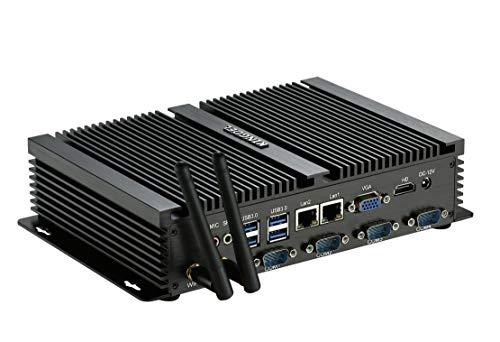
- 4x RS232 COM ports for industrial peripherals
- Dual Gigabit LAN for network flexibility
- Fanless metal case for quiet 24/7 use
Best For: Industrial users who need serial connectivity, dual LAN, and silent always-on operation.
Best for Serial-Control Workloads
WEIDIAN Core i7 Fanless Industrial Mini PC

- Core i7-10510U for stronger multitasking and control workloads
- 2 serial COM ports, GPIO, and dual LAN for industrial gear
- Triple-display support plus fanless 24/7 operation
Best For: Industrial control setups, kiosks, and edge systems that need serial ports and quiet always-on reliability.
Best for Serial-Heavy Automation
Industrial Mini PC with Core i7, 16GB RAM, 512GB SSD

- Six RS232 COM ports for industrial and legacy devices
- Fanless full-metal design supports quiet 24/7 operation
- Dual LAN and HDMI/VGA improve integration flexibility
Best For: Automation, monitoring, and industrial setups that rely on lots of serial connections.
Best for Industrial I/O
WEIDIAN i5 Fanless Industrial Mini PC

- 6 COM ports with RS232/RS422/485 support
- Dual LAN plus 2GPIO for industrial connectivity
- Fanless build with TPM 2.0 and watchdog support
Best For: Automation, kiosks, and edge systems that need lots of serial ports and always-on reliability.
Best for Serial-Heavy Setups
msecore Core i7 Fanless Industrial Mini PC

- Six RS232 COM ports for industrial peripherals
- Dual 2.5G LAN for network-heavy deployments
- Fanless metal case for quiet, dust-resistant operation
Best For: Industrial users who need multiple serial ports and dual-network connectivity in a compact, silent PC.
Best for Serial + Dual LAN Workflows
WEIDIAN J5005 Fanless Industrial Mini PC
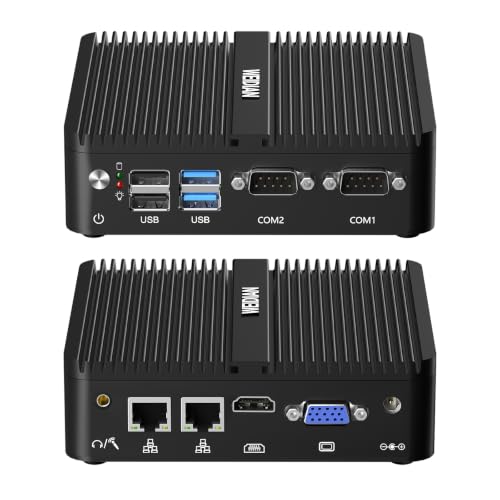
- Dual Gigabit LAN and RS232 ports for industrial setups
- Silent fanless chassis for 24/7 operation
- 4K dual-display output with VESA mounting
Best For: Industrial automation, signage, and compact always-on systems needing serial and network connectivity.
Best for Legacy Ports
Baieyu Core i5 Fanless Industrial Mini PC

- Fanless cooling for quiet, dust-friendly operation
- 2× RS232 COM plus dual 2.5GbE LAN
- Dual HDMI and Windows 11 Pro included
Best For: Teams that need a compact industrial PC with legacy serial ports and dual-display support.
Best for Serial I/O
KINGDEL Fanless i7 Industrial Mini PC

- Fanless metal build for quiet, dust-friendly operation
- 2x RS232 COM ports plus HDMI/VGA for legacy gear
- 16GB RAM and 512GB NVMe SSD for solid responsiveness
Best For: Industrial buyers who need serial ports, dual displays, and a compact always-on PC.
Best Simple Pick

- Dual LAN and RS232 ports for industrial connectivity
- Fanless cooling supports quiet, low-maintenance operation
- 16GB RAM and 512GB SSD deliver dependable daily performance
Best For: Industrial and business users who need serial connectivity, dual Ethernet, and a compact always-on mini PC.
Best Fanless for Reliability – MINIX Z150-0dB Fanless Mini PC
If you need a fanless mini pc for industrial use that stays quiet, compact, and low-maintenance, the MINIX Z150-0dB is built around that idea. Its Intel N150 chip, dual 4K display support, and 2.5G LAN make it a practical fit for light-duty kiosks, signage, office stations, and other always-on setups where airflow, dust control, and silence matter.
Best For: Quiet industrial, commercial, and office deployments that need dependable day-to-day performance without active cooling.
Pros:
- Fanless passive cooling helps reduce dust, vibration, and maintenance needs
- Intel N150 with 16GB RAM and 512GB SSD is solid for basic productivity and control tasks
- 4K dual display output and 2.5G LAN suit signage and connected workstations
- Auto power on is useful for unattended or always-on deployments
Cons:
- Not built for heavy workloads or demanding multitasking
- Integrated graphics are fine for basics, but not for creative or GPU-heavy work
- Industrial-grade use still depends on the specific environment and workload
Overall, this is a sensible pick if you want a fanless mini pc for industrial use and value quiet operation, stable basics, and simple deployment over raw speed. The upgraded cooling-focused design and network-ready feature set make it especially appealing for compact business systems.
Best for Serial & Dual-LAN Deployments – KINGDEL Fanless i5 Mini PC
If you need a fanless mini pc for industrial use, this KINGDEL box stands out for its practical port selection, quiet metal chassis, and built-in networking flexibility. The Core i5-3317U, 8GB of RAM, and 256GB SSD are enough for light-to-moderate control, signage, and edge-computing tasks where reliability matters more than raw speed.
Best For: Industrial setups that need multiple COM ports, dual LAN, and a silent, always-on mini PC for control or monitoring duties.
Pros:
- 4x RS232 COM ports make it a strong fit for legacy industrial equipment.
- Dual Gigabit NICs are useful for network separation, routing, or machine control.
- Fanless full-metal case supports quiet operation and fewer moving parts.
- Includes both HDMI and VGA plus multiple USB ports for flexible connections.
Cons:
- Older 3rd-gen Core i5 hardware is not ideal for demanding modern workloads.
- DDR3L memory and mSATA storage are less future-proof than newer platforms.
- No Windows or industrial software bundle is included out of the box.
Overall, this KINGDEL is a practical fanless mini pc for industrial use when your priority is port density, wired connectivity, and silent 24/7 operation rather than cutting-edge performance. It is especially appealing for systems that still depend on serial peripherals.
Best for Serial-Control Workloads – WEIDIAN Core i7 Fanless Industrial Mini PC
If you need a fanless mini pc for industrial use, this WEIDIAN model stands out for its Core i7-10510U processor, dual LAN, and serial COM ports. It’s built to handle always-on tasks in control rooms, kiosks, edge deployments, and light automation setups while staying quiet and compact.
Best For: Industrial buyers who need a silent, multi-port mini PC with serial connectivity, triple-display support, and 24/7 operation.
Pros:
- Core i7-10510U gives it plenty of headroom for demanding business and control tasks
- 2 RS232/RS422/RS485 COM ports plus GPIO make it well suited for industrial peripherals
- Triple-display output and dual Gigabit LAN add flexibility for monitoring and networking
- Fanless aluminum design supports quiet, continuous operation
Cons:
- More expensive than basic fanless mini PCs
- Not the best choice if you only need simple web or office use
- 4G module is supported but not included
For buyers comparing a fanless mini pc for industrial use, this one is especially appealing when serial ports, dual LAN, and multi-monitor output matter more than ultra-small size. It’s a practical pick for embedded and edge-computing environments where reliability and connectivity are the priority.
Best for Serial-Heavy Automation – Industrial Mini PC with Core i7, 16GB RAM, 512GB SSD
If you need a fanless mini pc for industrial use, this model stands out for its rich port selection, dual LAN, and 24/7 operation support. It combines a Core i7-5500U, 16GB of RAM, and a 512GB SSD in a compact full-metal chassis designed for control cabinets, factory floors, and other demanding spaces.
Best For: Automation setups, legacy equipment, and users who need multiple serial connections plus stable always-on operation.
Pros:
- Six RS232 COM ports make it a strong fit for industrial and legacy hardware
- Fanless, fully enclosed metal design helps with dust, shock, and low-noise operation
- Dual LAN, HDMI, VGA, and multiple USB ports support flexible system integration
- Auto power on, Wake on LAN, and RTC wakeup add convenient unattended-start options
Cons:
- Older 5th-gen Core i7 is capable, but not ideal for demanding modern workloads
- Expansion is practical, though the internal upgrade options are still somewhat limited
This is a practical fanless mini pc for industrial use if your priority is connectivity and reliability over raw performance. It makes the most sense in environments where serial ports, dual networking, and quiet 24/7 uptime matter more than newer consumer-focused features.
Best for Industrial I/O – WEIDIAN i5 Fanless Industrial Mini PC
If you need a fanless mini pc for industrial use, the WEIDIAN H4-T stands out for its unusually rich port selection, triple-display support, and quiet 24/7-friendly design. The Core i5-10210U platform, dual LAN, multiple COM headers, and GPIO make it a practical fit for control rooms, kiosks, automation stations, and edge deployments where reliability matters more than flashy looks.
Best For: Industrial users who need serial connectivity, dual Ethernet, and stable always-on performance in a compact fanless chassis.
Pros:
- 6 COM ports with RS232 and RS422/485 support for industrial equipment
- Triple display output via HDMI, DisplayPort, and USB-C
- Fanless design with TPM 2.0, watchdog, auto power-on, and VESA mounting
- Expandable storage and memory for longer-term deployment needs
Cons:
- Wi‑Fi 5 and Bluetooth 4.2 are serviceable, but not cutting-edge
- Full value depends on whether you actually need the serial and GPIO ports
- Bulky port set is more practical than portable
Overall, this is a strong choice when the priority is connectivity and uptime rather than raw gaming or creative performance. For a fanless mini pc for industrial use, it offers the kind of interfaces and reliability features that can simplify integration and reduce maintenance.
Best for Serial-Heavy Setups – msecore Core i7 Fanless Industrial Mini PC
If you need a fanless mini pc for industrial use, this msecore model stands out for its unusually dense I/O: dual 2.5G LAN, six RS232 COM ports, and plenty of USB connectivity. The Core i7-8550U, 16GB of RAM, and 256GB SSD give it enough headroom for business software, PLC tools, kiosks, and other always-on workloads.
Best For: Factory, lab, kiosk, and automation users who need lots of serial ports and reliable dual-network support in a compact, quiet chassis.
Pros:
- Six RS232 COM ports make it a strong fit for legacy industrial equipment.
- Dual 2.5G LAN helps with segmented networks, routing, or failover-style setups.
- Fanless metal design reduces dust intake and eliminates noise.
- Windows 11 Pro included, with Linux support for flexible deployments.
Cons:
- Older 8th-gen Core i7 is capable, but not the newest CPU platform.
- SIM/4G and Wi-Fi can’t be used at the same time.
- Overkill if you only need a basic office mini PC.
For buyers prioritizing connectivity over raw CPU freshness, this is a practical fanless mini pc for industrial use that covers the needs most commercial and automation installs actually have.
Best for Serial + Dual LAN Workflows – WEIDIAN J5005 Fanless Industrial Mini PC
If you need a fanless mini pc for industrial use, this WEIDIAN model is a practical fit for lightweight control tasks, signage, and always-on office or surveillance setups. The J5005 processor, dual Gigabit Ethernet, dual RS232 COM ports, and 4K dual-display output give it the connectivity and flexibility that matter more than raw power in many industrial deployments.
Best For: Industrial automation, digital signage, security systems, and compact workstation setups that need stable connectivity and silent 24/7 operation.
Pros:
- Fanless aluminum design supports silent, low-maintenance 24/7 use
- Dual Gigabit LAN and dual RS232 COM ports suit industrial peripherals and network tasks
- 4K dual-display support works well for kiosks, control rooms, and signage
- Expandable storage plus VESA mounting help in tight installations
Cons:
- J5005 hardware is better for light-to-moderate workloads than demanding compute jobs
- Limited ports compared with full-size industrial desktops
- Best suited to practical deployment needs rather than high-performance use
Overall, this is a solid fanless mini pc for industrial use when reliability, serial connectivity, and dual-network support matter more than speed. It is especially appealing for buyers building quiet, compact systems that need to run continuously with minimal upkeep.
Best for Legacy Ports – Baieyu Core i5 Fanless Industrial Mini PC
If you need a fanless mini pc for industrial use, the Baieyu model stands out for its practical mix of quiet cooling, dual Ethernet, and legacy-friendly I/O. The Core i5-8260U, Windows 11 Pro support, and 24/7-ready design make it a sensible fit for workstations, kiosks, and control-room setups where reliability matters more than flashy specs.
Best For: Factories, offices, kiosks, and other setups that need a compact, quiet PC with RS232 and dual-display support.
Pros:
- Fanless design is ideal for dusty or noise-sensitive industrial environments
- 2× RS232 COM ports and dual 2.5GbE LAN add real industrial utility
- Dual HDMI output supports two monitors for multitasking
- Includes Windows 11 Pro and a 512GB SSD with 16GB RAM
Cons:
- Not the newest CPU generation, so it’s more practical than cutting-edge
- Storage expansion is available, but extra drives are sold separately
- Some buyers may prefer a more ruggedized enclosure for harsher sites
This is a strong pick if your priority is a dependable fanless mini pc for industrial use with the right ports already built in. It’s less about premium performance and more about staying cool, quiet, and compatible with common business and automation gear.
Best for Serial I/O – KINGDEL Fanless i7 Industrial Mini PC
If you need a fanless mini pc for industrial use, this KINGDEL system stands out for its quiet cooling, metal chassis, and built-in legacy connectivity. It pairs an 8th Gen Core i7 with 16GB of RAM and a 512GB NVMe SSD, making it a practical fit for control rooms, automation tasks, digital signage, and other always-on deployments.
Best For: Industrial setups that need a compact, fanless PC with serial ports, dual-display support, and solid everyday performance.
Pros:
- Fanless all-metal design is better suited to dust-prone or noise-sensitive environments
- Includes 2x COM RS232 ports plus HDMI and VGA for industrial equipment and dual monitors
- 16GB DDR4 RAM and 512GB NVMe SSD provide responsive performance for business workloads
- WiFi, Bluetooth, and 4x USB 3.0 add flexibility for peripherals and networking
Cons:
- Not the newest CPU platform, so it is less future-proof than newer industrial minis
- VGA and RS232 are useful for legacy gear, but less relevant for modern-only setups
- No dedicated GPU for graphics-heavy industrial applications
This is a strong pick if you want a fanless mini pc for industrial use with real-world connectivity rather than just compact size. The KINGDEL focuses on uptime, ports, and practical deployment features over flashy extras.
Best Simple Pick – WEIDIAN Fanless i5 Mini PC
If you need a fanless mini pc for industrial use, this WEIDIAN model stands out for its dual LAN ports, RS232 COM support, and stable fanless cooling. It combines an 8th-gen Core i5, Windows 11 Pro, dual-display output, and plenty of USB ports in a compact chassis that suits kiosks, office deployments, and light industrial control tasks.
Best For: Buyers who need serial ports, dual Ethernet, and a compact always-on mini PC for industrial or business setups.
Pros:
- Dual Gigabit Ethernet and RS232 COM ports suit industrial networking and device control
- Fanless design helps reduce dust buildup, noise, and maintenance
- Dual HDMI, 8 USB ports, and VESA mounting make it easy to deploy
- 16GB RAM and 512GB SSD provide solid everyday performance
Cons:
- 8th-gen i5 is capable, but not ideal for heavy compute workloads
- Integrated graphics limit demanding media or CAD use
- Industrial-focused features may be more than casual home users need
For buyers prioritizing ports, reliability, and quiet operation over raw power, this is a practical fanless mini pc for industrial use. It fits well in control rooms, digital signage, and network appliance roles where wired connectivity and always-on stability matter most.
How We Picked the Best Fanless Mini PC for Industrial Use
We prioritized models that make sense for real-world industrial deployments: fanless cooling, business-class CPU options, enough RAM and SSD capacity for multitasking, and the ports needed for legacy and modern equipment. We also looked closely at dual LAN, COM port counts, display support, and Windows compatibility because those features often matter more than benchmark numbers in a Fanless Mini PC for Industrial Use.
Quick Comparison: What Matters Most
Some buyers need more serial ports for PLCs and machinery. Others need dual or triple display output for dashboards, monitoring, or kiosks. Newer entry-level systems such as N-series and J-series chips can be a good fit for light-duty control tasks, while Core i5 and Core i7 systems are better for heavier multitasking, edge apps, or multiple peripherals.
Key Buying Factors for Fanless Mini PC for Industrial Use
CPU and Workload
Match the processor to the job. For basic signage, POS, or lightweight control tasks, lower-power chips can be enough. For data collection, virtualization, analytics, or multiple connected devices, choose a stronger Core i5 or Core i7 platform.
Ports and Expansion
Industrial setups often depend on COM ports, dual LAN, USB 3.0, and multiple display outputs. If your equipment uses RS232, RS422, or RS485, verify the exact serial standard before buying. More ports usually mean less reliance on adapters and fewer points of failure.
Memory and Storage
At least 8GB RAM and a solid-state drive are the practical baseline. For heavier multitasking or longer service life, 16GB RAM and a 512GB SSD are a better target.
Networking and Reliability
Dual 2.5G or gigabit Ethernet can help separate machine networks from office networks or support failover. In industrial settings, stable wired connections are often more important than wireless extras.
Mounting, OS, and Support
Look for Windows 11 Pro or Windows 10 Pro if you need domain support, remote management, or compatibility with business software. Also consider VESA mounting, BIOS access, and vendor documentation for long-term deployment.
Who Should Buy Which Fanless Mini PC for Industrial Use?
If you need a low-power, compact option for simple control, signage, or office-adjacent industrial tasks, an entry-level fanless mini PC is usually enough. If your workflow depends on serial devices, choose a model with multiple COM ports. If you run heavier software, multiple screens, or 24/7 edge workloads, step up to a Core i5 or Core i7 system with 16GB RAM, SSD storage, and dual LAN for better headroom.
For most buyers, the best choice is the model that balances port selection, cooling, and serviceability rather than the one with the highest CPU spec on paper.